Switch to the New Jetpack Mobile App

Last month we introduced you to the new Jetpack mobile app. Today we’d like to share information on some upcoming changes to the WordPress app and dig into the key differences between the WordPress and Jetpack apps to help you decide which one is right for you. We’re here to help you make an informed decision. 

What’s changing in the WordPress app? 

Until now, the WordPress app has included a range of Jetpack-powered features focused on managing, growing, and keeping tabs on your site. In early March 2023, we’ll be streamlining the WordPress app to focus on the writing and publishing basics. As part of that update, Jetpack features will be removed from the WordPress app and only be available in the Jetpack app. To continue using your favorite Jetpack features, switch to the Jetpack app today. 

Why are there two apps?

WordPress comes in more than one flavor and is used for everything from newsletters to blogs, enterprise apps to high-traffic publishing networks. After listening to feedback from a diverse range of users and the wider WordPress community, it became clear that there are two main sets of expectations about what a mobile WordPress experience should look like. 

With that in mind, we set about rethinking and designing two distinct ways for you to use WordPress on the go:

The Jetpack app is intuitive, free-to-use, and puts the full WordPress experience in your pocket, whether you’re new to publishing on the internet or a seasoned veteran. You get all the essential tools that come with the WordPress app, plus a suite of features for growing your site. Discover new content and communities with the Reader, track your site’s performance on Stats, and get notified about comments and reactions with Notifications. You can download the Jetpack app today.

The updated WordPress app will focus on the basics of writing and publishing. If you’re only looking for the essential tools you need to publish on the go, with support for offline editing and the ability to upload media straight from your phone’s camera roll, this might be the best app for you.

We’re excited to hear from you and will continue updating the apps to meet your needs. Please feel free to comment on this post with any questions or feedback.

Which app should I use?

Here’s how the two apps compare, feature by feature:

FeaturesWordPress appJetpack appPostsxxPagesxxMediaxxCommentsxxSite SettingsxxStatsxReaderxNotificationsxActivity LogxJetpack SocialxJetpack BackupxJetpack ScanxMenusxPeoplexThemesx

With the new Jetpack app, you’ll still be able to focus on publishing, but you’ll also have the added benefit of powerful site management and growth tools. The app is free to use. Once you make the switch, you’ll find all the same features that you enjoy with the WordPress app right there, at no extra cost.

How do I make the switch to the Jetpack app?

To make a seamless switch to the Jetpack app from the WordPress app, follow these steps:

Make sure you have the latest version of the WordPress app installed. 

Download the Jetpack app for iOS or Android.

Open the app, and you’ll be “auto-magically” logged in with all your data and settings in place, including locally stored content, saved posts, and other in-app preferences.

After you’ve installed the Jetpack app, we’d advise you to delete the WordPress app. Managing your site across both apps is currently unsupported and may lead to issues such as data conflicts that are best avoided.

We’re here to make the switch from the WordPress app to the Jetpack app as smooth as possible. Thanks for your continued support, and let us know if you have any questions.

Ready to take off? Download the Jetpack mobile app today.

Quelle: RedHat Stack

Introducing new cloud services and pricing for ultimate flexibility

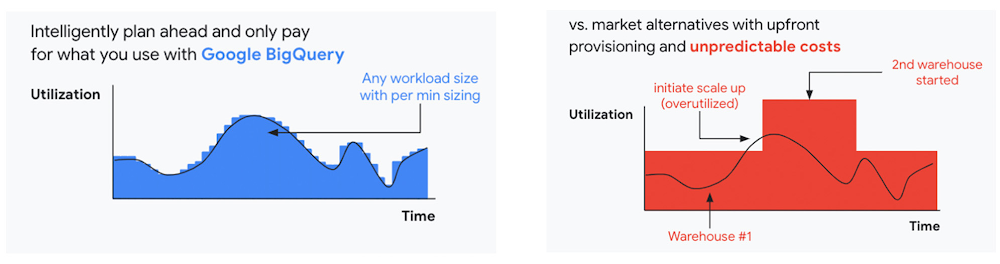
As the saying goes, “it’s hard to make predictions, especially about the future.” Some organizations find it challenging to predict what cloud resources they’ll need in months or years ahead. Every organization is on its own unique cloud journey. To help, we’re developing new ways for customers to consume and pay for Google Cloud services. We’re doing this by removing barriers to entry, aligning cost to consumption and providing contractual and product flexibility. Read on to learn how we’re rolling out several new go-to-market programs across these key areas to help our customers purchase and consume Google Cloud services more easily.Removing barriers to entry with Google Cloud Flex AgreementsMany customers choose multi-year commitments because they provide better line-of-sight into IT spend and budgeting. However, these commitments can create difficulty for those who don’t have clear visibility into their future cloud consumption needs. That’s why today we’re launching Flex Agreements, which enable customers to migrate their workloads to the cloud with no up-front commitments. As part of this new licensing option, Google Cloud customers still get access to unique incentives, such as monthly spend discounts1, committed use discounts, cloud credits, and access to professional services, based on monthly spend and workloads migrated to Google Cloud.Flex Agreements are just one example of how we are removing barriers to help customers start using Google Cloud. In 2022, we launched the Innovators Plus annual subscription, which gives developers a curated toolkit to accelerate their expertise, including access to live and on-demand training through Google Cloud Skills Boost, Google Cloud credits, and more. We also recently expanded trials for Google Cloud products. For example, the new Spanner free trial instance is good for 90 days, allowing developers to create Google Standard SQL or PostgreSQL databases, explore Spanner capabilities, and prototype applications—with no commitment or contract needed. Contractual and feature flexibility  Contractual flexibility has always been one of our core principles. Committed Use Discounts (CUDs), for example, provide discounted prices in exchange for a commitment to use a minimum level of resources for a specified term. Last year, we introduced Flexible CUD, spend-based commitments that offer predictable and simple flat-rate discounts that apply across multiple virtual machine families and regions.In addition to contractual flexibility, our customers also need the flexibility to choose features and functionality based on their stages of cloud adoption and the complexity of their business requirements. Therefore, over the next few quarters, we will launch new product pricing editions—Standard, Enterprise, and Enterprise Plus—in parts of our cloud portfolio. This new commercial packaging model will help give customers more choice and flexibility to optimize their cloud spend.For customers running workloads such as those in regulated industries like banking and public sector, the higher-end Enterprise Plus tier will offer compute, storage, networking and analytics services with high availability, multi-region support, regional failover and disaster recovery, advanced security, and a broad range of regulatory compliance support. The Enterprise pricing tier will include a broad range of features designed for customers with workloads that demand a high level of scalability, flexibility, and reliability. The Standard pricing tier will offer cost-efficient and easy-to-use managed services that include all essential capabilities such as autoscaling to meet the core workload requirements of customers.Align costs to consumption with autoscalingAt Google Cloud, a core requirement for the products we build is providing customers industry-leading capabilities to automatically scale (autoscale) services up and down to match capacity with real-time demand. Autoscaling improves uptime, reduces infrastructure costs, and removes the operational burden of managing resources.  Many Google Cloud products include autoscaling capabilities to help customers manage unplanned variations in demand. For example, Dataflow vertical and horizontal autoscaling, in combination with granular adaptive resource configuration (aka “right-fitting”), has resulted in up to 50% saving in infrastructure costs for streaming by automatically choosing the right number of instances required to run the jobs and dynamically re-allocating more or fewer instances during the runtime of jobs. Bigtable also provides native autoscaling capabilities, and Spanner’s autoscale is an open source tool that works across regional and multi-regional Spanner deployments. Similarly, we added multiple features such as Cluster Autoscaler, Horizontal Pod Autoscaling, Vertical Pod Autoscaling, and Node Auto-Provisioning to GKE for elasticity and cost efficiency. For L.L.Bean, the ability to quickly scale capacity to meet changing usage patterns (e.g., during the holidays), as well as to rapidly perform load tests to test capacity, are “night and day” with Google Cloud compared to L.L.Bean’s legacy on-premises IT system.”We won’t have to pay for peak capacity to have it available during peak shopping times. We just scale capacity up or down as needed.” — Randy Dyer, Enterprise Architect, L.L.BeanWe are now taking these capabilities to the next level by enabling autoscaling in BigQuery at a more granular level so you never pay more than what you use. This allows you to provision additional capacity in smaller increments, so you never overprovision and overpay for underutilized capacity. BigQuery customers can now try the new BigQuery autoscaler (currently in public preview) in their Google Cloud console.A commitment to flexibility and choiceAt Google Cloud, we remain deeply committed to the success of our customers and partners, and we are uniquely positioned to help organizations transform their business. By providing you with more flexibility and choice in how to purchase our products, we are empowering you to be more efficient and resilient.Join Google Data Cloud & AI Summit to hear the latest announcements around innovations in Google Data Cloud for databases, data analytics, business intelligence, and AI. Gain expert insights, new solutions, and strategies that can help you transform customer experiences with modern apps, boost revenue, and reduce costs.1. Not available for customers buying through Partner Advantage.
Quelle: Google Cloud Platform

H&R Block’s blockbuster data strategy

If you think your company isn’t making the most of its data, you’re probably right.

Just ask H&R Block. In 2019, before most people began sheltering in place due to COVID, the company rolled out a new data platform that would allow it to digitally serve the 13 million people who usually get their taxes done via tax prep experts at one of the company’s 10,000-plus retail offices.

"The upgrades we made came just in time because otherwise, we would have faced a much bigger problem," says Aditya Thadani, the company's vice president in charge of digital transformation and enterprise architecture.

H&R Block’s new data strategy, based on Microsoft’s Intelligent Data Platform, has been an essential ingredient in possibly the most sweeping strategic expansion in the company’s 67-year history. Rather than just focusing on tax-preparation services—a large percentage of the company’s revenues are booked in the two weeks before Tax Day—the company has become a player in the much larger market for small business services and has introduced a mobile banking app for consumers.

As a result, H&R Block is now a Wall Street darling. As of January 2023, the company’s share price had nearly tripled since the new data strategy was put in place.

While the timing may have been fortunate, the story nonetheless shows how a well-executed data modernization strategy can have a massive impact on everything from the speed of innovation to customer experience to bottom-line results.

From obstacle to enabler

The seeds of this resurgence were planted in 2017, when new CEO Jeff Jones began thinking about ways to leverage H&R Block’s reputation and retail presence to establish a broader, deeper relationship with clients throughout the year. Why stop at tax help, when small business owners who were short on time and sometimes financial expertise also needed help with payroll, invoicing, and strategy? Why not empower its 8 million "under-banked" clients—typically less-affluent people who don’t have, or don’t take full advantage of, a bank account—to participate more fully in the digital economy?

"We wanted to serve the client the way they want, where they want, but could we really?"

But there was a problem. The company’s previous approach to data was not up to the job. In fact, the walk-in business, which serves 13 million clients, and the online software business, which serves an additional 7 million, felt like two different companies. While the company has offered an online service since 2004, if a "DIY" client who did their taxes online walked into a retail location for some extra help, the tax pros there would have no record that they existed. To get help, they would have had to begin a new tax return from scratch, starting with their name and address. Similarly, walk-in clients couldn’t easily update or continue working on their tax return online once they got home.

"We tried to serve the client the way they want, where they want, but could we really?" says Thadani. "We had two operating units running on two different technology stacks that didn't talk to each other. The information was completely siloed, introducing friction as clients switched from one channel to another."

In early 2018, Jones approved investments to make IT a catalyst, rather than an obstacle, to fully realizing this vision.

A new data platform strategy

Step one was obvious, but formidable: to transform the company's underlying architecture from on-premises technology running in the company's Kansas City data center to the cloud. Over an eight-month period, a team led by Sameer Agarwal, IT director of data platforms, migrated a million lines of code running on legacy AS400 and Netezza appliances to Microsoft SQL Server, and consolidated five racks of data appliances into a single rack of servers to handle applications that still needed to run on-premises. Today, 75 percent of the company's workload is managed on Microsoft Azure, and Agarwal expects that to rise to 90 percent by mid-2023.

"I've never seen a company like ours move this fast," says Agarwal, who joined H&R Block in 2007 after years as a consultant with Tata Consultancy Systems.

Because of its intrinsic scalability, the cloud was an obvious cost-saving choice for a company that does so much of its business during just a few weeks of the year. But management's focus was less on short-term cost savings and more on unleashing innovation that could provide year-round value to clients. To that end, Thadani's team insisted on creating a unified architecture that brought all of that siloed data and business intelligence into a single platform.

"Management’s focus was less on short-term cost savings and more on unleashing innovation that could provide year-round value to clients."

The team made fast progress, and by 2019 the benefits were becoming evident internally. With an architecture built around cloud-native technology, business unit leaders found they could use data from across multiple products to quickly convert Jones's high-level vision into crisp business insights and execution. In the past, it could take several months just to get IT to incorporate a new type of data into reports—say, to study the impact a new digital service was having on the walk-in business. Now they can deliver it in days, says Thadani.

Building "the Block experience"

The strongest evidence of the changes began showing up in the products themselves. In 2018, the company rolled out a new price preview feature that let filers know up front how much their return would cost, rather than have the price change based on the number of tax forms required. Later that year, it introduced a number of hybrid options. One service lets clients have a tax pro do their return, without their having to even go to the office; another one lets DIY filers have a tax expert check their work and then sign and file the return on their behalf; a third lets clients leave their documents with a preparer at an H&R Block office and go home.

"In the past, it could take several months just to get IT to incorporate a new type of data into reports. Now we can deliver it in days."

Since then, the company's product developers have continued to let clients use whatever mix of virtual and human help serves their needs—a vision that was tailor-made to serve clients after the pandemic hit. For example, many clients that had grown used to filing their taxes online suddenly had questions about how to account for COVID stimulus checks. Thanks to the new architecture, the company was able to quickly create an online assistance add-on service that lets clients ask such questions for an extra $20. And in January 2022, it introduced a mobile banking app just six months after development began. Thadani thinks it would have taken considerably longer if the old architecture were still in place.

The benefits go far beyond speed. In the old approach, Thadani's team lacked the in-house data science skills or tools to make use of machine learning and other emerging technologies. Now, by taking advantage of the capabilities in Azure, the company has streamlined the data-gathering process so that the company's more than 90,000 tax pros spend less time on routine work like determining which of the tax documents will be required to complete a return, and more time advising clients.

Originally, this was viewed as a productivity-enhancing process improvement. But it is also making the company's clients more satisfied. The use of online capabilities by traditional walk-in clients tripled in the 2022 tax year. In early October 2022, the company announced a business formation service to help entrepreneurs choose the right corporate structure, whether on their own or with the help of an H&R adviser.

The great unlearning

Thadani believes an increased appreciation for the power of data has set off a cultural shift inside the IT organization that will continue to pay dividends in the coming years. The move to the cloud and away from high-maintenance legacy systems means engineers spend less time worrying about technical details and more on how to use technology to solve business problems. "It makes their jobs more fun and allows them an opportunity to have a bigger impact on our business," he says.

Looking back, Thadani says the biggest challenge wasn’t getting people to learn new tricks but to unlearn old ones.

"When you have a company with a long history and people with long tenures, all that experience sometimes gets in the way," he says. "We have people who are very good at their jobs and are used to doing things the same way for years. Now we're offering them a new way to do it. That's not always easy."

While it may not be easy, it certainly is becoming more compelling, as the company's tax pros come to understand how much more expansive their business relationships with clients can be.

"We are having deeper, richer conversations with our clients about their overall financial health, as opposed to simply saying, 'Here are your tax returns,'" says Thadani. "And that’s only possible because we now have a full view of every client."

Learn more about how H&R Block modernized its data platform with Azure

If you’d like to hear more on this Azure customer story, watch the H&R Block Learn from the Leaders: Optimize your Data Estate webinar
Quelle: Azure


5 Developer Workstation Security Best Practices

Supply chain attacks increased by 300% between 2020 and 2021, making clear that security breaches are happening earlier in the software development lifecycle. Research also shows that in 2021, 80% of cyber security breaches were due to human error, and 20% involved attacks on desktops and laptops. 

Developer workstations are being targeted for several reasons. Workstations have access to critical code and infrastructure, and the earlier a vulnerability is introduced, the more difficult it can be to identify the breach. Developers need to trust not only the dependencies they use directly but also the dependencies of those dependencies, called transitive dependencies. As we see more incidents stemming from developer workstations, developer workstation security should be a top priority for security-conscious organizations. 

Poor security practices in software development translate to trust-breaking breaches and expensive losses, with the average cost of a security breach reaching $9.44 million in the United States. Developers are increasingly responsible for not only the development of products but also for secure development. 

Organizations, regardless of industry, must be securing developer workstations in order to be prepared for the evolving and growing number of attacks. 

Docker’s white paper, Securing Developer Workstations with Docker, covers the top security risks when developing with containers — and how to best mitigate those risks with Docker. By understanding the potential attack vectors, your teams can mitigate evolving security threats.

Let’s take a look at five actions you can take to secure your developer workstations.

1. Prevent malware attacks

Malware refers to malicious software meant to attack software, hardware, or networks. In container development, malware can be particularly damaging not only because of the potentially harmful activities to be run within the container but also because of potential access to external systems like the host’s file system and network.

Containers should be secured by using only trusted images and dependencies, isolating and restricting permissions where possible, and running up-to-date software in up-to-date environments.

2. Build secure software supply chains

Supply chain attacks exploit direct and transitive dependencies. You may be familiar with Log4Shell, a vulnerability affecting an estimated hundreds of millions of devices. The vulnerability behind the infamous SolarWinds security incident was also a supply chain attack. Supply chain attacks increased by 300% in 2021, and security experts don’t expect them to slow down any time soon. 

Supply chain attacks can be mitigated through secure supply chain best practices. These include making sure every step of the supply chain is trustworthy, adding key automation, and making sure brand environments are clearly defined.

3. Account for local admin rights in policies

Individual developers may have different needs for their workstations. Many developers prefer to have local admin rights. Organizations are responsible for creating and enforcing policies that help developers work securely. How your team handles local admin rights is a team decision, and although the outcomes may differ per team, the conversation around local admin rights is a necessity to keep teams secure.

Finding the balance of security and autonomy is an active state. No balance can be achieved and then forgotten about. Instead, organizations must regularly review tools and configurations so developers can do their jobs without being unnecessarily blocked or accidentally jeopardizing their team, product, and customers.

4. Prevent hazardous misconfigurations

Configurations are necessary at almost every step of the software development lifecycle and connect development tools with production resources, such as environments and sensitive data. While more permissive configurations make anything seem possible, unfortunately, that flexibility can accidentally provide malicious actors access to sensitive resources. Configurations that are too strict frustrate developers and limit productivity.

Misconfiguration does not happen on purpose, but it can be mitigated. There’s no one-size-fits-all solution for configurations, given every team and organization has its own tooling, process, and network considerations. Regardless of your organization’s needs, make sure you’re considering the developer workstations and how your IT admins manage local configurations.

5. Protect against insider threats

Although most breaches come from outside of an organization, 20% of breaches in 2021 were caused by internal actors. For the same reasons that external attackers target the early stages of the software development lifecycle, internal bad actors have used similar strategies to bypass internal security safeguards.

Security measures that limit opportunities for external attackers also limit opportunities for internal bad actors. When considering settings, configurations, permissions, and scanning, remember that regardless of where the attack comes from, the trend of attacks is moving earlier in the development cycle, making securing developer workstations a critical step in your security strategy.

Hardened Docker Desktop: Stronger security for enterprises

With capabilities like Hardened Docker Desktop, we want every developer using Docker to be able to work securely and create secure products without being slowed down or needlessly distracted. In Securing Developer Workstations with Docker, we share container security best practices developed and tested by industry experts.

Read the white paper: Securing Developer Workstations with Docker.
Quelle: https://blog.docker.com/feed/