Manhattan Associates transforms supply chain IT with Google Cloud SQL

Editor’s note: Manhattan Associates provides transformative, modern supply chain and omnichannel commerce solutions. It enhanced the scalability, availability, and reliability of its software-as-a-service through a seamless migration to Google Cloud SQL for MySQL.Geopolitical shifts and global pandemics have made the global supply chain increasingly unpredictable and complex.At Manhattan Associates, we help many of the world’s leading organizations navigate that complexity through industry-leading supply chain commerce solutions like warehouse management, transportation management, order management, point of sale and much more, to continuously exceed increasing expectations.The foundation for those solutions is Manhattan Active® Platform, a cloud-native, API-first microservices technology platform that’s been engineered to handle the most complex supply chain networks in the world and designed to never feel like it.Manhattan Active solutions enable our clients to deliver exceptional shopping experiences in the store, online, and everywhere in between. They unify warehouse, automation, labor and transportation activities, bolster resilience, and seamlessly support growing sustainability requirements.More Resiliency and Less DowntimeManhattan Active solutions run 24×7 and need a database solution that can support this. Cloud SQL for MySQL helps us meet our availability goals with automatic failovers, automatic backups, point-in-time recovery, binary log management, and more. Cloud SQL also allows us to create in-region and cross-region replicas efficiently with near zero replication lags. We can create a new replica for a TB size DB in under 30 minutes, a process which used to take several days.We provide a 99.9% overall up-time service level agreement (SLA) for Manhattan Active Platform, and Cloud SQL helps us keep that promise. Unplanned downtime is 83% less than it would have been with our previous database solutions.Flexibility and Total Cost of OwnershipOne of the fundamental requirements in a cloud-native platform like Manhattan Active is a robust, efficient, and cost-effective database. Our original database solutions struggled across different cloud platforms and created challenges in total cost of ownership and licensing.We needed a more cost-efficient approach to managing a highly reliable and available database engine that could operate as a managed service, and Cloud SQL delivered.We were able to move every Manhattan Active solution from our previous cloud vendor to Google Cloud, including the shift to Cloud SQL, with less than four hours of downtime.Today, we run hundreds of Cloud SQL instances and operate most of them with just a few database administrators (DBA). By offloading the majority of our database management tasks to Cloud SQL, we significantly reduced the cost to maintain Manhattan Active Platform databases.We also need a solution where we resize our database within minutes. This requirement is needed to manage database performance and infrastructure costs. The ease of resizing our database within minutes allows us to keep the optimal performance levels and saves significantly on overall infrastructure costs.A Winning Innovation CombinationCloud SQL provides highly scalable, available, and reliable database capabilities within Manhattan Active Platform, which helps us provide significantly better outcomes for our clients and better experiences for their customers.Learn more about how you can use Cloud SQL at your organization.Get started today.Related Article70 apps in 2 years: How Renault tackled database migrationFrench automaker Renault embarked on a major migration of its information systems—moving 70 applications to Google Cloud.Read Article
Quelle: Google Cloud Platform

How Wayfair is reaching MLOps excellence with Vertex AI

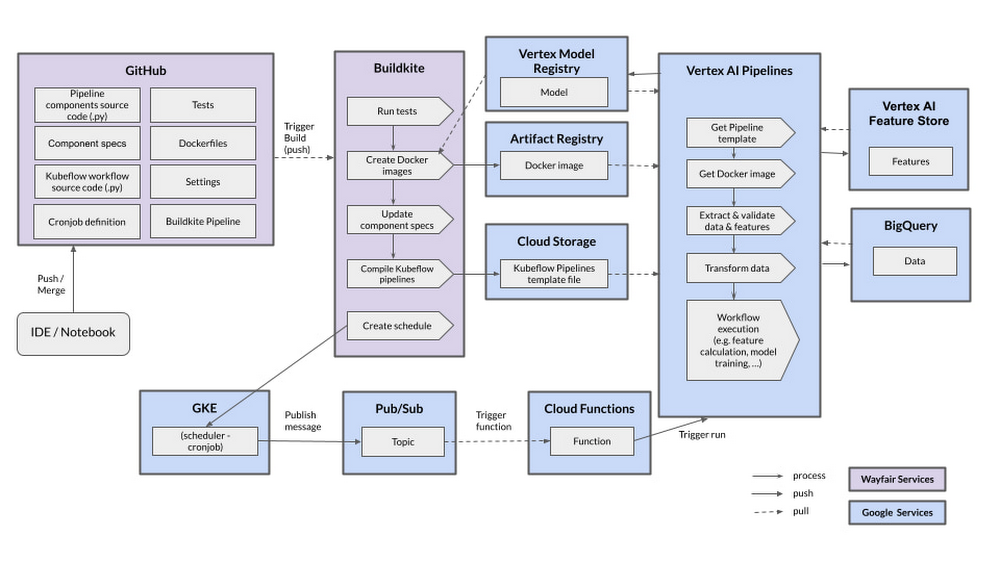
Editor’s note: In part one of this blog, Wayfair shared how it supports each of its 30 million active customers using machine learning (ML). Wayfair’s Vinay Narayana, Head of ML Engineering, Bas Geerdink, Lead ML Engineer, and Christian Rehm, Senior Machine Learning Engineer, take us on a deeper dive into the ways Wayfair’s data scientists are using Vertex AI to improve model productionization, serving, and operational readiness velocity. The authors would like to thank Hasan Khan, Principal Architect, Google for contributions to this blog.When Google announced its Vertex AI platform in 2021, the timing coincided perfectly with our search for a comprehensive and reliable AI Platform. Although we’d been working on our migration to Google Cloud over the previous couple of years, we knew that our work wouldn’t be complete once we were in the cloud. We’d simply be ready to take one more step in our workload modernization efforts, and move away from deploying and serving our ML models using legacy infrastructure components that struggle with stability and operational overhead. This has been a crucial part of our journey towards MLOps excellence, in which Vertex AI has proved to be of great support.Carving the path towards MLOps excellenceOur MLOps vision at Wayfair is to deliver tools that support the collaboration between our internal teams, and enable data scientists to access reliable data while automating data processing, model training, evaluation and validation. Data scientists need autonomy to productionize their models for batch or online serving, and to continuously monitor their data and models in production. Our aim with Vertex AI is to empower data scientists to productionize models and easily monitor and evolve them without depending on engineers. Vertex AI gives us the infrastructure to do this with tools for training, validating, and deploying ML models and pipelines.Previously, our lack of a comprehensive AI platform resulted in every data science team having to build their own unique model productionization processes on legacy infrastructure components. We also lacked a centralized feature store, which could benefit all ML projects at Wayfair. With this in mind, we chose to focus our initial adoption of the Vertex AI platform on its Feature Store component. An initial POC confirmed that data scientists can easily get features from the Feature Store for training models, and that it makes it very easy to serve the models for batch or online inference with a single line of code. The Feature Store also automatically manages performance for batch and online requests. These results encouraged us to evaluate the adoption of Vertex AI Pipelines next, as the existing tech for workflow orchestration at Wayfair slowed us down greatly. As it turns out, both of these services are fundamental to several models we build and serve at Wayfair today.Empowering data scientists to focus on building world-class ML modelsSince adopting Vertex AI Feature Store and AI Pipelines, we’ve added a couple of capabilities at Wayfair to significantly improve our user experience and lower the bar to entry for data scientists to leverage Vertex AI and all it has to offer:1. Building a CI/CD and scheduling pipelineWorking with the Google team, we built an efficient CI/CD and scheduling pipeline based on the common tools and best practices at Wayfair and Google. This enables us to release Vertex AI Pipelines to our test and production environments, leveraging cloud-native services.Keeping in mind that all our code is managed in GitHub Enterprise, we have dedicated repositories for Vertex AI Pipelines where the Kubeflow code and definitions of the Docker images are stored. If a change is pushed to a branch, a build starts in the Buildkite tool automatically. The build contains several steps, including unit and integration tests, code linting, documentation generation and automated deployment. The most important artifacts that are released at the end of the build are the Docker image and the compiled Kubeflow template. The Docker image is released to the Google Cloud Artifact Registry and we store the Kubeflow template in a dedicated Google Cloud Storage Bucket, fully versioned and secured. This way, all the components we need to run a Vertex AI Pipeline are available once we run a pipeline (manually or scheduled).To schedule pipelines, we developed a dedicated Cloud Function that has the permissions to run the pipeline. This Function listens to a Pub/Sub topic where we can publish messages with a defined schema that indicates which pipeline to run with which parameters. These messages are published from a simple cron job that runs according to a set schedule on Google Kubernetes Engine. This way, we have a decoupled and secure environment for scheduling pipelines, using fully-supported and managed infrastructure. 2. Abstracting Vertex AI services with a shared libraryWe abstracted the relevant Vertex AI services currently in use with a thin shared Python library to support the teams that develop new software or migrate to Vertex AI. This library, called `wf-vertex`, contains helper methods, examples, and documentation for working with Vertex AI, as well as guidelines for Vertex AI Feature Store, Pipelines, and Artifact Registry. One example is the `run_pipeline` method, which publishes a message with the correct schema to the Pub/Sub topic so that a Vertex AI pipeline is executed. When scheduling a pipeline, the developer only needs to call this method without having to worry about security or infrastructure configuration:code_block[StructValue([(u’code’, u’@cli.command()rndef trigger_pipeline() -> None:rn from wf_vertex.pipelines.pipeline_runner import run_pipelinernrn run_pipeline(rn template_bucket= f”wf-vertex-pipelines-{env}/{TEAM}”, # this is the location of the template, where the CI/CD has written the compiled templates torn template_filename=”sample_pipeline.json”, # this is the filename of the pipeline template to runrn parameter_values= {“import_date”: today()} # itu2019s possible to add pipeline parametersrn )’), (u’language’, u”), (u’caption’, <wagtail.wagtailcore.rich_text.RichText object at 0x3e90dc959c50>)])]Most notable is the establishment of a documented best practice for enabling hyperparameter tuning in Vertex AI Pipelines, which speeds up hyperparameter tuning times for our data scientists from two weeks to under one hour. Because it is not yet possible to combine the outputs of parallel steps (components) in Kubeflow, we designed a mechanism to enable this. It entails defining parameters at runtime and executing the resulting steps in parallel via the Kubeflow parallel-for operator. Finally, we created a step to combine the results of these parallel steps and interpret the results. In turn, this mechanism allows us to select the best model in terms of accuracy from a set of candidates that are trained in parallel:Our CI/CD, scheduling pipelines, and shared library have reduced the effort of model productionization from more than three months to about four weeks. As we continue to build the shared library, and as our team members continue to gain expertise in using Vertex AI, we expect to further reduce this time to two weeks by the end of 2022.Looking forward to more MLOps capabilitiesLooking ahead, our goal is to fully leverage all the Vertex AI features to continue modernizing our MLOps stack to a point where data scientists are fully autonomous from engineers for any of their model productionization efforts. Next on our radar are Vertex AI Model Registry and Vertex ML Metadata alongside making more use of AutoML capabilities. We’re experimenting with Vertex AI for AutoML models and endpoints to benefit some use cases at Wayfair next to the custom models that we’re currently serving in production. We’re confident that our MLOps transformation will introduce several capabilities to our team, including: automated data and model monitoring steps to the pipeline, as well as metadata management, and architectural patterns in support of real-time models requiring access to Wayfair’s network. We also look forward to performing continuous training of models by fully automating the ML pipeline that allows us to achieve continuous integration, delivery, and deployment of model prediction services. We’ll continue to collaborate and invest in building a robust Wayfair-focused Vertex AI shared library. The aim is to eventually migrate 100% of our batch models to Vertex AI. Great things to look forward to on our journey towards MLOps excellence.Related ArticleWayfair: Accelerating MLOps to power great experiences at scaleWayfair adopts Vertex AI to support data scientists with low-code, standardized ways of working that frees them up to focus on feature co…Read Article
Quelle: Google Cloud Platform

Founders and tech leaders share their experiences in “Startup Stories” podcast

From some angles, a lot of startup founders consider broadly similar questions, such as “should I use serverless?”, “how do I manage my data?”, or “do I have a use case for Web3?” But the deeper you probe, the more every startup’s rise becomes unique, from the early moments among founders, to the of hiring employees and creation of company culture, to efforts to find market fit and scale. These intersections of “common startup challenges” and individual paths to success mean almost any founder can learn something from another, across industries and technology spaces. To give startup leaders more access to these stories and insights, we’re pleased to launch our “Startup Stories” podcast, available on YouTube, Google Podcasts, and Spotify. Each episode features an intimate, in-depth conversation with a leader of a startup using Google Cloud, with topics ranging from technical implication to brainstorming ideas over glasses of whiskey. The first eleven episodes of season 1 are already online, where you can learn from the following founders and startup leaders: KIMO: Founder and CEO Rens ter Weijde, founder and CEO of KIMO, a Dutch AI startup focused on individualized learning paths, discusses how the concept of “mental resilience” has been key to his company’s growth.Nomagic: Ex-Googler Kacper Nowicki, now founder and CEO at Nomagic, a Polish AI startup that provides robotic systems, shares his experience closing an important seed roundWithlocals: Matthijs Keij, CEO of Withlocals, a Dutch experiential travel startup that connects travelers to local hosts, explores how her company and industry adapted to COVID-19.nPlan: Alan Mosca, founder and CEO of software startup nPlan, recalls that he knew what kind of company culture he wanted to build even before determining what product he wanted to sell. Huq Industries: Isambard Poulson, co-founder and CTO at UK-based mobility data provider Huq Industries, shares how his company persevered through the toughest early days. SiteGround: Reneta Tsankova, COO at European web-hosting provider SiteGround, explains how the founding team remained loyal to their values while handling rapid growth.Puppet: Deepak Giridharagopal, Puppet’s CTO, explains how Puppet managed to build its first SaaS product, Relay, while maintaining speed and agility.Orderly Health: Orderly Health software engineers share who created an ML solution to improve the accuracy of healthcare data, including how they built the initial product in only 60 days and how they leverage Google Cloud to innovate quickly and scale.Kinsta: Andrea Zoellner, VP of Marketing at US-based WordPress hosting platformKinsta, tells us how the company opted for a more risky and expensive investment in order to prioritize quality.Yugabyte: Karthik Ranganathan, founder and CTO of Yugabyte, reveals all of the challenges of building a distributed SQL database company that provides a fully managed and hosted database as a service.Current: Trevor Marshall, CTO at Current, tells us how he started his journey and how Google Cloud has supported the success of his business. We’re thrilled to highlight the innovative work and business practices of startups who’ve chosen Google Cloud. To learn more about how startups are using Google Cloud, please visit this link.Related ArticleCelebrating our tech and startup customersTech companies and startups are choosing Google Cloud so they can focus on innovation, not infrastructure. See what they’re up to!Read Article
Quelle: Google Cloud Platform

Zero-ETL approach to analytics on Bigtable data using BigQuery

Modern businesses are increasingly relying on real-time insights to stay ahead of their competition. Whether it’s to expedite human decision-making or fully automate decisions, such insights require the ability to run hybrid transactional analytical workloads that often involve multiple data sources.BigQuery is Google Cloud’s serverless, multi-cloud data warehouse that simplifies analytics by bringing together data from multiple sources. Cloud Bigtable is Google Cloud’s fully-managed, NoSQL database for time-sensitive transactional and analytical workloads.Customers use Bigtable for a wide range of use cases such as real time fraud detection, recommendations, personalization and time series. Data generated by these use cases has significant business value. Historically, while it has been possible to use ETL tools like Dataflow to copy data from Bigtable into BigQuery to unlock this value, this approach has several shortcomings, such as data freshness issues and paying twice for the storage of the same data, not to mention having to maintain an ETL pipeline. Considering the fact that many Bigtable customers store hundreds of Terabytes or even Petabytes of data, duplication can be quite costly. Moreover, copying data using daily ETL jobs hinders your ability to derive insights from up-to-date data which can be a significant competitive advantage for your business. Today, with the General Availability of Bigtable federated queries with BigQuery, you can query data residing in Bigtable via BigQuery faster, without moving or copying the data, in all Google Cloud regions with increased federated query concurrency limits, closing a longstanding gap between operational data and analytics. During our feature preview period, we heard about two common patterns from our customers.Enriching Bigtable data with additional attributes from other data sources (using SQL JOIN operator) such as BigQuery tables and other external databases (e.g. CloudSQL, Spanner) or file formats (e.g. CSV, Parquet) supported by BigQueryCombining hot data in Bigtable with cold data in BigQuery for longitudinal data analysis over long time periods (using SQL UNION operator)Let’s take a look at how to set up federated queries so BigQuery can access data stored in Bigtable.Setting up an external tableSuppose you’re storing digital currency transaction logs in Bigtable. You can create an external table to make this data accessible inside BigQuery using a statement like the following.External table configuration provides BigQuery with information like column families, whether to return multiple versions for a record, column encoding and data types given Bigtable allows for a flexible schema with 1000s of columns and varying encodings with version history. You can also specify app profiles to reroute these analytical queries to a different cluster and/or track relevant metrics like CPU utilization separately.Writing a query that accesses the Bigtable dataYou can query external tables backed by Bigtable just like any other table in BigQuery.code_block[StructValue([(u’code’, u’SELECT *rn FROM `myProject.myDataset.TransactionHistory`’), (u’language’, u”), (u’caption’, <wagtail.wagtailcore.rich_text.RichText object at 0x3e45dd909650>)])]The query will be executed by Bigtable, so you’ll be able to take advantage of Bigtable’s high throughput, low-latency database engine and quickly identify the requested columns and relevant rows within the selected row range even across a petabyte dataset. However note that unbounded queries like the example above could take a long time to execute over large tables so to achieve short response times make sure a rowkey filter is provided as part of the WHERE clause.code_block[StructValue([(u’code’, u”SELECT SPLIT(rowkey, ‘#’)[OFFSET(1)] AS TransactionID,rn SPLIT(rowkey, ‘#’)[OFFSET(2)] AS BillingMethodrn FROM `myProject.myDataset.TransactionHistory`rn WHERE rowkey LIKE ‘2022%'”), (u’language’, u”), (u’caption’, <wagtail.wagtailcore.rich_text.RichText object at 0x3e45cde1fe50>)])]Query operators not supported by Bigtable will be executed by BigQuery with the required data streamed to BigQuery’s database engine seamlessly.The external table we created can also take advantage of BigQuery features like JDBC/ODBC drivers and connectors for popular Business Intelligence and data visualization tools such as DataStudio, Looker and Tableau, in addition to AutoML tables for training machine learning models and BigQuery’s Spark connector for data scientists to load data into their model development environments. To use the data in Spark you’ll need to provide a SQL query as shown in the PySpark example below. Note that the code for creating the Spark session is excluded for brevity.code_block[StructValue([(u’code’, u’sql = SELECT u201cu201du201d SELECT rowkey, userid rn FROM `myProject.myDataset.TransactionHistory` u201cu201du201drnrn df = spark.read.format(u201cbigqueryu201d).load(sql)’), (u’language’, u”), (u’caption’, <wagtail.wagtailcore.rich_text.RichText object at 0x3e45ded85fd0>)])]In some cases, you may want to create views to reformat the data into flat tables since Bigtable is a NoSQL database that allows for nested data structures.code_block[StructValue([(u’code’, u’SELECT rowkey as AccountID, i.timestamp as TransactionTime, rn i.value as SKU, m.value as Merchant, c.value AS Chargern FROM `myProject.myDataset.TransactionHistory`, rn UNNEST(transaction.Item.cell) AS i rn LEFT JOIN UNNEST(transaction.Merchant.cell) AS m rn ON m.timestamp = i.timestamprn LEFT JOIN UNNEST(transaction.Charge.cell) AS c rn ON m.timestamp = c.timestamp’), (u’language’, u”), (u’caption’, <wagtail.wagtailcore.rich_text.RichText object at 0x3e45ded85f90>)])]If your data includes JSON objects embedded in Bigtable cells, you can use BigQuery’s JSON functions to extract the object contents.You can also use external tables to copy the data over to BigQuery rather than writing ETL jobs. If you’re exporting one day worth of data for the stock symbol GOOGL for some exploratory data analysis, the query might look like the example below.code_block[StructValue([(u’code’, u”INSERT INTO `myProject.myDataset.MyBigQueryTable` rn (symbol, volume, price, timestamp) rn SELECT ‘GOOGL’, volume, price, timestamprn FROM `myProject.myDataset.BigtableView` rn WHERE rowkey >= ‘GOOGL#2022-07-07′ rn AND rowkey < ‘GOOGL#2022-07-08′”), (u’language’, u”), (u’caption’, <wagtail.wagtailcore.rich_text.RichText object at 0x3e45ded85890>)])]Learn moreTo get started with Bigtable, try it out with a Qwiklab.You can learn more about Bigtable’s federated queries with BigQuery in the product documentation.Related ArticleMoloco handles 5 million+ ad requests per second with Cloud BigtableMoloco uses Cloud Bigtable to build their ad tech platform and process 5+ million ad requests per second.Read Article
Quelle: Google Cloud Platform

Containerizing a Legendary PetClinic App Built with Spring Boot

Per the latest Health for Animals Report, over half of the global population (billions of households) is estimated to own a pet. In the U.S. alone, this is true for 70% of households.
A growing pet population means a greater need for veterinary care. In a survey by the World Small Animal Veterinary Association (WSAVA), three-quarters of veterinary associations shared that subpar access to veterinary medical products hampered their ability to meet patient needs and provide quality service.
Source: Unsplash
 
The Spring Framework team is taking on this challenge with its PetClinic app. The Spring PetClinic is an open source sample application developed to demonstrate the database-oriented capabilities of Spring Boot, Spring MVC, and the Spring Data Framework. It’s based on this Spring stack and built with Maven.
PetClinic’s official version also showcases how these technologies work with Spring Data JPA. Overall, the Spring PetClinic community maintains nine PetClinic app forks and 18 repositories under Docker Hub. To learn how the PetClinic app works, check out Spring’s official resource.
Deploying a Pet Clinic app is simple. You can clone the repository, build a JAR file, and run it from the command line:
git clone https://github.com/dockersamples/spring-petclinic-docker
cd spring-petclinic-docker
./mvnw package
java -jar target/*.jar
 
You can then access PetClinic at http://localhost:8080 in your browser:


Why does the PetClinic app need containerization?
The biggest challenge developers face with Spring Boot apps like PetClinic is concurrency — or the need to do too many things simultaneously. Spring Boot apps may also unnecessarily increase deployment binary sizes with unused dependencies. This creates bloated JARs that may increase your overall application footprint while impacting performance.
Other challenges include a steep learning curve and complexities while building a customized logging mechanism. Developers have been seeking solutions to these problems. Unfortunately,  even the Docker Compose file within Spring Boot’s official repository shows how to containerize the database, but doesn’t extend this to the complete application.
How can you offset these drawbacks? Docker simplifies and accelerates your workflows by letting you freely innovate with your choice of tools, application stacks, and deployment environments for each project. You can run your Spring Boot artifact directly within Docker containers. This lets you quickly create microservices. This guide will help you completely containerize your PetClinic solution.
Containerizing the PetClinic application
Docker helps you containerize your Spring app — letting you bundle together your complete Spring Boot application, runtime, configuration, and OS-level dependencies. This includes everything needed to ship a cross-platform, multi-architecture web application. 
We’ll explore how to easily run this app within a Docker container, using a Docker Official image. First, you’ll need to download Docker Desktop and complete the installation process. This gives you an easy-to-use UI and includes the Docker CLI, which you’ll leverage later on.
Docker uses a Dockerfile to specify each image’s layers. Each layer stores important changes stemming from your base image’s standard configuration. Let’s create an empty Dockerfile in our Spring project.
Building a Dockerfile
A  Dockerfile is a text document that contains the instructions to assemble a Docker image. When we have Docker build our image by executing the docker build command, Docker reads these instructions, executes them, and creates a Docker image as a result.
Let’s walk through the process of creating a Dockerfile for our application. First create the following empty Dockerfile in the root of your Spring project.
touch Dockerfile
 
You’ll then need to define your base image.
The upstream OpenJDK image no longer provides a JRE, so no official JRE images are produced. The official OpenJDK images just contain “vanilla” builds of the OpenJDK provided by Oracle or the relevant project lead. That said, we need an alternative!
One of the most popular official images with a build-worthy JDK is Eclipse Temurin . The Eclipse Temurin project provides code and processes that support the building of runtime binaries and associated technologies. Temurin is high performance, enterprise-caliber, and cross-platform.
FROM eclipse-temurin:17-jdk-jammy
 
Next, let’s quickly create a directory to house our image’s application code. This acts as the working directory for your application:
WORKDIR /app
 
The following COPY instruction copies the Maven wrapper and our pom.xml file from the host machine to the container image. The COPY command takes two parameters. The first tells Docker which file(s) you would like to copy into the image. The second tells Docker where you want those files to be copied. We’ll copy everything into our working directory called /app.

COPY .mvn/ .mvn
COPY mvnw pom.xml ./

 
Once we have our pom.xml file inside the image, we can use the RUN command to execute the command ./mvnw dependency:resolve. This works identically to running the .mvnw (or mvn) dependency locally on our machine, but this time the dependencies will be installed into the image.

RUN./mvnw dependency:resolve

 
The next thing we need to do is to add our source code into the image. We’ll use the COPY command just like we did with our pom.xml  file above.

COPY src ./src

 
Finally, we should tell Docker what command we want to run when our image is executed inside a container. We do this using the CMD instruction.

CMD ["./mvnw", "spring-boot:run"]

 
Here’s your complete Dockerfile:

FROM eclipse-temurin:17-jdk-jammy
WORKDIR /app
COPY .mvn/ .mvn
COPY mvnw pom.xml ./
RUN ./mvnw dependency:resolve
COPY src ./src
CMD ["./mvnw", "spring-boot:run"]

 
Create a .dockerignore file
To increase build performance, and as a general best practice, we recommend creating a  .dockerignore file in the same directory as your Dockerfile. For this tutorial, your .dockerignore file should contain just one line:
target
 
This line excludes the target directory — which contains output from Maven — from Docker’s build context. There are many good reasons to carefully structure a .dockerignore file, but this simple file is good enough for now.
So, what’s this build context and why’s it essential? The docker build command builds Docker images from a Dockerfile and a context. This context is the set of files located in your specified PATH or URL. The build process can reference any of these files.
Meanwhile, the compilation context is where the developer works. It could be a folder on Mac, Windows, or a Linux directory. This directory contains all necessary application components like source code, configuration files, libraries, and plugins. With the .dockerignore file, you can determine which of the following elements like source code, configuration files, libraries, plugins, etc. to exclude while building your new image.
Building a Docker image
Let’s build our first Docker image:

docker build –tag petclinic-app .

 
Once the build process is completed, you can list out your images by running the following command:

$ docker images
REPOSITORY TAG IMAGE ID CREATED SIZE
petclinic-app latest 76cb88b61d39 About an hour ago 559MB
eclipse-temurin 17-jdk-jammy 0bc7a4cbe8fe 5 weeks ago 455MB

 
With multi-stage builds, a Docker build can use one base image for compilation, packaging, and unit tests. A separate image holds the application runtime. This makes the final image more secure and smaller in size (since it doesn’t contain any development or debugging tools).
Multi-stage Docker builds are a great way to ensure your builds are 100% reproducible and as lean as possible. You can create multiple stages within a Dockerfile and control how you build that image.
Spring Boot uses a “fat JAR” as its default packaging format. When we inspect the fat JAR, we see that the application is a very small portion of the entire JAR. This portion changes most frequently. The remaining portion contains your Spring Framework dependencies. Optimization typically involves isolating the application into a separate layer from the Spring Framework dependencies. You only have to download the dependencies layer — which forms the bulk of the fat JAR — once. It’s also cached in the host system.
In the first stage, the base target is building the fat JAR. In the second stage, it’s copying the extracted dependencies and running the JAR:

FROM eclipse-temurin:17-jdk-jammy as base
WORKDIR /app
COPY .mvn/ .mvn
COPY mvnw pom.xml ./
RUN ./mvnw dependency:resolve
COPY src ./src

FROM base as development
CMD ["./mvnw", "spring-boot:run", "-Dspring-boot.run.profiles=mysql", "-Dspring-boot.run.jvmArguments=’-agentlib:jdwp=transport=dt_socket,server=y,suspend=n,address=*:8000’"]
FROM base as build
RUN ./mvnw package

FROM eclipse-temurin:17-jre-jammy as production
EXPOSE 8080
COPY –from=build /app/target/spring-petclinic-*.jar /spring-petclinic.jar
CMD ["java", "-Djava.security.egd=file:/dev/./urandom", "-jar", "/spring-petclinic.jar"]

 
The first image eclipse-temurin:17-jdk-jammy is labeled base. This helps us refer to this build stage in other build stages. Next, we’ve added a new stage labeled development. We’ll leverage this stage while writing Docker Compose later on.
Notice that this Dockerfile has been split into two stages. The latter layers contain the build configuration and the source code for the application, and the earlier layers contain the complete Eclipse JDK image itself. This small optimization also saves us from copying the target directory to a Docker image — even a temporary one used for the build. Our final image is just 318 MB, compared to the first stage build’s 567 MB size.
Now, let’s rebuild our image and run our development build. We’ll run the docker build command as above, but this time we’ll add the –target development flag so that we specifically run the development build stage.

docker build -t petclinic-app –target development .

docker images
REPOSITORY TAG IMAGE ID CREATED SIZE
petclinic-app latest 05a13ed412e0 About an hour ago 313MB
 
Using Docker Compose to develop locally
In this section, we’ll create a Docker Compose file to start our PetClinic and the MySQL database server with a single command.
Here’s how you define your services in a Docker Compose file:

services:
petclinic:
build:
context: .
dockerfile: Dockerfile
target: development
ports:
– 8000:8000
– 8080:8080
environment:
– SERVER_PORT=8080
– MYSQL_URL=jdbc:mysql://mysqlserver/petclinic
volumes:
– ./:/app
depends_on:
– mysqlserver
mysqlserver:
image: mysql/mysql-server:8.0
ports:
– 3306:3306
environment:
– MYSQL_ROOT_PASSWORD=
– MYSQL_ALLOW_EMPTY_PASSWORD=true
– MYSQL_USER=petclinic
– MYSQL_PASSWORD=petclinic
– MYSQL_DATABASE=petclinic
volumes:
– mysql_data:/var/lib/mysql
– mysql_config:/etc/mysql/conf.d
volumes:
mysql_data:
mysql_config:
 
You can clone the repository or download the YAML file directly from here.
This Compose file is super convenient, as we don’t have to enter all the parameters to pass to the docker run command. We can declaratively do that using a Compose file.
Another cool benefit of using a Compose file is that we’ve set up DNS resolution to use our service names. Resultantly, we’re now able to use mysqlserver in our connection string. We use mysqlserver since that’s how we’ve named our MySQL service in the Compose file.
Now, let’s start our application and confirm that it’s running properly:

docker compose up -d –build

 
We pass the –build flag so Docker will compile our image and start our containers. Your terminal output will resemble what’s shown below if this is successful:


Next, let’s test our API endpoint. Run the following curl commands:
$ curl –request GET
–url http://localhost:8080/vets
–header ‘content-type: application/json’

 
You should receive the following response:

{

"vetList": [
{
"id": 1,
"firstName": "James",
"lastName": "Carter",
"specialties": [],
"nrOfSpecialties": 0,
"new": false
},
{
"id": 2,
"firstName": "Helen",
"lastName": "Leary",
"specialties": [
{
"id": 1,
"name": "radiology",
"new": false
}
],
"nrOfSpecialties": 1,
"new": false
},
{
"id": 3,
"firstName": "Linda",
"lastName": "Douglas",
"specialties": [
{
"id": 3,
"name": "dentistry",
"new": false
},
{
"id": 2,
"name": "surgery",
"new": false
}
],
"nrOfSpecialties": 2,
"new": false
},
{
"id": 4,
"firstName": "Rafael",
"lastName": "Ortega",
"specialties": [
{
"id": 2,
"name": "surgery",
"new": false
}
],
"nrOfSpecialties": 1,
"new": false
},
{
"id": 5,
"firstName": "Henry",
"lastName": "Stevens",
"specialties": [
{
"id": 1,
"name": "radiology",
"new": false
}
],
"nrOfSpecialties": 1,
"new": false
},
{
"id": 6,
"firstName": "Sharon",
"lastName": "Jenkins",
"specialties": [],
"nrOfSpecialties": 0,
"new": false
}
]
}

 
Conclusion
Congratulations! You’ve successfully learned how to containerize a PetClinic application using Docker. With a multi-stage build, you can easily minimize the size of your final Docker image and improve runtime performance. Using a single YAML file, we demonstrated how Docker Compose helps you easily build and deploy your PetClinic app in seconds. With just a few extra steps, you can apply this tutorial while building applications with much greater complexity.
Happy coding.
References

Build Your Java Image
Kickstart your Spring Boot Application Development
Spring PetClinic Application Repository

Quelle: https://blog.docker.com/feed/
Amazon Lookout für Vision stellt jetzt Anomalielokalisierung und CPU-Inferenz an der Edge bereit

Amazon Lookout für Vision stellt jetzt eine Anomalielokalisierung über semantische Segmentierung bereit. Sie können die Segmentierungsmodelle von Lookout für Vision verwenden, um die Stellen in einem Bild zu ermitteln, in denen mehrere Anomalietypen (wie etwa Kratzer, Dellen oder Risse) vorhanden sind, sowie die Beschriftung und Größe der Anomalie bestimmen. Auf dieser Basis können Sie dann Entscheidungen wie Klassifizierung, Einstufung, Lagerung und Versand, Überarbeitung oder Entsorgung treffen. Sie können die trainierten semantischen Segmentierungsmodelle zur Inferenz über das AWS SDK oder CLI in der AWS Cloud bereitstellen. Sie können sie auch auf einem Edge-Hardwaregerät Ihrer Wahl bereitstellen und die Inferenz lokal auf dem Gerät ausführen.
Quelle: aws.amazon.com

Amazon Nimble Studio unterstützt jetzt EC2 G3- und G5-Instances für virtuelle Workstations

Amazon Nimble Studio fügt Unterstützung für Amazon Elastic Compute Cloud (EC2) G3- und G5-On-Demand-Instances hinzu, wodurch Kunden zusätzliche GPU-Instance-Typen für ihre Kreativprojekte nutzen können. Künstler verlassen sich für ihre kreativen Anforderungen auf eine Mischung aus CPUs, RAM und GPUs. Sie können jetzt auf zusätzliche Instance-Typen wie die EC2 G3- und G5-Instances zugreifen (EC2 G5-Instances nutzen die NVIDIA A10G Tensor Core GPU), wodurch Nimble Studio-Kunden mehr Flexibilität haben, die richtigen Ressourcen für das Projekt zu nutzen.
Quelle: aws.amazon.com

AWS Network Firewall fügt die Kategorien Coin-Mining, Phishing und mobile Betriebssysteme zu AWS Managed Threat Signatures hinzu

AWS Network Firewall unterstützt AWS Managed Threat Signatures, um Bedrohungen zu erkennen und Angriffe auf bekannte Schwachstellen zu blockieren. So können Sie über die neuesten Sicherheitsbedrohungen auf dem Laufenden bleiben, ohne eigene Regeln schreiben und pflegen zu müssen. Ab heute können Sie verwaltete AWS-Regeln aktivieren, um sich vor Coin-Mining-Malware, Anmeldedaten-Phishing und Malware für mobile Betriebssysteme zu schützen. 
Quelle: aws.amazon.com