New: Free SEO Course

A successful website is a labor of love. I know, first-hand, how much work goes into getting a site launched. But the effort can’t stop there, because for most people, the whole point of publishing a website is to get people to see it. 

If your goal is like mine and you want to see a gradual increase in your site’s visitor traffic, a solid marketing strategy is needed. And no strategy would be complete without good SEO practices. SEO stands for search engine optimization, and as technology is always changing, optimizing your site for search engines, like Google, is a continual undertaking.

This is why we launched our FREE course, Intro to Search Engine Optimization (SEO).

The field of search engine optimization is complex and the sheer volume of information can be daunting and overwhelming for even the most fluent internet surfers. SEO has come a long way since Google first launched in 1996 and many practices that were considered strategic back then are now viewed as black hat tactics, which can penalize your site. 

Luckily, we’ve launched our latest course to provide a straightforward and easy-to-follow introduction to the world of SEO, which will give you a solid foundation of what you can do to ensure people have the best chance to find your content when they search online. 

In this course you will:

learn what SEO is and why it’s importantunderstand how to find and apply keywordsequip yourself to create stand-out content that gets results

By registering, you’ll get access to our course platform, where you can work through each lesson at your own pace and take your time to really put that knowledge into practice with your existing and future content.

Register for FREE!

Quelle: RedHat Stack

Orchestrate Looker data transformations with Cloud Composer

Today, we are announcing that Looker’s new Google Cloud operators for Apache Airflow are available in Cloud Composer, Google Cloud’s fully managed service for orchestrating workflows across cloud, hybrid, and multi-cloud environments. This integration gives users the ability to orchestrate Looker persistent derived tables (PDTs) alongside the rest of their data pipeline.Looker PDTs are the materialized results of a query, written to a Looker scratch schema in the connected database and rebuilt on a defined schedule. Because they are defined within LookML, PDTs reduce friction and speed up time to value by putting the power to create robust data transformations in the hands of data modelers. But administration of these transformations can be difficult to scale. By leveraging this new integration, customers can now get greater visibility into and exercise more granular control over their data transformations. Using Looker with Cloud Composer enables customers to:Know exactly when PDTs are going to rebuild by directly linking PDT regeneration jobs to the completion of other data transformation jobs. This insight ensures that PDTs are always up to date without using Looker datagroups to repeatedly query for changes in the underlying data and enables admins to closely control job timing and resource consumption.Automatically kick off other tasks that leverage data from PDTs, like piping transformed data into a machine learning model or delivering transformed data to another tool or file store. Quickly get alerted of errors that occur for more proactive troubleshooting and issue resolution.Save time and resources by quickly identifying any points of failure within a chain of cascading PDTs and restarting the build process from there rather than from the beginning. Within Looker, there are only options to rebuild a specific PDT or to rebuild the entire chain.Easily pick up any changes in your underlying database by forcing incremental PDTs to reload in full on a schedule or on an ad-hoc basis with the click of a button.Pairing Looker with Cloud Composer provides customers with a pathway for accomplishing key tasks like these, making it easier to manage and scale PDT usage.What’s NewThere are two new Looker operators available that can be used to manage PDT builds using Cloud Composer:LookerStartPdtBuildOperator: initiates materialization for a PDT based on a specified model name and view name and returns the materialization ID.LookerCheckPdtBuildSensor: checks the status of a PDT build based on a provided materialization ID for the PDT build job.These operators can be used in Cloud Composer to create tasks inside of a Directed Acyclic Graph, or DAG, with each task representing a specific PDT build. These tasks can be organized based on relationships and dependencies across different PDTs and other data transformation jobs.Getting StartedYou can start using Looker and Cloud Composer together in a few steps:Within your connection settings in your Looker instance, turn on the Enable PDT API Control toggle. Make sure that this setting is enabled for any connection with PDTs that you’d like to manage using Cloud Composer.Set up a Looker connection in Cloud Composer. This connection can be done through Airflow directly, but for production use, we’d recommend that you use Cloud Composer’s Secret Manager.Create a DAG using Cloud Composer.Add tasks into your DAG for PDT builds.Define dependencies between tasks within your DAG.To learn more about how to externally orchestrate your Looker data transformations, see this tutorial in the Looker Community. Data Transformations at ScaleThis integration between Looker and Cloud Composer pairs the speed and agility of PDTs with the added scalability and governance of Cloud Composer. By managing these Looker data transformations using Cloud Composer, customers can:Define and manage build schedules to help ensure that resourcing is allocated efficiently across all ongoing processesSee the jobs that are running, have errored, or have completed, including Looker data transformations, in one placeLeverage the output of a PDT within other automated data transformations taking place outside of LookerThanks to this integration with Cloud Composer, Looker is giving customers the ability to empower modelers and analysts to transform data at speed, while also tapping into a scalable governance model for transformation management and maintenance.  Looker operators for Cloud Composer are generally available to customers using an Airflow 2 environment. For more information, check out the Cloud Composer documentation or read this tutorial on setting up Looker with Apache Airflow.Acknowledgements: Aleks Flexo, Product ManagerRelated ArticleWhat is Cloud Composer?What is Cloud Composer? A fully managed workflow orchestration service built on Apache Airflow that helps author, schedule, and monitor p…Read Article
Quelle: Google Cloud Platform

Are your SLOs realistic? How to analyze your risks like an SRE

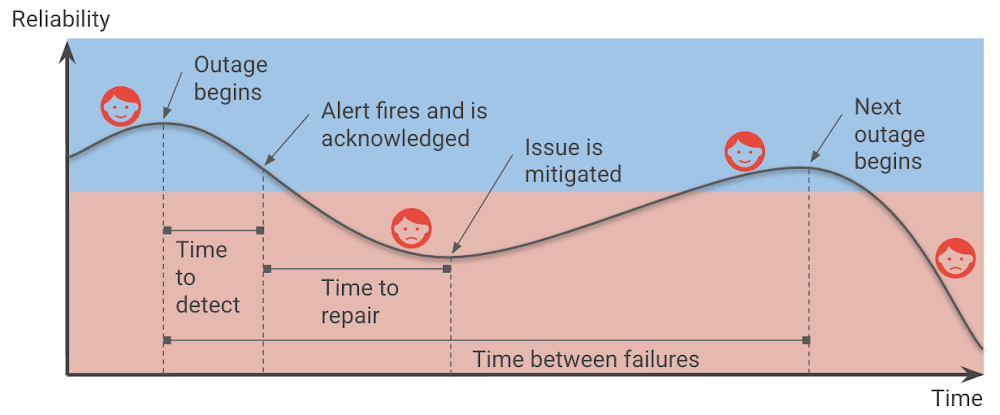
Setting up Service Level Objectives (SLOs) is one of the foundational tasks of Site Reliability Engineering (SRE) practices, giving the SRE team a target against which to evaluate whether or not a service is running reliably enough. The inverse of your SLO is your error budget — how much unreliability you are willing to tolerate. Once you’ve identified those targets and learned how to set SLOs, the next question you should ask yourself is whether your SLOs are realistic, given your application architecture and team practices? Are you sure that you can meet them? And what’s most likely to spend the error budget?At Google, SREs answer these questions up front when they take on a new service, as part of a Production Readiness Review (PRR). The intention of this risk analysis is not to prompt you to change your SLOs, but rather to prioritize and communicate the risks to a given service, so you can evaluate whether you’ll be able to actually meet your SLOs, with or without any changes to the service. In addition, it can help you identify which risks are the most important to prioritize and mitigate, using the best available data.You can make your service more reliable by identifying and mitigating risks.Risk analysis basicsBefore you can evaluate and prioritize your risks, though, you need to come up with a comprehensive list of things to watch out for. In this post, we’ll provide some guidelines for teams tasked with brainstorming all the potential risks to an application. Then, with that list in hand, we’ll show you how to actually analyze and prioritize the risks you’ve identified. What risks do you want to consider?When brainstorming risks, it’s important to try to map risks in different categories — risks that are related to your dependencies, monitoring, capacity, operations, and release process. And for each of those, imagine what will happen if specific failures happen, for example, if a third party is down, or if you introduce an application or configuration bug. Thus, when thinking about your measurements, ask yourself: Are there any observability gaps? Do you have alerts for this specific SLI? Do you even currently collect those metrics? Also be sure to also map any monitoring and alerting dependencies. For example, what happens if a managed system that you use goes down?Ideally, you want to identify the risks associated with each failure point for each critical component in a critical user journey, or CUJ. And after identifying those risks, you will want to quantify them:What percentage of users was affected by the failure?How often do you estimate that failure will occur?How long did it take to detect the failure? It’s also helpful to gather information about any incidents that happened in the last year that affected CUJs. Compared with gut feelings, relying on historical data can provide more accurate estimates and a good starting point for actual incidents. For example, you may want to consider incidents such as:A configuration mishap that reduces capacity, causing overload and dropped requestsA new release that breaks a small set of requests; the failure is not detected for a day; quick rollback when detected.A cloud provider’s single-zone VM/network outageA cloud provider’s regional VM/network outageThe operator accidentally deletes a database, requiring a restore from backupAnother aspect to think about is risk factors; these are global factors that affect the overall time to detection (TTD) and time to repair (TTR). These tend to be operational factors that can increase the time needed to detect outages (for example when using log-based metrics) or alert the on-call engineers. Another example could be a lack of playbooks/documentation or lack of automatic procedures. For example, you have:  Estimated time to detection (ETTD) of +30m due to operational overload such as noisy alertingA 10% greater frequency of a possible failure, due to lack of postmortems or action item follow-upBrainstorming guidelines: Recommendation for the facilitatorBeyond the technical aspects of what to look for in a potential risk to your service, there are some best practices to consider when holding a brainstorming session with your team. Start the discussion with a high-level block diagram of the service, its users, and its dependencies. Get a set of diverse opinions in the room — different roles that intersect with the product differently than you do. Also, avoid having only one party speak. Ask participants for the ways in which each element of the diagram could cause an error to be served to the user. Group similar root causes together into a single risk category, such as “database outage”.Try to avoid spending too long discussing things where the estimated time between a given failure is longer than a couple of years, or where the impact is limited to a very small subset of users.Creating your risk catalog You don’t need to capture an endless list of risks; seven to 12 risks per Service Level Indicator (SLI) are sufficient. The important thing is that the data capture high probability and critical risks. Starting with real outages is best. Those can be as simple as unavailability of <depended service or network>.Capture both infrastructure- and software-related issues. Think about risks that can affect the SLI, the time-to-detect and time-to-resolve, and frequency — more on those metrics below.Capture both risks in the risk catalog and risk factors (global factors). For example, the risk of not having a playbook adds to your time-to-repair; not having alerts for the CUJ adds to the time-to-detection; the risk of a log sync delay of x minutes increases your time-to-detection by the same amount. Then, catalog all these risks and their associated impacts to a global impacts tab.Here are a few examples of risks: A new release breaks a small set of requests; not detected for a day; quick rollback when detected.A new release breaks a sizable subset of requests; and no automatic rollback.A configuration mishap reduces capacity / Unnoticed growth in usage hits max.Recommendation: Examining the data/result of implementing the SLI will give you a good indication of where you stand in regard to achieving your targets. I recommend starting with creating one dashboard for each CUJ — ideally a dashboard that includes metrics that will also allow us to troubleshoot and debug problems in achieving the SLOs.Analyzing the risksNow that you’ve generated a list of potential risks, it’s time to analyze them, in order to prioritize their likelihood, and potentially find ways to mitigate against them. It’s time, in other words, to do a risk analysis. Risk analysis provides a data-driven approach to address and prioritize the needed risks, by estimating four key dimensions: the above-mentioned TTD and TTR, as well as time-between failures (TBF), and their impact on users.In Shrinking the impact of production incidents using SRE principles, we introduced a diagram of the production incident cycle. Blue represents when users are happy, and red represents when users are unhappy. The time that your services are unreliable and your users are unhappy consists of the time-to-detect and the time-to-repair, and is affected by the frequency of incidents (which can be translated to time-between-failures).Therefore, we can improve reliability by increasing the time between failures, decreasing the time-to-detect or time-to-repair, and of course, reducing the impact of the outages in the first place.Engineering your service for resiliency can reduce the frequency of total failures. You should avoid single points of failure in your architecture, whether it be an individual instance, availability zone, or even an entire region, which can prevent a smaller, localized outage from snowballing into global downtime.You can reduce the impact on your users by reducing the percentage of infrastructure or users affected or the requests (e.g., throttling part of the requests vs. all of them). In order to reduce the blast radius of outages, avoid global changes and adopt advanced deployments strategies that allow you to gradually deploy changes. Consider progressive and canary rollouts over the course of hours, days, or weeks, which allow you to reduce the risk and to identify an issue before all your users are affected.Further, having robust Continuous Integration and Continuous Delivery (CI/CD) pipelines allows you to deploy and roll back with confidence and reduce customer impact (See: SRE Book: Chapter 8 – Release Engineering). Creating an integrated process of code review and testing will help you find the issues early on before users are affected. Improving the time to detect means that you catch outages faster. As a reminder, having an estimated TTD expresses how long until a human being is informed of the problem. For example, imagine someone receives and acts upon a page. TTD also includes any delays until the ‘detection’ like data processing. For example, if I’m using a log-based alert, and my log system has an ingestion time of 5 minutes, this increases the TTD for every alert by 5 minutes.ETTR (estimated time-to-repair) is the time between the time a human sees the alert and the time your users are happy. Improving time-to-repair means that we fix outages quicker, in principle. That said, our focus should still be “does this incident still affect our users?” In most cases mitigations like rolling back new releases or diverting traffic to unaffected regions can reduce or eliminate the impact of an ongoing outage on users much faster than trying to roll forward to a new, patched build. The root cause isn’t yet fixed, but the users don’t know or care — all they see is that the service is working again. While it takes the human out of the loop, using automation can reduce the TTR and can be crucial to achieving higher reliability targets. However, it doesn’t eliminate the TTR altogether, because even if a mitigation such as failing over to a different region is automated, it still takes time for it to have an impact.A note about “estimated” values: At the beginning of a risk analysis, you might start with rough estimates for these metrics. But as you collect more data from incidents data you can update these estimates based on data from prior outages. Risk analysis process at a high level The risk analysis process starts by brainstorming risks for each of your SLOs, and more correctly for each one of your SLIs, as different SLIs will be exposed to different risks. In the next phase, build a risk catalog and iterate on it.Create a risk analysis sheet for two or three SLIs, using this template. Read more at How to prioritize and communicate risks.Brainstorm risks internally, considering the things that can affect your SLOs, and gathering some initial data. Do this first with the engineering team and then include the product team.The risk analysis sheets for each of your SLIs should include ETTD, ETTR, impact, and frequency. Include global factors and suggested risks and whether these risks are acceptable or not.Collect historical data and consult with the product team regarding the SLO-business needs. Iterate and update data based on incidents in production.Accepting risksAfter building the risk catalog and capturing the risk factors, finalize the SLOs according to business need and risk analysis. This step means you need to evaluate whether your SLO is achievable given the risks, and if it isn’t — what do you need to do to achieve your targets? It is crucial that PMs be part of this review process especially as they might need to prioritize engineering work that mitigates or eliminates any unacceptable risks.In how to prioritize and communicate risks, we introduce how to use the ‘Risk Stack Rank’ sheet to see how much a given risk may “cost” you, and which risks you can accept (or not) for a given SLO. For example, in the template sheet, you could accept all risks and achieve 99.5% reliability, some of the risks to achieve 99.9% and none of them to achieve 99.99%. If you can’t accept a risk because you estimate that it will burn more error budget than your SLO affords you, that is a clear argument for dedicating engineering time to either fixing the root cause or building some sort of mitigation.One final note: similar to SLOs, you will want to iterate on your risk refining your ETTD based on actual TTD observed during outages, and similarly for ETTR. After incidents, you need to update the data and see where you stand regarding those estimates. In addition, revisit those estimates periodically to evaluate whether your risks are still relevant, if your estimates are correct, or if there are any additional risks that you need to account for. Like the SRE principle of continuous improvement, it’s work that’s never truly done, but that is well worth the effort!For more on this topic, check out my upcoming DevOpsDays 2022 talk, taking place in Birmingham on May 6 and in Prague on May 24.   Further reading and resourcesSite Reliability Engineering: Measuring and Managing Reliability (Coursera course)Google Cloud Architecture Framework: ReliabilityThe Calculus of Service AvailabilityKnow thy enemy: how to prioritize and communicate risks—CRE life lessonsIncident Metrics in SRE – Google – Site Reliability EngineeringSRE on Google CloudRelated ArticleKnow thy enemy: How to prioritize and communicate risks—CRE life lessonsHow to effectively communicate and stack-rank risks in your system.Read Article
Quelle: Google Cloud Platform
Streamline Azure workloads with ExpressRoute BGP community support

In today’s globalized world, customers have started to maintain and expand their presence in the cloud across different geographic regions. With these increased deployments across Azure regions comes the increased complexity of customers’ hybrid networks. Establishing connectivity is no longer as simple as exchanging IP addresses between one pair of Azure regions and on-premises locations. Connectivity now requires additional configuration and reconfiguration of IP prefixes and route filters over time as the number of regions and on-premises locations grows. The introduction of Border Gateway Protocol (BGP) community support for Azure ExpressRoute, now in preview, lifts this burden for customers who connect privately to Azure. The support of this feature will also help simplify and unlock new network designs.

A brief overview of ExpressRoute

ExpressRoute lets customers extend their on-premises networks into the Microsoft Cloud over a private connection. With ExpressRoute, customers can connect to services in the Microsoft Cloud, including Microsoft Azure and Microsoft 365, without going over the public internet. An ExpressRoute connection provides more reliability, lower latency, and higher security than a public internet connection.

Globalized hybrid networks with ExpressRoute

A common scenario for customers to use ExpressRoute is to access workloads deployed in their Azure virtual networks. ExpressRoute facilitates the exchange of Azure and on-premises private IP address ranges using a BGP session over a private connection, enabling a seamless extension of customers’ existing networks into the cloud.

When a customer begins using multiple ExpressRoute connections to multiple Azure regions, their traffic can take more than one path. The hybrid network architecture diagram below demonstrates the emergence of suboptimal routing when establishing a mesh network with multiple regions and ExpressRoute circuits:

To ensure that traffic to Region A takes the optimal path over ExpressRoute Circuit 1, the customer could configure a route filter on-premises to ensure that Region A routes are only learned at the customer edge from ExpressRoute circuit 1, and not learned at all by ExpressRoute circuit 2. This approach makes the customer maintain a comprehensive list of IP prefixes in each region and have to regularly update this list whenever new virtual networks are added and private IP address space is expanded in the cloud. As the customer continues to grow their presence in the cloud, this burden can become excessive.

Simplifying routing with BGP communities

With the introduction of BGP community support for ExpressRoute, customers can easily grow their multiregional hybrid networks without the tedious work of maintaining IP prefix lists. A BGP community is a group of IP prefixes that share a common property called a BGP community tag or value. In Azure, customers can now:

Set a custom BGP community value on each of their virtual networks.
Access a predefined regional BGP community value for all their virtual networks deployed in a region.

Once these values are configured on customers’ virtual networks, ExpressRoute will preserve them on the corresponding private IP prefixes shared with customers’ on-premises. When these prefixes are learned on-premises, they are learned along with the configured BGP community values. For example, a customer can set the custom value of 12076:10000 on a virtual network in East US and then start receiving the virtual network prefixes along with the values of 12076:1000 and 12076:50004 (the regional value) on-premises. Customers can then configure their route filters based on these community values instead of by specifying IP prefixes.

With the ability to make routing decisions on-premises based on BGP communities, customers no longer need to maintain IP prefix lists or update their route filters each time they expand their address space in an existing region. Instead, they can filter based on regional BGP community values and update their configurations when deploying workloads in a new region.

Understanding complex networks

Customers may expand their Azure workloads across regions over time, as described earlier, but may also continue to build more complex networks within each region. They may progress from simpler single-virtual network deployments to pursuing hub-and-spoke or mesh topologies containing hundreds of resources. If connectivity or performance issues arise for traffic sent from these resources to on-premises, the complexity of the cloud network can make troubleshooting more difficult. With custom BGP community values configured on each virtual network within a region, a customer can quickly find the specific virtual network that traffic is originating from in Azure and narrow down their investigation accordingly.

Take advantage of custom BGP communities with your Azure workloads

With the power to simplify cross-regional hybrid network designs and speed up troubleshooting, custom BGP communities are a great way for customers to enhance current ExpressRoute setups and prepare for future growth.

Learn more about how to configure custom BGP communities for your own hybrid networks.
Quelle: Azure

Amazon MSK Serverless ist jetzt allgemein verfügbar

Wir freuen uns, Ihnen die allgemeine Verfügbarkeit von Amazon MSK Serverless anzukündigen, eine Art Amazon-MSK-Cluster, der es Entwicklern erleichtert, Apache Kafka auszuführen, ohne seine Kapazität verwalten zu müssen. MSK Serverless stellt automatisch Computing- und Speicherressourcen bereit und skaliert sie und bietet durchsatzbasierte Preise, sodass Sie Apache Kafka bei Bedarf verwenden und für die gestreamten und gespeicherten Daten bezahlen können.
Quelle: aws.amazon.com

Amazon RDS for MySQL unterstützt jetzt M6i- und R6i-Instances mit neuen Größen von bis zu 128 vCPUs und 1.024 GiB RAM

Amazon Relational Database Service (Amazon RDS) for MySQL Version 8.0 bietet jetzt Support für M6i- und R6i-Instances. M6i-Instances sind die 6. Generation von Amazon-EC2-x86-basierten Allzweck-Computing-Instances, die entwickelt wurden, um ein ausgewogenes Verhältnis von Rechen-, Arbeitsspeicher-, Speicher- und Netzwerkressourcen bereitzustellen. R6i-Instances sind die 6. Generation von speicheroptimierten Amazon-EC2-Instances, die für speicherintensive Workloads entwickelt wurden. M6i- und R6i-Instances basieren auf dem AWS-Nitro-System, einer Kombination aus dedizierter Hardware und schlankem Hypervisor, der praktisch alle Rechen- und Speicherressourcen der Host-Hardware für Ihre Instances bereitstellt.
Quelle: aws.amazon.com

Amazon Connect zeigt jetzt die Voice-ID-Attribute direkt auf der Kontaktdetailseite an

Amazon Connect ermöglicht es Ihnen jetzt, auf der Kontaktdetailseite nach Voice-ID-Authentifizierungs- und Betrugserkennungsergebnissen zu suchen und diese anzuzeigen, sodass Sie auf der Grundlage der Voice-ID-Ergebnisse leichter Maßnahmen ergreifen können. Sie können nach Kontakten auf der Grundlage von Voice-ID-Attributen wie Authentifizierungsstatus, Anruferaktionen (Anmeldung oder Abmeldung), Betrugsrisikostatus und Betrugsrisikogrund suchen. Diese Details sind auch auf der Kontaktdetailseite eines bestimmten Kontakts verfügbar. Sie können zum Beispiel nach allen Kontakten suchen, die als hochgradig betrugsgefährdet eingestuft sind, und dann diese Anrufaufzeichnungen abhören, um Betrugsmuster oder -strategien zu erkennen, was es Ihnen wiederum ermöglicht, zusätzliche Sicherheitsmaßnahmen zu ergreifen.
Quelle: aws.amazon.com

Amazon RDS unterstützt jetzt Internet Protocol Version 6 (IPv6)

Amazon Relational Database Service (Amazon RDS) bietet Kunden jetzt die Möglichkeit, IPv6-Adressen (Internet Protocol Version 6) in ihrer Virtual Private Cloud (VPC) auf neuen und bestehenden RDS-Instances zu verwenden. Kunden, die zu IPv6 wechseln, vereinfachen ihren Netzwerk-Stack, indem sie ihre Datenbanken in einem Netzwerk ausführen, das sowohl IPv4 als auch IPv6 unterstützt.
Quelle: aws.amazon.com






