Smartphone: Pebble-Gründer wünscht sich ein iPhone Mini mit Android
Der Pebble-Gründer Eric Migicovsky will einen Hersteller davon überzeugen, ein Oberklasse-Smartphone in einem kompakten Gehäuse anzubieten. (Smartphone, Apple)
Quelle: Golem

Der Pebble-Gründer Eric Migicovsky will einen Hersteller davon überzeugen, ein Oberklasse-Smartphone in einem kompakten Gehäuse anzubieten. (Smartphone, Apple)
Quelle: Golem

Editor’s note: Here, we look at how Equifax used Google Cloud’s Bigtable as a foundational tool to reinvent themselves through technology.Identifying stolen identities, evaluating credit scores, verifying employment and income for processing credit requests requires data—truckloads of data—galaxies of data! But it’s not enough to just have the most robust data assets; you have to protect, steward and manage them with precision. As one of the world’s largest fintechs, operating in a highly regulated space, our business at Equifax revolves around extracting unique insights from data and delivering them in real-time so our customers can make smarter decisions. Back in 2018, our leadership team made the decision to rebuild our business in the cloud. We had been more than a traditional credit bureau for years, but we knew we had to reinvent our technology infrastructure to become a next-generation data, analytics and technology company. We wanted to create new ways to integrate our data faster, scale our reach with automation and empower employees to innovate new products versus a “project” mindset. The result of our transformation is the Equifax Cloud™, our unique mix of public cloud infrastructure with industry-leading security, differentiated data assets and AI analytics that only Equifax can provide. The first step involved migrating our legacy data ecosystem to Google Cloud to build a data fabric. We set out to shut down all 23 global data centers and bring everything on the data fabric for improved collaboration and insights. With help from the Google Cloud team, we’re already well underway.Building data fabric on Cloud Bigtable From the start, we knew we wanted a single, fully managed platform that would allow us to focus on innovating our data and insights products. Instead of trying to build our own expertise around infrastructure, scaling and encryption, Google Cloud offers these capabilities right out of the box, so we can focus on what drives value for our customers. We designed our data fabric with Google Cloud’s NoSQL database, Bigtable, as a key component of the data architecture. As a fully managed service, Bigtable allows us to increase the speed and scale of our innovation. It supports the Equifax Cloud data fabric by rapidly ingesting data from suppliers, capturing and organizing the data, and serving it to users so they can build new products. Our proprietary data fabric is packaged as Equifax-in-a-Box, and it includes integrated platforms and tools that provide 80-90 percent of the foundation needed for a new Equifax business in a new geography. This allows our teams to rapidly deploy in a new region and comply with local regulations.Bigtable hosts the financial journals—the detailed history of observations across data domains such as Consumer Credit, Employment & Utility and more — for the data fabric, which play a role in nearly all our solutions. One of our largest journals, which hosts the US credit data, consists of about 3 billion credit observations along with other types of observations. When we run our proprietary Keying and Linking services to determine the identity of the individual to whom these datasets belong to, Bigtable handles keying and linking the repository to help us scale up instantly and get answers quickly. Innovating with the Equifax Cloud From everyday activities to new innovative offerings, we’re using the data fabric to transform our industry. Bigtable has been the bedrock of our platform, delivering the capabilities we need. For example, when a consumer goes into a store to finance a cellphone, we provide the retailer a credit file, which requires finding, farming, building, packaging and returning that file in short order. By moving to Google Cloud and Bigtable, we will be able to do all that now in under 100 milliseconds. Likewise, we’re using the data fabric to create a global fraud prevention product platform. Our legacy stack made it challenging to pull out and shape the data the way we wanted on a quick turn. However, with managed services like Bigtable, we have been able to build seven distinct views of the data for our fraud platform within four weeks—versus the few months it might have taken without the data fabric. Greater impact with Google Cloud We’ve made tremendous progress transforming into a cloud-native, next-generation data, analytics and technology company. With a global multi-region architecture, the data fabric runs in seven Google Cloud regions and eventually will support all 25 countries where Equifax operates. Our Equifax Cloud, leveraging key capabilities from Google Cloud, has given us additional speed, security and flexibility to focus on building powerful data products for the future. Learn more about Equifax and Cloud Bigtable. And check out our recent blog and graphics that answer the question, How BIG is Cloud Bigtable?Related ArticleCloud Bigtable launches Autoscaling plus new features for optimizing costs and improved manageabilityCloud Bigtable launches autoscaling that automatically adds or removes capacity in response to the changing demand for your applications.Read Article
Quelle: Google Cloud Platform
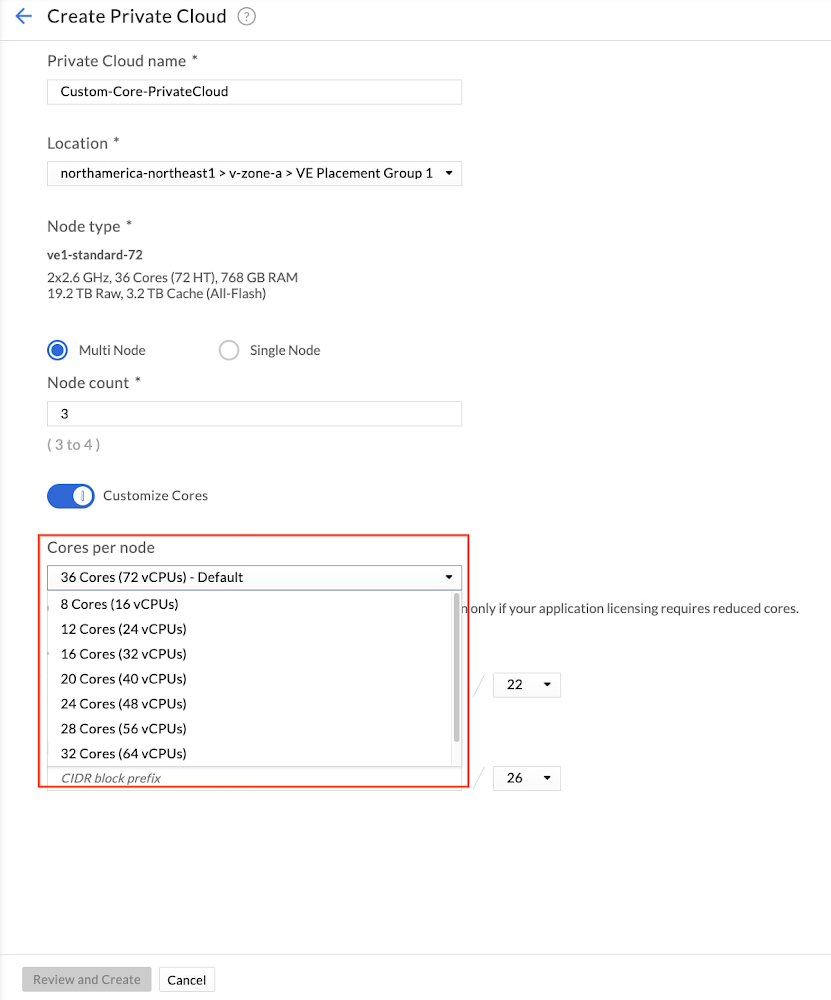
Customers are increasingly migrating their workloads to the cloud, including applications that are licensed and charged based on the number of physical CPU cores on the underlying node or in the cluster. To help customers manage and optimize their application licensing costs on Google Cloud VMware Engine, we introduced a capability called custom core counts — giving you the flexibility to configure your clusters to help meet your application-specific licensing requirements and reduce costs.You can set the required number of CPU cores for your workloads at the time of cluster creation, thereby effectively reducing the number of cores you may have to license for that application. You can set the number of physical cores per node in multiples of 4 — such as 4, 8, 12, and so on up to 36. VMware Engine also creates any new nodes added to that cluster with the same number of cores per node, including when replacing a failed node. Custom core counts are supported for both the initial cluster and for subsequent clusters created in a private cloud.It’s easy to get started, with just three or fewer steps depending on whether you’re creating a new private cloud and customizing cores in a cluster or adding a custom core count cluster to an already existing private cloud. Let’s take a quick look at how you can start using custom core counts:1. During private cloud creation, select the number of cores you want to set per node. The image below shows the selection process.2. Provide network information for the management components.3. Review the inputs and create a private cloud with custom cores per cluster node.That’s it. We’ve created a private cloud with a cluster that has 3 nodes and each node has 24 cores enabled (48 vCPUs). This gives a total of 72 cores enabled in the cluster. With this feature, you can right-size your cluster to meet your application licensing needs. If you’re running an application that is licensed on a per-core basis, you’ll only need to license 72 cores with custom core count, as opposed to 108 cores (36 cores X 3 nodes). For additional clusters in an already running private cloud, you just need 1 step to activate custom core counts.Stay tuned for more updates and bookmark our release notes for the latest update on Google Cloud VMware Engine. And if you’re interested in taking your first step, sign up for this no-cost discovery and assessment with Google Cloud!Related ArticleRunning VMware in the cloud: How Google Cloud VMware Engine stacks upLearn how Google Cloud VMware Engine provides unique capabilities to migrate and run VMware workloads natively in Google Cloud.Read Article
Quelle: Google Cloud Platform
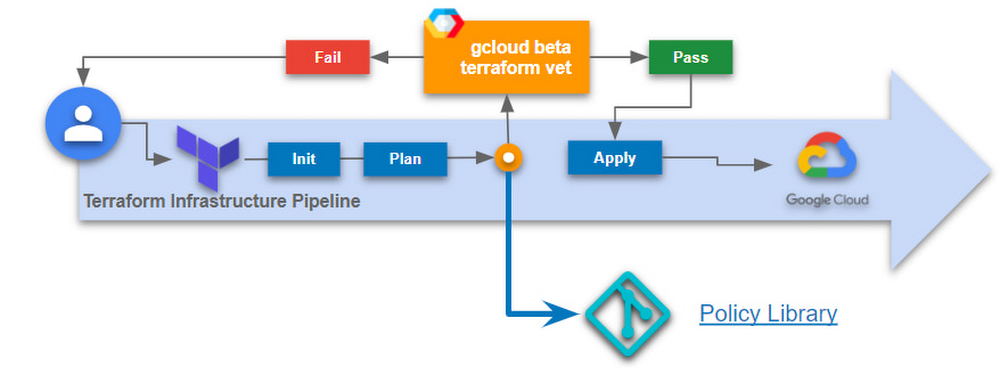
Terraformis a popular open source Infrastructure as Code (IaC) tool today and is used by organizations of all sizes across the world. Whether you use Terraform locally as a developer or as a platform admin managing complex CI/CD pipelines, Terraform makes it easy to deploy infrastructure on Google Cloud. Today, we are pleased to announce gcloud beta terraform vet, which is a client-side tool, available at no charge which enables policy validation for your infrastructure deployments and existing infrastructure pipelines. With this release, you can now write policies on any resource from Terraform’s google and google-beta providers. If you’re already using Terraform Validator on GitHub today, follow the migration instructions to leverage this new capability. The challengeInfrastructure automation with Terraform increases agility and reduces errors by automating the deployment of infrastructure and services that are used together to deliver applications.Businesses implement continuous delivery to develop applications faster and to respond to changes quickly. Changes to infrastructure are common and in many cases occur often. It can become difficult to monitor every change to your infrastructure, especially across multiple business units to help process requests quickly and efficiently in an automated fashion. As you scale Terraform within your organization, there is an increased risk for misconfigurations and human error. Human authored configuration changes can extend infrastructure vulnerability periods which expose organizations to compliance or budgetary risks. Policy guardrails are necessary to allow organizations to move fast at scale, securely, and in a cost effective manner – and the earlier in the development process, the better to avoid problems with audits down the road. The solutiongcloud beta terraform vet provides guardrails and governance for your Terraform configurations to help reduce misconfigurations of Google Cloud resources that violate any of your organization’s policies.These are some of the benefits of using gcloud beta terraform vet: Enforce your organization’s policy at any stage of application developmentPrevent manual errors by automating policy validationFail fast with pre-deployment checksNew functionalityIn addition to creating CAI based constraints, you can now write policies on any resource from Terraform’s google and google-beta providers. This functionality was added after receiving feedback from our existing users of terraform validator on github. Migrate to gcloud beta terraform vet today to take advantage of this new functionality. Primary use cases for policy validationPlatform teams can easily add guardrails to infrastructure CI/CD pipelines (between the plan & apply stages) to ensure all requests for infrastructure are validated before deployment to the cloud. This limits platform team involvement by providing failure messages to end users during their pre-deployment checks which tell them which policies they have violated. Application teams and developers can validate their Terraform configurations against the organization’s central policy library to identify misconfigurations early in the development process. Before submitting to a CI/CD pipeline, you can easily ensure your Terraform configurations are in compliance with your organization’s policies, thus saving time and effort.Security teams can create a centralized policy library that is used by all teams across the organization to identify and prevent policy violations. Depending on how your organization is structured, the security team (or other trusted teams) can add the necessary policies according to the company’s needs or compliance requirements. Getting startedThe quickstart provides detailed instructions on how to get started. Let’s review the simple high-level process:1. First, clone the policy library. This contains sample constraint templates and bundles to get started. These constraint templates specify the logic to be used by constraints.2. Add your constraints to the policies/constraints folder. This represents the policies you want to enforce. For example, the IAM domain restriction constraint ensures all IAM policy members are in the “gserviceaccount.com” domain. See sample constraints for more samples.code_block[StructValue([(u’code’, u’apiVersion: constraints.gatekeeper.sh/v1alpha1rnkind: GCPIAMAllowedPolicyMemberDomainsConstraintV2rnmetadata:rn name: service_accounts_onlyrn annotations:rn description: Checks that members that have been granted IAM roles belong to allowlistedrn domains.rnspec:rn severity: highrn match:rn target: # {“$ref”:”#/definitions/io.k8s.cli.setters.target”}rn – “organizations/**”rn parameters:rn domains:rn – gserviceaccount.com’), (u’language’, u”)])]3. Generate a Terraform plan and convert it to JSON format$ terraform show -json ./test.tfplan > ./tfplan.json4. Install the gcloud component, terraform-tools$ gcloud components update$ gcloud components install terraform-tools5. Run gcloud beta terraform vet$ gcloud beta terraform vet tfplan.json –policy-library=.6. Finally, view the results. If you violated any policy checks, you will see the following outputs. Pass:code_block[StructValue([(u’code’, u'[]’), (u’language’, u”)])]Fail: The output is much longer, here is a snippet:code_block[StructValue([(u’code’, u'[rn{rn “constraint”: rnu2026 rnrn”message”: “IAM policy for //cloudresourcemanager.googleapis.com/projects/PROJECT_ID contains member from unexpected domain: user:user@example.com”,rnu2026rn]’), (u’language’, u”)])]FeedbackWe’d love to hear how this feature is working for you and your ideas on improvements we can make.Related ArticleEnsuring scale and compliance of your Terraform deployment with Cloud BuildThe best way to run Terraform on Google Cloud is with Cloud Build and Cloud Storage. This article explains why, covering scale, security …Read Article
Quelle: Google Cloud Platform

Sony hat weitere Bluetooth-Hörstöpsel unter der Marke Link Buds vorgestellt. Die meisten Link-Buds-Besonderheiten gibt es beim neuen Modell allerdings nicht. (Sony, ANC)
Quelle: Golem

Norwegen ist Vorreiter bei Elektroautos. Jetzt werden dort auch Akkus recycelt. (Recycling, Technologie)
Quelle: Golem

Dürfen Krankenkassen pseudonymisierte Gesundheitsdaten aller Versicherten in eine Datenbank einspeisen? Im Fall von CCC-Sprecherin Kurz vorerst nicht. (DSGVO, Datenschutz)
Quelle: Golem

In Mainz ist Biontech beheimatet, was die Steuereinnahmen explodieren lässt. Mit dem Geld wird nun ein 365-Euro-Jahresticket für Schüler und Azubis finanziert. (ÖPNV, Coronavirus)
Quelle: Golem

Golem.de hat es gespielt: Arclight Rumble entpuppt sich als gelungenes Mobile Game – aber wie ein echtes Warcraft fühlt es sich nicht an. Von Peter Steinlechner (Warcraft, Blizzard)
Quelle: Golem

Quelle: <a href="“Selling Sunset” Star Christine Quinn Is Leaving The O Group To Go All-In On Crypto“>BuzzFeed






