Überwachung: Polizei setzt Handy-Erkennungskamera gegen Autofahrer ein
In Rheinland-Pfalz werden Handynutzer am Steuer eines Autos automatisch erkannt. Dazu wird das System Monocam aus den Niederlanden genutzt. (Polizei, Auto)
Quelle: Golem

In Rheinland-Pfalz werden Handynutzer am Steuer eines Autos automatisch erkannt. Dazu wird das System Monocam aus den Niederlanden genutzt. (Polizei, Auto)
Quelle: Golem
Amazon EC2 Auto Scaling unterstützt jetzt die voraussagende Skalierung in der Region AWS GovCloud (USA-West). Mit der die voraussagenden Skalierung können Sie Ihre Auto-Scaling-Gruppe proaktiv skalieren, um auf die kommende Nachfrage vorbereitet zu sein. Auf diese Weise vermeiden Sie eine übermäßige Bereitstellung von Kapazität, was zu niedrigeren EC2-Kosten führt und gleichzeitig die Reaktionsfähigkeit Ihrer Anwendung gewährleistet. (Bisher war die voraussagende Skalierung nur über AWS-Auto-Scaling-Pläne und nur in öffentlichen Regionen verfügbar.) Die Unterstützung in der Region AWS GovCloud (USA-West) ermöglicht es US-Behörden und Auftragnehmern, sensible Workloads auszuführen, indem sie ihre spezifischen regulatorischen und Compliance-Anforderungen erfüllen.
Quelle: aws.amazon.com
Amazon Redshift hat Support für eine neue Snapshot-Isolationsebene mit Unterstützung für gleichzeitige Transaktionen eingeführt. Amazon Redshift verhindert schmutzige Lesevorgänge, nicht wiederholbare Lesevorgänge und Phantom-Lesevorgänge gemäß den SQL-Standards. Die beiden Optionen, die Amazon Redshift für die Serialisierung von Transaktionen bietet, sind SERIALIZABLE und SNAPSHOT ISOLATION. Die Option SERIALIZABLE implementiert eine strenge Serialisierbarkeit, bei der eine Transaktion fehlschlagen könnte, wenn das Ergebnis nicht in eine serielle Reihenfolge der gleichzeitig laufenden Transaktionen abgebildet werden kann. Die Option SNAPSHOT ISOLATION ermöglicht eine höhere Gleichzeitigkeit, bei der gleichzeitige Änderungen an verschiedenen Zeilen in derselben Tabelle erfolgreich abgeschlossen werden können. Bei beiden Optionen arbeiten die Transaktionen weiterhin mit der letzten festgeschriebenen Version oder einem Snapshot der Datenbank.
Quelle: aws.amazon.com

Eine Schwachstelle in Huaweis App Gallery wird es noch etwa eine Woche lang ermöglichen, kostenpflichtige Android-Apps gratis zu beziehen. (Huawei, Android)
Quelle: Golem

Die neue Generation des Framework Laptop mit Alder-Lake-Chip und ein RJ45-Anschluss kommen. Die Mainboards sind auch einzeln bestellbar. (Framework Laptop, Intel)
Quelle: Golem

Die Verschlüsselung auf der Netzwerkhardware auszuführen spart Rechenleistung. Bei Google sind das 0,5 Prozent der CPU-Leistung weltweit. (Google, Verschlüsselung)
Quelle: Golem

Ukrainische Infanteristen nutzen E-Motorräder, um leise und schnell zum Einsatz zu gelangen und die Panzerabwehrlenkwaffe NLAW zu transportieren. (Elektromotorrad, Technologie)
Quelle: Golem

Frontex und Europol wollen für alle Reisenden eine Datei anlegen und mit verschiedenen Datenbanken abgleichen. Die Auswertung soll mit KI erfolgen. Von Matthias Monroy (EU, Datenschutz)
Quelle: Golem
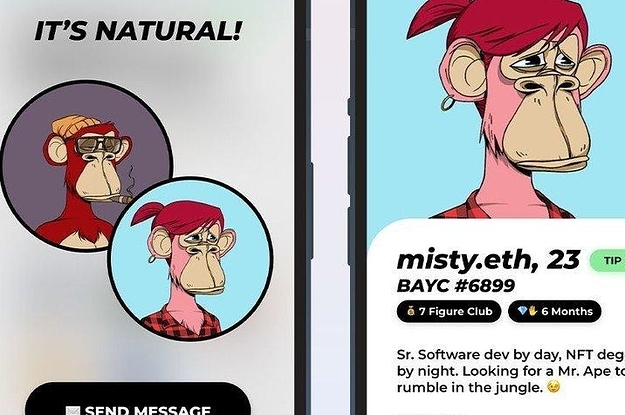
Quelle: <a href="The Bored Ape Dating App That Shut Down Because No Women Signed Up Was Just A Prank, Folks“>BuzzFeed

A Fresh New Design For Subscriber Emails
We recently rolled out some fresh, flavorful updates to the design of the emails that go out to your subscribers when you publish new posts to your site. With this new design update we worked on modernizing the out-the-box email templates that come with your WordPress.com website.
Clean, Content-First Design
Let’s take a look at the new look and feel.
Design can have a huge impact on engagement. With the new update, your subscribers will get a fresh looking email when they subscribe, receive a welcome email, and whenever you publish new posts. The new designs put your content first, and look beautiful on any device.
1. Confirmation Email
When a site visitor subscribes to your updates, the first email they’ll get will ask them to confirm their subscription. This helps make sure that the person subscribing is the owner of the email address shared. Just in case.
To put your personal stamp on that email, you can edit the message that gets sent out. Just head to: Settings → Reading → Follower settings → “Blog follow email text”, and you’re all set.
2. Welcome Email
Once your subscriber has confirmed that they’re good to go ahead, they’ll receive a Welcome Email. This one’s really important.
It turns out that the average open rate of Welcome Emails is 82% (GetResponse, 2017). So, for every 100 emails you send out, 82 people will open them. Compare that with the average email open rate of just 21%, and it’s easy to see how making a good first impression really matters.
3. New Subscriber Email
We don’t leave you out, either.
At the same time your new subscriber gets their Welcome Email, you’ll get a New Subscriber email. So you can celebrate.
4. New Post Updates
Now your subscriber’s all set, they’ll get a fresh new email every time you add a new post to your site. That’s one more reminder that you’re out there and publishing. And one more reason to keep coming back for more.
Getting Started
Email is one of the best ways to reach your site visitors, with 4.3 Billion users around the world forecast for this year alone (Statista, 2021).
On WordPress.com, tapping into that huge audience is as simple as adding a block to your site. Check out our support guide for the subscribe block to walk you through how to get that up and running.
Adding the block makes it a couple-of-clicks simple for your site visitors to subscribe to your content.
And once they’ve subscribed, they’ll receive all of your latest updates – with the new, fresh design – direct to their inbox.
Quelle: RedHat Stack






