Boost the power of your transactional data with Cloud Spanner change streams

Data is one of the most valuable assets in today’s digital economy. One way to unlock the value of your data is to give it life after it’s first collected. A transactional database, like Cloud Spanner, captures incremental changes to your data in real time, at scale, so you can leverage it in more powerful ways. Cloud Spanner is our fully managed relational database that offers near unlimited scale, strong consistency, and industry-leading high availability of up to 99.999%. The traditional way for downstream systems to use incremental data that’s been captured in a transactional database is through change data capture (CDC), which allows you to trigger behavior based on changes to your database, such as a deleted account or an updated inventory count.Today, we are announcing Spanner change streams, coming soon, that lets you capture change data from  Spanner databases and easily integrate it with other systems to unlock new value. Change streams for Spanner goes above and beyond the traditional CDC capabilities of tracking inserts, updates, and deletes. Change streams are highly flexible and configurable, letting you track changes on exact tables and columns or across an entire database. You can replicate changes from Spanner to BigQuery for real-time analytics, trigger downstream application behavior using Pub/Sub, and store changes in Google Cloud Storage (GCS) for compliance. This ensures you have the freshest data to optimize business outcomes. Change streams provides a wide range of options to integrate change data with other Google Cloud services and partner applications through turnkey connectors, including custom Dataflow processing pipelines or the change streams read API.Spanner consistently processes over 1.2 billion requests per second. Since change streams are built right into Spanner, you not only get industry-leading availability and global scale—you also don’t have to spin up any additional resources. The same IAM permissions that already protect your Spanner databases can be used to access change streams queries.Change stream queries are protected by spanner.databases.select, and change stream DDL operations are protected by spanner.databases.updateDdl.Change streams in actionIn this section, we’ll look at how to set up a change stream that sends change data from Spanner to an analytic data warehouse in BigQuery.Creating a change stream As discussed above, a change stream tracks changes on an entire database, a set of tables, or a set of columns in a database. Each change stream can have a retention period of anywhere from one day to seven days, and you can set up multiple change streams to track exactly what you need for your specific business objectives. First, we’ll create a change stream on a table called InventoryLedger. This table tracks inventory changes on two columns: InventoryLedgerProductSku and InventoryLedgerChangedUnits with a 7-day retention period.Change recordsEach change record contains a wealth of information, including primary key, the commit timestamp, transaction ID, and of course, the old and new values of the changed data, wherever applicable. This makes it easy to process change records as an entire transaction, in sequence based on their commit timestamp, or individually as they arrive, depending on your business needs. Back to the inventory example, now that we’ve created a change stream on the InventoryLedger table, all inserts, updates, and deletes on this table will be published to the InventoryStream change stream. These changes are strongly consistent with the commits on the InventoryLedger table: When a transaction commit succeeds, the relevant changes will automatically persist in the change stream. You never have to worry about missing a change record.Processing a change streamThere are numerous ways that you can process change streams depending on the use case:Analytics: You can send the change records to BigQuery, either as a set of change logs or by updating the tables.  Event triggering: You can send change logs to Pub/Sub for further processing by downstream systems. Compliance: You can retain the change log to Google Cloud Storage for archiving purposes. The easiest way to process change stream data is to use our Spanner connector for Dataflow, where you can take advantage of Dataflow’s built-in pipelines to BigQuery, Pub/Sub, and Google Cloud Storage. The diagram below shows a Dataflow pipeline that processes this change stream and imports change data directly into BigQuery.Alternatively, you can build a custom Dataflow pipeline to process change data with Apache Beam. In this case, we provide a Dataflow connector that outputs change data as an Apache Beam PCollection of DataChangeRecord objects. For even more flexibility, you can use the underlying change streams query API. The query API is a powerful interface that lets you read directly from a change stream to implement your own connector and stream changes to the pipeline of your choice. On the query API side, a change stream is divided into multiple partitions, which can be used to query a change stream in parallel for higher throughput. Spanner dynamically creates these partitions based on load and size. Partitions are associated with a Spanner database split, allowing change streams to scale as effortlessly as the rest of Spanner.Get started with change streamsWith change streams, your Spanner data follows you wherever you need it, whether that’s for analytics with BigQuery, for triggering events in downstream applications, or for compliance and archiving. Change streams are highly flexible and configurable —allowing you to capture change data for the exact data you care about, and for the exact period of time that matters for your business. And because change streams are built into  Spanner, there’s no software to install, and you get external consistency, high scale, and up to 99.999% availability.There’s no extra charge for using change streams, and you’ll pay only for extra compute and storage of the change data at the regular Spanner rates.To get started with Spanner, create an instance, or try it out with a Spanner Qwiklab.We’re excited to see how Spanner change streams will help you unlock more value out of your data!Related ArticleCloud Spanner myths bustedThe blog talks about the 7 most common myths and elaborates the truth for each of the myths.Read Article
Quelle: Google Cloud Platform
Meet Google’s unified data and AI offering

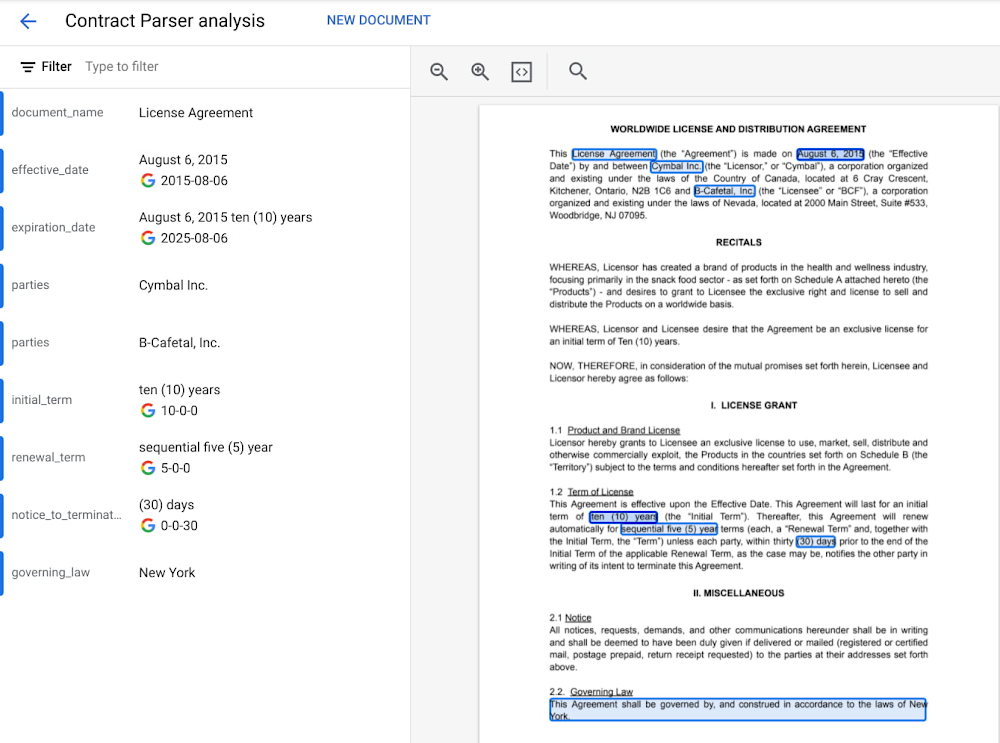
Without AI, you’re not getting the most out of your data.Without data, you risk stale, out-of-date, suboptimal models.But most companies are still struggling with how to keep these highly interdependent technologies in sync and operationalize AI to take meaningful action from data.We’ve learned from Google’s years of experience in AI development how to make data-to-AI workflows as cohesive as possible and as a result our data cloud is the most complete and unified data and AI solution provider in the market. By bridging data and AI, data analysts can take advantage of user-friendly, accessible ML tools, and data scientists can get the most out of their organization’s data. All of this comes together with built-in MLOps to ensure all AI work — across teams — is ready for production use. In this blog we’ll show you how all of this works, including exciting announcements from the Data Cloud Summit:Vertex AI Workbench is now GA bringing together Google Cloud’s data and ML systems into a single interface so that teams have a common toolset across data analytics, data science, and machine learning. With native integrations across BigQuery, Spark, Dataproc, and Dataplex data scientists can build, train and deploy ML models 5X faster than traditional notebooks. Introducing Vertex AI Model Registry, a central repository to manage and govern the lifecycle of your ML models. Designed to work with any type of model and deployment target, including BigQuery ML, Vertex AI Model Registry makes it easy to manage and deploy models. Use ML to get the most out of your data, no matter the formatAnalyzing structured data in a data warehouse, like using SQL in BigQuery, is the bread and butter for many data analysts. Once you have data in a database, you can see trends, generate reports, and get a better sense of your business. Unfortunately, a lot of useful business data isn’t in the tidy tabular format of rows and columns. It’s often spread out over multiple locations and in different formats, frequently as so-called “unstructured data” — images, videos, audio transcripts, PDFs — can be cumbersome and difficult to work with. Here, AI can help. ML models can be used to transcribe audio and videos, analyze language, and extract text from images—that is, to translate elements of unstructured data into a form that can be stored and queried in a database like BigQuery. Google Cloud’s Document AI platform, for example, uses ML to understand documents like forms and contracts. Below, you can see how this platform is able to intelligently extract structured text data from an unstructured document like a resume. Once this data is extracted, it can be stored in a data warehouse like BigQuery.Bring machine learning to data analysts via familiar toolsToday, one of the biggest barriers to ML is that the tools and frameworks needed to do ML are new and unfamiliar. But this doesn’t have to be the case. BigQuery ML, for example, allows you to train sophisticated ML models at scale using SQL code, directly from within BigQuery. Bringing ML to your data warehouse alleviates the complexities of setting up additional infrastructure and writing model code. Anyone who can write SQL code can train a ML model quickly and easily.Easily access data with a unified notebook interfaceOne of the most popular ML interfaces today are notebooks: interactive environments that allow you to write code, visualize and pre-process data, train models, and a whole lot more. Data scientists often spend most of their day building models within notebook environments. It’s crucial, then, that notebook environments have access to all of the data that makes your organization run, including tools that make that data easy to work with. Vertex AI Workbench, now generally available, is the single development environment for the entire data science workflow. Integrations across Google Cloud’s data portfolio allow you to natively analyze your data without switching between services:Cloud Storage: access unstructured dataBigQuery: access data with SQL, take advantage of models trained with BigQuery MLDataproc: execute your notebook using your Dataproc cluster for controlSpark: transform and prepare data with autoscaling serverless SparkBelow, you’ll see how you can easily run a SQL query on BigQuery data with Vertex AI Workbench.But what happens after you’ve trained the model? How can both data analysts and data scientists make sure their models can be utilized by application developers and maintained over time?Go from prototyping to production with MLOpsWhile training accurate models is important, getting those models to be scalable, resilient, and accurate in production is its own art, known as MLOps. MLOps allow you to:Know what data your models are trained onMonitor models in productionMake training process repeatableServe and scale model predictionsA whole lot more! (See the “Practitioners Guide to MLOps” whitepaper for a full and detailed overview of MLOps)Built-in MLOps tools within Vertex AI’s unified platform remove the complexity of model maintenance. Practical tools can help with everything from training and hosting ML models, managing model metadata, governance, model monitoring, and running pipelines – all critical aspects of running ML in production and at scale. And now, we’re extending our capabilities to make MLOps accessible to anyone working with ML in your organization. Easy handoff to MLOps with Vertex AI Model RegistryToday, we’re announcing Vertex AI Model Registry, a central repository that allows you to register, organize, track, and version trained ML models and is designed to work with any type of model and deployment target, whether that’s through BigQuery, Vertex AI, AutoML, custom deployments on GCP or even out of the cloud.Vertex AI Model Registry is particularly beneficial for BigQuery ML. While BigQuery ML brings the powerful scalability of BigQuery for batch predictions, using a data warehouse engine for real-time predictions just isn’t practical. Furthermore, you might start to wonder how to orchestrate your ML workflows based in BigQuery. You can now discover and manage  BigQuery ML models and easily deploy those models to Vertex AI for real-time predictions and MLOps tools. End-to-End MLOps with pipelinesOne of the most popular approaches to MLOps is the concept of ML pipelines: where each distinct step in your ML workflow from data preparation to model training and deployment are automated for sharing and reliably reproducing. Vertex AI Pipelines is a serverless tool for orchestrating ML tasks using pre-built components or your own custom code. Now, you can easily process data and train models with BigQuery, BigQuery ML, and Dataproc directly within a pipeline. With this capability, you can combine familiar ML development within BigQuery and Dataproc into reproducible, resilient pipelines and orchestrate your ML workflows faster than ever.See an example of how this works with the new BigQuery and BigQuery ML components.Learn more about how to use BigQuery and BigQuery ML components with Vertex AI Pipelines.Learn more and get started We’re excited to share more about our unified data and AI offering today at the Data Cloud Summit. Please join us for the spotlight session on our “AI/ML strategy and product roadmap” or the “AI/ML notebooks ‘how to’ session.”And if you’re ready to get hands on with Vertex AI, check out these resources:Codelab: Training an AutoML model in Vertex AICodelab: Intro to Vertex AI WorkbenchVideo Series: AI Simplified: Vertex AIGitHub: Example NotebooksTraining: Vertex AI: Qwik StartRelated ArticleWhat is Vertex AI? Developer advocates share moreDeveloper Advocates Priyanka Vergadia and Sara Robinson explain how Vertex AI supports your entire ML workflow—from data management all t…Read Article
Quelle: Google Cloud Platform

BigLake: unifying data lakes and data warehouses across clouds

The volume of valuable data that organizations have to manage and analyze is growing at an incredible rate. This data is increasingly distributed across many locations, including  data warehouses, data lakes, and NoSQL stores. As an organization’s data gets more complex and proliferates across disparate data environments, silos emerge, creating increased risk and cost, especially when that data needs to be moved. Our customers have made it clear; they need help. That’s why today, we’re excited to announce BigLake, a storage engine that allows you to unify data warehouses and lakes. BigLake gives teams the power to analyze data without worrying about the underlying storage format or system, and eliminates the need to duplicate or move data, reducing cost and inefficiencies. With BigLake, users gain fine-grained access controls, along with performance acceleration across BigQuery and multicloud data lakes on AWS and Azure. BigLake also makes that data uniformly accessible across Google Cloud and open source engines with consistent security. BigLake extends a decade of innovations with BigQuery to data lakes on multicloud storage, with open formats to ensure a unified, flexible, and cost-effective lakehouse architecture.BigLake architectureBigLake enables you to:Extend BigQuery to multicloud data lakes and open formats such as Parquet and ORC with fine-grained security controls, without needing to set up new infrastructure.Keep a single copy of data and enforce consistent access controls across analytics engines of your choice, including Google Cloud and open-source technologies such as Spark, Presto, Trino, and Tensorflow.Achieve unified governance and management at scale through seamless integration with Dataplex.Bol.com, an early customer using BigLake, has been accelerating analytical outcomes while keeping their costs low:“As a rapidly growing e-commerce company, we have seen rapid growth in data. BigLake allows us to unlock the value of data lakes by enabling access control on our views while providing a unified interface to our users and keeping data storage costs low. This in turn allows quicker analysis on our datasets by our users.”—Martin Cekodhima, Software Engineer, Bol.comExtend BigQuery to unify data warehouses and lakes with governance across multicloud environmentsBy creating BigLake tables, BigQuery customers can extend their workloads to data lakes built on Google Cloud Storage (GCS), Amazon S3, and Azure data lake storage Gen 2. BigLake tables are created using a cloud resource connection, which is a service identity wrapper that enables governance capabilities. This allows administrators to manage access control for these tables similar to BigQuery tables, and removes the need to provide object store access to end users. Data administrators can configure security at the table, row or column level on BigLake tables using policy tags. For BigLake tables defined over Google Cloud Storage, fine grained security is consistently enforced across Google Cloud and supported open-source engines using BigLake connectors. For BigLake tables defined on Amazon S3 and Azure data lake storage Gen 2, BigQuery Omni enables governed multicloud analytics by enforcing security controls. This enables you to manage a single copy of data that spans BigQuery and data lakes, and creates interoperability between data warehousing, data lake, and data science use cases.Open interface to work consistently across analytic runtimes spanning Google Cloud technologies and open source engines Customers running open source engines like Spark, Presto, Trino, and Tensorflow through Dataproc or self managed deployments can now enable fine-grained access control over data lakes, and accelerate the performance of their queries. This helps you build secure and governed data lakes, and eliminate the need to create multiple views to serve different user groups. This can be done by creating BigLake tables from a supported query engine like Spark DDL, and using Dataplex to configure access policies. These access policies are then enforced consistently across the query engines that access this data – greatly simplifying access control management. Achieve unified governance & management at scale through seamless integration with DataplexBigLake integrates with Dataplex to provide management-at-scale capabilities. Customers can logically organize data from BigQuery and GCS into lakes and zones that map to their data domains, and can centrally manage policies for governing that data. These policies are then uniformly enforced by Google Cloud and OSS query engines. Dataplex also makes management easier by automatically scanning Google Cloud storage to register BigLake table definitions in BigQuery, and makes them available via Dataproc Metastore. This helps end users discover these BigLake tables for exploration and querying using both OSS applications and BigQuery. Taken together, these capabilities enable you to run multiple analytic runtimes over data spanning lakes and warehouses in a governed manner. This breaks down data silos and significantly reduces the infrastructure management, helping you to advance your analytics stack and unlock new use cases.What’s next?If you would like to learn more about BigLake, please visit our website. Alternatively, get started with BigLake today by using this quickstart guide, or contact the Google Cloud sales team.Related ArticleLimitless Data. All Workloads. For EveryoneRead about the newest innovations in data cloud announced at Google Cloud’s Data Cloud Summit.Read Article
Quelle: Google Cloud Platform

Bringing together the best of both sides of BI with Looker and Data Studio

In today’s data world, companies have to consider many scenarios in order to deliver insights to users in a way that makes sense to them. On one hand, they must deliver trusted, governed reporting to inform mission-critical business functions. But on the other hand, they must enable a broad population to answer questions on their own, in an agile and self-serve manner. Data-driven companies want to democratize access to relevant data and empower their business users to get answers quickly. The trade-off is governance; it can be hard to maintain a single shared source of truth, granular control of data access, and secure centralized storage. Speed and convenience compete with trust and security. Companies are searching for a BI solution that can be easily used by everyone in an organization (both technical and non-technical), while still producing real-time governed metrics.Today, a unified experience for both self-serve and governed BI gets one step closer, with our announcement of the first milestone in our integration journey between Looker and Data Studio. Users will now be able to access and import governed data from Looker within the Data Studio interface, and build visualizations and dashboards for further self-serve analysis.This union allows us to better deliver a complete, integrated Google Cloud BI experience for our users. Business users will feel more empowered than ever, while data leaders will be able to preserve the trust and security their organization needs.This combination of ​self-serve and governed BI together will help enterprises make better data-driven decisions. Looker and Data Studio, Better Together Looker is a modern enterprise platform for business intelligence and analytics, that helps organizations build data-rich experiences tailored to every part of their business. Data Studio is an easy to use self-serve BI solution enabling ad-hoc reporting, analysis, and data mashups across 500+ data sets. Looker and Data Studio serve complementary use cases. Bringing Looker and Data Studio together opens up exciting opportunities to combine the strengths of both products and a broad range of BI and analytic capabilities to help customers reimagine the way they work with data. How will the integration work?This first integration between these products allows users to connect to the Looker semantic model directly from Data Studio. Users can bring in the data they wish to analyze, connect it to other available data sources, and easily explore and build visualizations within Data Studio. The integration will follow three principles with respect to governance:Access to data is enforced by Looker’s security features, the same way it is when using the Looker user interface.Looker will continue to be the single access point for your data.Administrators will have full capabilities to manage Data Studio and Looker together.How are we integrating these products?This is the first step in our roadmap that will bring these two products closer together. Looker’s semantic model allows metrics to be centrally defined and broadly used, ensuring a single version of the truth across all of your data. This integration allows the Looker semantic model to be used within Data Studio reports, allowing people to use the same tool to create reports that rely on both ad-hoc and governed data. This brings together the best of both worlds – a governed data layer, and a self-serve solution that allows analysis of both governed and ungoverned data.With this announcement, the following use cases will be supported:Users can turn their Looker-governed data into informative, highly customizable dashboards and reports in Data Studio.Users can blend governed data from Looker with data available from over 500 data sources in Data Studio, to rapidly generate new insights.Users can analyze and rapidly prototype ungoverned data (from spreadsheets, csv files, or other cloud sources) within Data Studio.Users can collaborate in real-time to build dashboards with teammates or people outside the company. When will this integration be available to use?The Data Studio connector for Looker is currently in preview. If you are interested in trying it out, please fill out this form.Next StepsThis integration is the first of many in our effort to bring Looker and Data Studio closer together. Future releases will introduce additional features to create a more seamless user experience across these two products. We are very excited to roll out new capabilities in the coming months and will keep you updated on our future integrations of the two products.Related ArticleLimitless Data. All Workloads. For EveryoneRead about the newest innovations in data cloud announced at Google Cloud’s Data Cloud Summit.Read Article
Quelle: Google Cloud Platform

The future is on FHIR for SAS and Microsoft Azure

This blog has been co-authored by Steve Kearney, PharmD, Global Medical Director, SAS.

This blog is part of a series in collaboration with our partners and customers leveraging the newly announced Azure Health Data Services. Azure Health Data Services, a platform as a service (PaaS) offering designed to support Protected Health Information (PHI) in the cloud, is a new way of working with unified data—providing care teams with a platform to support both transactional and analytical workloads from the same data store and enabling cloud computing to transform how we develop and deliver AI across the healthcare ecosystem.

There is a dichotomy in health care technology. Despite new developments in imaging, diagnostics, treatment, and surgical techniques, the lack of data standardization in the industry has trapped health insights in functional silos. Providers and payers alike struggle to manually reconcile incompatible file formats, which slows the transfer of information and negatively impacts quality care and patient experience.

Microsoft, along with partners such as global analytics software company SAS, are driving towards increased interoperability through enabling the use of standards such as Fast Healthcare Interoperability Resources (FHIR®). Together, SAS and Microsoft Azure are building deep technology integrations that unlock value by making disparate data and advanced analytics more accessible to health and life science organizations. With new capabilities such as the integration from Azure Health Data Services to SAS on Azure, the embedded AI capabilities of SAS Health are more efficient and secure, expanding the possibilities of patient-centric innovation and trusted collaboration across the health landscape.

FHIR puts the patient at the center of the health care ecosystem. When querying information in the previous HL7 format, the query is answered with the entire patient dataset that must be parsed to find the information desired for predictive modeling. Additionally, data would require harmonization within and across the organization, creating limitations on available data. In contrast, harmonized FHIR datasets persisting on Azure Health Data Services enable FHIR-based requests directed to the specific data points required, speeding up queries to near-real-time and protecting patient data.

While FHIR’s footprint in the industry is small compared to HL7’s, the global adoption of the FHIR standard is growing. Major electronic health records (EHR) companies like Cerner and Epic are moving quickly to support FHIR.1 Notably in the United States, the Centers for Medicare and Medicaid Services (CMS) has mandated its use for health insurance payers and providers.

Transform your analytical experience in the health cloud

The integration between Azure Health Data Services and SAS Health can be transformational for organizations who have struggled to operationalize analytics. Not only does this integration offer a technology that is secure, fast, and scalable, it democratizes analytics by allowing the business or clinical user to query a patient data set using a pre-set parameter or algorithm and return results within a clinical workflow.

The traditional view of health analytics is that it occurs outside the process of care and is in some way removed from the patient. That’s changing, thanks to secure health cloud environments like Azure Health Data Services and presents the opportunity for more real-time integration of patient and claims data. With the evolution of the citizen data scientist and respective interoperability, we now see a clearer path from analytics to improved health care outcomes.

The graphic below illustrates the role of health data analytic interoperability in health and life sciences. Ultimately, the use of diverse health data throughout the process of care in a shared cloud environment will enable better outcomes for us all.

SAS Health and Azure Health Data Services

The embedded-AI capabilities of SAS Health running on FHIR data ingested through Azure Health Data Services provide game-changing advantages across health care delivery and research.

Providers

SAS Health on FHIR gives speedy access to analytic insights within EHRs, parsing out only the information needed, allowing near-real-time results from, for example, pharmacy claims, laboratory results, or imaging. Predictive insights such as medication adherence or emerging health risks are more available through a secure FHIR-based exchange. Quality care and patient satisfaction increase when providers can integrate data across multiple systems and record types including patient records and claims data into a single view.

Payers

Payers governed by CMS are already mandated to transition to FHIR-based communication standards and are experiencing early wins. For example, adjudication of claims is one of the most time-consuming parts of the payer process. With FHIR, payers can securely query patient records to determine medical necessity of a service or procedure and whether appropriate authorization was obtained, cutting time dramatically in the process. With FHIR’s extensibility beyond the payer-provider core, pharmacy data can be queried to inform proactive disease management programs with specialty drugs and more real-time formulary approvals to meet patient needs.

Academic researchers

For clinical research, data sharing can be a common, time-consuming obstacle. FHIR-ready datasets can accelerate the generation of new health insights and expand the universe of data types for research, including social determinants of health, real-world data, genetics, device data from the internet of medical things, and more.

Ultimately, these innovations in health data analytic interoperability can make insights faster across the vast ecosystem of professionals who are committed to a healthier world. While technology is only one part of the solution, improving health begins with predicting future health risks and taking proactive steps to mitigate disease and promote physical and mental wellness.

Do more with your data with Microsoft Cloud for Healthcare

With Azure Health Data Services, health organizations can transform their patient experience, discover new insights with the power of machine learning and AI, and manage PHI data with confidence. Enable your data for the future of healthcare innovation with Microsoft Cloud for Healthcare.

We look forward to being your partner as you build the future of health.

Learn more about Azure Health Data Services.
Learn more about SAS Health on Azure.
Read our recent blog, “Microsoft launches Azure Health Data Services to unify health data and power AI in the cloud.”
Learn more about Microsoft Cloud for Healthcare.

®FHIR is a registered trademark of Health Level Seven International, registered in the U.S. Trademark Office and are used with their permission.

1Journal of the American Medical Informatics Association, Volume 28, Issue 11, November 2021, pages 2379–2384.
Quelle: Azure

Azure delivers strong MLPerf inferencing v2.0 results from 1 to 8 GPUs

Microsoft Azure is committed to providing its customers with industry-leading real-world AI capabilities. In December 2021, Microsoft Azure debuted its leadership performance with the MLPerf training v1.1 results. Azure debuted at number one among cloud providers and number two overall at scale among all submitters. Azure’s supercomputer's building blocks were used to generate the results in our v2.0 submissions for the MLPerf inferencing results published on April 6, 2022.

These industry-leading results are driven by Microsoft’s publicly available supercomputing capabilities designed for real-world AI inferencing workloads. Microsoft enables customers of all scales to deploy powerful AI solutions, whether at a focused local scale or at the scale of the largest supercomputers in the world.

Microsoft Azure’s publicly available AI inferencing capabilities are led by the NDm A100 v4, ND A100 v4, and NC A100 v4 virtual machines (VMs) that are powered by NVIDIA A100 SXM and PCIe Tensor Core graphics processing units (GPUs). These results showcase Azure’s commitment to making AI inferencing available to all in the most accessible way—while raising the bar for AI inferencing in Azure.

In our quest to continually provide the best technology for our customers, Azure has recently announced the preview for the NC A100 v4. With this introduction of the NC A100 v4 series, we have provided our customers with three different VM sizes ranging from one to four GPUs. From our benchmarking, we have seen more than two times performance over the previous generation. Azure’s customers can get access to these new systems today by signing up for the preview program.

Some highlights for this round of MLPerf inferencing submissions can be seen in the following tables.

Highlights from the results

ND96amsr A100 v4 powered by NVIDIA A100 80G SXM Tensor Core GPU

Benchmark
Samples/second
Queries/second
Scenarios

bert-99
27,500 plus
~22,500 plus
Offline and server

resnet
300,000 plus
~200,000 plus
Offline and server

3d-unet
24.87
 
Offline

NC96ads A100 v4 powered by NVIDIA A100 80G PCIe Tensor Core GPU

Benchmark
Samples/second
Queries/second
Scenarios

bert-99
~6,300
~5,300
Offline and server

resnet
144,000
~119,600
Offline and server

3d-unet
11.7
 
Offline

The above tables showcase three of the six benchmarks the team ran using NVIDIA A100 SXM and PCIe Tensor Core GPUs for offline and server scenarios respectively. Take a look at the full list of results for the various divisions.

Azure works closely with NVIDIA

The results were generated by deploying the environment using the VM offerings and Azure’s Ubuntu 18.04-HPC marketplace image. We worked closely with NVIDIA to quickly deploy the environment and perform benchmarks with industry-leading results in performance and scalability.

These results are a testament to Azure’s focus on offering scalable supercomputing for any workload while enabling our customers to utilize “on-demand” supercomputing capabilities in the cloud to solve their most complex problems. Visit the Azure Tech Community blog to read the steps to reproduce the results.

More about MLPerf

MLPerf is a consortium of AI leaders from academia, research labs, and industry where the mission is to “build fair and useful benchmarks” that provide unbiased evaluations of training and inference performance for hardware, software, and services—all conducted under prescribed conditions. To stay on the cutting edge of industry trends, MLPerf continues to evolve, holding new tests at regular intervals and adding new workloads that represent state-of-the-art AI. MLPerf’s tests are transparent and objective, so users can rely on the results to make informed buying decisions. The industry benchmarking group, formed in May 2018, is backed by dozens of industry leaders. The benchmark tests across inferencing are increasingly becoming the key tests that hardware and software vendors use to demonstrate performance. Take a look at the full list of results for MLPerf Inference v2.0.
Quelle: Azure






