Reddit AMA: Volkswagen-Chef Diess plant Billig-E-Auto und ID.4-Update
VW-Chef Herbert Diess widersprach Elon Musk und äußerte sich in einem Reddit-AMA zum Billig-Elektroauto und zum ID.4-Update. (VW, Elektroauto)
Quelle: Golem

VW-Chef Herbert Diess widersprach Elon Musk und äußerte sich in einem Reddit-AMA zum Billig-Elektroauto und zum ID.4-Update. (VW, Elektroauto)
Quelle: Golem

Wer die Preiserhöhung von Dazn umgehen möchte, kann sich mit Prepaidkarten eindecken. (Dazn, Streaming)
Quelle: Golem

Die Onlinebank N26 steht im Kampf gegen Betrügereien mit ihren Konten unter Druck. Dabei sperrt sie auch Konten unbescholtener Kunden. Ein Bericht von Daniel Ziegener (N26, Finanzsoftware)
Quelle: Golem

Der französische Publisher Nacon kauft den Hamburger Entwickler von Deponia und Der Herr der Ringe: Gollum. (Daedalic, Adventure)
Quelle: Golem
Benjamin Franklin high school is a wonderfully diverse, urban public school in New Orleans, Louisiana where I teach Introduction to Engineering classes. Recently, we collaborated with Red Hat for an electrical engineering project where students, led by Red Hat members, built Conversation Machines made from LEDs and buttons. I wanted to share a few takeaways that really stood out to me from the process and the lasting impact that it had on our classroom and our students.
Quelle: CloudForms
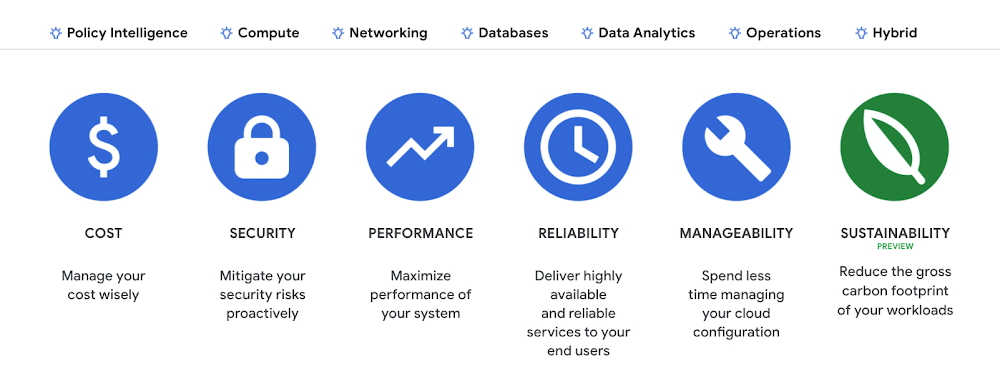
Last year, we analyzed the aggregate data from all customers across Google Cloud, and found over 600,000 gross kgCO2e in seemingly idle projects that could be cleaned up or reclaimed — which would have a similar impact to planting almost 10,000 trees1. Today, we’re making it easy for you to identify if any of those idle workloads are yours, with new Active Assist sustainability recommendations. Active Assist is a part of Google Cloud’s AIOps solution that uses data, intelligence, and machine learning to reduce cloud complexity and administrative toil. Under the Active Assist portfolio, we have products and tools like Policy Intelligence, Network Intelligence Center, Predictive Autoscaler, and a collection of Recommendations for various Google Cloud services — all focused on helping you achieve your operational goals. Today, we are broadening the scope of Active Assist to help you achieve your sustainability targets and reduce the carbon footprint of your workloads.The carbon emissions associated with your cloud infrastructure can be a big part of your overall environmental footprint. Choosing to run on Google Cloud is a great first step — we’ve matched the energy used by our data centers with 100% renewable energy since 2017, and are committed to running our operations on carbon-free energy 24/7 by 2030. But once you’re running on Google Cloud, if you want to reduce the gross carbon emissions of your workload you can take action to optimize your usage.Assessing the gross carbon impact of unattended projectsYou can now estimate the gross carbon emissions you’ll save by removing these idle projects with Active Assist Unattended Project Recommender, which provides rich utilization insights for all the projects in your organization, and uses machine learning to identify ones that are idle and most likely unattended. The data points Active Assist surfaces as a part of its utilization insights now include the carbonFootprintDailyKgCO2 field, which allows you to estimate carbon emissions associated with any given project. Recommendations also estimate the impact of removing an idle project in terms of kilograms of CO2 reduced per month. The capability is available via the Recommender API, Recommendation Hub, the Carbon Footprint dashboard, and BigQuery export of recommendations, making it easy for you to integrate with your company’s existing tools and workflows.Example unattended project in Recommendation HubIntroducing the Carbon Sense suiteIncreasing the sustainability of digital applications and infrastructure is a priority for 90% of global IT leaders2, and we’ll be continuing to invest across a number of product areas in Google Cloud, including AIOps features like Active Assist’s recommendations, to help you make progress towards your sustainability goals. To make it easy for you to find and consume these new features, we’re bundling our existing and future product work into the Carbon Sense suite — a collection of features that makes it easy to accurately report your carbon emissions, and reduce them. Active Assist joins products like Carbon Footprint, which provides you with the ability to understand and measure the gross carbon emissions of your Google Cloud usage, and our low-carbon signals, which help users choose cleaner regions to run their workloads, in the Carbon Sense suite. Stay tuned for more updates on Carbon Sense in the coming months. Getting started with sustainability recommendationsTo get started with Active Assist sustainability recommendations, check the Carbon Footprint dashboard and Recommendation Hub to review projects that may be idle and assess the carbon emissions associated with them. See recommendations in Google Cloud Console.To view the recommendations, you will need IAM permissions for Unattended Project Recommender itself and permissions to view resources in a given organization.You can also automatically export the recommendations from your Organization to BigQuery and then investigate any idle projects with DataStudio or Looker. Or, you can use Connected Sheets to use Google Workspace Sheets to interact with the data stored in BigQuery without having to write SQL queries.As with any other Recommender, you can choose to opt out of data processing for your organization or your projects at any time by disabling the appropriate data groups in the Transparency & Control tab under Privacy & Security settings.We hope you use Unattended Project Recommender to reduce the carbon footprint associated with your idle cloud resources, and can’t wait to hear your feedback and thoughts about this feature! Please feel free to reach us at active-assist-feedback@google.com. We also invite you to sign up for our Active Assist Trusted Tester Group if you would like to get early access to new features as they are developed.1. https://www.epa.gov/energy/greenhouse-gas-equivalencies-calculator2. https://inthecloud.withgoogle.com/it-leaders-research-21/sustainability-dl-cd.html
Quelle: Google Cloud Platform

When we launched Azure Spring Cloud with VMware in 2019, we set out to solve common challenges developers, IT operators, and DevOps teams face when running Spring Boot applications at scale. Since then we’ve had the opportunity to work with many customers to help them adopt the service including Bosch, Digital Realty, Kroger, Liantis, Morgan Stanley, National Life, Raley’s, and Swiss Re. They value the fully managed infrastructure of Azure Spring Cloud that lets them focus on their apps, while the service manages dynamic scaling, security patching, out-of-the-box instrumentation for monitoring, and more.
Many organizations are running thousands of Spring Boot applications on-premises and need advanced capabilities to accelerate their Spring modernization projects. Based on our learnings from customer engagements, we built a new Azure Spring Cloud tier—Enterprise—that we announced at SpringOne 2021. Azure Spring Cloud Enterprise includes commercially supported Spring runtime components to help enterprise customers ship faster and unlock Spring’s full potential. We are thankful to the many customers and partners who shared their learnings and helped shaped Enterprise tier, and we are excited to announce that Azure Spring Cloud Enterprise is now available in preview for all customers.
Azure Spring Cloud Enterprise represents our continued collaboration with VMware to combine Microsoft’s cloud platform expertise with VMware’s innovative Tanzu portfolio. We’re also committed to making it an application platform where you can deploy polyglot applications that are inherently portable across any Azure service, any cloud, or any on-premises system. With Azure Spring Cloud Enterprise, you gain productivity and access to Spring experts for Spring app development and deployments. Azure Spring Cloud Enterprise builds on top of all the features available in the Standard tier, including the ability to leverage the broader Azure ecosystem to supercharge your Spring Boot applications.
Figure 1: Azure Spring Cloud tier selection now includes Enterprise
Ship faster
Deploy and manage Spring and polyglot applications
The fully managed VMware Tanzu Build Service in Azure Spring Cloud Enterprise automates container creation, management, and governance at enterprise scale using open source Cloud Native Buildpacks and commercial VMware Tanzu Buildpacks. Tanzu Build Service offers a higher-level abstraction for building apps and provides a balance of control that reduces the operational burden on developers and supports enterprise IT operators who manage applications at scale. You can configure what Buildpacks to apply and build Spring applications and polyglot applications that run alongside Spring applications on Azure Spring Cloud.
Tanzu Buildpacks make it easier to build Spring, Java, NodeJS, Python, Go, and .NET Core applications and configure application performance monitoring agents such as Application Insights, New Relic, Dynatrace, AppDynamics, and Elastic.
Effortlessly route client requests to applications
You can easily manage and discover request routes and APIs exposed by applications using the fully managed Spring Cloud Gateway for VMware Tanzu and API portal for VMware Tanzu.
Spring Cloud Gateway for Tanzu effectively routes diverse client requests to applications in Azure Spring Cloud, Azure, and/or on-premises, and addresses cross-cutting considerations for applications behind the Gateway such as securing, routing, rate limiting, caching, monitoring, resiliency, and hiding applications. You can configure:
Single sign-on integration with your preferred identity provider without any additional code or dependencies.
Dynamic routing rules to applications without any application redeployment.
Request throttling without any backing services.
API portal for VMware Tanzu provides API consumers the ability to find and view API route details exposed by Spring Cloud Gateway for Tanzu and test API requests.
Figure 2: Fully managed Spring Cloud Gateway for Tanzu routes diverse client requests to applications in Azure Spring Cloud, Azure, and/or on-premises systems
Figure 3: API portal for VMware Tanzu visualizes APIs that are accessible from Spring Cloud Gateway for Tanzu and other OpenAPI-compliant sources
Flexible and configurable VMware Tanzu components
With Azure Spring Cloud Enterprise, customers can use fully managed VMware Tanzu components on Azure. Customers can select which VMware Tanzu components they want to use in their environment during Enterprise instance creation. Tanzu Build Service, Spring Cloud Gateway for Tanzu, API portal for VMware Tanzu, Application Configuration Service for VMware Tanzu, and VMware Tanzu Service Registry are available during the preview.
VMware Tanzu components deliver increased value to customers such that you can:
Grow your enterprise-grade application portfolio from a few applications to thousands with end-to-end observability while delegating operational complexity to Microsoft and VMware.
Lift and shift Spring applications across Azure Spring Cloud and any other compute environment.
Control your build dependencies, deploy polyglot applications, and deploy Spring Cloud middleware components as needed.
Microsoft and VMware will continue to add more enterprise-grade features, including Tanzu components such as Application Live View for VMware Tanzu, Application Accelerator for VMware Tanzu, and Spring Cloud Data Flow for VMware Tanzu¹.
Unlock Spring’s full potential with Long-Term Support (LTS)
Azure Spring Cloud Enterprise includes VMware Spring Runtime Support for application development and deployments. This support gives you access to Spring experts, enabling you to unlock the full potential of the Spring ecosystem and develop and deploy applications faster.
Figure 4: Do more with Spring framework through world-class support for Spring projects
Typically, open source Spring project minor releases are supported for a minimum of 12 months from the date of the initial release. In Azure Spring Cloud Enterprise, Spring project minor releases will receive commercial support for a minimum of 24 months² from the date of initial release through the VMware Spring Runtime Support entitlement. This extended support ensures the security and stability of your Spring application portfolio even after the open source end-of-life dates.
Figure 5: Commercial support timeline for Spring Boot
Fully integrated into the Azure and the Java ecosystem
Azure Spring Cloud, including Enterprise tier, runs on Azure in a fully managed environment. You get all the benefits of Azure and the Java ecosystem, and the experience is familiar and intuitive.
Common development practices
Azure ecosystem
Create service instances using a provisioning tool
Azure Portal, CLI, ARM Template, Bicep, or Terraform
Automate environments and application deployments
GitHub, Azure DevOps, GitLab, and Jenkins
Monitor end-to-end using any tool and platform
Application Insights, Azure Log Analytics, Splunk, Elastic, New Relic, Dynatrace, or AppDynamics
Connect Spring applications and interact with your cloud services
Spring integrations with Azure services for data, messaging, eventing, cache, storage, and directories
Securely load app secrets and certificates
Azure Key Vault
Use familiar development tools
IntelliJ, VS Code, Eclipse, Spring Tool Suite, Maven, or Gradle
For example, after you create your Enterprise service instance and deploy your applications, you can easily monitor with Application Insights or any other application performance management tools of your choice.
Figure 6: Application Transactions visible through Application Insights Application Map
Get started today
Azure Spring Cloud Enterprise delivers even more productivity, and you can leverage Spring experts to make your projects even more successful. We would love to see you try Enterprise and share your feedback—get started today.
You can also learn more about the Azure Spring Cloud Enterprise preview announcement by VMware.
¹The Azure Spring Cloud Enterprise roadmap is not confirmed and is subject to change.
²You can find the current support timelines for Spring projects.
Quelle: Azure
Amazon Elastic File System (Amazon EFS) unterstützt jetzt Leselatenzen von weniger als einer Millisekunde für alle neuen und bestehenden One-Zone- und Standard-General-Purpose-Dateisysteme. Latenzempfindliche Anwendungen wie Content-Management-Systeme, Analytik, DevOps und ML-Inferenzen können jetzt Leselatenzzeiten von durchschnittlich 600 Mikrosekunden erreichen.
Quelle: aws.amazon.com
Amazon Web Services (AWS) kündigt die allgemeine Verfügbarkeit von rechenoptimierten Amazon-EC2-C6a-Instances an. C6a-Instances werden von AMD-EPYC-Prozessoren der 3. Generation (Codename Milan) mit einer All-Core-Turbofrequenz von bis zu 3,6 GHz angetrieben. Sie bieten eine bis zu 15 % bessere Rechenleistung als C5a-Instances für eine Vielzahl von Workloads und sind 10 % günstiger als vergleichbare x86-basierte EC2-Instances. C6a-Instances basieren auf dem AWS-Nitro-System, einer Kombination aus dedizierter Hardware und schlankem Hypervisor, der praktisch alle Rechen- und Speicherressourcen der Host-Hardware für Ihre Instances bereitstellt.
Quelle: aws.amazon.com
Amazon Connect unterstützt jetzt CloudFormation für seinen Service zur Integration von Daten Dritter. Datenintegrationen ermöglichen es Amazon-Connect-Kunden, Daten aus SaaS-Anwendungen von Drittanbietern wie CRM, Qualitätsmanagement, Abrechnungssoftware und Auftragsmanagementlösungen herunterzuladen. Sie können jetzt AWS-CloudFormation-Vorlagen verwenden, um Datenintegrationen zusammen mit dem Rest Ihrer AWS-Infrastruktur auf sichere, effiziente und wiederholbare Weise bereitzustellen. Mit Datenintegrationen können Sie z. B. Wissensartikel aus Salesforce über geplante Synchronisierungen herunterladen und in der Amazon-Connect-Kundendienstmitarbeiteranwendung als Wissensartikel anzeigen, um Kundendienstmitarbeiter bei der schnellen Lösung von Problemen mit Anrufern zu unterstützen und gleichzeitig ihre Produktivität zu steigern.
Quelle: aws.amazon.com






