Scaling to new heights with Cloud Memorystore and Envoy

Modern applications need to process large-scale data at millisecond latency to provide experiences like instant gaming leaderboards, fast analysis of streaming data from millions of IoT sensors, or real-time threat detection of malicious websites. In-memory datastores are a critical component to deliver the scale, performance, and availability required by these modern applications. Memorystore makes it easy for developers building applications on Google Cloud to leverage the speed and powerful capabilities of the most loved in-memory store: Redis. Memorystore for Redis Standard Tier instances are a popular choice for applications requiring a highly available Redis instance. Standard Tier provides a failover replica across zones for redundancy and provides fast failover with a 99.9% SLA. However, in some cases, your applications may need to scale beyond the limitations of a single Standard Tier instance. Read replicas allow you to scale to a higher read throughput, but your application may require higher write throughput or a larger keyspace size as well. In these scenarios, you can implement a strategy to partition your cache usage across multiple independent Memorystore instances which is known as client-side sharding. In this post, we’ll discuss how you can implement your own client-side sharding strategy to scale infinitely with Cloud Memorystore and Envoy. Architectural Overview Let’s start by discussing an architecture of GCP native services alongside open-source software which can scale Cloud Memorystore beyond its usual limits. To do this, we’ll be sharding a cache such that the total keyspace is split among multiple otherwise independent Memorystore instances. Sharding can pose challenges to client applications which must then be rewritten for awareness of the appropriate place to search for a specific key and must be updated to scale the backend. However, client-side sharding can be easier to implement and maintain by encapsulating the sharding logic in a proxy, allowing your application and sharding logic to be updated independently. You’ll find a sample architecture below and we’ll briefly detail each of the major components.Memorystore for Redis Cloud Memorystore for Redis enables GCP users to quickly deploy a managed Redis instance within a GCP project. A single node Memorystore instance can support a keyspace as large as 300 GB and a maximum network throughput of 16gbps. With Standard Tier you get a highly available Redis instance with built in health checks and fast automatic failover.Today, we’ll show you how to deploy multiple Standard Tier Cloud Memorystore instances which can be used together to scale beyond the limits of a single instance for an application with increased scale demands. Each individual Memorystore instance will be deployed as a standalone instance that is unaware of the other instances within its shared host project. In this example, you’ll deploy three Standard Tier instances which will be treated as a single unified backend. By using Standard Tier instances instead of self-managed Redis instances on GCE, you get the benefit of: Highly available backends: Standard Tier provides high availability without requiring any additional work from you. Enabling high availability on self-managed Redis instances on GCE can add additional complexities and failure points.Integrated monitoring: Memorystore is integrated with Cloud Monitoring and you can easily monitor the individual shards using Cloud Monitoring, compared to having to deploy and manage monitoring agents on self managed instancesMemtier Benchmark Memtier Benchmark is a commonly used command line utility for load generation and benchmarking of key-value databases. You will deploy and use this utility to demonstrate the ability to easily scale to high query volume. Similar benchmarking tools or your own Redis client application could be used instead of Memtier Benchmark. Envoy​​Envoy is an open-source network proxy designed for service oriented architectures. Envoy supports many different filters which allow it to support network traffic from many different software applications and protocols. For this use case, you will deploy Envoy with the Redis filter configured. Rather than connecting directly to Memorystore instances, the Redis clients will connect to the Envoy proxy. By appropriately configuring Envoy, you can take a collection of independent Memorystore instances and define them as a cluster where inbound traffic will be load balanced among the individual instances. By leveraging Envoy, you decrease the likelihood of needing a significant application rewrite to leverage more than one Memorystore instance for higher scale. To ensure compatibility with your application, you’ll want to review the list of the Redis commands which Envoy currently supports.  Let’s get started. PrerequisitesTo follow along with this walkthrough, you’ll need a GCP project with permissions to do the following: Deploy Cloud Memorystore for Redis instances (permissions)Deploy GCE instances with SSH access (permissions)Cloud Monitoring viewer access (permissions) Access to Cloud Shell or another gCloud authenticated environment Deploying the Memorystore Backend You’ll start by deploying a backend cache which will serve all of your application traffic. As you’re looking to scale beyond the limits of a single node, you’ll deploy a series of Standard Tier instances. From an authenticated cloud shell environment, this can be done as follows:$ for i in {1..3}; do gcloud redis instances create memorystore${i} –size=1 –region=us-central1 –tier=STANDARD –async; doneIf you do not already have the Memorystore for Redis API enabled in your project, the command will ask you to enable the API before proceeding. While your Memorystore instances deploy, which typically takes a few minutes, you can move onto the next steps. Creating a Client and Proxy VM Next, you need a VM where you can deploy a Redis client and the Envoy proxy. You’ll be creating a single GCE instance where you deploy these two applications as containers. This type of deployment is referred to as a “sidecar architecture” which is a common Envoy deployment model. Deploying in this fashion nearly eliminates any added network latency as there is no additional physical network hop that takes place. While you are deploying a single vertically scaled client instance, in practice, you’ll likely deploy many clients and proxies, so the steps outlined in the following sections could be used to create a reusable instance template or repurposed for GKE. You can start by creating the base VM: $ gcloud compute instances create envoy-memtier-client –zone=us-central1-a –machine-type=e2-highcpu-32 –image-family cos-stable –image-project cos-cloud We’ve opted for a Container-Optimized OS instance as you’ll be deploying Envoy and Memtier Benchmark as containers on this instance. Configure and Deploy the Envoy Proxy Before deploying the proxy, you need to gather the necessary information to properly configure the Memorystore endpoints. To do this, you need the host IP addresses for the Memorystore instances you have already created. You can gather these programmatically: $ for i in {1..3}; do gcloud redis instances describe memorystore${i} –region us-central1 –format=json | jq -r “.host”; doneCopy these IP addresses somewhere easily accessible as you’ll use them shortly in your Envoy configuration. Next, you’ll need to connect to your newly created VM instance, so that you can deploy the Envoy Proxy. You can do this easily via SSH in the Google Cloud Console. More details can be found here.After you have successfully connected to the instance, you’ll create the Envoy configuration. Start by creating a new file named envoy.yaml on the instance with your text editor of choice. Use the following .yaml file, entering the three IP addresses of the instances you created:The IP addresses need to be inserted into the highlighted portions of each endpoint configuration near the bottom of the file. If you chose to create a different number of Memorystore instances, simply add or remove endpoints from the configuration file. Before you move on, take a look at a few important details of the configuration: We’ve configured the Redis Proxy filter to support the Redis traffic which you’ll be forwarding to Cloud Memorystore We’ve configured the Envoy proxy to listen for client Redis traffic on port 6379 We’ve chosen MAGLEV as the load balancing policy for the Memorystore instances which make up the client-side sharded cluster. You can learn more about the various types of load balancing available here. Scaling up and down the number of Memorystore backends requires rebalancing data and configuration changes which are not covered in this tutorial.Once you’ve added your Memorystore instance IP addresses, save the file locally to your container OS VM where it can be easily referenced. Now, you’ll use Docker to pull the official Envoy proxy image and run it with your own configuration. $ docker run –rm -d -p 8001:8001 -p 6379:6379 -v $(pwd)/envoy.yaml:/envoy.yaml envoyproxy/envoy:v1.21.0 -c /envoy.yaml Now that Envoy is deployed, you can test it by visiting the admin interface from the container VM: $ curl -v localhost:8001/stats If successful, you should see a print out of the various Envoy admin stats in your terminal. Without any traffic yet, these will not be particularly useful, but they allow you to ensure that your container is running and available on the network. If this command does not succeed, we recommend checking that the Envoy container is running. Common issues include syntax errors within your envoy.yaml and can be found by running your Envoy container interactively and reading the terminal output. Deploy and Run Memtier Benchmark While you’re still ssh’ed into the container OS VM, you will also deploy the Memtier Benchmark utility which you’ll use to generate artificial Redis traffic. Since you are using Memtier Benchmark, you do not need to provide your own dataset. The utility will populate the cache for you using a series of set commands. You can run a series of benchmark tests: $ for i in {1..15}; do docker run –network=”host” –rm -d redislabs/memtier_benchmark:1.3.0 -s 127.0.0.1 -p 6379 –test-time=300 –key-maximum=10000; doneHere are some configuration options of note: If you have configured Envoy to listen on another port, specify the appropriate port after the `-p` flagWe have chosen to run the benchmark for a set period of time (5 minutes, specified in seconds)  by using the –test-time flag rather than a set number of requests which is the default behavior. By default, the utility uses a uniform random pattern for getting and setting keys. You will not modify this, but it can be specified using the –keypattern flag.The utility works by performing gets and sets based on the minimum and maximum values of the key range as well as the specified key pattern which we just discussed. We will decrease the size of this key range by setting the –key-maximum parameter. This allows us to ensure a higher cache hit ratio which is more representative of most real world applications. The –ratio flag allows us to modify the set to get ratio of commands issued by the utility. By default, the utility issues 10 get commands for every set command. You can easily modify this ratio to better match your workload’s characteristics.   You can increase the load generated by the utility by increasing the number of threads with the `–threads` flag and/or by increasing the number of clients per thread with the `–clients` flag. The above command uses the default number of threads (4) and clients (50). Observe the Redis TrafficOnce you have kicked off the load tests, you can confirm that traffic is being balanced across the individual Memorystore instances via Cloud Monitoring. You can easily set up a custom dashboard that shows the Calls per minute for each of the Memorystore instances. Let’s start by navigating to the Cloud Monitoring Dashboards page. Next, you’ll click “Create Dashboard”. You will see many different types of widgets on the left side of the page which can be dragged onto the canvas on the right side of the page. You’ll select a “Line” chart and drag it onto the canvas. You then need to populate the line chart with data from the Memorystore instances. To do this, you’ll configure the chart via “MQL” which can be selected at the top of the chart configuration pane. For ease, we’ve created a query which you can simply paste into your console to populate your chart:If you have created your Memorystore instances with a different naming convention or have other Memorystore instances within the same project, you may need to modify the resource.instance_id filter. Once you’re finished, ensure that your chart is viewing the appropriate time range, and you should see something like:You should see nearly perfect distribution of the client workload across the Memorystore instances, effectively allowing infinite horizontal scalability for demanding workloads. More details on creating and managing custom dashboards can be found here. As you modify the parameters of your own testing, you’ll also want to keep the performance of the client and proxy in mind. As you vertically scale the number of operations sent by a client, you’ll eventually need to horizontally scale the number of clients and sidecar proxies which you have deployed to scale smoothly. You can view the Cloud Monitoring graphs for GCE instances as well. More details can be found here. Clean Up If you have followed along, you’ll want to spend a few minutes cleaning up resources to avoid accruing unwanted charges. You’ll need to delete the following: Any deployed Memorystore instances Any deployed GCE instancesMemorystore instances can be deleted like: $ gcloud redis instances delete <instance-name> –region=<region>If you followed the tutorial, you can use a command like: $ for i in {1..3}; do gcloud redis instances delete memorystore${i} –region=us-central1 –async; doneNote: You’ll need to manually acknowledge the deletion of each instance via the terminal The GCE container OS instance can be deleted like: $ gcloud compute instances delete <instance-name>If you created additional instances, you can simply chain them in a single command separated by spaces. Conclusion Client-side sharding is one strategy to address high scale use cases with Cloud Memorystore. Envoy and its Redis filter make implementation simple and extensible. The outline provided above is a great place to get started. These instructions can easily be extended to support other client deployment models including GKE and can be scaled out horizontally to reach even higher scale. As always, you can learn more about Cloud Memorystore through our documentation or request desired features via our public issue tracker.Related ArticleGet 6X read performance with Memorystore for Redis Read ReplicasMemorystore for Redis supports Read Replicas preview, allowing you to scale up to five replicas and achieve over one million read request…Read Article
Quelle: Google Cloud Platform

Announcing Google Cloud 2022 Summits [frequently updated]

Register for our 2022 Google Cloud Summit series, and be among the first to learn about new solutions across data, machine learning, collaboration, security, sustainability, and more. You’ll hear from experts, explore customer perspectives, engage with interactive demos, and gain valuable insights to help you accelerate your business transformation. Bookmark the Google Cloud Summit series website to easily find updates as news develops. Can’t join us for a live broadcast? You can still register to enjoy all summit content, which becomes available for on-demand viewing immediately following each event. Upcoming eventsData Cloud Summit | April 6, 2022Mark your calendars for the Google Data Cloud Summit, April 6, 2022. Join us to explore the latest innovations in AI, machine learning, analytics, databases, and more. Learn how organizations are using a simple, unified, open approach with Google Cloud to make smarter decisions and solve their most complex business challenges.At the event, you will gain insights that can help move you and your organization forward. From our opening keynote to customer spotlights to sessions, you’ll have the chance to uncover up-to-the-minute insights on how to make the most of your data.Equip yourself with the technology, the confidence, and the experience to capitalize on the next wave of data solutions. Register today for the 2022 Google Data Cloud Summit.Related ArticleRead Article
Quelle: Google Cloud Platform

Cloud Spanner myths busted

Intro to Cloud SpannerCloud Spanner is an enterprise-grade, globally distributed, externally consistent database that offers unlimited scalability and industry-leading 99.999% availability. It requires no maintenance windows and offers a familiar PostgreSQL interface. It combines the benefits of relational databases with the unmatched scalability and availability of non-relational databases. As organizations modernize and simplify their tech stack, Spanner provides a unique opportunity to transform the way they think about and use databases as part of building new applications and customer experiences.But choosing a database for your workload can be challenging; there are so many options in the market and each one has a different onboarding and operating experience. At Google Cloud we know it’s hard to navigate this choice and are here to help you. In this blog post, I want to bust the seven most common misconceptions that I regularly hear about Spanner so that you can confidently make your decision.Myth #1 Only use Spanner if you have a massive workloadThe truth is that Spanner powers Google’s most popular, globally available products, like YouTube, Drive, and Gmail, and has enabled many large scale transformations including that of Uber, Niantic and Sharechat. It is also true that Spanner processes more than 1 Billion queries per second at peak.At the same time, many customers also use Spanner for their smaller workloads (both in terms of transactions per second and storage size) for availability and scalability reasons. For example, Google Password Manager has small workloads that run on Spanner. These customers cannot tolerate downtime, require high availability to power their applications and seek scale insurance for future growth scenarios.Limitless scalability with the highest availability is critical in many industry verticals such as gaming and retail, especially when a newly launched game goes viral and becomes an overnight success or when a retailer has to handle a sudden surge in traffic due to a  Black Friday/Cyber Monday sale.  Regardless of workload size, every customer on the journey to the cloud wants the benefits of scalability and availability while reducing the operational burden and the costs associated with patching, upgrades and other maintenance.Myth #2 Spanner is too expensiveThe truth is, when looking at the cost of a database, it is better to consider Total Cost of Ownership (TCO) and the value it offers rather than the raw list price. We deliver significant value to our customers starting at this price including critical things like availability, price performance, and reduced operational costs. Availability: Spanner provides high availability and reliability by synchronously replicating data. When it comes to Disaster Recovery, Spanner offers 0-RPO and 0-RTO for zonal failures in case of a regional instance and regional failure in case of multi-regional instances. Less downtime, more revenue!Price-performance: Spanner offers one of the industry’s leading price-performance ratios which makes it a great choice if you are running a demanding, performance sensitive application. Great customer experiences require consistent, optimal latencies!Reduced operational cost: With Spanner, customers enjoy zero downtime upgrades and schema changes, and no maintenance windows. Sharding is automatically handled so the challenges associated with scaling up traditional databases don’t exist. Spend more time innovating, and less time administering!Security & Compliance: By default, Spanner already offers encryption for data-in-transit via its client libraries and for data-at-rest using Google-managed encryption keys. CMEK support for Spanner lets you now have complete control of the encryption keys. Spanner also provides VPC Service Controls support and has compliance certifications and necessary approvals so that it can be used for workloads requiring ISO 27001, 27017, 27018, PCI DSS, SOC1|2|3, HIPAA and FedRAMP.With Spanner, you have peace of mind knowing that your data’s security, availability and reliability won’t be compromised.And best of all, with the introduction of Granular Instance Sizing, you can now get started for as little as $65/month and unlock the tremendous value spanner offers.Pro tip : Use the auto-scaler to right size your Spanner instances. Take advantage of TTL to reduce the amount of data stored.Myth #3 You have to make a trade off between scale, consistency, and latencyThe truth is, depending on the use case and instance configuration, users can use Spanner such that they don’t have to pick between consistency, latency and scale.To provide strong data consistency, Spanner uses a synchronous, Paxos-based replication scheme, in which replicas acknowledge every write request. A write is committed when a majority of the replicas (e.g 2 out of 3), called a quorum, agree to commit the write. In the case of regional instances, the replicas are within the region and hence the writes are faster than in the case of multi-region instances, where the replicas are distributed across multiple regions. In the latter case, forming a quorum on writes can result in slightly higher latency. Nevertheless, Spanner multi-regions are carefully designed in geographical configurations that ensure that the replicas can communicate fast enough and write latencies are acceptably low.A read can be served strong (by default) or stale. A strong read is a read at a current timestamp and is guaranteed to see all the data that has been committed up until the start of the read. A stale read is a read executed at a timestamp in the past. In case of a strong read, the serving replica ​​will guarantee that you will see all data that has been committed up until the start of the read. In some cases, this means that the serving replica has to contact the leader to ensure that it has the latest data. In case of a multi-region instance where the read is served from a non-leader replica, this would mean that read latency can be slightly higher than if it was served from a leader region. Stale reads are performed over data that was committed at a  timestamp in the past and can, therefore, be served at very low latencies by the closest replica that is caught up until that timestamp. If your application is latency sensitive, stale reads may be a good option and we recommend using a stale read value of 15 seconds. Myth #4 Spanner does not have a familiar interfaceThe truth is that Spanner offers the flexibility to interact with the database via a SQL dialect based on ANSI 2011 standard as well as via a REST or gRPC API interface, which are optimized for performance and ease-of-use. In addition to Spanner’s interface, we recently introduced a PostgreSQL interface for Spanner, that leverages the ubiquity of PostgreSQL to meet development teams using an interface that they are familiar with. The PostgreSQL interface provides a rich subset of the open-source PostgreSQL SQL dialect, including common query syntax, functions, and operators. It supports a core collection of open-source PostgreSQL data types, DDL syntax, and information schema views. You get the PostgreSQL familiarity, and relational semantics at Spanner scale. Learn more about our PostgreSQL interface here.Myth #5 The only way to get observability data is via the Spanner Console​​The truth is that Spanner client libraries support OpenCensus Tracing and Metrics, which gives insight into the client internals and aids in debugging production issues. For instance, client-side traces and metrics include sessions and transactions related information. Spanner also supports the OpenTelemetery receiver, which provides an easy way for you to process and visualize metrics from Cloud Spanner System tables, and export these to the Application Monitoring (APM) tool of your choice. This could be either an open source combination of a time-series database like Prometheus coupled with a Grafana dashboard, or it could be a commercial offering like Splunk, Datadog, Dynatrace, NewRelic or AppDynamics. We’ve also published reference Grafana dashboards, so that you can debug the most common user journeys such as “Why is my tail latency high” or “Why do I see a CPU spike when my workload did not change”. Here is a sample docker service, to show how the Cloud Spanner receiver can work with Prometheus exporter and Grafana dashboards.We are continuing to embrace open standards, and continuing to integrate with our partner ecosystem. We also continue to evolve the observability experience offered by the Google console so that our customers get the best experience wherever they are. Myth #6 Spanner is only for global workloads requiring copies in multiple regions The truth is that, while Spanner offers a range of multi-region instance configurations, it also offers regional configuration in each GCP region. Each regional node is replicated in 3 zones within the region, while a multi-regional node is replicated at least 5 times across multiple regions. A regional configuration offers 4 nines of availability and protection against zonal failures.Typically, multi-regional instance configurations are indicated if your application runs workloads in multiple geographical locations or your business needs 99.999% of availability and protection against regional failures. Learn more here.Myth #7 Spanner schema changes require expensive locksThe truth is that Spanner never has table level locks. Spanner uses a multi-version concurrency control architecture to manage concurrent versions of schema and  data allowing ad-hoc and online qualified schema changes that do not require any downtime, additional tools, migration pipelines or complex rollback/backup plans. When issuing a schema update you can continue writing and reading from the database without interruption while Spanner backfills the update, whether you have 10 rows or 10 billon rows in your table.The same mechanism can be used for Point-in-time recovery (PITR) and snapshot queries using stale reads to restore both schema and the state of data at a given query-condition and timestamp up to a maximum of seven days.Now that we’ve learned the truth about Cloud Spanner, I invite you to get started – visit our website.Related ArticleImproved troubleshooting with Cloud Spanner introspection capabilitiesCloud-native database Spanner has new introspection capabilities to monitor database performance and optimize application efficiency.Read Article
Quelle: Google Cloud Platform

Strengthen protection for your GCE VMs with new FIDO security key support

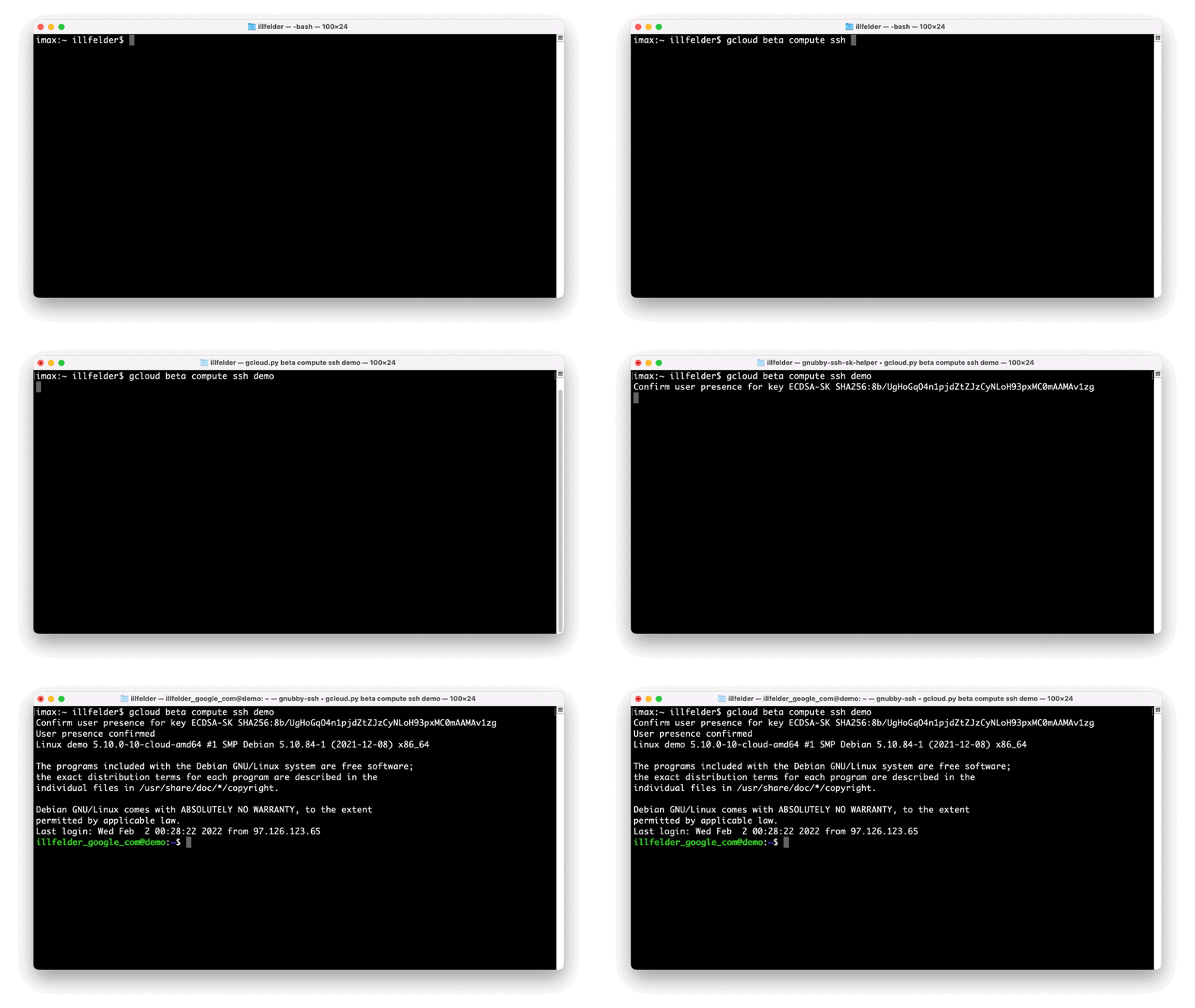
With the release of OpenSSH 8.2 almost two years ago, native support for FIDO authentication became an option in SSH. This meant that you could have your SSH private key protected in a purpose-built security key, rather than storing the key locally on a disk where it may be more susceptible to compromise. Building on this capability, today we are excited to announce in public preview that physical security keys can be used to authenticate to Google Compute Engine (GCE) virtual machine (VM) instances that use our OS Login service for SSH management. These advances in OpenSSH made it easier to protect access to sensitive VMs by setting up FIDO authentication to these hosts and physically protecting the keys used to grant access. And while we’ve seen adoption of this technology, we also know that management of these keys can be challenging, particularly around the manual process of generating and storing FIDO keys. Additionally, physical security key lifecycle issues could leave you without access to your SSH host. And if you lose or misplace your security key, you could be locked out.At Google Cloud we’ve been working hard on integrating our industry-first account level support for FIDO security keys with SSH in a way that makes it simple to get all the benefits of using FIDO security keys for SSH login, without any of the drawbacks.Now, when you enable security key support through OS Login for your GCE VMs, and one of your security keys will be required to complete the login process, any of the security keys configured on your Google account will be accepted during login. If you ever lose a security key, you can easily update your security key configuration (i.e. delete the lost key and add a new one) and your VMs will automatically start accepting the new configuration on next login.If desired, OS Login’s FIDO security key support can further be combined with 2 Step Verification to add an extra layer of security with two-factor authentication (2FA). When this is enabled, a user is required to both have their security key available, and prove authorized access to their Google Account at the time of logging in to their GCE instance through additional factors.If you’d like to learn more or try this capability out on your own instances, visit our documentation to get started.Related ArticleRead Article
Quelle: Google Cloud Platform

AWS SSO erweitert Unterstützung für Kunden-Compliance mit PCI-DSS und IRAP

Amazon Web Services (AWS) gab heute bekannt, dass AWS Single Sign-On (AWS SSO) seine Ausrichtung auf die Compliance-Anforderungen der Kunden in Bezug auf Sicherheit und Datenschutz verbessert hat. AWS SSO hat die Einhaltung des Payment Card Industry – Data Security Standard (PCI DSS) erreicht und ist das Information Security Registered Assessors Program (IRAP), das auf der GESWCHÜTZTEN Ebene bewertet wird. Diese sind zusätzlich zur bestehenden AWS-SSO-Unterstützung für die Einhaltung der Anforderungen der International Organization for Standardization (ISO), der System and Organization Controls (SOC) 1, 2 und 3, der Esquema Nacional de Seguridad (ENS) High, der Financial Market Supervisory Authority (FINMA) International Standard on Assurance Engagements (ISAE) 3000 Type 2 Report-Anforderungen und der Multi-Tier Cloud Security (MTCS). Dadurch haben Kunden mehr Möglichkeiten, die Zugriffsverwaltung für mehrere Konten und die Anwendungsauthentifizierung für Umgebungen, die Compliance-Standards unterliegen, zu vereinfachen.
Quelle: aws.amazon.com

AWS WAF führt AWS WAF Fraud Control – Account Takeover Prevention ein, um Ihre Anmeldeseite vor Credential-Stuffing-Angriffen zu schützen

AWS WAF kündigt die Einführung von AWS WAF Fraud Control – Account Takeover Prevention an, um die Anmeldeseite Ihrer Anwendung vor Credential-Stuffing-Angriffen, Brute-Force-Versuchen und anderen anomalen Anmeldeaktivitäten zu schützen. Account Takeover Prevention ermöglicht es Ihnen, Kontoübernahmeversuche am Netzwerkrand proaktiv zu stoppen. Mit Account Takeover Prevention können Sie unbefugten Zugriff verhindern, der zu betrügerischen Aktivitäten führen kann, oder Sie können betroffene Benutzer informieren, damit sie vorbeugende Maßnahmen ergreifen können.
Quelle: aws.amazon.com






