Bigtable Autoscaling: Deep dive and cost saving analysis

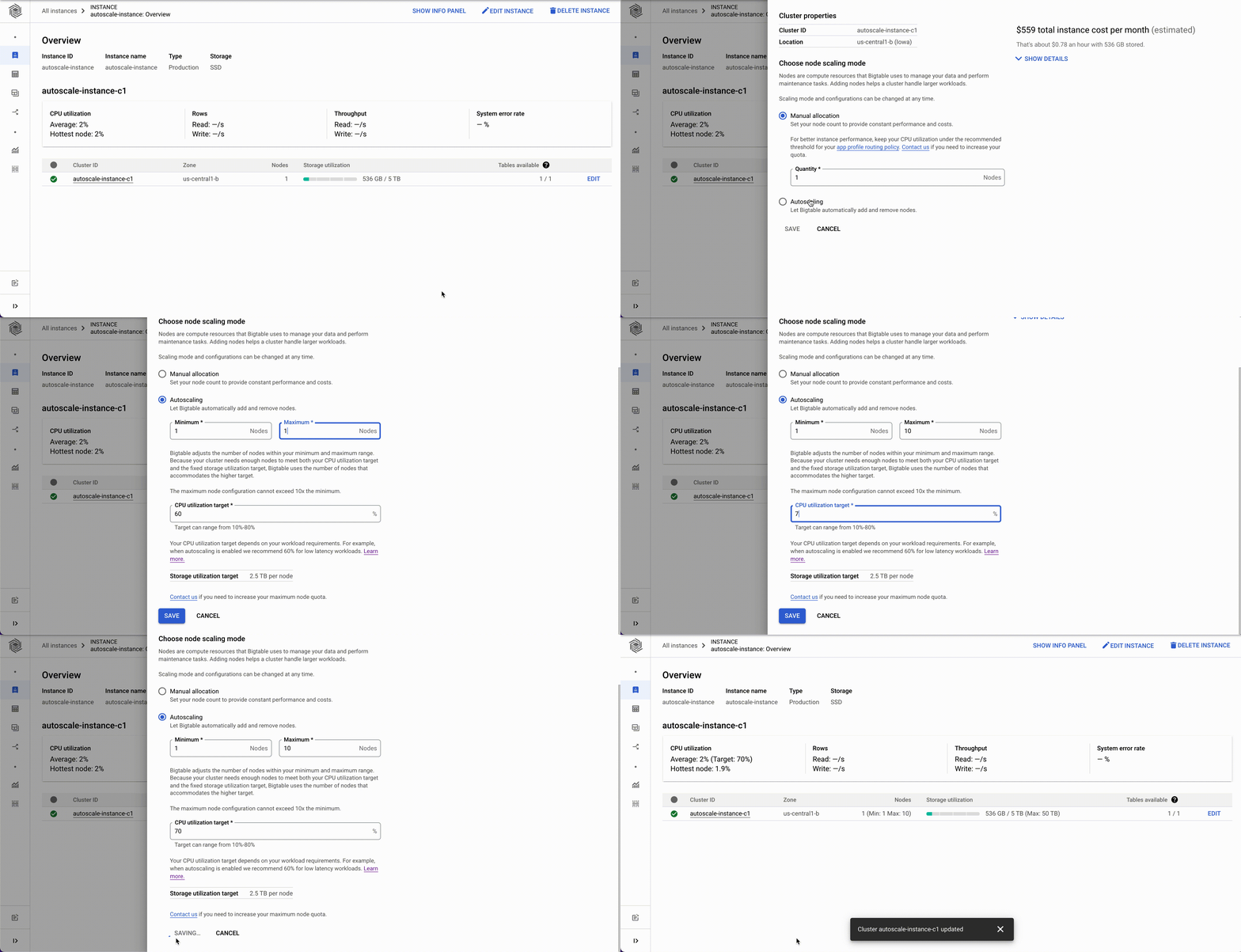
Cloud Bigtable is a fully managed service that can swiftly scale to meet performance and storage demands with the click of a button. If you’re currently using Bigtable, you might configure your cluster sizes to perform for peak throughput or programmatically scale to match your workload. Bigtable now supports autoscaling for improved manageability, and in one of our experiments autoscaling reduced costs of a common diurnal workload by over 40%.You only pay for what you need when autoscaling is enabled; Bigtable will automatically add or remove capacity in response to the changing demands of your workloads. Autoscaling enables you to spend more time on your business and less time managing your infrastructure due to the reduced overhead of capacity provisioning management. Autoscaling works on both HDD and SSD clusters, and is available in all Bigtable regions.We’ll look at when and how to use this feature, go through a performance analysis of autoscaling in action, and finally see how it can impact your database costs.Enabling AutoscalingCloud Bigtable autoscaling is configured at the cluster level and can be enabled using the Cloud Console, the gcloud command-line tool, the Cloud Bigtable Admin API, and Bigtable client libraries.With autoscaling enabled, Bigtable automatically scales the number of nodes in a cluster in response to changing capacity utilization. The business-critical risks associated with incorrect capacity estimates are significantly lowered: over-provisioning (unnecessary cost) and under-provisioning (missing business opportunities).Autoscaling can be enabled for existing clusters or configured with new clusters. You’ll need two pieces of information: a target CPU utilization and a range to keep your node count within. No complex calculations, programming, or maintenance are needed. One constraint to be aware of is the maximum node count in your range cannot be more than 10 times the minimum node count. Storage utilization is a factor in autoscaling, but the targets for storage utilization are set by Bigtable and not configurable. Below are examples showing how to use the Cloud Console and gcloud to enable autoscaling. These are the fastest ways to get started.Using Cloud ConsoleWhen creating or updating an instance via the Cloud Console you can choose between manual node allocation or autoscaling. When autoscaling is selected, you configure your node range and CPU utilization target.Using command lineTo configure autoscaling via the gcloud command-line tool, modify the autoscaling parameters when creating or updating your cluster as shown below.Updating an existing cluster:Creating a new cluster:Transparency and trustOn the Bigtable team, we performed numerous experiments to ensure that autoscaling performs well with our customers’ common workloads. It’s important that you have insight into Cloud Bigtable’s autoscaling performance, so you can monitor your clusters and understand why they are scaling. We provide comprehensive monitoring and audit logging to ensure you have a clear understanding of Bigtable’s actions. You’re able to connect Bigtable activity to your billing and performance expectations and fine tune the autoscaling configuration in order to ensure your performance expectations are maintained. Below is the Bigtable cluster monitoring page with graphs for metrics and logs for the cluster.Related ArticleCloud Bigtable launches Autoscaling plus new features for optimizing costs and improved manageabilityCloud Bigtable launches autoscaling that automatically adds or removes capacity in response to the changing demand for your applications.Read ArticleWhen is autoscaling right for your workload?Bigtable is flexible for a variety of use cases with dynamic traffic profiles. Bigtable autoscaling may not always be the right configuration for your business, so here are some guidelines for when autoscaling is ideal.When to use autoscalingYou’re an existing Bigtable user who wants to optimize costs, while maintaining performance for your cluster. For example: diurnal traffic patterns that you might see with online retail.You’re a new Bigtable user or have a new workload. Provisioning enough capacity to meet unknown use cases is hard.Your business is growing, and you’re not sure the extent of future growth.  You want to be prepared to scale for any opportunity.What autoscaling won’t solveCertain batch workloads. Autoscaling will react to a sharp increase in traffic (a “step” or batch upload of data). However, Bigtable will still need to rebalance the data and traffic against a rapid increase in nodes, and this may cause a performance impact as Bigtable works to rebalance. Autoscaling is likely not the correct solution to resolving hotspotting or ‘hot tablets’ in your Bigtable cluster. In these scenarios it is best to review data access patterns and row key / schema design considerations.Autoscaling in ActionCloud Bigtable’s horizontal scalability is a core feature, derived from the separation of compute and storage. Updating the number of nodes for a Bigtable instance is fast whether or not you use autoscaling. When you add nodes to your cluster, Bigtable rebalances your data across the additional nodes, thus improving the overall performance of the cluster. When you scale down your cluster, Bigtable rebalances the load from the removed nodes to the remaining nodes.With autoscaling enabled, Bigtable monitors the cluster’s utilization target metrics and reacts in real time to scale for the workload as needed. Part of the efficiency of Bigtable’s native autoscaling solution is that it connects directly to the cluster’s tablet servers to monitor metrics, so any necessary autoscaling actions can be done rapidly. Bigtable then adds or removes nodes based on the configured utilization targets. Bigtable’s autoscaling logic scales up quickly to match increased load, but scales down slowly in order to avoid putting too much pressure on the remaining nodes.Example workloadLet’s look at one of the experiments we ran to ensure that autoscaling performance was optimal in a variety of scenarios. The scenario for our experiment is a typical diurnal traffic pattern: active users during peak times and a significant decrease during off-peak times. We simulated this by creating a Bigtable instance with 30 GB of data per node and performed point reads of 1 kb. We’ll get some insights from this experiment using Bigtable’s monitoring graphs. You can access the cluster’s monitoring graphs by clicking on the cluster ID from the Bigtable instance overview page in the Cloud Console.Bigtable Instance overview page in Cloud ConsoleHaving clicked through to the cluster overview page, you can see the cluster’s node and CPU utilization monitoring graphs as seen below. Bigtable cluster overview page in the Cloud ConsoleThe node count graph shows a change from 3 nodes to 27 nodes and back down to 3 nodes over a period of 12 hours. The graph shows the minimum and maximum node counts configured as well as the recommended number of nodes for your current CPU load, so you can easily check that those are aligned. The recommended number of nodes for CPU target (orange line) is closely aligned with the actual number of nodes (blue line) as CPU utilization increases, since scaling up happens quickly to keep up with throughput. As CPU utilization decreases, the actual number of nodes lags behind the recommended number of nodes. This is in line with the Bigtable autoscaling policy to scale down more conservatively to avoid putting too much pressure on the remaining nodes. In the CPU utilization graph we see a sawtooth pattern. As it reaches a peak, we can compare both graphs to see the number of nodes is adjusted to maintain the CPU utilization target. As expected, CPU utilization drops when Bigtable adds nodes and steeply increases when nodes are removed. In this example (a typical diurnal traffic pattern), the throughput is always increasing or decreasing. For a different workload, such as one where your throughput changes and then holds at a rate, you would see more consistent CPU utilization. On the cluster overview page, we are also able to see the logs and understand when the nodes are changing and why.Logs on the Bigtable cluster overview page in the Cloud ConsoleTo get more insights, you can go to the instance monitoring view. Here we can see even more graphs showing the experiment workload activity. Note the diurnal traffic pattern mentioned above is in line with autoscaling behavior: as throughput increases, node count increases and as throughput decreases, node count decreases.Bigtable Instance overview page in the Cloud ConsoleCost evaluationCustom dashboard in the Cloud Console Metrics Explorer showing node count average, node count, and read throughputThis experiment workload ran for 12 hours. Let’s see how the costs would change for this scenario with and without autoscaling. Assume a Bigtable node cost1 of $0.65/hr per nodeComparing the number of nodes and cost when using autoscaling vs scaling for peak: 15.84 nodes on average for autoscaling / 27 nodes scaled for peak = .587The number of nodes required is 58.7% of the peak when using autoscaling in this scenario. This is a potential approximate cost saving of 41.3% when using Bigtable native autoscaling in this example.These savings can be significant when you’re working with large amounts of data and queries per second. SummaryAutoscaling with Bigtable provides a managed way to keep your node count and costs aligned with your throughput. Get started: Enable autoscaling via the Cloud Console or command line.Check performance: Keep an eye on your latency with the Bigtable monitoring tools and adjust your node range.Reduce costs: While maintaining a 60% CPU utilization in our example scenario, the new cost on the diurnal workload was 58.7% of the total when compared to scaling for peak.1. See Bigtable pricing: https://cloud.google.com/bigtable/pricing2. ‘Scale for peak’ is the provisioning policy adopted by many DB operational managers to ensure the peak load is supported.
Quelle: Google Cloud Platform
Cloud Bigtable launches Autoscaling plus new features for optimizing costs and improved manageability

Cloud Bigtable is a fully managed, scalable NoSQL database service for large operational and analytical workloads used by leading businesses across industries, such as The Home Depot, Equifax, and Twitter. Bigtable has more than 10 Exabytes of data under management and processes more than 5 billion requests per second at peak. Today, we’re announcing the general availability of autoscaling for Bigtable that automatically adds or removes capacity in response to the changing demand for your applications. With autoscaling, you only pay for what you need and you can spend more time on your business instead of managing infrastructure. In addition to autoscaling, we recently launched new capabilities for Bigtable that reduce cost and management overhead:2X storage limit that lets you store more data for less, particularly valuable for storage optimized workloads.Cluster groups provide flexibility for determining how you route your application traffic to ensure a great experience for your customers. More granular utilization metrics improve observability, faster troubleshooting and workload management. Let’s discuss these capabilities in more detail. Optimize costs and improve manageability with autoscalingThe speed of digitization has increased in most aspects of life driving up consumption of digital experiences. The ability to scale up and scale down applications to quickly respond to shifts in customer demand is now more critical for businesses  than ever before.  Autoscaling for Bigtable automatically scales the number of nodes in a cluster up or down according to the changing demands of usage. It significantly lowers your risk of over-provisioning and incurring unnecessary costs, and under-provisioning which can lead to missed business opportunities. Bigtable now natively supports autoscaling with direct access to the Bigtable servers to provide a highly responsive autoscaling solution.Customers are able to set up an autoscaling configuration for their Bigtable clusters using the Cloud Console, gcloud, the Bigtable admin API, or our client libraries. It works on both HDD and SSD clusters, and is available in all Bigtable regions. You can set the minimum and maximum number of nodes for your Bigtable autoscaling configuration in Cloud Console as shown below.Once you have set up autoscaling, it is helpful to  understand what autoscaling is doing, when and why to reconcile against billing and performance expectations. We have invested significantly in comprehensive monitoring and audit logging to provide developers with granular metrics and pre-built charts that explain how autoscaling makes decisions.Related ArticleBigtable Autoscaling: Deep dive and cost saving analysisBigtable now supports autoscaling. In this post we’ll look at when and how to use it, analyze autoscaling in action, and see its impact o…Read Article2X the storage limit Data is being generated at a tremendous pace and numerous applications need access to that data to deliver superior customer experiences.Many data pipelines supporting these applications require high throughput, and low latency access to vast amounts of data while maintaining the cost of compute resources. In order to meet the needs of storage driven workloads, Bigtable has doubled the storage capacity per node so that you can store more data for less, and don’t have to compromise on your data needs. Bigtable nodes now support 5TB per node (up from 2.5TB) for SSD and 16TB per node (up from 8TB) for HDD. This is especially cost-effective for batch workloads that operate on large amounts of data. Manageability at scale with cluster groupsBusinesses today need to serve users across regions and continents and ensure they provide the best experience to every user no matter the location. We recently launched the capability to deploy a Bigtable instance in up to 8 regions so that you can place the data as close to the end user as possible. A greater number of regions helps ensure your applications are performant for a consistent customer experience, where your customers are located. Previously, an instance was limited to four regions.With a global presence, there are typically multiple applications that require access to the replicated data. Each application needs to ensure that its serving path traffic does not see increased latency or reduced throughput because of a potential ‘noisy neighbor’ when additional workloads need access to the data. To provide improved workload management, we recently launched App Profile Cluster Group routing. Cluster group routing provides finer grained workload isolation management, allowing you to configure where to route your application traffic. This will allow you to allocate Bigtable clusters to handle certain traffic like batch workloads while not directly impacting the clusters being used to serve your customers.Greater observabilityHaving detailed insight and understanding of how your Bigtable resources are being utilized to support your business is crucial for troubleshooting and optimizing resource allocation. The recently launched CPU utilization by app profile metric includes method and table dimensions. These additional dimensions provide more granular observability into the Bigtable cluster’s CPU usage and how your Bigtable instance resources are being used. These observability metrics tell you what applications are accessing what tables with what API method, making it much easier to quickly troubleshoot and resolve issues.Learn moreTo get started with Bigtable, create an instanceor try it out with a Bigtable Qwiklab.Check out Youtube videos for step by step introduction to how Bigtable can be used in real world applications like Personalisation and Fraud detection.Learn how you can migrate data from HBase to Bigtable
Quelle: Google Cloud Platform

Google Cloud launches new dedicated Digital Assets Team

Blockchain technology is yielding tremendous innovation and value creation for consumers and businesses around the world. As the technology becomes more mainstream, companies need scalable, secure, and sustainable infrastructure on which to grow their businesses and support their networks. We believe Google Cloud can play an important role in this evolution.Building on our existing work with blockchain developers, exchanges, and other companies in this space, we are announcing today a new, dedicated Digital Assets Team within Google Cloud to support our customers’ needs in building, transacting, storing value, and deploying new products on blockchain-based platforms. This new team will enable our customers to accelerate their efforts in this emerging space and help underpin the blockchain ecosystems of tomorrow. What We’re Doing Today (and Into the Future)Blockchain and distributed-ledger-based companies like Hedera, Theta Labs, and Dapper Labs have already chosen to build on top of Google Cloud for scalability, flexibility, and security. Moving forward, Google Cloud’s Digital Assets Team will undertake a number of short- and long-term initiatives to support companies in the digital assets/blockchain ecosystem, including:Providing dedicated node hosting/remote procedure call (RPC) nodes for developers, allowing users to deploy blockchain validators on Google Cloud via a single click (“click to deploy”).Participating in node validation and on-chain governance with select partners.Helping developers and users host their nodes on thecleanest cloud in the industry, supporting their environmental, social, and governance initiatives.Supporting on-chain governance via participation from Google Cloud executives and senior engineers.Hosting several public BigQuery datasets on our Marketplace, including full blockchain transaction history for Bitcoin, Ethereum, Bitcoin Cash, Dash, Litecoin, Zcash, Theta, Hedera Hashgraph, Band Protocol, Polygon, XRP, and Dogecoin.Driving co-development and integration into Google’s robust partner ecosystem, including participating in the Google Cloud Marketplace.Embracing joint go-to-market initiatives with our ecosystem partners where Google Cloud can be the connective tissue between traditional enterprise and blockchain technologies.As we build out our team, we’re also exploring opportunities in the future to enable Google Cloud customers to make and receive payments using cryptocurrencies.Why Partner with Google CloudOur customers in this space—both traditional firms seeking to implement blockchain strategies and blockchain-native companies, such as exchanges, app providers, and decentralized platforms—are choosing Google Cloud for three key reasons:First, their businesses and their developer ecosystems can build on the industry’s cleanest cloud. Growing in a sustainable manner is top-of-mind for many businesses, but is particularly relevant in the blockchain space, where the ability to run and scale sustainably is critical. Google is carbon neutral today, and we’ve announced our goal to run on carbon-free energy, 24/7 at all of our data centers by 2030. We’ve also rolled out the ability for customers to choose a Google Cloud region in which to run based on carbon footprint data.Second, developers building on blockchain-based platforms can benefit from Google’s world-class developer platform. Google Cloud infrastructure ensures that developers can speed up the delivery of software and data on the blockchain, delivering fast access to applications for users. Third, Google Cloud technologies and services will ensure that blockchain-based companies can scale securely and reliably. Google can ensure that data, applications, games, or digital assets like NFTs will be delivered on a stable, secure, and trusted global network.Google Cloud’s Approach to Blockchain and Digital AssetsBlockchains and digital assets are changing the way the world stores and moves its information —as well as value. As an infrastructure provider, Google Cloud views the evolution of blockchain technology and decentralized networks today as analogous to the rise of open source and the internet 10-15 years ago. Just as open source developments were integral to the early days of the internet, blockchain is yielding innovation and value creation for consumers and businesses. As the technology becomes more mainstream, companies will need scalable, secure infrastructure on which to grow their businesses and support their networks.As such, we’re applying Google Cloud technology to the blockchain market with the following principles:Consistent with Google Cloud’s core business: We are specialists in data-powered innovation with leading infrastructure, industry solutions, and other cutting-edge technology. We pursue blockchain projects and partnerships that align with our mission and our expertise.User trust and governance: Blockchain networks raise novel questions concerning legal compliance and user privacy. We will maintain our commitment to our users through a robust focus on privacy and user trust, as well as an uncompromising focus on compliance with applicable laws.Network-agnostic: Google’s infrastructure will seek to preserve optionality of networks for the benefit of users. We’re inspired by the work already done in the digital assets space by our customers, and we look forward to providing the infrastructure and technologies to support what’s possible with blockchain technologies in the future. If you’re eager to learn more about Google Cloud’s new Digital Assets Team, please reach out to your Google Cloud sales representative or partner manager.
Quelle: Google Cloud Platform

Expanding support for early-stage startups on Google Cloud

Startups are uniquely adept at solving difficult challenges, and Google is committed to partnering with these organizations and delivering technology to help them do so as they start, build, and grow. Over the past year, we’ve deepened our focus on helping startups scale and thrive in the cloud, including launching new resources and mentorship programs, hosting our first-ever Google Cloud Startup Summit, growing our team of startup experts, and more.With the new year in full swing, I’m excited to roll out several new offerings and updates designed to support startups even more effectively.First, we will align Google Cloud’s startup program with Google for Startups to ensure startup customers enjoy a consistent experience across all of Google—including Google Cloud infrastructure and services—and to provide founders access to Google mentors, products, programs, and best practices. Going forward, our program will be the Google for Startups Cloud Program.Next, we’ll deepen our commitment to supporting founders that are just starting out, when access to the right technology and expertise can have a massive impact on their company’s growth trajectory. Early-stage startups are particularly well-positioned to move quickly and solve problems, but they need the ability to scale with minimal costs, to pivot to address a new opportunity, and to leverage expertise and resources as they navigate new markets and investors.  Supporting early-stage startups is a key goal of the Google for Startups Cloud Program, and today I’m thrilled to announce a new offer for funded startups that will make it easier for these companies to get access to the technology and resources they need. Providing new Google Cloud credits for early-stage startupsStarting now, the Google for Startups Cloud Program will cover the first year of Google Cloud usage for investor-backed startups, through series A rounds, up to $100,000. For most startups, this will mean they can begin building on Google Cloud at no cost, ensuring they can focus on innovation, growth, and customer acquisition. In their second year of the program, startups will have 20% of their Google Cloud usage costs covered, up to an additional $100,000 in credits.This new offering will make it simpler for startups to access to Google Cloud’s capabilities in AI, ML, and analytics, and to rapidly build and scale on Google Cloud infrastructure with services like Firebase and Google Kubernetes Engine (GKE).Learn more about this new offer and eligibility requirements here.Connecting startup customers to Google know-how and supportWe know that navigating decisions as a fast-scaling startup can be challenging. Last year, we introduced our global Startup Success Team as a dedicated Google Cloud point of contact for startups in our program as they build. Now that this team is fully up and running, we’re expanding it to all qualified, early-stage startups in the Google for Startups Cloud Program. These guides will get to know the unique needs of each startup throughout their two years in the program, and will help connect them with the right Google teams to help resolve any technical, go-to-market, or credit questions along the way. As a customer grows in their usage and expertise with Google Cloud, they’ll be connected to our startup expert account teams to continue their journey.   The Google for Startups Cloud Program joins Google’s numerous offerings for entrepreneurs. In addition to receiving mentorship, tailored resources, and technical support from Google subject matter experts, participating startups are eligible for additional Google product benefits to help their business including Google Workspace, Google Maps and more. Founders can take advantage of workshops, events, and technical training courses, as well as Google for Startups programsand partner offerings. They can also tap into a supportive network of peers through our new C2C Connect digital community just for founders and CTOs building on Google Cloud. Helping startups focus on innovation, not infrastructureOur goal is to help startups move fast now, without creating technical debt that will slow them down later. With our fully managed, serverless offerings like Cloud Run, Firestore, Firebaseand BigQuery, startups can spend their time on their roadmap, rather than infrastructure management. And as they go from MVP to product to scale, startups don’t need to overhaul their architecture—Google Cloud services scale with them.That’s how Nylas, a startup focused on business productivity, is able to rapidly scale its platform and support larger, enterprise customers, all while growing its revenue by 5X. FLYR Labs is helping airlines better manage revenue and forecast demand, with a platform powered by Google Cloud data and AI capabilities and running on GKE.Sniip is rapidly growing adoption of its app that helps people more easily track and pay bills, leveraging GKE to scale quickly and Cloud Run to empower their developers.With Google Cloud, startups benefit from a business and technology partnership to help them build and go to market. We’ll work with founders from the early prototypes to global scale as they expand to new markets. Startups around the world are choosing to build with Google Cloud. Join us and let’s get solving.Related ArticleRead Article
Quelle: Google Cloud Platform

7 reasons to attend Azure Open Source Day

To show you the latest capabilities of using Linux and Azure—and share some exciting announcements—we will be hosting Azure Open Source Day on Tuesday, February 15, 2022, from 9:00 AM to 10:30 AM Pacific Time.

Push your apps and data to the next level by using Azure, open source, and Linux together. Join this free digital event to learn how to natively run your open-source workloads on Azure, expand their capabilities, and innovate in new ways using Azure services.

At this event, you’ll learn how Microsoft is committed to open source and works with the open source community to develop new technologies. Hear about the latest trends and capabilities of using Linux and Azure together—direct from Microsoft insiders. Whether you’re new to Azure or are already using it, you’ll discover how to turbocharge your apps and data with open source and hybrid cloud technologies.

Here are seven reasons to attend the event

Get the inside scoop on CBL-Mariner, the Linux distribution built by Microsoft to host Azure open source services.
Find out how to better automate and manage Linux investments on Azure using Azure Hybrid Benefit and Project Bicep.
Discover tools for every developer, including Visual Studio Code, GitHub Codespaces, and Azure managed database and AI services.
Learn about application modernization best practices using containers and Azure Kubernetes Service (AKS).
Hear from Microsoft insiders and Linux industry leaders like Red Hat and SUSE.
Ask the experts your questions during the live chat Q and A.
Plus, be among the first to hear Microsoft CEO, Satya Nadella, share a special announcement on the 30th anniversary for Linux.

We look forward to seeing you there!

Register today for the Azure Open Source Day

Azure Open Source Day
Tuesday, February 15, 2022,
9:00 AM to 10:30 AM Pacific Time.

Delivered in partnership with AMD.
Quelle: Azure

Rightsize to maximize your cloud investment with Microsoft Azure

If you are running on-premises servers, chances are that you utilize a fraction of your overall server cores most of the time but are forced to over-provision to handle peak loads. Moving those workloads to the cloud can greatly reduce cost by “rightsizing” server capacity as needed.

Rightsizing is one of the key levers you have for controlling costs and optimizing resources. By understanding cloud economics, and using what Azure provides, you can identify the smallest virtual server instances that support your requirements and realize immediate savings by eliminating unused capacity.

Many industries experience spikes in server usage. When you rightsize with Azure, you are no longer compelled to buy and provision capacity based on peak demand, which results in excess capacity and excess spending.

For instance, H&R Block found that its servers got used most at specific times of the year—namely, tax season, and maintaining expensive on-premises infrastructure throughout the year was driving up costs. Once the tax preparer migrated the first 20 percent of its apps and platforms to Azure, it became very clear how the variable cost model of the cloud contrasted with the fixed model of the on-premises datacenters and revaluated its architecture.

Rightsizing in the cloud will mean different things to different organizations. One of the first questions to ask is how much of your environment is elastic versus static to get an idea of savings based on the reduction in footprint. In the example below, static usage never went above 30 percent of capacity, indicating a huge opportunity for savings.

What does rightsizing look like for you?

Turning off workloads can obviously have an immediate impact on your budget. But how aggressively should you look to trim? Do you always know what is driving the consumption? Are there situations where you can not immediately rightsize? For workloads still needed, what can be done to optimize those resources?

That optimization can take several forms:

Resizing virtual machines: Business and applications requirements evolve, so committing to a specific virtual machine size ahead of time can be limiting.
Shutting down underutilized instances: With workloads in the cloud, use Azure Advisor to find underutilized resources and get recommendations for resource optimization. This tool also can help determine the cost savings from rightsizing or shutting down central processing units (CPUs).
Interrupting workloads with Azure Spot Virtual Machines: You can get deep discounts for interruptible workloads that do not need to be completed within a specific timeframe.
Identify workloads that need extra capacity: With Azure, it is easier to meet consumption demands. In fact, the process can be largely automated.

When migrating workloads to Azure, do not consider it a one-to-one migration of server cores. The cloud is infinitely more flexible, allowing for unpredictable workloads and paying only for the resources needed. Plan for the peak but know that you do not have to hold on to that capacity. Under consistently high usage, consumption-based pricing can be less efficient for estimating baseline costs when compared to the equivalent provisioned pricing.

Be sure to consider tradeoffs between cost optimization and other aspects of the design, such as security, scalability, resilience, and operability. When using tools like Azure Advisor, understand that they can only give a snapshot of usage during their discovery period. If your organization experiences large seasonal fluctuations, you can save on provisioning your base workloads, typically your line-of-business applications, by reserving virtual machine instances and capacity with a discount. And when those seasonal patterns and occasional bursts drive up usage, pay-as-you-go pricing kicks in.

Those consistent workloads, like a batch process that runs every day using the same resources, you can get reduced pricing by taking advantage of Azure Reservations and receive discounts up to 72 percent by reserving your resources in advance.

And speaking of cost optimization tools, use the Azure Well-Architected Framework to optimize the quality of your Azure workloads. Read the overview of cost optimization to dive deeper into the tools and processes for creating cost-effective workloads. These tools really can help. According to an IDC assessment, Azure customer enablement tools can lower the three-year cost of operations by 24 percent.

Planning for growth no longer means overprovisioning for fear of hitting capacity. When you understand cloud economics and follow the key financial and technical guidance from Azure, your workloads will be much more cost-effective in Azure.

Learn more

Read the cost optimization documentation.
Review the cost optimization checklist.
Understand Azure Cost Management and Billing.

Quelle: Azure

Azure DDoS Protection—2021 Q3 and Q4 DDoS attack trends

This blog post was co-authored by Anupam Vij, Principal PM Manager, and Syed Pasha, Principal Network Engineer, Azure Networking

In the second half of 2021, the world experienced an unprecedented level of Distributed Denial-of-Service (DDoS) activity in both complexity and frequency. The gaming industry was perhaps the hardest hit, with DDoS attacks disrupting gameplay of Blizzard games1, Titanfall2, Escape from Tarkov3, Dead by Daylight4, and Final Fantasy 145 among many others. Voice over IP (VoIP) service providers such as Bandwidth.com6, VoIP Unlimited7, and VoIP.ms8 suffered outages following ransom DDoS attacks. In India, we saw a 30-fold increase of DDoS attacks during the nation’s festive season in October9 with multiple broadband providers targeted, which shows that the holidays are indeed an attractive time for cybercriminals. As we highlighted in the 2021 Microsoft Digital Defense Report, the availability of DDoS for-hire services as well as the cheap costs—at only approximately $300 USD per month—make it extremely easy for anyone to conduct targeted DDoS attacks.

At Microsoft, despite the evolving challenges in the cyber landscape, the Azure DDoS Protection team was able to successfully mitigate some of the largest DDoS attacks ever, both in Azure and in the course of history. In this review, we share trends and insights into DDoS attacks we observed and mitigated throughout the second half of 2021.

August recorded the highest number of attacks

Microsoft mitigated an average of 1,955 attacks per day, a 40 percent increase from the first half of 2021. The maximum number of attacks in a day recorded was 4,296 attacks on August 10, 2021. In total, we mitigated upwards of 359,713 unique attacks against our global infrastructure during the second half of 2021, a 43 percent increase from the first half of 2021.

Interestingly, there was not as much of a concentration of attacks during the end-of-year holiday season compared to previous years. We saw more attacks in Q3 than in Q4, with the most occurring in August, which may indicate a shift towards attackers acting all year round—no longer is holiday season the proverbial DDoS season! This highlights the importance of DDoS protection all year round, and not just during peak traffic seasons.

Microsoft mitigated a 3.47 Tbps attack, and two more attacks above 2.5 Tbps

Last October, Microsoft reported on a 2.4 terabit per second (Tbps) DDoS attack in Azure that we successfully mitigated. Since then, we have mitigated three larger attacks.

In November, Microsoft mitigated a DDoS attack with a throughput of 3.47 Tbps and a packet rate of 340 million packets per second (pps), targeting an Azure customer in Asia. We believe this to be the largest attack ever reported in history.

This was a distributed attack originating from approximately 10,000 sources and from multiple countries across the globe, including the United States, China, South Korea, Russia, Thailand, India, Vietnam, Iran, Indonesia, and Taiwan. Attack vectors were UDP reflection on port 80 using Simple Service Discovery Protocol (SSDP), Connection-less Lightweight Directory Access Protocol (CLDAP), Domain Name System (DNS), and Network Time Protocol (NTP) comprising one single peak, and the overall attack lasted approximately 15 minutes.

In December, we mitigated two more attacks that surpassed 2.5 Tbps, both of which were again in Asia. One was a 3.25 Tbps UDP attack in Asia on ports 80 and 443, spanning more than 15 minutes with four main peaks, the first at 3.25 Tbps, the second at 2.54 Tbps, the third at 0.59 Tbps, and the fourth at 1.25 Tbps. The other attack was a 2.55 Tbps UDP flood on port 443 with one single peak, and the overall attack lasted just a bit over five minutes.

In these cases, our customers do not have to worry about how to protect their workloads in Azure, as opposed to running them on-premises. Azure’s DDoS protection platform, built on distributed DDoS detection and mitigation pipelines, can scale enormously to absorb the highest volume of DDoS attacks, providing our customers the level of protection they need. The service employs fast detection and mitigation of large attacks by continuously monitoring our infrastructure at many points across the Microsoft global network. Traffic is scrubbed at the Azure network edge before it can impact the availability of services. If we identify that the attack volume is significant, we leverage the global scale of Azure to defend the attack from where it is originating.

Short burst and multi-vector attacks remain prevalent, although more attacks are lasting longer

As with the first half of 2021, most attacks were short-lived, although, in the second half of 2021, the proportion of attacks that were 30 minutes or less dropped from 74 percent to 57 percent. We saw a rise in attacks that lasted longer than an hour, with the composition more than doubling from 13 percent to 27 percent. Multi-vector attacks continue to remain prevalent.

It’s important to note that for longer attacks, each attack is typically experienced by customers as a sequence of multiple short, repeated burst attacks. One such example would be the 3.25 Tbps attack mitigated, which was the aggregation of four consecutive short-lived bursts that each ramped up in seconds to terabit volumes.

UDP spoof floods dominated, targeting the gaming industry

UDP attacks rose to the top vector in the second half of 2021, comprising 55 percent of all attacks, a 16 percent increase from the first half of 2021. Meanwhile, TCP attacks decreased from 54 percent to just 19 percent. UDP spoof floods was the most common attack type (55 percent), followed by TCP ACK floods (14 percent) and DNS amplification (6 percent).

Gaming continues to be the hardest hit industry. The gaming industry has always been rife with DDoS attacks because players often go to great lengths to win. Nevertheless, we see that a wider range of industries are just as susceptible, as we have observed an increase in attacks in other industries such as financial institutions, media, internet service providers (ISPs), retail, and supply chain. Particularly during the holidays, ISPs provide critical services that power internet phone services, online gaming, and media streaming, which make them an attractive target for attackers.

UDP is commonly used in gaming and streaming applications. The majority of attacks on the gaming industry have been mutations of the Mirai botnet and low-volume UDP protocol attacks. An overwhelming majority were UDP spoof floods, while a small portion were UDP reflection and amplification attacks, mostly SSDP, Memcached, and NTP.

Workloads that are highly sensitive to latency, such as multiplayer game servers, cannot tolerate such short burst UDP attacks. Outages of just a couple seconds can impact competitive matches, and outages lasting more than 10 seconds typically will end a match. For this scenario, Azure recently released the preview of inline DDoS protection, offered through partner network virtual appliances (NVAs) that are deployed with Azure Gateway Load Balancer. This solution can be tuned to the specific shape of the traffic and can mitigate attacks instantaneously without impacting the availability or performance of highly latency-sensitive applications.

Huge increase in DDoS attacks in India, East Asia remains popular with attackers

The United States remains the top attacked destination (54 percent). We saw a sharp uptick in attacks in India, from just 2 percent of all attacks in the first half of 2021 to taking the second position at twenty-three percent of all attacks in the second half of 2021. East Asia (Hong Kong) remains a popular hotspot for attackers (8 percent). Interestingly, relative to other regions, we saw a decrease in DDoS activity in Europe, dropping from 19 percent in the first half of 2021 to 6 percent in the second half.

The concentration of attacks in Asia can be largely explained by the huge gaming footprint10, especially in China, Japan, South Korea, Hong Kong, and India, which will continue to grow as the increasing smartphone penetration drives the popularity of mobile gaming in Asia. In India, another driving factor may be that the acceleration of digital transformation, for example, the “Digital India” initiative11, has increased the region’s overall exposure to cyber risks.

Defended against new attack vectors

During the October-to-December holiday season, we defended against new TCP PUSH-ACK flood attacks that were dominant in the East Asia region, namely in Hong Kong, South Korea, and Japan. We observed a new TCP option manipulation technique used by attackers to dump large payloads, whereby in this attack variation, the TCP option length is longer than the option header itself.

This attack was automatically mitigated by our platform’s advanced packet anomaly detection and mitigation logic, with no intervention required and no customer impact at all.

Protect your workloads from DDoS attacks with Microsoft

As the world moves towards a new era of digitalization with the expansion of 5G and IoT, and with more industries embracing online strategies, the increased online global footprint means that the threat of cyberattacks will continue to grow. As we have witnessed that DDoS attacks are now rampant even during non-festive periods, it is crucial for businesses to develop a robust DDoS response strategy all year round, and not just during the holiday season.

At Microsoft, the Azure DDoS Protection team protects every property in Microsoft and the entire Azure infrastructure. Our vision is to protect all internet-facing workloads in Azure, against all known DDoS attacks across all levels of the network stack.

Combine DDoS Protection Standard with Application Gateway Web Application Firewall for comprehensive protection

When combined with DDoS Protection Standard, Application Gateway web application firewall (WAF), or a third-party web application firewall deployed in a virtual network with a public IP, provides comprehensive protection for L3-L7 attacks on web and API assets. This also works if you are using Azure Front Door alongside Application Gateway WAF, or if your backend resources are in your on-premises environment.

If you have PaaS web application services running on Azure App Service or Azure SQL Database, you can host your application behind an Application Gateway and WAF and enable DDoS Protection Standard on the virtual network which contains the Application Gateway and WAF. In this scenario, the web application itself is not directly exposed to the public Internet and is protected by Application Gateway WAF and DDoS Protection Standard. To minimize any potential attack surface area, you should also configure the web application to accept only traffic from the Application Gateway public IP address and block unwanted ports.

Use inline DDoS protection for latency-sensitive workloads

If you have workloads that are highly sensitive to latency and cannot tolerate short burst DDoS attacks, we recently released the preview of inline DDoS protection, offered through partner network virtual appliances (NVAs) that are deployed with Azure Gateway Load Balancer. Inline DDoS protection mitigates even short-burst low-volume DDoS attacks instantaneously without impacting the availability or performance of highly latency-sensitive applications.

Optimize SecOps with Azure Firewall Manager

DDoS Protection Standard is automatically tuned to protect all public IP addresses in virtual networks, such as those attached to an IaaS virtual machine, Load Balancer (Classic and Standard Load Balancers), Application Gateway, and Azure Firewall Manager. In addition to Azure Firewall policy management, Azure Firewall Manager, a network security management service, now supports managing DDoS Protection Standard for your virtual networks. Enabling DDoS Protection Standard on a virtual network will protect the Azure Firewall and any publicly exposed endpoints that reside within the virtual network.

Learn more about Azure DDoS Protection Standard

•    Azure DDoS Protection Standard product page.
•    Azure DDoS Protection Standard documentation.
•    Azure DDoS Protection Standard reference architectures.
•    DDoS Protection best practices.
•    Azure DDoS Rapid Response.
•    DDoS Protection Standard pricing and SLA.

1Overwatch, World of Warcraft Go Down After DDoS | Digital Trends

2After years of struggling against DDoS attacks, Titanfall is being removed from sale | PC Gamer

3'Escape From Tarkov' suffers sustained server issues in possible DDoS attacks (nme.com)

4Dead by Daylight streamers are being DDoS attacked

5'Final Fantasy 14' EU servers affected by DDoS attack (nme.com)

6Bandwidth CEO confirms outages caused by DDoS attack | ZDNet

7DDoS Attack Hits VoIP and Internet Provider VoIP Unlimited Again UPDATE2 – ISPreview UK

8VoIP company battles massive ransom DDoS attack | ZDNet

930-fold increase in DDoS cyber attacks in India in festive season (ahmedabadmirror.com)

10Gaming industry in Asia Pacific – statistics and facts | Statista

11Di-Initiatives | Digital India Programme | Ministry of Electronics and Information Technology (MeitY) Government of India
Quelle: Azure

Save big by using your on-premises licenses on Azure

Are you still hesitating to move some or all your workloads to the cloud due to the added cost? One of the easiest ways to significantly lower your cost of ownership is by using a special licensing offer called Azure Hybrid Benefit.

When migrating Windows Server or SQL Server on-premises workloads to Microsoft Azure, Azure Hybrid Benefit allows you to use your existing licenses covered by Software Assurance (SA) or other subscriptions in Azure. By bringing both Windows and SQL Server licenses with SA to Azure, you can save up to 85 percent compared to pay-as-you-go pricing.

Don’t pay double

Server migration cost concerns take several shapes, including paying double for the cloud and on-premises licenses while migrating, and the added infrastructure and security costs. During migrations, Azure Hybrid Benefit helps reduce risk by allowing 180 days to run Azure and on-premises workloads simultaneously at no additional cost. Or you can keep both licenses permanently to continue running a hybrid infrastructure.

When using cloud services from other providers, organizations are required to pay for both the infrastructure and the licenses. With Azure Hybrid Benefit, you pay only for additional infrastructure. You will need to repurchase your Windows Server license on other providers’ clouds. And only Azure offers free extended security updates. When you move a Windows or SQL Server workload to Azure, the extended security updates provide three years of free security updates after the end of support, reducing risk and cost.

Moreover, Azure Hybrid Benefit applies to active and unused on-premises Red Hat or SUSE Linux subscriptions, allowing you to use your existing Linux workloads on Azure and pay only for your virtual machine infrastructure costs.

Windows Server savings

Only Azure Hybrid Benefit enables Windows Server license assignment in the cloud. The benefit is applicable to customers with an active SA or subscription license, such as EAS, SCE, or Open Value subscription on Windows Server (both Standard and Datacenter editions of Windows Server 2012 R2, Windows Server 2016, and Windows Server 2019). It is supported in all Azure regions and on virtual machines that are running SQL or third-party marketplace software.

Only Azure Hybrid Benefit offers unlimited virtualization for dedicated hosts. For a breakdown of the number of virtual cores allocated for those licenses, their requirements, and how to apply for benefits, check out Azure Hybrid Benefit for Windows Server.

Below is a snapshot of how much Azure Hybrid Benefit can save when moving Windows Server workloads.

SQL Server savings

The Hybrid Benefit for SQL Server on Azure Virtual Machines allows customers with Software Assurance to use their on-premises licenses when they run SQL Server on Azure Virtual Machines. With Software Assurance, you can use the benefit when deploying a new SQL virtual machine or activate SQL Server Azure Hybrid Benefit for an existing SQL virtual machine with a pay-as-you-go license.

And know that only with Azure Hybrid Benefit can you leverage your existing SQL Server licenses in both IaaS and PaaS environments. And only Azure Hybrid Benefit applies to SQL Server DBaaS and gives you four virtual CPUs for one core of SQL Server Enterprise in the exchange.

You can centrally manage your Azure Hybrid Benefit for SQL Server across the scope of an entire Azure subscription or overall billing account. In the Azure portal, you can now centrally manage your Azure Hybrid Benefit for SQL Server by assigning licenses to the scope of an entire Azure subscription or overall billing account.

Here is an example of the benefit applied to SQL Server:

Azure Hybrid Benefit helps you to significantly reduce the costs of running your workloads in the cloud. See the benefit description and rules for more on the licensing structure and use cases.

More ways to save

Even more savings can be found by purchasing Azure reserved instances, which provides discounts on Azure services when purchasing predicted capacity in advance. It gives us visibility into your one-year or three-year resource needs, which allows us to be more efficient and these savings are passed on to you as discounts of up to 72 percent. Together with Azure Hybrid Benefit, these reservations can provide more than 80 percent savings over the standard pay-as-you-go rate. Your actual savings may vary so use the Azure Hybrid Benefit Savings Calculator to estimate your savings range.

Learn more

Get more financial and technical guidance from Azure by visiting cloud economics.
Find out more special offers at Azure benefits and incentives.

Quelle: Azure

Microsoft launches landing zone accelerator for Azure Arc-enabled servers

We continue to innovate and add new capabilities to Azure Arc to enable new scenarios in hybrid and multicloud. We also want to provide our customers with the right guidance and best practices to adopt hybrid and multicloud technologies to meet their business needs. Today we’re launching the Azure Arc-enabled servers landing zone accelerator within the Azure Cloud Adoption Framework. The landing zone accelerator provides best practices, guidance, and automated reference implementations so that customers can get started with their deployments quickly and easily.

Azure Arc-enabled servers landing zone accelerator makes it easier for customers to increase security, governance, and compliance posture on servers that are deployed outside of Azure. Along with Azure Arc, services such as Microsoft Defender for Cloud, Azure Sentinel, Azure Monitor, Azure Log Analytics, Azure Policy, and many others are included in the reference implementations that can then be extended to production environments.

Design areas within the landing zone accelerator

The Azure Arc-enabled servers landing zone accelerator enables customers’ cloud adoption journey with considerations, recommendations, and architecture patterns most important to customers. For deploying Azure Arc-enabled servers in the most recommended way, we created a set of seven critical design areas. Each of these specific areas, walks customers through a set of design considerations, recommendations, architectures, and next steps:

Identity and access management
Network topology and connectivity
Resource organization
Governance and security disciplines
Management disciplines
Cost governance
Automation disciplines

Automation for landing zone accelerator

Azure Arc landing zone accelerator uses the sandbox automation powered by Azure Arc Jumpstart, for reference implementations. Since launching 18 months ago, Azure Arc Jumpstart has grown tremendously, with more than 90 automated scenarios, thousands of visitors a month, and a vivid open-source community sharing their learnings on Azure Arc. As part of Jumpstart, we developed ArcBox, an automated sandbox environment for all-things Azure Arc, deployed in customers’ Azure subscriptions.

Here’s what Kevin Booth, Principal Cloud Architect at Insight, a technology provider, had to say about Jumpstart—“The Azure Arc Jumpstarts have proven invaluable to us at Insight in familiarizing our people and our clients with Azure Arc’s use cases, feature set, and capabilities. We at Insight have taken the Jumpstart scenarios and integrated them into our own IP to help accelerate implementation to more rapidly onboard customers, in a best practice manner.”

For the Azure Arc-enabled servers landing zone accelerator, we developed the new ArcBox for IT Pros, which will act as the sandbox automation solution for Azure Arc-enabled servers with services like Azure Policy, Azure Monitor, Microsoft Defender for Cloud, Microsoft Sentinel, and more.

This provides customers with a comprehensive experience that can just be deployed and have a fully operational Azure Arc-enabled servers environment.

The sandbox automation supports Bicep, Terraform, and ARM templates, so customers can choose what makes sense to them and their organizations’ automation practices. This is also part of our new ArcBox 2.0 release.

Getting started

Hop over to the Hybrid and multicloud Cloud Adoption Framework page and explore the Azure Arc-enabled servers landing zone accelerator, the critical design areas, and sandbox automation.
Quelle: Azure

How Docker Desktop Networking Works Under the Hood

Modern applications make extensive use of networks. At build time it’s common to apt-get/dnf/yum/apk install a package from a Linux distribution’s package repository. At runtime an application may wish to connect() to an internal postgres or mysql database to persist some state, while also calling listen() and accept() to expose APIs and UIs over TCP and UDP ports. Meanwhile developers need to be able to work from anywhere, whether in an office or at home or on mobile or on a VPN. Docker Desktop is designed to ensure that networking “just works” for all of these use-cases in all of these scenarios. This post describes the tools and techniques we use to make this happen, starting with everyone’s favorite protocol suite: TCP/IP.

TCP/IP

When containers want to connect to the outside world, they will use TCP/IP. Since Linux containers require a Linux kernel, Docker Desktop includes a helper Linux VM. Traffic from containers therefore originates from the Linux VM rather than the host, which causes a serious problem.

Many IT departments create VPN policies which say something like, “only forward traffic which originates from the host over the VPN”. The intention is to prevent the host accidentally acting as a router, forwarding insecure traffic from the Internet onto secure corporate networks. Therefore if the VPN software sees traffic from the Linux VM, it will not be routed via the VPN, preventing containers from accessing resources such as internal registries.

Docker Desktop avoids this problem by forwarding all traffic at user-level via vpnkit, a TCP/IP stack written in OCaml on top of the network protocol libraries of the MirageOS Unikernel project. The following diagram shows the flow of packets from the helper VM, through vpnkit and to the Internet:

When the VM boots it requests an address using DHCP. The ethernet frame containing the request is transmitted from the VM to the host over shared memory, either through a virtio device on Mac or through a “hypervisor socket” (AF_VSOCK) on Windows. Vpnkit contains a virtual ethernet switch (mirage-vnetif) which forwards the request to the DHCP (mirage/charrua) server.

Once the VM receives the DHCP response containing the VM’s IP address and the IP of the gateway, it sends an ARP request to discover the ethernet address of the gateway (mirage/arp). Once it has received the ARP response it is ready to send a packet to the Internet.

When vpnkit sees an outgoing packet with a new destination IP address, it creates a virtual TCP/IP stack to represent the remote machine (mirage/mirage-tcpip). This stack acts as the peer of the one in Linux, accepting connections and exchanging packets. When a container calls connect() to establish a TCP connection, Linux sends a TCP packet with the SYNchronize flag set. Vpnkit observes the SYNchronize flag and calls connect() itself from the host. If the connect() succeeds, vpnkit replies to Linux with a TCP SYNchronize packet which completes the TCP handshake. In Linux the connect() succeeds and data is proxied in both directions (mirage/mirage-flow). If the connect() is rejected, vpnkit replies with a TCP RST (reset) packet which causes the connect() inside Linux to return an error. UDP and ICMP are handled similarly.

In addition to low-level TCP/IP, vpnkit has a number of built-in high-level network services, such as a DNS server (mirage/ocaml-dns) and HTTP proxy (mirage/cohttp). These services can be addressed directly via a virtual IP address / DNS name, or indirectly by matching on outgoing traffic and redirecting dynamically, depending on the configuration.

TCP/IP addresses are difficult to work with directly. The next section describes how Docker Desktop uses the Domain Name System (DNS) to give human-readable names to network services.

DNS

Inside Docker Desktop there are multiple DNS servers:

DNS requests from containers are first processed by a server inside dockerd, which recognises the names of other containers on the same internal network. This allows containers to easily talk to each other without knowing their internal IP addresses. For example in the diagram there are 3 containers: “nginx”, “golang” and “postgres”, taken from the docker/awesome-compose example. Each time the application is started, the internal IP addresses might be different, but containers can still easily connect to each other by human-readable name thanks to the internal DNS server inside dockerd.

All other name lookups are sent to CoreDNS (from the CNCF). Requests are then forwarded to one of two different DNS servers on the host, depending on the domain name. The domain docker.internal is special and includes the DNS name host.docker.internal which resolves to a valid IP address for the current host. Although we prefer if everything is fully containerized, sometimes it makes sense to run part of an application as a plain old host service. The special name host.docker.internal allows containers to contact these host services in a portable way, without worrying about hardcoding IP addresses.

The second DNS server on the host handles all other requests by resolving them via standard OS system libraries. This ensures that, if a name resolves correctly in the developer’s web-browser, it will also resolve correctly in the developer’s containers. This is particularly important in sophisticated setups, such as pictured in the diagram where some requests are sent over a corporate VPN (e.g. internal.registry.mycompany) while other requests are sent to the regular Internet (e.g. docker.com).

Now that we’ve described DNS, let’s talk about HTTP.

HTTP(S) proxies

Some organizations block direct Internet access and require all traffic to be sent via HTTP proxies for filtering and logging. This affects pulling images during build as well as outgoing network traffic generated by containers.

The simplest method of using an HTTP proxy is to explicitly point the Docker engine at the proxy via environment variables. This has the disadvantage that if the proxy needs to be changed, the Docker engine process must be restarted to update the variables, causing a noticeable glitch. Docker Desktop avoids this by running a custom HTTP proxy inside vpnkit which forwards to the upstream proxy. When the upstream proxy changes, the internal proxy dynamically reconfigures which avoids having to restart the Docker engine.

On Mac Docker Desktop monitors the proxy settings stored in system preferences. When the computer switches network (e.g. between WiFi networks or onto cellular), Docker Desktop automatically updates the internal HTTP proxy so everything continues to work without the developer having to take any action.

This just about covers containers talking to each other and to the Internet. How do developers talk to the containers?

Port forwarding

When developing applications, it’s useful to be able to expose UIs and APIs on host ports, accessible by debug tools such as web-browsers. Since Docker Desktop runs Linux containers inside a Linux VM, there is a disconnect: the ports are open in the VM but the tools are running on the host. We need something to forward connections from the host into the VM.

Consider debugging a web-application: the developer types docker run -p 80:80 to request that the container’s port 80 is exposed on the host’s port 80 to make it accessible via http://localhost. The Docker API call is written to /var/run/docker.sock on the host as normal. When Docker Desktop is running Linux containers, the Docker engine (dockerd in the diagram above) is a Linux program running inside the helper Linux VM, not natively on the host. Therefore Docker Desktop includes a Docker API proxy which forwards requests from the host to the VM. For security and reliability, the requests are not forwarded directly over TCP over the network. Instead Docker Desktop forwards Unix domain socket connections over a secure low-level transport such as shared-memory hypervisor sockets via processes labeled vpnkit-bridge in the diagram above.

The Docker API proxy can do more than simply forward requests back and forth. It can also decode and transform requests and responses, to improve the developer’s experience. When a developer exposes a port with docker run -p 80:80, the Docker API proxy decodes the request and uses an internal API to request a port forward via the com.docker.backend process. If something on the host is already listening on that port, a human-readable error message is returned to the developer. If the port is free, the com.docker.backend process starts accepting connections and forwarding them to the container via the process vpnkit-forwarder, running on top of vpnkit-bridge.

Docker Desktop does not run with “root” or “Administrator” on the host. A developer can use docker run –privileged to become root inside the helper VM but the hypervisor ensures the host remains completely protected at all times. This is great for security but it causes a usability problem on macOS: how can a developer expose port 80 (docker run -p 80:80) when this is considered a “privileged port” on Unix i.e. a port number < 1024? The solution is that Docker Desktop includes a tiny helper privileged service which does run as root from launchd and which exposes a “please bind this port” API. This raises the question: “is it safe to allow a non-root user to bind privileged ports?”

Originally the notion of a privileged port comes from a time when ports were used to authenticate services: it was safe to assume you were talking to the host’s HTTP daemon because it had bound to port 80, which requires root, so the admin must have arranged it. The modern way to authenticate a service is via TLS certificates and ssh fingerprints, so as long as system services have bound their ports before Docker Desktop has started – macOS arranges this by binding ports on boot with launchd –  there can be no confusion or denial of service. Accordingly, modern macOS has made binding privileged ports on all IPs (0.0.0.0 or INADDR_ANY) an unprivileged operation. There is only one case where Docker Desktop still needs to use the privileged helper to bind ports: when a specific IP is requested (e.g. docker run -p 127.0.0.1:80:80), which still requires root on macOS.

Summary

Applications need reliable network connections for lots of everyday activities including: pulling Docker images, installing Linux packages, communicating with database backends, exposing APIs and UIs and much more. Docker Desktop runs in many different network environments: in the office, at home and while traveling on unreliable wifi. Some machines have restrictive firewall policies installed. Other machines have sophisticated VPN configurations. For all these use-cases in all these environments, Docker Desktop aims to “just work”, so the developer can focus on building and testing their application (rather than debugging ours!)

If building this kind of tooling sounds interesting, come and make Docker Desktop networking even better, we are hiring see https://www.docker.com/career-openings 

DockerCon2022

Join us for DockerCon2022 on Tuesday, May 10. DockerCon is a free, one day virtual event that is a unique experience for developers and development teams who are building the next generation of modern applications. If you want to learn about how to go from code to cloud fast and how to solve your development challenges, DockerCon 2022 offers engaging live content to help you build, share and run your applications. Register today at https://www.docker.com/dockercon/
The post How Docker Desktop Networking Works Under the Hood appeared first on Docker Blog.
Quelle: https://blog.docker.com/feed/




