Red Hat Satellite 6.9.5 has been released
We are pleased to announce that Red Hat Satellite 6.9.5 is generally available as of August 31, 2021.
Quelle: CloudForms
We are pleased to announce that Red Hat Satellite 6.9.5 is generally available as of August 31, 2021.
Quelle: CloudForms
Network controls and segmentation methods allow you to control, segregate, and visualize Kubernetes traffic. These methods help you isolate tenants and better secure communications flows between containerized applications and microservices.
Quelle: CloudForms

This month, our team released features in the block editor that give your site a little breathing room: spacing controls for buttons and paragraphs. And the List View tool keeps getting better with drag-and-drop.
Powerful Expanded Button Formatting
Buttons never looked so good with custom padding.
Padding is empty space within the border of a block, which can bring clarity to your content and adjust the balance of the page’s layout.
Custom control over a button’s spacing, color, and aggressiveness of the corner radii — all within the visual editor — can elevate it as a powerful design element of your website.
Make a punchy set of buttons themed in your brand’s colors or place an effective Call to Action button to attract your visitors.
To try, add a button with the Buttons block, and in the block’s menu go to the Dimensions section and select Padding. Adjust the padding uniformly around the button by changing the one value. If you click the unlink icon, you can adjust the four sides independently. Experiment with changing the Border and Color as well. To quickly create a grid of similar buttons, select the Options icon (…) in the toolbar above the block in your post editor and select Duplicate.
New Spacing Controls
Manually adjust the padding of other blocks as well, like a Paragraph block.
Custom-indent an entire section of text or generously pad a small amount of text for a big effect.
Experiment by wrapping a couple paragraphs with a Group block. Select the Group block and in the block’s menu go to the Dimensions section and select Padding. You can adjust the padding in this block just as you did with the button.
Drag-and-Drop for Persistent List View
We mentioned updates to the List View in June and July.
Accessible in the top-left menu of your post editor, the List View is the table of contents of all the blocks used in your post — select the diagonal hamburger icon to open this list. For deeply nested layouts, you can expand and collapse certain sections of this list, making navigation more efficient.
Now, with drag-and-drop functionality, you can reposition blocks within your post. Drag-and-drop a block within the list to reposition it, but if you prefer to organize visually, you can also drag the block’s label from the list into the post editor. List View is more powerful than ever to reorganize a post.
Keep Building, Keep Exploring
Your feedback is crucial to expanding the block editor’s capabilities, so keep it coming. Watch here for more updates, and in the meantime, go forth and create!
Quelle: RedHat Stack

Headless EcommerceIn the last couple of years there has been a shift in the way retailers approach ecommerce: where in the past development efforts were prioritized around building a solid foundation for backend transactions and operations now it is clear that companies in this space are focusing on differentiating themselves by creating unique shopping experiences that increase engagement and reduce friction. But how can development teams spend the necessary time designing and writing code for this kind of interactions while also having to seamlessly maintain ecommerce vital components like online catalogs, shopping carts and checkout payment processes? Enter headless commerce. Headless commerce (HC) helps companies of all sizes to innovate, develop and launch in less time and using fewer resources by decoupling backend and frontend. Headless solution providers empower online retailers by offering a balance between flexibility and optimization through pre-built api-accessible modules and components that can be easily plugged into their frontend architecture. This translates into rapid development while keeping desired levels of security, compliance, integration and responsiveness. This composable approach enables dev teams not only to create new features but also connect other ecommerce components with less effort which is critical when responding to business trends. But above all, the main benefit retailers receive from HC, is owning and controlling the frontend for an engaging customer journey as well as quickly launching new experiences. Google Cloud + commercetoolscommercetools, a leader in the headless commerce space, has partnered with Google Cloud to make their cloud-native SaaS platform available in the Google Cloud Marketplace. With a flexible API system (REST API and GraphQL), commercetools’ architecture has been designed to meet the needs of demanding omnichannel ecommerce projects while offering real flexibility to modify or extend its features. It supports a variety of storefront providers like Vue Storefront, offers a large set of integrations and supports microservice-based architectures. All this while providing access to multiple programming languages (PHP, JS, Java) via its SDK tools. commercetools and Google Cloud provide development teams with all the tools to build high-quality digital commerce systems. Google Cloud’s scalability, AI/ML components, API management capabilities and CI/CD tools are a perfect fit to build frontend shopping experiences that easily integrate with the commercetools stack. Developers can take advantage of this compatibility by:Integrating systems with Google’s Retail Search, Recommendations AI and Vision Product SearchInjecting serverless functions into commercetools using Google Cloud FunctionsExtending and integrating commercetools via Events handled by Pub/SubManaging 3rd party, legacy, microservices and commercetools APIs with ApigeeSelecting the Google Cloud region commercetools uses for zero latency for custom appsExpanding their microservice ecosystem with components like Cloud Storage, Cloud SQL, Firestore and BigQueryAdditionally, commercetools allows ecommerce solutions to tap into the wider Google Ecosystem by providing authoritative data via Merchant Center, advertising via product listing ads and selling via Google Shopping. Architecture OverviewAs mentioned previously, headless commerce is increasingly preferred by retailers who want to own and control the ‘front-end’ for providing and enabling an engaging and differentiated user and shopping experiences. The approach involves a loosely coupled architecture that separates ‘front end’ from the ‘back end’ of a digital commerce application. The front end is typically built and managed by the retailer. They want to leverage an independent software vendor (ISV) offered, ready-to-use ‘back-end’ commerce building blocks for capabilities, such as product catalog, pricing, promotions, cart, shipping, account and others.Most retailers want to invest their time and resources in building a front end that requires an agile development model to introduce new and tweaking existing user experiences to acquire and retain customers. A few retailers that do not have an in-house web development team may choose an ISV that offers ready to use front end. The front end is a web app and designed as a progressive web application (PWA) on Google Cloud. The backend is a headless commerce offered by an ISV, such as commercetools. The backend commerce capabilities are built as a set of microservices, exposed as APIs, run cloud-native and implemented as headless. It is commonly referred to as the “MACH” solution. The API-first approach of the architecture allows easily integrating ‘best of breed’ capabilities built internally and/or offered by 3rd party ISVs.Leveraging Google Cloud ComponentsThe architecture of the front end will be implemented on Google Cloud and will integrate with the ISV’s headless commerce back end that runs natively in Google Cloud. The front end will be designed using cloud-native services for PWA web app development (Google Kubernetes Engine, CI/CD services), Google Product Discovery solution that includes Retail Search and Vision API Product Search for serving product search (text and image) and Recommendations AI for serving recommendations.Storage (Cloud Storage), Database (Cloud SQL, Cloud Firestore), and edge caching for content delivery (Cloud CDN) Networking (Cloud DNS, Global Load Balancing), and Security (Cloud Armor for DDoS, API Defense for API protection) Additionally, API management (Apigee on Google Cloud) can be used to orchestrate interactions of the front end with the APIs of the backend commerce services. The API management’s capability will be used for accessing the services of on-premises systems, such as ERP, order management system (OMS), warehouse management system (WMS) as needed to support the functioning of digital commerce application. Alternatively, depending on the frontend capabilities, developers can use middleware to build custom services and route requests. What’s next?A considerable number of retailers have adopted headless commerce and are now focusing on adopting best practices and leveraging the agility that comes with this approach. Just like commercetools offers robust components that meet the retailer’s backend operational needs (Product Catalog, Order Management, Carts, Payments, etc), Google Cloud’s Compute, Networking, Severless and AI/ML services provide the agility and flexibility required by development teams to quickly and easily extend their frontend capabilities. commercetools and Google Cloud work seamlessly together because they both prioritize ease of integration, scalability, security and iterability while providing ready-to-use building blocks. It also helps that commercetools backend runs on Google Cloud. Once an initial foundation of Google Cloud and commercetools has been established, adding new commerce modules and extending functionally of the current ones becomes a straightforward process that allows to route efforts to innovation initiatives. In the end, the main beneficiaries of this technical synergy are the shoppers that enjoy experiences which increase engagement and minimize friction. Alternatively, retailers can also save time and resources by relying on frontend integrations. commercetools offers a variety of third-party solutions that can effortlessly be added to a headless commerce architecture. These integrations as well as other important headless commerce extensions will be explored in future blog entries. In the meantime, all the necessary tools to leverage headless commerce can be found in just one place: Get started with commercetools on the Google Cloud Marketplace today!Related ArticleRead Article
Quelle: Google Cloud Platform

You need visibility into your cloud platform in order to monitor and troubleshoot it. Network Intelligence Center provides a single console for Google Cloud network observability, monitoring, and troubleshooting. Currently Network Intelligence Center has four modules: Network Topology: Helps you visualize the network topology including VPC connectivity to on-premises, internet, and their associated metrics. Connectivity Tests: Provides both static and dynamic network connectivity tests for configuration and data-plane reachability, to verify that packets are actually getting through.Performance Dashboard: Shows packet loss and latency between zones and regions that you are using. Firewall Insights: Shows usage for your VPC firewall rules and enables you to optimize their configurationClick to enlargeNetwork TopologyNetwork Topology collects real-time telemetry and configuration data from Google infrastructure and uses it to help you visualize your resources. It captures elements such as configuration information, metrics, and logs to infer relationships between resources in a project or across multiple projects. After collecting each element, Network Topology combines them to generate a graph that represents your deployment. This enables you to quickly view the topology and analyze the performance of your deployment without configuring any agents, sorting through multiple logs, or using third-party tools. Connectivity TestsThe Connectivity Tests diagnostics tool lets you check connectivity between endpoints in your network. It analyzes your configuration and in some cases performs run-time verification.To analyze network configurations, Connectivity Tests simulates the expected inbound and outbound forwarding path of a packet to and from your Virtual Private Cloud (VPC) network, Cloud VPN tunnels, or VLAN attachments. For some connectivity scenarios, Connectivity Tests also performs run-time verification where it sends packets over the data plane to validate connectivity and provides baseline diagnostics of latency and packet loss. Performance DashboardPerformance Dashboard gives you visibility into the network performance of the entire Google Cloud network, as well as the performance of your project’s resources. It collects and shows packet loss and latency metrics. With these performance-monitoring capabilities, you can distinguish between a problem in your application and a problem in the underlying Google Cloud network. You can also debug historical network performance problems.Firewall InsightsFirewall Insights enables you to better understand and safely optimize your firewall configurations. It provides reports that contain information about firewall usage and the impact of various firewall rules on your VPC network. For a more in-depth look into Network Intelligence Center check out the documentation.For more #GCPSketchnote, follow the GitHub repo. For similar cloud content follow me on Twitter @pvergadia and keep an eye out on thecloudgirl.dev
Quelle: Google Cloud Platform
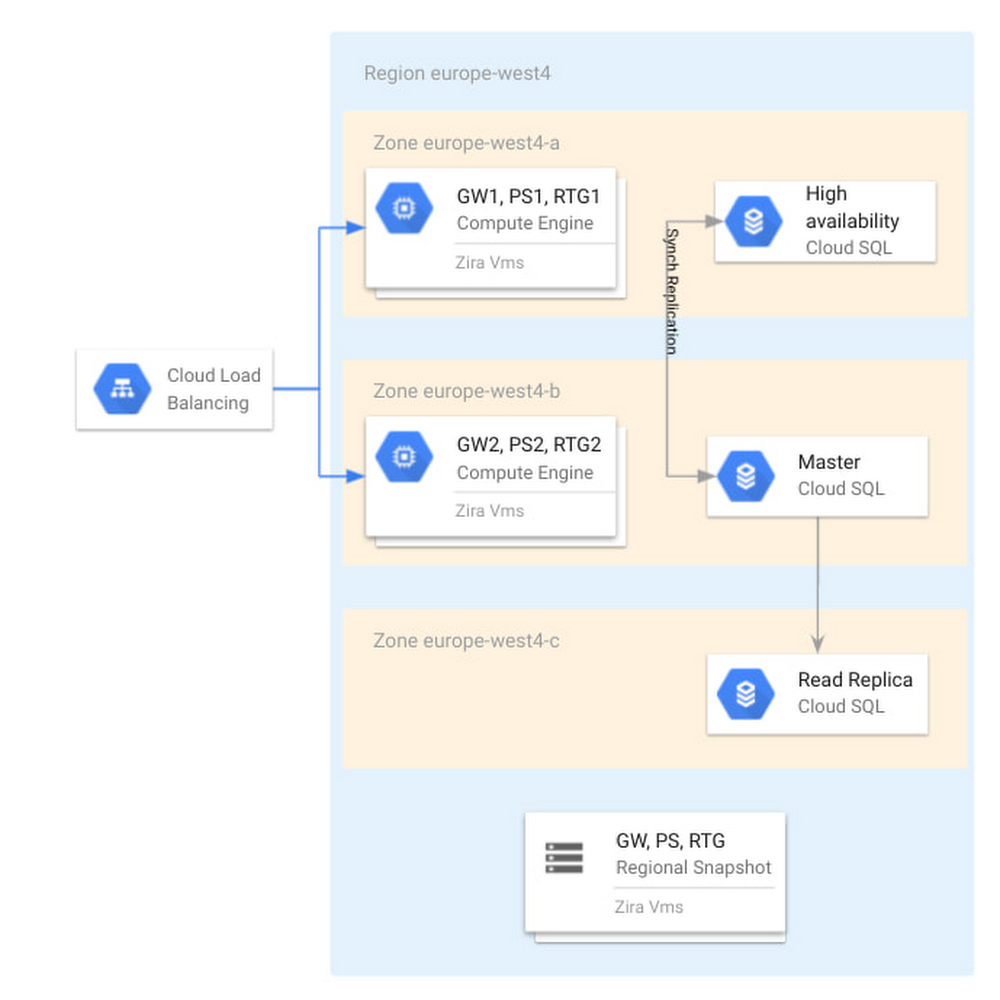
Editor’s note: In this blog, we look at how TIM Group, a leading information and communication technology (ICT) company in Italy and Brazil, used Cloud SQL for PostgreSQL to deliver a new billing application and saw 45% savings in database maintenance and infrastructure costs.In early 2020, TIM Group set out to solve a common challenge faced by large enterprises in order to keep up with competitive trends and new technological developments. One of our core IT systems, our billing function, was in need of a modernization overhaul and so we began a digital transformation project to build a new billing system on Google Cloud powered by Cloud SQL for PostgreSQL and Google Compute Engine. The new system was designed to automate important billing and credit systems that had been previously processed manually, and has already resulted in a 45% cost savings in database management, and a 20% savings in infrastructure costs. Designing a new digital journey My team is responsible for the development and maintenance of new billing systems for wholesale network access services. We began building a new system in 2020 that would modernize the way we bill for our B2B services with other telecom operators in the wholesale market, which in terms of revenue is an enormous market segment for TIM Group. The new billing system will help us to automate the formerly manual business processes for billing and credit management, and will eventually allow our IT department to decommission 16 legacy on-premise systems. Some of these legacy systems are 20 years old and no longer supported by the application stack. They suffer from poor performance, storage scalability limitations, low availability, and a lack of disaster recovery capabilities. In addition, they incur huge maintenance costs across applications and infrastructure levels, and they have no support for future use cases or innovation. Benchmarking Cloud SQL for a new billing systemWe initially started this project with a different planned architecture than the one we ended up building. At the outset, we had a blueprint architecture based on an Oracle database, and we acquired a license of a billing product called Wholesale Business Revenue Management (WBRM) from Zira to configure and customize as a base for our new billing system, compatible with both Oracle and PostgreSQL databases. Ultimately, we were designing a solution to run in our data centers based on VMware and Oracle, and a couple of months into the project we signed the partnership with Google Cloud. This decision opened up the possibility of running solutions on a modern cloud environment. We were excited by many of the capabilities we saw in Google Cloud’s solutions, including Cloud SQL, their fully managed relational database service for running MySQL, PostgreSQL and SQL Server. We tested the performance of Cloud SQL for PostgreSQL to see if it was comparable with the benchmark that Zira gave us for running WBRM on Oracle.The results were excellent; Cloud SQL for PostgreSQL met the Oracle database benchmark that Zira had given us based on previous stress tests. Using a database like Postgres would allow us to save on licensing costs and the contracting process with Oracle. To conduct these tests, we wanted to compare Oracle RAC against Cloud SQL for PostgreSQL, and look at which performed better in terms of application performance, scalability and ease of maintenance. We started with vertical scalability. We incremented the virtual CPUs and RAM by 20% and got a proportional benefit in throughput. We then tested horizontally scaled read workload and found that we had the same performance in user interface response time when linked to a read replica of a Cloud SQL for PostgreSQL database. We tested availability by switching down a node on the database, and found that all services were redirected to the follower node of the database with zero downtime. We were satisfied and encouraged by the results of these tests, and proceeded to build our new billing system with WBRM and Cloud SQL for PostgreSQL.Cutting database maintenance costs by up to 45%The managed services of Cloud SQL for PostgreSQL have given us considerable operational benefits. We were relying on external suppliers to handle most of our database maintenance, including updates, patching, security, and more administrative tasks. We saw 45% savings in eliminating that cost, and an additional 20% savings in infrastructure costs, which is a conservative estimate since we’re still in the process of fully rolling out the new system. We expect even bigger savings by the end of the project, which will hopefully go fully live at the end of 2021. Our project strategy has been to implement the new system in increments, replacing one service at a time. We started with services that weren’t supported by our legacy system, which included manual billing and credit processes that previously required 20-30 team members to maintain. As our year continues, we will continue work to dismiss legacy systems and to feed the new system with traffic usage, where we expect a huge ramp up of volume. Peeking under the hoodOur cloud instances are located primarily in the Netherlands region, with virtual machines in zones a and b for high availability. We have a highly available Cloud SQL instance across those zones. In zone c, we also have a read replica that we use to offload workloads from the primary that require read access only. For example, some departments have revenue assurance systems that connect to this read replica to check on orders billed or any revenue problems. On-premises, adding a new read replica server to the database can take two to three months, as it requires hardware allocation, tickets etc. In the cloud we can set up a read replica in a matter of minutes.For disaster recovery purposes, we make a daily backup with a 14 day retention period, and we have another operations team that is in charge of taking snapshots of our Zira VMs.Below, you can see our high level architecture. The application itself is hosted on Compute Engine and can be accessed through a load balancer. You can also see Cloud SQL and the read replicas in every zone and region mentioned above.Cloud SQL as part of the Zira WBRM architecture at TIM GroupTwo of our requirements were to direct some of the read traffic to the read replica and also to pool connections together. To meet those requirements, we have deployed PgBouncer which takes care of diverting the traffic and pgpool that takes care of connection pooling in front of Cloud SQL, as you can see in the diagram below.With Cloud SQL powering our new billing system, we can now automate previous manual billing and credit processing, dismiss over a dozen legacy systems, and build upon technology that provides high performance, easy storage scalability, high availability, and disaster recovery. And this is all at significant cost savings in database maintenance and infrastructure. In addition, we now have a database solution that integrates easily with other services like WBRM, and will empower TIM Group to innovate for use cases on our roadmap and beyond.Read more about TIM Group, Cloud SQL for PostgreSQL and Wholesale Business Revenue Management (WBRM) from Zira.Related ArticleIntroducing cross-region replica for Cloud SQLCross-region replication from Cloud SQL lets you ensure business continuity across Google Cloud regions in case of an outage or failure.Read Article
Quelle: Google Cloud Platform
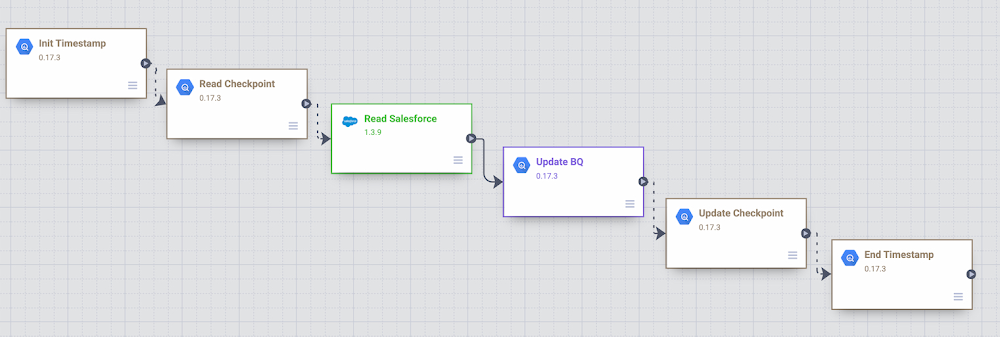
Organizations are increasingly investing in modern cloud warehouses and data lake solutions to augment analytics environments and improve business decisions. The business value of such repositories increases as customer relationship data is loaded and additional insights are generated.In this post, we’ll cover different ways to incrementally move Salesforce data into BigQuery using the scalability and reliability of Google services, an intuitive drag-and-drop solution based on pre-built connectors, and the self-service model of a code-free data integration service. A Common Data Ingestion Pattern:To provide a little bit more context, here is an illustrative (and common) use case:Account, Lead and Contact Salesforce objects are frequently manipulated by call center agents when using the SalesForce application.Changes to these objects need to be identified and incrementally loaded into a data warehouse solution using either a batch or streaming approach.A fully managed and cloud-native enterprise data integration service is preferred for quickly building and managing code-free data pipelines. Business performance dashboards are created by joining Salesforce and other related data available in the data warehouse.Cloud Data Fusion to the rescue To address the Salesforce ETL (extract, transform and load) scenario above, we will be demonstrating the usage of Cloud Data Fusion as the data integration tool. Data Fusion is a fully managed, cloud-native, enterprise data integration service for quickly building and managing code-free data pipelines. Data Fusion’s web UI allows organizations to build scalable data integration solutions to clean, prepare, blend, transfer, and transform data without having to manage the underlying infrastructure. Its integration with Google Cloud ensures data is immediately available for analysis. Data Fusion offers numerous pre-built plugins for both batch and real-time processing. These customizable modules can be used to extend Data Fusion’s native capabilities and are easily installed though the Data Fusion Hub component.For Salesforce source objects, the following pre-built plugins are generally available:Batch Single Source – Reads one sObject from Salesforce. The data can be read using SOQL queries (Salesforce Object Query Language queries) or using sObject names. You can pass incremental/range date filters and also specify primary key chunking parameters. Examples of sObjects are opportunities, contacts, accounts, leads, any custom object, etc. Batch Multi Source – Reads multiple sObjects from Salesforce. It should be used in conjunction with multi-sinks.Streaming Source – Tracks updates in Salesforce sObjects. Examples of sObjects are opportunities, contacts, accounts, leads, any custom object, etc.If none of these pre-built plugins fit your needs, you can always build your own by using Cloud Data Fusion’s plugin APIs. For this blog, we will leverage the out of the box Data Fusion plugins to demonstrate both batch and streaming Salesforce pipeline options.Batch incremental pipelineThere are many different ways to implement a batch incremental logic. The Salesforce batch multi source plugin has parameters such as “Last Modified After”, “Last Modified Before”, “Duration” and “Offset” which can be used to control the incremental loads.Here’s a look at a sample Data Fusion batch incremental pipeline for Salesforce objects Lead, Contact and Account. The pipeline uses the previous’ start/end time as the guide for incremental loads.Batch Incremental Pipeline – From Salesforce to BigQueryThe main steps of this sample pipeline are:For this custom pipeline, we decided to store start/end time in BigQuery and demonstrate different BigQuery plugins. When the pipeline starts, timestamps are stored on a user checkpoint table in BigQuery. This information is used to guide the subsequent runs and incremental logic.Using the BigQuery Argument Setter plugin, the pipeline reads from the BigQuery checkpoint table, fetching the minimum timestamp to read from.With the Batch Multi Source plugin, the objects lead, contact and account are read from Salesforce, using the minimum timestamp as a parameter passed to the plugin.BigQuery tables lead, contact and account are updated using the BigQuery Multi Table sink pluginThe checkpoint table is updated with the execution end time followed by an update to current_time column.Adventurous?You can exercise this sample Data Fusion pipeline in your development environment by downloading its definition file from GitHub and importing it through the Cloud Data Fusion Studio. After completing the import, adjust the plugin properties to reflect your own Salesforce environment. You will also need to: Create a BigQuery dataset named from_salesforce_cdf_stagingCreate the sf_checkpoint BigQuery table on dataset from_salesforce_cdf_staging as described below:3. Insert the following record into the sf_checkpoint table:Attention: The initial last_completion date = “1900-01-01T23:01:01Z” indicates the first pipeline execution will read all Salesforce records with LastModifedDate column greater than 1900-01-01. This is a sample value targeted for initial loads. Adjust the last_completion column as needed to reflect your environment and requirements for the initial run.After executing this sample pipeline a few times, observe how sf_checkpoint.last_completion column evolves as executions finish. You can also validate that changes are being loaded incrementally into BigQuery tables as shown below:BigQuery output – Salesforce incremental pipelineStreaming pipeline When using the Streaming Source plugin with Data Fusion, changes in Salesforce sObjects are tracked using PushTopic events. The Data Fusion streaming source plugin can either create a Salesforce PushTopic for you, or use an existing one you defined previously using Salesforce tools. The PushTopic configuration defines the type of events (insert, update, delete) to trigger notifications, and the objects columns in scope. To learn more about Salesforce PushTopics, click here. When streaming data, there is no need to create a checkpoint table in BigQuery as data gets replicated near real time, automatically capturing only changes, as soon as they occur. The Data Fusion pipeline becomes super simple as demonstrated in the sample below:Salesforce streaming pipeline with Cloud Data FusionThe main steps of this sample pipeline are:1. Add a Salesforce streaming source and provide its configuration details. For this exercise, only inserts and updates are being captured from CDFLeadUpdates PushTopic. As a reference, here is the code we used to pre-create the CDFLeadUpdates PushTopic in Salesforce. The Data Fusion plugin can also pre-create the PushTopic for you if preferred.Hint: In order to run this code block, login to Salesforce with the appropriate credentials and privileges, open the Developer Console and click on Debug | Open Execute Anonymous Window.2. Add a BigQuery sink to your pipeline in order to receive the streaming events. Notice the BigQuery table gets created automatically once the pipeline executes and the first change record is generated.After starting the pipeline, make some modifications to the Lead object in Salesforce and observe the changes flowing into BigQuery as exemplified below:BigQuery output – Salesforce streaming pipeline with Cloud Data FusionAdventurous?You can exercise this sample Data Fusion pipeline in your development environment by downloading its definition file from GitHub and importing it through the Cloud Data Fusion Studio. After completing the import, adjust the plugin properties to reflect your own Salesforce environment.Got deletes? If your Salesforce implementation allows “hard deletes” and you must capture them, here is a non-exhaustive list of ideas to consider:An audit table to track the deletes. A database trigger, for example, can be used to populate a custom audit table. You can then use Data Fusion to load the delete records from the audit table and compare/update the final destination table in BigQuery.An additional Data Fusion job that reads the primary keys from the source and compare/merge with the data in BigQuery.A Salesforce PushTopic configured to capture delete/undelete events and a Data Fusion Streaming Source added to capture from the PushTopic.Salesforce Change Data Capture.Conclusion:If your enterprise is using Salesforce and If it’s your job to replicate data into a data warehouse then Cloud Data Fusion has what you need. And if you already use Google Cloud tools for curating a data lake with Cloud Storage, Dataproc, BigQuery and many others, then Data Fusion integrations make development and iteration fast and easy. Have a similar challenge? Try Google Cloud and this Cloud Data Fusion quickstart next. For a more in-depth look into Data Fusion check out the documentation.Have fun exploring!
Quelle: Google Cloud Platform

Docker is used by millions of developers to build, share, and run any app, anywhere, and 55% of professional developers use Docker every day at work. In these work environments, the increase in outside attacks on software supply chains is accelerating developer demand for Docker’s trusted content, including Docker Official Images and Docker Verified Publisher images. Finally, the rapid global growth in developers – to an estimated 45 million by 2030 – pushes us to scale sustainably so we may continue to provide an innovative, free Docker experience that developers love.
To meet these challenges, today we’re announcing updates and extensions to our product subscriptions: Personal, Pro, Team, and Business. These updated product subscriptions provide the productivity and collaboration developers rely on with the scale, security, and trusted content businesses require, and do so in a manner sustainable for Docker.
What you need to know:
We’re introducing a new product subscription, Docker Business, for organizations using Docker at scale for application development and require features like secure software supply chain management, single sign-on (SSO), container registry access controls, and more.Our Docker Subscription Service Agreement includes a change to the terms for Docker Desktop:Docker Desktop remains free for small businesses (fewer than 250 employees AND less than $10 million in annual revenue), personal use, education, and non-commercial open source projects.It requires a paid subscription (Pro, Team or Business), starting at $5 per user per month, for professional use in larger businesses. You may directly purchase here, or share this post and our solution brief with your manager.While the effective date of these terms is August 31, 2021, there is a grace period until January 31, 2022 for those that require a paid subscription to use Docker Desktop.Docker Pro, Docker Team, and Docker Business subscriptions include commercial use of Docker Desktop.The existing Docker Free subscription has been renamed Docker Personal.No changes to Docker Engine or any upstream open source Docker or Moby project.Check out our FAQ or more information.
Docker Personal = Free
The new Docker Personal subscription replaces the Docker Free subscription. With its focus on open source communities, individual developers, education, and small businesses – which together account for more than half of Docker users – Docker Personal is free for these communities and continues to allow free use of all its components – including Docker CLI, Docker Compose, Docker Build/BuildKit, Docker Engine, Docker Desktop, Docker Hub, Docker Official Images, and more.
Docker Business = Management and security at scale
The new Docker Business subscription enables organization-wide management and security for businesses that use Docker for software development at scale. With an easy-to-use SaaS-based management plane, IT leaders can now efficiently observe and manage all their Docker development environments and accelerate their secure software supply chain initiatives. In addition to all the capabilities available in the Docker Pro and Docker Team subscriptions, Docker Business adds the ability to control what container images developers can access from Docker Hub, ensuring teams are building securely from the start by using only trusted content. And shortly, Docker Business will provide SAML SSO, the ability to control what registries developers can access, and the ability to remotely manage Docker Desktop instances.
More generally, the objective of the new Docker Business subscription is to help large businesses address the following challenges across their development organizations:
Gain visibility and control over content Which container registries are my developers pulling container images from? What images are they running locally on their laptops? What versions are they running? What security vulnerabilities do those container images have? How can I help my developers protect the organization?
Manage local resources and access to external services How can I ensure my developers’ local Docker environments are safe? How do I make sure Docker is effectively sharing resources with other local tools? How can I manage the networks accessible to Docker?
Manage Docker development environments at scale Many organizations have 100s and 1000s of developers using Docker and need a centralized point of control for developer onboarding/off-boarding with SSO, authentication and authorization, observability of behavior and content, and configuring the above controls.
The Docker Business subscription launches today at a price of $21 per user per month billed annually. And there’s more on the way – check-out our public roadmap for details.
Docker Desktop = New subscription terms
At Docker we remain committed to continuing to provide an easy-to-use, free experience for individual developers, open source projects, education, and small businesses. In fact, altogether these communities represent more than half of all Docker usage. Docker Personal and all its components – including Docker CLI, Docker Compose, Kubernetes, Docker Desktop, Docker Build/BuildKit, Docker Hub, Docker Official Images, and more – remain free for these communities.
Specifically, small businesses (fewer than 250 employees AND less than $10 million in revenue) may continue to use Docker Desktop with Docker Personal for free. The use of Docker Desktop in large businesses, however, requires a Pro, Team, or Business paid subscription, starting at $5 per user per month.
With Docker Desktop managing all the complexities of integrating, configuring, and maintaining Docker Engine and Kubernetes in Windows and Mac desktop environments – filesystems, VMs, networking, and more – developers can spend more of their time building apps, less on fussing with infrastructure. And with a paid subscription, businesses get additional value in Docker Desktop, including capabilities for managing secure software supply chains, centralizing policy visibility and controls, and managing users and access.
The updated terms for Docker Desktop reflect our need to scale our business sustainably and enable us to continue shipping new value in all Docker subscriptions. These new terms take effect August 31, 2021, and there is a grace period until January 31, 2022 for those who require a paid subscription to use Docker Desktop. (Note that licensing for Docker Engine and the upstream Docker and Moby open source projects is not changing.)
What’s next
We know this may be a significant change for some organizations, and we’re committed to helping you make this transition as smooth as possible. Individuals and small teams may purchase directly here. If you’re part of a larger organization that’s using Docker, share this post and our solution brief with your manager.
Over the next several months we’ll be covering the details of this announcement via webinars, community get-togethers, blog posts, and more. To kick things off, we have our Community All-Hands on September 16th and our first webinar introducing Docker Business on September 23rd – hope to see you at both! And for more details on the updated product subscriptions please visit docker.com/pricing and our FAQs.
These last 12 months have seen a whirlwind of releases, from image scanning in the Docker CLI to Docker Desktop on Apple Silicon, Audit Logs in Docker Hub, GPU support in Docker Desktop, BuildKit Dockerfile mounts, new Docker Verified Publisher images, and more. And – as you can see from our public roadmap – there’s more to come in the next 12 months, and we invite all members of the Docker community to contribute, vote, and make your voices heard. In doing so, we will together continue our shared journey of helping all developers build, share, and run any app, anywhere.
Learn more
Part of a larger organization? Check out our Docker Solution Brief.Read the Press ReleaseRead the FAQ
[1] Stack Overflow Survey 2021 – https://insights.stackoverflow.com/survey/2021[2] SlashData Global Developer Population 2019 – https://dockr.ly/3t7VNO4
The post Docker is Updating and Extending Our Product Subscriptions appeared first on Docker Blog.
Quelle: https://blog.docker.com/feed/

Bose hat mit dem Quiet Comfort 45 einen neuen ANC-Kopfhörer vorgestellt. Es ist eine verbesserte Version des Quiet Comfort 35 II. (Bose, Audio/Video)
Quelle: Golem

Weil einige an der O-RAN Alliance beteiligten Unternehmen auf die Entity-Liste gekommen und von den USA boykottiert worden sind, ist Nokia vorsichtig und pausiert. (Joe Biden, Server)
Quelle: Golem






