Online-Shopping: Bafin zufrieden mit 2FA für Kreditkarten
Durch die verpflichtende Zwei-Faktor-Authentifizierung für Kreditkarten sei der Schutz vor betrügerischen Zahlungen besser als bisher. (Kreditkarte, Onlineshop)
Quelle: Golem

Durch die verpflichtende Zwei-Faktor-Authentifizierung für Kreditkarten sei der Schutz vor betrügerischen Zahlungen besser als bisher. (Kreditkarte, Onlineshop)
Quelle: Golem

Ashley M. Gjøvik veröffentlichte E-Mails und Chatverläufe, die auf Missstände bei Apple hinweisen sollten. Der Konzern hat sie entlassen. (Apple, Datenschutz)
Quelle: Golem

Das Argon Eon ist im Kern ein Rasperry-Pi-Gehäuse. Dort passen aber vier Laufwerke und ein OLED-Display fürs Selbstbau-NAS hinein. (NAS, OLED)
Quelle: Golem

Das Unternehmen Parallels setzt viel daran, Windows 11 auch auf Apples M1 zum Laufen zu bringen. Microsoft will das wohl aber gar nicht. (Windows 11, Apple)
Quelle: Golem
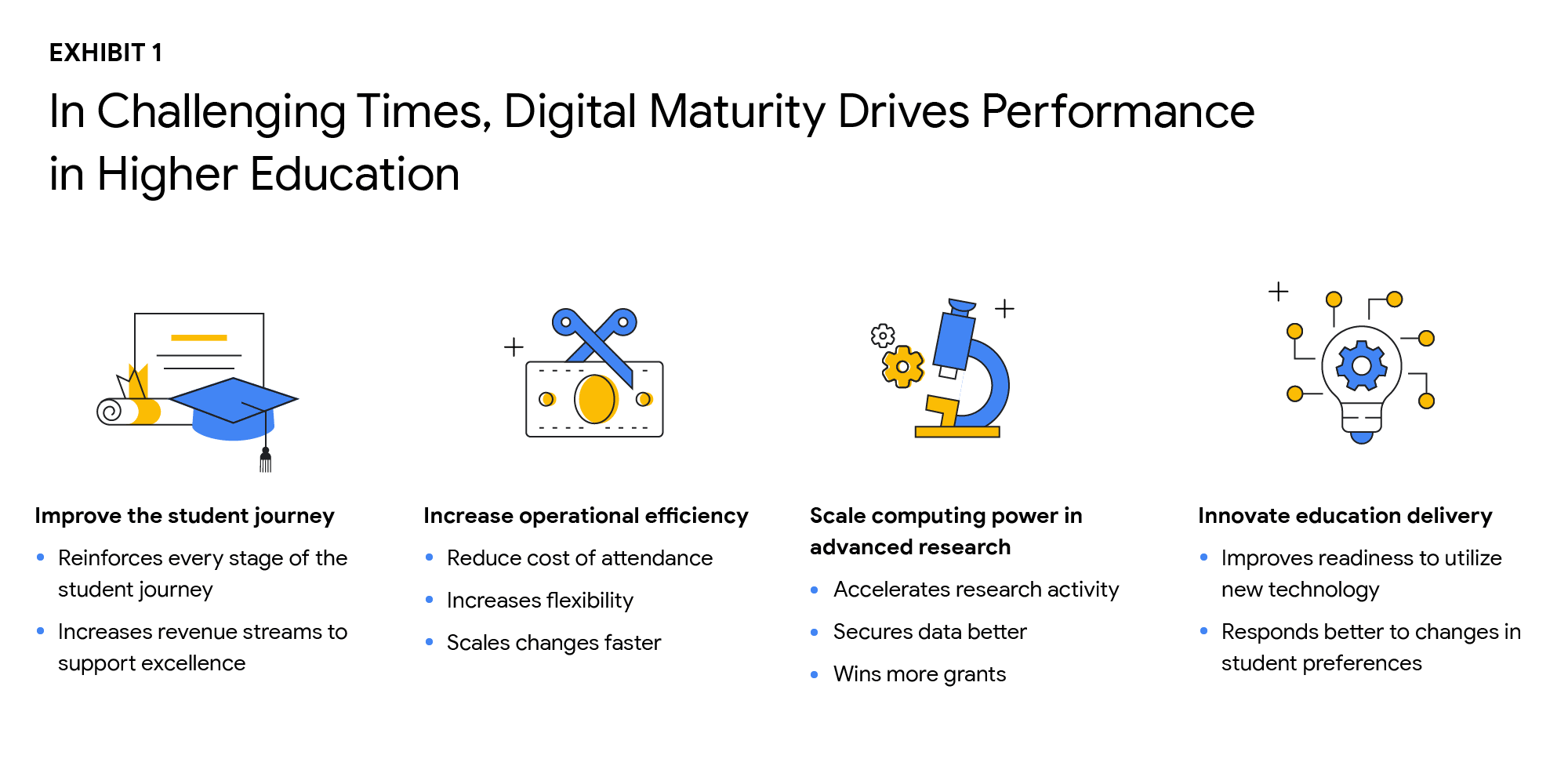
Why Higher Ed Needs to Go All-in on DigitalIn the wake of the COVID-19 pandemic, the majority of students within the 18-24-year-old demographic now expect hybrid learning environments–even once we are beyond the pandemic. And a vast number of adult learners are seeking options that accommodate their work and family lives now that it’s clear that effective learning can indeed occur virtually. Implementing cloud technologies and achieving digital maturity within higher education will enable institutions to be innovative and responsive to evolving student preferences, while being prepared for future disruptions.The state of digital maturityIn February and March 2021, Boston Consulting Group (BCG), in partnership with Google, surveyed U.S. higher education leaders on their views of the state of digital maturity in the higher education sector. This survey found that institutional and technology leaders strongly agreed that moving legacy IT systems to the cloud, centralizing and integrating data, and increasing the use of advanced analytics is necessary to make a successful digital transformation, and ultimately achieve digital maturity.But what is digital maturity? Digital maturity—a measure of an organization’s ability to create value through digital delivery—focuses on three areas of technological advancement that drive large-scale innovation:Using cloud infrastructureExpanding access to dataUsing that data to improve processes through advanced analytics, such as Artificial Intelligence and Machine Learning (AI/ML)Although university leaders agree on prioritizing digital maturity, more than 55% said they considered their schools to be “digital performers” or “digital leaders.” However, only 25% of tech leaders at these universities stated that their schools regularly use data analytics. As with corporations and governments, higher education institutions face barriers to technological innovation, such as:Competing priorities to meet step-change goals and decentralized decision makingBudget constraintsCultural resistance to changeTech staff skillset gapsStill, leaders understand that the way to overcome institutional inertia is with a strong, goal-oriented vision of what is best for the institution overall. Although only a handful of schools have reached digital maturity as we define it, others can learn a great deal from their examples. Here are the top takeaways from higher education leaders who successfully transformed their institutions:Digital solutions can improve the student journey in many waysAs digital capabilities hold the key to dealing effectively with declining enrollment and rising costs, higher ed leaders identified four goals that are critical to improving performance:Improve the student journeyIncrease operational efficiencyScale computing power in advanced researchInnovate education deliveryThe research found that technology investments can help enhance the student journey in the recruiting and retention of students, improving digital education delivery, government funding, and donations from alumni. Digital maturity can make institutions more agile and efficient in delivering education that aligns with the changing societal norms, evolving student preferences, and future disruptions. Survey participants shared that they plan to increase the use of the cloud by more than 50% over the next three years. By shifting legacy IT systems to the cloud, institutions can increase scalability, lower the cost of ownership, and improve operational agility, while offering a more secure, long-term data storage solution.Cloud-native software-as-a-service (SaaS) solutions provide an excellent platform for centralizing data. However, institutions that attempt to “lift and shift” their legacy systems to the cloud may encounter challenges to achieving measurable improvements in data integration and cost reduction. Higher ed leaders must realize that centralizing data and transitioning to the cloud do not happen simultaneously.Leaders who are able to articulate a strong vision and commitment will experience a more successful technology transformation. By linking their vision to specific needs, such as more effective recruiting, leaders will find their technology investments will have a more substantial return. University presidents should base their decisions about which systems to move, when, and how on desired performance outcomes.Big visions become a reality with small steps. Small pilot projects are an excellent way to start the journey toward digital maturity. Small steps toward a significant transformation can reduce resistance to change, build positive momentum, and produce better student outcomes. Read the full reporthere. If you’d like to talk to a Google Cloud expert, get in touch.
Quelle: Google Cloud Platform
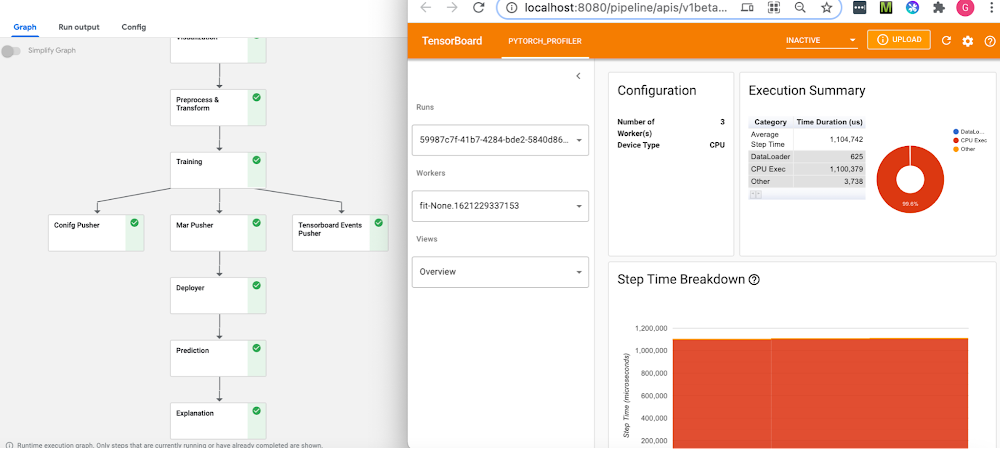
IntroductionML Ops is an ML engineering culture and practice that aims at unifying ML system development and ML system operation. An important ML Ops design pattern is the ability to formalize ML workflows. This allows them to be reproduced, tracked and analyzed, shared, and more.Pipelines frameworks support this pattern, and are the backbone of an ML Ops story. These frameworks help you to automate, monitor, and govern your ML systems by orchestrating your ML workflows. In this post, we’ll show examples of PyTorch-based ML workflows on two pipelines frameworks: OSS Kubeflow Pipelines, part of the Kubeflow project; and Vertex Pipelines. We are also excited to share some new PyTorch components that have been added to the Kubeflow Pipelines repo. In addition, we’ll show how the Vertex Pipelines examples, which require v2 of the KFP SDK, can now also be run on an OSS Kubeflow Pipelines installation using the KFP v2 ‘compatibility mode’.PyTorch on Google Cloud PlatformPyTorch continues to evolve rapidly, with more complex ML workflows being deployed at scale. Companies are using PyTorch in innovative ways for AI-powered solutions ranging from autonomous driving to drug discovery, surgical Intelligence, and even agriculture. MLOps and managing the end-to-end lifecycle for these real world solutions, running at large scale, continues to be a challenge. The recently-launched Vertex AI is a unified ML Ops platform to help data scientists and ML engineers increase their rate of experimentation, deploy models faster, and manage models more effectively. It brings AutoML and AI Platform together, with some new ML Ops-focused products, into a unified API, client library, and user interface.Google Cloud Platform and Vertex AI are a great fit for PyTorch, with PyTorch support for Vertex AI training and serving, and PyTorch-based Deep Learning VM images and containers, including PyTorch XLA support.The rest of this post will show examples of PyTorch-based ML workflows on two pipelines frameworks: OSS Kubeflow Pipelines, part of the Kubeflow project; and Vertex Pipelines. All the examples use the open-source Python KFP (Kubeflow Pipelines) SDK, which makes it straightforward to define and use PyTorch components.Both pipelines frameworks provide sets of prebuilt components for ML-related tasks; support easy component (pipeline step) authoring and provide pipeline control flow like loops and conditionals; automatically log metadata during pipeline execution; support step execution caching; and more.Both of these frameworks make it straightforward to build and use PyTorch-based pipeline components, and to create and run PyTorch-based workflows. Kubeflow PipelinesThe Kubeflow open-source project includes Kubeflow Pipelines (KFP), a platform for building and deploying portable, scalable machine learning (ML) workflows based on Docker containers. The open-source Kubeflow Pipelines backend runs on a Kubernetes cluster, such as GKE, Google’s hosted Kubernetes. You can install the KFP backend ‘standalone’ — via CLI or via the GCP Marketplace— if you don’t need the other parts of Kubeflow. The OSS KFP examples highlighted in this post show several different workflows and include some newly contributed components now in the Kubeflow Pipelines GitHub repo. These examples show how to leverage the underlying Kubernetes cluster for distributed training; use a TensorBoard server for monitoring and profiling; and more. Vertex PipelinesVertex Pipelines is part of Vertex AI, and uses a different backend from open-source KFP. It is automated, scalable, serverless, and cost-effective: you pay only for what you use. Vertex Pipelines is the backbone of the Vertex AI ML Ops story, and makes it easy to build and run ML workflows using any ML framework. Because it is serverless, and has seamless integration with GCP and Vertex AI tools and services, you can focus on building and running your pipelines without dealing with infrastructure or cluster maintenance.Vertex Pipelines automatically logs metadata to track artifacts, lineage, metrics, and execution across your ML workflows, and provides support for enterprise security controls like Cloud IAM, VPC-SC, and CMEK.The example Vertex pipelines highlighted in this post share some underlying PyTorch modules with the OSS KFP example, and include use of the prebuilt Google Cloud Pipeline Components, which make it easy to access Vertex AI services. Vertex Pipelines requires v2 of the KFP SDK. It is now possible to use the KFP v2 ‘compatibility mode’ to run KFP V2 examples on an OSS KFP installation, and we’ll show how to do that as well.PyTorch on Kubeflow Pipelines: PyTorch KFP Components SDKIn collaboration across Google and Facebook, we are announcing a number of technical contributions to enable large- scale ML workflows on Kubeflow Pipelines with PyTorch. This includes the PyTorch Kubeflow Pipelines components SDK with features for: Data loading and preprocessing Model Training using PyTorch Lightning as training loop Model profiling and visualizations using the new PyTorch Tensorboard Profiler Model deployment & Serving using TorchServe + KFServing with canary rollouts, autoscaling, and Prometheus monitoring Model Interpretability using CaptumDistributed training using the PyTorch job operator for KFPHyperparameter tuning using Ax/BoTorchML Metadata for Artifact Lineage Tracking Cloud agnostic artifacts storage component using Minio Computer Vision and NLP workflows are available for:Open Source Kubeflow Pipelines deployed on any cloud or on-prem Google Cloud Vertex AI Pipelines for Serverless pipelines solutionFigure 1: NLP BERT Workflow on Open Source KFP with PyTorch profiler and Captum insights, (top left) Pipeline View (top right) PyTorch Tensorboard Profiler for the training node, (bottom) Captum model insights for the model prediction Start by setting up a KFP cluster with all the prerequisites, and then follow one of the examples under the pytorch-samples here. Sample notebooks and full pipelines examples are available for the following: Computer Vision CIFAR10 pipeline, basic notebook, and notebook with Captum InsightsNLP BERT pipeline, and notebook with Captum for model interpretability.Distributed training sample using the PyTorch job operatorHyperparameter optimization sample using Ax/BotorchNote: All the samples are expected to run both on-prem and on any cloud, using CPU or GPUs for training and inference. Minio is used as the cloud-agnostic storage solution. A custom TensorBoard image is used for viewing the PyTorch Profiler.PyTorch on Kubeflow Pipelines : BERT NLP exampleLet’s do a walkthrough of the BERT example notebook. Training the PyTorch NLP modelOne starts by defining the KFP pipeline with all the tasks to execute. The tasks are defined using the component yamls with configurable parameters. All templates are available here. The training component takes as input a PyTorch Lightning script, along with the input data and parameters and returns the model checkpoint, tensorboard profiler traces and the metadata for metrics like confusion matrix and artifacts tracking.If you are using GPUs for training, set the gpus to value > 0 and use ‘ddp’ as the default accelerator type. You will also need to specify the gpu limit and node selector constraint for the cluster: For generating traces for the PyTorch Tensorboard profiler, “profiler=pytorch” is set in script_args. The confusion matrix gets logged as part of the ML metadata in the KFP artifacts store, along with all the inputs and outputs and the detailed logs for pipeline run. You can view these from the pipeline graph and the lineage explorer (as shown in Figure 2 below). Caching is enabled by default, so if you run the same pipeline again with the same inputs, the results will be picked up from the KFP cache.Figure 2: Pipeline graph view, Visualization for Confusion Matrix and ML Metadata in the Lineage ExplorerThe template_mapping.json config file is used for generating the component yaml files from the templates and setting the script names and docker container with all the code. You can create a similar Docker container for your own pipeline. Debugging using PyTorch Tensorboard ProfilerThe PyTorch Tensorboard Profiler provides insights into the performance bottlenecks like inefficiency for loading data, underutilization of the GPUs, SM efficiency, and CPU-GPU thrashing, and is very helpful for debugging performance issues. Check out the Profiler 1.9 blog for the latest updates. In the KFP pipeline, the Tensorboard Visualization component handles all the magic of making the traces available to the PyTorch Tensorboard profiler; therefore it is created before starting the training run. The profiler traces are saved in the tensorboard/logs bucket under the pipeline run ID and are available for viewing after the training step completes. You can access TensorBoard from the Visualization component of the pipeline after clicking the “Start Tensorboard” button. Full traces are available from the PyTorch Profiler view in the Tensboard as shown below:Figure 3: PyTorch Profiler Trace viewA custom docker container is used for the PyTorch profiler plugin, and you can specify the image name by setting the TENSORBOARD_IMAGE parameter. Model Serving using KFServing with TorchServePyTorch model serving for running the predictions is done via the KFServing + TorchServe integration. It supports prediction and explanation APIs, canary rollouts with autoscaling, and monitoring using Prometheus and Grafana. For the NLP BERT model, the bert_handler.py defines the TorchServe custom handler with logic for loading the model, running predictions, and doing the pre-processing and post processing. The training component generates the model files as a model-archiver package, and this gets deployed onto TorchServe. The minio op is used for making the model-archiver and the TorchServe config properties available to the deployment op. For deploying the model, you simply need to set the KFServing Inference yaml with the relevant values, e.g. for the GPU inference you will pass the model storage location, and the number of GPUs:Using Captum for Model InterpretabilityCaptum.ai is the Model Interpretability library for PyTorch. In the NLP example we use the explanation API of KFserving and TorchServe to get the model insights for interpretability. The explain handler defines the IntegratedGradient computation logic which gets called via the explain endpoint and returns a json response with the interpretability output. The results are rendered in the notebook using Captum Insights.This renders the color-coded visualization for the word importance.Distributed training using PyTorch job operatorThe Kubeflow PyTorch job operator is used for distributed training and it takes as inputs the job spec for the master and worker nodes along with the option to customize other parameters via the pytorch-launcher component.PyTorch on Kubeflow Pipelines : CIFAR10 HPO exampleHyperparameter optimization using Ax/BoTorchAx is the adaptive experimentation platform for PyTorch, and BoTorch is the Bayesian Optimization library. They are used together for Hyperparameter optimization. The CIFAR10-HPO notebook describes the usage for this. We start off by generating the experiment trials with the parameters that we want to optimize using the ax_generate_trials component.Next, the trials are run in parallel using the ax_train_component.And finally, the ax_complete_trials componentis used for processing the results for the best parameters from the Hyperparameter search.The best parameters can be viewed under Input/Output section of ax_complete trials (as shown in the figure below):PyTorch on Vertex Pipelines: CIFAR10 image classification exampleThe Vertex Pipelines examples in this post also use the KFP SDK, and include use of the Google Cloud Pipeline Components, which support easy access to Vertex AI services. Vertex Pipelines requires v2 of the KFP SDK. So, these examples diverge from the OSS KFP v1-based examples above, though the components share some of the same data processing and training base classes. It is now possible to use the KFP v2 ‘compatibility mode’ to run KFP V2 examples on an OSS KFP installation, and we’ll show how to do that as well.An example PyTorch Vertex Pipelines notebook shows two variants of a pipeline that: do data preprocessing, train a PyTorch CIFAR10 resnet model, convert the model to archive format, build a torchserve serving container, upload the model container configured for Vertex AI custom prediction, and deploy the model serving container to an endpoint so that it can serve prediction requests on Vertex AI. In the example, the torchserve serving container is configured to use the kfserving service envelope, which is compatible with the Vertex AI prediction service.Training the PyTorch image classification modelThe difference between the two pipeline variants in the notebook is in the training step. One variant does on-step-node single-GPU training— that is, it runs the training job directly on the Vertex pipeline step node. We can specify how the pipeline step instance is configured, to give the node instance the necessary resources. This fragment from the KFP pipeline definition shows that configuration, which specifies to use one Nvidia V100 for the training step in the pipeline:The other example variant in the notebook shows multi-GPU, single-node training via Vertex AI’s support for custom training, using the Vertex AI SDK. From the ‘custom training’ pipeline step, a custom job is defined, passing the URI of the container image for the PyTorch training code:Then the custom training job is run, specifying machine and accelerator types, and number of accelerators:PyTorch prebuilt training containers are available as well, though for this example we used PyTorch v1.8, which at time of writing is not yet available in the prebuilt set.Defining KFP PipelinesSome steps in the example KFP v2 pipelines are built from Python function-based custom components— these make it easy to develop pipelines interactively, and are defined right in the example notebook— and other steps are defined using a set of prebuilt components that make it easy to interact with Vertex AI and other services— the steps that upload the model, create an endpoint, and deploy the model to the endpoint.The custom components include pipeline steps to create a model archive from the trained PyTorch model and the model file, and to build a torchserve container image using the model archive file and the serving config.properties. The torchserve build step uses Cloud Build to create the container image.These pipeline component definitions can be compiled to .yaml files, as shown in the example notebook. The .yaml component definitions are portable: they can be placed under version control and shared, and used to create pipeline steps for use in other pipeline definitions.The KFP pipeline definition looks like the following, with some detail removed. (See the notebook for the full definition). Some pipeline steps consume as inputs the outputs of other steps. The prebuilt google_cloud_pipeline_components make it straightforward to access Vertex AI services. Note that the ModelDeployOp step is configured to serve the trained model on a GPU instance.Here’s the pipeline graph for one of the Vertex Pipelines examples:The pipeline graph for one of the KFP v2 example pipelines, running on Vertex PipelinesAs a pipeline runs, metadata about the run, including its Artifacts, executions, and events, is automatically logged to the Vertex ML Metadata server. The Pipelines Lineage Tracker, part of the UI, uses the logged metadata to render an Artifact-centric view of pipeline runs, showing how Artifacts are connected by step executions. In this view, it’s easy to track where multiple pipeline runs have used the same artifact. (Where a pipeline is able to leverage caching, you will often notice that multiple pipeline runs are able to use the same cached step outputs.)Vertex Pipeline artifact lineage tracking.Using KFP ‘v2 compatibility mode’ to run the pipelines on an OSS KFP installationIt is now possible to run the same KFP v2 pipelines in the Vertex example above on an OSS KFP installation. Kubeflow Pipelines SDK v2 compatibility mode lets you use the new pipeline semantics in v2 and gain the benefits of logging your metadata to ML Metadata. Compatibility mode means that you can develop a pipeline on one platform, and run it on the other.Here is the pipeline graph for the same pipeline shown above running on Vertex Pipelines, but running on an OSS KFP installation. If you compare it to the Vertex Pipelines graph in the figure above, you can see that they have the same structure.The example’s README gives more information about how to do the installation, and the example PyTorch Vertex Pipelines notebook includes sections that show how to launch an OSS KFP pipeline run once you’ve done the setup.The pipeline graph for one of the KFP v2 example pipelines, running on an OSS KFP installation.Next stepsThis post showed some examples of how to build scalable ML workflows using PyTorch, running on both OSS Kubeflow Pipelines and Vertex Pipelines. Kubeflow and Vertex AI make it easy to use PyTorch on GCP, and we have announced some new PyTorch KFP components that make creating PyTorch-based ML workflows even easier. We also showed how the Vertex Pipelines examples, which require v2 of the KFP SDK, can now also be run on an OSS Kubeflow Pipelines installation using the KFP v2 ‘compatibility mode’.Please check out the samples here and here, and let us know what you think! You can provide feedback on the PyTorch Forums or file issues on the Kubeflow Pipelines Github repository.AcknowledgementsThe authors would like to thank the contributions from the following people for making this work possible: Pavel Dournov, Henry Tappen, Yuan Gong, Jagadeesh Jaganathan, Srinath Suresh, Alexey Volkov, Karl Weinmeister, Vaibhav Singh, and the Vertex Pipelines team.Related ArticlePyTorch on Google Cloud: How To train and tune PyTorch models on Vertex AIWith the PyTorch on Google Cloud blog series, we will share how to build, train and deploy PyTorch models at scale, how to create reprodu…Read Article
Quelle: Google Cloud Platform

Next week, on Thursday September 16th, 2021 (8am PST/5pm CET) we’ll be hosting our next quarterly Docker Community All-Hands. This virtual event, free and open to everyone, is a unique opportunity for Docker staff and the broader Docker community to come together for company and product updates, live demos, community presentations and a live Q&A.
We’ve tried to pack as much Docker goodness in the 3 hour program and we look forward to welcoming the 3,000+ attendees that will be tuning in.
What we’ll cover
Company vision and product roadmap for 2021 and beyondHigh-level overview of Docker’s technology strategy Product updates and live demos of new features and integrationsCommunity news and updatesHands-on workshops and lightning talks presented by Docker CaptainsRegional workshops in French, Spanish and Portuguese by the community
Speakers
We’ll kick-off the event with a live panel and live Q&A with members of Docker’s executive and senior staff, including Scott Johnston (CEO), Justin Cormack (CTO), Jean-Laurent de Morlhon (VP of Engineering) and Dieu Cao (Sr. Director of Product Management)We’ll then have a couple of awesome demos from our engineering teamWe’ll then close out the first hour with our traditional community shout-outs The following two hours will be 100% community-driven, packed with lightning talks, workshops, demos, panels…in 5 different languages:Live Developer Panel (Francesco Ciulla)
Overview of the Secure Supply Chain Landscape (Brendon Mitch)Attack of the Killer Whales (Simon Arronson)Live Panel about Docker Adoption in Brazil (Lucas Santos) – session in PortugueseMejorando nuestros Dockerfiles utilizando Heredoc (Manuel Morejon) – session in SpanishTable Ronde sur l’évolution des abonnements Docker et de Docker Desktop (Aurélie Vache & Rachid Zarouali) – session in French5 Exciting IoT projects using Docker and Edge (Ajeet Singh Raina) – session in HindiCompose and Kubernetes (Michael Irwin)Developers in Databases Getting Docker (Julie Lerman)Debugging your Huge Container Images (Mike Irwin)Live panel discussion (Marcos Nils, Javier Ramirez and Manuel Morejon) – session in SpanishDockerfile Do and Do Nots (Melissa MacKay)Twisting The Containers For Fun & Profit: Breaking The Container Boundary (?) – session in HindiMaintaining a Local Registry Mirror (Brendon Mitch)Introduction to Docker (Amandeep Singh) – session in HindiContainerized Deployments for your SPA and API (Rob Rich)
Click here to register for the event and to view the detailed agenda.
The post Join Us for Our Next Docker Community All-Hands! appeared first on Docker Blog.
Quelle: https://blog.docker.com/feed/

Für zwei Geschäftsführer und Hilfen von Toll Collect wurden Steuergelder in Höhe von 520.000 Euro ausgegeben. Funklöcher kommen irgendwann später an die Reihe. (Long Term Evolution, Mobilfunk)
Quelle: Golem

Die IAA weckte Protest und wir probierten Laserprojektoren aus: die Woche im Video. (Golem-Wochenrückblick, Sony)
Quelle: Golem

Epic und andere Kunden dürfen legal weiterführende Links in ihre iOS-Apps einbauen. Andererseits ist Apple laut dem Gericht kein Monopolist. (Epic Games, Apple)
Quelle: Golem






