Applying DevSecOps practices to Kubernetes: security analysis and remediation
This post explores implementing DevSecOps principles to improve Kubernetes security analysis and remediation across the full development life cycle.
Quelle: CloudForms
This post explores implementing DevSecOps principles to improve Kubernetes security analysis and remediation across the full development life cycle.
Quelle: CloudForms
The Friday Five is a weekly Red Hat® blog post with 5 of the week’s top news items and ideas from or about Red Hat and the technology industry. Consider it your weekly digest of things that caught our eye.
Quelle: CloudForms
Mirantis Flow modernizes data center infrastructure with a complete software, support and services package CAMPBELL, Calif., September 16, 2021 — Mirantis, the open cloud company, today announced Mirantis Flow, a vendor-agnostic, cloud-native data center-as-a-service aimed at businesses currently using costly, lock-in cloud infrastructure technology to modernize infrastructure while enabling both virtualization and containerization for all … Continued
Quelle: Mirantis
Mirantis Flow reimagines the data center as a Cloud Native resources, enabling Data Center-as-a-Service and for containerized, virtualized, and bare metal workloads, in both public and private cloud.
Quelle: Mirantis
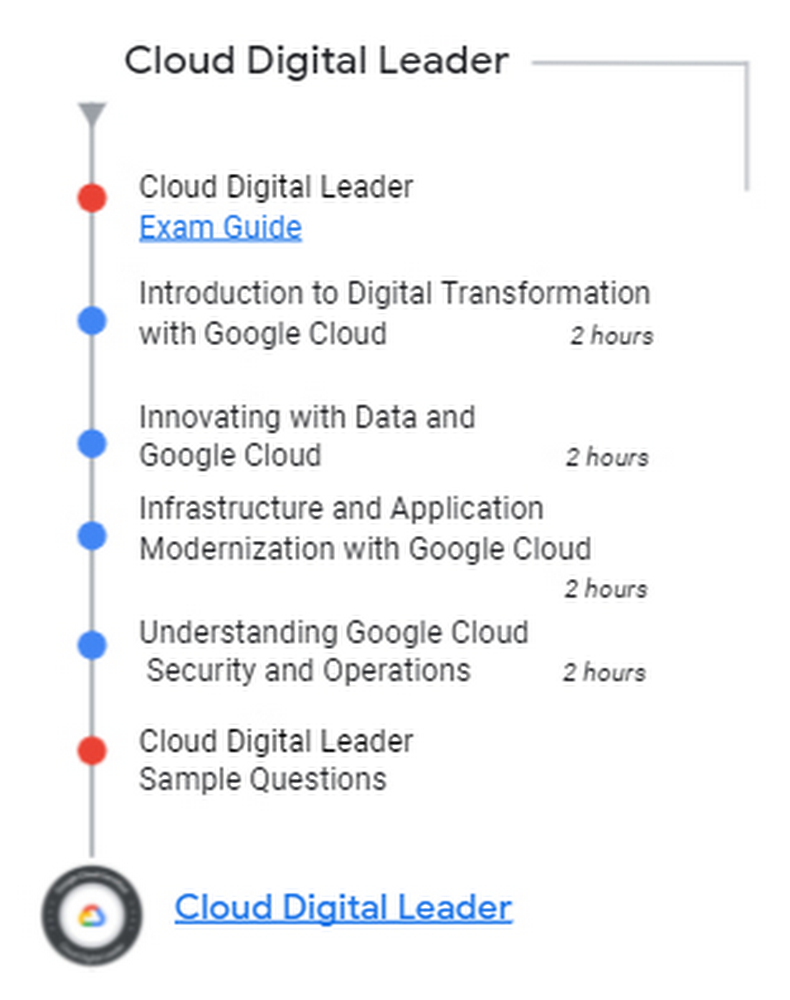
You asked for it, we listened! Today we’re announcing the Cloud Digital Leader learning pathway, our first offering for business professionals that includes both training and certification. The Cloud Digital Leader learning pathway is designed to skill-up individuals and teams that work with technical Google Cloud practitioners so they can contribute to strategic cloud-related business decisions. A Cloud Digital Leader understands and can distinguish not only the various capabilities of Google Cloud core products and services, but also how they can be used to achieve desired business goals.We asked one of our customers that participated in the beta why they are excited about this new offering and they said:”ANZ is transforming its technology landscape by addressing the size and complexity of our current estate and fully embracing cloud. Our strategic advantage has always been our people; they are crucial to the transformation. One of the best ways to ensure they are set up for success is to provide relevant learning opportunities. The benefit of the Google Cloud Digital Leader certification is it provides general cloud knowledge and a shared language across the bank so no one is left behind. This means our technology teams as well as our business and enablement teams.”, Michelle Dobson, Head of Cloud COE & Enablement, Australia and New Zealand Banking Group LimitedCloud Digital Leader Training The Cloud Digital Leader training courses are designed to increase your team’s cloud confidence so they can collaborate with colleagues in technical cloud roles and contribute to informed cloud-related business decisions.The courses provide customers with fundamental knowledge related to digital transformation with Google Cloud. The four courses are:1: Introduction to Digital Transformation with Google Cloud2: Innovating with Data and Google Cloud3: Infrastructure and Application Modernization with Google Cloud4: Understanding Google Cloud Security and OperationsCompletion of these courses is recommended (not required) as one of the steps to prepare for the Google Cloud Digital Leader Certification exam. Cloud Digital Leader CertificationAcquiring the Google Cloud Digital Leader Certification is an opportunity for your entire team to demonstrate its strong understanding of cloud capabilities, which can enhance organizational innovation with Google Cloud.The Cloud Digital Leader exam is role-independent and does not require hands-on experience with Google Cloud. The Cloud Digital Leader exam assesses your knowledge in three areas:General cloud knowledgeGeneral Google Cloud knowledgeGoogle Cloud products and servicesThis certification is a new offering and additional resources will be available soon. Check back on the learning path page.Start Innovating with Google CloudGet your team started on their Cloud Digital Leader learning journey! Speak to your sales representative about skilling up your team.Review the Cloud Digital Leader Certification exam using the exam guide. Take the Cloud Digital Leader learning pathRelated ArticleNew to Google Cloud? Here are a few free trainings to help you get startedFree resources like hands-on events, on-demand training, and skills challenges can help you develop the fundamentals of Google Cloud so y…Read Article
Quelle: Google Cloud Platform
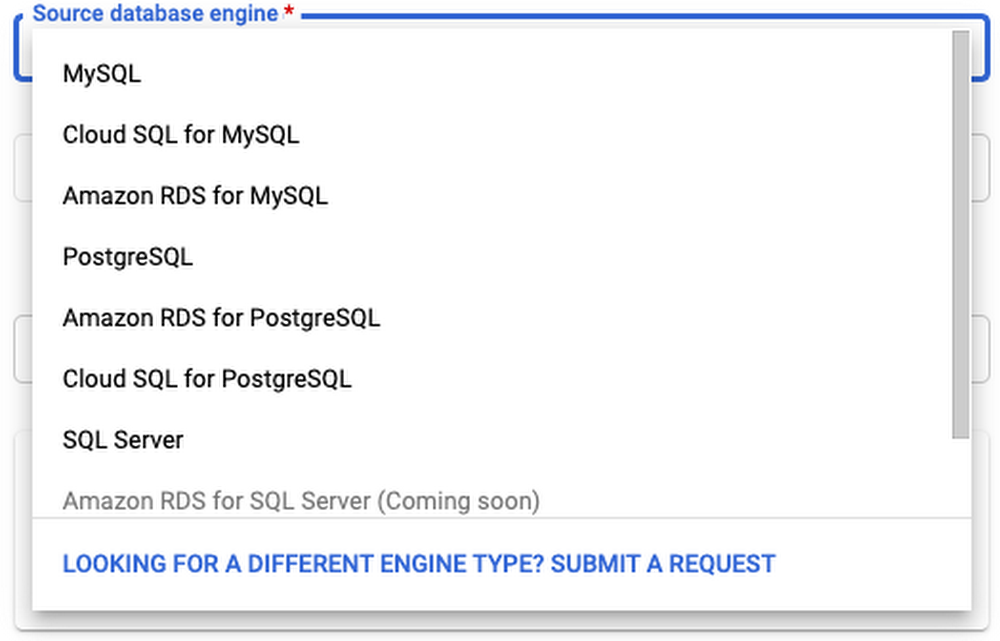
As many of you are probably aware, Postgres is ending long term support for version 9.6 in November, 2021. However, if you’re still using version 9.6, there’s no need to panic! Cloud SQL will continue to support version 9.6 for one more year after in-place major version upgrades becomes available. But if you would still like to upgrade right now, Google Cloud’s Database Migration Service (DMS) makes major version upgrades for Cloud SQL simple with low downtime.This method can be used to upgrade from any Postgres version, 9.6 or later. In addition, your source doesn’t have to be a Cloud SQL instance. You can set your source to be on-prem, self-managed Postgres, or an AWS source to migrate to Cloud SQL and upgrade to Postgres at the same time!DMS also supports MySQL migrations and upgrades, but this blog post will focus on Postgres. If you’re looking to upgrade a MySQL instance, check out Gabe Weiss’s post on the topic.Why are we here?You’re probably here because Postgres 9.6 will soon reach end of life. Otherwise, you might want to take advantage of the latest Postgres 13 features, like incremental sorting and parallelized vacuuming for indexes. Finally, you might be looking to migrate to Google Cloud SQL, and thinking that you might as well upgrade to the latest major version at the same time. Addressing version incompatibilitiesFirst, before upgrading, we’ll want to look at the breaking changes between major versions. Especially if your goal is to bump up multiple versions at once (for example, upgrading from version 9.6 to version 13) you’ll need to account for all of the changes between those versions. You can find these changes by looking at the Release Notes for each version after your current version, up to your target version.For example, before you begin upgrading a Postgres 9.6 instance, you’ll need to first address the incompatibilities in version 10, including renaming any SQL functions, tools, and options that reference “xlog” to “wal”, removing the ability to store unencrypted passwords on the server, and removing support for floating point timestamps and intervals. Preparing the source for migrationThere are a few steps we’ll need to take before our source database engine is ready for a DMS migration. A more detailed overview of these steps can be found in this guide. First, you must create a database named “postgres” on the source instance. This database may already exist if your source is a Cloud SQL instance.Next, install the pglogical package on your source instance. DMS relies on pglogical to transfer data between your source and target instances. If your source is a Cloud SQL instance, this step is as easy as setting the cloudsql.logical_decoding and cloudsql.enable_pglogical flags to on. Once you have set these flags, restart your instance for them to take effect.This post will focus on using a Cloud SQL instance as the source, but you can find instructions for RDS instances here, and foron-prem/self-managed instances here. If your source is a self-managed instance (i.e. on Compute Engine), an on-premises instance, or an Amazon RDS/Aurora instance, this process is a little more involved. Once you have enabled the pglogical flags on the instance, you will need to install the extension on each of your source databases that is not one of the following template databases: template0 and template1. If you are using a source other than Cloud SQL, you can check here to see what source databases need to be excluded.If you’re running Postgres 9.6 or later on your source instance, run CREATE EXTENSION IF NOT EXISTS pglogical; on each database in the source instance that will be migrated. Next, you’ll need to grant privileges on the to-be-migrated databases to the user that you’ll be using to connect to the source instance during migration. Instructions on how to do this can be found here. When creating the migration job, you will enter the username and password for this user when creating a connection profile.Creating the migration job in DMSThe first steps for creating a migration job in DMS are to define a source and destination. When defining a source, you’ll need to create a connection profile by providing the username and password of the migration user that you granted privileges to earlier, as well as the IP address for the source instance. The latter will be auto-populated if your source is a Cloud SQL instance:Next, when creating the destination, you’ll want to make sure that you have selected your target version of Postgres:After selecting your source and destination, you choose a connectivity method (see this very detailed post by Gabe Weiss for a deep-dive on connectivity methods) and then run a test to make sure your source can connect to your destination. Once your test is successful, you’re ready to upgrade! Once you start the migration job, data stored in the two instances will begin to sync. It might take some time until the two instances are completely synced. You can periodically check to see whether all of your data has synced by following the steps linked here. All the while, you can keep serving traffic to your source database until you’re ready to promote your upgraded destination instance.Promoting your destination instance and finishing touchesOnce you’ve run the migration, there are still a few things you need to do before your destination instance is production-ready. First, make sure any settings you have enabled on your source instance are also applied to your destination instance. For example, if your organization requires that production instances only accept SSL connections, you can turn on the enforce-SSL flag for your instance. Some system configurations, such as high availability and read replicas, can only be set up after promoting your instance. To reduce downtime, DMS migrations run continuously while applications still use your source database. However, before you promote your target to the primary instance, you must first shut down all client connections to the source to prevent further changes. Once all changes have been replicated to the destination instance, you can promote the destination, ending the migration job. More details on best practices when promoting can be found here.Finally, because DMS depends on pglogical to migrate data, there are a few limitations of pglogical that DMS inherits:The first is that pglogical only migrates tables that have a primary key. Any other tables will need to be migrated manually. To identify tables that are missing a primary key, you can run this query. There are a few strategies you can use for migrating tables without a primary key, which are describedhere.Next, pglogical only migrates the schema for materialized views, but not the data. To migrate over the data, first run SELECT schemaname, matviewnameFROM pg_matviews; to list all of the materialized view names. Then, for each view, run REFRESH MATERIALIZED VIEW <view_name>Third, pglogical cannot migratelarge objects. Tables with large objects need to be transferred manually. One way to transfer large objects is to use pg_dump to export the table or tables that contain the large objects and import them into Cloud SQL. The safest time to do this is when you know that the tables containing large objects won’t change. It’s recommended to import the large objects after your target instance has been promoted, but you can perform the dump and import steps at any time.Finally, pglogical does not automatically migrate users. To list all users on your source instance, run du. Then follow the instructions linked here to create each of those users on your target instance. After promoting your target and performing any manual steps required, you’ll want to update any applications, services, load balancers, etc to point to your new instance. If possible, test this out with a dev/staging version of your application to make sure everything works as expected. If you’re migrating from a self-managed or on-prem instance, you may have to adjust your applications to account for the increased latency of working with a Cloud SQL database that isn’t right next to your application. You may also need to figure out how you can connect to your Cloud SQL instance. There are many paths to connecting to Cloud SQL, including the Cloud SQL Auth proxy, libraries for connecting with Python, Java, and Go, and using a private IP address with a VPC connector. You can find more info on all of these connection strategies in the Cloud SQL Connection Overview docs.We did it! (cue fireworks)If you made it this far, congratulations! Hopefully you now have a working, upgraded Cloud SQL Postgres instance. If you’re looking for more detailed information on using DMS with Postgres, take a look at our documentation.Related ArticleMySQL major version upgrade using Database Migration ServiceGoogle’s Database Migration Service gives us the tool we need to perform Major Version upgrades for MySQL.Read Article
Quelle: Google Cloud Platform

In November 2019 Docker announced our re-focusing on the needs of developers. Specifically, we set out to simplify the complexity of modern application development to help developers get their ideas from code to cloud as quickly and securely as possible. We’ve made a lot of progress since delivering against our public roadmap, including shipping Docker Desktop support for Apple M1 silicon, providing image vulnerability scanning for individuals and teams, delivering more trusted content via Docker Verified Publisher partnerships with more than 100 ISVs, and a whole lot more.
The Magic of Docker Desktop
In particular, to enable developers to spend more time building apps, less time on infrastructure, we’re investing heavily to ensure Docker Desktop continues to magically remove the complexities of installing, securing, and maintaining Docker Engine, Kubernetes, Compose, BuildKit, and other modern app development tools for Mac and Windows desktops. This includes installing and maintaining a Linux VM in the native hypervisors, automatically configuring networking between the VM, the local host, and remote hosts, and transparently bind mounting files into local containers. Our own Ben Gotch dug into the details of the magic in a recent blog post.
Community Support for Docker Subscription Updates
Our focus on this mission – investing in developers and reducing complexity – was the driver of the Docker subscription updates we announced on Aug 31, 2021. The overwhelming, positive support from our community, both individual developers and businesses, who recognize the value Docker provides has been humbling and encouraging. These community members see the updated terms for what they are – a means for us to sustainably scale our business and continue delivering delightful Docker experiences to all developers. To share just a few examples:
While the above are just a few of the community members who expressed their support, we are thankful to everyone who has responded and supported us, each in their own way.
Accelerating New Features in Docker Desktop
In fact, the support has been so overwhelmingly positive that we’re able to accelerate our investment and delivery of several highly-requested Docker Desktop features in our public roadmap:
Docker Desktop for Linux (“DD4L”). DD4L is the second-most popular feature request in our public roadmap, as organizations aspire to provide a consistent, productive, and secure development environment across their Mac, Windows, and Linux desktops. Docker Desktop for Linux will be available to all developers through the free Docker Personal and paid Docker Pro, Team, and Business subscriptions. If you’re interested in early access please sign-up for our developer preview program.Docker Desktop Volume Management. Released in June 2021, Docker Desktop Volume Management is proving popular with our Docker Pro and Docker Team users. Developers love the GUI-based visibility and tools for local container volumes, as it helps them avoid local storage surprises and simplifies container volume management. With the overwhelming support we’re receiving, we’re able to make Docker Desktop Volume Management available to all developers in Docker Personal.Docker Compose v2.0 GA. Completely re-written from Python to Go and installed, configured, and maintained with Docker Desktop, Docker Compose v2.0 answers several needs of developers, including integrations with AWS and Azure, support for Apple M1 silicon, and support for desktop GPUs. Beta released in June 2021, GA release at the end of October.
It’s been a very encouraging couple of weeks after our subscription updates announced Aug 31, 2021. We are grateful to the Docker community for its support, which is allowing us to invest faster and further in Docker Desktop features for all developers. As we do so, we want to ensure we continue focusing on what’s important to YOU, so please participate in our public roadmap discussions early and often.
Let’s go build, ship, and run!
The post Accelerating New Features in Docker Desktop appeared first on Docker Blog.
Quelle: https://blog.docker.com/feed/

Das passwortlose Anmelden wird bereits von einigen Microsoft-Kunden genutzt. Die Funktion wird nun auf alle Konten ausgeweitet. (Microsoft, Office-Suite)
Quelle: Golem

Große Pläne für Mechwarrior 5: Demnächst stapft neben einer Erweiterung ein großes kostenloses Update heran – erstmals auch auf Playstation. (Mechwarrior, Sony)
Quelle: Golem

Die Regierung will die Förderung von Plugin-Hybriden nur noch von der Reichweite abhängig machen. Zudem werden künftig Kleinstautos gefördert. Ein Bericht von Friedhelm Greis (Plugin-Hybrid, Technologie)
Quelle: Golem






