Skysphere Concept: Audi zeigt Elektro-Cabrio mit variablem Radstand
Der offene Roadster Skysphere Concept von Audi wird elektrisch angetrieben und zeigt, wie sich der Hersteller künftige Designs vorstellt. (Elektroauto, Auto)
Quelle: Golem

Der offene Roadster Skysphere Concept von Audi wird elektrisch angetrieben und zeigt, wie sich der Hersteller künftige Designs vorstellt. (Elektroauto, Auto)
Quelle: Golem

Ikea verkauft die Modul-Steckdosenleiste Åskväder in einer ersten Filiale in Deutschland, die allgemeine Markteinführung steht kurz bevor. (Ikea, Smart Home)
Quelle: Golem

Golem.de hat die Leserschaft gefragt, wie sie zu Windows 11 steht. Die Antworten zeigen ein eher positives Bild vom Betriebssystem. Von Oliver Nickel (Windows 11, Studie)
Quelle: Golem

Mit Version 91 des Firefox-Browsers setzt das Mozilla-Team außerdem auf das automatische Löschen von Cookies, was Datenlecks verhindern soll. (Firefox, Browser)
Quelle: Golem

Etwa fünf Monate nach der RX 6700 XT legt AMD mit einem neuen Modell nach. Der Verkauf der Radeon RX 6600 XT beginnt heute. (AMD Navi, AMD)
Quelle: Golem
One of the best things organizations can do to transform their operations is also one of the things they’re often hesitant to do: embrace automation. Read more about some common misconceptions of automation and how it can expand your possibilities as an organization.
Quelle: CloudForms
Critical care patients generate huge volumes of data about their current state which is a challenge for clinicians to digest. Suppose computers could help clinicians analyze the data and detect diseases like sepsis early, before patients are deathly ill. That’s what we’re working towards with artificial intelligence and machine learning.
Quelle: CloudForms
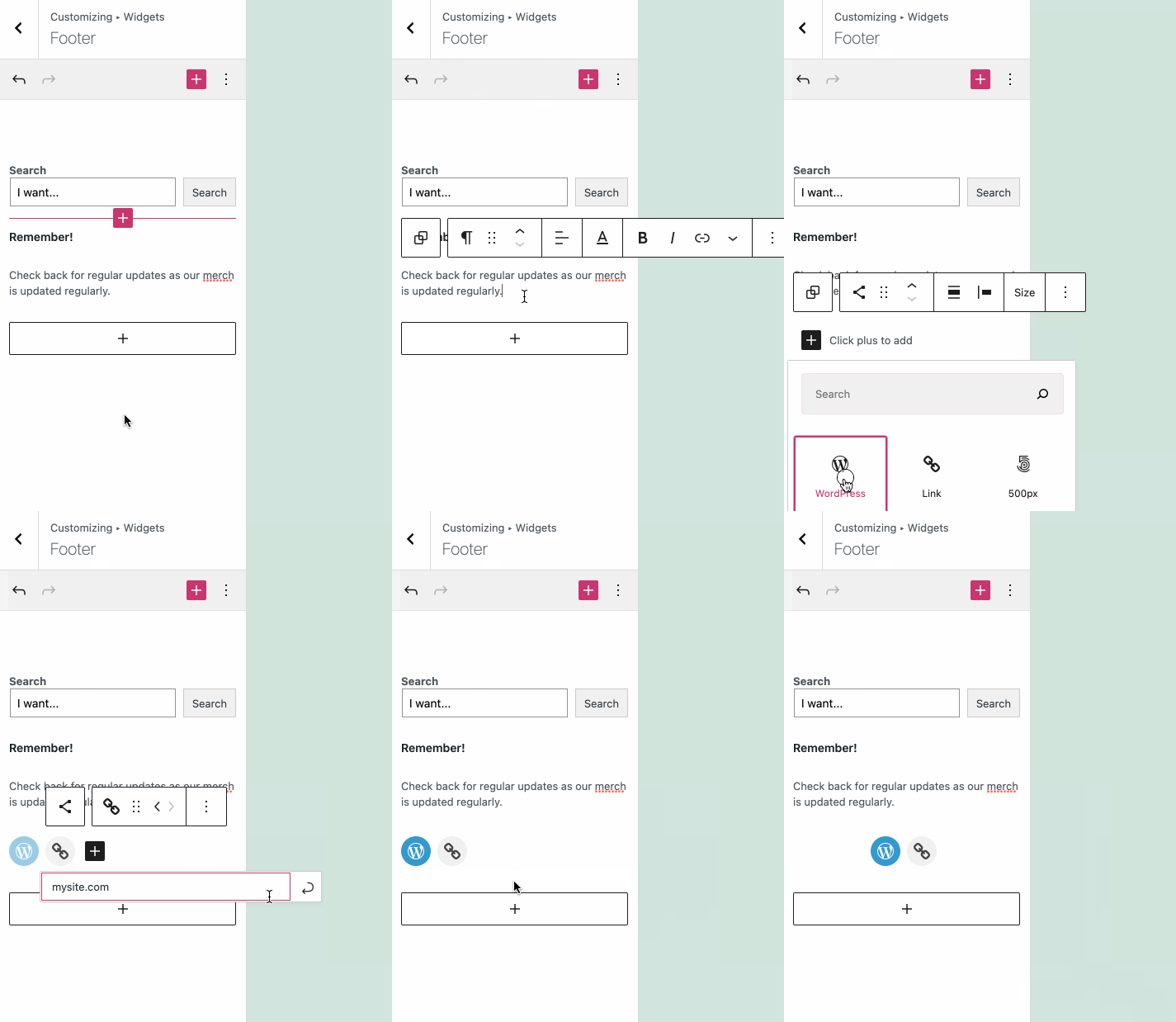
The block editor makes site creation fast and flexible. Now, you can use that same huge library of blocks available when editing your pages and posts to edit and customize your sidebars, headers, and footers.
What are Widgets?
Sidebars, headers, and footers on your WordPress.com website are powered by widgets. Widgets are small but powerful modules to arrange and display content and tools around the edges of your posts and pages. Until now, widgets have been the best way to insert a variety of content — from calendars to social icons — into the sidebar, header, and footer of your site.
Flexibility with the Block Editor
Setting up and managing widgets was a very static and often tricky process. The block editor you’re familiar with in pages and posts is now part of the widgets editor. This aims to put editing power in your control.
You’re no longer limited to just widgets — any block is for your choosing.
For example, in your sidebar, header, and footer, you can now:
Tweak the structure by adding columns or spacersQuickly add content like a Search block or a headerFormat content via colors and rich text editing
What About Older Widgets?
Every widget that exists today will be incorporated into blocks.
But don’t worry — your current widgets will still work and can be used alongside your other blocks. Even legacy widgets that don’t have a block equivalent will work. Just use your preferred method of inserting a block, search for the widget’s name, and insert.
Getting Started
If you’ve never edited the content in your sidebar, header, or footer, now is a great time to experiment!
To edit the content, go to Appearance → Customize → Widgets and you’ll now be able to directly add widgets and any blocks, while previewing exactly what they’ll look like on your site.
This update is just one more step on the way to a more intuitive site editing experience. Go forth and create!
Quelle: RedHat Stack
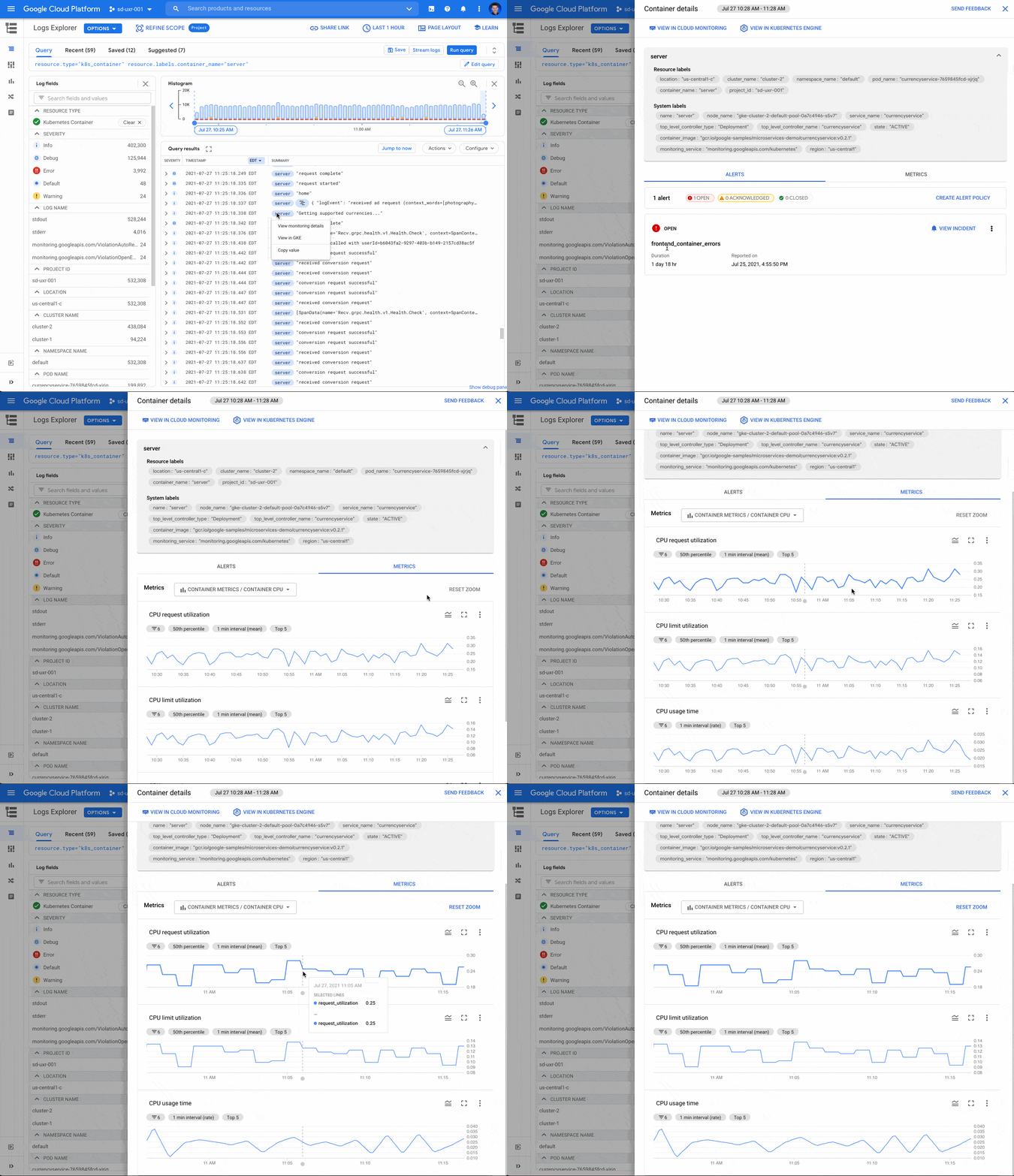
When you’re troubleshooting an application on Google Kubernetes Engine (GKE), the more context that you have on the issue, the faster you can resolve it. For example, did the pod exceed it’s memory allocation? Was there a permissions error reserving the storage volume? Did a rogue regex in the app pin the CPU? All of these questions require developers and operators to build a lot of troubleshooting context. Cloud Monitoring data for GKE in Cloud LoggingTo make it easier to troubleshoot GKE apps, we’ve added contextual Cloud Monitoring data accessible right from Cloud Logging. With this new feature, you can easily see the relevant pod, node and cluster events, metrics, alerts, and SLOs right from the log line itself. Additionally, the data loaded for a specific log entry is scoped to the Kubernetes resource, which saves you valuable time while investigating an app error.Today’s announcement builds on other recent integrations including the addition of a logs tab nested in the details page of each of your GKE resources and combining metrics and logs in the GKE Dashboard in Monitoring. Now, wherever you start your troubleshooting journey – in Monitoring, Logging or GKE – you have the observability data at your fingertips. For example, if you’re troubleshooting a GKE app error in Cloud Logging and looking at the app logs, you can now view the metric charts for container restarts, uptime, memory, CPU and storage without leaving the log entry. Active alerts are highlighted on the alerts tab, which can provide helpful context for troubleshooting. This unique and integrated experience brings together critical log and metric data for the specific Kubernetes resource where your app is running.Viewing Monitoring data for GKE from a log lineFrom a k8s_container, k8s_pod, k8s_node, or k8s_cluster log, select the blue chip with the resource.labels resource name and then select “View Monitoring details” to access an integrated metrics panel directly from the Logs Explorer. Selecting “View in GKE” opens the detailed view of the GKE resource in the Cloud Console on a new tab.The metrics panel provides a lot of contextual data including alerts, Kubernetes events and metrics related to the GKE resource.Alerts Alerts triggered by the GKE resource are displayed under the alerts tab. The color-coded alert status provides an easy way to see ongoing, acknowledged and closed incidents. Selecting “VIEW INCIDENT” opens the incident details in Cloud Monitoring. If you want to create a new alert, use the link to create a brand new alert policy.Kubernetes events for clusters and podsThe metrics panel provides select events for clusters and pods. For each event, the name, associated resource and a link to view/copy the log message are displayed. Kubernetes events can provide important information to help determine the root cause of an issue. For example, if a FailedScheduling event is displayed, this can quickly guide troubleshooting to check the resources available to the Kubernetes resource.Metrics for containers, pods and nodesThe metrics tab contains metrics bundles for container (default), pod and node metrics collected from the GKE cluster and reported in Cloud Monitoring. Each metric bundle offers pre-built charts that can be selected to view the CPU, memory, storage and container restarts. For example, by looking at the CPU or memory, you can determine whether there were any spikes in the metrics for the Kubernetes resources.More to comeWe’re committed to making Google Cloud’s operations suite the best place to troubleshoot your GKE apps. We’ve integrated logs directly into GKE resource details pages and built a specialized integrated GKE Dashboard, all to make it easier to troubleshoot GKE apps. However, there is still more coming and we’re already working hard to add new features to the metrics panels to surface even more context for troubleshooting GKE apps.Get started todayIf you haven’t already, to get started with Cloud Logging and Cloud Monitoring on GKE, viewdocumentation, watch a quick video on troubleshooting services on GKE and join the discussion in our new Cloud Operations page on the Google Cloud Community site.Related ArticleGKE operations magic: From an alert to resolution in 5 stepsTeams operating microservices increasingly rely on metrics, logs, and traces to identify and troubleshoot problems. The GKE Dashboard bri…Read Article
Quelle: Google Cloud Platform

A reverse proxy stands in front of your data, services, or virtual machines, catching requests from anywhere in the world and carefully checking each one to see if it is allowed.In order to decide (yes or no) the proxy will look at who and what.Who are you (the individual making the request)? What is your role? Do you have access permission (authorization)?What device are you using to make the request? How healthy is your device right now? Where are you located? At what time are you making the request?This issue of GCP Comics presents an example of accessing some rather confidential data from an airplane, and uses that airplane as a metaphor to explain what the proxy is doing.Click to enlargeReverse proxies work as part of the load balancing step when requests are made to web apps or services, and they can be thought of as another element of the network infrastructure that helps route requests to the right place. No one can access your resources unless they meet certain rules and conditions.If a request is invalid or doesn’t meet the necessary criteria set by your administrators, either because it is from an unauthorized person or an unsafe device, then the proxy will deny the request.Why might the proxy say no to my request? When assessing the user making the request, denial of access could be due to reasons such as:I’m in Engineering, but I am trying to access Finance data.I’m not even a part of the company.My job changed, and I lost access.Looking at the device originating the request, the proxy could deny access due to a number of factors, such as:Device operating system out of dateMalware detectedDevice is not reporting inDisk encryption missingDevice doesn’t have screen lockLeveraging identity and device information to secure access to your organization’s resources improves your security posture.ResourcesTo learn more about proxies and Zero Trust, check out the following resources:Overview of Identity-Aware ProxyExtending Zero Trust models to the webCreating a device-based access levelHow to set up a proxy for on-premises appsBeyondCorp Enterprise Quickstart GuideWant more GCP Comics? Visit gcpcomics.com & follow us on medium pvergadia & max-saltonstall, and on Twitter at @pvergadia and @maxsaltonstall. Be sure not to miss the next issue!Related ArticleWhat is zero trust identity security?A zero trust network is one in which no person, device, or network enjoys inherent trust. All trust, which allows access to information, …Read Article
Quelle: Google Cloud Platform






