5 ways Vertex Vizier hyperparameter tuning improves ML models

We recently launched Vertex AI to help you move machine learning (ML) from experimentation into production faster and manage your models with confidence—speeding up your ability to improve outcomes at your organization.But we know many of you are just getting started with ML and there’s a lot to learn! In tandem with building the Vertex AI platform, our teams are dropping as much best practices content as we can to help you come up to speed. Plus, we have a dedicated event on June 10th, Applied ML Summit, with sessions on how to apply ML technology in your projects, as well as grow your skills in this field. In the meantime, we couldn’t resist a quick lesson on hyperparameter tuning, because (a) it’s incredibly cool (b) you will impress your coworkers (c) Google Cloud has some unique battle tested tech in this area and (d) you will save time by getting better ML models into production faster. Vertex Vizier, on average, finds optimal parameters for complex functions in over 80% fewer trials than traditional methods. So it’s incredibly cool, but what is it?While machine learning models automatically learn from data, they still require user-defined knobs which guide the learning process. These knobs, commonly known as hyperparameters, control, for example, the tradeoff between training accuracy and generalizability.  Examples of hyperparameters are the optimizer being used, its learning rate, regularization parameters, the number of hidden layers in a DNN, and their sizes.Setting hyperparameters to their optimal values for a given dataset can make a huge difference in model quality. Typically, optimal hyperparameter values are found via grid searching a small number of combinations, or tedious manual experimentation. Hyperparameter tuning automates this work for you by searching for the best configuration of hyperparameters for optimal model performance. Vertex Vizier enables automated hyperparameter tuning in several ways:”Traditional” hyperparameter tuning: by this we mean finding the optimal value of hyperparameters by measuring a single objective metric which is the output of an ML model.  For example, Vizier selects the number of hidden layers and their sizes, an optimizer and its learning rate, with the goal of maximizing model accuracy.When hyperparameters are evaluated, models are trained and evaluated on splits of the data set. If evaluation metrics are streamed to Vizier (e.g. as a function of epoch) as the model is trained, Vizier’s early stopping algorithms can predict the final objective value, and recommend which unpromising trials should be early stopped. This conserves compute resources and speeds up convergence.Oftentimes, models are tuned sequentially on different data sets. Vizier’s built in transfer learning learns priors from previous hyperparameter tuning studies, and leverages them to converge faster on subsequent hyperparameter tuning studies.AutoML is a variant of #1, where Vertex Vizier performs both model selection, and also tunes architectures/non-architecture modifying hyperparameters. AutoML usually requires more code on top of Vertex Vizier (to ingest data etc), but Vizier is in most cases the “engine” behind the process. AutoML is implemented by defining a tree like (DAG) search space, rather than a “flat” search space (like in #1). Note that you can use DAG search spaces for any other purpose where searching over a hierarchical space makes sense.There are times when you may wish to optimize more than one metric. For example, we would like to optimize model accuracy, while minimizing model latency. Vizier can find thePareto frontier, which presents tradeoffs for multiple metrics, allowing users to choose the appropriate tradeoff. Simple example: I want to make a more accurate model, but would like to minimize serving latency. I do not know ahead of time what’s the tradeoff between the two metrics. Vizier can be used to explore and plot a tradeoff curve, so users can select on the most appropriate one. For example, “a latency decrease of 200ms will only decrease accuracy by 0.5%”Google Vizier is all yours with Vertex AIGoogle published the Vizier research paper in 2017, sharing our work and use cases for black-box optimization—i.e. The process of finding the best settings for a bunch of parameters or knobs when you can’t peer inside a system to see how well the knobs are working. The paper discusses our requirements, infrastructure design, underlying algorithms, and advanced features such as transfer learning that the service provides. Vizier has been essential to our progress with machine learning at Google, which is why we are so excited to make it available to you on Vertex AI.Vizier has already tuned millions of ML models at Google, and its algorithms are continuously improved for faster convergence and handling of real-life edge cases. Vertex Vizier’s models are very well calibrated and are self-tuning (they adapt to user data), and offer unique power features, such as hierarchical search spaces and multi-objective optimization. We believe Vertex Vizier’s set of features is a unique capability to Google Cloud, and look forward to optimizing the quality of your models by automatically tuning hyperparameters for you.To learn more about Vertex Vizier, check out these docs and if you are interested in what’s coming in machine learning over the next five years, tune in to our Applied ML Summit on June 10th, or watch the sessions on demand in your own time.Related ArticleGoogle Cloud unveils Vertex AI, one platform, every ML tool you needGoogle Cloud launches Vertex AI, a managed platform for experimentation, versioning and deploying ML models into production.Read Article
Quelle: Google Cloud Platform
Serve a TensorFlow Hub model in Google Cloud with Vertex AI

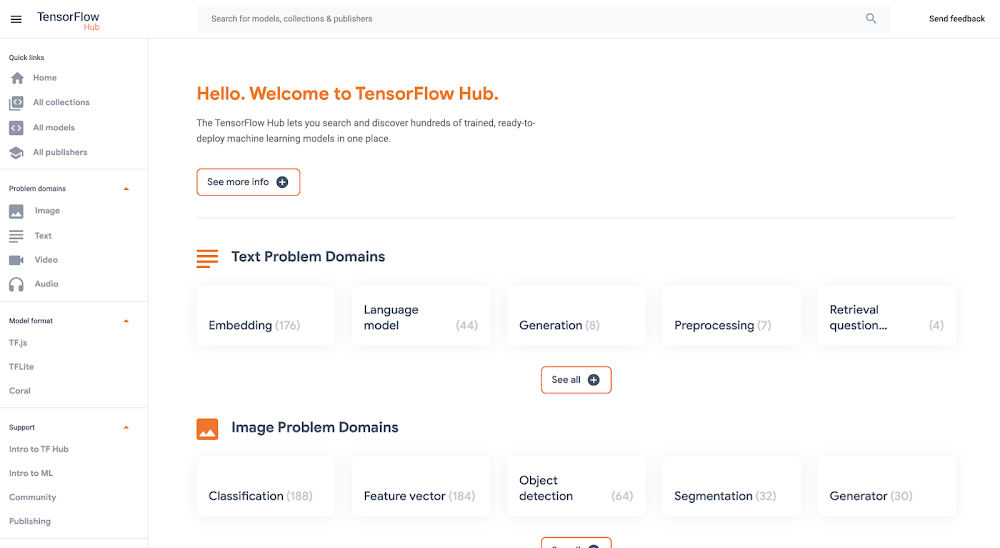
Good artists copy, great artists steal, and smart software developers use other people’s machine learning models.If you’ve trained ML models before, you know that one of the most time-consuming and cumbersome parts of the process is collecting and curating data to train those models. But for lots of problems, you can skip that step by instead using somebody else’s model that’s already been trained to do what you want–like detect spam, convert speech to text, or label objects in images. All the better if that model is built and maintained by folks with access to big datasets, powerful training rigs, and machine learning expertise.One great place to find these types of “pre-trained” models is TensorFlow Hub, which hosts tons of state-of-the-art models built by Google Research that you can download and use for free. Here you’ll find models for doing tasks like image segmentation, super resolution, question answering, text embedding, and a whole lot more. You don’t need a training data set to use these models, which is good news, since some of them are huge and trained on massive datasets. But if you want to use one of these big models in your app, the challenge then becomes where to host them (in the cloud, most likely) so they’re fast, reliable, and scalable. For this, Google’s new Vertex AI platform is just the ticket. In this post, we’ll download a model from TensorFlow Hub and upload it to Vertex’s prediction service, which will host our model in the cloud and let us make predictions with it through a REST endpoint. It’s a serverless way to serve machine learning models. Not only does this make app development easier, but it also lets us take advantage of hardware like GPUs and model monitoring features built into Vertex. Let’s get to it.Prefer doing everything in code from a Jupyter notebook? Check out this colab.Download a model from TensorFlow HubOn https://tfhub.dev/, you’ll find lots of free models that process audio, text, video, and images. In this post, we’ll grab one of the most popular Hub models, the Universal Sentence Encoder. This model takes as input a sentence or paragraph and returns a vector or “embedding” that maps the text to points in space. These embeddings can then be used for everything from sentence similarity to smart search to building chatbots (read more about them here).On the Universal Sentence Encoder page, click “Download” to grab the model in TensorFlow’s SavedModel format. You’ll download a zipped file that contains a directory formatted like so:-universal-sentence-encoder_4          -assets              -saved_model.pb          -variables                  – variables.data-00000-of-00001                  – variables.indexHere, the saved_model.pb file describes the structure of the saved neural network, and the data in the variables folder contains the network’s learned weights.On the model’s hub page, you can see it’s example usage:You feed the model an array of sentences and it spits out an array of vectors.Without this example, we can still learn about what input and output the model supports by using TensorFlow’s SavedModel CLI. If you’ve got TensorFlow installed on your computer, in the directory of the Hub model you downloaded, run:For this model, that command outputs:From this, we know that our model expects as input a one-dimensional array of Strings. We’ll use this in a second.Getting started with Vertex AIVertex AI is a new platform for training, deploying, and monitoring machine learning models launched this year at Google I/O.For this project, we’ll just use the prediction service, which will wrap our model in a convenient REST endpoint.To get started, you’ll need a Google Cloud account with a GCP project set up. Next, you’ll need to create a Cloud Storage bucket, which is where you’ll upload the TensorFlow Hub model. You can do this from the command line using gsutil:If this model is big, this could take a while!In the side menu, enable the Vertex AI API. Once your Hub model is uploaded to Cloud Storage, it’s straightforward to import it into Vertex AI following the docs or this quick summary:On the Vertex AI “Models” tab, click import:2. Choose any name for your model:3. Choose a compatible version of TensorFlow to use with your model (for newer models, >= 2.0 should work). Select “GPU” if you want to pay for GPUs to speed up prediction time:4. Point “Model artifact location” to the model folder you uploaded to Cloud Storage:5. Click “Import.” 6. Once your model is imported, you’ll be able to try it out straight from the models tab. Click on the name of your model:7. Here in the model page, you can test your model right from the UI. Remember how we inspected our model with the saved_model_cli earlier and learned it accepted as input an array of strings? Here’s how we can call the model with that input:8. Once you’ve verified your model works in the UI, you’ll want to deploy it to an endpoint so you can call it from your app. In the “Endpoint” tab, click “Create Endpoint” and select the model you just imported:9. Voila! Your TensorFlow Hub model is deployed and ready to be used. You can call it via POST request from any web client or using the Python client library:Now that we’ve set our TensorFlow Hub model on Vertex, we can use it in our app without having to think about (most of) the performance and ops challenges of using big machine learning models in production. It’s a nice serverless way to get building with AI fast. Happy hacking!Related ArticleWhat is Vertex AI? Developer advocates share moreDeveloper Advocates Priyanka Vergadia and Sara Robinson explain how Vertex AI supports your entire ML workflow—from data management all t…Read Article
Quelle: Google Cloud Platform
Our journey from office-centric to remote-first

Docker Inc. started like many startups with engineers working from a single location. For us, this was in the Bay Area in the US. We were very office-centric, so the natural way to increase diversity and to get engineers from different cultures to work together was to open new offices in diverse locations. Right from the start, our goal was to mix American and European ways of producing software, giving us the best of both cultures.

Step 1 – Opening European offices

In 2015, Docker started to open offices in Europe, starting with Cambridge in the United Kingdom and followed by Paris in France. With these two locations, the long road to gaining experience working with remote employees began.

Having multiple offices scattered around the world is different from being fully remote. But you still start experiencing some of the challenges of not having everybody in the same location simultaneously. We spent a great deal of our time on planes or trains visiting each other.

Despite the robust open-source culture of the company, which shows that you can build great software while not having everybody in the same room, we still had a very office-centric culture. A lot of the context of a given product conversation or decision was linked to a given office. When you were not in the office where the decision was made, you only had partial information about the decision.

We learned a lot during this time: organizing work effectively and enjoyably while appreciating different cultures, time zones (France and US West Coast are 9 hours apart…), paperwork, salary expectations, public holidays, etc. 

Step 2 – Remote Engineers in an office-centric culture

The products Docker builds have a significant impact on the world, so hiring great engineers has never been a problem at Docker. We were artificially limiting ourselves to hiring talent close to one of our offices. We could open more offices or start hiring people as fully remote wherever they lived. In 2017, we hired a couple of very experienced remote engineers who had 5+ years of experience working remotely. They brought a lot of their best practices, and with them, the company learned how to be better at working with remote engineers. 

One of the areas we made changes was in how we ran meetings. Instead of only having remote employees dial in and struggling to follow conversations in conference rooms, we got everyone, even those in offices, to dial in with a good headset so that everyone was on the same level. This drastically improves the quality of meetings for those who are remote. 

We also learned the power of good writing as time zones forced communication to be more asynchronous. Concise, clear, and effective, writing became critical. 

We worked hard on our company core values, one of them is “Open Collaboration”. Following that value, we started to close 1600+ slack channels to concentrate our communication around just a few dozen. We advocated for communication to happen in public slack channels by default and limiting the usage of private channels to only when necessary.

Remote engineers felt better, but there was still a life in the office they couldn’t grasp, this is when we introduced Wormholes. Wormholes are pretty low-tech, they are a monitor, a camera, and speakers open in the offices all day. Remote engineers connect to it, have a view of the offices, and can feel the ambiance and hear general conversations. They can also slack someone to come close to the wormhole for “direct” communication. They were pretty popular until we left our offices to start working from home.

Step 3 – Remote work during a worldwide pandemic

In early 2020, once we were pretty experienced at remote working, we advocated for all positions to be open in any country that we had legal entities, making it easier for us to hire good talent.

Then Covid hit us along with everyone else. Relatively confident in our experience of working remotely, we thought that we were more ready than others to have everyone working at home. We quickly realized that working remotely and working remotely through a pandemic are not the same at all. 

While we had the software and culture to embrace a remote-first workforce, the pandemic itself brought new challenges. Not being able to see each other in the office or family and relatives for such a long time has taken a toll on everybody. This also highlighted inequality that we didn’t realize before: people with small apartments, young kids, or living alone were hit harder than those living with relatives and enjoying a large house.

These hard-learned lessons fueled the way we shape the future of work at Docker. Giving employees help to set up their home office, helping them move from one city to another, and generally spending enough time and energy making sure everybody is comfortable as we transition to this exciting new future of work.

Step 4 – Embracing remote-first

While other companies are pushing their employees to get back to offices, we decided that there is no turning back for Docker Inc. and that we will stay remote-first. All of our offices are closed and will remain so. When Covid releases its pressure on the world, we will offer employees who live near to each other support to meet up and continue to collaborate and drive our culture, while we will look for chances to do this as a whole company both remote and in-person as things return to normal in the future. 

Our journey from office-centric to remote-first has been exciting, and we’re eager to get even better at being remote-first. 

We are now in a position to hire almost wherever you are, so if you’re interested in living this experience with us while producing impactful software, we have positions open in Engineering and Product. 
The post Our journey from office-centric to remote-first appeared first on Docker Blog.
Quelle: https://blog.docker.com/feed/

DockerCon Live 2021: A Look Back at What’s New

Nearly 80,000 participants registered for DockerCon Live 2021! There were fantastic keynotes, compelling sessions, thousands of interactions and everything in-between that a developer and development teams need to help solve their day-to-day application development challenges.

In all that excitement, you might have missed the new innovations that Docker announced to make it easier for developers to build, share and run your applications from code to cloud. These enhancements are a result of Docker’s continued investment and commitment to make sure developers have the best experience possible while making app development more efficient and secure.

Application security is directly tied to the software supply chain. Developers are realizing the importance of integrating security as early as possible in the development process. They  must now consider the security directives of their organization and associated compliance rules while also enabling their teams to work in the most secure, efficient way possible.

These new product enhancements bolster security in a number of dimensions including scanning for vulnerabilities during different development stages and increasing team security by offering tools such as audit logs and scoped access tokens.  

Take a look at what we announced:

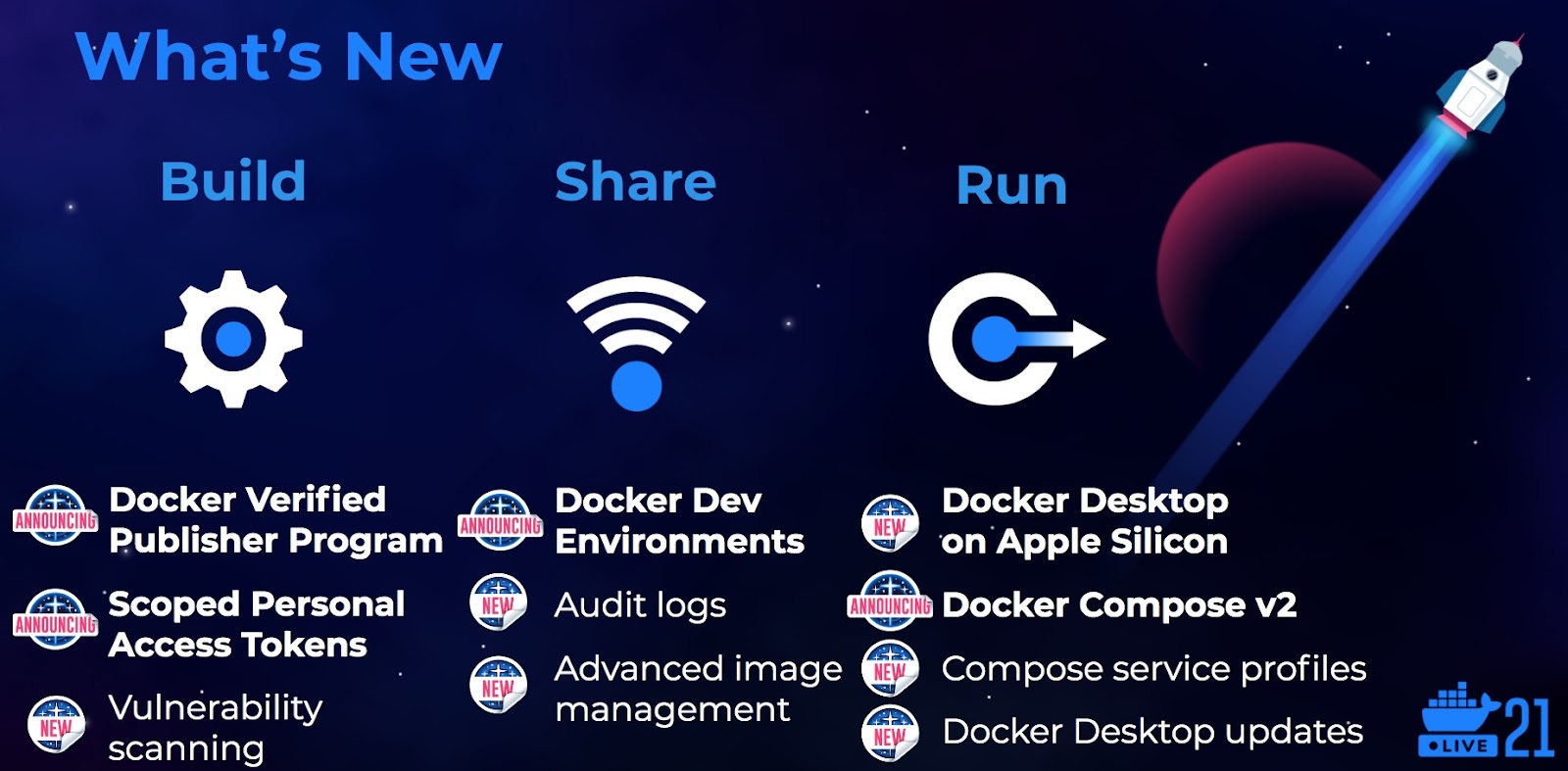
Verified Publisher ProgramDocker launched the Docker Verified Publisher program to provide access to Docker differentiated and trusted content that developers can leverage as reliable building blocks for their applications. The Docker Verified Publisher offerings include popular developer components such as Bitnami and Spring software from VMWare, RedHat Universal Base Images (UBI), Canonical Ubuntu and more.

Docker Dev EnvironmentsDocker Development Environments form the foundation of Docker’s new collaborative team development experience. It empowers teams to work better together to create novel, new value for customers by spending less time setting up and debugging environments, bringing the ease of use and reproducibility of containers to an interactive development environment. Developers can now easily share more than just their code, taking the dependencies and wider application context and sharing this with a teammate as simply as doing a docker push. Docker Development Environments will be available this summer. 

Docker Compose v2Docker continues investing in Docker Compose, a developer favorite tool for running multiple container applications. Version 2 incorporates the docker compose command into the Docker CLI. Compose now supports GPU configuration for Windows and Linux as well as Compose Service Profiles. Compose Service profiles can help your team to run different sets of services associated with a profile when you’re debugging vs testing vs developing, while managing all of that configuration in one docker-compose.yml. Docker Compose v2 is currently available in Docker Desktop and will be included in the Docker Linux packages later in the year by default.

Scoped Access TokensWith access to software supply chains becoming a higher security concern, Docker is updating Personal Access Tokens (PATs), to support fine-grained permissioning.  The new Docker token permissions, which are scheduled to release later this summer, include the options to define access that is read only, or read and write or read public repos only. This security feature provides developers and their managers with tighter control over which teams, and which automated application delivery pipelines have access to their code.Learn more in our press release.

Advanced Image ManagementDocker’s Advanced Image Management Dashboard available on Docker Hub for Docker Pro and Team users provides developers with a new level of access and fine grained control for all of the content stored in Docker Hub. Developers can now remove old content and explore older versions of pushed images. 

Vulnerability Scanning Docker also launched vulnerability scanning options as part of Docker Hub and Docker Desktop in conjunction with our partner Snyk to include security testing options along multiple points of the developer inner loop. Docker is also bringing ‘docker scan’ to the Docker CLI on LINUX with the same seamless CLI experience that developers are familiar with. Read more about the Snyk partnership.

Audit LogsAudit logs provide owners of Docker Team accounts a report of all their team member activities.  Team leaders can view and track any changes that are made, that date that a change was made and who initiated the change.  

Docker Desktop on Apple SiliconDocker recently announced support for Docker Desktop on the Apple M1 continuing to support developers in our community with their choice of local development environments. Learn more  

Compose Service ProfilesCompose Service profiles help development teams to run different sets of services associated with a profile when debugging, testing or developing while managing all of that configuration in one docker-compose.yml. 

Docker Desktop UpdatesUpdates to Docker Desktop include integration of Compose, Compose Service profiles and BuildX.  BuildX is Docker’s next-gen build command and enables developers to do multi-architecture builds, share those builds with dev teams and the community on DockerHub, speed up build processes with remote caches and so much more. 

Want to get started right away?

Save 20% off Docker Pro and Team Subscriptions  New and returning customers can use the DOCKERCON21 promo code to receive a 20% discount for an annual subscription, or for the first 3 months of a monthly subscription. Offer is valid until 11:59 PM PT on June 11, 2021. Visit https://www.docker.com/pricing
The post DockerCon Live 2021: A Look Back at What’s New appeared first on Docker Blog.
Quelle: https://blog.docker.com/feed/

Neue neuronale Text-zu-Sprache-Stimme in kanadischem Französisch für Amazon Polly

Wir freuen uns, heute die allgemeine Verfügbarkeit von Gabrielle, Amazon Pollys erster neuronaler Text-zu-Sprache-Stimme in kanadischem Französisch bekanntgeben zu dürfen. Bei Amazon Polly handelt es sich um einen Service, der Text in natürliche Sprache umwandelt. Ab sofort können Kunden unter zwei weiblichen Stimmen in kanadischem Französisch auswählen: Chantal, eine standardmäßige Text-zu-Sprache-Stimme und die gerade eingeführte Gabrielle.
Quelle: aws.amazon.com

Amazon QLDB unterstützt IAM-basierte Zugriffsrichtlinien für PartiQL-Abfragen und Ledger-Tabellen

Amazon Quantum Ledger Database (Amazon QLDB) unterstützt ab sofort erweiterte Amazon-IAM-Berechtigungen (Identity Access Management) für Authentifizierung, Abfragen und Datenzugriff in QLDB. Diese Version baut auf dem bestehenden Berechtigungsmodell von Amazon QLDB auf und fügt eine Trennung des Zugriffs nach PartiQL-Befehl und Ledger-Tabelle hinzu. Mit dieser Funktion können QLDB-Kunden nun detailliertere Richtlinien für die Datenbankautorisierung und den Datenbankzugriff implementieren, die strenge Sicherheitsanforderungen erfüllen.
Quelle: aws.amazon.com

Amazon CloudWatch wird um Metriken zur Nutzung von APIs der Steuerebene für alle AWS-Services ergänzt

Ab sofort bietet Amazon CloudWatch Bedienern und Entwicklern Transparenz und verwertbare Einblicke in die Nutzung von APIs der Steuerebene, und zwar für alle AWS-Services. Die Metriken zur Anzahl der API-Aufrufe werden in der CloudWatch-Konsole nach AWS-Services geordnet. Zudem sind Tausende von verfügbaren Nutzungsmetriken im AWS/Usage-Namespace durchsuchbar.
Quelle: aws.amazon.com






