Introducing container-native Cloud DNS: Global DNS for Kubernetes

Kubernetes networking almost always starts with a DNS request. DNS has broad impacts on your application and cluster performance, scalability, and resilience. That is why we are excited to announce the release of container-native Cloud DNS—the native integration of Cloud DNS with Google Kubernetes Engine (GKE) to provide in-cluster Service DNS resolution with Cloud DNS, our scalable and full-featured DNS service. Several new capabilities are introduced when using Cloud DNS as the cluster DNS provider:Managed DNS that removes the need for in-cluster DNS PodsDNS resolution local to every GKE node for high throughput, horizontally scalable DNS performanceMulti-regional, cross-cluster service discovery for GKE ServicesIntegration with Google Cloud’s operations suite for DNS monitoring and loggingContainer-native Cloud DNS lowers the operational burden on the cluster administrator by obviating the need for clusters to allocate resources for managing DNS. It also scales transparently—you no longer need to worry about bottlenecks due to increased demand for name resolutions. It provides capabilities for public and private DNS resolution for GKE applications outside of the cluster. This flexibility opens up many service discovery use-cases which reduce friction introduced by cluster boundaries.Finally, existing tooling, monitoring, and logging for Cloud DNS can be extended for all DNS resolution inside GKE as well without separate monitoring systems for containers and VMs. All in all, Cloud DNS provides a highly-available, globally distributed DNS infrastructure, managed entirely by GoogleWith Cloud DNS, every new Service creates a DNS record that can be resolved locally on the GKE node using the Cloud DNS dataplane. Cloud DNS local caching and resolution ensures that DNS requests don’t need to go across the network, improving performance dramatically.Click to enlargeCluster-scope DNSWith a new mode of operation called cluster-scope DNS, each GKE cluster gets its own private DNS zone. You can only resolve Services within the scope of this DNS zone, and VMs or Pods outside the cluster have no visibility to the DNS records of that cluster. This allows GKE clusters using kube-dns to transparently migrate to Cloud DNS without having to make application changes. The records are automatically synced between Cloud DNS with the ClusterIP or Pod IPs depending on the type of Service:Click to enlargeVPC-scope DNSThanks to its global, multi-regional scale, Cloud DNS enables a new mode of operation in GKE called VPC-scope DNS. This enables GKE DNS records to be resolvable within the entire VPC for truly global, multi-cluster service discovery.With the new ability to customize the cluster DNS domain, GKE can now provide unique domains for each cluster, allowing them to be uniquely resolved from a GKE cluster in a different region, a VM that isn’t part of GKE, or even an on-premises client that has access across a VPN.Click to enlargeVPC-scope DNS creates a single service discovery domain across all your GKE clusters and clients in the network. This seamless service discovery is completely automatic and can easily be enabled on a per-cluster basis.Between global service discovery, local DNS resolution on every node, and integration with Google Cloud’s operations suite and observability, container-native Cloud DNS vastly improves the operator experience while greatly improving application performance. Give it a try today and see for yourself how much your team can benefit!Related ArticleGKE best practices: Exposing GKE applications through Ingress and ServicesWe’ll walk through the different factors you should consider when exposing applications on GKE, explain how they impact application expos…Read Article
Quelle: Google Cloud Platform
Google Cloud VMware Engine now HIPAA compliant

We are excited to announce that as of April 1, 2021, Google Cloud VMware Engineis covered under the Google Cloud Business Associate Agreement (BAA), meaning it has achieved HIPAA compliance. Healthcare organizations can now migrate and run their HIPAA-compliant VMware workloads in a fully compatible VMware Cloud Verified stack running natively in Google Cloud with Google Cloud VMware Engine, without changes or re-architecture to tools, processes, or applications.Healthcare organizations increasingly use cloud platforms to personalize patient care, analyze large datasets more effectively, enhance research and development collaboration, and share medical knowledge. Leveraging cloud platforms can also help healthcare organizations increase the privacy and security of information systems, including protected health information (PHI), and, as a result, better comply with applicable laws and regulations while reducing the burden of compliance. For PHI, the Health Insurance Portability and Accountability Act of 1996 (HIPAA) set standards in the United States to protect individually identifiable health information. HIPAA applies to health plans, most healthcare providers, and healthcare clearinghouses that manage PHI electronically, and to persons or entities that perform certain functions on their behalf. With Google Cloud, organizations can leverage solutions that enable secure, continuous patient care and data-driven clinical and operational decisions with ease, while being empowered with collaboration and productivity tools. Further, Google Cloud Platform supports HIPAA compliance. We offer HIPAA-regulated customers the same products at the same pricing that is available to all customers, unlike many other cloud providers. For healthcare organizations that leverage VMware on-premises, having a consistent, cloud-integrated platform that provides seamless access to native cloud services unlocks the opportunity to extend, migrate, and modernize healthcare IT infrastructure and applications in a fast, low-risk manner at their own pace. This is especially important for mission-critical healthcare provider workloads, where having a low-risk way to adopt the cloud is important. Google Cloud VMware Engine offers that solution. By achieving coverage under Google Cloud’s BAA, Google Cloud VMware Engine enables healthcare organizations to realize the benefits of cloud computing and stay on track with their HIPAA compliance efforts without additional complexity. This is very relevant in hybrid scenarios, where customers would like to leverage other native cloud services such as analytics and big data processing, without having to enter into multiple BAAs.Google Cloud VMware Engine offers dedicated, isolated software-defined datacenter environments with fully redundant and dedicated 100 Gbps networking that are suitable for healthcare organizations to run applications storing and processing PHI data. Customers have the ability to encrypt their virtual storage area network (vSAN) using an external key management server. Healthcare customers can run their workloads in a native VMware environment—vSphere, vCenter, vSAN, NSX-T, and HCX—while benefiting from Google Cloud’s highly performant infrastructure to meet the needs of their workloads. Customers can connect their VMware applications to native Google Cloud services such as BigQuery and artificial intelligence (AI) to derive new insights from existing data and quickly make informed decisions. Protecting against and mitigating the impact of ransomware attacks is top-of-mind for Healthcare organizations. This requires building a cyber resilience program and back-up strategy to prepare for how users can restore core systems or assets affected by a security (in this case, ransomware) incident. This is a critical function for supporting recovery timelines and lessening the impact of a cyber event so organizations can get back to operating their business.  Google Cloud VMware Engine in combination with Google Cloud first party solutions such as Actifio Go, or partner solutions such as NetApp CVO can provide an efficient way to recover incremental point-in-time backups along with on-demand provisioning of new compute to  recover both data and infrastructure from Ransomware attacks quickly and efficiently. Healthcare customers can also use Google Cloud VMware Engine as a disaster recovery (DR) target for their on-premises VMware workloads. Healthcare organizations also need a business continuity plan for their mission critical applications. When a disaster occurs, hospitals need their data protected so they can quickly get back to treating patients. It is a HIPAA requirement that healthcare organizations must be able to recover from a natural disaster. Google Cloud VMware Engine offers a like-for-like cost-effective DR target for these customers. The DR environment can be operated without new training using the same tools as their on-premises deployment. Google Cloud VMware Engine is currently available in 12 regions across the globe including three regions in the US, which means our regional and multi-national customers can take advantage of this service for geographic diversification as well. If you are interested in understanding more and taking advantage of Google Cloud VMware Engine, contact your Google sales team now.For details, see HIPAA compliance on Google Cloud Platform.Note: This post has been contributed to by Manish Lohani, Product Management, Google Cloud and Wade Holmes, Solution Management, Google CloudRelated ArticleNew in Google Cloud VMware Engine: improved reach, networking and scaleThe latest version of Google Cloud VMware Engine is chock full of new features and integrations, including enhanced networking capabilities.Read Article
Quelle: Google Cloud Platform

How BIG is Cloud Bigtable?

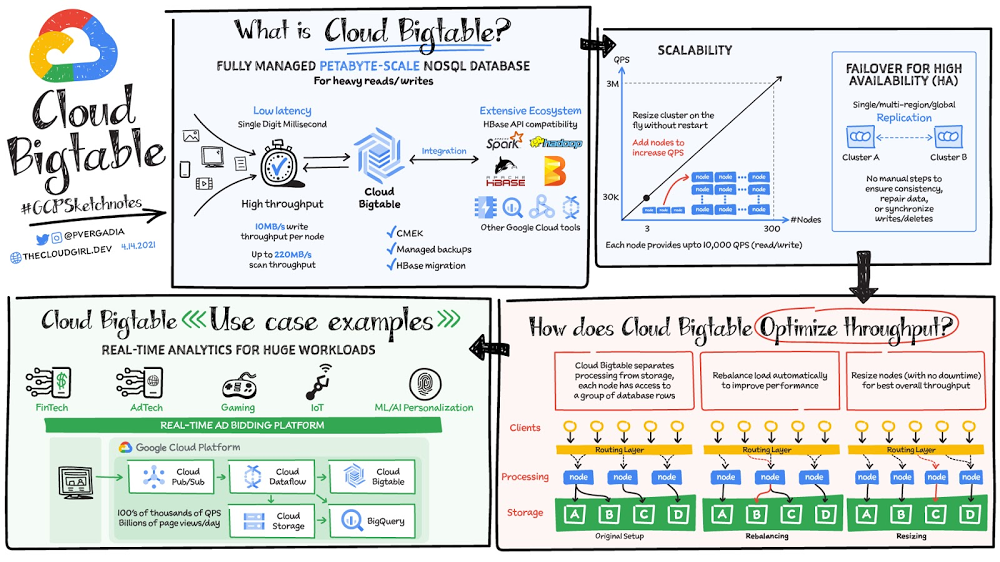
“Building an application that needs low latency and high throughput?”—You need a database that can scale for a large number of reads and writes. Cloud Bigtable is designed to handle just that. Cloud Bigtable is a fully managed wide-column NoSQL database that scales to petabyte-scale. It’s optimized for low latency, large numbers of reads and writes, and maintaining performance at scale. It offers really low latency of the order of single-digit milliseconds. It is an ideal data source for time series and MapReduce-style operations. Bigtable supports the open-source HBase API standard to easily integrate with the Apache ecosystem including HBase, Beam, Hadoop and Spark. It also integrates with Google Cloud ecosystem including Memorystore, BigQuery, Dataproc, Dataflow and more. Click to enlargeSome Cloud Bigtable FeaturesData is by default encrypted with Google managed encryption keys but, for specific compliance and regulatory requirements if customers need to manage their own keys, customer managed encryption keys (CMEK) are also supported.Bigtable backups let you save a copy of a table’s schema and data, then restore from the backup to a new table at a later time. Backups can help you recover from application-level data corruption or from operator errors such as accidentally deleting a table.Scale and High Availability (HA)How BIG is Bigtable? Overall,  Bigtable has nearly 10 Exabytes of data under management. It delivers highly predictable performance that is linearly scalable. Throughput can be adjusted by adding/removing nodes — each node provides up to 10,000 operations per second (read and write). You can use Bigtable as the storage engine for large-scale, low-latency applications as well as throughput-intensive data processing and analytics. It offers high availability with an SLA of 99.5% for zonal instances. It’s strongly consistent in a single cluster; replication between clusters adds eventual consistency. If you leverage Bigtable’s multi cluster routing across two clusters, the  SLA increases to 99.99% and if that routing policy is utilized across clusters in 3 different regions you get a 99.999% uptime SLA.Replication for Cloud Bigtable enables you to increase the availability and durability of your data by copying it across multiple regions or multiple zones within the same region. To use replication in a Bigtable instance, just create an instance with more than 1 cluster or add clusters to an existing instance. Bigtable supports up to 4 replicated clusters located in Google Cloud zones where Bigtable is available. Placing clusters in different zones or regions enables you to access your data even if one zone or region becomes unavailable. Bigtable treats each cluster in your instance as a primary cluster, so you can perform reads and writes in each cluster. You can also set up your instance so that requests from different types of applications are routed to different clusters. The data and changes to data are synchronized automatically across clusters. How does it optimize throughputThrough separation of processing and storage, Cloud Bigtable is able to automatically configure throughput by adjusting the association of nodes and data. In the rebalancing example, if Node A is experiencing a heavy load, the routing layer can move some of the traffic to a less heavily loaded node, improving overall performance. Resizing comes into play when a node is added to again ensure a balanced load across nodes, ensuring best overall throughput.Click to enlargeChoice of app profile and traffic routing can also affect performance. An app profile with multi-cluster routing automatically routes requests to the closest cluster in an instance from the perspective of the application, and the writes are then replicated to the other clusters in the instance. This automatic choice of the shortest distance results in the lowest possible latency. An app profile that uses single-cluster routing can be optimal for certain use cases, like separating workloads or to have read-after-write semantics on a single cluster, but it will not reduce latency in the way multi-cluster routing does.Replication can improve read throughput, especially when you use multi-cluster routing. And it can reduce read latency by placing your data geographically closer to your users.  Write throughput does not increase with replication because write to one cluster must be replicated to all other clusters in the instance. Resulting in each cluster spending the CPU resources to pull changes from the other clusters.ConclusionBigtable is a database of choice for use cases that require a specific amount of  scale or throughput with strict latency requirements, such as IoT, AdTech, FinTech, gaming and ML based personalizations. You can ingest 100s of thousands of events per second from websites or IoT devices through Pub/Sub, process them in Dataflow and send them to Cloud Bigtable. For a more in-depth look into Cloud Bigtable check out the documentation or join the upcoming webinar with our experts Build high-throughput, low-latency apps with Cloud Bigtable.For more #GCPSketchnote, follow the GitHub repo. For similar cloud content follow me on Twitter @pvergadia and keep an eye out on thecloudgirl.dev.Related ArticleBigtable vs. BigQuery: What’s the difference?Bigtable vs BigQuery? What’s the difference? In this blog, you’ll get a side-by-side view of Google BigQuery and Google Cloud Bigtable.Read Article
Quelle: Google Cloud Platform

Ankündigung von R5d-Instances und Lookup-Cache für Amazon Neptune

Ab sofort können Sie Ihre RDF/SPARQL- oder Apache-TinkerPop-Graph-Anwendung mit R5d-Instances auf Amazon Neptune starten. Der Instance-Typ R5d basiert auf dem Amazon-EC2-Nitro-System und verfügt über lokalen NVMe-basierten SSD-Block-Level-Speicher. Neptune-R5d-Instances führen einen Lookup-Cache ein, der dank einem NVMe-SSD-Speicher mit niedriger Latenz die Leistung von Leseabfragen verbessert und Datenabrufe aus dem Speicher reduziert.
Quelle: aws.amazon.com

Mit AWS Glue Studio können Sie jetzt Einstellungen für Streaming-ETL-Aufträge festlegen

Mit AWS Glue Studio können Sie jetzt die Einstellungen für Ihren Streaming-ETL-Auftrag (Extrahieren, Transformieren und Laden) im visuellen Auftragseditor festlegen. Mit dieser Funktion können Sie Ihre AWS-Glue-Streaming-ETL-Aufträge für Ihre Anwendung optimieren. Sie können die Fenstergröße für das Lesen von Daten aus dem Datenstrom wählen, ob das Schema jedes Datensatzes erkannt oder das Schema aus dem AWS Glue Data Catalog verwendet werden soll, sowie Verbindungseinstellungen, die eine Feinabstimmung vornehmen, wie der AWS Glue-Auftrag aus dem Stream liest.
Quelle: aws.amazon.com





