The benefits of serverless for the banking and financial services industry

The financial services industry, like many industries, is currently undergoing a radical shift. In addition to the change to all-digital transactions, customers have come to expect comprehensive services that are able to meet their needs when, where and how they want them. In order to keep up with rapidly changing customer demands and remain compliant with industry regulations, financial services organizations must have the right IT infrastructure and processes in place. 
Quelle: CloudForms

Why you need to explain machine learning models

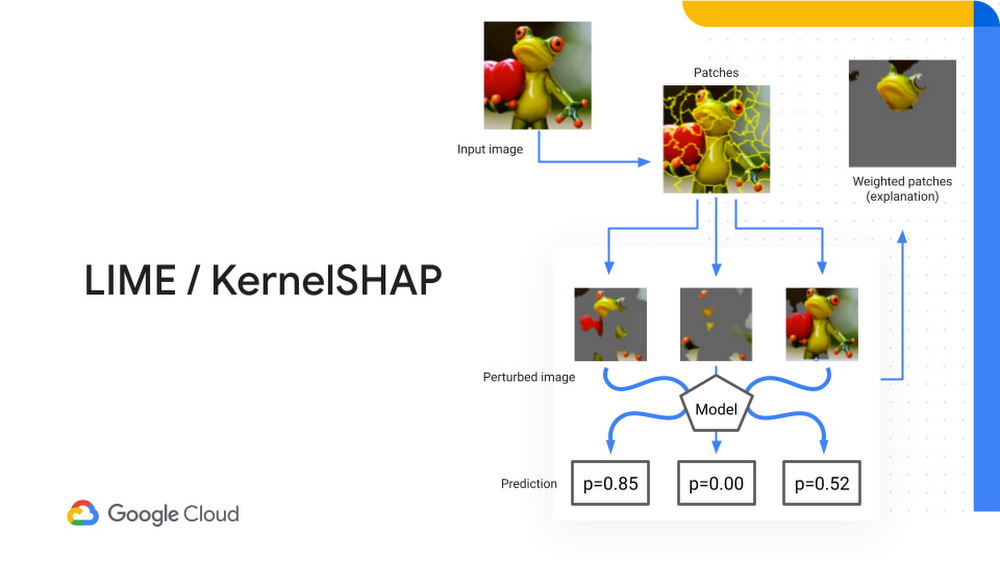
Many companies today are actively using AI or have plans to incorporate it into their future strategies — 76% of enterprises are now prioritizing AI and ML over other initiatives in their IT budgets and the global AI industry is expected to reach over $260 billion by 2027.  But as AI and advanced analytics become more pervasive, the need for more transparency around how AI technologies work will be paramount. In this post, we’ll explore why explainable AI (XAI) is essential to widespread AI adoption, common XAI methods, and how Google Cloud can help. Why you need to explain ML modelsAI technology suffers from what we call a black box problem. In other words, you might know the question or the data (the input), but you have no visibility into the steps or processes that provide you with the final answer (the output). This is especially problematic in deep learning and artificial neural network approaches, which contain many hidden layers of nodes that “learn” through pattern recognition. Stakeholders are often reluctant to trust ML projects because they don’t understand what they do. It’s hard for decision-makers to relinquish control to a mysterious machine learning model, especially when it’s responsible for critical decisions. AI systems are making predictions that have a profound impact, and in some industries like healthcare or driverless cars, it can mean the difference between life and death. It’s often hard to get support that a model can be trusted to make decisions, let alone make them better than a human can—especially when there is no explanation of how that decision was made. How did the AI model predict or make a decision? How can you be sure there is no bias creeping into algorithms? Is there enough transparency and interpretability to trust the model’s decision? Decision-makers want to know the reasons behind an AI-based decision, so they have the confidence that it is the right one. In fact, according to a PwC survey, the majority of CEOs (82%) believe that AI-based decisions must be explainable to be trusted.What is Explainable AI? Explainable AI(XAI) is a set of tools and frameworks that can be used to help you understand how your machine learning models make decisions. This shouldn’t be confused with showing a complete step-by-step deconstruction of an AI model, which can be close to impossible if you’re attempting to trace the millions of parameters used in deep learning algorithms. Rather, XAI aims to provide insights into how models work, so human experts are able to understand the logic that goes into making a decision. When you apply XAI successfully, it offers three important benefits: 1. Increases trust in ML modelsWhen decision-makers and other stakeholders have more visibility into how a ML model found its final output, they are more likely to trust AI-based systems. Explainable AI tools can be used to provide clear and understandable explanations of the reasoning that led to the model’s output. Say you are using a deep learning model to analyze medical images like X-rays, you can use explainable AI to produce saliency maps (i.e. heatmaps) that highlight the pixels that were used to get the diagnosis. For instance, a ML model that classifies a fracture would also highlight the pixels used to determine that the patient is suffering from a fracture.2. Improves overall troubleshooting Explainability in AI can also enable you to debug a model and troubleshoot how well a model is working. Let’s imagine your model is supposed to be able to identify animals in images. Over time, you notice that the model keeps classifying images of dogs playing in snow as foxes. Explainable AI tools make it easier to figure out why this error keeps occurring. As you look into your explainable AI models that you’re using to show how a prediction is made, you discover that that ML model is using the background of an image to differentiate between dogs and foxes. The model has mistakenly learned that domestic backgrounds are dogs and snow in an image means the image contains a fox. 3. Busts biases and other potential AI potholesXAI is also useful for identifying sources of bias. For example, you might have a model to identify when cars are making illegal left hand turns. When you are asked to define what the violation is based on in an image, you find out that the model has picked up a bias from the training data. Instead of focusing on cars turning left illegally, it’s looking to see if there is a pothole. This influence could be caused by a skewed dataset that contained a large amount of images taken on poorly maintained roads, or even real-bias, where a ticket might be more likely to be given out in an underfunded area of a city. Where does explainability fit into the ML lifecycle? Explainable AI should not be an afterthought that’s done at the end of your ML workflow. Instead, explainability should be integrated and applied every step of the way—from data collection, processing to model training, evaluation, and model serving. There are a few ways you can work explainability into your ML lifecycle. This could mean using explainable AI to identify data set imbalances, ensure model behavior satisfies specific rules and fairness metrics, or show model behavior both locally and globally. For instance, if a model was trained using synthetic data, you need to ensure it behaves the same when it uses real data. Or, as we discussed above with deep learning models for medical imaging, a common form of explainability is to create heatmaps to identify the pixels used for image classification.Another tool you might use is sliced evaluations of machine learning model performance. According to our AI principles, you should avoid creating or reinforcing unfair bias. AI algorithms and datasets can often reflect or reinforce unfair biases. If you notice that a model is not performing well for a small minority of cases, it’s important for you to address any fairness concerns. Sliced evaluations will allow you to explore how different parts of a dataset might be affecting your results. In the case of imaging models, you might explore different images based on factors like poor lighting or over exposure. We also recommend creating model cards, which can help explain any potential limitations, any trade-offs you have to make for performance, and then, providing a way to test out what the model does. Explainable AI methodsWhen we talk about explainable AI methods, it’s important to understand the difference between global and local methods.A global method is understanding the overall structure of how a model makes a decision. A local method is understanding how the model made decisions for a single instance. For instance, a global method might be that you look at a table that includes all the features that were used, ranked by the overall importance they have for making a decision. Feature importance tables are commonly used to explain structured data models to help people understand how specific input variables impact the final output of a model.But what about explaining how a model makes a decision for an individual prediction or a specific person? This is where local methods come into play. For the purpose of this post, we’ll cover local methods based on how they can be used for explaining model predictions in image data.Here are the most common explainable AI local methods:Local interpretable model-agnostic explanation (LIME)  Kernel Shapley additive explanations (KernalSHAP) Integrated gradients (IG) Explainable explanations through AI (XRAI) Both LIME and KernalShap break down an image into patches, which are randomly sampled from the prediction to create a number of perturbed (i.e. changed) images. The image will look like the original, but parts of the image have been zeroed out. Perturbed images are then fed to the trained model and asked to make a prediction. In the example below, the model would be asked: Is this image a frog or not a frog?The model would then provide the probability of whether the image is a frog. Based on the patches that were selected, you can actually rank the importance of each patch to the final probability. Both these methods can be used to help explain the local importance for determining whether the image contained a frog.Integrated gradients is a technique used to give importance value based on gradients of the final output. IG takes baseline images and compares them to the actual pixel value of the images that contain the information the corresponding model is designed to identify. The idea is that the value should improve in accuracy when the image contains what the model was trained to find. It helps determine how much a gradient changes from the baseline image to the point where it makes a prediction, providing an attribution mask that helps determine what the image is using to classify an image.XRAI is a technique that combines all of the three methods mentioned above, combining patch identification with integrated gradients to show salient regions that have the most impact on a decision, rather than individual pixels. The larger regions in this approach tend to deliver better results.Another emerging method that we’re starting to incorporate at Google Cloud is TracIn—a simple, scalable approach that estimates training data influence. The quality of ML model’s training data can have a huge impact on a model’s performance. TracIn tracks mislabeled examples and outliers from various datasets and helps explain predictions by assigning an influence score to each training example. If you are training a model to predict whether images have zucchinis, you would look at the gradient changes to determine which reduce loss (proponents) and increase loss (opponents). TracIn allows you to identify what images allow the model to learn to identify a zucchini and which are used to distinguish what’s not a zucchini.Using Explainable AI in Google CloudWe launched Vertex Explainable AI to help data scientists not only improve their models but provide insights that make them more accessible for decision-makers. Our aim is to provide a set of helpful tools and frameworks that can help data science teams in a number of ways, such as explaining how ML models reach a conclusion, debugging models, and combating bias.With Vertex Explainable AI platform, you can:Design interpretable and inclusive AI. Build AI systems from the ground up with Vertex Explainable AI tools designed to help detect and resolve bias, drift, and other gaps in data and models. With AI Explanations, data scientists can use AutoML Tables, Vertex Predictions, and Notebooks to explain how much a factor contributed to model predictions, helping to improve datasets and model architecture. The What-If Tool enables you to investigate model performance across a wide range of features, optimize strategies, and even manipulate individual datapoint values.Deploy ML models with confidence by providing human-friendly explanations. When deploying a model on AutoML Tables or Vertex AI , you can reflect patterns found in your training data to get a prediction and a score in real time about how different factors affected the final output. Streamline model governance with performance monitoring and training. You can easily monitor predictions and provide ground truth labels for prediction inputs with the continuous evaluation feature. Vertex Data Labelingcompares predictions with ground truth labels to incorporate feedback and optimize model performance.  AI continues to be an exciting frontier that will continue to shape and inspire the future of enterprises across all industries. But in order for AI to reach its full potential and gain wider adoption, it will require that all stakeholders, not just data scientists, understand how ML models work. That’s why, we remain committed to ensuring that no matter where AI goes in the future, it will serve everyone—be it customers, business users, or decision-makers. Next stepsLearn how to serve out explanations alongside predictions by running this Jupyter notebook on Cloud AI Platform. Step-by-step instructions are also available on Qwiklabs. And if you are interested in what’s coming in machine learning over the next five years, check out our Applied ML Summit to hear from Spotify, Google, Kaggle, Facebook and other leaders in the machine learning community.Related ArticleGoogle Cloud unveils Vertex AI, one platform, every ML tool you needGoogle Cloud launches Vertex AI, a managed platform for experimentation, versioning and deploying ML models into production.Read Article
Quelle: Google Cloud Platform
The top cloud capabilities industry leaders want for sustained innovation

Cloud computing technologies help companies and governments to deliver essential services to their customers and citizens—never was this seen more than during the pandemic. From enabling the quick rollout of indispensable programs like unemployment assistance or access to COVID-19 testing online portals to leveraging on-demand infrastructure to meet enterprise compute needs, cloud empowers IT leaders to react and respond quickly under extreme pressure.  With increasingly complex environments, which include a mix of proprietary and vendor solutions, legacy apps, geographically distributed, and resources living both on-premises or across multiple clouds, enterprises and agencies want to achieve more agility and improve cost efficiencies without getting locked into a single vendor in the future. At the same time, they are looking to leverage emerging technologies like edge solutions with the rollout of 5G.Multicloud and hybrid cloud approaches, coupled with open-source technology adoption, enable IT teams to take full advantage of the best cloud has to offer. And a recent study from the International Data Group (IDG) shows just how much of a priority this has become for business leaders. Multicloud and hybrid cloud capabilities among ‘must-haves’ from cloud providersAfter more than a year of uncertainty, organizations are applying lessons learned along the way as they assess the capabilities they need out of their cloud providers to keep pace with rapidly evolving requirements.  The results of the Google-commissioned study by IDG, based on a global survey of over 2,000 IT decision-makers, shows that multicloud/hybrid cloud support and other cutting edge technologies, such as containers, microservices, service mesh, and AI-powered analytics, are now major considerations for enterprises when selecting a cloud provider. This is true at almost all companies, regardless of their digital maturity, including those who are fully transformed (digital natives), currently implementing strategy (digital forwards), or not yet implementing any transformation strategy (digital conservatives).Related ArticleRead ArticleOrganizations are progressively more committed to the cloud, especially those who are further along on their digital transformation journey. The survey found that the majority of digital natives (83%) and digital forward (81%) companies list multicloud/hybrid cloud support and cutting-edge technology as key considerations when considering a cloud provider. However, the same factors are still among the top considerations for over 70% of digital conservatives.Another trend that goes hand-in-hand with multicloud and hybrid cloud support is the broader adoption of open source software solutions. In particular, open source technologies address barriers that arise from the need to modernize or integrate legacy systems and technologies—a primary pain point that impedes transformation efforts.  While once viewed as unconventional, open source has become vital to unlocking cloud innovation, delivering the speed and rich capabilities needed to speed production and increase creativity. This link between cloud and open source is also reflected in the IDG study results.  While globally, 74% of global IT leaders say they prefer open-source cloud solutions, this number jumps to 82% at digital-forward organizations and 87% for digital natives. By comparison, the same is true for just over half of digital-conservative companies.Freedom to innovate—anywhereGoogle Cloud’s commitment to multicloud, hybrid cloud, and open source enables our customers to use their data as well as build and run apps in the environment of their choice, whether on-premises, in Google Cloud, on another cloud provider, or across geographic regions. To learn more about the IDG findings and how IT leaders are creating new ways to operate and innovate, download the full report.Interested in how Google Cloud’s commitment to multi/hybrid cloud and OSS empowers transformation and drives innovation?Our distributed cloud services, including Anthos and Google Kubernetes Engine (GKE),  provide consistency between any public and private clouds as well as a solid foundation for modernization and future growth, while allowing developers to build, manage, and innovate faster, anywhere. Anthos extends Google Cloud’s best-in-breed solutions to any environment, enabling teams to modernize apps faster and establish operational consistency. It can be used for both legacy and cloud-native deployments, running on existing virtual machines (VMs) and bare metal services, while minimizing vendor lock-in and meeting regulatory requirements. Google Cloud’s commitment to multicloud, hybrid cloud, and open source enable organizations to leverage their data and run their applications and services on the cloud or in the environment of your choice, rather than using a single vendor solution. We aim to support our customers’ journeys to reinvention, and we hope that together we can pave the way for whatever is coming next.Related ArticleRead Article
Quelle: Google Cloud Platform

All about cables: A guide to posts on our infrastructure under the sea

From data centers and cloud regions to subsea cables, Google is committed to connecting the world. Our investments in infrastructure aim to further improve our network—one of the world’s largest—which helps improve global connectivity, supporting  users and Google Cloud customers. Our subsea cables play a starring role in this work, linking up cloud infrastructure that includes more than 100 network edge locations and over 7,500 edge caching nodes. As it turns out, readers of this blog seem to find what happens under the sea just as fascinating as what’s going on in the cloud. Posts on our cables are consistently among our most popular, which is why we brought them together for you here so you can take a deeper dive (pun intended).Here’s a list our most popular posts on our underwater infrastructure:2021Hola, South America! Announcing the Firmina subsea cableThis bears repeating: Introducing the Echo subsea cableThe Dunant subsea cable, connecting the US and mainland Europe, is ready for service2020Announcing the Grace Hopper subsea cable, linking the U.S., U.K. and Spain2019Introducing Equiano, a subsea cable from Portugal to South AfricaA quick hop across the pond: Supercharging the Dunant subsea cable with SDM technologyCurie subsea cable set to transmit to Chile, with a pit stop to Panama2018Expanding our cloud network for a faster, more reliable experience between Australia and Southeast AsiaDelivering increased connectivity with our first private trans-Atlantic subsea cable2017Google invests in INDIGO undersea cable to improve cloud infrastructure in Southeast Asia2016New undersea cable expands capacity for Google APAC customers and usersGoogle Cloud customers run at the speed of light with new FASTER undersea pipeA journey to the bottom of the internetOur cable systems provide the speed, capacity and reliability Google is known for worldwide, and at Google Cloud, our customers can make use of the same network infrastructure that powers Google’s own services. To learn more, you can view our network on a map, or read more about our network.Related ArticleHola, South America! Announcing the Firmina subsea cableThe new Firmina subsea cable will run from the eastern U.S. to Argentina, and will be the world’s longest cable cable powered by a single…Read Article
Quelle: Google Cloud Platform

How Zebra Technologies manages security & risk using Security Command Center

Zebra Technologies enables businesses around the world to gain a performance edge – our products, software, services, analytics and solutions are used principally in the manufacturing, retail, healthcare, transportation & logistics and public sectors. With more than 10,000 partners across 100 countries, our businesses and workflows operate across the interconnected world. Many of these workflows run through Google Cloud, where we host environments for both our own enterprise use and for our customer solutions. As CISO for Zebra, it’s my team’s responsibility to keep our organization’s network and data secure. We must ensure the confidentiality, integrity, and availability of all our assets and data. Google Cloud’s Security Command Center (SCC) supports our approach to protecting our technology environment.Adopting a cloud-native security approachSecuring our environment at all times is of utmost importance. As a security-conscious organization, we run best-of-breed security technologies in our environment. During our cloud transformation, we found security visibility gaps that our existing tools did not address when it came to our cloud assets and infrastructure. We needed to augment the capabilities we had with our cloud-agnostic security stack by adding cloud-native security tools that could provide a holistic view of our Google Cloud assets. That’s when we found Security Command Center. SCC’s cloud-native, platform-level integration with Google Cloud provides real-time visibility into our assets. It gives us the ability to see resources that are currently deployed, their attributes, and changes to those resources in real-time. For instance, SCC gives visibility into how many projects are new, what resources like Compute Engine, Cloud Storage buckets are deployed, what images are running on our containers, and security findings in our firewall configurations.At Zebra, the infosec team partners with product and security solution teams to manage risk, and to provide technology platforms that detect and respond to threats in our environment. We use SCC across our teams to monitor our Google Cloud environment, quickly discover misconfigurations, and detect and respond to the threats. We were also looking for new ways to get additional vulnerability information provided by vulnerability scanners into the hands of the development and support teams. Security Command Center emerged as a means to communicate that information through a common user interface. SCC’s third-party integration capabilities enabled us to provide findings from our vulnerability scanner into the same user interface in Security Command Center for our development and support teams to assess risk and drive resolution. The compliance benchmarks views that were provided out-of-the-box by Security Command Center revealed how we stacked up against key industry standards, and showed best practices to take corrective action. Operationalizing with Security Command Center PremiumWe run a 24/7 infosec operation that monitors and responds to threats across our environment. We use SCC for critical detection and response both in our Security Operations Center (SOC) and in our Vulnerability Management functions. SCC helps us identify threats such as potential malware infections, data exfiltration, cryptomining activity, brute force SSH attacks, and more. We particularly like SCC’s container security capabilities that enable us to detect top attack techniques that foreclose adversarial pathways for container threats. We’ve also integrated Security Command Center into our Security Incident and Event Management (SIEM) tool to ensure threat detections that are surfaced by Security Command Center get an immediate response. The integration capabilities provided by SCC allow us to seamlessly embed it into our SOC design, where we triage and respond to events. Being able to act from the platform in the same manner and in the same timeframe as detections from our other tools allows us to respond effectively using the same standard processes. Our SOC team has seen great value in how SCC allows us to directly pivot from a finding to detailed logs, which has helped us to significantly reduce triage time.We have a dedicated Vulnerability Management function that addresses misconfiguration risks in our resources, and vulnerabilities in our applications. Our Vulnerability Management team uses information presented in SCC’s dashboards to assess potential configuration risks and work with the asset owners to drive resolution. SCC helped us to address what needed to be fixed, especially as new resources are coming onboard into our environment we were able to detect if those assets had mis-configurations or violated any compliance controls. This team uses third-party tools to scan for known common vulnerability exposures (CVEs). We liked how SCC integrates with third-party vulnerability tools, so we can use SCC as a single pane of glass for our vulnerability information. For instance, we can use SCC to identify critical assets that have misconfigurations or vulnerabilities, assess the severity in one view so that we can immediately act to fix the issue. Before deploying SCC, we relied on spreadsheets or other mechanisms to share this information. Now, all security vulnerability findings exist in a unified view. All relevant information is available for our teams to digest and address from the same place. We also engage our engineering development teams to take certain ownership for addressing the security findings for the assets in their line of business. This is what the industry refers to as “shift left” security. We have multiple development teams at Zebra, and believe they should have the power to address security findings within their teams. SCC’s granular access control (scoped view) capability enables us to provide asset visibility and security findings in real-time based on roles and responsibilities. This ensures individual teams can only see the assets and findings for which they are responsible. This helps us limit sensitive information to those who have a need to know, and helps those individual teams to take action quickly as they are not overwhelmed or distracted by security findings that are not under their ownership. It also helps us reduce security risk and achieve compliance goals by limiting access as needed within our organization. In addition, this scoped view capability has created operational efficiencies in how we addressed our asset misconfigurations and vulnerability findings.Securing the future together with Google CloudSecurity Command Center has become integral to our security fabric thanks to its native platform-level integration with Google Cloud, as well as its ease of use. Overall, Security Command Center helps us continuously monitor our Google Cloud environment to provide real-time visibility and a prioritized view of security findings so that we can quickly respond and take action. Both Zebra and Google have a shared goal to keep cloud environments secure. With the help of Google Cloud and Security Command Center, Zebra Technologies improved our overall security posture and workload protection. It also helped us enhance our collaboration between the development teams and security teams as well as manage and lower the company’s security risk. Google Cloud blog note:Security Command Center is a native security and risk management platform for Google Cloud. Security Command Center Premium tier provides built-in services that enable you to gain visibility into your cloud assets, discover misconfigurations and vulnerabilities in your resources, detect threats targeting your assets, and help maintain compliance based on industry standards and benchmarks. To enable a Premium subscription, contact your Google Cloud Platform sales team. You can learn more about Security Command Center and how it can help with your security operations using our product documentation.Related ArticleSecurity Command Center now supports CIS 1.1 benchmarks and granular access controlApply fine-grained access control and compare your security posture against industry best practices with new Security Command Center capa…Read Article
Quelle: Google Cloud Platform

How BBVA is using Cloud SQL for it’s next generation IT initiatives

Editor’s note: Today we’re hearing from Gerardo Mongelli de Borja, Diego Garcia Teba and Víctor Armingol Guisado – Google Cloud Architects at BBVA. They share how Google Cloud fits into their multi cloud strategy and how their team provides Google Cloud services to stakeholders in BBVA.Banco Bilbao Vizcaya Argentaria, S.A. (BBVA) is a Spanish multinational financial services company and one of the largest financial institutions in the world. Based in Madrid and Bilbao, Spain, BBVA has been engaged in digital transformation on a multi-cloud architecture which started nine years ago. Services like Cloud SQL and other solutions from Google Cloud have played instrumental roles in our transformation.Financial institutions aren’t typically known for their quick embrace of new technology, but our willingness to try and benefit from new Google Cloud solutions has helped us carve a trailblazing path of digital adoption and innovation not only within the Spanish banking sector, but within the European and the Americas sectors as well. How we started on Google CloudWe began building on Google Cloud by deploying a social network service on Google App Engine with Firestore (back then Datastore). This proved to be an incredibly flexible solution that provided such short delivery times that we decided to integrate our organization’s intranet on the same system. From that point forward, BBVA stakeholders requested a number of internal employee-related applications, and we developed them using the same App Engine/Firestore system. Since then, BBVA has further extended its cloud adoption. We established a global architectural department whose main purpose was to build an internal cloud called Ether Cloud Services (ECS). 90 to 95 percent of our current Google Cloud services were born in the cloud, and to avoid vendor lock-in, we’ve designed and built a multi-cloud architecture, with our entire ECS spanning over Google Cloud, AWS, and Azure.  To better iterate on our long-term plans, our section of the engineering team was moved within the architectural department and tasked with building an integration architecture for Google Cloud. This internal team provides the solutions and archetypes that allow the rest of BBVA to build their services on top of Google Cloud, following our established patterns. Cloud SQL fits our strategy for effective managed servicesOver those nine years, our database architecture has transformed as well, and we’ve tested various services within Google Cloud to determine which best suited our needs and our roadmap, starting with Datastore and later moving to Cloud SQL as we explored relational database engines. We also used Bigtable upon its release, and more recently, we’ve been using Firestore.BBVA prioritizes managed services where available for their speed, ease of maintenance, and centralized control features. The fully managed relational database service provided by Cloud SQL fits perfectly within our internal strategy. Any time there’s a management application with a use case for a transactional relational database, we consider the option of Cloud SQL. For most initiatives, we use MySQL, since people often have experience working with it. PostgreSQL is also used for more specific use cases such as global deployments, which are typically regional in Europe or the U.S. and provide service to Mexico and other American countries.How BBVA approaches new initiativesWhenever there’s a business requirement within BBVA, the solution architecture department first jumps in and analyzes our overall technology stack and the initiative requirements. When a Google Cloud use case arises—and that’s mainly on internal employee-activity applications—we pull from many of the Google Cloud solutions, deciding which tools can be used within the organization.The internal application examples include paycheck portals, internal directories, and internet applications like procurement, project control, and management control, all developed within BBVA. For example, we have many WordPress apps within the organization that use Cloud SQL. Most of the applications are built on top of our base stack of App Engine with Datastore. From there, if the initiative needs relational data coverage, we propose Cloud SQL as a solution. If the internal stakeholders need to install their own third-party product, we may suggest using Compute Engine, Cloud Run, or Google Kubernetes Engine GKE)Because the Google stack is so deep and diverse, our internal Google Cloud team often fields internal questions about how to use a service, such as how to integrate Dataflow with an external cloud. So then solution architects often come to us to ask for a proof of concept, or an investigation, which leads to a new integration. Having that in mind, when an initiative brings its own use case, the solution architecture department sets up the solution, and turns to us to set up the whole Google Cloud environment. Part of our job is to provide daily support to such tasks. We set up the project, we set up the Cloud Identity and Access Management (Cloud IAM) roles, and all the permissions. More specifically for Cloud SQL, we set up the database itself according to their needs. We give them a root user with a generated root password, and we provide initial guidelines on how to start using Cloud SQL. For example, we try to avoid direct external connections, since we want to avoid IP whitelisting, so we recommend using Cloud SQL Proxy for their direct connections. From time to time, we monitor their use and consumption, the billing for those projects, and whether they have the proper sizing for Cloud SQL databases. As part of our constant monitoring work on initiatives, we continue to benchmark Cloud SQL against other databases within Google Cloud like Datastore and MySQL in order to recommend the best option for each use case. Using Cloud Composer, we also provide backup systems for individual databases to comply with legal standards. For example, we might need a full backup for the last ten years, or one backup for a week, or the last 30 full logical backups.  We have many IT silos within BBVA. Different teams try to tackle a problem with a solution they arrange themselves. So as part of our digital transformation, we may offer these teams the option to put their information on a database type of their choice so long as it’s within Google Cloud. That way, they get the features they need, and we get the control we need. Using Cloud SQL to solve shadow ITOne of the next big things for us to solve is Shadow IT. Cloud SQL allows us to give project owners, solution architects and other groups in general, a way to create resources in a secure, controlled and approved way while at the same time giving them the freedom and flexibility to spin up resources without us having to be a bottleneck in the process. This allows us to apply best practices, keep things secure and in compliance, out of the box monitoring and alarms and gives us better visibility into BBVA’s database inventory on GCP.Google Cloud supports our multi-cloud strategyThe full integration of Google Cloud solutions feels natural and intuitive, and makes it so easy to work with its various tools, such as SQL Proxy orIdentity Aware Proxy (IAP). Everything is connected and easy to use. And when we find a solution that works for a use case, we reproduce that solution over and over within the organization. In addition to Cloud SQL, we’re super fans of Firebase, and we have an explosion of use cases within BBVA that are being handled well with this solution. We’re currently migrating toMemorystore for Redis to change our applications from Google App Engine version one to version two. As our embrace of the full Google Cloud stack of products shows, we’ve found them to be instrumental and effective solutions in our digital transformation, offering security, scalability, and fully managed services that perform across our multi-cloud architecture, and allow us to focus on new initiatives and meeting the needs of our future roadmap. Learn more about BBVA. To further explore the benefits to your organization of a multi-cloud strategy, check out our recent blog.Related ArticleThe 5 benefits of Cloud SQL [infographic]Check out this infographic on the 5 benefits of Cloud SQL, Google Cloud’s managed database service for MySQL, PostgreSQL and SQL Server.Read Article
Quelle: Google Cloud Platform






