Migrate from Oracle to PostgreSQL with minimal downtime with Datastream

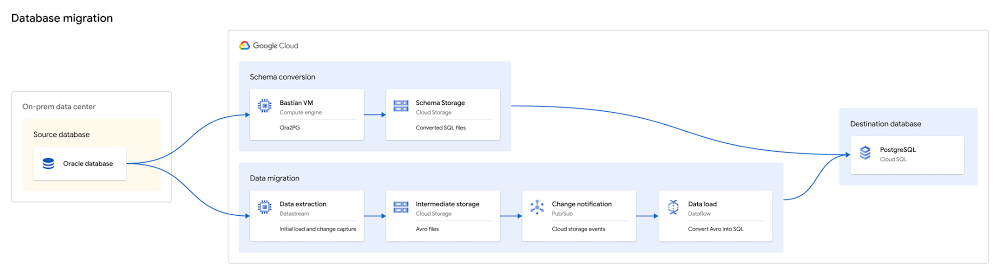
One of the biggest obstacles faced by enterprises pursuing digital transformation is the challenge of migrating off of legacy databases. These databases are typically locked into on-premises data centers, expensive to upgrade and difficult to maintain. We want to make it easier. To that end, we’ve built an open source toolkit that can help you migrate Oracle databases into Cloud SQL for PostgreSQL, and do so with minimal downtime and friction.Click to enlargeThe Oracle to Postgres toolkit uses a mix of existing open source and Google Cloud services, and our own Google-built tooling to support the process of converting schema, setting up low-latency, ongoing data replication, and finally performing migration validation from Oracle to Cloud SQL for PostgreSQL.Migrations are a multi-step process, and can be complex and iterative. We have worked to simplify them, and created a detailed process with stages that are well-documented and easy to run.The stages of a database migration typically include:Deploying and preparing resources, where required resources are deployed and the docker images are built that will be used during the subsequent stages.Converting the schema with Ora2Pg, which is often an iterative process of converting, rebuilding, reviewing, and revising the schema until it aligns with your needs.Continuously migrating the data, which leverages Datastream and Dataflow.Datastream ingests the data from Oracle by reading the log using LogMiner, then stages the data in Google Cloud Storage. As new files are written, a Pub/Sub notification is emitted, and the files are picked up by Dataflow using a custom template to load the data into Cloud SQL for PostgreSQL. This allows you to migrate your data in a consistent fashion using CDC for low downtime.Validating the data migration, which can be used to ensure all data was migrated correctly and it is safe to begin using the destination database. It can also be used to ensure downstream objects (like views or PL/SQL) have been translated correctly.Cutting over to use PostgreSQL, where the application switches from reading Oracle to Postgres.Following these steps will help to ensure a reliable migration with minimal business impact.Since the process of migration tends to be iterative, try migrating a single table or single schema in a test environment before approaching production. You can also use the toolkit to migrate partial databases. For instance, you can migrate one specific application’s schema, while leaving the remainder of your application in Oracle.This post will walk you through each stage in more detail, outlining the process and considerations we recommend for the best results.Deploying and Preparing ResourcesInstalling the Oracle to Postgres toolkit requires a VM with Docker installed. The VM will be used as a bastion and will require access to the Oracle and PostgreSQL databases. This bastion will be used to deploy resources, run Ora2Pg, and run data validation queries.The toolkit will deploy a number of resources used in the migration process. It will also build several Docker images which are used to run Dataflow, Datastream, Ora2Pg, and Data Validation.The Google Cloud resources which are deployed initially are:Any required APIs for Datastream, Dataflow, Cloud Storage, and Pub/Sub which are currently disabled are enabledA Cloud SQL for PostgreSQL destination instanceA Cloud Storage bucket to stage the data as it is transferred between Datastream and DataflowA Pub/Sub topic and subscription setup with Cloud Storage notifications to notify on the availability new filesThe migration preparation steps are:Docker images are built forOra2PgData validationDatastream managementConnectivity is tested to both the Oracle DB and the Cloud SQL for PostgreSQL instanceBefore you begin, ensure that the database you’d like to migrate is compatible with the usage of Datastream. Converting schemas with Ora2Pg Migrating your schema can be a complex process and may sometimes involve manual adjustment to fix issues originating from usage of non-standard Oracle features. Since the process is often iterative, we have divided this into two stages, one to build the desired PostgreSQL schema and a second to apply the schema.The toolkit defines a base Ora2pg configuration file which you may wish to build on. The features selected by default align with the data migration template as well, particularly regarding the use of Oracle’s ROWID feature to reliably replicate tables to PostgreSQL, and the default naming conventions from Ora2Pg (that is, changing all names to lowercase). These options should not be adjusted if you intend to use the Data Migration Dataflow template, as it assumes they have been used.The Oracle ROWID feature, which maintains a consistent and unique identifier per row, is used in the migration as a default replacement for primary keys, in the event that the table does not have a primary key. This is required for data migration using the toolkit, though the field can be removed after the migration is finished if the field is not required by the application. The design converts an Oracle ROWID value into an integer, and then the column is defined as a sequence in PostgreSQL. This allows you to continue to use the original ROWID field as a primary key in PostgreSQL even after the migration is complete.The final stage of the Ora2Pg template applies the desired SQL files which were built in the previous step to PostgresQL. To run this multiple times as you iterate, make sure to clear previous schema iterations from PostgreSQL before re-applying. Since the goal of the migration toolkit is to support migration of Oracle tables and data to PostgreSQL, it does not convert or create all Oracle objects by default. However, Ora2Pg does support a much broader set of object conversions. In the event that you’d like to convert additional objects beyond tables and their data, the docker image can be used to convert any Ora2Pg supported types; however, this is likely to require varying degrees of manual fixes depending on the complexity of your Oracle database. Please refer to the Ora2Pg documentation for support in these steps.Continuously migrating the dataThe data migration phase will require deploying two resources for replication, Datastream and Dataflow. A Datastream stream that pulls the desired data from Oracle is created, and the initial table snapshots (“backfills”) will begin replicating as soon as the stream is started. This will load all the data into Cloud Storage, then leveragingDataflow and the Oracle to PostgreSQL template to replicate from Cloud Storage into PostgreSQL.Datastream utilizes LogMiner for CDC replication of all changes for the selected tables from Oracle, and aligns backfills and ongoing changes automatically. The advantage of the fact that this pipeline buffers data in Cloud Storage is that it allows for easy redeployment in the event that you’d like to re-run the migration, if, say, a PostgreSQL schema changes, without requiring you to re-run backfills against Oracle.The Dataflow job is customized with a pre-built, Datastream-aware template to ensure consistent, low-latency replication between Oracle and Cloud SQL for PostgreSQL. The template uses Dataflow’s stateful API to track and consistently enforce order at a primary key granularity. As mentioned above, this leverages the Oracle ROWID for tables which do not have a primary key, for reliable replication of all desired tables. This ensures the template can scale to any desired number of PostgreSQL writers, to maintain low latency replication at scale, without losing consistent order. During the initial replication (“backfill”), it’s a best-practice to monitor and consider scaling up PostgreSQL resources if replication speeds are running slower than expected, as this phase in the pipeline has the greatest likelihood of being a bottleneck. Replication speeds can be verified using the events per second metric in the Dataflow job.Note that DDL changes on the source are not supported during migration runtime, so ensure your source schema can be stable for the duration of the migration run.Validating the data migrationDue to the inherent complexity of heterogeneous migrations, it is highly recommended to use the data validation portion of the toolkit as you prepare to complete the migration. This is to ensure that the data was replicated reliably across all tables, that the PostgreSQL instance is in a good state and ready for cutover, and to validate complex views or PL/SQL logic in the event that you used Ora2Pg to migrate additional Oracle objects beyond tables (though outside the scope of this post).We provide validation tooling which is created from the latest version of our open source Data Validator. The tool allows you to run a variety of high-value validations, including schema (column type matching), row count, and more complex aggregations.After Datastream reports that backfills are complete, an initial validation can ensure that tables look correct and that no errors which resulted in data gaps have occurred. Later in the migration process, you can build filtered validations or validate a specific subset of data for pre-cutover validation. Note that since this type of validation is run once you’ve stopped replicating from source to destination, it’s important that it runs faster than the backfill validation to minimize downtime. For this reason, it gives a variety of options to filter or limit the number of tables validated to run more quickly while still giving high confidence of the integrity of the migration.If you’ve re-written PL/SQL as part of your migration, we encourage more complex validation usage. For example, using `–sum “*”` in a validation will ensure that the values in all numeric columns add up to the same value. You can also group on a key (like a date/timestamp column) to validate slices of the tables. These will help ensure the table is not just valid, but is also accurate after SQL conversion occurs.Cutting over to use PostgreSQLThe final step in the migration is the cutover stage, when your application begins to use the destination Cloud SQL for PostgreSQL instance as its system of record. Since the time of cutover is preceded by database downtime, this should be scheduled in advance if it can cause a business disruption. As part of the process of preparing for cutover, it’s a best practice to validate that your application has been updated to be able to read from and write to PostgreSQL, and the user has all the permissions required before the final cutover occurs.The process of cutover is:Check if there are any open transactions on Oracle and ensure that the replication lag is minimal When there are no outstanding transactions, stop writes to the Oracle database – downtime beginsEnsure all outstanding changes are applied to the Cloud SQL for PostgreSQL instanceRun any final validations with the Data ValidatorPoint the application at the PostgreSQL instanceAs mentioned above, running final validations will add downtime, but is recommended as a way to ensure a smooth migration. Preparing Data Validations beforehand and timing their execution accordingly will allow you to balance downtime with confidence in the migration result.Get started todayYou can get started today with migrating your Oracle databases to Cloud SQL for PostgreSQL with the Oracle to PostgreSQL toolkit. You can find much more detail on running the toolkit in the Oracle to PostgreSQL Tutorial, or in our Oracle to PostgreSQL Toolkit repository.
Quelle: Google Cloud Platform
Network Connectivity Center: Expanding SD-WAN’s reach with new partners

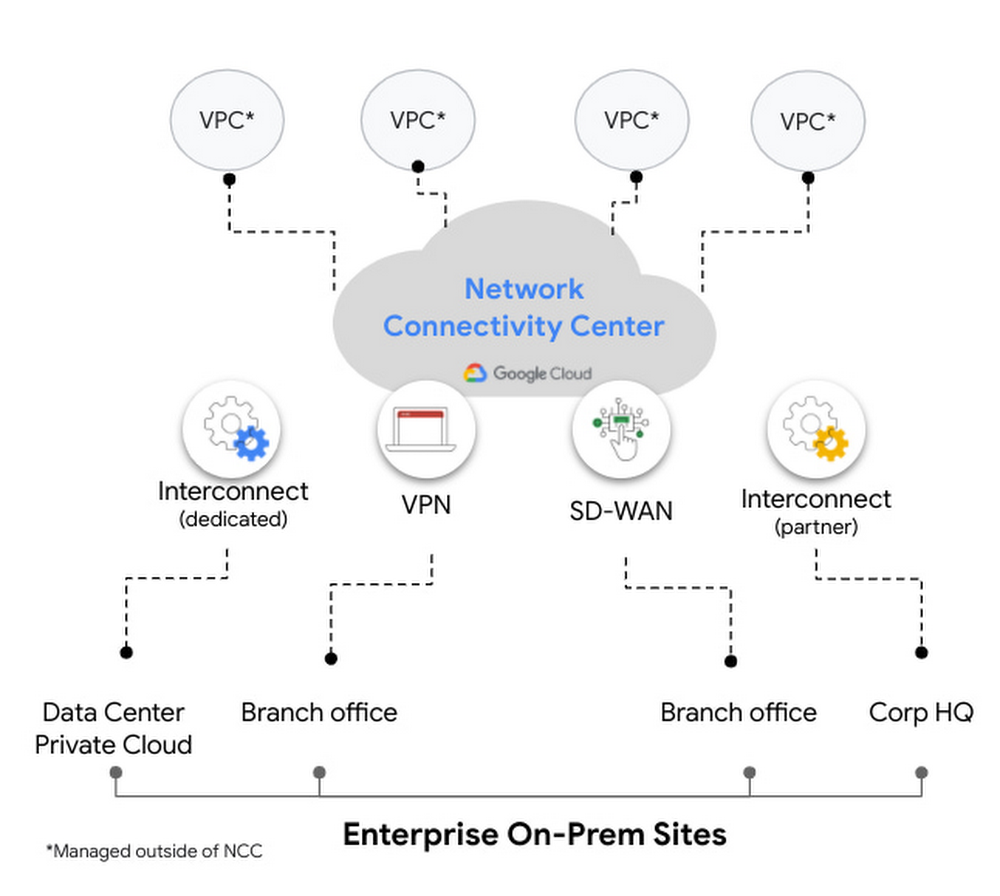
Last month, we announced the preview launch of Network Connectivity Center, a new solution designed to simplify on-prem and cloud connectivity to Google Cloud. Today, we are excited to announce integrations with Fortinet, Palo Alto Networks, Versa Networks and VMware, allowing enterprises to embrace the power of automation and simplify their networking deployments even further. Network Connectivity Center lets administrators to easily create, manage and connect heterogeneous on-premises and cloud networks to Google Cloud resources such as VPCs, which leverage Google’s global network infrastructure. The solution provides a centralized management model that allows connectivity between on-prem locations and to application workloads in Google Cloud via multiple hybrid connectivity types such as Cloud VPN, Cloud Interconnect and third-party router appliances such as SD-WAN VMs or any other type of network virtual appliance. Network Connectivity Center is a globally available resource that enables global connectivity, allowing third-party virtual appliances to easily connect with VPCs using standard BGP, enabling dynamic route exchange and simplifying the overall network architecture and connectivity model. Network Connectivity Center can also allow dynamic route exchange between customer sites, for site-to-site connectivity.Developing a WAN architecture to connect multiple on-prem locations with each other and to cloud VPCs can be cumbersome. Our partners’ integrations with Network Connectivity Center make for a more unified customer experience, reducing the operational overhead of manually deploying various resources with automated workflows. Read on for more details about these integrations from Fortinet, Palo Alto Networks, Versa Networks and VMware:Fortinet Fortinet Secure SD-WAN and Adaptive Cloud Security empowers organizations to secure any application on any cloud and to deliver applications with a seamless, secure, and superior quality of experience (QoE) to its users. Fortinet’s FortiGate Secure SD-WAN integration with Google Cloud Network Connectivity Center allows customers to more effectively interconnect applications and workloads running on Google Cloud for hybrid cloud and multi cloud deployments. The result is an even more simplified, automated, and operationally efficient cloud on-ramp experience—all with the industry-best security intelligence and protection from FortiGuard Labs. More here. Palo Alto NetworksPalo Alto Networks Prisma SD-WAN is one of the industry’s first next-generation SD-WAN that is application-defined, autonomous, and cloud-delivered.  With the integration of Prisma SD-WAN, organizations can seamlessly connect branches including remote offices, small sites, and large corporate offices to multi-cloud. This turnkey integration expands our strategic partnership, allowing organizations to simplify and further automate branch-to-cloud connectivity with our unique API-based CloudBlades platform without any service disruptions. In addition, organizations can gain deep application intelligence and visibility while extending Prisma Access capabilities, our cloud-delivered security platform, to Google Cloud and ensure security and optimal branch-to-branch connectivity. Together, Prisma SD-WAN combined with Prisma Access that leverages Google Cloud becomes one of the industry’s most comprehensive SASE solutions. More here.Palo Alto Networks VM-Series Virtual Next-Generation Firewalls integrate with Network Connectivity Center to deliver streamlined connectivity with best-in-class enterprise security. With Network Connectivity Center, VM-Series firewalls can be deployed to provide horizontal scale, cross-region redundancy, and active-active high availability with session synchronization. More here.Versa NetworksIntegrating Network Connectivity Center with Versa Secure SD-WAN from Versa SASE delivers reliable, enterprise-grade connectivity for branch users to on-prem and cloud workloads. Versa Secure SD-WAN provides network SLA monitoring, Deep Packet Inspection, video and voice performance analytics, and Forward Error Correction to overcome underperforming links and deliver an optimal and consistent user experience.By deploying Versa Secure SD-WAN with Network Connectivity Center, customers can achieve reliable end-to-end connectivity—from users located in branch and remote locations to the on-prem and cloud applications. The Versa Secure SD-WAN solution offers end-to-end QoS that allows for complete performance visibility across the network, thereby delivering significant savings for an organization’s total consumption costs. More here.VMwareVMware SD-WAN™, a cloud-hosted networking service of VMware SASE, delivers secure, reliable, efficient and agile access when using Google Cloud Network Connectivity Center. This combined solution enables organizations—across all industries and around the globe—to gain simple-to-deploy, high-performance connectivity for branch office locations, data centers, cloud destinations and remote workers. VMware SD-WAN breaks down barriers to workload migration resulting from poor user experience pegged to WAN conditions.By combining the flexibility of SD-WAN and on-demand nature of cloud, enterprises can now more easily access their Google Cloud workloads from their SD-WAN connected sites globally based on business needs in an agile manner via Network Connectivity Center SD-WAN partner integrations. More here. Global connectivity made easyTo learn more about Google Cloud Network Connectivity Center and get started, check out our documentation pages.Related ArticleIntroducing Network Connectivity Center: A revolution in simplifying on-prem and cloud networkingWith Network Connectivity Center, you can connect and manage VPNs, interconnects, third-party routers and SD-WAN across on-prem and cloud…Read Article
Quelle: Google Cloud Platform

Real-time Change Data Capture for data replication into BigQuery

Businesses hoping to make timely, data-driven decisions know that the value of their data may degrade over time and can be perishable. This has created a growing demand to analyze and build insights from data the moment it becomes available, in real-time. Many will find that the operational and transactional data fuelling their business is often stored in relational databases, which work well for processing transactions, but aren’t designed or optimized for running real-time analytics at scale.Traditional approaches to solving this challenge include replicating data from one source to another in scheduled bulk loads of entire, frequently large, datasets. This is often costly, strenuous on production systems, and can become a bottleneck to making timely and accurate decisions.So, how can you run real-time analytics against operational and transactional data?You can achieve this with a technique for data integration known as Change Data Capture (CDC). CDC identifies and captures changes in source databases (updates, inserts and deletes). This allows you to process only the data that has changed, at the moment it changes. CDC delivers a low-latency, near real-time, and cost-effective solution for data acquisition, replication, storage and analysis. CDC can replicate transactional data into data warehouses, unlocking the potential to analyze the freshest data for operational reporting, streaming analytics, cache invalidation, event-driven architectures, and more. However, implementing CDC solutions can be complex, require expensive licenses, and be heavily reliant on niche technical expertise. In this blog, we’ll explore how you can take advantage of a completely cloud-native, end-to-end solution to this problem. Replicating operational data into BigQuery with real-time CDCBigQuery is Google Cloud’s data warehouse which offers a serverless and cost-effective way to store large amounts of data, it is uniquely optimized for large-scale analytics. While BigQuery is a great solution for operational analytics, one of the biggest challenges is bringing in data in a reliable, timely, and easy-to-use manner. There have been scattered solutions in this area, but they have largely placed the burden of integration on customers.The launch of Datastream, our new, serverless CDC and replication service, solves many of these challenges. Datastream synchronizes data across heterogeneous databases, applications, and storage systems with minimal latency. It supports data replication for a variety of use cases, including real-time analytics. Datastream integrates with our Data and Analytics services allowing you to create simple, end-to-end, cloud-native solutions that replicate your changed data into BigQuery:Cloud Data Fusion is Google Cloud’s integration service for building ETL and ELT data pipelines. Data Fusion already supports the replication of data from SQL Server and MySQL to BigQuery through an easy-to-use, wizard-driven experience. Data Fusion now integrates with Datastream to support Oracle as a data source, without the need for expensive licenses or agents.Dataflow is our fully managed service for unified stream and batch data processing. Dataflow’s integration with Datastream includes the launch of three new templates that replicate data to BigQuery, Cloud Spanner and Cloud SQL for PostgreSQL. You can also extend and customize the Dataflow templates that ingest and process changed data from Datastream sources. This is key if you need to do transformations or enrichments with data from another source before storing it in Google Cloud.Let’s dive into an example and explore how you can use these integrations:Imagine that you are running a business, FastFresh, that offers same day delivery of  fresh food to homes across London. To sell all your produce and minimize food waste, you want to build real-time reports to understand whether you have a surplus of produce and should apply discounts before the end of the day. Your operational data, such as produce inventory, is stored in Oracle and is being continuously updated as customers purchase goods. You want to replicate this data into BigQuery so you can run analysis and generate these real-time reports.Replicating data from Oracle to BigQuery with Data Fusion and DatastreamData Fusion is completely code-free and is the perfect solution for those wanting to build a simple, end-to-end replication pipeline using one service. Data Fusion is built with data democratization in mind – a guided replication wizard  invites not just data scientists and analysts, but also business users and database administrators to take ownership of their data pipeline creation and information management. To synchronize your inventory data from Oracle to BigQuery you just need to follow the wizard to set up your data sources and destinations. You can select the tables, columns and change operations (update, inserts or deletes) that you want to synchronize. This granular level of control allows you to capture only the data that you actually need replicated, minimizing redundancy, latency and cost:Data Fusion will generate a feasibility assessment before beginning the replication process, giving you the opportunity to fix any problems before starting replication, fast-tracking your journey to building a production-ready pipeline.Finally, you can use the monitoring dashboard to visualize your streams performance and events, enabling you to build a holistic oversight of your pipeline and spot any bottlenecks or unexpected behavior in real time:Replicating your operational data into BigQuery, Spanner or Cloud SQL with Dataflow TemplatesIf you need to replicate data to targets other than BigQuery, or you are a data engineer wanting to build and manage your own change data capture jobs, you’ll want to use a combination of Datastream and Dataflow for replication. To streamline this integration, we’ve launched three new pre-built streaming templates in Dataflow’s interface:Datastream to BigQueryDatastream to Cloud SpannerDatastream to Cloud SQL for PostgreSQLThese templates offer a lightweight and simple replication solution that doesn’t require expertise in Java or Python.  You first create a Datastream stream to synchronize your changed data to a Cloud Storage bucket. You can create multiple streams across multiple sources that replicate into the same bucket. This means you can stream change data from multiple sources into BigQuery with a single Dataflow job, reducing the number of pipelines you need to manage. Datastream normalizes data types across sources, allowing for easy, source-agnostic downstream processing in Dataflow.Next, you create a Dataflow job from one of our new streaming templates – Datastream to BigQuery, for our use case. All you have to do is specify the streaming source bucket and the staging and replication datasets in BigQuery.  And that’s it! Your job will begin with minimal start up time and changed data will be replicated to BigQuery. In a subsequent blog post, we’ll share tips on how to enrich your Dataflow CDC jobs on the fly.Reap the rewards: Analyzing your operational data in BigQueryNow that your operational data is being replicated to BigQuery, you can take full advantage of its cost-effective storage and analytical prowess. BigQuery scales serverlessly and allows you to run queries over  petabytes of data in a matter of seconds to build the real time insights. You can create materialized viewsover your replicated tables to boost performance and efficiency or take advantage of BQML to create and execute ML models for say, demand forecasting or recommendations. In our use case, we wanted to create dashboards to monitor stock inventory in real-time. Connecting your BigQuery data to business intelligence services like Looker allows you to build sophisticated, real-time reporting platforms.Both Data Fusion and Dataflow (using Datastream-specific templates) replicate data to storage solutions in Google Cloud. Here’s a table that can help you make the right decision for your use case and organization: When should I use Cloud Data Fusion or Dataflow templates?Beyond replication: processing and enriching your changed data before synchronizing to your target destinationTemplates and code-free solutions are great for replicating your data as it is. But what if you wanted to enrich or process your data as it arrives, before storing it in BigQuery?  For example, when a customer scans their membership card before making a purchase, we may want to enrich the changed data by looking up their membership details from an external service before storing this into BigQuery. This is exactly the type of business case Dataflow is built to solve! You can extend and customize the Dataflow templates that ingest and process changed data from Datastream sources. Stay tuned for our next blog in this series as we explore enriching your changed data in more detail!In the meantime, check out our Datastream announcement blog post and start replicating your operational data into BigQuery with Dataflow or Data Fusion.
Quelle: Google Cloud Platform

Ankündigung von Verbesserungen für die Texterkennung bei Amazon Rekognition – Unterstützung für mehr Wörter, höhere Genauigkeit und geringere Latenz

Amazon Rekognition ist ein auf Machine Learning basierender Bild- und Videoanalyseservice, der Objekte und Konzepte, Menschen, Gesichter, ungeeignete Inhalte identifizieren und Text erkennen kann. Die Texterkennung von Rekognition erkennt und liest Text in einem Bild und gibt für jedes gefundene Wort Begrenzungsrahmen zurück. Ab heute kann Rekognition bis zu 100 Wörter in einem Bild erkennen, ehemalig betrug diese Begrenzung 50 Wörter. Darüber hinaus erhalten Sie eine höhere Genauigkeit, insbesondere in Fällen mit unleserlichem Text, die jetzt korrekt abgelehnt werden. Schließlich wird die durchschnittliche Latenz für jeden API-Aufruf zur Texterkennung um bis zu 70 % reduziert.
Quelle: aws.amazon.com

AWS X-Ray unterstützt jetzt VPC-Endpunkte

AWS X-Ray unterstützt jetzt VPC-Endpunkte. Mit dieser Funktion können Sie über Ihre Virtual Private Cloud (VPC) mit dem X-Ray-Service kommunizieren, ohne diesen Datenverkehr dem öffentlichen Internet auszusetzen. VPC-Endpunkte werden von AWS PrivateLink unterstützt, einer AWS-Technologie, die die private Kommunikation zwischen Ihren VPC- und AWS-Services wie X-Ray im privaten AWS-Netzwerk ermöglicht.
Quelle: aws.amazon.com

AWS App2Container unterstützt jetzt die Bereitstellung von Containeranwendungen für AWS App Runner

AWS App2Container (A2C) unterstützt jetzt die Bereitstellung von containerisierten Java- und Springboot-Webanwendungen für AWS App Runner. Mit dieser Funktion können Benutzer jetzt zusätzlich zu ECS und EKS, die zuvor unterstützt wurden, App Runner als Bereitstellungslaufzeit als Ziel festlegen. Mit App2Container können Entwickler eine laufende Linux-basierte Webanwendung verwenden, in wenigen einfachen Schritten analysieren, containerisieren und für App Runner bereitstellen und eine sichere URL für den Zugriff auf den Webservice erhalten. Benutzer können die kontinuierliche Bereitstellung, automatische Skalierung und Überwachung des von App Runner angebotenen bereitgestellten Webservices nutzen.
Quelle: aws.amazon.com





