Mirantis Container Cloud 2.8 brings more control and visibility
Mirantis Container Cloud 2.8 brings more control and visibility
Quelle: Mirantis

Mirantis Container Cloud 2.8 brings more control and visibility
Quelle: Mirantis
The U.S. Navy spends billions annually to fight rust and corrosion on its ships. Of course, this is to be expected given its vessels are largely made of steel. However, inspections of ships, aircraft and vehicles are a time-consuming and critical part of keeping the U.S. Navy at top performance. To address this issue, Google Cloud and Simple Technology Solutions (STS)—a Google Cloud partner and 8a HUBZone small business specializing in cloud solutions for the federal government—successfully completed the first phase of its project to help identify rust and corrosion in hard-to-reach places of ships, funded by the Department of Navy (DON) Small Business Innovation Research program. With the successful completion of phase one, STS and Google Cloud teams are now kicking off its second phase. In the first phase, STS built a corrosion detection and analysis solution using Google Cloud’s artificial intelligence/machine learning (AI/ML) platform. Leveraging Google’s native computer-vision capabilities and commercial drones, the team successfully identified “corrosion of interest” in aerial images of vessels, with confidence scores of more than 90% with very few false positives. This was an engineering feat that required complex integration between emerging software and hardware technologies. Phase two of the project aims to achieve the same corrosion detection capability across any required platform. As such, the solution will be expanded to include aircraft, buildings, bridges, and other infrastructure across the Department of Defense (DoD), and other commercial verticals, like oil and gas, construction, and maritime shipping. With commercialization and speed-to-market being the priority, STS will also add a front-end user interface (UI) to the solution in phase two. The UI will include interactive 3D models of the platform to map detection of severe corrosion to the exact location on the vessel or aircraft. This will allow inspectors to use the solution independently in the field and best prioritize where they spend their time. “The objective for the project was not only intended for ships, aircraft, or vehicles, but also to truly transcend all forms of corrosion across industries,” said Steve McKee, lead for DON’s Naval Enterprise Sustainment Technology Team. “The corrosion problem is not unique to the Navy, or to the Department of Defense. There are ramifications for the defense industry, maritime shipping, aviation, mining, and more. There are countless sectors for which this solution will have a resounding impact. We believe the entire defense ecosystem will benefit.” Expanding AI / ML platform detection and analysis capabilities is a complex engineering challenge and will require extensive new data collection, expanded sensor capabilities, and new algorithms, including: New data collection: STS is partnering with DroneUp, a commercial drone flight services company, to collect new platform corrosion images using semi-autonomous drones. In addition to automating data collection, DroneUp will show the interiors of vessels and tanks—not just the exterior. Several groups within the Department of the Navy, the Department of the Air Force, and other federal agencies are contributing a trove of corrosion data across platforms to expedite training the new models. This collaboration is a testament to the pervasiveness of the corrosion detection and inspection challenges. Expanded sensor capabilities:Images and RGB color model and camera sensors data are not sufficient to detect corrosion on all platforms. For example, infrared or multi-spectral sensors are required for aircraft, as thick coats of paint typically cover the corrosion, making it invisible to the naked eye. Similarly, submarines and ships have anechoic tiles, or surfaces that are coated in rubber. An “ecosystem of sensor data” is required to achieve platform agnosticism and maximize commercialization potential. New algorithms: New data technologies and models will be developed corresponding to the various sensor inputs and then fused with the solution. The existing model will also be enhanced to include a categorization schema to prioritize inspector activities. This application of AI / ML combined with drone imagery showcases one of the many possibilities for this technology across the DoD and beyond. As this collaboration continues to phase two, Google Cloud and STS will continue to work toward ways to further expand this corrosion detection model, and ultimately improve the process for corrosion across all types of infrastructure. To learn more about our solutions for the Federal Government, visit cloud.google.com/solutions/federal-government.
Quelle: Google Cloud Platform

With summer just around the corner, things are really heating up. But you’re in luck because this month BigQuery is supplying a cooler full of ice cold refreshments with this release of user-friendly SQL capabilities. We are pleased to announce three categories of BigQuery user-friendly SQL launches: Powerful Analytics Features, Flexible Schema Handling, and New Geospatial Tools.Powerful Analytics FeaturesThese powerful SQL analytics features provide greater flexibility to analysts for organizing, filtering, and rendering data in BigQuery than ever before. You can enable spreadsheet-like functionality on summarized data using PIVOT and UNPIVOT and filter irrelevant data in analytic functions using QUALIFY.Through this section, we will become familiar with these new features through examples using the BigQuery Public dataset, usa_names.PIVOT/UNPIVOT (Preview)One of the most time-consuming tasks for data analytics practitioners is wrangling data into the right shape. SQL is great for wrangling data, but sometimes you want to reformat a table as you would in a spreadsheet, pivoting rows and columns interchangeably. To support this use case, we are pleased to introduce PIVOT and UNPIVOT operators in BigQuery. PIVOT creates columns from unique values in rows by aggregating values, and UNPIVOT reverses this action.The example below uses PIVOT on bigquery-public-data.usa_names.usa_1910_current to show the number of males and females born each year, representing each gender as a column. Then UNPIVOT reverses this action.QUALIFY (Preview)More advanced users of SQL know the power of analytic functions (aka window functions). These functions compute values over a group of rows, returning a single result for each row. For example, customers use analytic functions to compute a grand total, subtotal, moving average, rank, and more. With the announcement of support for QUALIFY, BigQuery users can now filter on the results of analytic functions by using the QUALIFY clause. QUALIFY belongs in the family of query clauses used for filtering along with WHERE and HAVING. The WHERE clause is used to filter individual rows in a query. The HAVING clause is used to filter aggregate rows in a result set after aggregate functions and GROUP BY clauses. The QUALIFY clause is used to filter results of analytic functions. To show the utility of QUALIFY, the example below uses QUALIFY to return the top 3 female names from each year in the last decade using from bigquery-public-data.usa_names.usa_1910_current. Flexible Schema HandlingNew SQL for administrators and data engineers enables table renaming for data pipeline processes, as well as flexible column management.Table Rename (GA)In data pipeline processes, tables are often created and then renamed so that they can make way for the next iteration of the pipeline run. To accomplish this, customers need a mechanism by which they can create a table and then subsequently rename it. Now if customers want to change this name using SQL, they can. Using the simple syntax that ALTER TABLE RENAME TO provides, customers will be able to rename a table after creation to clear the way for the next iteration of tables in the data pipeline.DROP NOT NULL constraints on a column (GA)While BigQuery has historically provided many tools available in the UI, CLI and APIs, we know that many administrators prefer interfacing with the database using SQL. BigQuery recently released DDL statements which enable data administrators to provision and manage datasets and tables, greatly simplifying provisioning and management. Today, we continue the next addition in this line of releases by announcing ALTER COLUMN DROP NOT NULL constraint on a column:ALTER COLUMN DROP NOT NULL allows the administrator to remove the NOT NULL constraint from a column in BigQuery.CREATE VIEW with column list (GA)Views are used ubiquitously by BigQuery customers to capture business logic. Oftentimes, BigQuery users have business requirements to assign aliases to columns in views. Now BigQuery supports doing so upon view creation in a column name list format with the release of CREATE VIEW with column list syntax.New Geospatial ToolsST_POINTN, ST_STARTPOINT, and ST_ENDPOINTGeospatial data is incredibly valuable to data analytics customers dealing with data from the physical world. BigQuery has very strong geospatial function support to help customers process marketing data, track storms, or manage self-driving cars. Particularly for analyzing vehicle or location tracking data, we’re thrilled to provide three new functions to allow users to easily extract or filter on key points: ST_POINTNST_STARTPOINTST_ENDPOINTFor example, when working with vehicle histories, ST_POINTN, ST_STARTPOINT, and ST_ENDPOINT allow users to extract elements such as the start and the end of a trip. For identifying origin-destination pairs these functions will make that task much easier.As sure as a hot summer day pairs well with an ice-cold beverage, these new user-friendly SQL features in BigQuery pair well with your data analytics workflows. To learn more about BigQuery, visit our website, and get started immediately with the free BigQuery Sandbox.
Quelle: Google Cloud Platform
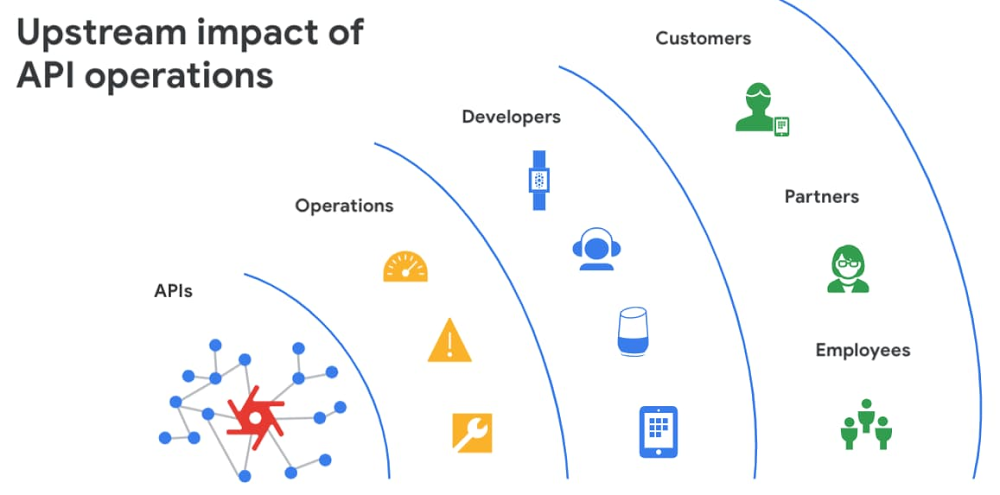
APIs are the backbone of digital transformation. Via APIs, you can securely share data and functionality with developers both inside and outside of your organizational boundaries, letting you build applications faster, seamlessly connect and interact with partners, and drive new business revenue. Because APIs encompass business-critical information, any downtime or performance degradation can lead to significant loss in revenue, customers, and brand value. Therefore, there’s mounting pressure on operations teams to ensure that APIs are always available and performing as expected. If the APIs go down, so too do the services that fuel customer experiences and on which the organization relies for collaboration and business processes.However, as you build and scale your API programs, it becomes practically impossible for API operators to manually monitor and manage all your APIs. To help, we brought the power of industry-leading AI and ML technologies to API operations via Apigee X, a major release of our API management platform. Apigee X seamlessly weaves together Google Cloud’s expertise in AI, security and networking to help you efficiently build and manage APIs at scale. Put your API data into actionApigee applies machine learning to your API metadata and provides you the required tools that simplify various aspects of API operations. A great example of AI for APIs is anomaly detection: AI-powered rules trigger alerts based on a set of predefined conditions that are determined by applying Google’s industry-leading machine learning models to your historical API data.Auto-thresholds adjust the monitoring criteria of your APIs and set them to pattern-based values. Reduce overhead results because operators don’t have to manually monitor anomalies or adjust the monitoring thresholds on APIs.“By applying AI and ML models to our historical API data, these advanced features are able to alert us about scenarios we haven’t thought of. Such automation capabilities significantly reduce our upfront efforts. And from a security perspective, the actionable insights help us ensure that our proxies are exposed only over secure HTTPs ports and adhere to compliance requirements. We’re also able to closely monitor user activity and quickly pull out reports during audits.” – Adam Brancato, Sr. Manager, Global Technology and Security at CitrixAs our customers scale their API programs, they find it extremely useful to harness AI-powered capabilities. In our recent State of the API Economy 2021 report, we found a 230% increase in enterprises’ use of anomaly detection, bot protection, and security analytics features.To learn more about Apigee X, and see AI and machine learning in action, check out this video, and to try Apigee X for free, click here.Related ArticleThe time for digital excellence is here—Introducing Apigee XApigee X, the new version of Google Cloud’s API management platform, helps enterprises accelerate from digital transformation to digital …Read Article
Quelle: Google Cloud Platform

OS configuration management is an important way that administrators of large fleets of virtual machines (VMs) can automate and centralize the deployment, configuration, maintenance and reporting of software configurations of those VM instances. You can install security and monitoring agents to make sure all VM are secured and protected, bootstrap management tools or ensure OS compliance across your fleet. In January, we introduced VM Manager, a suite of infrastructure management tools to simplify and automate the maintenance of large fleets of Compute Engine VMs, including OS patch, OS inventory, and OS configuration management. The first version of OS configuration management helps install and maintain agents and operating system (OS) software configurations at scale, and is currently used in production by hundreds of customers. Today, we are excited to introduce OS configuration management (Preview) with enhanced features and capabilities. What’s new?OS configuration management introduces a new UI (in addition to the API and gcloud command-line), providing an at-a-glance compliance view for your VM fleet and the ability to drill down and find the root cause for non-compliant VMs in seconds. The new UI provides a guided wizard-based experience to create and apply policy assignments to managing VM fleets at scale. In the new version we have also improved reliability with independent zonal services—a user-controlled safe rollout process for deploying policies. If new policies are not working as expected, you can stop the process without impacting all VMs. Finally, OS configuration management introduces multiple new functional capabilities: dry-run (compliance only) reporting mode; the ability to define, validate and enforce compliance for custom resources periodically; as well as options to exclude or include certain VMs, for example Google Kubernetes Engine (GKE) nodes, based on labels. For more information see OS configuration management overview.VM Manager uses the OS Config agent to manage VMs. Today, the OS Config agent is pre-installed for all Compute Engine public OS images (Windows, Debian, CentOS, RHEL, Ubuntu, SLES, and Container-Optimized OS) and can be activated with one click across all your VM instances. Once VM Manager is enabled, it automatically activates agents for newly created VMs, making sure the whole fleet is under control. For OS configuration management (Beta) usersAll existing guest policies will continue to work without any changes. We’ll continue to support OS configuration management (beta release) at the same level as before. A comparison document is available to help you to understand the differences between OS configuration management Preview and Beta to guide you on which version to use. Get started todayGeneral Availability of OS configuration management is planned for later this year. To learn more about all the new features of OS configuration management, see the OS configuration management documentation.To learn more about VM Manager, visit the documentation, or watch our Google Cloud Next ‘20: OnAir session, Managing Large Compute Engine VM Fleets.Related ArticleIntroducing VM Manager: Operate large Compute Engine fleets with easeThe new VM Manager simplifies infrastructure and compliance management for the largest of Compute Engine VM fleets.Read Article
Quelle: Google Cloud Platform

Es wäre praktisch, wenn das Elektroauto während der Fahrt geladen werden könnte. In Italien soll das getestet werden. (Elektromobilität, Technologie)
Quelle: Golem

Der Bundesverband der Deutschen Industrie (BDI) will die gesetzliche Pflicht zum Homeoffice aufheben lassen und fordert auch das Test-Ende in Betrieben. (Homeoffice, Bundesregierung)
Quelle: Golem

Die chinesische Regierung will das Kryptomining in China regulieren. Erste Unternehmen haben daraus Konsequenzen gezogen. (Kryptomining, Internet)
Quelle: Golem

Tesla muss Schadenersatz zahlen, weil das Unternehmen die Ladegeschwindigkeit und Batteriekapazität durch ein Software-Update gedrosselt hatte. (Tesla, Technologie)
Quelle: Golem

Die Menschenheit hat sich selbst erledigt – also kämpfen wir in Biomutant als Hamster (oder so) mit Handkantenschlägen und Hightech-Waffen. Von Peter Steinlechner (Spieletest, THQ Nordic)
Quelle: Golem






