DockerCon LIVE 2021: One Month Before Lift Off

WIth exactly one month before lift off, here’s a quick update on all the goodness that awaits you at this year’s DockerCon LIVE 2021. Like last year, we’ll have one full day of keynotes, breakout sessions across several tracks and live panels and interviews. The current agenda and full list of speakers is available on our website.  

Engaging in real-time

A big focus is live content and interaction between speakers and attendees. Our partners at The Cube have worked hard on improving their conference platform and expanding on functionality, so get ready for more real-time content and awesome new features to help speakers and attendees connect, meet, greet, share and learn from each other. 

Keynotes

To help set the stage, that day kick’s with must-see keynotes from Docker leadership and compelling guest speakers. We’ll have a special post about our keynote line-up on our blog soon.

Breakout sessions

We’re still building out the schedule (yes, that’s what happens when you have so much awesome content to work with!) but we anticipate that we’ll have at least 40 breakout sessions with an absolutely stellar line-up of speakers. You can find the current list of speakers here and the agenda here.

Live Panels

This year we want to put more emphasis on the word “live” in “DockerCon LIVE”. We’ll be hosting several live panels (yep, in real time!) hosted by Docker’s Head of Developer Relations, Peter McKee and Docker Captain Extraordinaire, Bret Fisher. These panels will cover a range of topics in depth, from security, to the future of container development, to running containers without infrastructure. 

Community Rooms

Building on last year’s awesome Captains on Deck track, we’re expanding on the idea and broadening the scope even further by introducing “Community Rooms”. These rooms will be virtual spaces for attendees to come together to present, demo, discuss content about Docker in their own language and/or around a specific thematic area, and in real time. For example, we’ll have a “Brazil Room” for the Portuguese-speaking community to present and talk about all things Docker in Portuguese, while the “WSL2 room” will provide a space for the attendees to present and discuss anything related to WSL2. Each room will be chaired by one or several Docker Captains and will offer 100% live content and interaction. (Stay tuned for more on this in an upcoming blog post).  

The Cube Channel

Like last year, we’ll have a dedicated track for theCUBE’s John Furrier to go behind the scenes to give exclusive interviews with keynote speakers, community leaders and ecosystem partners throughout the day.

Join Us for DockerCon LIVE 2021  Join us for DockerCon LIVE 2021 on Thursday, May 27. DockerCon LIVE is a free, one day virtual event that is a unique experience for developers and development teams who are building the next generation of modern applications. If you want to learn about how to go from code to cloud fast and how to solve your development challenges, DockerCon LIVE 2021 offers engaging live content to help you build, share and run your applications. Register today at https://dockr.ly/2PSJ7vn
The post DockerCon LIVE 2021: One Month Before Lift Off appeared first on Docker Blog.
Quelle: https://blog.docker.com/feed/

Welcome to Red Hat Summit 2021: A truly global event

Red Hat Summit is the premier open source event and it’s entering the second year as a virtual experience. We’re truly excited about the chance to meet, virtually, with Red Hat customers, users and partners from around the world. And we do mean around the world, as this year’s Red Hat Summit is a truly global event with a choice of three schedules for our friends all over the globe. 
Quelle: CloudForms

Build security into Google Cloud deployments with our updated security foundations blueprint

At Google, we’re committed to delivering the industry’s most trusted cloud. To earn customer trust, we strive to operate in a shared-fate model for risk management in conjunction with our customers. We believe that it’s our responsibility to be active partners as our customers securely deploy on our platform, not simply delineate where our responsibility ends. Toward this goal, we have launched an updated version of our Google Cloud security foundations guide and corresponding Terraform blueprint scripts. In these resources, we provide opinionated step-by-step guidance for creating a secured landing zone into which you can configure and deploy your Google Cloud workloads. We highlight key decision points and areas of focus, and provide both background considerations and discussions of the tradeoffs and motivations for each of the decisions we’ve made. We recognize that these choices might not match every individual company’s requirements and business context; customers are free to adopt and modify the guidance we provide.  This new version enhances and expands the initial guide and blueprint we launched back in August 2020 to incorporate practitioner feedback and account for additional threat models. In this latest version, we have extended our guidance for networking and key management; and added new guidance for secured CICD (Continuous Integration and Continuous Deployment). We review the guide and corresponding blueprints regularly as we continue to update best practices to include new product capabilities. Since its release, the guide has been the most frequently accessed content in our best practices center. We’re committed to keeping it up-to-date, comprehensive, and relevant to meet your security needs.“The security foundations guide and Terraform blueprint have enabled customers to accelerate their onboarding to Google Cloud and enabled us to assist clients in adopting security leading practices to operate their environments and workloads.” – Arun Perinkolam, Principal and US Google Cloud Security Practice & Alliance Leader, Deloitte & Touche LLPWho can use the security foundations blueprintThe guide and Terraform blueprint can be useful to all of the following roles in your organization:The security leader that wants to understand Google’s key principles for cloud security and how to apply and implement them to help secure their own organization’s deployment.The security practitioner that needs detailed instructions on how to apply security best practices when setting up, configuring, deploying, and operating a security-centric infrastructure landing zone that’s ready to deploy your workloads and applications.The security engineer that needs to configure and operate multiple security controls to correctly interact with one another.The business leader that needs to quickly identify the skills their teams need to meet the organization’s security, risk, and compliance needs on Google Cloud. In this role, you also need to be able to share Google’s security reference documentation with your risk and compliance teams.The Risk and Compliance officer that needs to understand the controls available on Google Cloud to meet their business requirements and how those controls can be automatically deployed. You also need visibility into control drift and areas that need additional attention to meet the regulatory needs of your business.All of these roles can use this document as a reference guide. You can also use the provided Terraform scripts to automate, experiment, test, and accelerate your own live deployments, modifying them to meet your specific and unique needs.Create a better starting point for complianceIf your business operates under specific compliance and regulatory frameworks, you need to know whether your configuration and use of Google Cloud services meets those requirements. This guide provides a proven blueprint and starting point to do so.After you’ve deployed the security foundations blueprint as a landing zone, Security Command Center Premium provides you a dashboard overview and downloadable compliance reports of your starting posture for the CIS 1.0, PCI-DSS 3.2.1, NIST-800-53 andISO/IEC 27001 frameworks at the organization, folder, or project level.Implement key security principlesIn addition to following compliance and regulatory requirements, you need to protect your infrastructure and applications.The security foundation guide and blueprint and the associated automation scripts help you adopt three security principles that are core to Google Cloud’s own security strategy:Executing defense in depth, at scale, by default.Adopting the BeyondProd approach to infrastructure and application security.De-risking cloud adoption by moving toward a shared fate relationship.Defense in depth, at scale, by defaultA core principle for how Google secures its own infrastructure dictates that there should never be just one barrier between an attacker and a target of interest. This is what we mean by defense in depth. Adding to this core principle, security should be scalable and all possible measures should be enabled by default.The security foundations guide and blueprint embody these principles. Data is protected by default through multiple layered defenses using policy and controls that are configured across networking, encryption, IAM, detection, logging, and monitoring services.BeyondProdIn 2019, we published documentation on BeyondProd, Google’s approach to native cloud security. This was motivated by the same insights that drove our BeyondCorp effort in 2014, because it had become clear to us that a perimeter-based security model wasn’t secure enough. BeyondProd does for workloads and service identities what BeyondCorp did for workstations and users. In the conventional network-centric model, once an attacker breaches the perimeter, they have free movement within the system. Instead, the BeyondProd approach uses a zero-trust model by default. It decomposes historically large monolithic applications into microservices, thus increasing segmentation and isolation and limiting the impacted area, while also creating operational efficiencies and scalability.The security foundations guide and blueprint jumpstart your ability to adopt the BeyondProd model. Security controls are designed into and integrated throughout each step of the blueprint architecture and deployment. Logical control points like organization policies provide you with consistent, default preventive policy enforcement at build and deploy time. Centralized and unified visibility through Security Command Center Premium provides unified monitoring and detection across all the resources and projects in your organization during run time.Shared fateTo move from shared responsibility to shared fate, we believe that it’s our responsibility to be active partners with you in deploying and running securely on our platform. This means providing holistic capabilities throughout your Day 0 to Day N journey, at:Design and build time: Supported security foundations and posture blueprints that encode best practices by default for your infrastructure and applications.Deploy time: “Guard rails” though services like organization policies and Assured Workloads that enforce your declarative security constraints.Run time: Visibility, monitoring, alerting, and corrective-action features through services like Security Command Center Premium.Together, these integrated services reduce your risk by starting and keeping you in a more trusted posture with better quantified and understood risks. This improved risk posture can then allow you to take advantage of risk protection services, thus de-risking and ultimately accelerating your ability to migrate and transform in the cloud.What’s included in the Google Cloud security foundations guide and the blueprintThe Google Cloud security foundations guide is organized into sections that cover the following:The foundation security modelFoundation designThe example.com sample that expresses the opinionated organization structureResource deploymentAuthentication and authorizationNetworkingKey and secret managementLoggingDetective controlsBillingCreating and deploying secured applicationsGeneral security guidance The foundation reference organization structureUpdates from version #1This updated guide and the accompanying repository of Terraform blueprint scripts adds best practice guidance for four main areas: Enhanced descriptions of the foundation (Section 5.6), infrastructure (Section 5.7), and application (Section 5.8) deployment pipelines.Additional network security guidance with new alternative hub-and-spoke network architecture (Section 7.2) and hierarchical firewalls (Section 7.7).New guidance about key and secret management (Section 8).A new creation and deployment process for secured applications (Section 12). We update this blueprint to stay current with new product capabilities, customer feedback, and the needs of and changes to the security landscape.To get started building and running your own landing zone, read the Google Cloud security foundations guide, and then try out the Terraform blueprint template either at the organization level or the folder level.Our ever-expanding portfolio of blueprints is available on our Google Cloud security best practices center to help you build security into your Google Cloud deployments from the start and help make you safer with Google.
Quelle: Google Cloud Platform

Sign here! Creating a policy contract with Configuration as Data

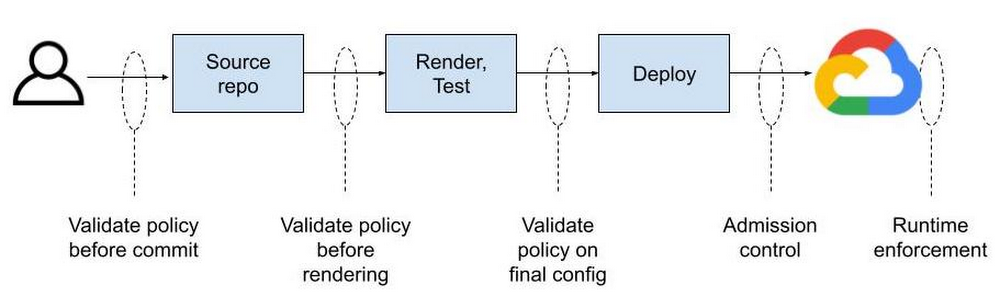
Configuration as Data is an emerging cloud infrastructure management paradigm that allows developers to declare the desired state of their applications and infrastructure, without specifying the precise actions or steps for how to achieve it. However, declaring a configuration is only half the battle: you also want policy that defines how a configuration is to be used. Configuration as Data enables a normalized policy contract across all your cloud resources. That contract, knowing how your deployment will operate, can be inspected and enforced throughout a CI/CD pipeline, from upstream in your development environment to deployment time, and ongoing in the live runtime environment. This consistency is possible by expressing configuration as data throughout the development and operations lifecycle.Config Connector is the tool that allows you to express configuration as data in Google Cloud. In this model, configuration is what you want to deploy, such as “a storage bucket named my-bucket with a standard storage class and uniform access control.” Policy, meanwhile, typically specifies what you’re allowed to deploy, usually in conformance with your organization’s compliance needs. For example, “all resources must be deployed in Google Cloud’s LONDON region.” When each stage in your pipeline treats configuration as data, you can use any tool or language to manipulate configuration as data, knowing they will interoperate and that policy can be consistently enforced at any or all stages. And while a policy engine won’t be able to understand every tool, it can validate the data generated by each tool. It’s just like data in a database can be inspected by anyone who knows the schema regardless of the tool that wrote into the database.Contrast that with pipelines today, where policy is manually validated, hard coded in scripts within the pipeline logic itself, or post-processed on raw deployment artifacts after rendering configuration templates into specific instances. In each case, policy is siloed—you can’t take the same policy and apply it anywhere in your pipeline because formats differ from tool to tool. Helm, for example, contains code specific to its own format.1Terraform HCL may then deploy the Helm chart.2The HCL becomes a JSON plan, where the deployment-ready configuration may be validated before being applied to the live environment.3These examples show three disparate data formats across two different tools representing different portions of a desired end state. Add in Python scripting, gcloud CLI, or kubectl commands and you start approaching ten different formats—all for the same deployment!  Reliably enforcing a policy contract requires you to inject tool- and format-specific validation logic on case-by-case basis. If you decide to move a config step from Python to Terraform or from Terraform to kubectl, you’ll need to re-evaluate your contract and probably re-implement some of that policy validation. Why don’t these tools work together cleanly? Why does policy validation change depending on the development tools you’re using? Each tool can do a good job enforcing policy within itself. As long as you use that tool everywhere, things will probably work ok. But we all know that’s not how development works. People tend to choose tools that fit their needs and figure out integration later on.A Rosetta Stone for policy contractsImagine that everyone is defining their configuration as data, while using tools and formats of their choice. Terraform or Python for orchestration. Helm for application packaging. Java or Go for data transformation and validation. Once the data format is understood (because it is open source and extensible), your pipeline becomes a bus that anyone can push configuration onto and pull configuration from.Policies can be automatically validated at commit or build time using custom and off-the-shelf functions that operate on YAML. You can manage commit and merge permissions separately for config and policy to separate these distinct concerns. You can have folders and unique permissions for org-wide policy, team-wide policy, or app-specific policy. Therein lies the dream. The most common way to generate configuration is to simply write a YAML file describing how Kubernetes should create a resource for you. The resulting YAML file is then stored in a git repository where it can be versioned and picked up by another tool and applied to a Kubernetes cluster. Policies can be enforced on the git repo side to limit who can push changes to the repository and ultimately reference them at deploy time.For most users this is not where policy enforcement ends. While code reviews can catch a lot of things, it’s considered best practice to “trust but verify” at all layers in the stack. That’s where admission controllers come in, which can be considered to be the last mile of policy enforcement. Gatekeeper serves as an admission controller inside of a Kubernetes cluster. Only configurations that meet defined constraints will be admitted to the live cloud environment.Let’s tie these concepts together with an example. Imagine you want to enable users to create Cloud Storage buckets, but you don’t want them doing so using the Google Cloud Console or the gcloud command line tool. You want all users to declare what they want and push those changes to a git repository for review before the underlying Cloud Storage buckets are created with Config Connector. Essentially you want users to be able to submit a YAML file that looks like this:This creates a storage bucket in a default location. There is one problem with this: users can create buckets in any location even if company policy dictates otherwise. Sure, you can catch people using forbidden bucket locations during code review, but that’s prone to human error.This is where Gatekeeper comes in. You want the ability to limit which Cloud Storage bucket location can be used. Ideally you can write policies that look like this:The above StorageBucketAllowedLocation policy rejects StorageBucket objects with the spec.location field set to any value other than one of the Cloud Storage multi-region locations: ASIA, EU, US. You decide where to validate policy without being limited by your tool of choice and anywhere in your pipeline.Now you have the last stage of your configuration pipeline. Testing the contractHow does this work in practice? Let’s say someone managed to check in StorageBucket resource with the following config:Our policy would reject the bucket because an empty location is not allowed. What happens if configuration was set to a Cloud Storage location not allowed by the policy, US-WEST1 for example?Ideally you would catch this during the code review process before the config is committed to a git repo, but as mentioned above, that’s error prone. Luckily, the configuration will fail because the allowmultiregions policy constraint only allows multi-region bucket locations including ASIA, EU, and US, and will reject the configuration. So, now, if you set location to “US” you can deploy the Cloud Storage bucket. You can also apply this type of location policy or any other like it to all of your resource types—Redis instances, Compute Engine virtual machines, even Google Kubernetes Engine (GKE) clusters. Beyond admission control, you can apply the same constraint anywhere in your pipeline, by ”shifting left” policy validation at any stage. One contract to rule them allWhen config is managed in silos—whether across many tools, pipelines, graphical interfaces, and command lines—you can’t inject logic without building bespoke tools for every interface. You may be able to define policies built for your front-end tools and hope nothing changes on the backend. Or you can wait until deployment time to scan for deviations and hope nothing appears during crunch time. Compare that with configuration as data contracts, which are transparent and normalized across resource types, which has facilitated a rich ecosystem of tooling built around Kubernetes with varied syntax (YAML, JSON) and languages including Ruby, Typescript, Go, Jinja, Mustache, Jsonnet, Starlark, and many others. This isn’t possible without a data model. Configuration-as-Data-inspired tools such as Config Connector and Gatekeeper let you enforce policy and governance as natural parts of your existing git-based workflow rather than creating manual processes and approvals. Configuration as data normalizes your contract across resource types and even cloud providers. You don’t need to reverse engineer scripts and code paths to know if your contract is being met—just look at the data.1. https://github.com/helm/charts/blob/master/stable/jenkins/templates/jenkins-master-deployment.yaml2. https://medium.com/swlh/deploying-helm-charts-w-terraform-58bd3a690e553. https://github.com/hashicorp/terraform-getting-started-gcp-cloud-shell/blob/master/tutorial/cloudshell_tutorial.mdRelated ArticleI do declare! Infrastructure automation with Configuration as DataConfiguration as Data enables operational consistency, security, and velocity on Google Cloud with products like Config Connector.Read Article
Quelle: Google Cloud Platform

Introducing new connectors for Workflows

Workflows is a service to orchestrate not only Google Cloud services, such as Cloud Functions,  Cloud Run, or machine learning APIs, but also external services. As you might expect from an orchestrator, Workflows allows you to define the flow of your business logic, as steps, in a YAML or JSON definition language, and provides an execution API and UI to trigger workflow executions. You can read more about the benefits of Workflows in our previous article.We are happy to announce new connectors for Workflows, which simplify calling Google Cloud services and APIs. The first documented connectors offered in preview when Workflows was launched in General Availability were:Cloud TasksCompute EngineFirestorePub/SubSecret ManagerThe newly unveiled connectors are:BigQueryCloud BuildCloud FunctionsCloud SchedulerGoogle Kubernetes EngineCloud Natural Language APIDataflowCloud SQLCloud StorageStorage Transfer ServiceCloud TranslationWorkflows & Workflow ExecutionsIn addition to simplifying Google Cloud service calls (no need to manually tweak the URLs to call) from workflow steps, connectors also handle errors and retries, so you don’t have to do it yourself. Furthermore, they take care of APIs with long-running operations, polling the service for a result when it’s ready, with a back-off approach, again so you don’t have to handle this yourself.Let’s take a look at some concrete examples on how connectors help. Creating a Compute Engine VM with a REST API callImagine you want to create a Compute Engine Virtual Machine (VM) in a specified project and zone. You can do this by crafting an HTTP POST request with the proper URL, body, and OAuth2 authentication using the Compute Engine API’s instances.insert method as shown in create-vm.yaml:This works but it is quite error prone to construct the right URL with the right parameters and authentication mechanism. You also need to poll the instance status to make sure it’s running before concluding the workflow:Note that even the HTTP GET call above could fail and it’d be better to wrap the call in a retry logic. Creating a Compute Engine VM with the Workflows compute connectorIn contrast, let’s now create the same VM with the compute connector dedicated to Compute Engine as shows in create-vm-connector.yaml:The overall structure and syntax is pretty similar, but this time, we didn’t have to craft the URL ourselves, nor did we have to specify the authentication method. Although it’s invisible in this YAML declaration, error handling and retry logic are handled by Workflows directly, unlike the first example where you have to handle it yourself.Transparent waiting for long-running operationsSome operations from cloud services are not instantaneous and can take a while to execute. A synchronous call to such operations will return immediately with an object that indicates the status of that long-running operation. From a workflow execution, you might want to call a long-running operation and move to the next step only when that operation has finished. In the standard REST approach, you have to check at regular intervals if the operation has terminated or not. To save you from the tedious work of iterating and waiting, connectors take care of this for you! Let’s illustrate this with another example with Compute Engine. Stopping a VM can take a while. A request to the Compute Engine REST API to stop a VM returns an object with a status field that indicates whether the operation has completed or not.The Workflows compute connector and its instances.stop operation will appropriately wait for the stop of the VM — no need for you  to keep checking its status until the VM stops. It greatly simplifies your workflow definition as shown in create-stop-vm-connector.yaml.Note that we still use the instances.get operation in a subworkflow to check that the VM is indeed TERMINATED but this is nice-to-have as instances.stop already waits for the VM to stop before returning.In connector, users can set a timeout field, which is the total wait time for this connector call. All of the retries and polling logic is hidden. Now, compare this to stop-vm.yaml where the workflow stops the VM without the connector. You can see that the YAML is longer and the logic is more complicated with HTTP retry policy for the stop call and also the polling logic to make sure the VM is actually stopped.Increased reliability through connector retriesEven the best services can have momentary outages due to traffic spikes or network issues. Google Cloud Pub/Sub has an SLA of 99.95, which means no more than 43s of downtime per day on average, or under 22 minutes per month. Of course, most products routinely outperform their SLAs by a healthy margin. What if you want strong assurances your workflow won’t fail if products remain within their SLAs? Since Workflows connectors retry operations over a period of several minutes, even if there is an outage of several minutes, the operation will succeed and so will the workflow.Let’s connect!To learn more about connectors, have a look at some of our workflows-samples repo, which show you how to interact with Compute Engine, Cloud Pub/Sub, Cloud Firestore, and Cloud Tasks. You can find the samples described in this blog post in workflows-demos/connector-compute. This is the initial set of connectors; there are many more Google Cloud products for which we will be creating dedicated connectors. We’d love to hear your thoughts about which connectors we should prioritize and focus on next (fill this form to tell us). Don’t hesitate to let us know via Twitter to @meteatamel and @glaforge!Related ArticleChoosing the right orchestrator in Google CloudThere are a few tools available for orchestration in Google Cloud—some better suited for microservices and API calls, others for ETL work…Read Article
Quelle: Google Cloud Platform