Changing How Updates Work with Docker Desktop 3.3

Today we are pleased to announce the release of Docker Desktop 3.3.

We’ve been listening to your feedback on our Public Roadmap and we are consistently asked for three things: smaller downloads, more flexible installation options, and more frequent feature releases, bug fixes, and security updates.

We also heard from our community that the smaller updates are appreciated, requiring immediate installation is not convenient, and automatic background downloads are problematic for developers on constrained or metered bandwidth.

We’ve heard you and are changing how updates to Docker Desktop work, while still maintaining the ability to provide you with smaller, faster updates. We are also providing additional flexibility to developers with Pro or Team subscriptions.

Flexibility for Updates 

With Docker Desktop 3.3, when a new update to Docker Desktop is available, it will no longer be automatically downloaded and installed on your next restart. You can now choose when to start the download and installation process.

To encourage developers to stay up to date, we have built in increasingly persistent reminders after an update has become available.

If you use Docker Desktop at work you may need to skip a specific update. For this reason, Pro or Team subscription developers can skip notifications for a particular update when a reminder appears.

Finally, developers in larger organizations, who don’t have administrative access to install updates to Docker Desktop, or are only allowed to upgrade to IT-approved versions, there is now an option in the Settings menu to opt out of notifications altogether for Docker Desktop updates if your Docker ID is part of a Team subscription.

It’s your positive feedback that helps us continue to improve the Docker experience. We truly appreciate it. Please keep that feedback coming by raising tickets on our Public Roadmap.

See the release notes for Docker Desktop for Mac and Docker Desktop for Windows for the complete set of changes in Docker Desktop 3.3 including the latest Compose release, update to Linux Kernel 5.10, and several other bug fixes and improvements you’ve been waiting for.

And check out our Tech Preview page for the latest updates on support for Apple Silicon (there’s an RC3!).

Interested in learning more about what else is included with a Pro or Team subscription in addition to more flexible update options? Check out our pricing page for a detailed breakdown.
The post Changing How Updates Work with Docker Desktop 3.3 appeared first on Docker Blog.
Quelle: https://blog.docker.com/feed/

Cook up your own ML recipes with AI Platform

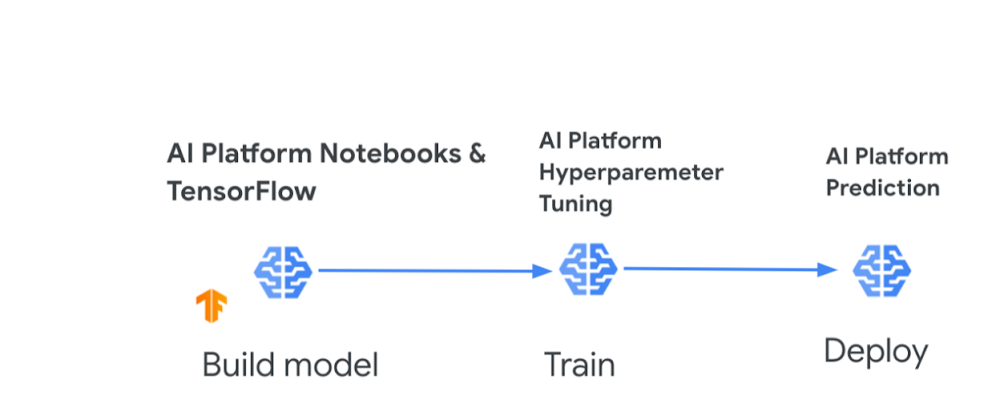
For anyone with a sweet tooth for confections and machine learning, I have some good news. You might remember recently my colleagues, Sara Robinson and Dale Markowitz, collaborated to create some delicious new baked inventions, including the Breakie (a fusion between cake, cookies, and bread). All of this was done through a baking ML model that they built with AutoML Tables, a no-code way to create machine learning models on tabular data.Well, it wasn’t long before legendary confectionery manufacturer Mars Wrigley approached Sara and Cloud AI for a Maltesers + AI kitchen collaboration. Sara trained a new ML model to generate recipes for cookies, cakes, scones, traybakes, and any “hy-bread” of these. After hours of model training and baking experiments, Sara combined Maltesers with her model’s AI-optimized cake and cookie recipes to create a brand new dessert, which even includes the classic British ingredient, Marmite. To break it down, Sara used a few tools to build and customize her model:AI Platform Notebooks (Jupyter lab environment for feature engineering and model development) and TensorFlow AI Platform Hyperparameter Tuning(model training)AI Platform Prediction (model deployment)You can try out Sara’s AI-powered Mars recipe yourself, but if you have an appetite to build your own ML model for other creations like pizzas, pies, milkshakes, or stir-frys, let’s boil down the objectives and steps to get you started:Objective: Create a model that takes a type of dish as input, and produces the amounts of the different ingredients needed to create it.Steps:Collect the data. You’ll want to collect a sizable dataset around the dish recipes you’re interested in (various types of pizzas, baked goods, or noodles for example). You’ll want data on the amount of each ingredient that goes into the dish. So if you’re focused on pizzas, you need data on the amounts of dough, cheese, and toppings that make up each pizza type. Prepare the data. Whittle down each of those recipes to core ingredients that span the dishes. This might be a bit arbitrary but think about which ingredients affect the fundamental makeup of all dishes like texture, flavor, or consistency. In the pizza example, I’d narrow it down to only dough ingredients, cheese type, sauce, and common toppings. Preprocess the data. Make sure all ingredient amounts are in the same measurement unit (e.g., ounces or grams). You may also need to scale the model inputs so that all ingredient amounts fall within a standard range. You can use data augmentation to create new training examples. If you’re using AutoML you can skip this step, as it handles many data preparation tasks for you, but keep in mind best practicesfor creating training data. Build your model. AI Platform lets you develop, train, and deploy your model using notebooks, a built-in Data Labeling Service, and the ability to store datasets in Cloud Storage or BigQuery. You can also use AutoML Tables and import data directly from CSV files, Google Sheets, or a BigQuery database. Train your model. You can use AI Platform Hyperparameter Tuning, a service for running multiple training job trials to optimize a model’s hyperparameters. Additionally,  AutoML Tables provides automated feature engineering. With either tool, you can determine which ingredients are important predictors of each dish type, such as basil  being an important predictor of a Margherita pizza (this can be more easily done using AutoML). Deploy your model and predict. Once you have tuned your hyperparameters and trained your model, you can use AI Platform Prediction to create custom recipes (amounts of ingredients to create a dish or combo-dish). With both AI Platform and AutoML you can also discover feature importance scores (how heavily weighted ingredients are for a dish). AI-powered recipes delivered! Now before you run off to grab your apron, let me share some sweet resources to help you get started.AI resources to give you a tasteAI Platform QuickstartThis tutorial shows how to train a neural network on AI Platform using the Keras sequential API and how to serve predictions from that model. You can also run the tutorial as a notebook in Colab. You’ll learn how to:Train a model on AI Platform using prewritten Keras codeDeploy the trained model to AI PlatformServe online predictions from the deployed modelPlus learn how to dig into the training code used for this model and ensure it’s compatible with AI Platform. Even though the dataset is around US Census income, you can use the tutorial as a framework for understanding how to train, deploy, and serve models on AI Platform for cooking-inspired (or other) datasets of your choosing. Build your first AI Platform NotebookIn this tutorial, Sara walks you through tools in AI Platform Notebooks for exploring your data and prototyping ML models. You’ll learn how to: Create and customize an AI Platform Notebooks instanceTrack your notebook code with git, directly integrated into AI Platform NotebooksUse the What-If Tool within your notebookAutoML TablesI’d be remiss if I didn’t emphasize that you can also create custom ML models without code. I mentioned that when Sara and Dale teamed up to create their Breakie recipe, they used AutoML Tables, which relieves much of the heavy burden by automating feature engineering so you can easily build and deploy state-of-the-art machine learning models on structured data. The codeless interface guides you through the full end-to-end ML workflow, making it easy for anyone to build models and reliably incorporate them into broader applications. There are a ton of quickstarts, samples, and videos to help you get started on AutoML Tables. Use them to learn how to:Create a dataset and modelImport data into a datasetDeploy a modelEvaluate your modelUse AutoML Tables from a Jupyter notebookAI Adventures video playlistCheck out coverage from Yufeng Guo and Priyanka Vergadia on AI Platform. In this featured video, Yufeng covers how you can use AI Platform built-in algorithms to train and deploy machine learning models without writing any training code. Plus check out other videos in the playlist to learn about:Training models with custom containers on AI PlatformAI Platform Pipelines for improving the reliability of your ML workflowsUsing AI Prediction service to get explanations of your models and better understand their outputsMaking the most of the AI Data Labeling service on AI PlatformIf you’ve made it to this point, you’re probably getting hungry and eager to put this in action. You can explore more AI on Google Cloud, and share your recipes with Sara, Dale, and me online. We’ve tried this with baking, but we’d love to hear if you have success with models for other types of recipes! – StephanieRelated ArticleHow sweet it is: Using Cloud AI to whip up new treats with Mars MaltesersMars uses Google Cloud AI to invent a tasty new cake that includes maltesers and marmite!Read Article
Quelle: Google Cloud Platform

Google Cloud and AVEVA’s OSIsoft serve the industrial sector a new flavor of PI

Across the industrial sector, many digital enablers and disruptive technologies are transforming businesses to be more efficient, profitable, nimble, and secure: smart factories with connected machines, the rise of the industrial internet of things (IIoT), proliferation of sensors and data, and new cloud strategies, to name a few.Our work with the PI System is designed to help industrial companies modernize their data and take it beyond the operational space to Google Cloud, deriving more insights and business value. Thanks to our partnership with AMD and OSIsoft, now part of AVEVA, customers can effectively, safely, and easily deploy a fully functioning PI System to Google Cloud. Together, we assist customers along that transformational journey through the launch of GCP deployment scripts for PI Core.The PI System is the market-leading data management platform for industrial operations in essential industries such as energy, mining, oil and gas, utilities, pharmaceutical, facilities, manufacturing, and more. The PI System automatically captures sensor data from every relevant source, refines and contextualizes the data, and delivers it to a broad ecosystem of people, tools, and applications for analysis and strategic planning. It also serves as a single source of truth for consistent decision making.With the PI System, industrial companies can generate insights from their data, including:Analyzing seasonal trends  Determining if utilities are meeting the demands of production  Comparing the performance of different lots of raw material  Determining when maintenance is required on equipment  Optimizing the utilization or performance of a production line  The new deployment scripts are a natural addition to PI Integrator for Business Analytics, which integrates Google Cloud with PI Core, the on-premises portion of the PI System. PI Integrator for Business Analytics can deliver critical operational data directly to Google Cloud destinations like Cloud Storage, BigQuery, and Pub/Sub. It can also be deployed either on-prem or on Google Cloud.The solution allows customers to take time-series data from one or many of their PI Core deployments and move it onto BigQuery, Google Cloud’s enterprise data warehouse for analytics. Customers can take advantage of exabyte-scale storage and petabyte-scale SQL queries in this high-speed, in-memory BI engine, enabling cloud-based artificial intelligence (AI) and machine learning (ML) tools that provide deep insights like anomaly detection and predictive maintenance from that data.Through our partnership, PI Core-based solutions for industrial customers are further protected by Google Cloud’s robust security features, like encrypting cloud data at rest by default, that keep data safe and more secure. What’s more, PI Core is aligned with real-time mission-critical industrial applications, avoiding delays in time-sensitive process automation or discrete manufacturing processes. Serving a new slice of PI (System) on Google CloudGCP deployment scripts for PI Core are the latest achievement in our partnership. We developed these deployment scripts for PI Core on Google Cloud using Infrastructure as Code (IaC) with PowerShell and Terraform technologies. With PI Core on Google Cloud, customers can generate business insights through the power of Google Cloud’s Smart Data Platform with AI/ML combined with other contextualized data. The scripts accelerate an industrial customer’s digital transformation and support quick and iterative testing and prototyping. They’re also designed for customers who are considering moving their on-prem system to Google Cloud, or customers who would like to deploy PI Core as an aggregation system to bring diverse on-prem data from multiple PI Systems into one place.Click to enlargeThese deployment scripts automate the provision of the PI Core components running on Google Cloud N2D VM instances powered by hardware such as 2nd Gen AMD EPYC™ processors. GCP deployment scripts for PI Core include recommended practices for both platforms by delivering automation to deploy test and development environments.  The scripts are offered in non-high availability (non-HA) configuration, with an HA version providing failover capabilities for PI Core coming soon. These scripts are open-sourced, and the non-HA version is now available on Google’s GitHub.By running PI Core on Google Cloud, the industrial sector has an easy and efficient path to business insights, generating more value from their collected data in a safe and managed environment. Enabling PI Core deployment on Google Cloud through scripts is just one of the solutions that we’re building together. Stay tuned for more updates.Learn more about PI Core and the overall PI System for the industrial sector. Learn more about Google Cloud instances powered by AMD. Ready to get started with our deployment scripts? Visit the GCP deployment scripts for PI Core on our Github.Related ArticleCOVID-19 reshapes manufacturing landscape, new Google Cloud findings showAccording to our new research released today, manufacturers around the world have started to revamp their operating models and supply cha…Read Article
Quelle: Google Cloud Platform

Get Involved with Docker

Every day, hundreds of passionate Docker users around the world contribute to Docker. Whether you are just getting started or are an expert in your field, there are many ways to get involved and start contributing to Docker. If you’re into technical writing, you can easily publish and/or edit articles in docs.docker.com. If you’re more into code contribution, there are dozens of open source Docker projects you can dive into. Or if you’re just interested in sharing knowledge and spreading Docker goodness, you can organize a local meetup or a virtual workshop on our community events page. 

There are literally countless ways one can contribute to Docker. This makes it sometimes a bit difficult to find the right project or activity that maps to your interests and level of Docker expertise. That’s why we’ve been working to make it easier for anyone to learn more about ways to contribute and find the right project or activity. To this end, we created a community-driven website that aims to make it easier than ever to navigate the many different contribution opportunities that exist at Docker, and ultimately, to find the right contribution pathway to get started. 

The website is entirely built on top of GitHub, is editable by the community and is organized into six distinct sections, from technical to non-technical contributions. 

We also put emphasis on “community events” which are central in our efforts to engage more contributors. You’ll find lots of tools and resources that will be continuously updated, including event handbooks. These handbooks are specifically designed with step-by-step guidance on how to run a workshop with a full list of topics to cover, e.g. “Docker for Node.JS developers” workshop.  Again, the website is entirely editable by anyone with a GitHub account so if you have content to share, a bug to flag or a recommendation to make, just make a pull request.

This is an experimental website: we’re still building out sections and figuring out the right format and structure. We look forward to seeing it evolve and improve over time with the contributions from the community to become a very useful resource for the Docker community.

A *huge* hat tip to Docker Captain Ajeet Raina for driving this initiative forward!

References and links:

Get Involved with Docker website How to contribute to the Get Involved siteCommunity Leaders Handbooks
The post Get Involved with Docker appeared first on Docker Blog.
Quelle: https://blog.docker.com/feed/