Leaf Space: Enabling next-gen satellites on Google Cloud
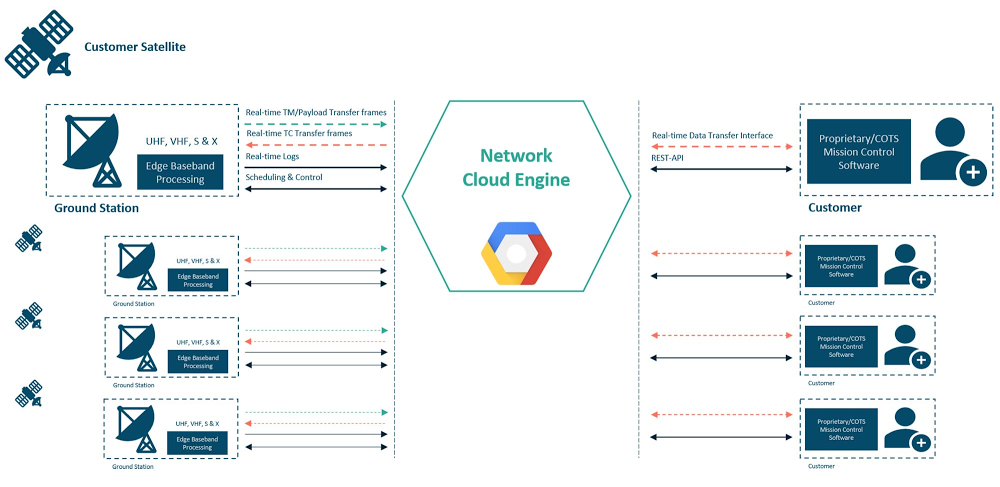
There is a revolution happening in the space industry. Spurred on by low rocket launch costs, component miniaturization, and digitalization, more than 15,000 satellites will launch over the next decade1—more than have been launched throughout the prior six decades—studying the Earth’s weather and environment, helping people and things communicate in remote locations, monitoring critical infrastructure, backhauling cellular traffic, and performing other important tasks. And if all goes as planned, Leaf Space’s “Ground Station as a Service” which runs on Google Cloud will be there to help.Most of these new satellites will be launched into low Earth orbit (LEO). Unlike traditional broadcast TV satellites, which operate in a geostationary (GEO) orbit approximately 36,000 kilometers from the Earth’s surface, LEO satellites are much closer to Earth, typically at an altitude of 500 to 2,000 kilometers. For communications missions, this reduces the latency, or the amount of time that it takes a signal to travel from the ground to the satellite and back, and increases the capacity density, or the number of bits per square kilometer that the satellite can deliver. For Earth observation satellites, this increases the resolution of images or other observations that the satellite is making. LEO satellites are also cheaper and faster to manufacture and launch.However, there is a downside to using LEO. Unlike GEO satellites which appear to be fixed in the sky, LEO satellites move relative to the Earth’s surface. As a result, for a specific LEO satellite, there is no single ground antenna that will always have that satellite within its field of view. Uninterrupted connectivity between the ground and the satellite requires multiple antennas that are distributed around the world. The number of antennas can be reduced if interruptions to space-to-ground communications are allowed, but even in that scenario, several sites are desirable.This creates a problem for new satellite operators. Launching even one satellite requires a worldwide network of antennas, and most of the time, those antennas will be idle when the satellite is not overhead.Ground Station as a ServiceEnter companies like Leaf Space. Since it was founded in 2014, Leaf Space’s mission has been to simplify access to space with global infrastructure composed of antennas, processing equipment, and software that it offers as a service to satellite operators. A satellite operator can lease time on Leaf Space’s ground network, and when a satellite is within its field of view, use Leaf Space’s antennas and other equipment to communicate between the satellite and ground. And because an antenna can be shared among many satellites and even satellite operators via a reservation system (much like a conference room that’s reserved by different teams over the course of the day), this lowers operating costs by creating a more efficient utilization of resources. This model is known as Ground Station as a Service (GSaaS). Today, Leaf Space operates a network of eight such GSaaS stations across Europe and New Zealand with plans to expand around the world.Leaf Space software operating on Google CloudNetwork Cloud Engine (NCE) is the brain of Leaf Space’s GSaaS solution. NCE manages multiple satellite missions by ingesting relevant mission constraints, automatically optimizing a schedule of contacts between the satellites and the antennas, orchestrating the activity of the network by automatically configuring signal processing equipment at the ground stations, and enabling control and visibility for satellite mission control center operations teams.NCE orchestrates the entire ground station network operation, while edge resources are utilized to handle baseband processing (the process needed to extract bits and bytes from an RF signal). You can see the flow of data from a satellite to its mission control center (and vice versa) in the diagram below.NCE runs entirely on Google Cloud. A member of Google Cloud’s startup program, Leaf Space chose Google Cloud for the wealth and maturity of its services, its worldwide regions, and its high-speed network backbone. NCE uses Google Cloud services for network connectivity, data transfer, processing, and software control and orchestration. These products enabled Leaf Space’s engineering team to save several months of development time relative to implementing these services from scratch, start commercial operations and continuously roll-out upgrades and new features on a weekly basis. Key solution design decisions and performance metricsIn designing NCE, Leaf Space took advantage of Google Cloud services in order to establish a secure, reliable, scalable, easy to maintain and efficient system by virtualizing major components of a typical ground station network backbone and avoiding any human-in-the-loop process. NCE is composed of several components. The main ones, such as scheduling, ground station control, data transfer, routing, and APIs are built on Google Kubernetes Engine (GKE). Additional specific tasks are handled through Cloud Functions, Cloud Load Balancer and Compute Engine.Building the NCE on Google Cloud has enabled Leaf Space to achieve the following objectives:Leverage automated continuous deployment via Cloud Build and source repositoriesUtilize a multi-server distributed system with liveness probes to ensure zero downtimeLoad-balance traffic with fast autoscaling for high loads Avoid wasting compute resources for low-load servicesEliminate operating system maintenance tasks, allowing more focus on developmentThanks to Google Cloud services, Leaf Space also reduced time-to-market of new features from weeks to days, leveraging all the automated tools for code management: any time a new tag is pushed, the code is validated, a docker container is built and set in production on GKE. A key advantage of this approach is that the team can deploy new capabilities with zero downtime, a significant advantage for a system that must run at high SLAs.The Leaf Space solution utilizes Cloud Function and Kubernetes Engines, Google products that are tightly integrated with other services such as Pub/Sub and Cloud Storage. It decreases time to process logs, creating alerts to monitor the GSaaS network and providing visual analysis of the data received from the satellites.The solution is inherently scalable, making it easy for Leaf Space to add new ground stations or new customers to the production environment and to handle surges in demand.A single NCE ground station and user running on Google Cloud.User experience with using cloud-powered GSaaSWith Google Cloud services such GKE, Scheduler, Redis Cloud Memory Store, Pub/Sub and CloudSQL, Leaf Space was able to create a GSaaS solution that customers report is easy and straightforward to use.To access the system, a user simply provides their spacecraft details, such as orbital parameters, launch date, and baseband configuration. NCE then creates a user account and configures the GSaaS network, including accounting for any applicable regulatory requirements, such as the user’s spectrum license. The mission constraints that the automatic scheduling service needs are set through the API, and NCE then creates an optimized schedule for communications between the satellite and the antenna network. When it comes time to establish a link between the satellite and the ground, NCE spins up the edge baseband processing chain and enables the data routing between the active ground station and the user interface. Any packets that are received, demodulated, and decoded are directly forwarded in real-time to the user or the satellite.What happens to the downlinked data?Once the data reaches the user, customers can perform further processing and extract useful information from it, for example performing weather monitoring from GPS occultation sensors, ship detection from a SAR (Synthetic Aperture Radar) acquisition or deforestation trend analysis from optical images. All these analyses can be done directly in the cloud environment by the user using Google Cloud Data Analytics, Artificial Intelligence and Machine Learning services. The ultimate end-product can then be easily stored and distributed to end customers. In short, Google Cloud provides an efficient way for Leaf Space to provide GSaaS services to the space ecosystem and further open the doors for development of the space economy. Having the entire processing chain in the cloud from the acquisition phase (through the GSaaS) to data analytics and distribution significantly lowers the delivery latencies and allows efficient distribution of the data. Together, Leaf Space and Google Cloud look forward to enabling the next generation of LEO satellites. If you want to learn more about how Google Cloud can help your startup, visit our startup page to learn more or apply for our Startup Program, and sign up for our monthly startup newsletter to get a peek at our community activities, digital events, special offers, and more.A big thank you to Jai Dialani, Leaf Space Sr. Business Developer and the entire Leaf Space team, for creating this solution and your contributions to this blog post.1. Euroconsult study; https://www.euroconsult-ec.com/research/WS319_free_extract_2019.pdfRelated ArticleGlideFinder: How we built a platform on Google Cloud that can monitor wildfiresDmitry Kryuk, founder and CTO of GlideFinder, shares how they built a platform that can locate wildfires, alert subscribers, and provide …Read Article
Quelle: Google Cloud Platform