These Microsoft SQL Server on RHEL 8 benchmark results might surprise you

When it comes right down to it, a database is only useful if you can use it to get access to the information you need, when you need it. That’s why performance is so important whether you are running on bare metal, in virtual machines or containers. Regardless of whether you’re running on-premises or in the public or private cloud. One of the key factors influencing performance is traditionally the choice of an underlying operating system. 
Quelle: CloudForms

Broadcom improves customer threat protection with flexible data management

Editor’s note: Today we’re hearing from Padmanabh Dabke, Senior Director of Data Analytics and Zander Lichstein, Technical Director and Architect for GCP Migration at Broadcom. They share how Google Cloud helped them modernize their data analytics infrastructure to simplify their operations, lower support and infrastructure costs and greatly improve the robustness of their data analytics ecosystem. Broadcom Inc. is best known as a global technology leader that designs and manufactures semiconductor and infrastructure software solutions. With the acquisition of Symantec in 2019, Broadcom expanded their footprint of mission critical infrastructure software. Symantec, as a division of Broadcom, has security products that protect millions of customers around the world through software installed on desktops, mobile devices, email servers, network devices, and cloud workloads. All of this activity generates billions and billions of interesting events per day.  We have dozens of teams and hundreds of systems which, together, provide protection, detection, exoneration, and intelligence, all of which requires handling a massive amount of data in our data lake.   Broadcom’s Security Technology and Response (STAR) team leverages this data lake to provide threat protection and analytics applications. The team needed a more flexible way to manage data systems while eliminating resource contention and enabling cost accountability between teams.Our data lake has served us well but as our business has grown so have our technology requirements. We needed to modernize the legacy implementation of the data lake and analytics applications built on top. Its monolithic architecture made it difficult to operate and severely limited the choices available to individual application developers. We chose Google Cloud to speed up this transformation. In spite of the complexity and scale of our systems, the move to Google Cloud took less than a year and was completely seamless for our customers. Our architectural optimizations, coupled with Google Cloud’s platform capabilities simplified our operational model, lowered support and infrastructure costs, and greatly improved the robustness of our data analytics ecosystem. We’ve reduced the number of issues being reported on the data lake, translating to a reduction of 25% in monthly support calls from internal Symantec researchers related to resource allocation and noisy neighbor issues.Where does our data come from and how do we use it?Providing threat protection requires a giant feedback loop. As we detect and block cyber attacks in the field, those systems send us telemetry and samples: the type of threats, where they came from, and the damage they tried to cause. We sift through the telemetry to decide what’s bad, what’s good, what needs to be blocked, which websites are safe or unsafe, and convert those opinions into new protection which is then pushed back out to our customers. And the cycle repeats.In the early days, this was all done by people—experts mailing floppy disks around. But these days the number of threats and the amount of data are so overwhelming that we must use machine learning (ML) and automation to handle the vast majority of the analysis. This allows our people to focus on handling the newest and most dangerous threats. These new technologies are then introduced into the field to continue the cycle.Shortcomings of the legacy data platformOur legacy data platform had evolved from an on-prem solution, and was built as a single, massive, relatively inflexible multi-tenant system. It worked well when there was a big infrastructure team that maintained it but failed to take advantage of many capabilities built into Google Cloud. The design also introduced a number of obvious limitations, and even encouraged bad habits from our application teams. Accountability was challenging, changes and upgrades were painful, and performance ultimately suffered. We’d built the ecosystem on top of a specific vendor’s Apache Hadoop stack. We were always limited by their point of view, and had to coordinate all of our upgrade cycles across our user base. Our data platform needed a transformation. We wanted to move away from a centralized platform to a cloud-based data lake that was decentralized, easy to operate, and cost-effective. We also wanted to implement a number of architectural transformations like Infrastructure as Code (IaC) and containerization. “Divide and Conquer” with ephemeral clustersWhen we built our data platform on Google Cloud, we went from a big, centrally managed, multi-tenant Hadoop cluster to running most of our applications on smaller, ephemeral Dataproc clusters. We realized that most of our applications follow the same execution pattern. They wake up periodically, operate on the most recent telemetry for a certain time window, and they generate analytical results that are either consumed by other applications or pushed directly to our security engines in the field. The new design obviated the need to centrally plan the collective capacity of a common cluster by guessing individual application requirements. It also meant that the application developers were free to choose their compute, storage, and software stack within the platform as they seemed fit, clearly a win-win for both sides. After the migration, we also switched to using Google Cloud and open-source solutions in our stack. The decentralized cloud-based architecture of our data lake provides users with access to shared data in Cloud Storage, metadata services via a shared Hive Metastore, job orchestration services via Cloud Composer, and authorization via IAM and Apache Ranger. We have a few use cases where we employ Cloud SQL and Bigtable. We had a few critical systems based on HBase which we were able to easily migrate to Bigtable. Performance has improved, and it’s obviously much easier to maintain. For containerized workloads we use Google Kubernetes Engine (GKE), and to store our secrets we use Secret Manager. Some of our team members also use Cloud Scheduler and Cloud Functions. Teaming up for speedSTAR has a large footprint on Google Cloud with a diverse set of applications and over 200 data analytics team members. We needed a partner with in-depth understanding of the technology stack and our security requirements. Google Cloud’s support accelerated what would otherwise have been a slow migration. Right from the start of our migration project, their professional services organization (PSO) team worked like an extension of our core team, participating in our daily stand-ups and providing the necessary support. The Google Cloud PSO team also helped us quickly and securely set up IaC (infrastructure as code). Some of our bleeding edge requirements even made their way to Google Cloud’s own roadmap, so it was a true partnership. Previously, it took almost an entire year to coordinate just a single major-version upgrade of our data lake.  With this Google Cloud transformation we can do much more in the same time, it only took about a year to not only move and re-architect the data lake and its applications, but also to migrate and optimize dozens of other similarly complex and mission-critical backend systems. It was a massive effort, but overall, it went smoothly, and the Google Cloud team was there to work with us on any specific obstacles. A cloud data lake for smoother sailingMoving the data lake from this monolithic implementation to Google Cloud allowed the team to deliver a platform focused entirely on enabling app teams to do their jobs. This gives our engineers more flexibility in how they develop their systems while providing cost accountability, allowing app-specific performance optimization, and completely eliminating resource contention between teams.Having distributed control allows teams to do more, make their own decisions, and has proven to be much more cost-effective. Because users run their own persistent or ephemeral clusters, their compute resources are decoupled from the core data platform compute resources and users can scale on their own. The same applies to user-specific storage needs.We now also have portability across cloud providers to avoid vendor lock-in, and we like the flexibility and availability of Google Cloud-specific operators in Composer, which allow us to submit and run jobs across Dataproc or on an external GKE cluster.We’re at a great place after our migration. Processes are stable and our data lake customers are happy. Application owners can self-manage their systems. All issues around scale have been removed. On top of these benefits, we’re now taking a post-migration pass at our processes to optimize some of our costs. With our new data lake built on Google Cloud, we’re excited about the opportunities that have opened up for us. Now we don’t need to spend a lot of time on managing our data and can devote more of our resources to innovation. Learn more about Broadcom. Or check out our recent blog exploring how to migrate Apache Hadoop to Dataproc.
Quelle: Google Cloud Platform

Continuous migration to Cloud SQL for terabyte-scale databases with minimal downtime

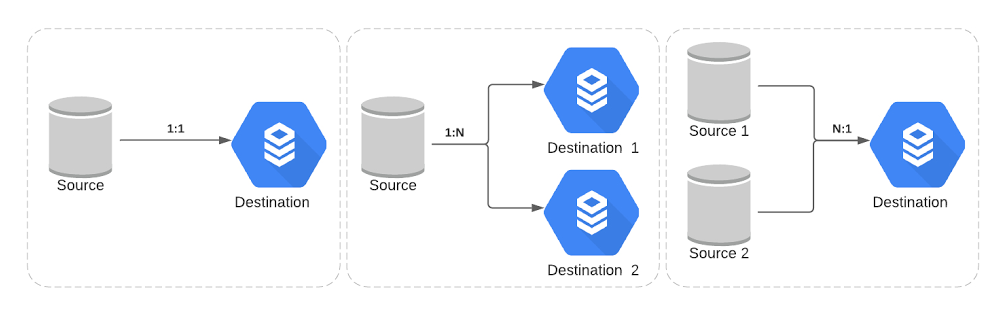
When Broadcom completed its Symantec Enterprise Security Business acquisition in late 2019, the company made a strategic decision to move its Symantec workloads to Google Cloud, including its Symantec Endpoint Security Complete product. This is the cloud-managed SaaS version of Symantec’s endpoint protection, which provides protection, detection and response capabilities against advanced threats at scale across traditional and mobile endpoints.To move the workloads without user disruption, Broadcom needed to migrate terabytes of data, across multiple databases, to Google Cloud. In this blog, we’ll explore several approaches to continuously migrating terabyte-scale data to Cloud SQL and how Broadcom planned and executed this large migration while keeping their downtime minimal.Broadcom’s data migration requirementsTerabyte scale: The primary requirement was to migrate 40+ MySQL databases with a total size of more than 10 TB. Minimal downtime: The database cutover downtime needed to be less than 10 minutes due to SLA requirements.Granular schema selection: There was also a need for replication pipeline filters to selectively include and exclude tables and/or databases. Multi-source and multi-destination: Traditional single source and single destination replication scenarios didn’t suffice here—see some of Broadcom’s complex scenarios below:How to set up continuous data migration Below are the steps that Broadcom followed to migrate databases onto Google Cloud:Step 1: One-time dump and restoreBroadcom leveraged the mydumper/myloader tool for the initial snapshot over the native mysqldump, as this tool provided support for multithreaded parallel dumps and restores.Step 2: Continuous replication pipelineGoogle offers two approaches to achieve continuous replication for data migration:Approach A: Database Migration ServiceGoogle recently launched this managed service to migrate data to Cloud SQL from an external source, such as on-premises or another cloud provider. It streamlines the networking workflow, manages the initial snapshot and ongoing replication, and provides the status of the migration operation. Approach B: External Server ReplicationThis process enables data from the source database server—the primary— to be continuously copied to another database—the secondary. Check out Best Practices for Migrating to Cloud SQL for MySQL video for more information.How Broadcom migrated databasesTo handle Broadcom’s unique requirements and to give a finer level of control during the data migration, Broadcom and Google Cloud’s Professional Services team jointly decided on approach B, augmented with a set of custom set of wrapped stored procedures.Here’s a look at the solution diagram highlighting the process for data migration:These are the steps followed for the data migration at Broadcom:Clone the source database Take Dump of a source database and upload it to Google Cloud StorageProvision compute instances and install tools such as mydumper, Cloud Storage clientInitiate parallel dump operation using mydumperEncrypt dump and upload to Cloud Storage bucketProvision the Cloud SQL and Restore the dumpProvision compute instances and install tools such as myloaderDownload dump from Google Cloud Storage bucket and decrypt itInitiate parallel restore operation using myloaderConfigure External Server Replication using the Stored Procedure Update Cloud SQL configuration to be read-replica Set up external primary replication pipeline along with table and/or database level filters Configure optimized parameter for replicationDatabase CutoverPassivate upstream services traffic to the database to allow read replica lag to catch upWhen replication lag is zero, promote the Cloud SQL read replica to master and cut over the upstream traffic from the original source to the Cloud SQL instanceSome additional data security and integrity considerations for the data migration:Communication between source to destination should be over a private network through VPC peering for ongoing replication traffic, so that none of traffic leaves the private VPC boundary.Data at rest and in transit should be encrypted with support for TLS/SSL.Large-scale migration requires full automation for repeated reliability and can be achieved via Ansible automation framework. Also, automate data integrity checks between source and destination databases.Ability to detect and recover from failure point in restoration and replication.Learn more about Cloud SQL.Related ArticlePreparing your MySQL database for migration with Database Migration ServiceRecently, we announced the new Database Migration Service (DMS) to make it easier to migrate databases to Google Cloud. DMS is an easy-to…Read Article
Quelle: Google Cloud Platform

Optimizing object storage costs in Google Cloud: location and classes

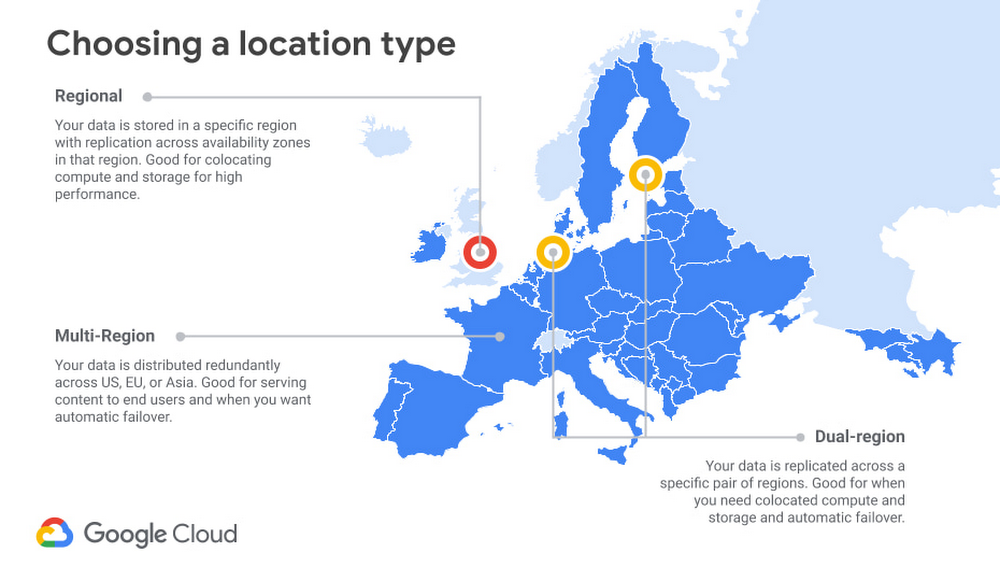
Storage is a critical component of any cloud-based infrastructure. Without a place to store and serve your data, databases won’t work, compute can’t run, and networks have nowhere to put the data they’re carrying. Storage is one of the top three cloud expenses for many customers, and most companies’ storage needs are only growing. It’s no surprise that customers ask us how to optimize their storage costs. The vast majority of cloud storage environments use object storage, as opposed to the file or block storage used in most on-prem environments. Google Cloud’s object storage offering, Cloud Storage, is good for bulk storage of large amounts of data. Object storage is inherently “unstructured” (key-value pairs, with very large values), but the files stored within may be binary data, text data, or even specialized data formats like Apache Parquet or Avro. At a penny or less per gigabyte, object storage is the cheapest and most scalable solution for the bulk of your data. But even though object storage pricing is low, costs can add up. For an organization with many workloads running, and changing needs over time, it can be challenging to optimize cloud storage needs (and costs) for each new or newly migrated application.You can save on cloud storage in a number of ways. How you do so depends on a range of factors, including your data lifecycle needs, retrieval patterns, governance requirements, and more. This blog is the first in a series on how to save money on object storage in Google Cloud. We’ll start by focusing on two of the biggest decisions you can make, namely, the Google Cloud regions where you store the data, and the storage class options that you can select.Start with the right configurationYour first opportunity to save on object storage is when you initially set up the bucket. Setting up storage is easy, but there are a few key decisions to make. Some of those choices, like storage location, become difficult and time consuming to change as the amount of data you are storing increases, so it is important to make the right decision for your needs.LocationChoosing a storage location is about balancing between cost, performance, and availability, with regional storage costing the least, and increasing for dual- or multi-region configurations.In general, regional storage has the lowest availability, because it is limited to, as the name implies, a single region. The data is still highly available. With single region storage, data is redundantly stored across multiple zones in the region (see this page for more about Google Cloud regions and zones). Google Cloud’s systems are designed to isolate failures within a zone. Dual-region and multi-region storage provide even greater availability, since there are now multiple regions (with multiple zones in each) that can serve requests, providing access to data even upon the unlikely event of a region-wide outage.In terms of performance, picking a location for your storage is a complex topic. In general, pinning your data to a region (either by selecting regional or dual-region locations) will offer important performance gains when readers and writers are co-located in the same region. For example, if your workloads are hosted in a single Google Cloud region, you may want to ensure that your object storage is located in the same region to minimize the number of network hops. Alternately, if you have on-premises workloads using Cloud Storage for reads and writes, you may want to use a dedicated regional interconnect to reduce your overall bandwidth consumption and to improve performance. Multi-region storage, conversely, will normally offer good performance for directly serving traffic to a very large geographic area, such as Europe or North America, with or without Cloud CDN. Many applications, particularly consumer-facing applications, will need to account for “last mile” latency between the cloud region and the end-user. In these situations, architects may find more value in multi-region storage, which offers very high availability and cost savings over dual-region storage. As to cost, regional storage is the lowest priced option. Dual-regions are the most expensive, as they are effectively two regional buckets with shared metadata, plus the attendant location pinning and high performance. Multi-regions are priced in the middle, as Google is able to store data more economically by retaining the flexibility of choosing where to place the data. Roughly, for every $1 of regional storage, expect to pay ~$1.30 for multi-region, and ~$2 for dual-region storage of any given class.Since these are significant multipliers, it’s important to think strategically about location for your Cloud Storage buckets. Some services create buckets in the US multi-region by default, but don’t blindly accept the default. Consider your performance and availability requirements, and don’t pay for more geo-redundancy and availability than you need.Storage classOnce you’ve picked a location for your Cloud Storage buckets, you need to choose a default storage class. Google Cloud offers four classes: Standard, Nearline, Coldline, and Archive. Each class is ideal for a different data retrieval profile, and the default class will automatically apply to all writes without a class specified. For greater precision, storage class can be defined on each individual object in the bucket. At the object level, storage class can be changed either by rewriting the object or using Object Lifecycle Management. (We’ll talk more about lifecycle management in a future blog in this series.)Storage pricing is for on-demand usage, but there’s still an implicit “contract” in the price that helps you get the best deal for your use case. In the case of “hot” or “standard” storage, the contract has a higher per-GB monthly storage price, but there are no additional per-GB fees for retrieval or early deletion. For “cooler” storage classes, your monthly per-GB storage costs can be much lower, and you will need to consider per-GB fees for retrieval and for early deletion. Your goal is to choose a default storage class which will generate the lowest total cost for your use case most of the time. A long-term view (or forecast) is important.To start, the guidelines we give in our documentation are safe bets:Standard: Access regularly, no retention minimum. This is “hot” data.Nearline: Access less than once a month, retain for more than a month.Coldline: Access less than once a quarter, retain for more than a quarter.Archive: Access less than once a year, retain for more than a year.But what if your data access retrievals vary? Many Cloud Storage users retain data for more than a year (if not indefinitely), so we won’t complicate the analysis with early deletion costs. (In other words, this analysis assumes you will retain all data for more than a year.) However, for retrieval costs, if you have a borderline case, a mixture of cases that you can’t easily predict, or just want to be more precise, you can use the following formula to find the breakeven point for access frequency between two storage classes.Where: hs = Gigabyte-month storage cost for the “hotter” classcs = Gigabyte-month storage cost for the “colder” classcr = Gigabyte retrieval cost for the “colder” class(hs – cs) / cr  = Portion of data read each month at the breakeven pointFor example, consider Standard vs Nearline Regional storage in us-central1 (prices as of January, 2021):(0.02GB/m – 0.01GB/m) / 0.01GB = 1.0/m = 100% per monthThis means that you could read up to 100% of the amount of data you store in Nearline once each month and still break even. Keep in mind, however, two caveats to this calculation:Repeat reads also count. If you read 1% of your data 100 times in the month, that would be just like reading 100% of the data exactly once. This calculation assumes larger (10s of MBs or greater) average object size. If you have very small files, operations costs will impact the calculation. Nonetheless, if you’re reading any less than 100% of the amount you stored and don’t have tiny objects (more on that below), you could likely save money just by using Nearline storage.For a visualization of this trend across all our storage classes, here’s a chart showing storage and retention costs for us-central1 (Iowa) Regional storage classes. These trends will be similar in all locations, but the “Best Rate” inflection points will differ.Assuming, again, that you plan to keep your data for one year or longer, you want your storage class selections to follow the “Best Rate” dotted line shown above. In this case, the inflection points for data read exactly once per month are at about 10%, 60%, and 100% for Archive, Coldline, and Nearline, respectively. Another way to think about this is that if you access less than 10% of your data or less exactly once per month, Archive is the most cost-effective option. If you access between 10% and 60% of your data exactly once per month, Coldline is the cost-optimized choice. And if you expect to access between 60% and 100% of your data exactly once per month, Nearline is the lowest-cost storage class. Standard storage will be the best option if you access 100% of your data or more exactly once per month; this makes it a good choice if you have frequently accessed data with many repeat reads.ConclusionObject storage plays a significant role in cloud applications, and enterprises with large cloud storage footprints must keep an eye on their object storage costs. Google’s object storage offering, Cloud Storage, offers many different avenues to help customers optimize their storage costs. In this blog, the first of a series, we shared some guidance on two of the most important avenues: storage location and storage class. Storage location and storage class are defined at the creation of your bucket, and each option offers different tradeoffs. Our guidance above is designed to help you make the right choice for your storage requirements.For more information about Cloud Storage and how to get started, see our how-to guides, and stay tuned for additional blog posts on optimizing object storage costs for retrieval patterns and lifecycle management.
Quelle: Google Cloud Platform
Reclaim time and talent with AppSheet Automation

Digital transformation has been an enterprise priority for years, butrecent Google Cloud research reinforces that the mandate is more pressing today than ever, with most companies increasing their technology investments over the last year.  While there are many dependencies shaping the future of work, the challenge is to leverage technology to support shifting work cultures. Automation is the rallying point for this goal. According to research firm Forrester, “Automation has been a major force reshaping work since long before the pandemic; now, it’s taking on a new urgency in the context of business risk and resiliency…  As we emerge from the crisis, firms will look to automation as a way to mitigate the risks that future crises pose to the supply and productivity of human workers.”1Last fall, we announced early access for AppSheet Automation, a significant addition to AppSheet, our no-code development platform, that leverages Google AI to make it easier to automate business processes. Today, as part of our mission to further support the future of work, we are making AppSheet Automation generally available (GA). AppSheet Automation empowers even those without coding skills to reshape their own work with powerful new features including smarter extraction of structured data from documents and compatibility with a wider range of data sources like Google Workspace Sheets and Drive.AppSheet Automation eliminates busyworkBy making it easier to automate business processes, AppSheet Automation helps enterprises reduce IT backlogs and save money, while addressing possibly the most pervasive talent headache of all: busywork associated with manual tasks. A recent survey of AppSheet Automation early adopters found that 64% of those leveraging AppSheet Automation were able to focus on high-impact work rather than manual tasks. By harnessing the power of automation, talent can reclaim lost time while providing more space for high impact work. Manually entering receipt data or tracking down paper copies is time consuming, for example. But with AppSheet Automation’s Intelligent Document Processing feature, these tasks no longer need to be inefficient. Unstructured data such as invoices, receipts, and W-9s can be automatically extracted from documents, all thanks to Google Cloud’s Document AI. Process automations such as these help organizations to reclaim time and talent spent on repetitive tasks, empowering a company’s talent to spend more time on strategic and impactful work.Extract unstructured data with Intelligent Document ProcessingGrowing adoption of AppSheet Automation Enterprise customers from around the world in a variety of industries are already using Google Cloud’s no-code application development platform, AppSheet, to empower their employees to build powerful business applications. Globe Telecom, a leading full-service telecommunications company in the Philippines, has built more than 50 business apps, within 8 weeks, with AppSheet, for example. “We’ve always been on the lookout for grassroots innovations among our employees at Globe. It is something that we’re very keen on cultivating for our people. AppSheet gave us this flexibility – the perfect tool to mine these innovative minds. It allows us to quickly execute and transform how business is done and improve how we serve our customers,” said Carlo Malana, Chief Information Officer at Globe. Similarly EBSCO, one of the largest privately held, family-owned companies in the United States, has been working to discover how the union of no-code app development and smarter automation capabilities can increase workforce efficiency. They have been using AppSheet Automation for tasks ranging from auto-ingesting W9s during employee onboarding to eliminating process gaps. “AppSheet Automation lays the groundwork for many automation projects to come, which will increase the speed of deployment, as well as provide better insight into automation processes, as the build process forces you to visually lay it out,” said Matthew Brown, IT Architect at EBSCO.Improving workforce collaboration with AppSheet AutomationWith this GA announcement, we are extending AppSheet Automation’s data source eventing support beyond Salesforce to also include Google Workspace Sheets and Drive, which will make collaboration even easier while keeping IT governance and security top of mind.Looking ahead, we’re also building the ability to embed rich AppSheet views in Gmail to perform approvals on the go. This will allow users to perform process approvals without having to leave their current interface and helps save time.A look towards the future with app views accessible within GmailAs automation extends the power of no-code, organizations around the globe will find new and creative ways to engage with their workforce. Technologies such as AppSheet empower the people working within today’s highly distracted business landscape, helping them to spend more time on the work that matters and to do things they couldn’t do before. We believe this human-centric approach, which balances the needs of line-of-business workers with required IT governance and security, is important to supporting enterprises to become both more empathetic and efficient, and we’re thrilled to see how you use AppSheet’s new automation features. Ready to join the conversation? Start building for free and join our AppSheet Creator Community to engage with Creators from around the world. 1. Forrester Research, The COVID-19 Crisis Will Accelerate Enterprise Automation Plans, May 5, 2020
Quelle: Google Cloud Platform






