Faster, cheaper, greener? Pick the Google Cloud region that’s right for you

When it comes to sustainability, we get more done when we move together. That’s why Google Cloud partners with nonprofits, research organizations, governments, and businesses to build technology and tools to accelerate meaningful change. Technologies like machine learning are proving to be invaluable for tackling unique challenges like identifying species in biodiversity and restoration projects such as those being done by Wildlife Insights. Data analytics tools like BigQuery can deliver insights into real-time energy consumption data, helping energy managers at E.ON make decisions that reduce costs and CO2 footprint. And hyper-efficient infrastructure is helping customers like Carrefour reduce their energy use. Using all the tools we have at Google Cloud, we’re committed to helping make your digital transformation a sustainable one too. As we continue to operate the cleanest cloud in the industry we’re working with a growing group of cloud customers focused on reducing the carbon impact of their operations. Over 90% of global IT leaders plan to or currently report on sustainability metrics, with 26% of those leaders accelerating emissions reduction projects in the past year1. In the past year we’ve worked with over 50 customers to evaluate their IT estates for their carbon impact. From digital image libraries to huge data lakes, we’ve seen potential net-carbon reductions from a few thousand kg of CO2e to many kilotons, combining the determination of our customers and Google’s net carbon neutral cloud.  While we match all of the electricity we consume on a global and annual basis with wind and solar purchases (which helps zero out the net carbon impact of Google Cloud Platform and Workspace), we’re working on carbon-free energy, 24/7. Completely decarbonizing the electricity supply is critical to realizing a carbon-free future and averting the worst impacts of climate change.  To help our customers do this, last month we shared the average hourly Carbon Free Energy Percentage (CFE%) for the majority of our Google Cloud regions. Today, we’re sharing a new tool leveraging this data— a Google Cloud region picker—that helps customers assess key inputs like price, latency to their end users and carbon footprint, as they choose which Google Cloud region to run on. Using the region picker, you weigh factors from “Not Important” to “Important” and select the region from where your user traffic emanates, if applicable. For the almost 90% of developers and IT executives we surveyed2 who would move to a more sustainable data center option, this tool should help them make that decision quickly, using just three inputs: Carbon footprint is based on the amount of carbon-free energy supply for each region.Cost uses the price for generic compute instances in the region.  Latency is approximated using physical distance between selected countries and the city or country of the region.The list of recommended Google Cloud regions changes dynamically, stack ranked based on the values you input into the tool. We know different types of workloads have different requirements, so you can easily test different priorities. In our research3, production workloads serving user traffic most frequently ranked performance or latency as their top requirement; internal systems like HR or billing ranked performance and data residency the top requirement. However, for best-effort workloads like batch jobs or backup, carbon scores were ranked as the top characteristic more than any other factor. For companies like Snap Inc., and their sustainability lead Emily Barton, reducing the carbon impact of their digital infrastructure is an important sustainability target for the company. “We’re collaborating with Google to make carbon-free energy data and carbon considerations more useful for users at Snap,” said Emily Barton. Similarly, customers like Salesforce are working to decarbonize its own infrastructure and the services it provides to customers, using our CFE data to help reduce its footprint. We’re working to integrate carbon considerations more commonly into application development, data center migration, multi-region or multi-cloud design and architecture. Our partners like SADA Systems are joining us in the effort. “As a leading Google Cloud partner committed to bringing innovative solutions to customers we’re excited to incorporate sustainability into that commitment,” said Brian Suk, Sr. Solutions Architect. “The CFE measurements and the new tooling being introduced today are already influencing how SADA designs its own Google Cloud-based solutions, and we look forward to evolving our strategy to support more sustainable solutions for our customers.” Building a sustainable future is a team effort. We’re excited to partner with our customers to cut carbon emissions, explore new ways to protect the earth’s resources, better harness renewable energy and simply improve the sustainability of their IT infrastructure. Be sure to check out what we’re up to in cloud sustainability and across Google, and use the region picker for your next Google Cloud project.1. IDG, “No Turning Back: How the Pandemic Has Reshaped Digital Business Agendas”, 20212. Google Cloud survey to US IT executives and developers on carbon-free energy prioritization.3. Google Cloud survey to US IT executives and developers on carbon-free energy prioritization.Related ArticleHow carbon-free is your cloud? New data lets you knowA Google Cloud region’s Carbon-Free Energy percentage (CFE%) lets you choose where best to run your workloads to meet your sustainability…Read Article
Quelle: Google Cloud Platform

Proxyless gRPC adds support for advanced traffic management features

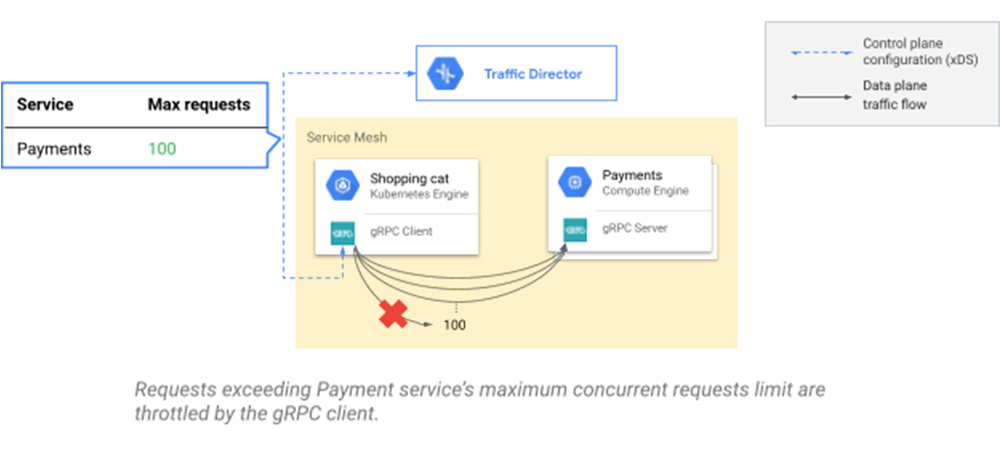
For developers building cloud-native microservices, an increasingly common choice is to use gRPC, a high-performance, open-source RPC framework that you can use with Traffic Director for your service mesh. Last year, the gRPC community introduced support for the xDS APIs, bringing service mesh capabilities to proxyless gRPC services. With the most recent release of gRPC, we are adding support for three new capabilities: maximum stream duration (timeout), circuit breaking, and fault injection, enabling you to improve the reliability of your microservices. If you’re already using Traffic Director with proxyless gRPC services, you can add these capabilities via a simple API call. Let’s take a look at these new capabilities.Stop misbehaving calls with maximum stream durationThe addition of maximum stream duration allows you to configure time limits for all RPCs within the mesh. This feature can be used to ensure clients abort operations that are running unusually slowly when it is unlikely they will succeed, enabling them to try another backend or report an error more quickly. The new xDS maximum stream duration is well integrated with gRPC’s per-RPC deadline, which is set by the client application. When both of them are configured, the effective timeout of requests will be the smaller of the two, respecting the requirements for both the service manager and the client application.Prevent request flooding with circuit breakersCircuit breaking can be used to control the maximum number of simultaneous RPCs allowed from each client to your service. This helps prevent excessive load that, if unchecked, could cause a widespread service outage. With circuit breakers, new RPCs won’t be sent out if the client has reached the limit of outstanding requests specified by the service manager. Compared to server-side rate limiters, which deny incoming requests when the server is experiencing heavy load, excessive RPCs are throttled by the clients, so no network or service resources will be consumed.Provision system robustness with fault injection testsFault injection provides a way to test the resiliency of microservices in the presence of different types of failures. With this feature, you can artificially delay or fail a percentage of RPCs to determine how well your system handles these scenarios before they happen due to a real production event. Fault injection can be configured for all RPCs or  a specific set of requests based on headers set by clients. This gives you the ability to stage different failure scenarios without completely bringing down the production service.If you’ve been thinking about adopting a service mesh, improving performance, or increasing the reliability of your system, proxyless gRPC and Traffic Director can help you do that.  Once you have proxyless gRPC applications set up with Traffic Director, you can enable the above reliability features on all your applications via a single API call, as opposed to having to code each application independently. For more information about using gRPC with Traffic Director and these new features, see the following links:Traffic Director with proxyless gRPC services overviewAdvanced traffic management overviewRelated ArticleTraffic Director and gRPC—proxyless services for your service meshWith the addition of xDS API support, you can now use Traffic Director with proxyless gRPC services.Read Article
Quelle: Google Cloud Platform

What no-code automation looks like with AppSheet

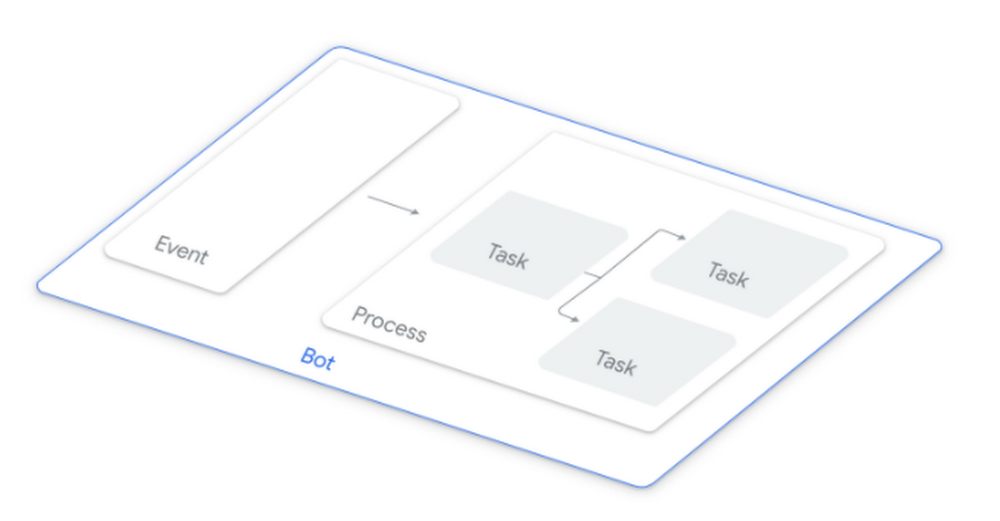
As developers, we talk about automation in the context of technology as often as your friends might talk about Bitcoin — and for good reason: automation has spanned the farthest corners of cloud computing, from infrastructure as code, container orchestration, and DevOps to machine learning and even billing management. It’s making life easier for infrastructure operators, developers, SecOps engineers, and cloud admins by saving them time, which, as we all know, is a finite resource.  More recently, automation has played a pivotal role in not just productivity gains, but also democratizing technology for citizen developers. Google Cloud AutoML for example, has lowered the barrier to entry for machine learning through pre-built models and automated model creation.And now AppSheet is taking the baton and bringing automation to its platform with the GA release of AppSheet Automation. AppSheet is Google Cloud’s intent-aware, no-code application development platform that lets you create applications faster and with less investment than a traditional code-based approach. As an extension of the AppSheet platform, AppSheet Automation offers new, integrated workflow automation capabilities. It leverages Google AI to make it easier to automate business processes, and empowers those without coding skills to reshape their work with features like smarter extraction of structured data from documents and compatibility with a wide range of data sources like Google Workspace Sheets and Drive.AppSheet Automation reclaims developer timeI recently had Jennifer Cadence, Product Marketing Manager for AppSheet, on the GCP Podcast, and she helped paint a clearer picture for me:“Employees are losing an estimated 20% of time to tasks that could be automated1. It’s also mindspace and time we could use to focus on high impact work.”Even as developers, we spend time on manual tasks that lengthen development time or add item after item to our list of things to do. We get requests from business groups to create applications to do things like invoice processing, employee onboarding, and integration with third-party systems. My good friend, John, for example is a data scientist who is still responsible every week for reporting data from a dashboard into a Google Sheet — something he finds frustrating and feels should be automated, so he can focus on high-value work like data experimentation. Likewise, in the past I’ve spent hours on approvals, updating metrics from Salesforce into Sheets, or building an automation that extracts text from a Sheet into a Doc. For employees doing the same, it’s not surprising retention can become problematic. The times I’ve felt the most fulfilled by and creative at my job have been when I get to do more impactful work. AppSheet Automation is designed to give time back to developers and practitioners, and to democratize app development for business users. You can take reasonably complicated ideas and processes and translate them into working apps by using the platform to express them through automation. Technical audiences will see two benefits:Reduce development time by implementing solutions without coding. Reduce backlog by empowering the line of business users who are closest to the problem to build their own solutions. Our survey of early adoptersshows that over 60% of those engaging with AppSheet Automation have an in-house solution but are seeking something more efficient. Let’s talk about how.Automation of course!Through the Automation tab in AppSheet, the first new addition you’ll find are Bots, which are used to create automations by combining events with processes. This is the core of what makes AppSheet Automation easy to use. You envision a process or idea, and structure it intuitively here.Bots can be configured to trigger a process on detection of an event (e.g., a new employee record is created in a Google Sheet), or according to a predetermined schedule. Once enabled, bots run in the background, listening for event triggers. Bots work with your connected data source, and can be created or modified with a few clicks. Changes made are reflected in real time in the app editor so you always know what your automation consists of.Events occur when data is changed (e.g., the priority of a service ticket is changed from low to high) or periodically on a schedule (e.g., every Monday morning at 9 AM).A Process is a sequence of steps (control steps and tasks). A simple process may have just a few steps, such as conditional branches or email tasks, and complete quickly. But a process can be complex, have multiple steps, and take hours or days to complete. It can:Loop over many records Call another processWait for a human to respond to a requestA Task is a simple activity that runs quickly, like “Send an email,” “Change data,” or “Call a webhook.”Modularity is a key design principle of AppSheet Automation. Tasks, Events, and Processes are reusable components. Tasks can be reused in multiple processes. Processes can call other processes. Processes and Events can be reused in multiple bots. This allows for “create once, reuse multiple times” strategies. Intelligent document processingWith AppSheet Automation, you can also leverage intelligent document processing, which uses Document AI to automatically detect invoices, receipts, and forms from documents, PDFs, and images, and to trigger automations and natural language processing. AppSheet Automation connects to documents (and folders) in Google Drive. In the case of documents, you can choose from one of three currently supported types: InvoicesReceiptsW-9 formsIntent-awareUnlike code-driven platforms, AppSheet is a no-code, intent-driven platform. The platform infers the intent of the app being built, which makes the creation and customization process much easier than other options. It uses natural language processing, anticipates the intent of the creator based on keywords, and surfaces contextual suggestions. For example, when you type in “Issue Resolved,” the platform presents bot suggestions. After you select one of them, you have a completely implemented bot ready to go with the event configuration, expressions, the process, and steps. Suggestions are surfaced at multiple levels. When you click to add a new step and start typing in a keyword “re(turn)”, it presents contextual suggestions that make authoring  simple and intuitive.Integration with external data sourcesIn many cases, you need to integrate data from both internal and external company sources, like databases, Airtable, or Box, which requires developer expertise. Remember John, the data scientist? He’s one of a handful of scientists, and his developer team is limited. They can’t afford to spend time learning how to integrate new tools that aren’t part of their primary job, which is why AppSheet and its ability to integrate data sources can be invaluable.It supports various data sources, including Google Workspace, Microsoft Excel, AWS DynamoDB, Dropbox, API management platforms like Apigee, and cloud/on-premises databases. Once you point AppSheet to your data source, it uses machine learning to understand the schema/structure of your data, including dependencies and relationships, and it develops relevant suggestions for bots, events, processes, and steps. You can also tap into Sheets, Drive, and Salesforce through external eventing to create a more streamlined automation experience.How to get startedAppSheet Automation offers intelligent process authoring and rich connectivity, introduces bots, and addresses the long tail of human-centric processes, document based workflows, and app integration use cases. The onus of creating human-centric app workflows no longer needs to fall on development teams, and when it does, AppSheet Automation can help significantly reduce development times. Survey results show that AppSheet Automation has reduced the amount of time to develop automated solutions and time spent on manual tasks. Sample appsThere are a ton of sample apps to get you started. Just login to AppSheet.com and head to “Sample apps” at the top. VideosWe also have many videos to help you learn how to automate processes, integrate with Workspace, build UIs, deploy your apps, and more. Online community There’s already a vibrant community around AppSheet, so check out community.AppSheet.com to join the conversation and engage with other creators from around the world. You can find helpful answers, submit feature requests, and explore AppSheet resources.Head to AppSheet.com to start building with no-code!You can find me on Twitter at @stephr_wong.1 Jobs lost, jobs gained: What the future of work will mean for jobs, skills, and wages How Much Time Are You Wasting on Manual, Repetitive Tasks?
Quelle: Google Cloud Platform

Four consecutive years of 100% renewable energy—and what’s next

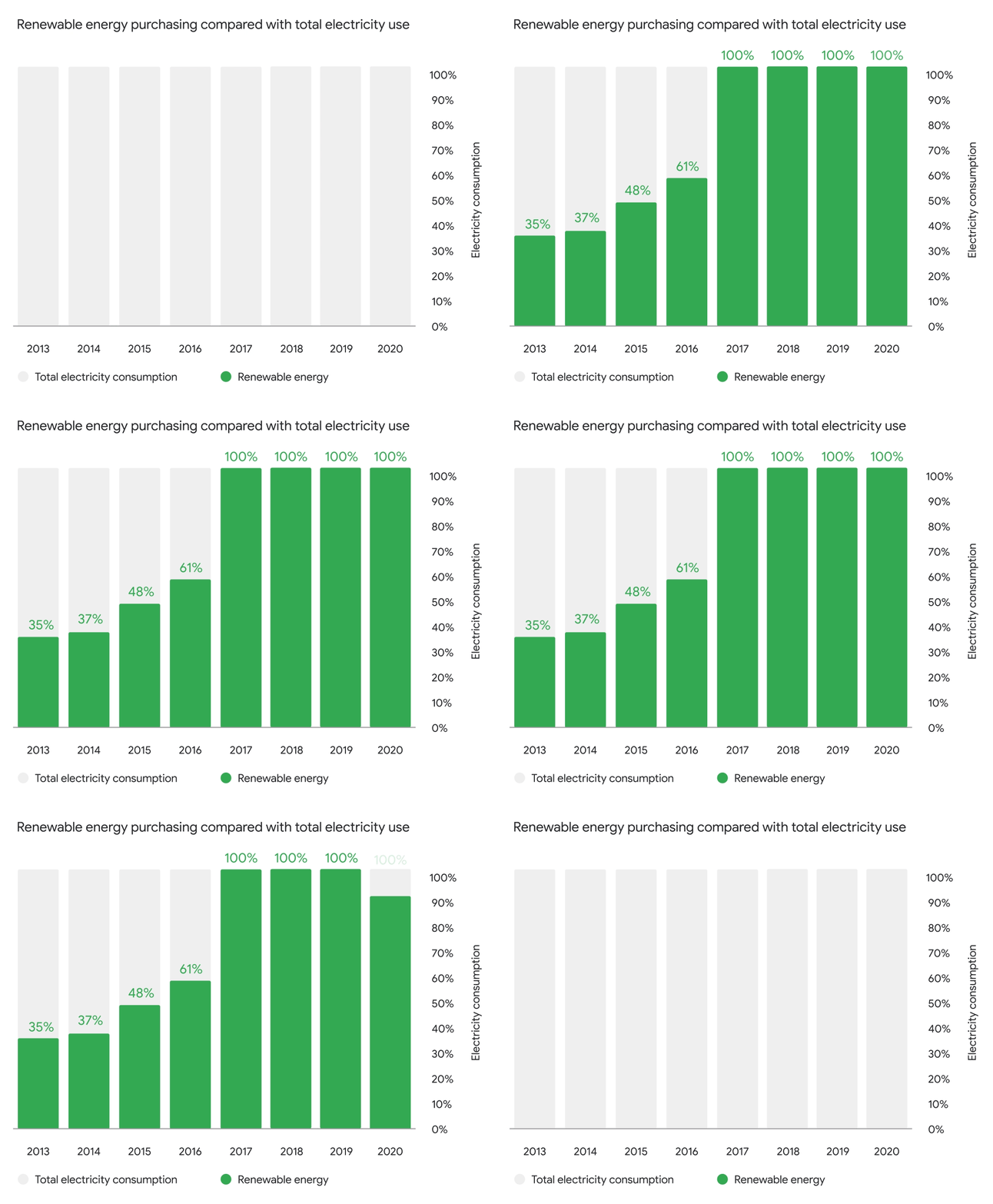
We’re proud to announce that in 2020 Google again matched 100 percent of its global electricity use with purchases of renewable energy. We were the first company of our size to achieve this milestone back in 2017, and we’ve repeated the accomplishment in every year since. All told, we’ve signed agreements to buy power from more than 50 renewable energy projects, with a combined capacity of 5.5 gigawatts – about the same as a million solar rooftops.Achieving 100 percent renewable energy year after year is no easy feat, because the amount of computing done in Google data centers continues to grow. This was especially true in 2020 – a year when many peoples’ work, school, doctor’s appointments, first dates, and visits with loved ones moved online. Even as Google Meet and Duo hosted over a trillion minutes of video calls in 2020, our renewable energy procurement kept pace.The path to 100% starts with reducing the amount of energy we use in the first place. Researchers recently found that worldwide data center electricity stayed close to flat in the last decade, even as computing needs grew 550 percent. And Google has led this trend: compared with five years ago, we now deliver around seven times as much computing power with the same amount of electrical power.Last year’s accomplishment was also due to a global package of renewable energy deals that we announced in late 2019. As those projects came online over the course of 2020, hundreds of new turbines and hundreds of thousands of new solar panels began converting wind and sun into electrons.Our renewable energy projects that started operations in 2020 spanned four continents. Some highlights we’re especially excited about:  Google’s first offshore wind project, in the blustery North Sea, began contributing electrons to the grid where we operate our Belgium data center.In Chile, we began purchasing power  from a new solar farm in the Antofagasta region  to match our growing load in South America. Solar panels distributed across hundreds of public housing rooftops helped us source new clean energy in land-constrained Singapore.Across the U.S., large-scale solar and wind projects gave a boost to data centers from Oklahoma to Alabama to Virginia. So what’s next? Though we’re thrilled to have matched Google’s annual electricity consumption with renewable energy for four years running, we’re now building on our progress to target an even larger ambition: by 2030, Google aims to run on entirely 24/7 carbon-free energy, everywhere we operate. As we discuss in a new explainer, achieving this goal means shifting away from a net-zero model of “emit and compensate” and instead targeting “absolute zero,” where we simply never emit carbon from our operations in the first place. Solving this challenge is not only important for Google, but will also be essential for fully transitioning electric grids to carbon-free energy. We hope our efforts to develop solutions for our own operations can lead the way. For more, check out Google CEO Sundar Pichai’s 2021 Earth Day update on our progress.
Quelle: Google Cloud Platform

How Lumiata democratizes AI in healthcare with Google Cloud

Editor’s note: Today’s guest post comes from AI for healthcare platform Lumiata. Here’s the story of how they use Google Cloud to power their platform—performing data prepping, model building, and deployment to tackle inherent challenges in healthcare organizations. If ever there was a year for healthcare innovation—2020 was it. At Lumiata, we’ve been on a mission to deliver smarter, more cost-effective healthcare since 2013, but the COVID-19 pandemic added new urgency to our vision of making artificial intelligence (AI) easy and accessible. Using AI in healthcare went from a nice-to-have to a must-have for healthcare organizations. Just imagine how differently you could plan or assess risk if you could identify communities that are more likely to develop long-term effects or co-morbidities and end up in the hospital. Our Lumiata AI Platform helps healthcare organizations use AI to improve quality of care, minimize risk, and reduce costs, without having to build those predictive analytics capabilities themselves. We’re making it possible for healthcare organizations to benefit from the latest technologies to derive valuable insights from their data at scale—and ultimately offer better care to their patients. As an AI-first organization, we’ve been able to try new things to meet our customers’ changing needs, and our Google Cloud infrastructure lets us experiment and develop solutions quickly (check out our previous post on why we chose Google Cloud to help us deliver AI). What our customers need: fast, accessible AIAI provides an enormous opportunity for healthcare organizations, with an almost unlimited number of practical applications. AI isn’t just a solution you can switch on—it requires implementing the right, often purpose-built, solutions to extract the right insights from your data. AI in healthcare is the next frontier, but the transformation can be slow. Without Lumiata’s help, many organizations struggle to operationalize AI, from data prepping to model building and deployment, even if they have identified the problems they would like to solve. Having advanced data science teams isn’t enough—you need to establish a fast, flexible, and resilient infrastructure to deploy projects. Healthcare AI projects are often plagued by a lack of understanding of the complexity of the high-dimensional data and what it takes to simplify it, as well as what’s required from engineering to productionize AI. In addition, it can be difficult to get the appropriate buy-in to make the changes needed to be successful.In addition, healthcare organizations are building technology on waterfall methodologies, which lack the feedback loops and continual improvement to deliver the promised results. Without fast proof that AI is worth the investment, many projects fail before they’ve even started.This is where Lumiata comes in. Our goal is to get customers up and running with the ability to perform fast queries and accurate, AI- and ML-driven predictions in a few weeks. The wealth of healthcare data is ripe for generating AI-powered insights and predictions, but it’s often trapped in legacy systems. Also, many organizations simply don’t have the resources to build everything themselves. We provide predictive products to healthcare businesses looking to leverage machine learning without the heavy lift by offering low- to no-code data modeling tools and solutions—all based on Google Cloud. That way, organizations are empowered to get started and run models when they don’t necessarily have the team do it themselves. We selected Google Cloud because of its security infrastructure, intuitive AI tools, and multi-cloud application management technologies. BigQuery, Google’s serverless data warehouse, enables us to provide access to huge amounts of data. With Google Cloud Dataflow and Apache Beam, we built a data ingestion and extraction process to join and normalize disparate patient records and datasets. The entire system is built on a Google Kubernetes Engine, allowing us to scale quickly to meet infrastructure requirements, and Kubeflow helps us develop and deliver our machine learning pipelines. Additionally, Google Cloud’s fully managed services mean we don’t have to think about building and operating our infrastructure. Instead, we invest our resources in doing more work for our customers and addressing their data needs. Let’s take a look at how Google Cloud helps us deliver AI solutions to our customers through the steps of a typical ML building process.1. Data prepping—from raw input to a 360-degree viewHealthcare organizations often suffer from information data silos that lack interoperability, so there’s no true understanding of the total amount of data and insights available. Most companies rarely have a comprehensive longitudinal person record (LPR) into every person’s health history. When it comes to machine learning, cleaning and preparing data is where teams spend the majority of their time. It’s slow and incredibly time-consuming. In addition, working with on-premises environments doesn’t provide enough elasticity–you need to move quickly, and only the cloud has the capacity to support data prepping for AI. We’ve created a data preparation process that takes raw, messy data and transforms it into fully prepped data for machine learning. Our data management pipeline ingests raw, disparate patient datasets and turns them into what we call Lumiata Person360 records. Using BigQuery and Dataflow, we ingest raw data dumps, link with existing or synthesized identifiers, validate, clean, and normalize it based on medications, procedures, diagnosis codes, and lab results. The data is then tied into a single person record and tagged with proprietary disease codes. Our automated pipeline gives us incredible speed to intake data, and Google Cloud ensures we can scale to handle massive datasets seamlessly. For instance, we’ve been able to take 63 million person records (roughly 2.5 terabytes of data) and run them through our entire data management pipeline in less than four hours. As healthcare organizations handle protected health information and must ensure Health Insurance Portability and Accountability (HIPAA) compliance, it’s imperative that we have the highest level of security and compliance at all times. To ensure this, we deploy single-tenant instances of the entire platform as its own Google Cloud Platform project with its own Kubernetes, networking, buckets, BigQuery tables, and services. 2. Removing the burden of training data modelsOne of the biggest challenges with model building is developing the infrastructure that enables transparent access to various data sources. Infrastructure setup takes time and resources, and often creates complexity when determining how to manage diverse data representations, architecture, and data quality. This is compounded by the fact that ML pipelines must continuously scale as the data for analysis increases. Ultimately, we don’t want our customers to have to worry about the underlying infrastructure. We use Kubernetes and Kubeflow to build scalable ML pipelines and deep learning architectures that can support massive datasets. Our platform unlocks millions of input variables (machine learning features) from Person360 patient records and mixes them with our own internal 110 million-member data asset. We then use this data for training our complex data models to predict cost, risk, disease onset, and medical events.Google’s AI Platform also makes it easier for us to experiment faster with large training datasets from our 120 million records. For instance, we have shifted from more traditional machine learning (like gradient boosted decision trees) toward larger deep learning models that can take multiple predictions across more than 140 medical conditions and analyze them across a specific time dimension. The real value here is the speed at which we can service our customers from the time they drop their data into our platform to the first datasets. Our automated machine learning pipeline enables us to reduce the time it takes to deliver the first outputs—from months to weeks. For instance, we can now train our models with feature matrices containing 11 million people in less than two hours—and all without having to waste time setting up infrastructure for distributed training. 3. Deploying and serving models in productionProductizing complex ML models comes with its own host of challenges. After models are trained and ready for deployment, it can be difficult to maintain consistency as you scale model deployments to meet new use cases or requirements across the organization. Our data science and machine learning engineering teams run offline experiments (outside of Kubeflow) using the Google AI Platform, allowing a single team member to run numerous experiments a day. Once we have a model that works, we version the training pipeline, pre-trained models, and inference pipelines before deploying it onto Kubeflow. The Lumiata AI Platform allows us to benefit from serverless and distributed training—our data scientists are training more models per week, and we have made quicker leaps forward using BERT-based deep learning models. Building on top of Kubernetes and Kubeflow gives us a fast, scalable path to deploy and serve models to our customers. Kubeflow’s reusable components allow us to scale without having to build from scratch. There’s no need to worry about the nuances of training, tuning, and deploying models—customers can simply upload their data and get predictions out on the other end. Running ML and AI in productionThe real impact of simplifying AI implementation is that it opens up previously undiscovered paths for improvement. For instance, we recently launched Pharmacy Intelligence, an AI-powered intervention tool that leverages pharmacy visit data to improve chronic disease management. We partnered up with FGC Health, a Canadian retail pharmacy chain, to help them identify diabetic patients at risk for cardiovascular complications who have gaps in care. The tool will then recommend a simple, actionable intervention, such as a visit to a specialist, drug titration, or adjustments to their existing drug regimen. This is a wonderful example of how using AI to address common gaps in care has the power to save lives. As a company, we see Google Cloud as the core of our platform, enabling us to innovate more rapidly. As a result, we’re delivering solutions for new and interesting problems, such as claims payment integrity, predicting hospital admission and readmission, and identifying disease progression fingerprints for more personalized care. We’re helping healthcare companies become smarter, more powerful, and more effective—leveraging the information they already have in new ways to power the next generation of patient care.Related ArticleRoad to recovery: How Google Cloud is helping states get the COVID-19 vaccine to more peopleGoogle Cloud is proud to partner with a number of states across the U.S. to support vaccination efforts at scale.Read Article
Quelle: Google Cloud Platform

LinuxKit as a Commodity for Building Linux Distributions

Guest post by Docker Captain Gianluca Arbezzano

Recently Corey Quinn from LastWeekInAWS wrote an article that made me think “Nobody Cares About the Operating System Anymore”. Please have a look at it! I like the idea that nobody cares about where their application runs. Developers only want them running.

A bit of context about Tinkerbell

I am one of the maintainers for the Tinkerbell project. A bare metal workflows engine that heavily relies on containers and Docker to get its work done. It tries to find an answer for a reasonable question: how do we manage rooms of pieces of hardware? More in practice, how can we bring an API on top of everybody’s data centers?

Containers are the abstraction we decided to use when running reusable code (that we call actions) in somebody else’s hardware. Mainly because distribution, packaging, and runtime are solved issues. Everyone knows how to build, push and run a container.

I think this scenario compares well with the story Corey highlighted. Operating systems are an established, well-known abstraction for the majority of the use cases.

The special operating system for bare metal provisioning

The lifecycle of a bare metal server can be summarised as follows:

You mount SSDs, RAMs and you rack your server, cabling it with power and dataIf you have a BMC, you can remotely start the server. Otherwise, you have to push the power button manuallyThe BIOS looks for bootable devices, USBs, disks, but it can’t find anything to boot because the disk driver is not something that server has nowadays, and there are not operators running with USB sticks in modern datacentersUsually, the last chance a server has to boot when nothing works is via netbooting. A popular technology for that is called PXE (the new one iPXE).PXE makes a DHCP request; you can imagine it as the last SOS: “PLEASE tell me what to do.”If there is a DHCP listening, it can replay with a rescue message to simplify things with a script that PXE can execute.

Usually, the script contains boot information for an operating system, a Linux operating system that can run on RAM. For example, this is how you can Netboot Alpine.

Now the hardware has an ephemeral (on RAM) fully operational operating system. Tinkerbell distributes two of them, one called OSIE and the second one called Hook:

OSIE is the one ran by Equinix Metal internally to provision their entire cloud offerHook is a more recent one the Tinkerbell community develop using LinuxKit

OSIE or Hooks are essential for bare metal provisioning because they are the source of power for what you can do on the hardware itself. Tinkerbell starts a docker daemon, and it downloads and executes a set of actions (as you read Docker containers).

The actions all together build workflows that looks like:

Provisioning: flash and install the end is the operating system on the disk, so next boot, you can access Ubuntu, CentOS, CoreOS, or what you needDeprovision: you can wipe disks and make the server available for a next brand new use

This article is about why we choose LinuxKit, and I hope it will give you more information about when you should think about using it as well!

Nobody cares about the operating system, but you can not avoid one

As you can imagine reading briefly about Tinkerbell when it comes to bare metal provisioning, every bit counts because the hardware lifecycle is cold and not that fast. Stay in control of every step is crucial, from when the server power to when it makes the DHCP request when the hardware boots the in-memory operating system until you finally get what you want executed!

When it comes to operating systems and Linux maintaining a distribution is a lot of work! Even if it dedicated to a specific use case like the one we have to Tinkerbell (it is just a temporary execution environment that relays on Docker) we still have to take care of:

Compatibilities: there are many hardware devices, drivers, kernel modules, architecturesSize: the operating system runs on RAM, yeah it is not that expensive nowadays, but still, we have to be carefulNeeds: We can not assume that all the environments where Tinkerbell runs are the same. For example somebody will make like the idea to run an SSH server as part of the in memory environment because their server do not have a serial console and SSH is a good option for troubleshooting. Or they want to run agents for service discovery like Consul, or for monitoring like Telegraf to improve observability and monitoring. Or some scanner for security purposes.

We can’t make one that works for everything and everybody. That’s why with Hook we decided to adopt LinuxKit.

LinuxKit is now part of the Linux Foundation, initially developed by Docker specifically to release Docker for Mac. You can think about it as a Linux builder focused on containers.

You can add a program on boot as init, or as long-running services. The cool part is that everything runs as a container giving us the ability to package building blocks as Docker containers, leaving a clear path from end-user to build their environment, based on their needs reusing LinuxKit itself (if they want) and the building blocks we developed.

One of the building blocks I am referring to is a Docker container who overrides the logic used by LinuxKit to start the docker daemon. Along that it also starts what we call tink-worker. An agent who reaches out to the tink server obtaining the next workflow to run. You can think about them as api-server and kubelet for Kubernetes but instead of running pods tink-worker reaches out to the Docker daemon running actions such as:

streaming a new operating system to a particular diskformatting or partitioning a diskExecuting commands with a different chrootBut it can be every container, you can even run an action that notifies you on slack when your workflows reaches a certain point

LinuxKit provides facilities for multi-architecture and output format as well. We are working for ARM support, for example.

Being part of something bigger than ourselves

LinuxKit has a supportive community with docs, examples and even a Slack channel. End users of Tinkebell can make use of hundreds of people and maintainers dedicated to only building distros with LinuxKit. This makes the effort of maintaining Tinkerbell scoped to a reasonable size. Allowing us to stay strict to what matters most. Provisioning bare metal quickly.
The post LinuxKit as a Commodity for Building Linux Distributions appeared first on Docker Blog.
Quelle: https://blog.docker.com/feed/

Neue Datasets im Registry of Open Data on AWS von United States Geological Survey (USGS), dem Schweizer Institut für Bioinformatik, iNaturalist.org und anderen Organisationen verfügbar

Achtundzwanzig neue oder aktualisierte Datasets von der US Geological Survey, dem Schweizer Institut für Bioinformatik, iNaturalist.org, der National Oceanic and Atmospheric Agency (NOAA) und anderen Organisationen sind im Registry of Open Data auf Amazon Web Services (AWS) in den folgenden Kategorien verfügbar.
Quelle: aws.amazon.com