A (visual) space odyssey: How Theta Labs reached the outer limits of video streaming

Theta Labs, a leading decentralized video streaming platform, revolutionized the livestream experience with their peer-to-peer bandwidth sharing distributed ledger technology. And thanks to database and analytics solutions from Google Cloud, Theta Labs has scaled to stay ahead of its growing active user base on their blockchain platform. It was this ability to reach more remote viewers and give larger audiences the opportunity to discover new things that caught the attention of NASA, which wanted to spread interest in science and technology to younger viewers. NASA chose Theta Labs as one of only a handful of video services with direct access to NASA’s source video feed for the SpaceX launch and other events. Below, take a visual joyride through Theta Labs’ interstellar streaming mission. See what they did, the technology they used to overcome the challenges, and the outcomes they were able to achieve.WhoTheta Labs is a leading decentralized video streaming platform that is powered by users and decentralized on a new blockchain. Theta broadcasted NASA’s Women’s Equality Day and livestreamed the latest SpaceX rocket launch during COVID-19.IndustryLive streaming experiences, with a twist: Theta Labs reaches viewers in areas with little or no access to high speed internet. Blockchain-based, peer-to-peer technology lets users share bandwidth using distributed ledger technology.The challengeFacilitating a livestream of a space launch with so many viewers requires a powerful infrastructure—one that’s scalable, reliable, and secure. Theta wanted to reach more users but needed to avoid hitting VM caps that previously caused issues with latency and the customer experience.“With Google Cloud’s over 1600 nodes, we are able to get closer to our users than ever before.” – Wes Levitt, Head of Strategy, Theta LabsThe solutionGoogle Cloud’s databases and analytics products such as BigQuery, Dataflow, Pub/Sub and Firestore brought Theta Labs unlimited scale and performance, allowing them to:Analyze streaming viewership data for real-time for analyticsForecast how many concurrent users to support during livestream eventsPredict reputation scores for thousands of edge nodes and address bad actors or underperformanceCreate the listener/subscriber for the topic the ETL pipeline publishes and ingest into BigQuery tables running fast queriesThe benefitsReplacing customized scripts for analysis with BigQuery saved hours or even days of engineering time, and saved costs while improving performanceGetting insights from data faster serves internal teams well and customers, too—Theta can now share engagement metrics with partners to help reach more audiencesRunning faster queries led to brand-new findings on viewership, bandwidth donations, and impactful moments during a livestreamTheta’s migration took less than six months, with a return on investment almost immediatelyOur partnership with Google Cloud has also let us reach viewers in regions that normally would have trouble accessing streaming video. Jieyi Long, Co-founder/CTO, Theta LabsLearn more about BigQuery here.
Quelle: Google Cloud Platform

Multi-layer API security with Apigee and Google Cloud Armor

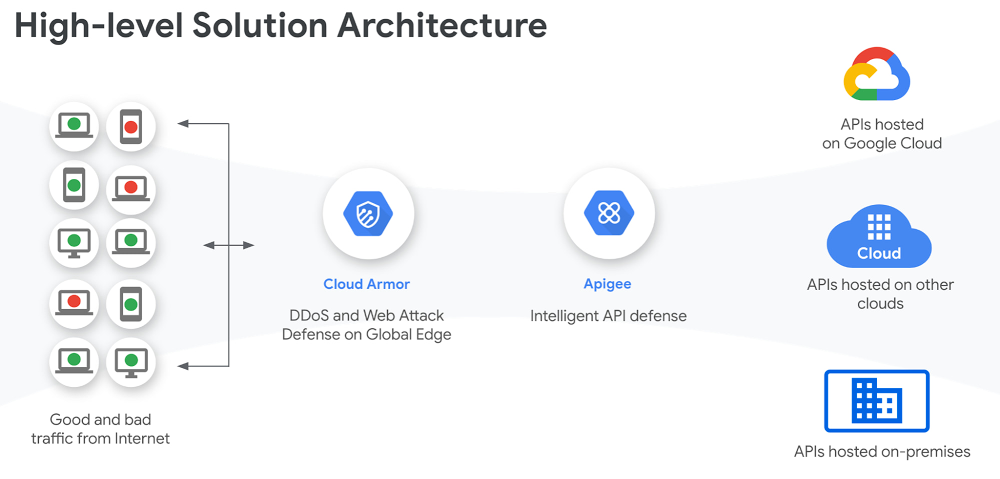
Information security has become headline news on a daily basis. You have probably heard of security risks ranging from malicious bots used in schemes both big and small, to all-out “software supply chain attacks” that involve large-name enterprises and their customers, and that ultimately affect numerous governments, organizations, and people. As businesses expand their digital programs to serve their customers via online channels and to operate from anywhere with a global remote workforce, such security attacks are expected to become more common. Because application programming interfaces (APIs) are fundamental components of an enterprises’ digital programs, connecting the data and functionality that power various apps and services, they are also vectors of malicious attacks–as well as sources of insights that enterprises can use to better understand attack patterns and how to thwart them. Our State of the API Economy 2021report found a 172% rise in abusive traffic and a 230% increase in enterprises’ use of anomaly detection, bot protection, and security analytics features. As agile, smart, and proactive digital security mechanisms have become the cost of doing business, API security has become an indispensable part of an enterprise’s IT security portfolio–and as this article explores, our recent release of Apigee X makes API security even more powerful. Multi-layer API security with Apigee and Google Cloud ArmorAPIs are the doors to various digital assets–and every door needs a lock to keep what’s behind it safe and protected from unauthorized access. Therefore, to help organizations secure APIs to the highest level, Google Cloud has brought together Apigee and Cloud Armor, combining industry-leading API management and web application firewall technologies. With Apigee X, the latest release of Google Cloud’s full lifecycle API management platform, customers can easily and seamlessly apply Cloud Armor web application firewall (WAF) to APIs, adding another layer of security to ensure that corporate digital assets are accessed only by authorized users. For companies such as AccuWeather, a global leader in weather data and forecasting, APIs have been essential to both building new applications and monetizing data and functionality for outside developers, so those communities can innovate with AccuWeather assets as well. With this new expanded surface area from their APIs, AccuWeather needed robust security to manage and secure its digital assets.“Over the last decade, AccuWeather has continued to transform as a digital solution for serving business customers with the most accurate and useful weather information using APIs. With Apigee’s strategic partnership and comprehensive API management platform, we were able to design, develop, and launch our industry-leading APIs in a few short weeks.” said Chris Patti, Chief Technology Officer at AccuWeather. “Today, we serve over 50 billion API calls per day. As many organizations embrace their own digital solutions, they are increasingly adopting API-first strategies for accelerated transformation. With the new Apigee X release, we can foresee furthering our API programs with the best of Google capabilities like reCaptcha, Cloud Armor, and Content Delivery Network (CDN) for global scale, performance and security.” Apigee and Cloud Armor together help secure your APIs at multiple levels.Click to enlargeWhile Apigee X includes OAuth (Open Authorization), API keys, role-based access and many other API-level security features, Cloud Armor offers network and application  security such as DDoS (Distributed Denial of Service) protection, geo-fencing, mitigation of OWASP (Open Web Application Security Project) Top 10 risks, and custom Layer-7 filtering. With Apigee X and Cloud Armor, developers enjoy integrated, out-of-the-box security capabilities to protect their APIs at multiple levels.Click to enlargeCustomers can also easily leverage Cloud Identity and Access Management (IAM) for authenticating and authorizing access to the Apigee platform as well as to gain more control over encrypted data with customer-managed encryption keys (CMEK). Apigee X and Cloud Armor deliver powerful protection for applications and APIs against threats and fraud.  These products are also available as part of our WebApp and API Protection (WAAP) solution that adds anti-bot and anti-abuse measures from reCAPTCHA Enterprise.Security is a moving target, with attackers and new vulnerabilities emerging all the time–but with a multi-layer approach to API security, enterprises can trust that they can quickly leverage APIs for new digital services and experiences without compromising security along the way.  To learn more about Apigee X, and see Apigee and Cloud Armor in action, check out this videoRelated ArticleHow leading enterprises use API analytics to make effective decisionsExplore why API monitoring and analytics are essential to successful digital transformation initiativesRead Article
Quelle: Google Cloud Platform

Event-triggered detection of data drift in ML workflows

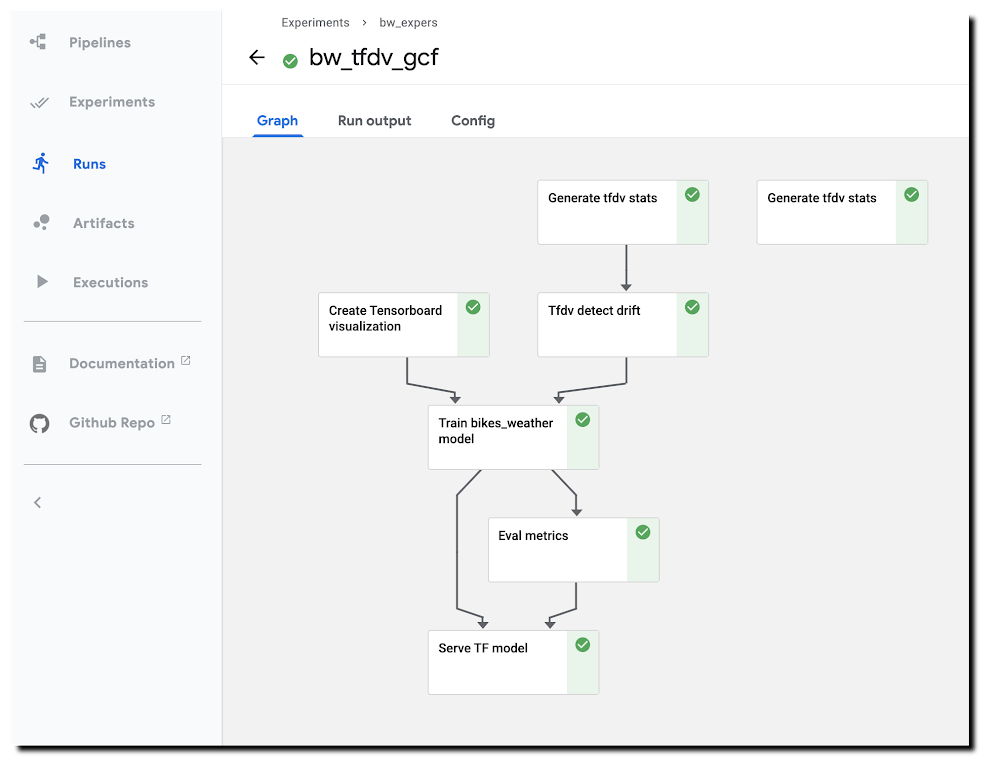
With ML workflows, it is often insufficient to train and deploy a given model just once. Even if the model has desired accuracy initially, this can change if the data used for making prediction requests becomes—perhaps over time—sufficiently different from the data used to originally train the model. When new data becomes available, which could be used for retraining a model, it can be helpful to apply techniques for analyzing data ‘drift’, and determining whether the drift is sufficiently anomalous to warrant retraining.It can also be useful to trigger such an analysis—and potential re-run of your training pipeline—automatically, upon arrival of new data.This blog post highlights an example notebook that shows how to set up such a scenario with Kubeflow Pipelines (KFP). It shows how to build a pipeline that checks for statistical drift across successive versions of a dataset and uses that information to make a decision on whether to (re)train a model; and how to configure event-driven deployment of pipeline jobs when new data arrives. (In this example, we show full model retraining on a new dataset. An alternate scenario—not covered here—could involve tuning an existing model with new data.)The notebook builds on an example highlighted in a previous blog post—which shows a KFP training and serving pipeline—and introduces two primary new concepts:The example demonstrates use of the TensorFlow Data Validation (TFDV) library to build pipeline components that derive dataset statistics and detect drift between older and newer dataset versions, and shows how to use drift information to decide whether to retrain a model on newer data.The example shows how to support event-triggered launch of Kubeflow Pipelines runs from a Cloud Functions (GCF) function, where the Function run is triggered by addition of a file to a given Cloud Storage (GCS) bucket.The machine learning task uses a tabular dataset that joins London bike rental information with weather data, and trains a Keras model to predict rental duration. See this and this blog post and associated README for more background on the dataset and model architecture.A pipeline run using TFDV-based components to detect ‘data drift’.Running the example notebookThe example notebook requires a Google Cloud Platform (GCP) account and project, ideally with quota for using GPUs, and—as detailed in the notebook—an installation of AI Platform Pipelines (Hosted Kubeflow Pipelines) (that is, an installation of KFP on Google Kubernetes Engine (GKE)), with a few additional configurations once installation is complete. The notebook can be run using either Colab (open directly) or AI Platform Notebooks (open directly).Creating TFDV-based KFP componentsOur first step is to build the TFDV components that we want to use in our pipeline.Note: For this example, our training data is in GCS, in CSV-formatted files. So, we can take advantage of TFDV’s ability to process CSV files. The TFDV libraries can also process files in TFRecords format. We’ll define both TFDV KFP pipeline components as ‘lightweight’ Python-function-based components. For each component, we define a function, then call kfp.components.func_to_container_op() on that function to build a reusable component in .yaml format. Let’s take a closer look at how this works (details are in the notebook).Below is the Python function we’ll use to generate TFDV statistics from a collection of csv files. The function—and the component we’ll create from it—outputs the path to the generated stats file. When we define a pipeline that uses this component, we’ll use this step’s output as input to another pipeline step.TFDV uses a Beam pipeline—not to be confused with KFP Pipelines—to implement the stats generation. Depending upon configuration, the component can use either the Direct (local) runner or the Dataflow runner. Running the Beam pipeline on Dataflow rather than locally can make sense with large datasets.To turn this function into a KFP component, we’ll call kfp.components.func_to_container_op(). We’re passing it a base container image to use: gcr.io/google-samples/tfdv-tests:v1. This base image has the TFDV libraries already installed, so that we don’t need to install them ‘inline’ when we run a pipeline step based on this component.We’ll take the same approach to build a second TFDV-based component, one which detects drift between datasets by comparing their stats. The TFDV library makes this straightforward. We’re using a drift comparator appropriate for a regression model—as used in the example pipeline—and looking for drift on a given set of fields (in this case, for example purposes, just one).The tensorflow_data_validation.validate_statistics() call will then tell us whether the drift anomaly for that field is over the specified threshold. See the TFDV docs for more detail.(The details of this second component definition are in the example notebook). Defining a pipeline that uses the TFDV componentsAfter we’ve defined both TFDV components—one to generate stats for a dataset, and one to detect drift between datasets—we’re ready to build a Kubeflow Pipeline that uses these components, in conjunction with previously-built components for a training & serving workflow.Instantiate pipeline ops from the componentsKFP components in yaml format are shareable and reusable. We’ll build our pipeline by starting with some already-built components—(described in more detail here)—that support our basic ‘train/evaluate/deploy’ workflow. We’ll instantiate some pipeline ops from these pre-existing components like this, by loading them via URL:Then, we define a KFP pipeline from the defined ops. We’re not showing the pipeline in full here—see the notebook for details.Two pipeline steps are based on the tfdv_op, which generates the stats. tfdv1 generates stats for the test data, and tfdv2 for the training data.In the following, you can see that the tfdv_drift step (based on the tfdv_drift_op) takes as input the output from the tfdv2 (stats for training data) step.While not all pipeline details are shown, you can see that this pipeline definition includes some conditional expressions; parts of the pipeline will run only if an output of an ‘upstream’ step meets the given conditions. We start the model training step if drift anomalies are detected. (And, once training is completed, we’ll deploy the model for serving only if its evaluation metrics meet certain thresholds.)Here’s the DAG for this pipeline. You can see the conditional expressions reflected; and can see that the step to generate stats for the test dataset provides no downstream dependencies, but the stats on the training set are used as input for the drift detection step.The pipeline DAGHere’s a pipeline run in progress: A pipeline run in progress.See the example notebook for more details on how to run this pipeline.Event-triggered pipeline runsOnce you have defined this pipeline, a next useful step is to automatically run it when an update to the dataset is available, so that each dataset update triggers an analysis of data drift and potential model (re)training.We’ll show how to do this using Cloud Functions (GCF), by setting up a function that is triggered when new data is added to a GCS bucket.Set up a GCF function to trigger a pipeline run when a dataset is updatedWe’ll define and deploy a Cloud Functions (GCF) function that launches a run of this pipeline when new training data becomes available, as triggered by the creation or modification of a file in a ‘trigger’ bucket on GCS.In most cases, you don’t want to launch a new pipeline run for every new file added to a dataset—since typically, the dataset will consist of a collection of files, to which you will add/update multiple files in a batch. So, you don’t want the ‘trigger bucket’ to be the dataset bucket (if the data lives on GCS)—as that will trigger unwanted pipeline runs.Instead, we’ll trigger a pipeline run after the upload of a batch of new data has completed.To do this, we’ll use an approach where the ‘trigger’ bucket is different from the bucket used to store dataset files. ‘Trigger files’ uploaded to that bucket are expected to contain the path of the updated dataset as well as the path to the data stats file generated for the last model trained. A trigger file is uploaded once the new data upload has completed, and that upload triggers a run of the GCF function, which in turn reads info on the new data path from the trigger file and launches the pipeline job.Define the GCF functionTo set up this process, we’ll first define the GCF function in a file called main.py, as well as an accompanying requirements file in the same directory that specifies the libraries to load prior to running the function. The requirements file will indicate to install the KFP SDK:kfp==1.4The code looks like this (with some detail removed); we parse the trigger file contents and use that information to launch a pipeline run. The code uses the values of several environment variables that we will set when uploading the GCF function.Then we’ll deploy the GCF function as follows. Note that we’re indicating to use the gcs_update definition (from main.py), and specifying the trigger bucket. Note also how we’re setting environment vars as part of the deployment.Trigger a pipeline run when new data becomes availableOnce the GCF function is set up, it will run when a file is added to (or modified in) the trigger bucket. For this simple example, the GCF function expects trigger files of the following format, where the first line is the path to the updated dataset, and the second line is the path to the TFDV stats for the dataset used for the previously-trained model. More generally, such a trigger file can contain whatever information is necessary to determine how to parameterize the pipeline run.gs://path/to/new/or/updated/dataset/gs://path/to/stats/from/previous/dataset/stats.pbWhat’s next?This blog post showed how to build Kubeflow Pipeline components, using the TFDV libraries, to analyze datasets and detect data drift. Then, it showed how to support event-triggered pipeline runs via Cloud Functions. The post didn’t include use of TFDV to visualize and explore the generated stats, butthis example notebook shows how you can do that.You can alsoexplore the samples in the Kubeflow Pipelines GitHub repo.Related ArticleWith Kubeflow 1.0, run ML workflows on Anthos across environmentsKubeflow on Google’s Anthos platform lets teams run machine-learning workflows in hybrid and multi-cloud environments and take advantage …Read Article
Quelle: Google Cloud Platform

Amazon EC2 Auto Scaling bietet Support für lokale Zeitzonen bei der geplanten Skalierung

Die geplante Skalierungsfunktion von
Amazon EC2 Auto Scaling ermöglicht es Ihnen, einen Zeitplan für Ihre Auto Scaling-Gruppe festzulegen, um Ihre EC2-Kapazität ein- und auszuskalieren. Amazon EC2 Auto Scaling ermöglicht jetzt das Festlegen einer lokalen Zeitzone für geplante Skalierungsaktionen über die
AWS Command Line Interface (CLI) und
AWS SDKs, wobei die Unterstützung in der
AWS-Managementkonsole und
AWS CloudFormation in Kürze folgen wird. Die Auswahl einer Zeitzone erleichtert die Überprüfung von Zeitplänen und beseitigt auch die Notwendigkeit, Zeitpläne für die Sommerzeit anzupassen.

Quelle: aws.amazon.com

Neues Beratungsangebot für AWS-Lösungen – Design and Implementation for Druva Data Protection Solutions

Design and Implementation for Druva Data Protection Solutions ist ein Beratungsangebot für AWS-Lösungen, das über einen Beratungsauftrag von Softcat, einem AWS Storage Competency Partner, bereitgestellt wird. Mit dem Beratungsangebot Design and Implementation for Druva Data Protection Solutions kann Softcat eine vollständig ausgeführte Backup-Lösung für Ihr Unternehmen entwerfen und implementieren. Kunden, die dieses Beratungsangebot anfordern, nehmen an einem Projekt teil, das die Durchführung der TCO-Analyse (Total Cost of Ownership), die Planung der Implementierung, die Beschaffung der Software und die Bereitstellung des Projekts umfasst.
Quelle: aws.amazon.com

Neue AWS Solutions Consulting Offer – Conversational AI Platform

Die Conversational AI Platform ist ein AWS Solutions Consulting-Angebot, das über einen Beratungsauftrag von Accenture, einem AWS Machine Learning Competency Partner, bereitgestellt wird. Die Conversational AI Platform unterstützt Unternehmen bei der Verwaltung des gesamten Lebenszyklus einer Conversational AI-Lösung. Kunden, die dieses Beratungsangebot in Anspruch nehmen, nehmen an einem Projekt teil, das die Entdeckung und Planung, den Wertnachweis, einen Lösungspiloten und die laufende Skalierung und Verwaltung umfasst.
Quelle: aws.amazon.com

AWS Wavelength ist jetzt ISO 9001, 27001, 27017 und 27018 konform

ISO-zertifizierte AWS-Services, die in AWS Wavelength bereitgestellt werden, entsprechen jetzt den Standards ISO 9001, ISO/IEC 27001, ISO/IEC 27017, und ISO/IEC 27018. AWS pflegt seine Zertifizierungen durch umfangreiche Audits seiner Kontrollorgane. So ist sichergestellt, dass Sicherheitsrisiken für Informationen, die sich auf die Vertraulichkeit, Integrität und Verfügbarkeit von Unternehmens- und Kundendaten auswirken könnten, erfolgreich begegnet wird.
Quelle: aws.amazon.com

Neues Beratungsangebot für AWS-Lösungen – Virtual Desktop Accelerator

Virtual Desktop Accelerator ist ein Beratungsangebot für AWS-Lösungen, das über einen Beratungsauftrag von RedNight Consulting, einem AWS Digital Workplace Competency Partner, bereitgestellt wird. Virtual Desktop Accelerator beschleunigt Ihre Amazon WorkSpaces-Bereitstellung und befähigt Sie, Ihre virtuelle Umgebung zu verwalten und zu skalieren. Kunden, die dieses Beratungsangebot anfordern, nehmen an einem Engagement teil, das einen Walkthrough der kritischen Designelemente, Hilfe bei der Entscheidungsfindung über die zu verwendenden Features und Funktionen und die Bereitstellung von Amazon WorkSpaces für Ihr Unternehmen bietet.
Quelle: aws.amazon.com