Earn the new Google Kubernetes Engine skill badge for free

We’ve added a new skill badge this month, Optimize Costs for Google Kubernetes Engine (GKE), which you can earn for free when you sign up for the Kubernetes track of the skills challenge. The skills challenge provides 30 days free access to Google Cloud labs and gives you the opportunity to earn skill badges to showcase different cloud competencies to employers. In this post, I’ll explain the basics of GKE cost optimization and how to earn this new skill badge. For best practices from experts and a live walkthrough of how to manage workloads and clusters at scale to optimize time and cost, sign up here for my no-cost March 19 webinar. Can’t join the event live on March 19? The training will also be available on-demand after March 19. GKE is a secured and fully managed Kubernetes service now with an autopilot mode of operation. It allows you to speed up app development without sacrificing security, streamline operations with release channels, and manage infrastructure with Google Site Reliability Engineers. When using GKE, you need to know Kubernetes workload best practices and understand how to optimize your costs. GKE includes autoscaling and our training will show you how to use this to help you run less when you don’t need it and more when you do. How to earn the Optimize Costs for Google Kubernetes Engine skill badgeBefore you take the training to earn the Optimize Costs for Google Kubernetes Engine skill badge, you’ll need to already know basic concepts around cluster creation and management. To earn the skill badge, you’ll first need to go through four labs which will provide you with hands-on experience on how to manage a GKE multi-tenant cluster with namespaces, optimize costs for GKE Virtual Machines, combine GKE autoscaling strategies, and optimize GKE workloads. Afterwards, you’ll need to successfully pass the challenge lab, which will test your knowledge before the skill badge can be yours. In this lab, you’ll play the role of the lead GKE administrator for an online boutique store whose site is broken down into microservices and now it’s time to get it running on GKE. As the GKE administrator, you need to make sure your GKE cluster is optimized to run the online boutique application with all its many microservices because you have a big marketing campaign coming up. You’ll also want to make sure it can autoscale appropriately to handle both traffic spikes and traffic lulls where you’ll want to save on your infrastructure costs. Along the way, you’ll learn core principles of cost optimization in GKE you can apply in your own environments.Ready to take your first step towards learning how to optimize GKE costs and earning your skill badge?Joinme for my March 19 webinar. You can also watch the webinar on-demand after March 19.Related Article2021 resolutions: Kick off the new year with free Google Cloud trainingTackle your New Year’s resolutions with our new skills challenges which will provide you with no cost training to build cloud knowledge i…Read Article
Quelle: Google Cloud Platform
Cloud Spanner launches point-in-time-recovery capability

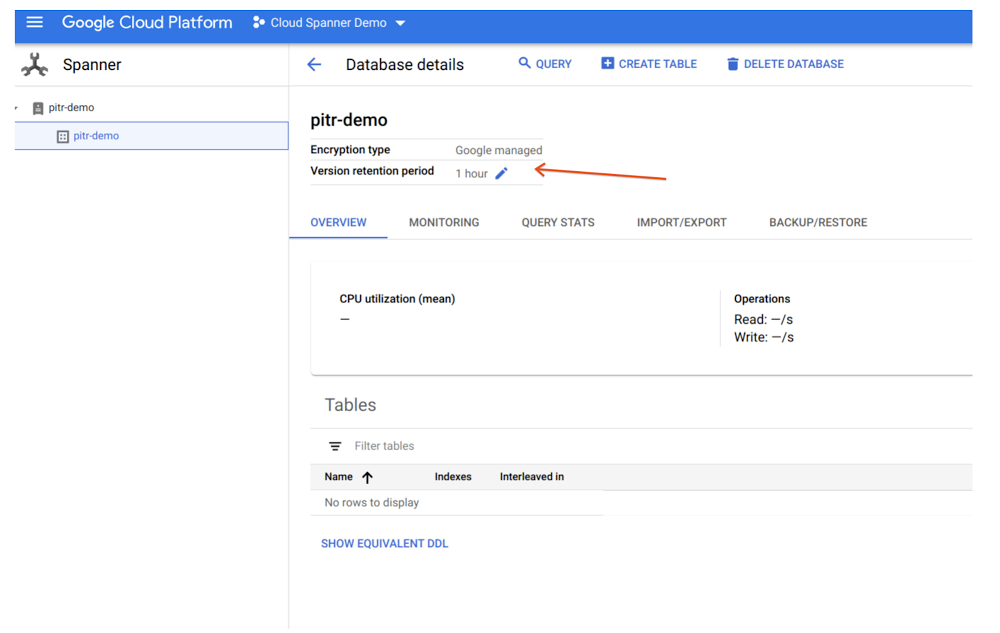
Cloud Spanner, a horizontally scalable relational database, recently launched a point-in-time recovery (PITR) capability that provides complete data protection against inadvertent data deletion or updates due to a user error. Spanner already provides Backup and Restore and Import/Export, which recover the database to the last state when the backup or the export was taken. With PITR capability, Spanner now offers continuous data protection with the ability to recover your past data to a microsecond granularity. This helps enterprises quickly fix data corruption to reduce risk and loss of business, and minimize impact on customer experience.PITR is simple and flexible to use and provides data protection with greater control and granularity. All you need to do is configure a database’s version retention period to retain all versions of data and schema, from a minimum of one hour up to a maximum of seven days. Spanner will take care of the rest. In the case of logical data corruption, depending on the situation, you have the choice of recovering the complete database or just restoring specific portions of the database—saving you precious time and resources, as you don’t have to restore the whole database.Let’s take two common real-life examples: first, John, a database administrator at a multinational financial company, accidentally deletes a live table in production and figures out the mistake based on customer complaints after a day. Second, Kim, a site reliability engineer at a national online retailer, rolls out a new payment processing engine that corrupts their consumer payments database while trying to perform multiple schema changes. If the version retention period in Spanner’s PITR capability is configured correctly, it can save the day for both John and Kim. John can perform a stale read specifying a query condition and timestamp in the past, then write the results back into the live database to recover the table. Kim can use the backup or export capability by specifying a timestamp in the past to back up or export the entire database, respectively, and then restore or import it to a new database. Setting up and recovering an entire database with PITRThe version retention period is at the database level, hence we first need to go to the desired Database Details page to set a new retention period. By default, it’s been set to one hour for every database created. Now, with the PITR feature, we can set this period up to seven days with minute/hour/day granularity.The figure below shows how to set a database’s retention period in the UI console:Click to enlargeYou can do this for each database in your instance. Now, let’s see how you can create a backup at a point in time in the past (version time) in the UI and restore from that backup. The figure below shows the creation of the backup in the UI:Click to enlargeWhen you list the backups for a database in the UI, you can see the Version time differs from the Backup Creation time, informing you that backup data is from a database version at a point in time in the past.Click to enlargeNow you can restore the database to recover the complete database within the same instance or in another instance within the same region or multi-region in which you are using Spanner.Note that the restored database will have the same version retention period that was in the original database at the time of backup creation; it won’t default back to one hour.If the seven-day maximum data retention window for PITR does not meet your needs, Spanner continues to offer data protection options for longer retention times with backups (maximum one-year retention window) and export capability, which enables you to export data in CSV or Avro file formats that you can keep for as long as you need. Learn more PITR is now available in all Google managed regions globally. You are charged for the additional storage consumed for storing all the versions of the key in the version retention period. If you choose to use Backup/Restore or Import/Restore capability for recovering the data, you will pay for them as per their pricing.  To learn more about PITR, see documentation. To get started with Spanner, create an instanceor try it out with a Spanner Qwiklab.Related ArticleBack up on demand, emulate and develop with ease — new Spanner featuresCloud database service Spanner adds backup-restore feature plus new developer features, like local emulator, query optimizer versioning, …Read Article
Quelle: Google Cloud Platform

How carbon-free is your cloud? New data lets you know

Google first achieved carbon neutrality in 2007, and since 2017 we’ve purchased enough solar and wind energy to match 100% of our global electricity consumption. Now we’re building on that progress to target a new sustainability goal: running our business on carbon-free energy 24/7, everywhere, by 2030. Today, we’re sharing data about how we are performing against that objective, so our customers can select Google Cloud regions based on the carbon-free energy supplying them. Completely decarbonizing our data center electricity supply is the critical next step in realizing a carbon-free future and supporting Google Cloud customers with the cleanest cloud in the industry. On the way to achieving this goal, each Google Cloud region will be supplied by a mix of more and more carbon-free energy and less and less fossil-based energy. We measure our progress along this path with our Carbon Free Energy Percentage (CFE%). Today we’re sharing the average hourly CFE% for the majority1 of our Google Cloud regions here and on GitHub. Customers like Salesforce are already integrating environmental impact into their IT strategy as they work to decarbonize the services they provide to their customers. Patrick Flynn, VP of Sustainability at Salesforce, is committed to harnessing their culture of innovation to tackle climate change. “At Salesforce we believe we must harness the power of innovation and technology across the customer relationship to address the challenge of climate change,” says Patrick Flynn, VP of Sustainability at Salesforce. “With Google’s new Carbon Free Energy Percentage, Salesforce can prioritize locations that maximize carbon free energy, reducing our footprint as we continue to deliver all our customers a carbon neutral cloud every day.”Click to enlargeWe’re sharing this data so you – like Salesforce – can incorporate carbon emissions into decisions on where to locate your services across our infrastructure. Just like the potential differences in a region’s price or latency, there are differences in the carbon emissions associated with the production of electricity that is sourced in each Google Cloud region. The CFE% will tell you on average, how often that region was supplied with carbon-free energy on an hourly basis. Maximizing the amount of carbon-free energy that supplies your application or workload will help reduce the gross carbon emissions from running on it. Of course, all regions are matched with 100% carbon-free energy on an annual basis, so the CFE% tells you how well matched the carbon-free energy supply is with our demand. A lower-scoring region has more hours in the year without a matching, local amount of carbon-free energy. As we work on increasing the CFE% for each of our Google Cloud regions, you can take advantage of locations with a higher percentage of carbon-free energy. You must also consider your data residency, performance and redundancy requirements, but here are some good ways to reduce the associated gross carbon emissions of your workload: Pick a lower-carbon region for your new applications. Cloud applications have a tendency to stay put once built, so build and run your new applications in the region with the highest CFE% available to you.Run batch jobs in a lower carbon region. Batch workloads are often planned ahead, so picking the region with the highest CFE% will increase the carbon-free energy supplying the job. Set an organizational policy for lower carbon regions. You can restrict the location of your cloud resources to a particular region or subset of regions using organizational policies. For example, if you want to use only US-based regions, restricting your workloads to run Iowa and Oregon, currently the leading CFE% leaders, rather than Las Vegas and S. Carolina would mean your app would be supplied by carbon-free energy an average of 68% more often. And remember, the cleanest energy is the energy you didn’t use in the first place. Increasing the efficiency of your cloud applications will translate into using less energy, and often less carbon emissions. Try serverless products that automatically scale with your workload and take advantage of rightsizing recommendations for your compute instances. 24/7 carbon-free energy is the goal we’re chasing for all of our Google Cloud regions around the globe. Along the way, we’re working on new ways to help you make lower-carbon decisions and lower your Google Cloud Platform carbon footprint. Stay tuned, and make sure you read the full details of today’s launch here.1. We’ll be updating the list as we receive data for additional regions.Related ArticleAnnouncing ‘round-the-clock clean energy for cloudGoogle Cloud sets goal for all services to be powered by carbon-free energy sources, all the time, by 2030.Read Article
Quelle: Google Cloud Platform

Turbo boost your Compute Engine workloads with new 100 Gbps networking

Today, we are excited to announce the public preview of 100, 75, and 50 Gbps high-bandwidth network configurations for General Purpose N2 and Compute Optimized C2 Compute Engine VM families. This is the result of continuous efforts to optimize our Andromeda host networking stack, allowing us to offer higher-bandwidth options on existing VM families when using the Google Virtual NIC (gVNIC). These VMs were previously limited to 32 Gbps.Some of the most demanding workloads on Google Cloud will now be able to take advantage of these high-throughput VMs, such as tightly-coupled high performance computing (HPC), network appliances, financial risk modeling and simulation, and scale-out analytics. Combining high-throughput VMs with high-performance Local SSD will be beneficial for I/O-intensive, flash-optimized databases. For applications that are sensitive to both latency and throughput, you’ll be able to combine compact placement policies on C2 instances with 100 Gbps bandwidth for superior networking performance.Flexible bandwidth optionsWe’ve always offered flexible packaging options to give you control over the compute resources that work best for your needs. We’re continuing that trend by offering these higher bandwidth configurations as add-on options for existing, mid- to large-size N2 and C2 machines.The tables below summarize the new networking options for those VM families:Click to enlargeFor N2 VMs that have standard, high-memory, high-cpu, and custom configurations, you can expect these same bandwidth options as long as they meet the above vCPU requirements.Since these higher bandwidth configurations are optional, add-on features for your VMs, they will show up as incremental charges over and above what you pay for the underlying VM, as separate dedicated network bandwidth SKUs on your Cloud Billing report. We meter VM network bandwidth the same way we do for vCPUs and memory, in dollars per hour. Visit our pricing page for specific pricing in your region. Here’s an example using the beta gCloud SDK to create a N2 instance with 75 Gbps network bandwidth:Using the TIER_1 setting on the network-performance-configs flag automatically upgrades your instance with increased network bandwidth.To use these new features, make sure that you’re using the beta channel, and run gcloud components update to get the latest SDK. See Benchmarking higher bandwidth VM instances for more information on setting up VMs and running network throughput tests.Differentiated networkingWe strive to make it easy for our customers to take advantage of our differentiated features. Some unique aspects of high-throughput VM networking  are:It’s an add-on feature. Since we’ve optimized networking performance on existing N2 and C2 VMs, you don’t need to reconfigure your workloads for any new instance types to take advantage of high-throughput networking. You also maintain all compatibility with scripts and automation tools.No additional inventory constraints. These networking capabilities don’t impose additional inventory constraints on your N2 or C2 deployments. In fact, you can upgrade VMs to use increased bandwidth in any zone where you can create an N2 or C2 instance.Best-in-class throughput. Google Cloud offers the best throughput performance of any cloud provider, and we’re doubling down on that performance with even more bandwidth offerings today.Leveraging Google Cloud’s unique Andromeda architectureOur new A2 instances with NVIDIA A100 GPUs support 100 Gbps networking today. Building on our work for A2s, we’re now able to offer higher bandwidth configurations on existing C2 and N2 VM families by optimizing Google Cloud’s uniqueAndromeda network, whichwe’ve upgraded to support hardware offloads such as zero-copy,TSO, and encryption, all without introducing downtime for your VM. The result is up-to 100 Gbps of encrypted traffic between VMs.Get started todayHigh bandwidth configurations for N2 and C2 VMs are available in Preview today (in regions and zones that support these machine types) for all customers using the beta gCloud SDK or our Cloud APIs.For more details, check out our documentation for network bandwidth as well as our how-to guide for benchmarking your VM’s network performance.Please note that this feature is in public preview and will be billed at no cost throughout this period. The pricing in our documentation is general availability pricing and will go into effect when the public preview ends.Related ArticleGoogle Cloud networking in depth: How Andromeda 2.2 enables high-throughput VMsLearn how improvements in Andromeda 2.2 enable Compute Engine VMs with higher throughput.Read Article
Quelle: Google Cloud Platform

Docker and CNCF Join Forces for “Container Garage” Event Series

At Docker, we’re constantly trying to engage and connect with developer communities around the world to explore ways we can cross pollinate ideas, share, and learn from each other. Today, we’re thrilled to announce that Docker and the CNCF are joining forces to run a community-led event series called “Container Garage”, covering all things containers and focusing on a particular theme each time (eg. “runtime”, “images”, “security” etc…). The aim of the event is to engage our respective communities and foster closer collaboration.

To this end Docker Captains and CNCF Ambassadors are taking the lead with the planning and execution of the event, working in lock-step to curate excellent content and recruit amazing speakers for engaging talks, demos, and live panels.

The kick-off event will be on Thursday April 1st around the theme of container runtimes. The agenda is structured as follows: 

2pm – 4pm CET : Talks & Demos

4pm – 4:15 CET : Break

4:15pm – 5pm CET : Live panel discussion

5pm – 5:15 : Break

5pm – 7pm CET : Talks & Demos 

Again, the first event will be held on April 1st on the topic of container runtimes.

You can register for free and see the final agenda on the Container Garage event page. . 

If you have any questions, please don’t hesitate to ping @idvoretskyi (CNCF Slack) or @williamq (Docker Community Slack). 
The post Docker and CNCF Join Forces for “Container Garage” Event Series appeared first on Docker Blog.
Quelle: https://blog.docker.com/feed/

Bundle-Management-APIs jetzt allgemein verfügbar für Amazon WorkSpaces

Amazon WorkSpaces-Bundle-Management-APIs sind jetzt für Kunden verfügbar, um WorkSpaces-Bundle-Vorgänge über die Befehlszeilenschnittstelle (CLI) durchzuführen. Der neue Satz von APIs unterstützt Vorgänge zum Erstellen, Löschen und Zuordnen von Bildern für WorkSpaces-Bundles. Diese APIs sind für die Verwendung durch WorkSpaces-Administratoren gedacht, die WorkSpaces-Verwaltungs-Workflows automatisieren möchten.

Quelle: aws.amazon.com

AWS Glue DataBrew ist jetzt in den AWS-Regionen Asien-Pazifik (Seoul), Nordamerika (Montreal) und Südamerika (São Paulo) verfügbar.

AWS Glue DataBrew ist ein visuelles Datenaufbereitungstool, mit dem Datenanalysten und Datenwissenschaftler Daten auf einfache Weise bereinigen und normalisieren können, um sie für Analysen und Machine Learning vorzubereiten. Das Tool ist ab sofort auch in den folgenden drei AWS-Regionen verfügbar:

Asien-Pazifik (Seoul)
Nordamerika (Montreal)
Südamerika (São Paulo)

Quelle: aws.amazon.com

AWS Cost Anomaly Detection unterstützt jetzt AWS CloudFormation

AWS Cost Anomaly Detection unterstützt jetzt die Bereitstellung von Kostenüberwachungen und Warnungen zu Abonnements über AWS-CloudFormation-Vorlagen. Sie können Cost Anomaly Detection jetzt über JSON- oder YAML-Befehle einrichten, was schnelle, konsistente und skalierbare Konfigurationen über AWS-Konten hinweg ermöglicht.
Quelle: aws.amazon.com

AWS Config fügt 3 neue Config-Regeln für Amazon Secrets Manager hinzu

AWS Config unterstützt jetzt 3 neue verwaltete AWS-Config-Regeln, mit denen Sie überprüfen können, ob Ihre Secrets in AWS Secrets Manager in Übereinstimmung mit den Sicherheits- und Compliance-Anforderungen Ihres Unternehmens konfiguriert sind. AWS Config erfasst und wertet Konfigurationen Ihrer AWS-Ressourcen aus. Die von AWS Config verwalteten Regeln sind vordefinierte Regeln, die AWS Config verwendet, um zu bewerten, ob Ihre AWS-Ressourcenkonfigurationen den gängigen bewährten Methoden entsprechen. AWS Secrets Manager hilft beim einfachen Rotieren, Verwalten und Abrufen von Datenbankanmeldeinformationen, API-Schlüsseln und anderen Secrets während ihres Lebenszyklus.
Quelle: aws.amazon.com






