Amazon Elastic File System verdreifacht den Lesedurchsatz

Amazon Elastic File System (Amazon EFS) ermöglicht Ihnen jetzt einen bis zu 3x höheren Lesedurchsatz in Ihrem Dateisystem. Beispielsweise bieten Dateisysteme im Bursting-Modus jetzt einen Bursting-Lesedurchsatz von 300 MB/s oder 300 MB/s pro TiB an Daten, die im Amazon-EFS-Standard gespeichert sind, je nachdem, welcher Wert höher ist. Wenn Sie einen bereitgestellten Durchsatz von 1 GB/s konfiguriert haben, kann Ihre Anwendung nun ohne Anwendungs- oder Konfigurationsänderungen bis zu 3 GB/s für Lesevorgänge (und weiterhin 1 GB/s für Schreibvorgänge) verarbeiten.  
Quelle: aws.amazon.com

Amazon Managed Blockchain unterstützt jetzt Ressourcen-Tagging und Tag-basierte Zugriffskontrolle

Amazon Managed Blockchain unterstützt jetzt das Zuweisen von Tags zu Netzwerken, Mitgliedern, Vorschlägen, Einladungen und Knoten. Tags können bestehenden Ressourcen und neuen Ressourcen zum Zeitpunkt der Erstellung zugewiesen werden. Zudem können Sie differenzierte Zugriffssteuerungen definieren, indem Sie Tags und IAM-Richtlinien (AWS Identity and Access Management) verwenden, um den Zugriff auf Ressourcen und Aktionen zu steuern. Tags sind Schlüssel-Wert-Paare, die Sie Ressourcen zuweisen können, um Ressourcen einfach zu organisieren und zu suchen, Ressourcenaktivitäten zu automatisieren, Kostenzuordnungsberichte zu erstellen und den Zugriff auf Ressourcen zu steuern.
Quelle: aws.amazon.com

Limiting public IPs on Google Cloud

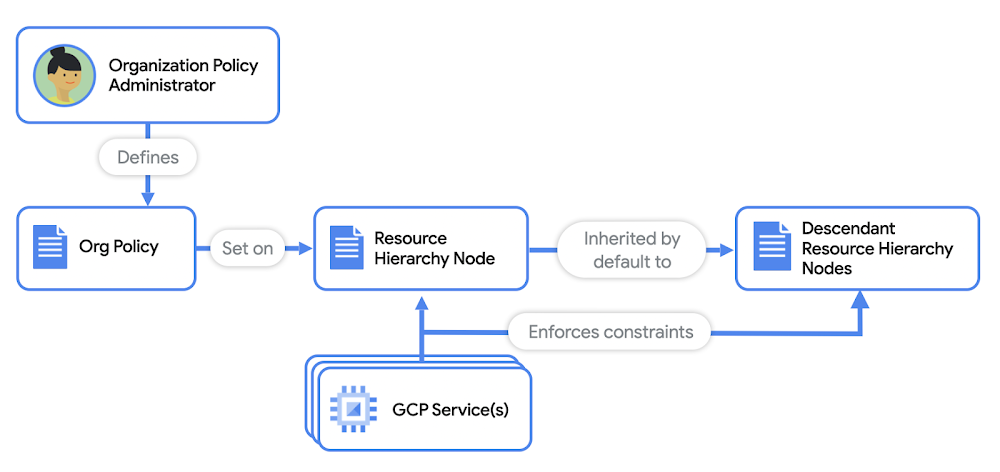
You’ve heard this saying: Hope is not a strategy when it comes to security. You have to approach security from all angles, while minimizing the burden on dev and SecOps. But with an ever increasing number of endpoints, networks, and attack surfaces, setting automated and trickle down security policies across your cloud infrastructure can be a challenge. On top of that administrators need to set guardrails to ensure that their workloads are always compliant with security requirements and industry regulations. Public IPs are among the most common ways that enterprise environments are exposed to the internet, making them susceptible to attacks and data exfiltration. That’s why limiting public IPs is paramount in securing these environments. On Google Cloud Platform, it’s important to understand what resources use public IPs in your network, which can include:VMsLoad balancersVPN gatewaysWhen you start to deploy production level systems, you’re looking at potentially thousands of instances in which your developers can deploy public IP addresses. Organization PoliciesOrganization policies give you centralized control over your organization’s Google Cloud resources. As the organization policy administrator, you can configure restrictions across your entire resource hierarchy. For example, you can set organization policies on your top-level GCP organization, on nested folders, or on projects. These policies can be inherited by nested folders and projects, or they can be overridden on a case by case basis. Using organization policies, you can enforce constraints on Google Cloud resources, such as VMs and load balancers to adhere to basic security requirements at all times. You can use organization policies as guardrails to ensure no public IPs are allowed in your Google Cloud network. It’s a perfect tool for IT or Security Admins to ensure all cloud deployments adhere to their security standards. Let’s walk through how to set them up.Limit public IPs for VMsCompute Engine instances can be exposed to the internet directly when you:Assign the VM a public IPUse protocol forwarding with the VM as its endpointTo prevent Compute Engine instances from getting public IPs, first make sure you have the Org Policy Admin role in the organization, so you can add and edit org policies. Then, on the Organization policies page in the Google Cloud Console, search for and edit the org policy constraint named constraints/compute.vmExternalIpAccess. This constraint lets you define the set of Compute Engine VMs that are allowed to use public IPs in your network. (No other VMs will be able to be assigned a public IP.) Edit the policy with the following values:Under Custom values, paste the path to any instance for which you want to want to allow external IP creation, for example: projects/{project-id}/zones/{zone}/instances/{instance-name}.Now you’ve restricted public IP creation to only the instances you’ve explicitly specified, and prevented public IP creation for any other instances in your organization.Prevent protocol forwarding to a VMTo prevent protocol forwarding from being enabled, use the org policy constraint named constraints/compute.restrictProtocolForwardingCreationForTypes, and set it to the following values. Note that the policy value is case sensitive.This constraint lets you limit virtual hosting of public IPs by Compute Engine VM instances in your organization.Limit public IPs of VPN gatewaysFor VPNs, a VPN gateway requires a public IP address for you to connect your on-premises environment to Google Cloud. To ensure that your VPN gateway is protected, use the org policy constraint named constraints/compute.restrictVpnPeerIPs. This constraint will limit the public IPs that are allowed to initiate IPSec sessions with your VPN gateway.Limit Public IPs of Load BalancersGoogle Cloud offers a variety of internal and external load balancers. To prevent the creation of all external load balancer types, use the org policy constraint named  constraints/compute.restrictLoadBalancerCreationForTypes. Then make sure to add all external load balancers for the policy values, as shown below:Instead of manually entering each load balancer, you can also simply add in:EXTERNAL, which will always cover all types of external load balancers. As new load balancer types are introduced, you can be assured your infrastructure will remain secure.Restricting GKE servicesGoogle Kubernetes Engine (GKE) lets developers create and expose their services to the internet easily. But if you apply the previously discussed policies for VMs and load balancers, no new GKE services can be exposed to the internet without the org admin’s knowledge. For example, if a developer attempts to create a GKE service with an external load balancer, the forwarding rule for the required load balancer can’t be created with the org policy constraint in place. Furthermore, checking the status of the GKE service will deliver a pending external IP. When they run kubectl describe service, they’ll get an error due to the load balancer org policy constraint in place.Keep in mind organization policies are not retroactive. They will only apply to new infrastructure requests after the policy is set. So you don’t have to worry about breaking any existing workloads when you add these policies to your org. You can apply org policies easily and efficiently across your entire org hierarchy or on a subset of resources from a single, centralized place, and prevent stray resources from being assigned public IPs when they shouldn’t have them. Try it out for yourself, and learn more in the organization policy constraints documentation.For more cloud content, follow me on Twitter @stephr_wong.Related ArticleYour top network performance problems and how to fix themWhether you want to troubleshoot a performance problem or optimize your deployment decisions, Google Cloud has a comprehensive set of too…Read Article
Quelle: Google Cloud Platform

Getting vaccines into local communities safely and effectively

Introducing: Google Cloud’s Intelligent Vaccine Impact solutionWith a number of COVID-19 vaccines approved, state and local governments are now focused on executing effective and equitable immunization programs. This promises to be the largest public health campaign of a generation, and Google is committed to helping our customers and communities rise to the challenge of getting vaccines to more people.Google has supported communities and public health organizations throughout the pandemic through research grants, telehealth support, and more. And as the global challenge to immunize millions of people continues to rise, we’re proud to extend our commitment by today announcing Google Cloud’s Intelligent Vaccine Impact solution. With this offering, we’ve created a set of core technologies to help regional and local governments deliver successful COVID-19 public health strategies, ranging from vaccine information and scheduling, to distribution and analytics, to forecasting and modeling COVID-19 cases, and more.The Intelligent Vaccine Impact solution helps increase vaccine availability and equitable access to those who need it, and assists governments in building awareness, confidence, and acceptance of vaccines. We designed our solution to easily integrate with existing technologies, knowing that governments will administer their vaccine distributions in unique ways. COVID forecasting to help make better decisions on vaccine distribution and allocation The first part of the Intelligent Vaccine Impact solution involves COVID-19 forecasting and “what-if” analysis. Google Cloud researchers developed a novel, time-series, machine-learning approach that combines AI with a foundation of epidemiology. We also developed an AI-driven “what-if” model to be used for COVID-19 response and other infectious disease policy intervention decision-making, using our Application Modernization platform with Anthos, Kubernetes, and BigQuery.  Using a unique set of Looker dashboards, state epidemiologists and public health professionals can now aggregate the results of these models in BigQuery with both public and private datasets to drive better policy decisions. Government leaders can then see how the forecasts change in response to policy changes (e.g., mask mandates, modified reopening plans, or vaccination programs). And public sector leaders can also create custom forecasts for their counties and public health organizations. The goal of this component of the solution is to help leaders make informed and effective decisions. Higher-quality vaccine information to take the burden off state & local agenciesThe second core component of the Intelligent Vaccine Impact solution is the vaccine information portal. The COVID-19 vaccine release has brought a flood of questions and concerns from the public to government agencies. As people search for answers on public web pages, call health departments, and react to announcements on social media, many local governments have been overwhelmed. Working in partnership with SpringML, MTX, Deloitte, and other partners, Google Cloud has built several vaccine information portals—part of the Intelligent Vaccine Impact solution—that help people learn about vaccine availability, determine if they qualify, sign up for vaccination, and submit their information so that when they are eligible they can be vaccinated as quickly as possible. Using core Google Cloud serverless technologies like App Engine, Firestore, and Cloud Functions, these portal websites allow for seamless scalability to meet the needs of thousands to hundreds of thousands of constituents registering simultaneously. Vaccine scheduling management to seamlessly manage vaccine rollout to populationsOnce constituents have visited the vaccine information portal, they then interact with the scheduling management component of the Intelligent Vaccine Impact solution. Google Cloud’s Dialogflow and Contact Center AI intelligent virtual agents provide call-in lines that can help people determine their eligibility, get registered, and schedule vaccine appointments even if they are not able to get online. And to assist in scheduling and reminders, standard text messaging notifications can help patients remember appointments and vaccine information. The solution also offers convenient online registration and pre-screening, location searches, and appointment setting, as well as automated reminders. And it supports QR codes or the creation of unique patient IDs that accelerate check-in, as well as the ability to quickly book booster appointments. Of course, because the response requires high levels of integration and data portability, the Intelligent Vaccine Impact solution relies on Apigee and the Google Cloud Healthcare API to transmit data securely using common formats such as HL7 or FHIR—which interoperates with existing healthcare and immunization systems. Sentiment analysis to help assess community sentiment around vaccinesFinally, understanding how local communities feel about the risks and benefits of the vaccine is critical to being able to increase confidence in vaccination—and ultimately end COVID-19. That’s why the Intelligent Vaccine Impact solution features a Sentiment Analysis component, in partnership with Syntasa, that offers a central source of insight for constituent sentiment and feedback. Constituents engage with government organizations across a wide variety of communications systems, including call centers, websites and apps, chatbots, advertising campaigns, social media, search, and news feeds. With Google’s sentiment analysis tool, government organizations can direct communications efforts that provide clear and accurate information to specific audiences, addressing specific concerns as they arise. Understanding changing beliefs and behaviors throughout the vaccination lifecycle allows agencies to enable a more tailored and informed vaccination campaign.Intelligent Vaccine Impact solution in actionGoogle Cloud is already deploying the Intelligent Vaccine Impact solution in a number of states. North Carolina, for instance, is engaged with Google Cloud on several of the solution’s components to help streamline their vaccine rollouts.“Our newest effort is to develop a process and technology to streamline accessing information for North Carolinians,” said Sam Gibbs, deputy secretary for Technology and Operations, State of North Carolina. “This technology will provide a central location for residents to find information such as when it is their turn to get their vaccine or guidance to easily locate a vaccination location.”We’re proud to support this critical mission, and to put resilient infrastructure in place to face the challenges around COVID-19 vaccinations. Google Cloud’s Intelligent Vaccine Impact solution builds on our strong foundation of projects supporting state and local health agencies during the COVID-19 pandemic, and we remain committed to assisting public health agencies nationwide. For more information, visit cloud.google.com/solutions/government.
Quelle: Google Cloud Platform