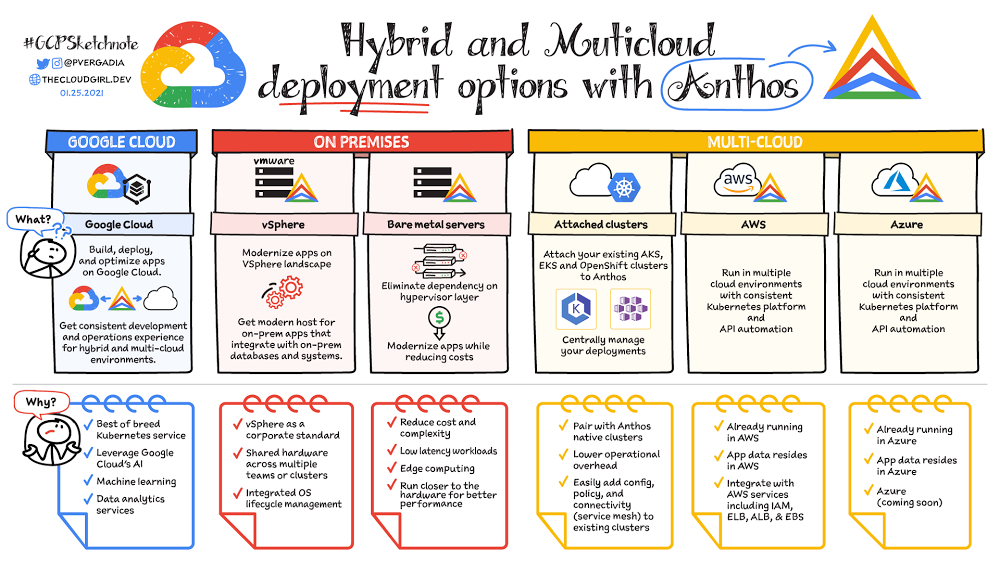
What are my hybrid and multicloud deployment options with Anthos?

Anthos is a managed application platform that extends Google Cloud services and engineering practices to your environments so you can modernize apps faster and establish operational consistency across them. With Anthos, you can build enterprise-grade containerized applications faster with managed Kubernetes on Google Cloud, on-premises, and other cloud providers.. In this blog post, we outline each of Anthos deployment options:Google Cloud VMware vSphereBare metal serversAWSMicrosoft AzureAttached clustersDeployment Option 1: Google CloudOne way to improve  your apps’ performance is to run your compute closer to your data. So, if you are already running your services on Google Cloud then it’s best to use Anthos to build, deploy, and optimize your containerized workloads directly on Google Cloud. You can take advantage of Google Cloud AI, machine learning, and data analytics services to gain critical business insights, improve decision-making, and accelerate innovation. In this video, Tony Pujals walks you through a sample deployment for Anthos, including how to use the different tools that Anthos offers—such as Anthos Service Mesh and Anthos Config Management—to modernize, manage, and standardize your Kubernetes environments.Deployment Option 2: VMware vSphere If you are using VMware vSphere in your own environment then you can choose to run Anthos clusters on VMware, which enables you to create, manage, and upgrade Kubernetes clusters on your existing infrastructure. This is a good option if vSphere is a corporate standard for your organization and if you have shared hardware across multiple teams or clusters and with integrated OS lifecycle management. With Anthos clusters on VMware, you can keep all your existing workloads on-premises without significant infrastructure updates. At the same time, you can modernize legacy applications by transforming them from VM-based to container-based using Migrate for Anthos. Going forward, you may decide to keep the newly updated, containerized apps on-prem or move them to the cloud. Either way, Anthos helps you to manage and modernize your apps with ease and at your own pace.Deployment Option 3: Bare metal serversThough virtual machines are unquestionably useful for a wide variety of workloads,  a growing number of organizations are  running Kubernetes on bare metal servers to take advantage of reduced complexity, cost, and hypervisor overhead. Anthos on bare metal lets you run Anthos on physical servers, deployed on an operating system provided by you, without a hypervisor layer. Anthos on bare metal comes with built-in networking, lifecycle management, diagnostics, health checks, logging, and monitoring. Mission critical applications often demand the highest levels of performance and lowest latency from the compute, storage, and networking stack. By removing the latency introduced by the hypervisor layer, Anthos on bare metal lets you run computationally intensive applications such as GPU-based video processing, machine learning, and more, in a cost-effective manner. Anthos on bare metal allows you to leverage existing investments in hardware, OS and networking infrastructure. The minimal system requirement to run Anthos on bare metal at the edge on resource-constrained hardware. This means that you can capitalize on all the benefits of Anthos—centralized management, increased flexibility, and developer agility—even for your most demanding applications.Deployment Option 4: AWSIf your organization has more than a few teams, chances are pretty good that they’re using different technologies, and perhaps even different cloud platforms. Anthos is designed to abstract these details and provide you with a consistent application platform.Anthos on AWS enables you to create Google Kubernetes-based clusters with all of the Anthos features you’d expect on Google Cloud. This means easy deployment using Kubernetes-native tooling, Anthos Config Management for policy and configuration enforcement, and Anthos Service Mesh for managing the increasing sprawl of microservices.When you use the Google Cloud Console, you have a single pane of glass that you can use to manage your applications all in one place no matter where they are deployed.  Deployment Option 5: Microsoft AzureWe are always extending Anthos to support more kinds of workloads, in more kinds of environments, and in  more locations. We announced last year that Anthos is coming to Azure. Support for Microsoft Azure is currently in preview, so stay tuned for more details!Deployment Option 6: Anthos attached clustersWhen thinking about deploying Anthos, you may be wondering about what you’ll do with your existing Kubernetes clusters. With Anthos attached clusters, you can retain your existing Kubernetes clusters while taking advantage of key Anthos features.  Whether you’re running Amazon EKS,  Microsoft AKS, or Red Hat OpenShift, you can attach your existing clusters to Anthos. That means you can centrally manage your deployments in Google Cloud Console, enforce policies and configuration using Anthos Config Management, and centrally monitor and collect logs. Of course, Anthos doesn’t manage everything; you still must manually maintain your clusters and keep them up to date. This deployment option does, however, enable you to begin your Anthos journey at a pace that works well for you, and eases the transition to Anthos in other cloud environments.ConclusionSo there you have it—six different hybrid and multicloud deployment options for Anthos! Depending on where your infrastructure and data is today, one or perhaps a combination of these options will help you power your application modernization journey, with a modern application platform that just works on-prem or in a public cloud, ties in seamlessly with legacy data center infrastructure, enables platform teams to cost-optimize, and supports a modern security posture anywhere.Here is a comprehensive video series on Anthos that walks you through how to get started:Here is a comprehensive video series on Anthos that walks you through how to get started:What is Anthos?For more resources on Anthos checkout the Consistent service delivery everywhere with Anthos eBook.And, for more #GCPSketchnote and similar cloud content follow me on twitter @pvergadia and keep an eye out on thecloudgirl.dev.Related ArticleIntroducing the Anthos Developer Sandbox—free with a Google accountThe new Anthos Developer Sandbox spins up all the tools you need to learn how to develop for the Anthos platform.Read Article
Quelle: Google Cloud Platform

How to optimize your network for live video on Google Cloud

Like so many industries impacted by the global pandemic, the media and entertainment industry was forced to quickly create ad-hoc solutions to help broadcasters “keep the show on the air.” This caused seismic shifts in media production, distribution, and consumption, which accelerated trends like virtual work that were already underway and are now likely permanent. Google Cloud can be a key enabler in the long-term evolution of live TV supply chains. In 2020, the internet also faced unprecedented demand. Internet Exchanges (IXPs) recorded net increases up to 60%1 in total bandwidth handled per country during Q1 2020. Google’s unique global fiber optic network and approach to cloud provides highly differentiated capabilities for media supply chains that can isolate broadcasters from potential bandwidth bottlenecks.Next, in line with Google’s philosophy of creating an open platform and making it easy for our partners to work with us, Google has created a comprehensive partnership ecosystem with some of the best known media technology companies. This blog post is one of the first in a series from the Google Cloud teams that work closely with media customers and partners every day. In this installment, we share best practices for network setup and configuration, which is crucial for high-quality video broadcasts. 1. Understanding and Calibrating your Network and VMsBroadcast distribution of live video requires highly consistent network performance. The following considerations are important factors in the production and distribution of a video stream:Latency (the time taken to transmit a packet from Point A → Point B)Jitter (the latency’s variance over time)Packet drops (the number of packets lost from Point A → Point B)Here is how to understand and calibrate your network and VMs:Network Baseline: Understand your current network’s performance level of latency, jitter and packet drops.Calibrate: Adjust your cloud transmission endpoints to compensate for these artifacts by:Adjusting your lossless overlay protocol with the correct amount of error correction and redundancy to manage the packet drops especially over large distances. Opt for a suitable media overlay transport protocol like Secure Reliable Transport (SRT), Zixi or Reliable Internet Stream Transport(RIST)/SMPTE 2022-7.Latency and jitter change by distance and number of intermediate processing and transit steps; therefore, measure both parameters and adjust receiving app/VM network buffers as needed.Benchmark VMs: Optimizing VM sizes and tuning OS changes (in a Linux environment) have a direct impact on video transport performance. These include:Changing the size of Guest OS ‘receive’ buffer.Changing to a higher performance (CPU/RAM) machine type if your VMs used for media transport (responsible for ingress/egress traffic) run at greater than 50% sustained CPU utilization. It’s best to leave the extra headroom to account for the inevitable temporary spikes in CPU utilization due to workload/network jitter inherent in any network.A blanket high level of error correction, buffering, and redundancy in your transport protocol is wasteful and can significantly increase network traffic and CPU overhead. Google Cloud’s network allows you to create systems with lower latency and jitter in two ways:Google’s global fiber optic network directly connects different continents and regions over a dedicated backbone. Therefore, all regions are within a single network hop of each other, not encumbered by extraneous network hops or third-party transit agreements.We published PerfKit Benchmarker to provide you with visibility and further understanding of jitter and latency in your architecture.Details of setting up and executing a thorough test will be provided in an upcoming blog post. In the meantime, you can refer to this prior blog post about general network measurement and instrumentation on Google Cloud.2. Ingest into CloudYou can get your raw media stream into Google Cloud over the public internet or over interconnect, with your business requirements determining the most appropriate ingest method. In either case, the use of a lossless protocol like SRT is recommended.Public Internet: When using the public internet, you’ll likely use either TCP or UDP with a lossless protocol overlay. Generally, UDP with a lossless overlay (such as SRT) is recommended; alternatively, you can also transmit your signal over a VPN from on-premise to Google Cloud. If using a secure transport like SRT, the need for a VPN is reduced, but other protocols without security might still require a VPN.The Google Cloud VPN is not a VM-based, single point of failure. Instead, it’s a regional scale-out service that provides up to 3gbps bandwidth per tunnel. Additional tunnels can be set up for greater bandwidth, and the VPN is available in HA configurations that offer 99.99% service availability as well. The Google Cloud VPN uses the premium network tier. You can also proactively get notified of over-utilized VPN tunnels before it becomes a bottleneck, preventing packet loss and increasing resiliency of your system. When not using a VPN, we recommend using Google Premium Network tier for public internet ingestion so that traffic from your source enters Google’s network from the closest point of presence to that source.Interconnect: For higher throughput streaming, especially for UDP/RTP based ingest methods, a dedicated connection (Dedicated Interconnect or Partner Interconnect via a service provider) is more common. When choosing an interconnect type, consider your connection requirements, such as the connection location and required capacity. Both types of interconnect can be configured with redundancy to achieve a 99.99% SLA. Visit Google’s peering site to get started, and read  more about Google Cloud’s interconnect best practices.3. DistributionToday’s modern broadcasters and media companies have two main distribution needs: one, sending linear channels/streams to other traditional MVPDs, partners, and operators; and two, sending VOD/live traffic directly to end consumers for viewing via applications and smart TVs.Distribution to traditional MVPDs, Partners, and OperatorsGoogle’s global network is a differentiated offering that provides distributors a quantum leap in cloud-based media transmission capability across three key areas: reach, reliability, and performance.Reach: the single, global planet-wide network with 91 global direct interconnect locations allows feeds originating from any region in the world to be transmitted to any other region after the appropriate in-cloud processing and transformation. This allows you to confidently meet your business requirements to supply media to your distribution partners.Reliability: the global network has been designed to self-heal in the event of various failures or congestion by intelligently finding alternate optimal paths for your data with minimal effort on your part. These operations are handled automatically. We’ve devised mechanisms to defend against advanced attacks including DDoS threats. Our infrastructure was able to absorb a 2.5 Tbps DDoS attack in September 2017—the highest-bandwidth attack reported to date. By deploying Google Cloud Armor integrated into our Cloud Load Balancingservice—which can scale to absorb massive DDoS attacks—you can protect services deployed in Google Cloud, other clouds, or on-premise.Performance: Google’s innovation in its network stack gives you the benefit of extremely high network performance within and between regions. That means you can transmit media to partners with high throughput and low latency, packet loss, and jitter.OTT and Direct-to-Consumer (DTC) DistributionThe en-masse adoption of streaming media has necessitated petabyte-scale global delivery of content to end customers. The end customers vary widely in their location, connectivity, equipment, and last-mile ISPs.Google Cloud CDN has been purpose-built to deliver content with speed, efficiency, and reliability to all corners of the world. Cloud CDN caches your content in more than 100 locations around the world and hands it off to 144 network edge locations, placing your content close to your users, usually within one network hop through their ISP – giving your viewers the best possible content experience. Additionally, by using Cloud CDN, you get the benefit of over a decade of edge innovation, such as fast SSL handshakes through QUIC, advanced congestion control through BBR, simplified DNS management through global anycast IPs, and DDoS absorption at scale.While Cloud CDN can serve content from any origin, Google Cloud Storage (GCS) with advanced capabilities like multi-regional buckets allow you to further leverage Google’s innovations to delight your customers.4. Measuring, Monitoring, and ImprovingPerfKit Benchmarker is an open-source tool created at Google that allows you to measure and understand performance across multiple clouds and hybrid deployments. Use PerfKit Benchmarkerto get visibility into and benchmark performance metrics like latency, throughput, and jitter. You can access the tutorial here. Google Cloud offers Network Intelligence Center for comprehensive and proactive monitoring, troubleshooting, and optimization capabilities across hybrid deployments. Four products are available within Network Intelligence Center today: Connectivity Tests, Network Topology, Performance Dashboard, and Firewall Insights. Learn more about how to fix your top network issues using these products.ConclusionProper network setup and configuration is crucial to achieve high quality video broadcasts in the cloud. Google’s global network provides customers with a highly capable system, and with proper tuning for media use cases, customers can achieve high reliability and performance in their broadcast system.No network system is static and unchanging. The Google Cloud network provides out-of-the-box tools for monitoring and insights. This allows you to continuously measure and improve your aggregate performance in an ever-changing environment where the needs of your broadcast partners and customers are continuously evolving.1. https://www.oecd.org/coronavirus/policy-responses/keeping-the-internet-up-and-running-in-times-of-crisis-4017c4c9/Related ArticleYour top network performance problems and how to fix themWhether you want to troubleshoot a performance problem or optimize your deployment decisions, Google Cloud has a comprehensive set of too…Read Article
Quelle: Google Cloud Platform

AWS Glue DataBrew unterstützt jetzt sechs weitere Trennzeichen für seine Datensätze

AWS Glue DataBrew unterstützt jetzt die folgenden Trennzeichenoptionen für seine Datensätze, sodass Sie die Flexibilität haben, eine Vielzahl von CSV- und TSV-Dateien zur Datenaufbereitung in DataBrew zu verwenden. Zu den unterstützten Trennzeichen gehören:

Komma (,)
Doppelpunkt (:)
Strichpunkt (;)
senkrechter Strich (|)
Tabulatorzeichen (t)
Caret (^)
Leerzeichen ( )

Quelle: aws.amazon.com

AWS Control Tower bietet jetzt die Massenaktualisierung von Konten

AWS Control Tower bietet Ihnen jetzt die Möglichkeit, bis zu 300 Konten in einer registrierten AWS-Organisationseinheit (OE) mit nur einem Klick über die AWS-Control-Tower-Konsole zu aktualisieren. Dies ist besonders nützlich in Fällen, in denen Sie die Ihre Landing Zone von AWS Control Tower aktualisieren und auch Ihre registrierten Konten aktualisieren müssen, um sie an die aktuelle Landing-Zone-Version anzupassen.
Quelle: aws.amazon.com

AWS Glue DataBrew ist jetzt in sechs weiteren AWS-Regionen verfügbar

AWS Glue DataBrew ist ein visuelles Datenaufbereitungstool, mit dem Datenanalysten und Daten-Wissenschaftler Daten auf einfache Weise bereinigen und normalisieren können, um sie für Analysen und Machine Learning vorzubereiten. Das Tool ist ab sofort auch in den folgenden AWS-Regionen verfügbar:

USA West (Nordkalifornien)
Asien-Pazifik (Singapur)
Asien-Pazifik (Mumbai)
EU (Stockholm)
EU (London)
EU (Paris)

Quelle: aws.amazon.com






