How to develop with PyTorch at lightning speed

Over the years, I’ve used a lot of frameworks to build machine learning models. However, it was only until recently that I tried out PyTorch. After going through the intro tutorial, Deep Learning with PyTorch: A 60 Minute Blitz, I started to get the hang of it. With PyTorch support built into Google Cloud, including notebooks and pre-configured VM images, I was able to get started easily.There was one thing that held me back. All of the wonderful flexibility also meant that there were so many ways to do things. How should I load my training and test data? How should I train my model, calculating the loss and logging along the way? I got everything working properly, but I kept wondering if my approach could be improved. I was hoping for a higher level of abstraction that would take care of how to do things, allowing me to focus on solving the problem.I was delighted to discover PyTorch Lightning! Lightning is a lightweight PyTorch wrapper that helps you organize your code and provides utilities for common functions. With Lightning, you can produce standard PyTorch models easily on CPUs, GPUs, and TPUs! Let’s take a closer look at how it works, and how to get started.To introduce PyTorch Lightning, let’s look at some sample code in this blog post from my notebook, Training and Prediction with PyTorch Lightning. The dataset used, from the UCI Machine Learning Repository, consists of measurements returned from underwater sonar signals to metal cylinders and rocks. The model aims to classify which item was found based on the returned signal. Acoustic data has a wide variety of applications, including medical imaging and seismic surveys, and machine learning can help detect patterns in this data.Organizing your notebook code with PyTorch LightningAfter installing Lightning, I started by creating a SonarDataset, inheriting from the standard PyTorch Dataset. This class encapsulates logic for loading, iterating, and transforming data. For example, it maps the raw data, with “R” for rocks and “M” for mines, into 0 and 1. That enables the data to answer the question, “is this a mine?”, a binary classification problem. Here’s a code snippet from that class:Next, I created a SonarDataModule, inheriting from Lightning’s LightningDataModule. This class provides a standard way to split data across training, testing, and validation sets, and then to load each set into a PyTorch DataLoader. Here’s a code snippet of from the setup() method in the SonarDataModule:Finally, I created a SonarModel, inheriting from LightningModule. This class contains the model, as well as methods for each step of the process, such as forward() for prediction, training_step() for computing training loss, and test_step() for calculating accuracy.Training and predicting with your modelLightning’s Trainer class makes training straightforward. It manages details for you such as interfacing with PyTorch DataLoaders; enabling and disabling gradients as needed; invoking callback functions; and dispatching data and computations to appropriate devices.Let’s look at a couple of the methods in the tutorial notebook. First, you instantiate a new trainer, specifying options such as the number of GPUs to use and how long to train. You train your model with fit(), and can run a final evaluation on your test data with test(). A tune() method is also provided to tune hyperparameters.After the training process, you can use standard PyTorch functions to save or predict with your model, for instance:Getting started with LightningGoogle Cloud’s support for PyTorch makes it easy to build models with Lightning. Let’s walk through the steps. First, you’ll want to create a notebook instance using Cloud AI Platform Notebooks. You can select a PyTorch instance that is preloaded with a PyTorch DLVM image, including GPU support if you’d like. Once your notebook instance is provisioned, simply select OPEN JUPYTERLAB to begin.Since PyTorch dependencies are already configured, all you need to do is include one line in your notebook to start using Lightning: !pip install pytorch-lightning.If you’d like to access the sample for this tutorial, you can open a new terminal (File > New > Terminal), and then run git clone https://github.com/GoogleCloudPlatform/ai-platform-samples. You’ll find the sample in ai-platform samples > notebooks > samples > pytorch > lightning.With Lightning, using PyTorch is more accessible than ever before. With best practices and helpful utilities embedded in the framework, you can focus on solving ML problems. Since Lightning produces standard PyTorch code, you’ll be able to leverage Google Cloud’s PyTorch support for developing, training, and serving your models.
Quelle: Google Cloud Platform
Beyond Corp Enterprise: True zero trust architecture for the multicloud

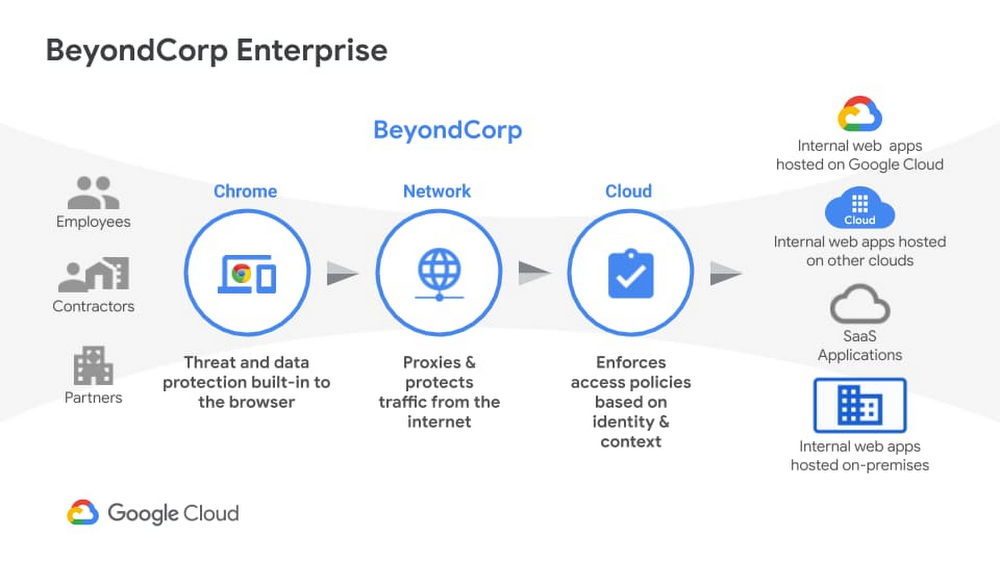
We recently announced the general availability of BeyondCorp Enterprise, Google’s comprehensive zero trust product offering. As we work to democratize zero trust, building a solution to support customers across different environments was top of mind for our team. Google has over a decade of experience managing and securing cloud applications at a global scale and this new offering was developed based on learnings from our experience managing our own enterprise, feedback from customers and partners, as well as informed by leading engineering and security research. We recognize the complexities that come with a zero trust journey and understand that most customers host resources across different cloud providers. With this in mind, BeyondCorp Enterprise was purpose-built as a multicloud solution, enabling customers to securely access resources hosted not only on Google Cloud or on-premises, but also across other clouds such as Azure and Amazon Web Services (AWS). Beyond Corp Enterprise provides context-aware access controls for internal and SaaS applications and cloud resources, and offers integrated threat and data protection without the for a Virtual Private Network (VPN). This solution is hosted on Google’s global network infrastructure and enables elastic-scaling based on use, helping customers manage secure access for different user groups, including employees, contractors or temporary workers, and partners. The diagram below shows the high-level architecture of BeyondCorp Enterprise. As you can see, BeyondCorp Enterprise supports applications and resources hosted on Google Cloud, on other clouds, or on-premises.Click to enlargeSo what does this mean for you and how can BeyondCorp Enterprise help? Google continues to emphasize its commitment for multi-cloud environments with BeyondCorp Enterprise. Customers “live” in a diverse world of different clouds and different vendors and we know it’s unrealistic that customers would have 100 percent of their resources hosted in one provider. That’s why we have been mindful to not only support access to apps on other clouds, but also build integrations with other leading technology vendors so customers can leverage their existing investments. The potential for the zero trust architecture is limitless as our ecosystem is built such that it is easily extensible by security partners, and the rulesets can be enriched to include additional signals like threat and data loss. Using a combination of user and device attributes, BeyondCorp Enterprise uses criteria such as the user’s location when trying to access a resource, the time of day the user is trying to access the resource, or the type of device a user is using to access a resource. BeyondCorp Enterprise also leverages Endpoint Verification in the Chrome Browser to identify the posture of the device accessing an application. These various parameters are used to configure “grant” or “deny” rules and policies, which are then enforced by the cloud Identity Aware Proxy and a combination of other controls.Click to enlargeEnterprise customers who adopt a “best of breed” approach to security will find Google’s approach to zero trust and the BeyondCorp Enterprise architecture complementary to their strategy. As an example, if you use one of our BeyondCorp Alliance partners  as your endpoint detection and response solution or Unified Endpoint Management (UEM) solution, you can also integrate signals from these solutions to incorporate into your policies and protect your resources across your on-premises, Google Cloud, or other clouds. This architecture ensures that you have the autonomy to choose your preferred security vendors.Once secure access is granted, BeyondCorp Enterprise provides threat and data protection capabilities, including the ability to protect SaaS applications and other websites from data loss, data exfiltration, credential theft, malware, and phishing attacks. Because these capabilities are delivered through the Chrome Browser, we can support users on Windows, Mac, Linux, and ChromeOS, again making it easy to meet customers where they are and enable simple deployment and adoption.Many people think zero trust requires a complete overhaul of their environment and would entail installing multiple agents on a computer; but instead, all you need is a web browser. We are excited to bring disruptive innovation to our customers in a way that does not disrupt security operations. rotectionGoogle is a true engineering-driven company. Innovating and solving global-scale problems is at the core of the company’s DNA. Ideas and projects that led to the creation of products that have redefined how people across the world work, such as Gmail, Google Maps, and of course, the Chrome Browser, which also birthed BeyondCorp Enterprise. If you would like to learn more about BeyondCorp Enterprise, visit the product page, register for our upcoming webinar on Feb 23, or contact your Google account team.Related ArticleBeyondCorp Enterprise: Introducing a safer era of computingThe GA of Google’s comprehensive zero trust product offering, BeyondCorp Enterprise, brings this modern, proven technology to organizatio…Read Article
Quelle: Google Cloud Platform

Set up Anthos Service Mesh for multiple GKE clusters using Terraform

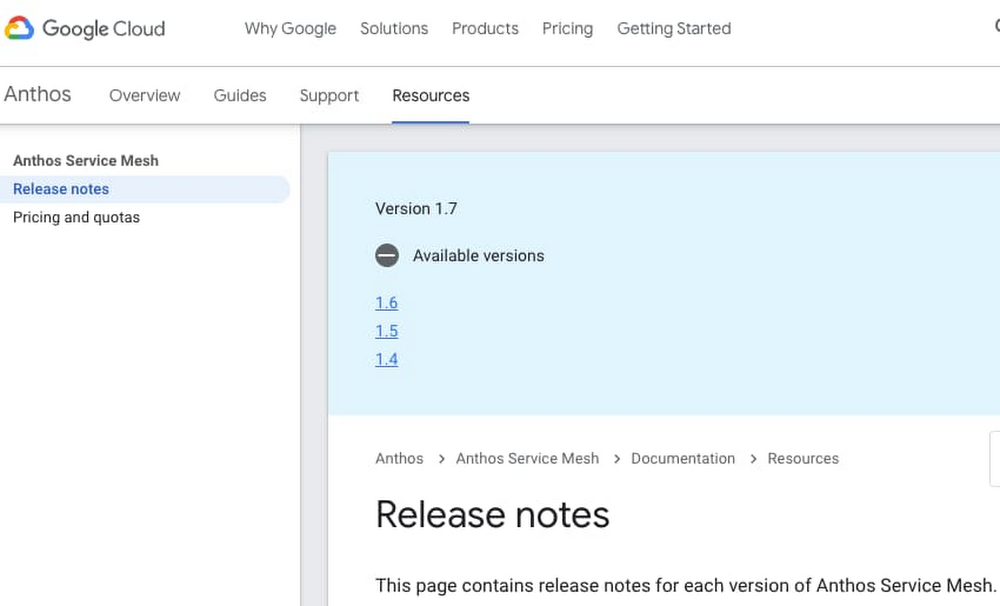
Anthos Service Mesh is a managed service mesh for Google Kubernetes Engine (GKE) clusters. Anthos Service Mesh allows GKE clusters to use a single logical service mesh, so that pods can communicate across clusters securely and services can share a single Virtual Private Cloud (VPC). Using Anthos Service Mesh requires GKE clusters and firewall rules. As well, access to the GKE GKE control plane needs to be granted, if private clusters are used. Infrastructure-as-code (IaC) makes bootstrapping Anthos Service Mesh significantly easier. In this blog post, we explain the new features of Anthos Service Mesh, and how to implement it across two private GKE clusters using Terraform. We also provide automation scripts, giving a guided tour for setting up a cloud environment.For those who want to get started immediately, there is a Git repo with complete source code and README instructions. There are also bonus sections at the end, for mesh traffic security scanning and external databases respectively.Supported versionThe supported versions are Anthos Service Mesh 1.7 and 1.8. For more information on Anthos Service Mesh versions, please check the Anthos Service Mesh release notes.Fig 3.1 – Anthos Service Mesh version release notesShared VPCsAnthos Service Mesh 1.8 can be used for a single shared VPC, even across multiple projects. Please consult the documentation on Anthos Service Mesh 1.8 multi-cluster support for complete details:Fig 3.2 – Anthos Service Mesh multi-cluster supportSSL/TLS terminationTLS termination for external requests is supported with Anthos Service Mesh 1.8. Doing so requires modifying the Anthos Service Mesh setup files.You can set up Anthos Service Mesh using the install_asm script. A custom istio-operator.yaml file can be used by running install_asm with the –custom_overlay option.In order for Istio (i.e., Anthos Service Mesh) to allow access to external services, change the egress policy to REGISTRY_ONLY. Please see the blocking-by-default Istio documentation for more details.For TLS termination of requests to Prisma Cloud (Twistlock), please the below section on Prisma Cloud.SecurityAnthos Service Mesh has inherent security features (and limitations), as described in the security overview documentation. Additionally, please follow the GKE best practices for security.NOTE: Anthos Service Mesh inherently implements Istio security best practices, such as namespaces and limited service accounts. Workload identity is an optional GKE-specific service account, limited to a namespace.The Istio ingress gateway needs to be secured manually. Please see the Secure Gateways Istio documentation for more details.For security scanning of GKE cluster ingress, please see the below section on Prisma Cloud.Container workload securityGKE cluster network policies allow you to define workload access across pods and namespaces. This is built on top of the Kubernetes NetworkPolicy API. There is also a helpful tutorial on configuring GKE network policies for applications.There are detailed steps for securing container workloads in GKE. This involves a layered approach to node security, pod/container security contexts and pod security policies. As well, Google Cloud’s Container-Optimized OS (both cos and cos_containerd) apply the default Docker AppArmor security policies to all containers started by Kubernetes.Container runtime (Containerd)We recommend using the cos_containerd runtime for GKE clusters using Anthos Service Mesh. The current Docker container runtime is being sunsetted from GKE. Adopting cos_containerd now will avoid having to migrate in the future.Using Containerd as the container runtime still allows developers to use Docker to build containers. Here are some potential conflicts, when migrating from Docker to Containerd:running privileged Pods executing Docker commandsrunning scripts on nodes outside of Kubernetes infrastructure (for example, using ssh to troubleshoot issues)using third-party tools that perform such similarly privileged operationsusing tooling that was configured to react to Docker-specific log messages in your monitoring systemTo avoid such conflicts, we recommend a canary deployment of your clusters with cos_containerd. You can find Instructions for canary deployments in the above-linked migration documentation.Security scanning with Prisma Cloud (formerly Twistlock)To do a security scan of the pod traffic on Anthos Service Mesh, you can use Palo Alto Networks’ Prisma Cloud (formerly Twistlock), a cloud security posture management (CSPM) and cloud workload protection platform (CWPP) that provides multi-cloud visibility and threat detection. Please consult the Prisma Cloud admin guide (latest as of January 7, 2021) for more details.Prisma Cloud setupFor setup instructions, please see the Twistlock folder README file in the anthos-service-mesh-multicluster source code repository. The table below contains links to the official Prisma Cloud setup documentation.Table 4.1 – Prisma VersionsTLS terminationPrisma Cloud TLS requests are terminated at the Prisma Cloud console. When a request comes from Prisma Cloud SaaS to a Twistlock container, the API call is also terminated with a TLS certificate.External databases with Google Cloud SQL for PostgreSQLMany organizations wish to establish external database connectivity to their Anthos Service Mesh environment. One common example uses Google Cloud SQL for PostgreSQL (Cloud SQL).Cloud SQL is external to GKE, thus requiring GKE to do SSL termination for external services. With Anthos Service Mesh, you can use an Istio ingress gateway, which allows SSL passthrough, so that the server certificates can reside in a container. However, this approach is problematic for many PostgreSQL databases.PostgreSQL uses application-level protocol negotiation for SSL connections. The Istio proxy currently uses TCP-level protocol negotiation. This causes the Istio proxy sidecar to error out during the SSL handshake, when it tries to auto-encrypt the connection with PostgreSQL. Fortunately Cloud SQL can itself host a sidecar for TLS termination.For setup instructions, please see the postgres folder README file in the anthos-service-mesh-multicluster source code repository.Towards federated clustersAnthos Service Mesh 1.7 and 1.8 can now federate multiple GKE clusters. Taken as “managed Istio” in a single VPC, this container orchestration model takes GKE to its full potential, and can be configured using tools like Terraform and shell scripts that are available in the anthos-service-mesh-multicluster Git repo.If you have not already tried out the sample code, please navigate to the Git repo and do so. This is a good next step as the README files are detailed and instructive. Learning-by-doing is an effective way to understand Anthos Service Mesh. As well, the Terraform code uses the latest Google Cloud modules, giving you valuable tools for your toolbox.We encourage you to make contributions to the Git repo, using Google Cloud Professional Services’ contributing instructions.NOTE: As of November 12, 2020, Anthos Service Mesh, Mesh CA and the Anthos Service Mesh dashboards in Google Cloud Console are available for any GKE customer and do not require the purchase of Anthos. See pricing for details.[1] Prisma Cloud SaaS Version Administrator’s Guide[2] Twistlock Reference ArchitectureRelated ArticleGKE best practices: Exposing GKE applications through Ingress and ServicesWe’ll walk through the different factors you should consider when exposing applications on GKE, explain how they impact application expos…Read Article
Quelle: Google Cloud Platform

The Dunant subsea cable, connecting the US and mainland Europe, is ready for service

We’re thrilled to say bonjour to the Dunant submarine cable system, which has been deployed and tested and is now ready for service. Crossing the Atlantic Ocean between Virginia Beach in the U.S. and Saint-Hilaire-de-Riez on the French Atlantic coast, the system expands Google’s global network to add dedicated capacity, diversity, and resilience, while enabling interconnection to other network infrastructure in the region. It’s named in honor of Swiss businessman and social activist Henry Dunant, the founder of the Red Cross and first recipient of the Nobel Peace Prize. The historic landing was made possible in partnership with SubCom, a global partner for undersea data transport, which engineered, manufactured and installed the Dunant system on schedule despite the ongoing global pandemic.Delivering record-breaking capacity of 250 terabits per second (Tbps) across the AtlanticAs we shared when we originally announced the Dunant cable, Dunant is the first long-haul subsea cable to feature a 12 fiber pair space-division multiplexing (SDM) design, and will deliver record-breaking capacity of 250 terabits per second (Tbps) across the ocean—enough to transmit the entire digitized Library of Congress three times every second. Increased cable capacity is delivered in a cost-effective manner with additional fiber pairs (twelve, rather than six or eight in past generations of subsea cables) and power-optimized repeater designs. While previous subsea cable technologies relied on a dedicated set of pump lasers to amplify each fiber pair, the SDM technology used in Dunant allows pump lasers and associated optical components to be shared among multiple fiber pairs. This ‘pump sharing’ technology enables more fibers within the cable while also providing higher system availability. Transforming businesses in the cloud worldwideThe power and capacity of our infrastructure plays an important role in Google’s mission to make the world’s information more accessible and useful, and in Google Cloud’s role in transforming businesses in the cloud worldwide.This means organizations can:Run their apps where they need them with open, hybrid, and multi-cloud solutions so their developers can build and innovate faster, in any environment, without being forced into a single vendor solution.Get smarter and make better decisions with the leading data platform with machine learning and advanced analytics capabilities that helps them maximize the insights they derive from their data.Run on the cleanest cloud in the industry, on tools and technologies that will foster a carbon-free future for everyone and enable them to reduce their carbon footprint. Operate confidently with advanced security tools that protect their data, applications, and infrastructure—as well as that of their customers—from fraudulent activity, spam, and abuse. Transform how their people connect and collaborate, with all the digital tools they need to do their best work, whether at home, at work, or in the classroom.Save money, increase efficiency, and optimize spend—from reducing time spent on platform management with Anthos to saving up to 32% migrating your applications to Google versus running them on-prem.Get customized industry solutions that tackle their toughest challenges—retail, CPG, financial services, manufacturing, media, entertainment and telco, gaming, public sector, and healthcare and life sciences, you name it.Looking aheadThis work is part of our ongoing efforts to build a superior cloud network for our customers, with well-provisioned direct paths between our cloud and our customers. The Google Cloud network consists of fiber optic links and subsea cables—which will soon include the Grace Hopper subsea cable—between 100+ points of presence, thousands of edge node locations, 100+ Cloud CDN  locations, 91 dedicated interconnect locations and 24 GCP regions, with additional regions announced in places like Chile, Spain, Italy France and Poland. All of this means better reliability, speed and security performance as compared with the nondeterministic performance of the public internet, or other cloud networks. And while we haven’t hastened the speed of light, we’re still very much hard at work at bringing you a better and faster cloud.Learn more about our infrastructure and data centers.Related ArticleA quick hop across the pond: Supercharging the Dunant subsea cable with SDM technologyIn 1858, Queen Victoria sent the first transatlantic telegram to U.S. President James Buchanan, sending a message in Morse Code at a rate…Read Article
Quelle: Google Cloud Platform