Corona-Krise: Hannover Messe findet digital statt
Im Jahr 2020 wurde die Hannover Messe komplett abgesagt. Im April 2021 soll sie digital stattfinden. (Messe)
Quelle: Golem

Im Jahr 2020 wurde die Hannover Messe komplett abgesagt. Im April 2021 soll sie digital stattfinden. (Messe)
Quelle: Golem
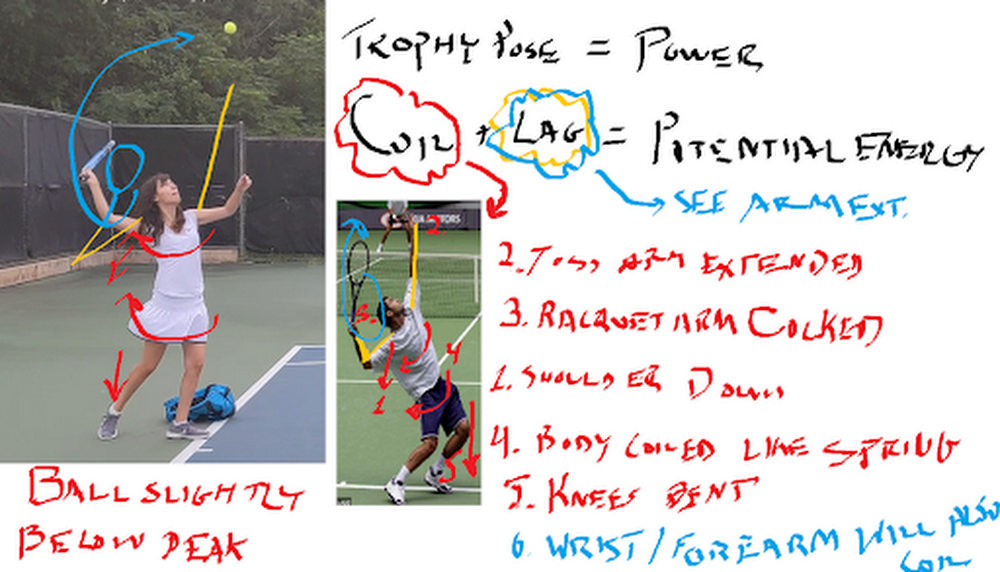
Ah, the Super Bowl. Or, as I prefer to say, the Superb Owl—that oh-so-American Sunday defined by infinite nachos, high-budget commercials, and memes that can last us half a decade. As an uncoordinated math geek, I can’t say I’ve ever had much connection to the “Football” part of the Super Bowl. That said, sports, data analytics, and machine learning make a powerful trio: most professional teams use this technology in one way or another, from tracking players’ moves to detecting injuries to reading numbers off players’ jerseys. And, for the less athletic of us, machine learning may even be able to help us improve our own skills.Which is what we’ll attempt today. In this post, I’ll show you how to use machine learning to analyze your performance in your sport of choice (as an example, I’ll use my tennis serve, but you can easily adopt the technique to other games). We’ll use the Video Intelligence API to track posture, AutoML Vision to track tennis balls, and some math to tie everything together in Python.Want to try this project for yourself? Follow along in the Qwiklab.I give full credit for this idea from my fellow Googler Zack Akil, who used the same technique to analyze penalty kicks in soccer (sorry, “football”).Using machine learning to analyze my tennis serveTo get started, I set out to capture some video data of my tennis serve. I went to a tennis court, set up a tripod, and captured some footage. Then I sent the clips to my tennis coach friend, who gave me some feedback that looked like this:These diagrams were great because they analyzed key parts of my serve that differed from those of professional athletes. I decided to use this to hone in on what my machine learning app would analyze:Were my knees bent as I served?Was my arm straight when I hit the ball?How fast did the ball actually travel after I hit it? (This one was just for my personal interest)Analyzing posture with pose detectionTo compute the angle of my knees and arms, I decided to use pose detection—a machine learning technique that analyzes photos or videos of humans and tries to locate their body parts. There are lots of tools you can use to do pose detection (like TensorFlow.js), but for this project, I wanted to try out the new Person Detection feature of the Google Cloud Video Intelligence API. (You might recognize this API from my AI-Powered Video Archive, where I used it to analyze objects, text, and speech in my family videos.) The Person Detection feature recognizes a whole bunch of body parts, facial features, and clothing. From the docs:To start, I clipped the video of my tennis serves down to just the sections where I was serving. Since I only caught 17 serves on camera, this took me about a minute. Next, I uploaded the video to Google Cloud Storage and ran it through the Video Intelligence API. In code, that looks like: To call the API, you pass the location in Cloud Storage where your video is stored as well as a destination in cloud storage where the Video Intelligence API can write the results.When the Video Intelligence API finished analyzing my video, I visualized the results using this neat tool built by @wbobeirne. It spits out neat visualization videos like this:Pose detection makes a great pre-processing step for training machine learning models. For example, I could use the output of the API (the position of my joints over time) as input features to a second machine learning model that tries to predict (for example) whether or not I’m serving, or whether or not my serve will go over the net. But for now, I wanted to do something much simpler: analyze my serve with high school math!For starters, I plotted the y position of my left and right wrists over time:It might look messy, but that data actually shows pretty clearly the lifetime of a serve. The blue line shows the position of my left wrist, which peaks as I throw the tennis ball a few seconds before I hit it with my racket (the peak in the right wrist, or orange line).Using this data, I can tell pretty accurately at what points in time I’m throwing the ball and hitting it. I’d like to align that with the angle my elbow is making as I hit the ball. To do that, I’ll have to convert the output of the Video Intelligence API–raw pixel locations–to angles. How do you do that? Obviously using the Law of Cosines, duh! (Just kidding, I definitely forgot this and had to look it up. Here’s a great explanation of the Law of Cosines and some Python code.)The Law of Cosines is the key to converting points in space to angles. In code, that looks something like:Using these formulae, I plotted the angle of my elbow over time:By aligning the height of my wrist and the angle of my elbow, I was able to determine the angle was around 120 degrees (not straight!). If my friend hadn’t told me what to look for, it would have been nice for an app to catch that my arm angle was different from professionals and let me know.I used the same formula to calculate the angles of my knees and shoulders. (You can find all the details in the code.)Computing the speed of my servePose detection let me compute the angles of my body, but I also wanted to compute the speed of the ball after I hit it with my racket. To do that, I had to be able to track the tiny, speedy little tennis ball over time.As you can see here, the tennis ball was sort of hard to identify because it was blurry and far away.I handled this the same way Zack did in his Football Pier project: I trained a custom AutoML Vision model.If you’re not familiar with AutoML Vision, it’s a no-code way to build computer vision models using deep neural networks. The best part is, you don’t have to know anything about ML to use it.AutoML Vision lets you upload your own labeled data (i.e. with labeled tennis balls) and trains a model for you.Training an object detection model with AutoML VisionTo get started, I took a thirty second clip of me serving and split it into individual pictures I could use as training data to a vision model:ffmpeg -i filename.mp4 -vf fps=10 -ss 00:00:01 -t 00:00:30 tmp/snapshots/%03d.jpgYou can run that command from within the notebook I provided, or from the command line if you have ffmpeg installed. It takes an mp4 and creates a bunch of snapshots (here at fps=20, i.e. 20 frames per second) as jpgs. The -ss flag controls how far into the video the snapshots should start (i.e. start “seeking” at 1 second) and the flag -t controls how many seconds should be included (30 in this case).Once you’ve got all your snapshots created, you can upload them to Google Cloud storage with the command:gsutil mb gs://my_neat_bucket # create a new bucketgsutil cp tmp/snapshots/* gs://my_neat_bucket/snapshotsNext, navigate to the Google Cloud console and select Vision from the left hand menu:Create a new AutoML Vision Model and import your photos.Quick recap: what’s a machine learning classifier? It’s a type of model that learns how to label things from example. So to train our own AutoML Vision model, we’ll need to provide some labeled training data for the model to learn from.Once your data has been uploaded, you should see it in the AutoML Vision “IMAGES” tab:Here, you can start applying labels. Click into an image. In the editing view (below), you’ll be able to click and drag a little bounding box:For my model, I hand-labeled about 300 images which took me ~30 minutes. Once you’re done labeling data, it’s just one click to train a model with AutoML–just click the “Train New Model” button and wait.When your model is done training, you’ll be able to evaluate its quality in the “Evaluate” tab below.As you can see, my model was pretty darn accurate, with about 96% precision and recall.This was more than enough to be able to track the position of the ball in my pictures, and therefore calculate its speed:Once you’ve trained your model, you can use the code in this Jupyter notebook to make a cute little video like the one I plotted above.You can then use this to plot the position of the ball over time, to calculate speed:Unfortunately, I realized too late I’d made a grave mistake here. What is speed? Change in distance over time, right? But because I didn’t actually know the distance between me, the player, and the camera, I couldn’t compute distance in miles or meters–only pixels! So I learned I serve the ball at approximately 200 pixels per second. Nice.So there you have it–some techniques you can use to build your own sports machine learning trainer app. And if you do build your own sports analyzer, let me know!Related ArticleBaking recipes made by AIIn this post, we’ll show you how to build an explainable machine learning model that analyzes baking recipes, and we’ll even use it to co…Read Article
Quelle: Google Cloud Platform
Editor’s note: Today we’re hearing from Kathleen Vignos, Director of Platform Engineering at Twitter. Kathleen shares how Google Cloud training and certifications help Twitter leaders and employees increase business impact, stay up to date with the latest technologies, and grow their careers. One of Twitter’s core values is having a growth mindset, and as a director in Twitter’s Platform Engineering organization, I believe it’s important for engineering leaders like me to stay up to date on technical training and ensure our teams also have the training they need. I lead our infrastructure automation group which includes our cloud acceleration team. As part of our hybrid cloud strategy, our cloud acceleration engineers focus on enabling Twitter developers to use cloud services such as Google Cloud. To ensure we promote best practices in the cloud, I helped organize and participated in a 6 day-long Google Cloud training session at Twitter. This training gave us all an opportunity to better understand how we could use the latest cloud technologies as well as learn new skills and ways of thinking. During the sessions, we focused on how to design and plan secure cloud architecture solutions as well as manage and provision cloud infrastructure. We also learned how to analyze and optimize technical and business processes. On top of that, the training helped us prepare for Google Cloud’s Professional Cloud Architect certification. Why IT leaders should take Google Cloud trainingCloud architecture training is important for technical leaders because it helps you further your cloud architecture expertise and understand which business decisions to make and the trade-offs involved as you assess your cloud strategy. The training can also help you improve your on-prem strategy. I see the way Google Cloud groups their products together as a type of organizational framework which helped me gain a fresh perspective on how I should structure teams who support our on-prem environment. I’ve also been able to improve our on-prem strategy by considering some of the cloud best practices taught in the sessions. The hands-on experience provided during Google Cloud’s training is valuable as well. As engineering leaders progress in their careers, they get further away from the hands-on experience of coding every day and digging into consoles and features. This type of training provides a unique opportunity for us to keep learning, which is vital as our industry continues to rapidly evolve. We need to have a strong understanding of the technologies we’re already managing and the emerging innovations we need to invest in. For example, running gcloud commands in training labs helps demonstrate how to do things like spin up instances, along with options to do that on the command line, through the console, or via the Cloud API. Creating a networking subnet during the sessions helps mimic the problems that arise for our teams when they need to troubleshoot while setting up networking between services. Simple queries against Bigtable show the power and ease of being able to manipulate large datasets.Moreover, taking the training allowed me to assess the value of the coursework to decide what kind of training to continue providing for my teams.Why IT leaders should invest in Google Cloud training and certifications for their teamsTo earn a Google Cloud certification, individuals need to take Google Cloud training and pass a comprehensive certification exam. The certifications are valuable credentials which help your team validate their expertise and grow their careers as well as help organizations retain top talent. When members of my team became certified, it signaled to others at Twitter that my team includes cloud experts. Certified individuals can also help others at Twitter grow their cloud skills. Developers and engineers highly value the ability to work with new technologies and continue learning new skills at their jobs. In fact, given Twitter’s commitment to learning and growth, our developers and engineers have an expectation that they’re going to be able to work with the most interesting, complex, challenging scale problems and have access to the newest technologies to solve those problems. Providing training and certification opportunities along with the ability to train during work hours signals to employees that a company is invested in their careers and growth. Employees feel more engaged in their work and are more likely to stay at an organization when it’s clear they can move their careers forward within the company with strong support from leadership. Interested in learning more about Google Cloud certifications? Watch this on-demandwebinarfor an overview of available certifications and receive learning paths with recommended training courses, tips, and tools you can use to prepare for certification exams.Related Article2021 resolutions: Kick off the new year with free Google Cloud trainingTackle your New Year’s resolutions with our new skills challenges which will provide you with no cost training to build cloud knowledge i…Read Article
Quelle: Google Cloud Platform
Mit Patch Manager, einer Funktion von AWS Systems Manager, können Sie jetzt Aktionen konfigurieren, die auf einer verwalteten Instance vor und nach der Installation von Patches ausgeführt werden. Mit dieser Funktion können Sie Aktionen konfigurieren, um Prüfungen vor der Installation durchzuführen, z. B. um sicherzustellen, dass der "Windows Update Service" vor dem Patchen von Instanzen ausgeführt wird. Darüber hinaus können Sie Aktionen konfigurieren, die Zustandsprüfungen nach der Installation durchführen, um sicherzustellen, dass Ihre Instanzen nach dem Patching gesund sind.
Quelle: aws.amazon.com
Sie können AWS Elemental MediaLive jetzt so konfigurieren, dass Live-Videos direkt in Ihrer eigenen Amazon Virtual Private Cloud (Amazon VPC) bereitgestellt werden. Für Kunden, die spezielle Video-Workflows in ihrer eigenen Amazon VPC ausführen, kann MediaLive jetzt Live-Video für diese Anwendungen bereitstellen, ohne öffentliche IPs zu verwenden. MediaLive unterstützt bereits VPC-Eingänge für einen MediaLive-Kanal.
Quelle: aws.amazon.com

Ducati hat ein neues Elektromodell vorgestellt: einen Elektrotretroller. Das angekündigte Elektromotorrad lässt weiter auf sich warten. (E-Scooter, Technologie)
Quelle: Golem

Der VW ID.6 könnte das nächste Elektroauto von Volkswagen sein, das auf der MEB-Plattform basiert. Erste Bilder zeigen die Nähe zum ID. Roomzz. (Volkswagen ID., Technologie)
Quelle: Golem

Strategie mit King Arthur, politische Ränke in Suzerain und Action mit Super Meat Boy Forever: 2021 gibt es zum Jahresbeginn ungewöhnlich viele tolle Games, wir stellen sie vor. Von Rainer Sigl (Spieletest, Aufbauspiel)
Quelle: Golem

Während der Kurs der Gamestop-Aktien weiter fällt, sind diese wieder frei handelbar. Und weitere Hedgefonds berichten von Gewinnen. (Gamestop, Börse)
Quelle: Golem

Dank der eingebauten Kameras können Pixel-Nutzer künftig Vitalfunktionen messen und in Google Fit speichern. Weitere Android-Smartphones sollen folgen. (Google Pixel, Google)
Quelle: Golem






