Showcase Your Figma Designs on WordPress P2

Figma — one of the most popular and fastest growing digital design tools today — was recently voted “the most exciting design tool of 2021.” 

In many organizations, a smaller group — often the design team — uses Figma on a daily basis. But designers need a seamless way to share their work and gather feedback from other disciplines across the organization. Enter P2. P2 is a product powered by WordPress.com that boosts remote, asynchronous team collaboration. With P2, team members can share ideas, collect feedback, and assign tasks to one another.

You can now embed Figma files on P2 and get contextual feedback from everyone, creating a more inclusive environment, eliminating the need for others to learn and navigate design-specific software. 

Sharing Figma files on P2 allows teams to review designs and comment where everyone collaborates. It integrates all work in a single spot, helping track project progress. P2 is fully searchable for future reference too! As you iterate in Figma, your files will magically sync on P2. No more messy screen grabs or wondering which Figma file is the most up-to-date.

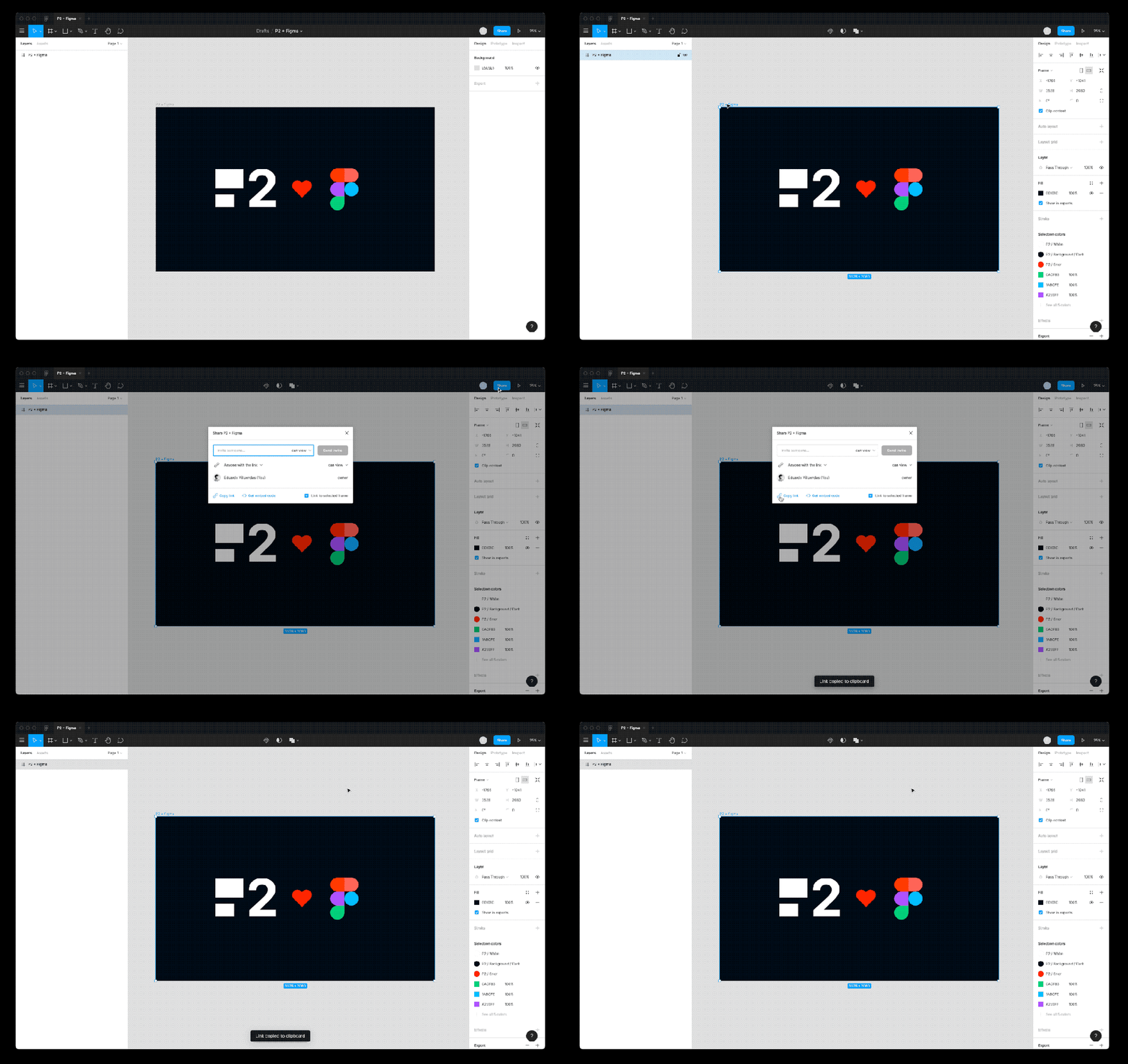
Step 1 : Copy the link to the art board or prototype from Figma

Step 2: Add the Figma block and paste the link into it

Get P2

Want to know more about how P2 can help improve communication and collaboration on your teams? Check out a demo. You can also create your own P2 here and take it for a spin. Any questions? Feel free to comment on the demo P2.
Quelle: RedHat Stack

Introducing Bare Metal Solution for SAP workloads

When customers run SAP workloads on Google Cloud, we know that scalability is a major concern. It’s why SAP on Google Cloud offers some of the industry’s most powerful SAP-certified infrastructure options: single-node 6TB and 12TB VMs optimized for S/4HANA OLTP workloads.Some of our customers, however, run on-premises SAP environments that are far bigger than the biggest and most robust VMs. As you might expect, running SAP workloads at such massive scale can be an expensive, complex, and generally burdensome undertaking. But customers can see major operational benefits like greater scalability and lower cost of ownership if they move these mega-scale SAP workloads to a cloud environment. Performance is critical as well. See below for details on our record setting bare metal performance benchmark for SAP. Bare Metal Solution: a good fit for massive SAP workloadsRecently, we expanded Bare Metal Solution to include SAP-certified hardware options. Bare Metal Solution systems are dedicated, single-tenant systems designed specifically to run workloads that are too large or otherwise unsuitable for standard, virtualized environments. The Bare Metal Solution gives SAP customers great options for modernizing their biggest and most challenging workloads.Bare Metal Solution supplies fully-managed hardware and supporting infrastructure offered as a subscription service. This includes storage and networking, as well as power, cooling, and other infrastructure within a secure, low latency datacenter. We handle the hardware, you handle the softwareWhile Google Cloud manages the hardware and infrastructure for Bare Metal Solution, our customers maintain control over the software running on these systems. This includes full control over the operating systems and all of the software associated with their SAP environments and application workloads. Bare Metal Solution also provides automated onboarding and provisioning tools that simplify tasks such as operating system configuration and setup for backup and monitoring tools.Click to enlargeThere are several ways our SAP customers see value when they migrate these mega-scale workloads to Bare Metal Solution. Many customers take advantage of low-latency connections with Google Cloud AI and machine learning tools, with BigQuery, and with private access to Google Cloud APIs and services. In addition, subscription-based pricing eliminates over-provisioning costs and requires no upfront capital investments. There are also no data ingress or egress charges between the Bare Metal Solution and other Google Cloud services in the same region.Bare Metal Solution gives customers a choice of SAP-certified systems for running their workloads. Google Cloud and Intel collaborated to create a best in class architecture for SAP on bare metal that can provide fast insights, low latency, and high throughput. This includes general-purpose Intel® Xeon systems with up to 224 vCPUs and 3TB of memory. Additionally two machine types are certified specifically to run very large-scale HANA workloads using 12 and 16-socket Intel® 2nd gen Xeon Scalable processors configured with 18TB and 24TB of memory, respectively. Bare Metal Solution hits a new SAP benchmarking recordCustomers require a high degree of performance and reliability from Google Cloud, which was a key principle in the design phase for Bare Metal Solution. The workloads running on these systems are absolutely critical for customers and it’s no small feat to ensure consistent infrastructure performance and reliability at such massive scale.That’s why we’re thrilled to share some recent news about a major Google Cloud team achievement: a new world record for system performance against a key SAP performance benchmark.Many of our SAP customers are familiar with the SAP Standard Application Benchmarks. These benchmarks are an important tool for testing hardware and database performance of SAP applications, scalability, concurrency, power efficiency, multi-user behavior, and many other facets of enterprise application performance.The Google Cloud team focused its benchmarking efforts on the SAP Sales & Distribution benchmark: a hardware-independent measure of system performance. The unit of measurement is the SAP Application Performance Standard (SAPS); 100 SAPs is defined as the system performance required to process 2,000 business order line items in one hour.To certify the solution, Google Cloud tested a 16-socket/24TB server using the Intel Cascade Lake processor against this critical and closely followed benchmark. We were thrilled with the result: the Bare Metal Solution server set a new world record for Intel processors, achieving 892,270 SAPS.SAP benchmarking records are a genuine mark of achievement for the companies that earn them—as you can tell by looking at how many times new contenders have stepped up with new performance records over the past quarter century. This is our first contribution as a SAP benchmarking record holder, but we certainly hope it won’t be the last as we work to deliver faster, more reliable and more innovative infrastructure for SAP customers.Learn more about Bare Metal Solution on Google Cloud as well as our offerings for SAP customers.Related ArticleBare Metal Solution: new regions, new servers, and new certificationsCheck out new regions and a smaller 8-core server, plus HIPAA and PCI-DSS compliance, for Bare Metal Solution to move your Oracle workloa…Read Article
Quelle: Google Cloud Platform

Architecting a data lineage system for BigQuery

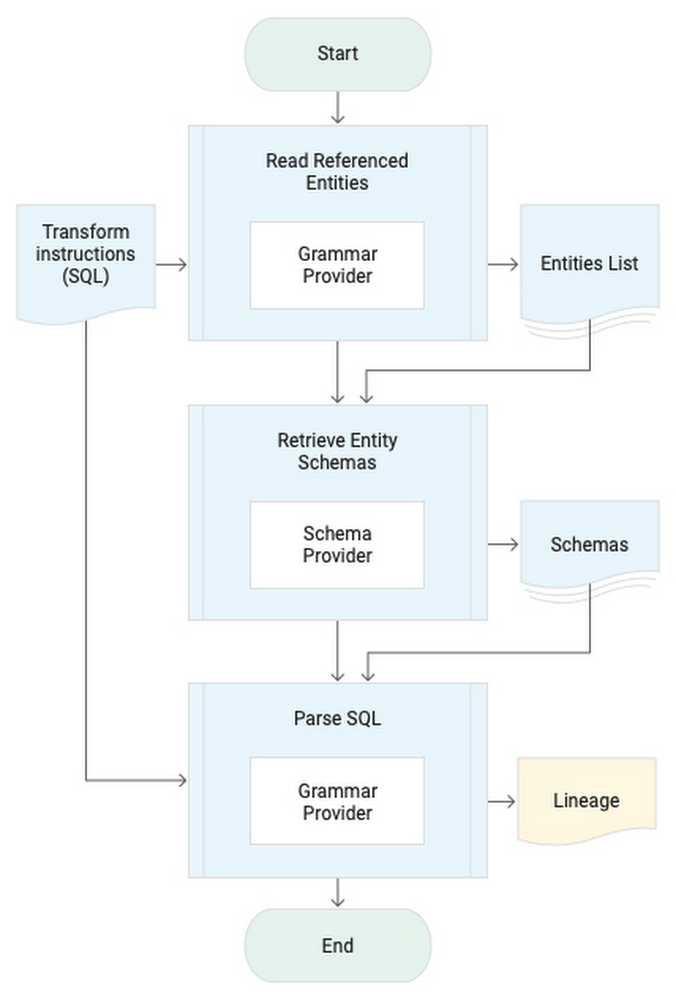
Democratization of data within an organization is essential to help users derive innovative insights for growth. In a big data environment, traceability of where the data in the data warehouse originated and how it flows through a business is critical. This traceability information is called data lineage. Being able to track, manage, and view data lineage helps you to simplify tracking data errors, forensics, and data dependency identification. In addition, data lineage has become essential for securing business data. An organization’s data governance practices require tracking all movement of sensitive data, including personally identifiable information (PII). Of key concern is ensuring that metadata stays within the customer’s cloud organization or project.Data Catalog provides a rich interface to attach business metadata to the swathes of data scattered across Google Cloud in BigQuery, Cloud Storage, Pub/Sub or outside Google Cloud in your on-premises data centers or databases. Data Catalog enables you to organize operational/business metadata for data assets using structured tags. Data Catalog structured tags are user-specified and you can use them to organize complex business and operational metadata, such as entity schema, as well as data lineage.Common data lineage user journeysData lineage can be useful in a variety of user journeys that require a number of related but different capabilities. Different user journeys require lineage information at different granularities like relationships between data assets such as tables or datasets, while other user journeys require data lineage at column level for each table. Another category of user journeys trace data from specific rows in a table and is often referred to as row-level lineage. Here, we’ll describe our proposed architecture, which focuses on the most commonly used (column-level) granularity for automated data lineage and can be used for the following user journeys:Impact/dependency analysisSchema modification of existing data assets, like deprecation and replacement of old data assets, is commonplace in enterprises. Data lineage helps you flag the breaking changes and identify specific tables or BI dashboards that will be impacted by the planned changes.Data leakage/exfiltrationIn a self-service analytics environment, accidental data exfiltration is high risk and can cause a loss of face for the enterprise. Data lineage helps in identifying unexpected data movement to ensure that data egress is done only to the approved projects/locations where it is accessible only by approved people. Debugging data correctness/qualityData quality is often compromised by missing or incorrect raw data as well as incorrect data transformations in the data pipelines. Data lineage enables you to traverse the lineage graph back, troubleshoot the data transformations, and trace the data issues all the way to raw data.Validating data pipelinesCompliance requirements need you to ensure that all approved data assets are sourcing data exclusively from authorized data sources and the data pipelines are not erroneously using, for instance, a table that was created by an analyst for their own use, or a table that still has PII data. Data lineage empowers you to validate and certify data pipelines’ adherence to governance requirements.Introspection for data scientistMost data scientists require a close examination of the data lineage graph to really understand the usability of data for their intended purpose. By traversing the data lineage graph and examining the data transformations, you get critical insights into how the data asset was built and how it can be used for building ML models or for generating business insights.Lineage extraction systemA passive data lineage system is suitable for SQL data warehouses like BigQuery. The lineage extraction process starts with identifying source entities used to generate the target entity through the SQL query. Parsing a query requires the schema information of the source entities of the query from the Schema Provider. The Grammar Provider is then used to identify the relation between output columns to the source columns and the list of functions/transforms applied for each output column. Here’s a look at the procedure to derive lineage:Click to enlargeA tuple of source, target, and transform information based lineage data model is used to record the extracted lineage.A cloud-native lineage solution for your BigQuery serverless data warehouse would use the BigQuery audit logs in real time from Pub/Sub. An extraction Dataflow pipeline parses the query’s SQL using the ZetaSQL grammar engine, uses the table schema from BigQuery API and persists the generated lineage in a BigQuery table and as a tag in Data Catalog. The lineage table can then be queried to identify the complete flow of data in the data warehouse. Here’s a look at the architecture:Click to enlargeTry data lineage for yourselfEnough talk! Deploy your own BigQuery data lineage system by cloning the bigquery-data-lineage Github repository or take it a step further by trying to dynamically propagate the data access policy to derived tables based on the lineage signals.Related ArticleUnderstanding the fundamentals of tagging in Data CatalogSee how to use tagging and templates inside Data Catalog, Google Cloud’s metadata management service that covers operational and business…Read Article
Quelle: Google Cloud Platform

Don't fear the authentication: Google Drive edition

There are times when I’m building an application on GCP when I don’t want to use a more traditional datastore like Cloud SQL or Bigtable. Right now, for example, I’m building an app that allows non-technical folks to easily add icons into a build system. I’m not going to write a front-end from scratch, and teaching them source control, while valuable, isn’t really something I wanted to tackle right now. So an easy solution is to use Google Drive. Maybe you never thought of it as a data store…but let’s talk about it here for a minute. Super simple interface, has rudimentary source control built into it, and it has an API so I can automate pulling the icons from Drive into proper source control and our build system for everyone to consume the icons!Only one problem…and I have a confession to make. I hate OAuth, and on the surface it seems like you need to use OAuth in order to use Google Drive’s API. Okay okay, hate is probably too strong of a word. I don’t hate what it does. I recognize that it’s hugely important. I just don’t like that since it’s not something I use every day, I can never remember exactly what I need to do. I need which token from where now? And do I put it in a header? What’s the name of the header? I’m always looking up how to implement OAuth correctly each time I have to do it.Now, what IS in my day to day sweetspot? Working with service accounts and IAM within GCP for authorization. So it turns out…if you want to integrate Google Drive functionality into your application that already uses GCP services, you can totally use IAM service accounts to do it!The key to this magic is to understand that IAM service accounts are also users. And users have email addresses. If you look at a service account in the list on the access page in the console:That email address is the magic. Just as you can share a Drive folder with a person, you can also share a Drive folder with an IAM service account. Or a Sheet, or a Doc. Whatever it is you want to integrate into your GCP application. So in my case, I needed to share the Drive folder where our marketing folks were going to put the icons. Let’s walk through what I did to get it working. I created a service account in the console here. Click the Create Service Account button up at the top. Give it a name, grant it account access to what roles the application needs for the GCP services you’re using. Drive itself doesn’t actually need a specific permission role. So for example, if the application needs to also be able to write entries into a Cloud SQL database as well as access the Drive content, then you’d need to give it the Cloud SQL Client role. Only add the permissions you need. Do not give blanket “Owner” permissions please.When you’re done, click into the details of your service account in the list, and click “Add Key”Pick the JSON type, and it will download the bearer token for that service account. PLEASE be careful with it. It’s a bearer token, which means anyone that has it now has permission to do stuff in your project based on the permissions you gave the service account. For example, writing to or reading from the database if you gave it the Cloud SQL Client role. This is why you only want to give it the specific roles you want, and not Owner level permissions.The code, in Python, looks like this:If you aren’t familiar, the discovery APIs are wrappers on the REST APIs in native languages, like Python. Finding all of what you can do with the API is a little bit all over the place depending on what you want to do. A good place to start is here, which walks through the basics of Drive APIs, like creating folders and files, downloading, searching, etc. For example, grabbing all the folders in a Drive folder would be:That will fetch the first 100 folders (pageSize is 100 by default, you can change it by adding another parameter pageSize=n to the list call) in our marketing_icon_folder_id, giving us the names and Drive ids of those folders.So that’s it. A nice quick way to avoid having to remember how to set up OAuth when you want to use Google Drive as a data store with a simple UI, basic versioning, and fully-featured APIs for your GCP-integrated application. Thanks for reading, hopefully it helps! If you’re looking for ideas for things to create, we have a number of codelabs that might spark some fun ideas here. If you have questions, or you want to tell me what cool things you’re doing with Drive and GCP, reach out to me on Twitter, my DMs are open.Related ArticleEnforcing least privilege by bulk-applying IAM recommendationsLearn how to identify IAM roles with unnecessary permissions in your Google Cloud organization—and rightsize them automatically.Read Article
Quelle: Google Cloud Platform