Top 5 trends for API-powered digital transformation in 2021

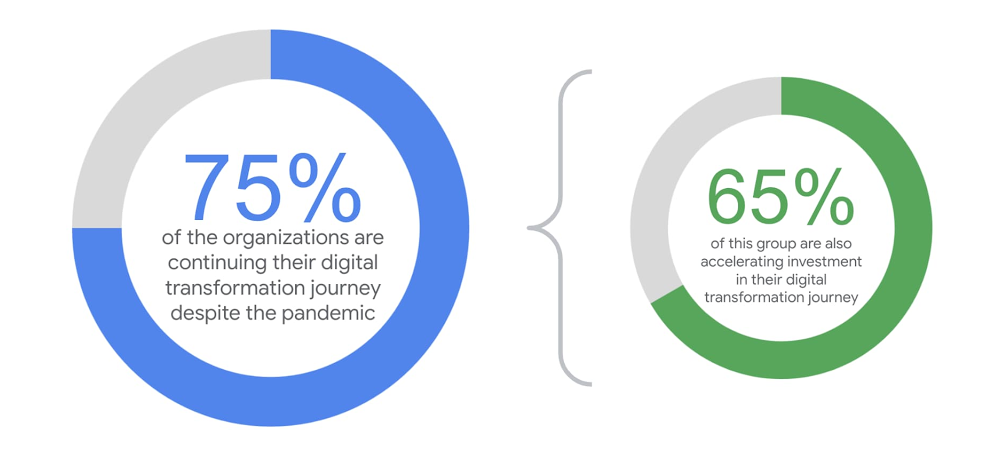
Our “State of the API Economy 2021” report confirms that though digital transformation has been among enterprises’ top business imperatives for years, the COVID-19 pandemic and changing market conditions have increased this urgency. Organizations across the world weathered the pandemic by compressing years of digital transformation into just a few months. Our research reflects this urgency: in response to the pandemic and its rippling effect on business in 2020, nearly three in four organizations continued their digital transformation investments. Two-thirds of those companies are increasing investments or completely evolving their strategies to become digital-first companies.Digital  transformation relies on an organization’s ability to package its services, competencies, and assets into modular pieces of software that can be repeatedly leveraged. Every company in the world already has valuable data and functionality housed within its systems. Capitalizing on this value, however, means liberating it from silos and making it interoperable and reusable in different contexts—including by combining it with valuable assets from partners and other third parties.APIs enable these synergies by letting developers easily access and combine digital assets in different systems, even if those systems were never intended to interoperate. In their most basic form, APIs are how software talks to software, but if the APIs are designed with the developer experience in mind, rather than just as bespoke integration projects, they become extremely powerful, enabling developers to repeatedly leverage data and functionality for new apps and automations.As part of creating the “State of API Economy 2021” research report, we surveyed over 700 IT executives around the globe to identify key trends about how they are responding to the pandemic and its rippling effects on business. Our findings identified five key trends in 2021 for API-first digital transformation:1. Increasing SaaS and Hybrid Cloud-based API DeploymentsWhen asked about future areas of technology focus and investment, one in two respondents reported increasing SaaS use to administer workloads, as well as an increase in hybrid cloud adoption —both areas in which APIs are crucial tools. APIs serve a variety of use cases from connecting internal applications to enabling digital ecosystem strategies, so it’s no surprise that many organizations are choosing to leverage a mix of on-premises and cloud infrastructure to host those APIs.2. Analytics Expand Competitive AdvantageWhile deploying APIs helps companies develop their digital presence, measuring API performance is key to optimizing their use and illuminating further routes to innovation. When our survey respondents were asked how APIs at the company are currently measured, top responses included metrics focused on API performance, those focused on traditional IT-centric numbers, and those focused on consumption of APIs. But when asked about preference for API measurement, business impact—including Net Promoter Score (NPS) and speed-to-market—tops the list.Leading businesses use API analytics to not only inform new strategies but also align leadership goals and outcomes. Because executive sponsors tend to support tangible results (like an API that’s attracting substantial developer attention or accelerating delivery of new products), teams can use API metrics to effectively unite leaders around digital strategies and justify continued platform-level funding for the API program. 3. AI and ML – Powered API Management is Gaining TractionWhile some aspects of API security and management are as straightforward as applying authentication mechanisms to control access or applying rate limits when API calls exceed a certain limit (such as during a DDoS attack), artificial intelligence (AI) and machine learning (ML) are emerging as important ways for organizations to bolster their API management and security capabilities.It’s no wonder that new, AI- and ML-powered API security and monitoring solutions are gaining widespread adoption to help companies detect and block malicious attacks. In fact, usage for anomaly detection, bot protection, and security analytics grew 230% year-over-year among Apigee customers between September 2019 and September 2020.4. API Ecosystems Are Innovation DriversAPIs are the backbone of digital business ecosystems that encompass networks of partners, developers, and customers. These ecosystems may be composed entirely of internal parties (i.e., developers within an organization) or may include external individuals and organizations, such as suppliers, third-party providers, contractors, customers, developers, regulators, or even competitors.Our research found that while companies of all API maturity levels are likely to be focused on speeding up development of new applications and connecting internal applications, high-maturity organizations are significantly more likely to focus on developing a developer ecosystem or B2B partner ecosystem around their APIs.5. API Security and Governance More Important Than EverIn 2020, virtually all industries, from retail and manufacturing to finance and hospitality, shifted how they do business, with a focus on digital maturity coming into sharp relief in the wake of COVID-19. Customer, employee, and partner-facing operations all moved to digital mediums. While this created new opportunities for innovation, it also exacerbated the difficulty of keeping up with growing security threats by opening up more avenues for hackers to access sensitive data.When designed and managed properly, APIs provide business optionality to control access to digital assets, to combine old systems with new technologies, and to empower developers to experiment, innovate, and react to changing customer needs. But APIs exposed without the proper controls, security protections, developer considerations, and visibility mechanisms can become a liability that puts corporate and customer data at risk. Our research demonstrates increased investment in security and governance remain top-of-mind to enable enterprises better leverage and protect their digital assets.Even as 2021 begins with carryover from many of 2020’s challenges, looking ahead, enterprises should start thinking beyond digital transformation for the coming decade and strive to achieve digital excellence. Businesses will need to leverage advanced cloud capabilities around security, global reach, access management, and artificial intelligence to support the growing global digital ecosystems. With well-designed and managed APIs, enterprises can help ensure that they’re able to adapt their business from one disruption to the next. And, at Google, we are here to partner with you to help achieve your digital excellence.Want to learn more? The “State of API Economy 2021” report describes how digital transformation initiatives evolved throughout 2020, as well as where they’re headed in the years to come. This report is based on Google Cloud’s Apigee API Management Platform usage data, Apigee customer case studies, and analysis of several third-party surveys conducted with technology leaders from enterprises with 1,500 or more employees, across the United States, United Kingdom, Germany, France, South Korea, Indonesia, Australia, and New Zealand. Read the full report
Quelle: Google Cloud Platform

Think big: Why Ricardo chose Bigtable to complement BigQuery

With over 3.7 million members, Ricardo is the most trusted, convenient, and largest online marketplace in Switzerland. We successfully migrated from on-prem to Google Cloud in 2019, a move that also raised some new use cases that we were keen to solve. With our on-premises data center closing, we were under deadline to find a solution for these use cases, first looking at our data stream process. We found a solution using both Cloud Bigtable and Dataflow from Google Cloud. Here, we take a look at how we decided upon and implemented that solution, as well as look at future use cases on our roadmap. Exploring our data use cases For analytics, we had originally used the Microsoft SQL data warehouse, and had decided to switch to BigQuery, Google Cloud’s enterprise data warehouse. That meant that all of our workloads had to be pushed there as well, so we chose to run the imports and the batch loads from Kafka into BigQuery through Apache Beam. We also wanted to give internal teams the ability to perform fraud detection work through our customer information portal, to help protect our customers from the sale of fraudulent goods or from actors using stolen identities. Also, our engineers had to work quickly to address how to move our two main streams of data that had been stored in separate systems. One is for articles—essentially, the items for sale posted to our platform. The other is for assets, which contain the various descriptions of the articles. Before, we’d insert the streams into BigQuery, and then do a JOIN. One of the challenges is that Ricardo has been around for quite some time, so we sometimes have an article that hasn’t been stored since 2006, or gets re-listed, so it may miss some information in the asset stream. One problem, which solution?Doing research into solving our data stream problem, I came across a Google Cloud blog that provided a guide to common use patterns for Dataflow (Google Cloud’s unified stream and batch processing service), with a section on Streaming Mode Large Lookup Tables. We have a large lookup table of about 400 GB with our assets, in addition to our article stream. But we needed to be able to look up the asset for an article. The guide suggested that a column-oriented system could answer this kind of query in milliseconds, and could be used in a Dataflow pipeline to both perform the lookup and update the table. So we explored two options to solve the use case. We tried out a prototype with Apache Cassandra, the open-source, wide column store, NoSQL database management system, which we can stream into from BigQuery using Apache Beam to preload it with the historical data. We built a new Cassandra cluster on Google Kubernetes Engine (GKE), using the CASS Operator, released by Datastax as open source. We created an index structure, optimized the whole thing, did some benchmarks, and happily found that everything worked. So we had the new Cassandra cluster, the pipeline was consuming assets and articles, and the assets were looked up from the Cassandra store where they were also stored. But what about day-to-day tasks and hassles of operations? Our Data Intelligence (DI) team needs to be completely self-sufficient. We’re a small company, so we need to move fast, and we don’t want to build a system that quickly becomes legacy. We were already using and liking the managed services of BigQuery. So using Bigtable, which is a fully managed, low-latency, wide column NoSQL database service, seemed like a great option. A 13 percent net cost savings with BigtableIn comparison to Bigtable, Cassandra had a strike against it in the area of budgeting. We found that Cassandra needed three nodes to secure the availability guarantees. With Bigtable, we could have a fault-tolerant data pipeline/Apache Beam pipeline running on Apache Flink. We could also have fault tolerance in the case of low availability, so we didn’t need to run the three nodes. We were able to schedule 18 nodes when we ingested the history from BigQuery into Bigtable, for the lookup table, but as soon as the lookup table was in, we could scale down to two or one node, because it can handle 10,000 requests per second guaranteed. Bigtable takes care of availability and durability behind the scenes and so it supplies guarantees even with one node.With this realization, it became quite clear that the Bigtable solution was easier to manage than Cassandra, and it was also more cost-effective. As a small team, when we factored in the ops learning costs, the downtime, and the tech support needed for the Cassandra-on-GKE solution, it was already more available to use one TB in a Bigtable instance to start out with, versus the Cassandra-on-GKE solution with three times the E2 node cluster, which is pretty small, at an 8 CPU GM. Bigtable was the easier, faster, and less expensive answer. By moving such lookup queries to Bigtable, we ultimately saved 13 percent in BigQuery costs. (Keep in mind that these are net savings, so the additional cost for running Bigtable is already factored in.)As soon as this new solution lifted off, we moved another workload to Bigtable where we integrated data from Zendesk tickets for our customer care team. We worked on integrating the customer information, making it available in Bigtable to have the product key lookup linked with the Zendesk data so that this information could be presented to our customer care agents instantly. Benefiting from the tight integration of Google Cloud tools  If you’re a small company like ours, building out a data infrastructure where the data is highly accessible is high priority. For us, Bigtable is our store where we have processed data available to be used by services. The integration of the services between Bigtable, BigQuery, and Dataflow makes it so easy for us to make this data available. One of the other reasons we found the platform on Google Cloud to be superior is because with Dataflow and BigQuery, we can make quick adjustments. For example, one morning, thinking about an ongoing project, I realized we should have reversed the article ID—it should have a reverse string instead of a normal string to prevent hotspotting. To do that, we could quickly scale up to 20 Bigtable nodes and 50 Dataflow workers. Then the batch jobs read from BigQuery and wrote to the newly created schema with Bigtable, and it was all done in 25 minutes. Before Bigtable, this kind of adjustment would have taken days to complete.Bigtable’s Key Visualizer opens up opportunitiesThe idea to reverse the article ID came to me as I thought about the Key Visualizer from Bigtable, which is so nicely done and easy to use compared to our previous setup. It’s tightly integrated, but easy to explain to others. We use SSD nodes and the only configuration we need to worry about is the number of nodes, and if we want to have a replication or not. It’s like a volume on a stereo—and that was really mind-blowing, too. The speed of scaling up and down is really fast, and with Dataflow, it doesn’t drop anything, you don’t have to pre-warm anything, you can just schedule it and share it while it’s running. We haven’t seen ease of scaling like this before.Considering future use cases for BigtableFor future cases, we’re working on improvements to our fraud detection project involving machine learning (ML) that we hope to move to Bigtable. Currently we have a process, triggered every hour by Airflow in Cloud Composer, that takes the data from BigQuery for the last hour, and then runs over the data, with the Python container executing with the model that is being loaded and that takes the data as an input. If the algorithm is 100 percent sure the article is fraudulent, it would block the product, which would require a manual request from customer care to unblock. If the algorithm is less certain, it would go into a customer care inbox and get flagged, where the agents would check it.What’s currently missing in the process is an automated feedback loop, a learning adjustment if the customer care agent replies, “This is not fraud.” We could actually write out some code to perform the action, but we need a faster solution. It would make more sense to source this in the pipe directly from Bigtable for the learning models. In the future, we’d also like to have the Dataflow pipeline writing to BigQuery and Bigtable at the same time for all of the important topics. Then, we could source for these kinds of use cases and serve them directly from Bigtable instead of BigQuery, making them soft “real time.”With the 13 percent savings in BigQuery costs, and the tight integration of all the Google Cloud managed services like Bigtable, our small (but tenacious) DI team is free from the hassles of operations work on our data platform. We can devote that time to developing solutions for these future use cases and more. See what’s selling on Ricardo.ch. Then, check out our site for more information about the cloud-native key value store Bigtable.
Quelle: Google Cloud Platform

Loading complex CSV files into BigQuery using Google Sheets

Building an ELT pipeline using Google Sheets as an intermediaryBigQuery offers the ability to quickly import a CSV file, both from the web user interface and from the command line:Limitations of autodetect and importThis works for your plain-vanilla CSV files, but can fail on complex CSV files. As an example of a file it fails on, let’s take a dataset of New York City Airbnb rentals data from Kaggle. This dataset has 16 columns, but one of the columns consists of pretty much free-form text. This means that it can contain emojis, new line characters, …Indeed, try to open this file up with BigQuery:and we get the errors like:This is because a row is spread across multiple lines, and so the starting quote on one line is never closed. This is not an easy problem to solve — lots of toolsstruggle with CSV files that have new lines inside cells.Sheets to the rescueGoogle Sheets, on the other hand, has a much better CSV import mechanism. Open up a Google Sheet, import the CSV file and voila …The cool thing is that by using a Google Sheet, you can do interactive data preparation in the Sheet before loading it into BigQuery.First, delete the first row (the header) from the sheet. We don’t want that in our data.ELT from a Google SheetOnce it is in Google Sheets, we can use a handy little trick — BigQuery can directly query Google Sheets! To do that, we define the Google Sheet as a table in BigQuery:Steps from the BigQuery UISelect a dataset and click on Create TableSelect Drive as the source, specify the Drive URL to the Google SheetSet Google Sheet as the file formatGive the table a name. I named it airbnb_raw_googlesheetSpecify the schema:This table does not copy the data from the sheet — it queries the sheet live.So, let’s copy the data as-is into BigQuery (of course, we could do some transformation here as well):How to automateYou can automate these steps:Here’s an article on how toread a CSV file into Sheets using PythonFrom then on, usedataform.co or BigQuery scripts to define the BigQuery table and do the ELT.To import complex CSV files into BigQuery, build an ELT pipeline using Google Sheets as an intermediary. This allows you to handle CSV files with new lines and other special characters in the columns. Enjoy!Related Article[New blog series] BigQuery explained: An overviewOur new blog series provides an overview of what’s possible with BigQuery.Read Article
Quelle: Google Cloud Platform

How Cloud Operations helps users of Wix’s Velo development platform provide a better customer experience

With more and more businesses moving online, and homegrown entrepreneurs spinning up new online apps, they’re increasingly looking for an online development platform to help them easily build and deploy their sites. Many choose Velo by Wix because it’s an open web development platform with an intuitive visual builder that accelerates front-end development and comes with a number of benefits including a robust serverless architecture, integrated database management, and access to a host of built-in Wix business solutions.But building a great app is only part of the job, you also need to ensure that it runs smoothly and provides the best user experience possible. To make this happen, we’ve collaborated with Wix to bring Google Cloud operations suite—formerly known as Stackdriver—to Velo to monitor, troubleshoot and improve the performance of applications built in their online environments.How customers are using Wix’s Velo and Cloud OperationsA number of online businesses are already using services from Cloud operations suite to help ensure a consistent online experience for their apps. Here are just two examples.PostSomeJoyCreated in the UK during the pandemic in April 2020, PostSomeJoy makes it easy for users to send unique postcards to their loved ones. They built their site on Wix’s Velo and use Cloud operations integration to aid a better customer experience and postcard delivery. The site provides a wide variety of photos and imagery for users to choose when they send their postcards. To do this, they use Cloudinary as their media management tool, accessed from their dashboard through an API call executed by Velo. Cloud Logging helps them troubleshoot the root cause of any importing issues with their images so they can continuously provide a great user experience. Local HoopsLocal Hoops is a Seattle-based elite basketball training academy for children ages 6-18. In March 2020, the organization used Velo to create a full virtual academy with a Members Login to allow athletes to continue their training at home during the pandemic. Local Hoops have created this virtual academy with a range of membership levels, and are using the app to deliver personalized workout plans and videos to their users. But sometimes things go wrong, and Operations logs these issues by error type, such as whether the user was not a member or at the wrong membership level to access certain content, so they can understand how best to resolve. By quickly reviewing and acting on error logs, Local Hoops can resolve customer issues faster, resulting in a better user experience.Thanks to Velo, we were able to move our training from the court to online and keep these young athletes active and motivated. Google Cloud Operations was monumental in the smooth operation of this. Kelly Edwards, Founder, Local HoopsNspect.ioFounded in the Czech Republic, Nspect.io is a cyber security software and services company that provides penetration testing services to ensure that IP addresses open to the Internet are more secure and less vulnerable to cyber attacks. They’ve built their platform with Wix’s Velo, and Cloud operations suite has been instrumental in helping them improve their customer experience. When their customers order software or security testing, a custom dashboard created in the Cloud Operations suite helps them provide their customers with the status of their order—from the start of an order, to approval and provisioning, and finally through to billing and completion. When Nspect.io sends emails, Cloud Logging helps them log any modifications to email sends and then records success or failure. This is important because logging is the only way Nspect.io developers can debug and understand failures. With the help of Cloud operations suite, Nspect.io has been able to scale at pace.Learn moreUsing Velo by Wix with Cloud operations suite helps businesses get online faster and respond to issues quickly, setting them up for success.Learn more about using Cloud operations suite with Wix’s Velo.
Quelle: Google Cloud Platform




