Top 9 posts from Google Cloud in 2020

In 2020, everything changed. Who would have expected that how we live, work, communicate, and learn would be different by the end of the year? At Google Cloud, we saw how COVID-19 forced changes not only in how our customers worked in offices, but also how software developers and IT practitioners innovated. To support these changes, we introduced new products, features, and resources to address the needs we hear most from our customers: how to better connect people, how to get smarter with your data, how to build faster, and how to do this all with the confidence that your data is safe. Meeting your customers’ needs is essential, and so is empowering your employees with the tools and information they need in real time.Here, we take a look back at the year’s most popular posts from the Google Cloud blog:1. Google Workspace brought productivity to a new levelThe arrival of Google Workspaceallowed our customers to better connect their workforce with the tools they needed to get anything done, in one place. It included everything our customers loved about G Suite, including all of the familiar productivity apps—Gmail, Calendar, Drive, Docs, Sheets, Slides, Meet—and added a new, deeply integrated user experience. For example, we introduced new ways that core Workspace tools like video, chat, email, files, and tasks became more deeply integrated, powerful, and efficient.2. New features and security measures made Google Meet the place to be2020 was all about connecting virtually. As more employees, educators, and students worked remotely in response to the spread of COVID-19, we wanted to help them stay connected and productive. We rolled out free access to our advanced Google Meet video-conferencing capabilities to all G Suite and G Suite for Education customers globally through September. We added features such as support for larger meetings for up to 250 participants per call; live streaming for up to 100,000 viewers; and the ability to record meetings and save them to Google Drive. We also rolled out other top-requested features, including tiled layouts, low-light mode, noise cancellation, and others. And as the year progressed, we never stopped innovating, introducing Meet on the Nest Hub Max, customizable backgrounds, and moderation controls like meeting attendance, Q&A, and polling. We also shared the array of counter-abuse protections we built to give you confidence that your meetings are safe, including anti-hijacking measures for both web meetings and dial-ins and browser-based security features, 2-step Verification, and our Advanced Protection Program. For schools, we introduced several features to improve the remote learning experiences for teachers and students. 3. Google Cloud learning resources connected cloud students with new topicsTo help you transition to remote work and learning, we shared details about our Google Cloud learning resources, which you can use at home. These include our extensive catalog of over 100 on-demand training courses on Pluralsight and Coursera designed to get you started on the path to certification in cloud architecture, data engineering, and machine learning; hands-on labs on Qwiklabs; and interactive webinars at no cost for 30 days, so you can gain cloud experience—and get smarter about cloud—no matter where you are.  4. The COVID-19 public dataset program opened up a world of research possibilitiesTo aid researchers, data scientists, and analysts in the fight against COVID-19, we made a hosted repository of public datasets, like our COVID-19 Open Data dataset, free to access and query through our COVID-19 Public Dataset Program. Researchers can also use BigQuery MLto train advanced machine learning models with this data right inside BigQuery at no additional cost. 5. Google Cloud’s coronavirus response combined business continuity, monitoring, free resources, and moreWith all of the challenges impacting our customers, we wanted to give them confidence that our people were here when you needed them. We outlined all of the measures we take to make our services available to customers everywhere during the pandemic and beyond. These include regular disaster recovery testing (DiRT) of our infrastructure and processes; multiple SRE coverage areas; compute and storage hardware capacity monitoring and reserves; remote access and backup contingencies for our support teams; enhanced support structure for customers on the front lines; and free access to the premium version of Hangouts Meet to existing customers. 6. AppSheet empowered citizen app developers with no-codeWe were proud to share that Google acquired AppSheet, a leading no-code application development platform used by enterprises across a variety of industries. This acquisition helps enterprises empower millions of citizen developers to more easily and quickly create and extend applications without the need for professional coding skills. Employees will be able to develop richer applications at scale that use Google Sheets and Forms, and top Google technologies like Android, Maps, and Google Analytics. In addition, AppSheet customers can continue to integrate with a number of cloud-hosted data sources, including Salesforce, Dropbox, AWS DynamoDB, and MySQL. 7. API experts brought order to complex design decisionsAs many software developers know, there are two primary models for API design: RPC and REST. Most modern APIs are implemented by mapping them to the same HTTP protocol. It’s also common for RPC API designs to adopt one or two ideas from HTTP while staying within the RPC model, which has increased the range of choices that an API designer faces. We looked at the choices and offered guidance on how to choose between them, focusing on gRPC, OpenAPI, and REST—three significant and distinct approaches for building APIs that use HTTP.8. Google Cloud detective work solved a tricky networking problemIf you’ve ever wondered how Google Cloud Technical Solutions Engineers (TSE) approach your support cases, we offered a Google Cloud mystery story—the case of the missing DNS packets. Follow along to see how they worked closely with our customer to gather information in the course of their troubleshooting, and how they reasoned their way through to a resolution. This true story offers insight into what to expect the next time you submit a ticket to Google Cloud support.9. Google Cloud Next ‘20: OnAir lit up the digital stageFinally, to keep you up to date with all of the important announcements made at Google Cloud Next ‘20: On Air, we offered a week-by-week breakdown focused on product areas like application development, artificial intelligence and machine learning, databases, data analytics and much more. Check out the blog for the full list.That’s a wrap for 2020! Keep coming back to the Google Cloud blog for announcements, helpful advice, customer stories, and more in 2021.Related ArticleRead Article
Quelle: Google Cloud Platform
2020: The year in databases at Google Cloud

2020 was a year unlike any other, and all its unexpectedness brought foundational enterprise technology into the spotlight. Businesses needed their databases to be reliable, scalable, and consistently well-performing. As a result, migration plans accelerated, rigid licensing fell further out of favor, and transformative application development sped up. This was clear even in 2019, when cloud database management system (DBMS) revenues were $17 billion, up 54% from 2018, according to Gartner Predicts. We’ll be eager to see what Gartner reports from 2020, but from our perspective, growth accelerated significantly this year. We believe that our data vision of openness and flexibility was reflected in the first-ever DBMS Magic Quadrant this year. Gartner named Google Cloud a Leader in DBMS for 2020. We heard from customers across industries that this was the year they started or stepped up their database modernization. To help them meet their mission-critical goals, Google Cloud continued to launch new products and features. Here’s what was new and notable this year.New options, new flexibility entered the cloud database sceneDatabase migration service now available for Cloud SQLDatabase migrations can be a challenge for enterprises. We give our customers a uniquely easy, secure, and reliable experience with the recent launch of our serverless Database Migration Service (DMS), which provides high-fidelity, minimal downtime migrations for MySQL and PostgreSQL workloads and is designed to be truly cloud-native. Our blog announcing the launch has more info, and steps to get you started. SQL Server, managed in the cloudEnterprise companies often tell us how important the ability to migrate to Cloud SQL for SQL Server is to their larger goals of infrastructure modernization and a multi-cloud strategy. Cloud SQL for SQL Server is now generally available globally to help you keep your SQL Server workloads running. Our blog on the subject lists the five steps to get started migrating, a link to the full migration guide, and a helpful video for more details. Bare Metal Solution for Oracle databases comes to five new Google Cloud regionsBare Metal Solution lets businesses run specialized workloads such as Oracle databases in Google Cloud Regional Extensions, while lowering overall costs and reducing risks associated with migration. Last year we announced the availability of Bare Metal Solution in five more regions: Ashburn, Virginia; Frankfurt; London; Los Angeles, California; and Sydney. We also launched four more sites this year: Amsterdam, São Paulo, Singapore, and Tokyo. Customers did amazing things with cloud databases in 2020We’ve seen some clear trends emerge in cloud migration. We’ve seen customers follow what we’re referring to as a three-phase journey: migration, when they transition large commercial and open source databases; modernization, which involves moving from legacy to open source databases; and transformation, building next-gen applications and opening up new possibilities. Wherever you are in this journey, Google Cloud is focused on supporting you with the services, best practices, and tooling ecosystem to enable your success.At pharmaceutical and pharmacy technology giant McKesson, teams chose Cloud SQL to modernize their legacy environment. 3D printing and design company Makerbot shared how they architected Google Cloud’s tightly integrated tools—including Google Kubernetes Engine (GKE), Pub/Sub, and Cloud SQL—for an innovative autoscaling solution.We heard from Bluecore, developer of a marketing platform for large retailers that delivers campaigns through predictive data models, about how they turned to Cloud SQL for a fully managed solution that offered campaign creation functionality without slowing down the retail brand’s website. Customers like Handshake, provider of a platform to connect universities, also chose a Cloud SQL migration. Financial solutions provider Freedom Financial Network switched from Rackspace to Cloud SQL to meet growing demand. And at Google Cloud Next ‘20: OnAir, we heard from ShareChat and The New York Times about the successes they’ve found using our cloud-native databases. We also heard from Khan Academy, which uses Cloud Firestore to help meet the rising demand for online learning. Enterprise readiness arrived for open source databasesIn the event of a regional outage in Google Cloud, you want your application and database to quickly start serving your customers in another available region. This year, we launched Cloud SQL cross-region replication, available for MySQL and PostgreSQL database engines. We’ve worked closely with Cloud SQL customers facing business continuity challenges to simplify the experience, and our blog explains how to get started and offers a look at how Major League Baseball puts cross-region replication to use.In addition, Cloud SQL added committed use discounts as well as more maintenance controls, serverless exports, and point-in-time-recovery for Postgres.This past fall, we announced that Cloud SQL now supports MySQL 8. You now have access to a variety of powerful new features for better productivity—such as instant DDL statements (e.g. ADD COLUMN), atomic DDL, privilege collection using roles, window functions, and extended JSON syntax. Check out the full list of new features. Cloud SQL database service adds PostgreSQL 13We also launched support in Cloud SQL for PostgreSQL 13, giving you access to the latest features of PostgreSQL while letting Cloud SQL handle the heavy operational lifting. Recent PostgreSQL 13 performance improvements across the board include enhanced partitioning capabilities, increased index and vacuum efficiency, and better extended monitoring. Our recent blog has more details, more features, and instructions for getting started. Tools for measuring performance of Memorystore for RedisA popular open source in-memory data store, Redis is used as a database, cache, and message broker. Memorystore for Redis is Google Cloud’s fully managed Redis service. Memorystore recently added support for Redis 5.0, as well as VPC service controls, Redis Auth and TLS encryption. You’ll see how you can measure the performance of Memorystore for Redis, as well as performance tuning best practices for memory management, query optimizations, and more. Cloud-native databases: trusted for enterprise workloads, better for developers Google Cloud Spanner is the only managed relational database with unlimited scale, strong consistency, and 99.999% availability. (Check out more details on what’s new in Spanner.) In 2020, we announced new enterprise capabilities for Spanner, including the general availability of managed backup-restore and ninenew multi-regions of Spanner that offer 99.999% availability. Spanner also introduced support for new SQL capabilities, including query optimizer versioning, foreign keys, check constraints, and generated columns. Plus, Spanner introduced the C++ client library for C++ application developers and local Emulator that lets you develop and test your applications using a local emulator, helping reduce application development costs. Bigtable, our fully managed NoSQL database service, now offers managed backups for high business continuity and lets users add data protection to workloads with minimal management overhead. Bigtable expanded its support for smaller workloads, letting you create production instances with one or two nodes per cluster, down from the previous minimum of three nodes per cluster.Firestore, which lets mobile and web developers build apps easily, added new features such as the Rules Playground, letting you test your updated Firebase Security rules quickly. The Firestore Unity SDK, added this year, makes it easy for game developers to adopt Firestore. In addition, Firestore introduced a C++ client library and offers a richer query language with a range of new operators, including not-in, array-contains, not-equal, less than, greater than, and others. That’s a wrap for the year in databases. Stay tuned to the Google Cloud Blog for up-to-the-minute announcements, launches, and best practices for 2021. Gartner, Magic Quadrant for Cloud Database Management Systems, November 23, 2020, Donald Feinberg, Adam Ronthal, Merv Adrian, Henry Cook, Rick GreenwaldGartner does not endorse any vendor, product or service depicted in its research publications and does not advise technology users to select only those vendors with the highest ratings or other designation. Gartner research publications consist of the opinions of Gartner’s research organization and should not be construed as statements of fact. Gartner disclaims all warranties, expressed or implied, with respect to this research, including any warranties of merchantability or fitness for a particular purpose
Quelle: Google Cloud Platform

2020 review: How serverless solutions helped customers thrive in uncertainty

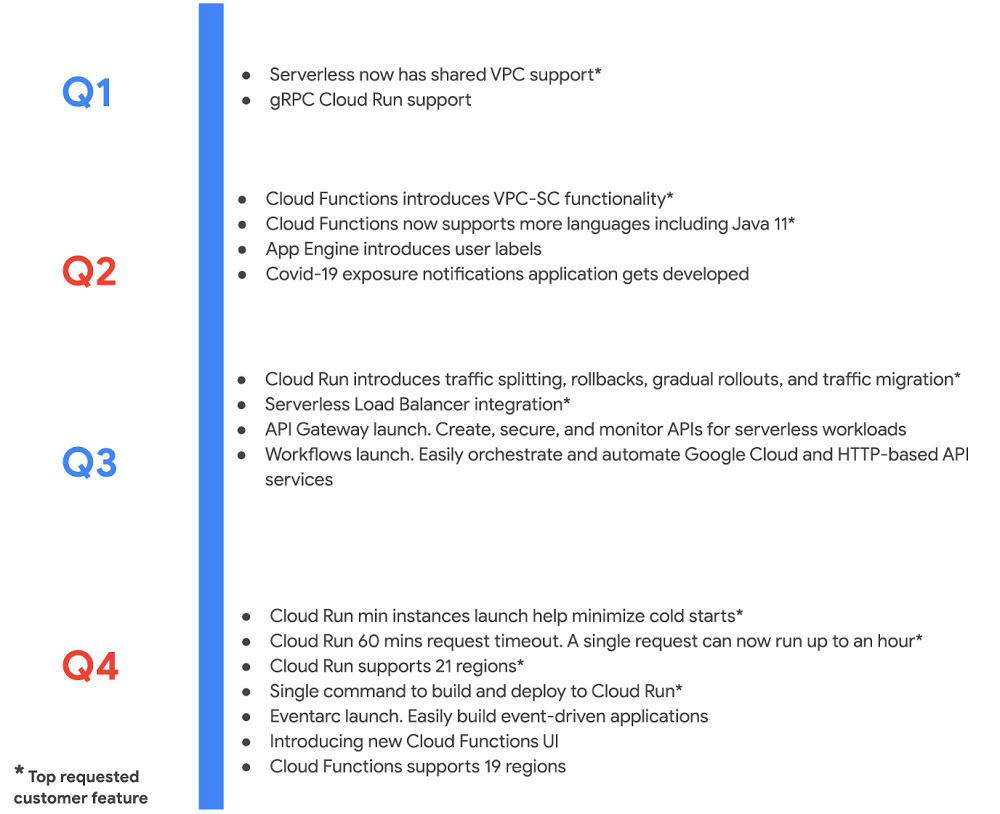
What a year it has been. 2020 challenged even the most adaptive enterprises, upending their best laid plans. Yet, so many Google Cloud customers turned uncertainty into opportunity. They leaned into our serverless solutions to innovate rapidly, in many cases introducing brand new products, and delivering new features to respond to market demands. We were right there with them, introducing over a 100 new capabilities—faster than ever before! I’m grateful for the inspiration our customers provided, and the tremendous energy around our serverless solutions and cloud-native application delivery. Cloud Run proved indispensable amidst uncertainty As digital adoption accelerated, developers turned to Cloud Run—it’s the easiest, fastest way to get your code to production securely and reliably. With serverless containers under the hood, Cloud Run is optimized for web apps, mobile backends, and data processing, but can also run most any kind of application you can put in a container. Novice users in our studies built and deployed an app on Cloud Run on their first try in less than five minutes. It’s so fast and easy that anyone can deploy multiple times a day. It was a big year for Cloud Run. This year we added an end-to-end developer experience that goes from source and IDE to deploy, expanded Cloud Run to a total of 21 regions, and added support for streaming, longer timeouts, larger instances, gradual rollouts, rollbacks and much much more. These additions were immediately useful to customers. Take MediaMarktSaturn, a large European electronics retailer, which chose Cloud Run to handle a 145% traffic increase across its digital channels. Likewise, using Cloud Run and other managed services, IKEA was able to spin solutions for challenges brought by the pandemic in a matter of days, while saving 10x the operational costs. And unsurprisingly, Cloud Run has emerged as a service of choice for Google developers internally, who used it to spin up a variety of new projects throughout the year. With Cloud Run, Google Cloud is redefining serverless to mean so much more than functions, reflecting our belief that self-managing infrastructure and an excellent developer experience shouldn’t be limited to a single type of workload. That said, sometimes a function is just the thing you need, and this year we worked hard to add new capabilities to Cloud Functions, our managed function as a service offering. Here is a sampling: Expanded features and regions: Cloud Functions added 17 new capabilities and is available in several new regions, for a total 19 regions.  A complete serverless solution: We also launched API Gateway, Workflows and Eventarc. With this suite, developers can now create, secure, and monitor APIs for their serverless workloads, orchestrate and automate Google Cloud and HTTP-based API services, and easily build event-driven applications.Private access: With the integration between VPC Service Controls and Cloud Functions, enterprises can secure serverless services to mitigate threats, including data exfiltration. Enterprise can also take advantage of VPC Connector for Cloud Functions to enable private communication between cloud resources and on-premises hybrid deployments. Enterprise scale: Enterprises working with huge data sets can now leverage gRPC to connect a Cloud Run servicewith other services. And finally, the External HTTP(S) Load Balancing integration with Cloud Run and Cloud Functions lets enterprises run and scale services worldwide behind a single external IP address. While both Cloud Run and Cloud Functions have seen strong user adoption in 2020, we also continue to see strong growth in App Engine, our oldest serverless product, thanks largely to its integrated developer experience and automatic scaling benefits. In 2020, we added support for new regions, runtimes, and Load Balancing, to App Engine to further build upon developer productivity and scalability benefits.Click to enlargeBuilt-in security powered continuous innovation Companies have had to reconfigure and rethink their business to adapt to the new normal during the pandemic. Cloud Build, our serverless continuous integration/continuous delivery (CI/CD) platform, helps by speeding up the build, test, and release cycle. Developers perform deep security scans within the CI/CD pipeline and ensure only trusted container images are deployed to production.Consider the case of Khan Academy, which raced to meet unexpected demand as students moved to at-home learning. Khan Academy used Cloud Build to experiment rapidly with new features such as tailored schedules, while scaling seamlessly on App Engine. Then there was New York State, whose unemployment systems saw a 1,600% jump in new unemployment claims during the pandemic. The state rolled out a new website built on fully managed serverless services including Cloud Build, Pub/Sub, Datastore, and Cloud Logging to handle this increase. We added a host of new capabilities to Cloud Build in 2020 across the following areas to make these customer successes possible: Enterprise readiness: Artifact Registry brings together many of the features requested by our enterprise customers, including support for granular IAM, regional repositories, CMEK , VPC-SC, along with the ability to manage Maven, npm packages and containers. Ease of use: With just a few clicks, you can create CI/CD pipelines that implement out-of-the-box best practices for Cloud Run and GKE. We also added support for buildpacks to Cloud Build to help you easily create and deploy secure, production-ready container images to Cloud Run or GKE. Make informed decisions: With the new Four Keys project, you can capture key DevOps Research & Assessment (DORA) metrics to get a comprehensive view of your software development and delivery process. Additionally, the new Cloud Build dashboard provides deep insights into how to optimize your CI/CD process.Interoperability across CI/CD vendors: Tekton, founded by Google in 2018 and donated to the Continuous Delivery Foundation (CDF) in 2019, is becoming the de facto standard for CI/CD across vendors, languages, and deployment environments, with contributions from over 90 companies. In 2020, we added support for new features like triggers to Tekton.  GitHub integration: We brought advanced serverless CI/CD capabilities to GitHub, where millions of you collaborate on a day-to-day basis. With the new Cloud Build GitHub app, you can configure and trigger builds based on specific pull request, branch, and tag events.Click to enlargeContinuous innovation succeeds when your toolchain provides security by default, i.e., when security is built into your process. For New York State, Khan Academy and numerous others, a secure software supply chain is an essential part of delivering software securely to customers. And the availability of innovative, powerful, best-in-class native security controls is precisely why we believe Google Cloud was named a leader in the latest Forrester Wave™ IaaS Platform Native Security, Q4 2020 report, and rated highest among all providers evaluated in the current offering category.Onboarding developers seamlessly to cloud We know cloud development can be daunting, with all its services, heaps of documentation and a continuous flow of new technologies. To help, we invested in making it easier to onboard to cloud and maximizing developer productivity:Cloud Shell Editor with in-context tutorials: My personal favorite go-to tool for learning and using Google Cloud is our Cloud Shell Editor. Available on ide.cloud.google.com, Cloud Shell Editor is a fully functional development tool that requires no local setup, and is available directly from the browser. We recently enhanced Cloud Shell Editor with in-context tutorials, built-in auth support for Google Cloud APIs, and extensive developer tooling. Do give it a try, we hope you like it as much as we do!In-context tutorials available within Cloud Shell EditorSpeed up cloud-native development: To improve the process of building serverless applications, we integrated Cloud Run and Cloud Code. And to speed up Kuberentes development via Cloud Code, we added support for buildpacks. We also added built-in support for 400 popular Kubernetes CRDs out of the box, along with new features such as inline documentation, completions, and schema validation to make it easy for developers to write YAML. Leverage the best of Google Cloud: Cloud Code now lets you easily integrate numerous APIs, including AI/ML, compute, databases, identity and access management as you build out your app. Additionally, with new Secret Manager integration, you can manage sensitive data like API keys, passwords, and certificates, right from your IDE.Modernize legacy applications:  With Spring Cloud GCP we made it easy for you to modernize legacy Java applications with little-to-no code changes. Additionally, we announced free accessto the Anthos Developer Sandbox, which allows anyone with a Google account to develop applications on Anthos at no cost.Click to enlargeOnwards to 2021In short, it’s been a busy year, and like everyone else, we’re looking out to 2021, when everyone can benefit from the accelerated digital transformation that companies undertook this year. We hope to be a part of your journey in 2021, helping developers build applications quickly and securely that allow your business to adapt to market changes and improve your customers’ experience. Stay safe, have a happy holiday, and we look forward to working with you to build the next generation of amazing applications!Related ArticleWhat’s new with Google CloudFind our newest updates, announcements, resources, events, learning opportunities, and more in one handy location.Read Article
Quelle: Google Cloud Platform

Compiling Qt with Docker multi-stage and multi-platform

This is a guest post from Viktor Petersson, CEO of Screenly.io. Screenly is the most popular digital signage product for the Raspberry Pi. Find Viktor on Twitter @vpetersson.

For those not familiar with Qt, it is a cross-platform development framework that is used in a wide range of products, including cars (Tesla), digital signs (Screenly), and airplanes (Lufthansa). Needless to say, Qt is very powerful. One thing you cannot say about the Qt framework, however, is that it is easy to compile — at least for embedded devices. The countless blog posts, forum threads, and Stack Overflow posts on the topic reveal that compiling Qt is a common headache.

As long-term Qt users, we have had our fair share of battles with it at Screenly. We migrated to Qt for our commercial digital signage software a number of years ago, and since then, we have been very happy with both its performance and flexibility. Recently, we decided to migrate our open source digital signage software (Screenly OSE) to Qt as well. Since these projects share no code base, this was a greenfield opportunity that allowed us to start afresh and explore exciting new technologies for the build process.

Because compiling Qt (and QtWebEngine) is a very heavy operation, we would need to pre-compile and distribute Qt so that the Dockerfile could simply download and include it in the build process (rather than compiling as part of the installation process).

We sat down and created the following requirements for our build process:

The process must be fully automated from start to finish.We need to be able to build Qt/QtWebEngine for all supported Raspberry Pi boards (with the appropriate Qt device profile).We should use cross compilation on x86 to speed up the process where it makes sense.We need to be able to run the full process on CI, and thus cannot rely on a Raspberry Pi.We should confine everything to run inside Docker containers so we do not clutter the host with build packages.

With the above goals in mind, we had a great opportunity to try out the new multi-platform support in Docker. Used in conjunction with multi-stage builds, we were able to get the best of both worlds:

Use emulation where we cannot cross-compileSwitch to cross-compilation for the heavy lifting

How does multi-platform in Docker work?

The easiest way to use multi-platform functionality in Docker is to invoke it from the command line. Using the docker buildx, we can tap into new beta functionalities. By running docker buildx build –platform linux/arm/v7 -t arm-build . This command builds the docker image as per the `Dockerfile` in the current directory using ARMv7 emulation. Behind the scenes, Docker runs the whole Docker build process in a QEMU virtualized environment (qemu-user-static to be precise). By doing this, the complexity of setting up a custom VM is removed. Once built, we can even use docker run to launch containers in ARMv7 mode automagically.

Multi-platform, multi-stage and Qt

While multi-platform functionality is a great stand-alone feature, it gets even more powerful when combined with multi-stage builds. Within a single Dockerfile, we’re able to mix and match platforms and copy between the steps. This functionality is exactly what we ended up doing with the Qt build process for Screenly OSE.

Stage 1: ARM

Thanks to the fine folks over at Balena, we are able to use a Raspbian base image in the first stage. We can invoke this step using:

FROM –platform=linux/arm/v7 balenalib/rpi-raspbian:buster as builder

After the above step, we can use Docker as we normally do and execute various RUN commands, such as installing packages etc.. Do note that this container is running emulated using QEMU if the build is not run on ARMv7 hardware. In our case, we use the command to install the Qt build dependencies. The above step also allows us to fully eliminate the need for copying files from either a disk image (which is what the Qt Wiki suggests) or rsync files from a physical Raspberry Pi. 

Stage 2: x86

Once we have installed our dependencies in our ARM step, we can switch over to the builder’s native x86 architecture to avoid emulation and do the cross compile with the following line:

FROM –platform=linux/amd64 debian:buster

Now, we are onto the interesting part. After we have switched over to x86, we can copy files from the previous step. We do this in order to create a sysroot that we can use for Qt. We complete this step by running the following commands:

<!– wp:paragraph –>
<p>RUN mkdir -p /sysroot/usr /sysroot/opt /sysroot/lib</p>
<!– /wp:paragraph –>

<!– wp:paragraph –>
<p>COPY –from=builder /lib/ /sysroot/lib/</p>
<!– /wp:paragraph –>

<!– wp:paragraph –>
<p>COPY –from=builder /usr/include/ /sysroot/usr/include/</p>
<!– /wp:paragraph –>

<!– wp:paragraph –>
<p>COPY –from=builder /usr/lib/ /sysroot/usr/lib/</p>
<!– /wp:paragraph –>

<!– wp:paragraph –>
<p>COPY –from=builder /opt/vc/ sysroot/opt/vc/</p>
<!– /wp:paragraph –>

We now have the best of both worlds. By taking advantage of both multi-step and multi-platform functionality, we generate a sysroot that we can use to build Qt. Since we used a fully functional Raspbian image in our previous step, we are even able to get Qt to pick up all existing libraries.

./configure

-sysroot /sysroot

As we mentioned in the introduction, compiling Qt is far from straightforward. There are a lot of steps required to compile it successfully. To learn more about the exact steps, you can see the full Dockerfile and script build_qt5.sh. 

To emulate or not to emulate…

Being able to emulate a platform like ARM is amazing and provides a lot of flexibility. However, it does come at a cost. There is a big performance penalty. This issue is the reason why we do not actually compile Qt using emulation. Instead, we use cross-compilation. If you have the ability to cross-compile rather than emulate, know that cross-compilation will give you much better performance.

About Screenly

Screenly is the most popular digital signage product for the Raspberry Pi. If you want to turn a physical screen into a secure, remotely-controllable device (over UI or digital signage API) that can display dashboards, images, videos, and webpages, Screenly makes setup a breeze. Screenly is available in two flavors: an open source version and a commercial version. 
The post Compiling Qt with Docker multi-stage and multi-platform appeared first on Docker Blog.
Quelle: https://blog.docker.com/feed/

Sichern Sie sich jetzt Ihren SageMaker Studio Access mit AWS PrivateLink und AWS IAM SourceIP Restrictions

Amazon SageMaker Studio ist die erste integrierte Entwicklungsumgebung (Integrated Development Environment, IDE) für Machine Learning (ML). Es bietet eine einzige, webbasierte visuelle Schnittstelle, auf der Sie alle ML-Entwicklungsschritte durchführen können, die für Vorbereitung, Build, Schulung und Abstimmung, Bereitstellung und Überwachung von Modellen erforderlich sind. Ab heute können Sie die Verbindung von Ihrem Amazon Virtual Private Cloud (VPC) an SageMaker Studio mit AWS PrivateLink sichern. Bei Verwendung von PrivateLink, fließt der Verkehr vollständig innerhalb des AWS-Netzwerks ohne das öffentliche Internet zu durchqueren, daher wird eine zusätzliche Sicherheitsebene hinzugefügt. 
Quelle: aws.amazon.com

Attribute-Based Access Control (ABAC) für den AWS Key Management Service

Heute kündigte AWS Key Management Service (KMS) die Verfügbarkeit für attributbasierte Zugriffskontrolle (ABAC) an, um die Verwendung von Tags und Alias-Namen in Richtlinienbedingungen zu erlauben. Bei der attributbasierten Zugriffskontrolle handelt es sich um eine Autorisierungsstrategie, die Berechtigungen basierend auf Tags definiert, die an Benutzer und AWS-Ressourcen angefügt werden können. KMS unterstützt zusätzlich die Verwendung von wichtigen Alias-Namen in Richtlinienbedingungen.
Quelle: aws.amazon.com

Einführung von AWS Systems Manager Fleet Manager

Heute kündigt AWS den Fleet Manager an, eine neue Funktion im AWS Systems Manager, der Ihnen hilft Ihren Fernserverwaltungsprozess zu optimieren und zu skalieren. Fleet Manager stellt Ihnen visuelle Tools bereit, um Ihre Windows-, Liniux- und macOS-Server zu verwalten, damit Sie leicht allgemeine Administratoraufgaben für Ihre Flotte durchführen können, die auf AWS und On-Premises ausgeführt wird, ohne dass Sie diese Server mittels Remote-Zugriff verbinden müssen. 
Quelle: aws.amazon.com

Ankündigung der ersten AWS Wavelength Zone in Tokio, Japan

Heute kündigen wir die allgemeine Verfügbarkeit von AWS Wavelength im KDDIs 5G-Netzwerk in Japan an. Wavelength ermöglicht Entwicklern, Anwendungen zu entwickeln, die eine extrem niedrige Latenz oder eine hohe Bandbreite für mobile Geräte und Benutzer in KDDIs 5G-Netzwerk benötigen. AWS Wavelength ist heute im KDDI 5G-Netzwerk in Tokio verfügbar und wir arbeiten mit KDDI zusammen, um AWS-Infrastruktur und Services näher zu den Kunden in ganz Japan zu bringen.
Quelle: aws.amazon.com





