Nachhaltigkeit: KIT-Team entwickelt biologisch abbaubares Display
Das Display ist zwar nur einmal nutzbar. Aber es endet nicht als Elektronikschrott. (Wissenschaft, Display)
Quelle: Golem

Das Display ist zwar nur einmal nutzbar. Aber es endet nicht als Elektronikschrott. (Wissenschaft, Display)
Quelle: Golem

Mit verlustarmer Glasfaser werden nach 50 Jahren immer wieder neue Übertragungsrekorde erreicht. Doch auch eine Glasfaser im Boden muss irgendwann ausgetauscht werden. (Corning, Telekom)
Quelle: Golem
sysdig.com – Kubernetes 1.20 is about to be released! And it comes packed with novelties. Here is the detailed list of what’s new in Kubernetes 1.20.
Quelle: news.kubernauts.io
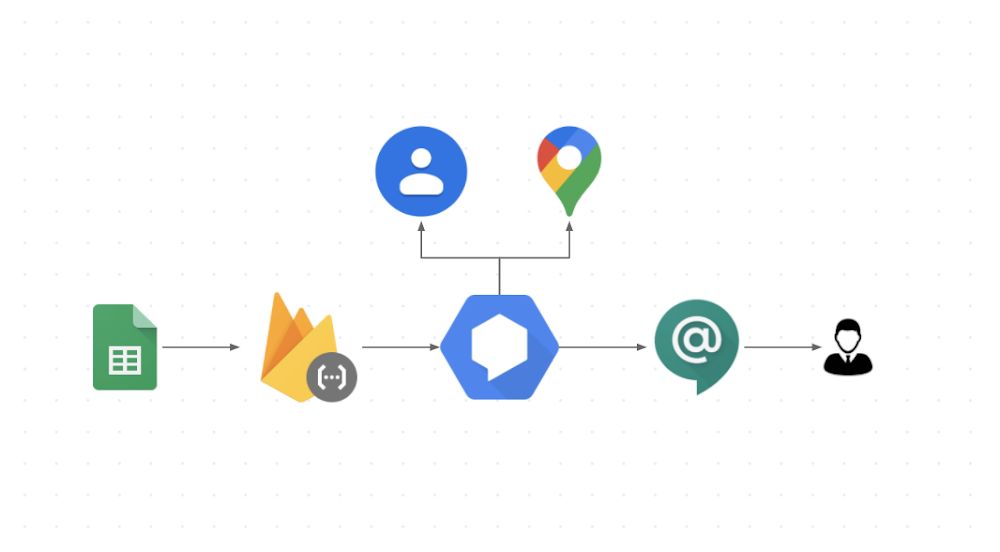
In today’s world, where online collaborative work is crucial and maintaining productivity is key, chatbots have an important role to play. Why chatbots? Workers frequently need to incorporate information from external sources in their communications, and chatbots can help them find that information all in one place. In this post we’ll walk you through a bot that was inspired by a real use case here at Google. In large companies such as Google, it can be difficult to find out which person is responsible for a specific product area. When customer teams have a question they often have to go through many ad hoc trackers such as the one here in Sheets (sample scrubbed data) to find answers. When you are on the go a lot, this gets even harder, especially if you don’t remember the Sheets URL and how to use it to find your answer. Instead of sifting through a spreadsheet, what if you could just send a chat message to see who to contact for networking or security expertise? That’s where the integration between Dialogflow and Google Chat comes in! It helps reduce context switching for users, because they can ask their questions right within Google Chat, addressing a bot built in Dialogflow that integrates with the Sheets API to find answers. Let’s see how it works!If you’d rather watch than read, we share the entire process in this video:How does it work?When a user asks a question in Google Chat, the bot that is initiated integrates with Dialogflow to facilitate natural conversations. Dialogflow, in turn, integrates with a backend database or Sheets (as shown in the image) via a Cloud Functions fulfillment. Extracting the information from Google SheetsTo extract the information from Sheets we first need to know exactly what information is relevant to fulfill a request. After identifying the pieces of information we need, we use the Sheets API to extract them. Defining the input phrasesWhile it would be easier to write a basic bot that requires the input to be formatted in a predetermined order, such a bot would be difficult to use. Users would have to remember the order and always spell everything correctly. And if a tool is too hard to use, people aren’t going to use it.The key to chatbot adoption is usability, and that means the ability to handle phrases that occur in natural conversation, like these: “Who is on Gmail for data management?””I would like to know the data management guru “”Tell me who is the data management specialist”This is where Dialogflow comes in. Dialogflow is a natural language understanding platform that simplifies the design and integration of conversational user experiences for mobile apps, web apps, bots, and more. We built our bot in three easy steps, which should look familiar to you if you’ve completed the Deconstructing Chatbots video series. Step 1: Define the entitiesDialogflow uses models trained on natural conversation. Before we can use these models, however, our bot needs to know the key phrases in our context, such as the role types, skills, and account names (e.g., Account Specialist, Gmail, and Security).Step 2: Configure the intentsAn intent is essentially the user’s question. This is where we define how to use the entities we just created by defining Actions and Parameters. When we add the bot to a room, the intent is where the response comes from.Actions and ParametersThe entities you define are used in configuring your actions and parameters. In this case, Roles, Skills, and Accounts are all required parameters for this intent to be fulfilled (and the user can provide these in any order they like). If a user forgets one, we define a prompt to get it from the user. Training phrases Because different people talk differently, we use training phrases to provide different examples of user requests. Dialogflow uses a pretrained NLP model, and these training phrases are the realistic questions that help train a specific model for our use case.Step 3: Set up fulfillment codeFulfillment is where we glue everything together, connecting all the APIs in a Node.js Firebase function. In this case, we use the Sheets API but you can connect to any backend you choose. Refer to the sample code for details.One-click integration Dialogflow integrates with many popular conversation platforms like Google Chat, Google Assistant, Slack, and more. Direct end-user interactions are handled for you, so you can focus on building your agent. Each integration handles end-user interactions in a platform-specific way, so see the documentation for your integration platform for details. ConclusionBuilding a chatbot that integrates Google Chat, Dialogflow, and Sheets (or another data source) is straightforward. For more details, watch our Integrate Dialogflow with Google Chat video, where we talk in more depth about the process, and check out the full source code on GitHub. Want to learn more about building chat and voice applications using Dialogflow? We’ve created an entire video series on Deconstructing Chatbots that will take you from zero to hero in no time!For more cloud content follow us on Twitter @pvergadia and @srivas_dev.Related ArticleConversational AI drives better customer experiencesConversational AI takes contact centers into a new era of customer service.Read Article
Quelle: Google Cloud Platform

Toyota will ein E-SUV auf den Markt bringen, das auf der neuen e-TNGA-Plattform basiert, die die Japaner für viele Autos einsetzen wollen. (Toyota, Technologie)
Quelle: Golem

Als IT-Trainee (m/w/d) mit Fokus IT oder IT-Beratung haben Berufseinsteiger die Möglichkeit, den Weg in eine digitale und agile Allianz mitzugestalten. (Ausbildung)
Quelle: Golem

Playstation 5, XBox Series X/S oder Nintendo Switch? Golem.de hat sich mit Konsolen und Ökosystemen auseinandergesetzt und bietet Beratung für die Weihnachtseinkäufe. Von Peter Steinlechner (Playstation 5, Microsoft)
Quelle: Golem

Google stellt die selbst entwickelte Fuzzing-Engine Atheris als Open Source zur Verfügung. (Softwareentwicklung, Google)
Quelle: Golem

Es eignet sich zur 2D-Darstellung oder zur Videowiedergabe in Servern per VGA-Anschluss. (PC-Hardware, Grafikhardware)
Quelle: Golem
The post Lens 4.0 Kubernetes IDE is here appeared first on Mirantis | Pure Play Open Cloud.
There’s been a lot of excitement around here about Lens lately. And why not? With more than 1.3 million downloads and close to 10,000 stars on Github since its inception in March 2020, Lens has quickly become the world’s most popular IDE for Kubernetes, and with release of Lens 4.0, that’s likely to not just continue, but accelerate.
In particular, large enterprises are beginning to see the true value of Lens. Many of them feel the complexity of Kubernetes is slowing down adoption, preventing them from seeing the container ROI they were expecting.
Lens is a user-friendly desktop application for all your kubernetes platforms. It enables users to easily onboard and operate their applications in Kubernetes, improving time to market and productivity, and increasing ROI. It is a standalone application for MacOS, Windows, and Linux operating systems, and an open source project that dramatically simplifies application development for Amazon EKS, Google GKE, Microsoft AKS, Mirantis Container Cloud, Red Hat Openshift, and other CNCF-certified Kubernetes distributions.
In fact, we’re so excited about the quality and value of Lens that we’ve added it to the lineup of products for which we provide commercial support and services.
Enterprise Support, Training and Services for Lens
Mirantis is the biggest contributor to, and in the driver’s seat of, the Lens open source project, and with all our know-how and insights into the Lens IDE user base, we have designed a suite of value-added services to help enterprises in their journey towards adopting, integrating, and unlocking the full potential of Lens at scale. With these value-added services, enterprises using Lens will enjoy faster time to market, productivity and ROI for their container infrastructure investments. These value-added services include:
Technical Support: Just like for any other enterprise-grade solution, you’ll be able to get professional technical support to help you through any problems that you encounter, whether you’re running on Windows, MacOS, or Linux, with a first response time of 4 business hours.
Professional Services: We’ve seen how powerful Lens can be in remaking the way your developers create the software that runs your business, but as they say, “with great power comes great responsibility.” Mirantis provides professional services to ensure that your Lens deployments comply with any IT governance or guardrails you have in place, and we can help you create your own custom extensions to help Lens give you even more of a leg up over the competition.
Training: Mirantis Training provides private operator or developer track courses, and even training in extensions development.
Have we piqued your curiosity? Schedule a demo to see what Lens can do.
Lens 4.0 New Features
The strength of the Lens Kubernetes IDE is in the way in which it takes managing Kubernetes clusters and workloads and the many, many, MANY objects and settings they involve and makes it not just straightforward, but simple. As Miska Kaipiainen, senior director of engineering and principal of the Lens open source project says in the community’s blog announcing the new release, “These users are using Lens because it provides the full situational awareness for everything that runs in Kubernetes. It’s lowering the barrier of entry for people just getting started and radically improving productivity for people with more experience.”
Lens 4.0, which was released a few days ago, takes that utility to the next level with the addition of the Extensions API. The Extensions API means that any company, vendor, or individual developer can create plugins for Lens, enabling a seamless experience between their products and Kubernetes clusters.
We have been working with our partners and friends in the cloud native ecosystem to refine Lens 4.0 extension API capabilities. Some of these vendors have already made their first extensions available for public use, while others are still iterating. In the near future, you can look forward to extensions from companies such as:
Ambassador Labs (formerly Datawire)
Aqua Security
Carbon Relay
Carbonetes
Clastix
Eagle AI
Kong
nCipher
Nu Skin International
StackRox
Wohlig Transformation
You can also create a Lens extension of your own or become a partner. To learn more, join us next Tuesday, December 15, when the Lens Kubernetes IDE User Group is hosting a virtual workshop, How to Build a Lens Extension.
Meanwhile, we want to congratulate the Lens community on this milestone, and remind you to watch this space for more information on creating extensions of your own!
If you haven’t tried Lens yet, check out the Getting Started with Lens blog.
The post Lens 4.0 Kubernetes IDE is here appeared first on Mirantis | Pure Play Open Cloud.
Quelle: Mirantis






