AI, Kubernetes, multi-cloud, and more: Free training to take advantage of before 2021

Google Cloud is continuing to offer no-cost learning opportunities until the end of this year to help you build in-demand cloud skills. Read on to find out how you can further your knowledge of AI, Kubernetes, multi-cloud, and more. AI and machine learning Join Lak Lakshmanan, Google Cloud’s Director of Data Analytics and AI Solutions, on December 15 to find out how to use Google Cloud’s new Document AI. Lak will walk you through how to extract structured data from scanned PDF documents so you can increase operational efficiency, improve customer experience, and make faster, smarter decisions. You’ll also have an opportunity to get your questions answered live. Reserve your seathereto learn about Document AI.You can also learn how to use AI and machine learning to help power businesses in different industries such as finance and retail in sessions from our Let’s Get Solving series. Google experts will provide case studies, teach you how to use BigQuery, demo technology like Open Banking, and more. Registerherefor industry-specific learning opportunities.  Kubernetes If you sign up by December 31, you’ll get access to unlimited Kubernetes training and the opportunity to earn Google Cloud skill badges on Qwiklabs at no-cost for 30 days. We recommend you begin with the following quests on Qwiklabs: “Deploy to Kubernetes in Google Cloud” and “Kubernetes Solutions.” “Deploy to Kubernetes in Google Cloud” will teach you how to configure Docker images and containers and deploy fully fledged Kubernetes Engine applications. By taking the “Kubernetes Solutions” quest, you’ll have a chance to practice with a wide variety of Kubernetes use cases such as building Slackbots with NodeJS, deploying game servers on clusters, and running the Cloud Vision API. Sign uphereto get started with Kubernetes. Hybrid and multi-cloud  Instructors will lead you through hands-on labs and you’ll have a chance to test your skills throughout with quizzes during our two-day Cloud OnBoard series on architecting with Google Kubernetes Engine (GKE) and hybrid architecture with Anthos. Register for the introduction to hybrid and multi-cloud technologyhere. Data analytics Interested in taking your data analytics skills to the next level? If you register by December 31, you can get access to a 6-week learning path which will outline recommended Google Cloud training to prepare experienced cloud professionals for the Google Cloud Professional Data Engineer certification. Google Cloud certifications validate your cloud expertise and help you elevate your career. Through our training partner, Coursera1, the first month of training will be available at no cost as well as 30 days of unlimited Qwiklabs access at no cost. You can get access to the certification preparation learning pathhere. We hope these training resources help you strengthen your cloud skills this year. Stay tuned for new learning opportunities in January. 1. Coursera first month free promotion is only available to learners who have not previously paid for training on Coursera. A credit card is required to activate your free month. After the first month is over, your subscription will auto-renew to a $49 monthly charge until you cancel your Coursera subscription.
Quelle: Google Cloud Platform

Cloud Run min instances: Minimize your serverless cold starts

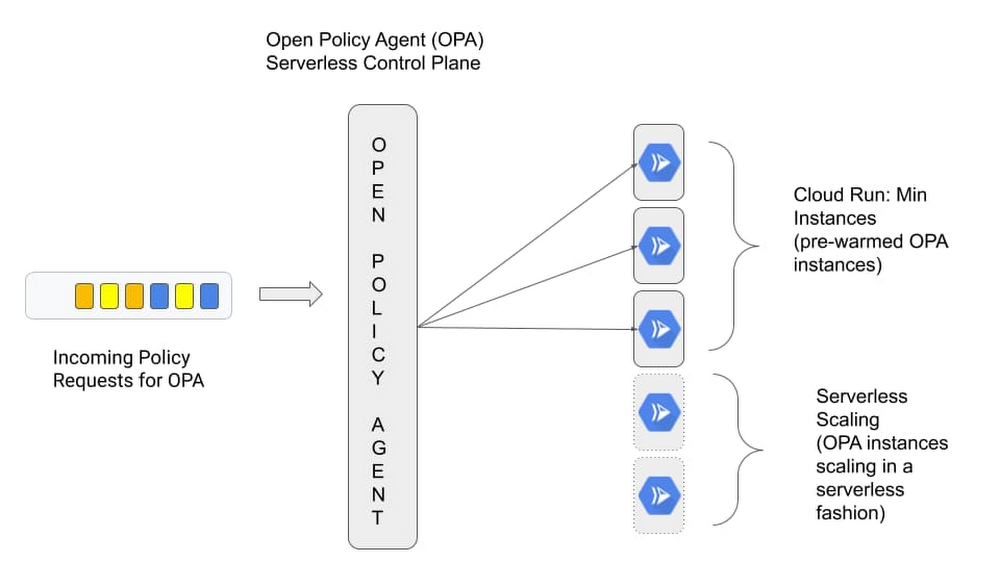
One of the great things about serverless is its pay-for-what-you-use operating model that lets you scale a service down to 0. But for a certain class of applications, the not-so-great thing about serverless is that it scales down to 0, resulting in latency to process the first request when your application wakes back up again. This so-called “startup tax” is novel to serverless, since, as the name implies, there are no servers running if an application isn’t receiving traffic. Today, we’re excited to announce minimum (“min”) instances for Cloud Run, our managed serverless compute platform. This important new feature can dramatically improve performance for your applications. And as a result, it makes it possible to run latency-sensitive applications on Cloud Run, so they too can benefit from a serverless compute platform. Let’s take a deeper look. Cut your cold startsWith this feature, you can configure a set of minimum number of Cloud Run instances that are on standby and ready to serve traffic, so your service can start serving requests with minimal cold starts. To use Cloud Run’s new min instances feature, simply configure the number of min instances for your Cloud Run service with a simple gcloud command or the UI.Once configured, the min instances will be ready and waiting to serve traffic for your application, thereby minimizing the cold starts for your application and enabling you to run latency sensitive applications on Cloud Run.Reuse bootstrapping logicIn addition to minimizing cold starts, Cloud Run min instances also helps you cut down on bootstrapping time for key operations such as opening database connections or loading files from Cloud Storage into memory. By lowering bootstrapping time, min instances help reduce request latency further, since you only need to run your bootstrapping logic once, and then leverage it across multiple requests for your configured number of min instances.Consider the following golang serverless function, which shows how you can run your bootstrapping logic once, and reuse it across your min instances:Run bootstrapping logic once, and reuse it across Min InstancesReap benefits of serverless at lower cost  In addition to setting a minimum number of instances, Cloud Run min instances also lets you configure them with throttled CPU, so you can take advantage of this capability at a much lower cost. This way, you can have your cake and eat it too: leverage the efficiency and cost advantages of serverless, while moving latency sensitive workloads to serverless.Cloud Run min instances in actionSo we talked about the benefits that Cloud Run min instances can bring, and how to use the feature, but how does it work in real life and why would you want to use it? Traditionally serverless platforms cater to applications that benefit from scaling to zero, but make certain trade offs on initial response times due to cold start latency during the bootstrap period. This is acceptable for applications you’ve built from the ground up and for which you have full control over the source and how it behaves at runtime. But there’s a whole class of applications that people use off the shelf for which a traditional serverless approach isn’t a great fit. Think custom control planes such as Prometheus for collecting metrics and Open Policy Agent (OPA) for making policy decisions. These control planes typically require advanced configuration and a bit of bootstrapping during the initial start up, and can’t tolerate additional latency. When you’re starting up OPA, for instance, you typically fetch policies from a remote source and cache them to speed up future policy decisions. In a typical serverless environment, control planes such as OPA would take a performance hit when scaling to zero and back up again to handle policy requests, as it sits in the request path for critical user transactions.Cloud Run min instances allows you to address this problem head on. Instead of scaling to zero and possibly having to bootstrap the policy engine between each request, we can now ensure each request will be handled by a “warm” instance of OPA.Let’s look at this in action. In the following section we deploy OPA to run as a central control plane and enable min instances to meet our performance requirements.We configure the OPA server to pull a policy bundle from a Cloud Storage bucket at run time, which, when queried will allow http GET requests for the “/health” HTTP path. Here is what the OPA policy looks like:The policy is packaged in a policy bundle and uploaded to a Cloud Storage bucket. But first, we need to bootstrap some dependencies, as we show in this tutorial about the bootstrapping process. To keep things simple we leverage a helper script.Change into the min-instances-tutorial directory:Before we can deploy the OPA Cloud Run instance we need to perform the following tasks:Create an OPA service account Create a Cloud Storage bucket to hold the OPA policy bundleUpload the OPA policy bundle (bundle.tar.gz) to Cloud StorageGrant permission to the OPA service account to access the OPA bundleAt this point all the dependencies to host OPA are in place. We are ready to deploy OPA using the ‘gcloud’ command. The bucket name and the service account email address are stored in the ‘.env’ file created by the bootstrapping script run in the previous step.$ source .envCreate the open-policy-agent Cloud Run instance:Here’s the output from the command, signaling that we’ve successfully bootstrapped our environment:Now, when the OPA server starts up for the first time, it downloads the policy bundle from Cloud Storage and caches it. But thanks to the min instances, this only happens once.Now we are ready to test making a policy decision. We can do that with curl. Retrieve the open-policy-agent cloud run URL:Query the OPA server by providing a set of input and retrieve a policy decision based on the policy bundle stored in Cloud Storage:Here’s the response:Now if you wait for a few minutes you’ll observe that OPA does not scale to zero, and that the process is frozen in the background, and will only be thawed when the next request hits the instance. If you would like to learn more about how this affects pricing be sure to check out the Pricing Page. Min instances for a maximum of applications At first glance, Cloud Run min instances may seem like a small thing, but we believe that this feature is going to enable more off-the-shelf applications to run under the serverless model and be more cost efficient—and give you more control over the trade-offs inherent in serverless compute. To get started with Cloud Run, check out these Quickstarts.
Quelle: Google Cloud Platform

Control access to your web sites with Identity-Aware Proxy

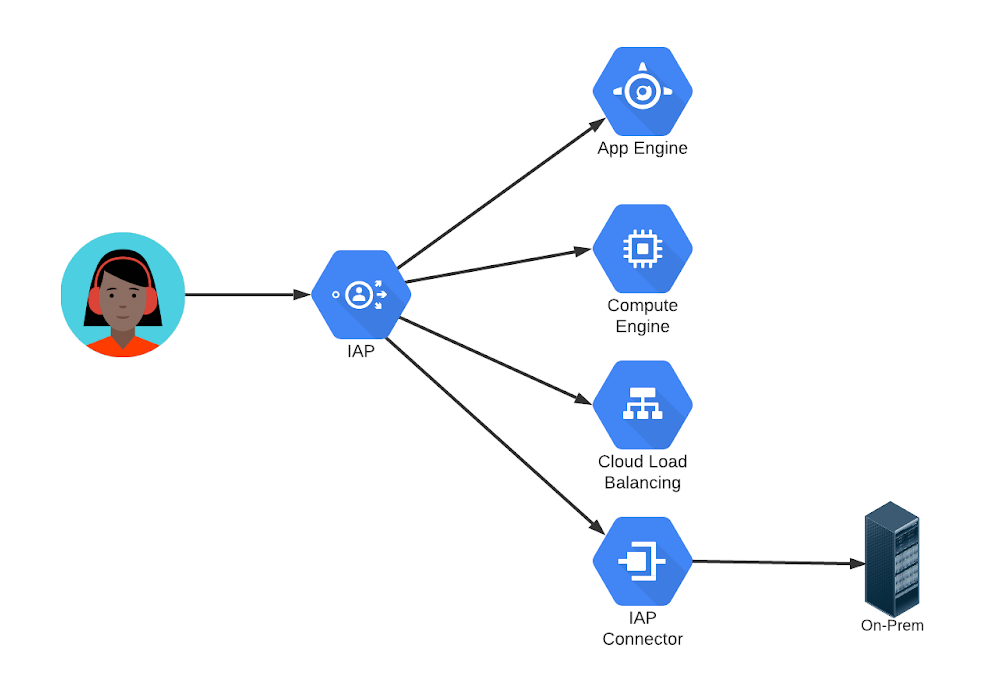
Does your company need to make an internal website accessible to employees, temporary workers, and contractors? How about running a public site open to all, but with some functions requiring personalization? Or perhaps providing a highly restricted site that only authorized users, running on secure platforms, can access?Those are all common use cases, and there are many different ways to address each of them. But there is one easy-to-use and deploy solution that can handle them all: Google Cloud Identity-Aware Proxy (IAP).IAP is a service that intercepts requests to a web site, authenticates the user making the request, and allows only authorized users’ requests to reach the site. IAP can be used to protect web sites running on many platforms, including App Engine, Compute Engine, and other services behind a Google Cloud Load Balancer. But it isn’t restricted to Google Cloud: you can use it with IAP Connector to protect your own on-premises applications, too.Protecting a website with IAP can be configured using the Google Cloud Console. Identity-Aware Proxy is managed under the Security submenu. From there, an organization can enable IAP and then turn it on for selected sites. Access is permitted by granting the IAP-secured Web App User role to one or more individual email addresses, entire email domains, or a group email address. Those users can use the sites just like any other internet site after an authentication step.The core steps are similar regardless of the case:Create an employee-only, or “intranet”, server by specifying that only users who authenticate with company email addresses should be allowed access. IAP can authenticate Gmail or Google Workspace addresses, addresses in a company’s Active Directory or other LDAP directory via Google Cloud Directory Sync, or addresses supported by other common identity providers. For public, but authenticated, access, specify that IAP should allow “allAuthenticatedUsers”. Anyone willing and able to authenticate will be given access to the site. IAP’s second major function is to add headers to each request with user identity information, so the receiving site can use that information without having to perform its own authentication.Access can be limited to any group, or combination of groups, by specifying a group email address instead of individual ones. And IAP can go even further than basing access on identity only. Organizations can set device policies members of a group must follow in order to be given access. Those policies can require specific operating system versions, use of company profiles on browsers or mobile devices, or even use of company owned equipment only.Over my career, I have set up web sites, managed user registration and authentication, tracked sessions, configured firewalls, and used VPNs for internal sites. I was thrilled to discover Identity-Aware Proxy. I didn’t need to do any of those things any more! It seemed almost magical. If you have similar use cases, you should take a close look at IAP for yourself.Related ArticleCloud Identity-Aware Proxy: Protect application access on the cloudWhether your application is lift-and-shift or cloud-native, administrators and developers want to provide simple protected application ac…Read Article
Quelle: Google Cloud Platform