Mirantis Brings OpenStack to Kubernetes, Adding Private Cloud Capabilities to Mirantis Cloud Native Platform

The post Mirantis Brings OpenStack to Kubernetes, Adding Private Cloud Capabilities to Mirantis Cloud Native Platform appeared first on Mirantis | Ship Code Faster.
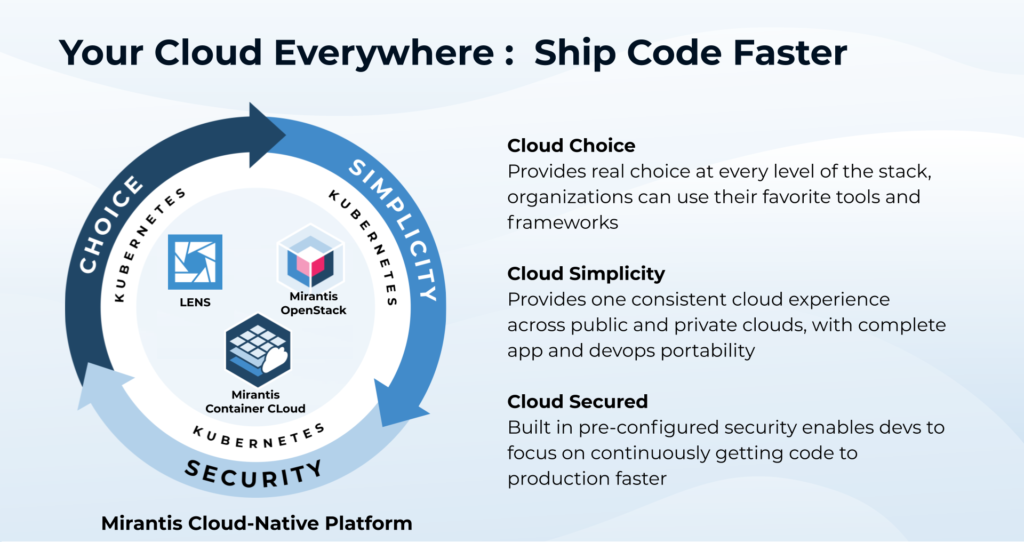
To help customers ship code faster, the new Mirantis OpenStack for Kubernetes combines Mirantis’ track record of enterprise success with both Kubernetes and OpenStack.
Campbell, CA, December 10, 2020 — Mirantis, the open cloud company, today announced the first in a planned series of enhancements to the Mirantis Cloud Native Platform, enabling customers to ship code faster on a Kubernetes foundation that provides simplicity, cloud choice and security. This first release, already available to Mirantis Container Cloud customers via continuous updates, adds the ability to deploy, scale, and update private clouds on Kubernetes substrates.
Building on this foundation, Mirantis today released Mirantis OpenStack for Kubernetes — a containerized edition of the open-source infrastructure-as-a-service (IaaS) platform chosen by Mirantis customers across industries and geographies to build some of the largest and best-performing private clouds in the world.
“Kubernetes and containers are superior technologies for building and releasing applications that run anywhere, scale gracefully, are resilient, and that can be updated without service downtime,” said Shaun O’Meara, global field CTO at Mirantis. “We engineered Mirantis Cloud Native Platform to deliver, monitor, and update Kubernetes clusters, anywhere — on bare metal, private, or public clouds — providing a simple, self-service experience for customers.”
Mirantis OpenStack for Kubernetes provides a feature-rich, mature environment for hosting both legacy apps and modern use cases such as Network Functions Virtualization, mobile network operations, and large-scale scientific computing. And it provides this without operational headaches — under the hood, leveraging Kubernetes to ensure configurability, resilience, robustness and seamless updates for OpenStack running on top of it.
“Organizations still need virtual machines and private cloud infrastructure to make them easy to consume and manage at scale — in many cases, hosting their most valuable applications,” said O’Meara. “At the same time, almost all are now moving forward with containers and Kubernetes, because they know these technologies will help them ship code faster and run applications with unprecedented resilience, scale, and economy. So Mirantis Cloud Native Platform addresses this whole continuum of needs, with maximum choice, simplicity, and security.”
By delivering a batteries-included, secure by default, and certified implementation of Kubernetes everywhere, and using it as a substrate for managing key applications and technologies, Mirantis Cloud Native Platform and Mirantis Container Cloud can deliver a simple cloud-like experience that supports all the development and hosting models organizations need (VMs, containers, orchestrators); managing the entire platform stack on any infrastructure (bare metal, private clouds, public clouds), and providing a unified management experience to smoothly operationalize these complex technologies across a diverse multi-cloud.
To learn more about Mirantis OpenStack for Kubernetes visit: https://www.mirantis.com/software/mirantis-openstack-for-kubernetes/ The post Mirantis Brings OpenStack to Kubernetes, Adding Private Cloud Capabilities to Mirantis Cloud Native Platform appeared first on Mirantis | Ship Code Faster.
Quelle: Mirantis

Announcing Mirantis OpenStack for Kubernetes

The post Announcing Mirantis OpenStack for Kubernetes appeared first on Mirantis | Ship Code Faster.
Today, Mirantis announced the general availability of Mirantis OpenStack for Kubernetes, a new offering now included in the Mirantis Cloud Native Platform. Existing users of Mirantis Container Cloud (formerly Docker Enterprise Container Cloud) will automatically receive the update, which lets them deploy containerized OpenStack control planes, Ceph storage, and compute hosts on Mirantis Kubernetes Engine (formerly Docker Enterprise/UCP).
What does this announcement mean?
Easy to use, resilient private clouds – Pragmatically, it means customers can use Mirantis Cloud Native Platform to air-drop classic private cloud capacity anywhere they have physical host capacity to run it (such as bare metal datacenters at HQ; distributed server farms at satellite locations; colos; medium-scale ‘edge’ server racks, etc. And then it lets them manage, observe, scale, and update this capacity via the same, smooth, public-cloud-like, centrally-administered, continuously-updated, self-service-oriented user experience Mirantis Container Cloud wraps around Kubernetes clusters.
In fact, if someone needs easy, self-service delivery of dev/test/production Kubernetes clouds in tandem with classic, mature virtual-machine hosting capability, they can use Mirantis Container Cloud to deploy Mirantis OpenStack, and then again to deploy Mirantis Kubernetes Engine clusters on virtual machines managed by OpenStack. Given the bare metal capacity, there’s probably no easier, faster way to bootstrap private infrastructure-as-a-service and use it to deliver dynamic container orchestration capability.
OpenStack — product of one of the world’s largest and most formidable open source communities — just celebrated its tenth anniversary. The Register and others marked the occasion with articles discussing the framework’s dominance in telecommunications, where it’s a preferred host for Network Functions Virtualization workloads, among other fields. OpenStack is today a very mature IaaS cloud solution that’s remarkably easy to use — complete with a sleek web interface (Horizon) and comprehensive APIs.
Why OpenStack on Kubernetes?
Using Kubernetes as a substrate for OpenStack solves “challenges” historically associated with running big, production OpenStack clouds (some of which will sound familiar to Kubernetes users).
MOS clusters leverage native Kubernetes features for resilience and adaptability. They use K8s operators to maintain cluster state, horizontal pod autoscaling to expand control-plane capacity under load, and seamless, zero-downtime Kubernetes rolling updates of OpenStack and other components. Containerized OpenStack components execute on Mirantis Container Runtime (formerly Docker Engine – Enterprise), which provides DISA STIG security, FIPS-140-2 encryption, and other characteristics making them suitable for use in gov/mil, financial services, and other regulated sectors.   
Mirantis Cloud Native Platform delivers Mirantis OpenStack for Kubernetes the same way  it does Mirantis Kubernetes Engine child clusters: ready for work, centrally administered, observed, and with Mirantis Container Cloud providing a single point of integration with corporate directory and other services. Mirantis OpenStack for Kubernetes clusters are delivered pre-instrumented and integrated with StackLight metrics, so users get observability out of the box. Mirantis Container Cloud also provides a single point of integration with enterprise directory, notifications, ticketing, etc., and top-level identity and access management, so Mirantis OpenStack clusters can be delivered with users, teams, tenants, SSH keys, etc. already provisioned for immediate use and secure access.

Kubernetes: Zamboni for the Multi-Cloud Hockey Rink
Mirantis OpenStack for Kubernetes also proves a point that Mirantis has embraced (and debated) internally for several years: that Kubernetes can work very well as a substrate for delivering and managing complex and even reputedly “tricky” applications, while giving users maximum choice in where their applications run.
As Shaun O’Meara, Global Field CTO at Mirantis, says in the press release: “Kubernetes and containers are superior technologies for building and releasing applications that run anywhere, scale gracefully, are resilient, and that can be updated without service downtime.” A modern workload constellation like containerized OpenStack can leverage Kubernetes directly for performance (for example, by scaling control-plane components out, horizontally, to deal with particular kinds of bursty load); resilience; optimal scheduling; failed-workload restarts; operator-based storage management; etc., and draw on its built-in lifecycle management features and associated best-practice for managing updates with zero or minimal impact on service availability.
And Kubernetes — or at least, Mirantis Kubernetes Engine: a Kubernetes distribution engineered to have minimal dependencies on host and OS — can “manage down” as well. For Mirantis Cloud Native Platform and Container Cloud, this means simpler, more reliable, and more highly-optimizable logic for managing bare metal, and for addressing the particular requirements and opportunities presented by private- and public-cloud substrates.
In short, Kubernetes means managing the whole stack more reliably, and delivering that seamless, simple, cloud experience for managing Kubernetes (and now OpenStack, and soon other enabling technologies) across the multi-cloud.
Early Adopters Show the Way
Current Mirantis OpenStack customers are enthusiastically evaluating and working with Mirantis OpenStack on Kubernetes, which lets them improve the efficiency and agility of their OpenStack private cloud implementations while also gaining a unified model for providing Kubernetes (and Swarm) orchestration across the multi-cloud. Several are also using Mirantis OpenStack to host Kubernetes clusters used as foundations for platform-as-a-service, serverless computing, and similar frameworks.
Enterprises, financial services, and other orgs are also using Mirantis OpenStack for Kubernetes to resource-manage high performance computing on bare-metal OpenStack compute nodes, using this capacity for machine-learning, big data analytics, media processing, and other initiatives. Mirantis Container Cloud, OpenStack, and Kubernetes give these organizations great flexibility to allocate compute dynamically and share expensive hardware economically among jobs, projects, and teams.
Infrastructure and service providers, meanwhile, are adopting Mirantis OpenStack for Kubernetes as a foundation for ambitious public IaaS offerings, as well as initiatives providing centralized infrastructure for managing large fleets of IoT devices and the data and transactional loads they generate. Telco operators are applying Mirantis OpenStack for Kubernetes for hosting NFV workloads, and for new trials around 5G edge computing.
To schedule a live demo of Mirantis OpenStack for Kubernetes, click here.
The post Announcing Mirantis OpenStack for Kubernetes appeared first on Mirantis | Ship Code Faster.
Quelle: Mirantis

Streaming analytics 101: Making modern data decisions with ease

Within the realm of modern data collection, streaming analytics is just what it sounds like: a flow of constantly moving data called event streams. These streams comprise events that occur as the result of an action at any moment, such as a web click, a transaction, or a fraudulent activity. Streaming analytics provides the ability to constantly monitor these operational events and automatically perform an action as soon as these event streams are generated. When streaming analytics is working well, you can ask questions of your data and get answers that help you make better decisions: What are your customers buying online at any given moment? What error messages are they seeing, and how often? To get streaming analytics right, it helps to think about what you want to get out of it. Think about where you want to focus your time and resources, and which data can provide you the most relevant insights.Why should you consider streaming analytics? According to IDC, by 2025, more than a quarter of data created in the global datasphere will be real time in nature. What’s driving the growth? Well, what aspects of your life or business aren’t creating a digital trail today? There are a lot of forces at work creating all this real-time data: digital and connected devices and connected devices innovations such as industrial sensors, smartphones, wearables, and car navigation; online interactions such as purchase histories, clickstreams, advertising, inventories, and ledgers; and digital communication services such as social media posts, photos, email, and collaboration platforms. The volume, velocity and variety of data is exponentially increasing and businesses have to be able to charter this new brave world in order to remain competitive. The de facto approach of organizing data for analytics has been in batch, where new data may only be processed hourly, daily or even weekly. This approach focuses on historical information, which limits businesses to only be able to react to past events. In today’s business environment, where data often has become a strategic differentiator, if data is not processed in near-real time, decisions may be made too late. Real-time data from event sources provides a high-value opportunity to act on a perishable insight within a tight window. That means businesses need to act fast. To do so, we need analysis to arrive at the point of action in real time. That’s the difference between preventing fraud and discovering fraud, a customer making a purchase or abandoning a cart, and proactive/effective and reactive/ineffective customer service.There are plenty more places where real-time data can make a difference on a business’s bottom line:Creating targeted pricing strategies. If your business runs promotions on items, testing the right pricing is paramount to ensuring that customers buy your products. Streaming data can allow for more precise actions on price elasticity for each customer, timing of discounts, customized offering and sales channelDetecting fraud in real time. Access to real-time streaming data means you can respond quickly to any financial irregularities—so instead of writing off the costs of a fraudulent transaction, a company can flag it immediately.Building customer loyalty and capturing market share. Building more responsive relationships helps to gain customer trust and capture revenue. So companies that can propose and interact with their prospects in close to real time with a customized offering of content, pricing, and solution will lead to loyal and happy customers.Finding operational efficiencies. Real-time data analytics can continually monitor data integrity and let you respond automatically. Adoption of streaming can help eliminate manual processes that are susceptible to error, enable better data interoperability with other organizations, and increase speed-to-market by making data more actionable.How to assess if streaming analytics is right for your businessNot all your problems will benefit from streaming analytics equally and getting started with real-time data can be overwhelming. There are plenty of ways to capture, ingest, and process data, and plenty of information to be gleaned from analyzing your company’s data. Which data is the right data to gather and analyze? What’s the right way to prioritize the data you want to capture in real time, and which data can wait? To decide if streaming analytics is right for you, it helps to consider the following: Assess your current environment: identify which applications generate data in your organization and rank those data streams based on their importance. For example, in retail, the need for real-time applications would probably rank higher for website clickstreams compared to back office payroll, given direct revenue generation opportunity. Map real-time analysis use cases to the data streams: decide which are your critical activities to improve top and bottom line, whether it be responding to customers, detecting faulty products or enhancing security.Evaluate buy vs. build: Do you have staff with the right skill sets to capture the maximum value from the technology? Do you have the resources to hire these experts? This will have an implication on time to value as you choose between an open source technology vs. a fully managed service.At Google Cloud, our fully managed, real-time streaming platform includes Cloud Pub/Sub for durable message storage and real-time message delivery, Cloud Dataflow, our data processing engine for real-time and batch pipelines, and BigQuery, our serverless data warehouse. We design for flexibility and scalability, so we also support and integrate with familiar open-source tools, plus other Google Cloud tools like Cloud Storage and our databases. The result is you don’t have to make compromises as streaming and batch sources are pulled into one place for easy access and powerful analytics.We offer reference patterns to help you get started with an architecture for your high-value use cases. What’s next?Learn more here, try Google Cloud for free or contact the Google Cloud sales team.Related ArticlePub/Sub makes scalable real-time analytics more accessible than everHere’s how the move from daily batch processing to real-time processing for data analytics gets easier with Pub/Sub to scale fast.Read Article
Quelle: Google Cloud Platform

How to develop secure and scalable serverless APIs

Among Google Cloud customers, we see a surge in interest in developing apps on so-called serverless platforms that let you develop scalable, request- or event-driven applications without having to set up your own dedicated infrastructure. A serverless architecture can considerably improve the way you build applications and services, in turn accelerating innovation and increasing agility. Serverless computing is also a key enabler of “composable enterprise” strategies where you modularly reuse and combine data and functionality to create new customer experiences and new business models.  Adding an API facade to serverless applications is a great way to connect data, integrate systems, and generally build more modern applications. APIs let a business securely share its data and services with developers both inside and outside the enterprise; doing so with serverless makes it easy to scale those APIs securely—without any of the usual technical complexity. Benefits of serverless RESTful APIsAs organizations expand their API programs, a key question is how to build comprehensive APIs that are highly scalable and secure. To accomplish this, many organizations have been migrating their business-critical APIs to serverless architectures. For these organizations, serverless APIs provide several benefits:ScalabilityReduced hardware and labor costs due to cloud-based payment modelReliability and availabilityNo need for load balancing, infrastructure maintenance, or security patchesOperational efficiency Increase in developer productivityDesigning serverless APIsDevelopers use REST APIs to build standalone applications for a mobile device or tablet, with apps running in a browser, or through any other type of app that can make a request to an HTTP endpoint. By building that API on a serverless environment like Cloud Run or Cloud Functions, you can have that code execute in response to requests or events—something you can’t do in a traditional VM or container-based environment. Since building a robust serverless application means designing with services and data in mind, it is important to develop APIs as an abstraction layer for your data and services. As an example, a database activity such as changes to a table’s row could be used as an event trigger that happens via an API call.Leveraging Google Cloud API Gateway to secure your APIsGoogle Cloud API Gateway lets you provide secure access to your backend services through a well-defined REST API, which is consistent across all of your services, regardless of the service implementation. This provides two key benefits: Scalability – API Gateway gives you all the operational benefits of serverless, such as flexible deployment and scalability, so that you can focus on building great applications. It can manage APIs for multiple backends including the serverless Cloud Functions, Cloud Run, and App Engine, as well as Compute Engine, and Google Kubernetes Engine.Security  – Google Cloud’s API Gateway adds additional layers of security, such as authentication and key validation, by configuring security definitions that require all incoming calls to provide a valid API key. It also allows you to set quotas and specify usage limits to protect your APIs from abuse or excessive usage.Here is a quick demo of Google Cloud API Gateway:Get started nowWith API Gateway, you can create, secure, and monitor APIs for Google Cloud serverless back ends, including Cloud Functions, Cloud Run, and App Engine. Built on Envoy, API Gateway gives you high performance, scalability, and the freedom to focus on building great apps. Get started building your APIs for free.Related ArticleGoogle Cloud API Gateway is now available in public betaGoogle Cloud API Gateway makes it easy to securely share and manage serverless APIsRead Article
Quelle: Google Cloud Platform

MakerBot implements an innovative autoscaling solution with Cloud SQL

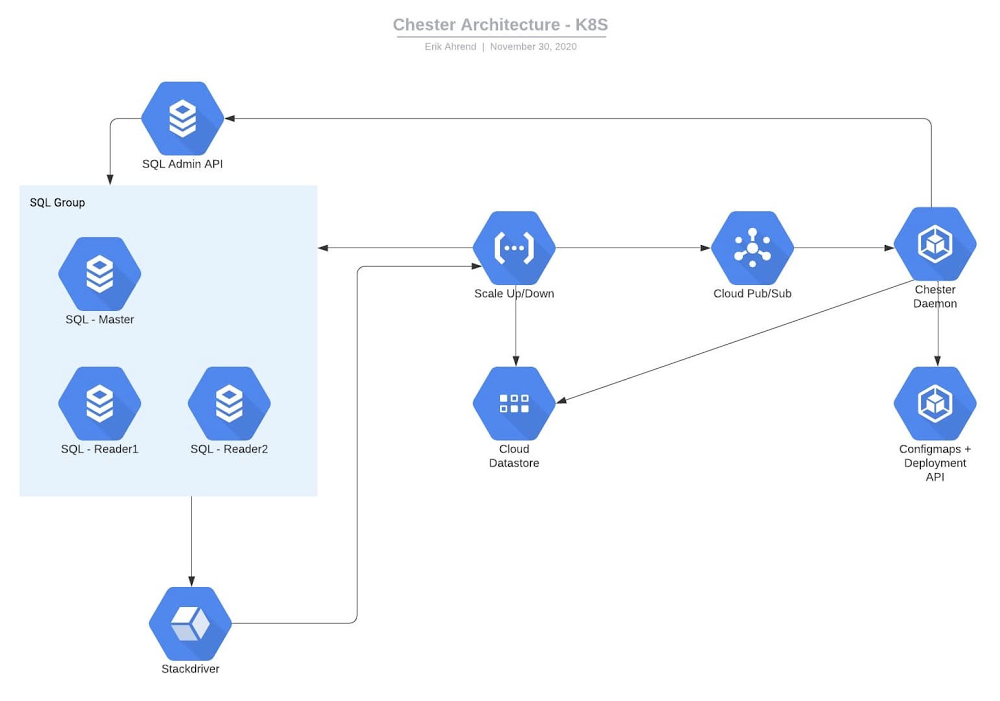
Editor’s note: We’re hearing today from MakerBot, a pioneer in the desktop 3D printing industry. Their hardware users and community members needed easy access to 3D models, and IT teams needed to offload maintenance operations to focus on product innovation. Here’s how they moved to Google Cloud to save time and offer better service.MakerBot was one of the first companies to make 3D printing accessible and affordable to a wider audience. We now serve one of the largest install bases of 3D printers worldwide and run the largest 3D design community in the world. That community, Thingiverse, is a hub for discovering, making, and sharing 3D printable things. Thingiverse has more than two million active users who use the platform to upload, download, or customize new and existing 3D models.Before our database migration in 2019, we ran Thingiverse on Aurora MySQL 5.6 in Amazon Web Services. Looking to save costs, as well as consolidate and stabilize our technology, we chose to migrate to Google Cloud. We now store our data in Google Cloud SQL and use Google Kubernetes Engine (GKE) to run our applications, rather than hosting our own AWS Kubernetes cluster. Cloud SQL’s fully managed services and features allow us to focus on innovating critical solutions, including a creative replica autoscaling implementation that provides stable, predictable performance. (We’ll explore that in a bit.)A migration made easierThe migration itself had its challenges, but SADA—a Google Cloud Premier Partner—made it a lot less painful. At the time, Thingiverse’s database had ties to our logging ecosystem, so a downtime in the Thingiverse database could impact the entire MakerBot ecosystem. We set up a live replication from Aurora over to Google Cloud, so reads and writes would go to AWS and, from there, shipped to Google Cloud via Cloud SQL’s external master capability.Our current architecture includes three MySQL databases, each on a Cloud SQL Instance. The first is a library for the legacy application, slated to be sunset. The second stores data for our main Thingiverse web layer—users, models, and their metadata (like where to find them on S3 or gif thumbnails), relations between users and models, etc—that has about 163 GB of data.Finally, we store statistics data for the 3D models, such as number of downloads, users who downloaded a model, number of adjustments to a model, and so on. This database has about 587 GB of data. We leverage ProxySQL on a VM to access Cloud SQL. For our app deployment, the front end is hosted on Fastly, and the back end on GKE. Worry-free managed serviceFor MakerBot, the biggest benefit of Cloud SQL’s managed services is that we don’t have to worry about them. We can concentrate on engineering concerns that have a bigger impact on our organization rather than database management or building up MySQL servers. It’s a more cost-effective solution than hiring a full-time DBA or three more engineers. We don’t need to spend time on building, hosting, and monitoring a MySQL cluster when Google Cloud does all of that right out of the box. A faster process for setting up databasesNow, when a development team wants to deploy a new application, they write out a ticket with the required parameters, the code then gets written out in Terraform, which stands it up, and the team is given access to their own data in the database. Their containers can access the database, so if they need to read-write to it, it’s available to them. It only takes about 30 minutes now to give them a database, a far more automated process thanks to our migration to Cloud SQL.Although autoscaling isn’t currently built into Cloud SQL, its features enable us to implement strategies to get it done anyway. Our autoscaling implementationThis is our solution for autoscaling. Our diagram shows the Cloud SQL database with main and other read replicas. We can have multiple instances of these, and different applications going to different databases, all leveraging ProxySQL. We start by updating our monitoring. Each one of these databases has a specific alert. Inside of that alert’s documentation, we have a JSON structure naming the instance and database. When this event gets triggered, Cloud Monitoring fires a webhook to Google Cloud Functions, then Cloud Functions writes data about the incident and the Cloud SQL instance itself to Datastore. Cloud Functions also sends this to Pub/Sub. Inside GKE, we have the ProxySQL name space and the daemon name space. There is a ProxySQL service, which points to a replica set of ProxySQL pods. Every time a pod starts up, it reads the configuration from a Kubernetes config map object. We can have multiple pods to handle these requests.The daemon pod receives the request from Pub/Sub to scale up Cloud SQL. With the Cloud SQL API, the daemon will add/remove read replicas from the database instance until the issue is resolved.Here comes the issue—how do we get ProxySQL to update? It only reads the config map at start, so if more replicas are added, the ProxySQL pods will not be aware of them. Since ProxySQL only reads the config map at the start, we have the Kubernetes API perform a rolling redeploy of all the ProxySQL pods, which only takes a few seconds and this way we can also scale up and down the number of ProxySQL pods based on load.This is just one of our plans for future development on top of Google Cloud’s features, made easier by how well all of its integrated services play together. With Cloud SQL’s fully managed services taking care of our database operations, our engineers can get back to the business of developing and deploying innovative, business-critical solutions.Learn more about MakerBot and about Google Cloud’s database services.Related ArticleExport data from Cloud SQL without performance overheadWe’re launching export offloading in Cloud SQL so you can export data from your MySQL and PostgreSQL database instances without impacting…Read Article
Quelle: Google Cloud Platform

How EDI empowers its workforce in the field, in the office, and at home

For consulting companies such as EDI Environmental Dynamics Inc. (EDI), interactions among employees and customers are the direct drivers of value, and helping them collaborate has a tangible impact on the bottom line. However, connecting people from the field to work-from-home spaces to the office is no easy task.EDI, an environmental consulting company that helps organizations assess environmental impacts and meet government regulations, has eight offices across Western and Northern Canada. Frontline workers account for 80% of its total employees, ranging from biologists and scientists to safety inspectors and project managers. EDI’s success is directly linked to its remote workforce’s ability to work effectively in the field and to collaborate with coworkers and clients across Western Canada. With the help of Google Workspace and AppSheet, EDI is enabling its mobile workforce to function more efficiently and collaboratively than ever before.Bringing efficiency to its frontline workersJust four years ago, much of EDI’s field work was still being tracked with pen and paper, resulting in frequent challenges, from error-prone data retention to inefficient collaboration. Luckily, EDI was able to address this using AppSheet, Google Cloud’s no-code application development platform. With AppSheet, EDI has replaced the majority of its pen-and-paper processes with tailored apps. As EDI’s Director of IT, Dennis Thideman explains, “AppSheet allows us to be much more responsive to our field needs. Using it, we can spin up a basic industrial application, share it with our field workers, and have them adjust their workflows—all in just a few hours. Doing that from scratch might take weeks or months.”For EDI, there are a couple of features that make AppSheet shine. First, AppSheet is platform-agnostic, meaning it works on most devices and most operating systems, so any employee can access their AppSheet apps. Secondly, because 90% of EDI’s projects involve working in remote areas, they can leverage AppSheet’s Offline Mode, allowing workers to collect data on their mobile devices in the field and have it automatically download when they reconnect to the internet. Eliminating the challenges associated with pen and paper has resulted in even more benefits than EDI leaders originally anticipated: namely, employees work faster across an unexpectedly wide range of use cases. For example, governmental regulations require EDI to complete a pre-trip safety evaluation before heading into the field. Before using AppSheet, this evaluation would take upwards of four hours to complete. By streamlining the process with an AppSheet app, EDI employees have reduced that time down to one hour. EDI averages over 850 evaluations every year, and they’ve realized over 2,550 hours in annual savings—savings that can be passed on to clients and allow staff to focus more time on other tasks. This is just one of more than 35 mission-critical applications that EDI has built with AppSheet.Time savings is a huge benefit, but as Logan Thideman, an IT manager at EDI, explains “At the end of the day, we realized that the biggest benefits of AppSheet aren’t about time savings as much as they are about high-quality data.” Collecting and analyzing good data is critical to EDI’s operations, as most data collected in the field can never be replicated. For example, if a water quality sample for a certain day is lost (which can happen easily when using pen and paper), that information can never be retrieved again. AppSheet makes data collection easy. Employees are much less likely to lose a smart device than they are a paper form, and any data entered would be immediately uploaded to a Google Sheet or SQL database when they return from the field, meaning data is always backed up in the cloud. From there, information can quickly be analyzed by coworkers, passed on to the client, or shared with government agencies to ensure proper compliance.Overall, EDI found that the more they could enable their field workers with AppSheet apps, the more those employees could focus on providing quality research and recommendations to their clients and gain a stronger competitive advantage in the market.Enhancing collaboration everywhereEnabling collaboration in remote environments can be difficult, but Google Workspace has made this easy for EDI. Google Workspace lets employees effortlessly share documents and work together in real time. Given its ease of use for mobile workers, Google Meet has become all-important and is used as EDI’s tool of choice for face-to-face collaboration. It became even more essential when COVID-19 arrived. As Dennis Thideman explains, “Google Meet allowed us to adapt to the COVID-19 environment quickly as we were already conversant with it. In just two days, we were able to transition our employees from office to home because of it.” By leveraging Google Meet and the rest of the Google Workspace platform, EDI employees are able to remain productive, regardless of where they’re working.Google Workspace also makes it easy to collaborate with customers. Because many of EDI’s customers leverage Microsoft Office tools such as Word, Excel, and PowerPoint, EDI still needs to use them. Google Workspace makes it easy to continue using Microsoft products in its environment, allowing employees to store Microsoft Office files on Google Drive and open, edit and save them using Google Docs, Sheets, and Slides. AppSheet and Google Workspace’s deep integrations also make collaboration easy. Employees can update data in Google Sheets, save images and reports to Drive, and update Calendar events all from AppSheet apps. Together, the two platforms simplify many of the activities that consumed so much time in the past.An empowered workforceEmpowering employees has been at the core of EDI’s success, and Google Workspace and AppSheet have given EDI a clear advantage. Collaboration has become easier and more agile using Google Workspace. Robust AppSheet apps have been built to streamline mission-critical processes. For unique project requirements, simple AppSheet apps are built in a matter of hours. As Dennis Thideman summarizes, Google Workspace and AppSheet “make managing a distributed, deskless workforce much simpler, giving EDI better growth opportunities and a competitive edge in the marketplace.”Learn more about Google Workspace and AppSheet.
Quelle: Google Cloud Platform

Using Document AI to automate procurement workflows

Earlier this month we announced the Document AI platform, a unified console for document processing. Document AI is a platform and a family of solutions that help businesses to transform documents into structured data with machine learning. With custom parsers and Natural Language Processing, DocAI can automatically classify, extract, and enrich data within your documents to unlock insights. We showed you how to visually inspect a parsed document in the console. Now let’s take a look at how you can integrate parsers in your app or service. You can use any programming language of your choice to integrate DocAI and we have client libraries in Java, Node.js, Go and more. Today, I’ll show you how to use our Python client library to extract information from receipts with the Procurement DocAI solution. Step 1: Create the parserAfter enabling the API and service account authentication (instructions), navigate to the Document AI console and select Create Processor.We’ll be using the Receipt Parser, click on it to create an instance.Next you’ll be taken to the processor details page,  copy your processor ID.Step 2: Set up your processor codeIn this code snippet, we show how to create a client and reference your processor. This code snippet shows how to create a client and reference your processor. You might want to try one of our quickstarts before integrating this into production code.Note how simple the actual API call looks. You only have to specify the processor and the content of your document. No need to memorize a series of parameters, we’ve done the hard work for you. You can also process large sets of documents with asynchronous batch calls. This is beneficial because you can choose to use a non-blocking background process and poll the operation for its status. This also integrates with GCS and can process more than one document per call. Step 3: Use your data Inspect your results, each of the fields extracted per processor are relevant to the document type. For our receipt parser, Document AI will correctly identify key information like currency, supplier information (name, address, city) and line items. See the full list here. Across all the parsers, data is grouped naturally where it would be otherwise difficult to parse out with only OCR. For example, see how a receipt’s line items attributes are grouped together in the response. Use the JSON output to extract the data you need and integrate into other systems. With this structure, you can easily create a schema to use with one of our storage solutions such as BigQuery. With the receipt parser, you’ll never have to manually create an expense report again!Get started today! Check out our documentation for more information on all the parser types or contact the Google Cloud sales team.Related ArticleIntroducing Document AI platform, a unified console for document processingDocument AI Platform is a unified console for document processing in the cloud.Read Article
Quelle: Google Cloud Platform

Expanding Docker’s Developer Preview Program

Back in April, we did a limited launch of a Desktop Developer Preview Program, an early access program set up to enable Docker power-users to test, experiment with and provide feedback on new unreleased features on Docker Desktop. The aim was to empower the community to work in lock-step with Docker engineers and help shape our product roadmap.

For this first phase of the program, we limited the program to a small cohort of community members to test the waters and gather learnings as we planned to roll-out a full-fledged program later in the year. 

Today, we’re thrilled to announce the official launch of the program, renaming it the Docker Developer Preview Program and broadening its scope to also include Docker Engine on Linux. 

What are the benefits of joining the program?

First and foremost, this is an opportunity for anyone in the community to help shape and improve the experience of millions of Docker users around the world. As a member, you get direct access to the people who are building our products everyday: our engineering team, product managers, community leads etc… Through the program’s private Slack channel, you get to share your feedback, tell us what is working in our new features and how we could improve, and also help us dig in when something’s really buggy. 

What specific tasks are expected from me if I join? 

All program members meet in our private Slack channel to share, discuss and get updates on new tasks to perform. You’ll be expected to run pre-release builds of Docker Desktop and help us investigate on private builds when we are working on particular issues of features.

We may also need you to stress test all of our new features and tell us what goes wrong. You might even work directly with the engineering team to help us debug issues and get to the bottom of things. Lastly, you will be strongly encouraged to join our monthly engineering briefings on Zoom.

One important point to stress is that the program is 100% voluntary, meaning that if you have time to perform all the tasks, that’s great but if you don’t, that’s also fine! We just want to make sure that everyone who joins is motivated to help. 

Can anyone join the program?

The program is open to everyone who answers yes to the following questions: 

Do you use Docker on a daily basis?  Do you want to have access to features in development, months before they become mainstream? Do you have a high tolerance for occasional functional regressions? Are you looking for an easy but very impactful way to help Docker and its millions of users?

If you answered yes to all the questions above, we’d love for you to apply today! 
The post Expanding Docker’s Developer Preview Program appeared first on Docker Blog.
Quelle: https://blog.docker.com/feed/

Docker Desktop 3.0.0: Smaller, Faster Releases

Today with the release of Docker Desktop 3.0.0, we’re launching several major improvements to the way we distribute Docker Desktop. From now on we will be providing all updates as deltas from the previous version, which will reduce the size of a typical update from hundreds of MB to tens of MB. We will also download the update in the background so that all you need to do to benefit from it is to restart Docker Desktop. Finally, we are removing the Stable and Edge channels, and moving to a single release stream for all users.

Changes Based on Your Feedback

Many of you have given us feedback that our updates are too large, and too time consuming to download and install. Until now, we only provided complete installers, which meant that each update required downloading a file of several hundred MB. But from now on we will be providing all updates as deltas from the previous version, which will typically be only tens of MB per release.

We have also heard that updates are offered at an inconvenient time, when you launch Docker Desktop or when you reboot your machine, which are times that you want to start work not spend several minutes downloading a new version. Now that updates are so small we are able to download them in the background, and only require a restart to start using the new version. 

At the same time, we are removing the Stable and Edge channels, and moving to a single, cumulative release stream for all users. The two channels date from the very early days of Docker Desktop and were designed to give users a choice between getting the very latest features at the cost of some instability, or a slower but more stable version. 

But in practice, lots of users have told us that the system was confusing and inflexible. It was hard to know when bug fixes would reach each version, making users confused why they were still seeing an issue when we said it had been fixed. Fixes arrived in Stable too slowly, but users didn’t want to switch to Edge to receive the fix they were waiting for because it meant resetting their containers and images. Furthermore, Edge meant accepting frequent, large updates from then on, which users found disruptive. Also, the two channels used parallel but separate version numbers, leading to confusion about which version was ‘later’.

In summary, many users have told us that they find the two channels unfamiliar and confusing. “I don’t want to have to choose between stability and a fix for my bug, I want both” was typical of the comments we heard from our users. So going forward there will be only a single release stream that everyone will share. It will have all the latest fixes and experimental features so that everyone can benefit from them as early as possible. Updates will be cumulative so that there is no longer any confusion about which features have reached which builds. When we introduce an experimental feature, it will be available to everyone, but we will make it clear that it is experimental.

Our vision is that you no longer have to choose between prompt fixes and low maintenance: from now on everyone will have the latest features and fixes, while receiving updates that are an order of magnitude smaller and are applied automatically.

Join the Docker Developer Preview Program

We know that many of our Edge users like to get even earlier notice of upcoming features and play with them before they’re ready for general consumption. For you, we’re today opening up our developer preview program more widely. It was previously by invitation only, but with the removal of the Edge channel, we’d like to invite anyone interested to join and get access to new features before they reach a public release. 

And today we have released to our preview users two exciting features that we know a lot of people have been waiting for: Docker Desktop on Apple M1 chips, and GPU support on WSL 2. To find out more about the Docker Developer Preview Program, read my colleague William Quiviger’s blog post.

The Year in Desktop Innovation

2020 has been the busiest year ever for Docker Desktop, in line with our commitment at the end of last year to refocus our business on developers. During 2020, we have released:

The Docker Dashboard, giving you access to your containers, applications and local and remote images in one UI;Docker Desktop for Windows 10 Home; The WSL 2 backend on Windows, giving a more native integration and vastly improved performance;docker compose for Azure Container Instances and Amazon Elastic Container Service; Partnership with Snyk on security scanning of local images and displaying the results of image scans from Docker Hub; New filesystems on both Windows and Mac; Substantial CPU improvements on Mac; Automatic, delta updates;And Docker Desktop is now fully supported.

There’s lots more to come next year, but we are proud to label this release as version 3, and we invite you to download Docker Desktop 3.0.0 today and try it out!

The post Docker Desktop 3.0.0: Smaller, Faster Releases appeared first on Docker Blog.
Quelle: https://blog.docker.com/feed/