Deploying to serverless platforms with GitHub Actions

Join us on December 16, 2020, 11am PT / 2pm ET to learn more about Automating CI/CD pipelines with GitHub Actions and Google Cloud.Serverless computing hides away infrastructure allowing for developers to focus on building great applications. Google Cloud Platform offers 3 serverless compute platforms—Cloud Functions, App Engine, and Cloud Run—with the benefits of zero server management, no up-front provisioning, auto-scaling, and only paying for the resources used. Serverless applications are quick and easy to spin up, but a system for continuous integration and continuous delivery (CI/CD) is key for long-term operability. However, CI/CD systems tend to be known for their complexity, so GitHub Actions aim to reduce the overhead by abstracting away the test infrastructure and creating a developer-centric CI/CD system. You can get started quickly by adding a configuration file to your repo to automate your builds, testing, and deployments. Google wants to meet you on GitHub and provides Google Cloud Platform integrated GitHub actions.Let’s walk through how to deploy to Google Cloud Platform’s serverless options using the integrated GitHub actions. Learn more about Google’s serverless hosting options orGoogle Cloud Platform full range of hosting options to find which platform is right for you.Cloud FunctionsCloud Functions is Google Cloud’s Function-as-a-Service platform that allows users to create single-purpose, stand-alone functions that respond to events and HTTP requests. Cloud Functions are great for pieces of code like sending notification emails, performing database sanitization and maintenance, integrating with webhooks, and processing background tasks.Use the google-github-actions/deploy-cloud-functions to deploy an HTTP function by specifying the function name and runtime:Or deploy a background function that can be triggered by events, such as Pub/Sub messages, Firebase events, or changes in a Cloud Storage bucket, by specifying trigger type and resource:A function triggered when a new object is created in Cloud Storage would be deployed with inputs like:Learn more about specifying event triggers.App EngineApp Engine is the original serverless platform for hosting modern web applications. App Engine allows you to deploy from source by selecting a runtime from a set of popular programming languages.Deploy your source code with the google-github-actions/deploy-appengine action by specifying a service account key with permissions to deploy and the path to App Engine app’s settings file, app.yaml which sits next to your application to define the service for the deployment.The project ID is also set to ensure deployment to the correct project, since service accounts can be given permissions to separate projects.Cloud RunCloud Run hosts stateless containers with any choice of language, library, or binary. Cloud Run is a great choice for REST API backends, lightweight data processing, and automated services like webhooks and scheduled tasks.Use the google-github-actions/deploy-cloudrun action to deploy a container image hosted in Google Container Registry or Artifact Registry to Cloud Run to create a new service or a revision.Need to build your image too? Use the built-in Docker tool to build and push your image or utilize the setup-gcloud action (below) to submit a Cloud Build using the gcloud CLI tool.Setup Cloud SDKThe Cloud SDK, also known as the gcloud CLI tool, is commonly used to interact with Google Cloud Platform. Use the setup-gcloud action to add the gcloud CLI tool to the path to interact with many Google Cloud services. This action can be used to authenticate other Google Cloud Platform actions by utilizing export_default_credentials. This exports the path to Default Application Credentials as the environment variable GOOGLE_APPLICATION_CREDENTIALS for services to be automatically authenticated in later steps. The credentials input in the other actions, then can be omitted.Try it for yourself!Google and GitHub are excited to make it easier for you to set up CI/CD pipelines. Try Google Cloud GitHub actions today:Explore Google’s GitHub actions and give us feedback on your experience.Try out one of the example workflows.If you need control of your test environment, try setting up GitHub Actions self-hosted runners on Google Cloud.Join us on December 16, 2020, 11am PT / 2pm ET to learn more about Automating CI/CD pipelines with GitHub Actions and Google Cloud. Save your seat!Related ArticleCloud Build brings advanced CI/CD capabilities to GitHubTighter integration between Cloud Build and GitHub opens up advanced CI/CD workflows for DevOps shops.Read Article
Quelle: Google Cloud Platform

Automatically right-size Spanner instances with the new Autoscaler

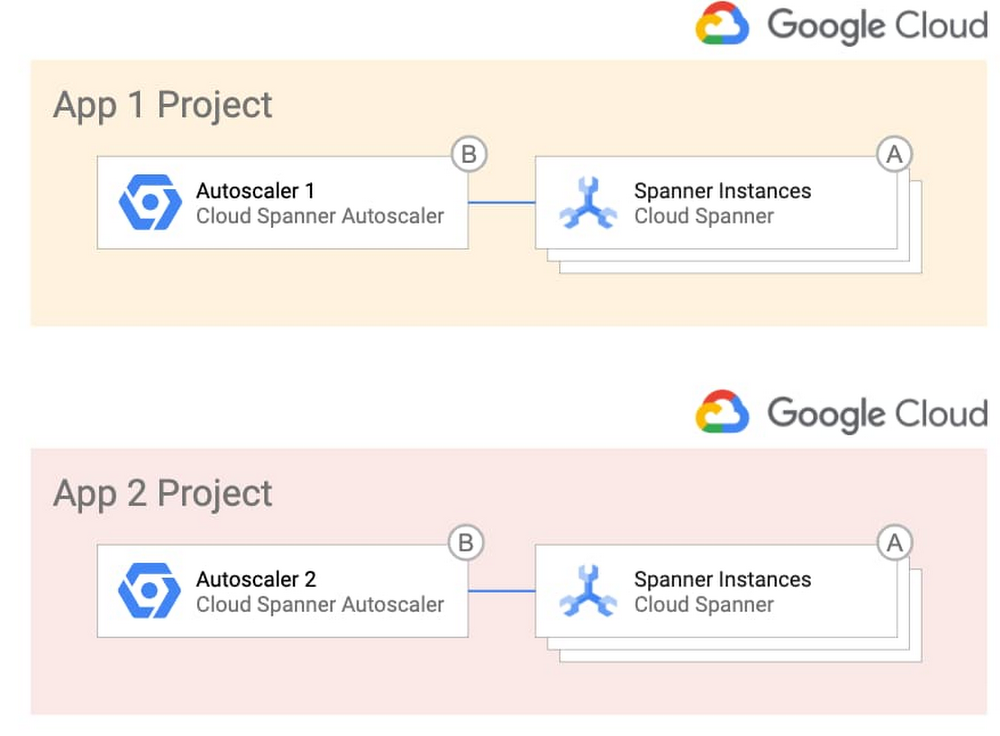
With Cloud Spanner, you can easily get a highly available, massively scalable relational database. This has enabled Google Cloud customers to innovate on applications without worrying about whether the database back end will scale to meet their needs. Spanner also lets you optimize costs based on usage. To make it even easier to build with Spanner, we’re announcing the release of the Autoscaler tool. Autoscaler is an open source tool for Spanner that watches key utilization metrics and adds or removes nodes as needed based on those metrics.To quickly jump in, clone this GitHub repository and set the Autoscaler up with the provided Terraform configuration files. What can the Autoscaler do for me?Autoscaler was built to make it easier to meet your operational needs while maximizing the efficiency of your cloud spend by adjusting the number of nodes based on your user demand. The Autoscaler supports three different scaling methods: linear, stepwise, and direct. With these scaling methods, you can configure the Autoscaler to match your workload. You can mix and match the methods to adjust to your load pattern throughout the day, and if you have batch processes, you can scale up on a schedule and then back down once the job has finished.While most load patterns can be managed using the default scaling methods, in the event you need further customization, you can easily add new metrics and scaling methods to the Autoscaler, extending it to support your particular workload. Many times you will have more than one Spanner instance to support your applications, so the Autoscaler can manage multiple Spanner instances from a single deployment. Autoscaler configuration is done through simple JSON objects, so different Spanner instances can have their own configurations and use a shared Autoscaler.Lastly, since development and operations teams have different working models and relationships, the Autoscaler supports a variety of different deployment models. Using these models, you can choose to deploy the Autoscaler alongside your Spanner instances or use one centralized Autoscaler to manage Spanner in different projects. The different deployment models allow you to find the right balance between empowering developers and minimizing support of the Autoscaler.Related Article3 reasons to consider Cloud Spanner for your next projectLearn about the cloud database Spanner, which brings massive scale and strong consistency to your applications. Here’s why to consider al…Read ArticleHow do I deploy the Autoscaler in my environment?If you want the simplest design, you can deploy the Autoscaler in a per-project topology, where each team that owns one or more Spanner instances becomes responsible for the Autoscaler infrastructure and configuration. Here’s what that looks like:Alternatively, if you want more control over the Autoscaler infrastructure and configuration, you can opt to centralize them and give the responsibility to a single operations team. This topology could be desirable in highly regulated industries. Here’s a look at that topology:If you want the best of both worlds, you can centralize the Autoscaler infrastructure so that a single team is in charge of it, which offers your application teams the freedom to manage the configuration of the Autoscaler for their individual Spanner deployments. This diagram shows this deployment option.To get you up and running quickly, the GitHub repository includes the Terraform configuration files and step-by-step instructions for each of the different environments.How does Autoscaler work?In a nutshell, the Autoscaler retrieves metrics from the Cloud Monitoring API, compares them to recommended thresholds, and requests Spanner to add or remove nodes. This diagram shows the internal components of the distributed deployment.You define how often the Autoscaler gets the metrics by configuring one or more Cloud Scheduler Jobs (1). When these jobs trigger, Cloud Scheduler publishes a message with per-instance configuration parameters that you define into a Pub/Sub queue (2). A Cloud Function (“Poller”) reads the message (3), calls the Cloud Monitoring API to get the Cloud Spanner instance metrics (4), and publishes them into another Pub/Sub queue (5).A separate Cloud Function (“Scaler”) reads the new message (6), verifies that a safe period has passed since the last scaling event (7), calculates the number of recommended nodes, and requests Cloud Spanner to add or remove nodes to a particular instance (8).Throughout the flow, the Autoscaler writes a step-by-step summary of its recommendations and actions to Cloud Logging for tracking and auditing.Get startedWith Autoscaler, you now have an easy way to automatically right-size your Spanner instances while continuing to deliver best performance and high availability for your database. Its deployment flexibility and configuration options mean that it can adapt to your particular use case, environments, and team structure. To learn more or contribute, check out the GitHub repository, experiment with the Autoscaler in a Qwiklab, or check out the free trial to get started.Related ArticleOpening the door to more dev tools for Cloud SpannerLearn how to integrate a graphical database development tool with cloud databases like Cloud Spanner with the JDBC driver.Read Article
Quelle: Google Cloud Platform

The Wellcome Sanger Institute: Creating the right conditions for groundbreaking research with Anthos

Editor’s note: Today we speak with Dr. Vladimir Kiselev, head of the Cellular Genetics Programme’s Informatics team at the Wellcome Sanger Institute, to hear how Google Cloud’s multi-cloud solution, Anthos, will help researchers collaborate and share their analyses more effectively.The Wellcome Sanger Institute has been at the very forefront of scientific discovery since 1992. Originally created to sequence DNA for the Human Genome Project, it’s now one of the world’s biggest centers for genomic science, employing almost 1,000 scientists, engineers, and research professionals across five separate programs. One of these is the Cellular Genetics Programme, which combines cutting-edge “cell-atlasing” methodologies with computational techniques to map cells in the human body and further our understanding of how they work.The programme calls for cutting-edge technology, and that’s where Dr. Vladimir Kiselev, who heads the informatics team for the Cellular Genetics Programme, comes in. “We provide the technological infrastructure that lets researchers do their work,” he says. “Our tasks are varied, from setting up imaging data pipelines to helping researchers to analyze sequencing data, and running websites for them. It’s a mixed environment with plenty of scope and freedom to support the research team with whatever it needs.”One of the most popular initiatives spearheaded by the informatics team has been to enable secondary data analysis through JupyterHub, an open-source virtual notebook that allows researchers to fully document and share their analyses online. With a user-friendly interface, JupyterHub makes it easy for researchers with minimal bioinformatics experience to access a Sanger cloud service with sufficient power to handle large datasets. This has not only assisted the work of faculty members within the Cellular Genetics Programme, it has also made working with external collaborators much easier. Today, 90 registered users rely on JupyterHub, and 15% of them are from other institutes based anywhere from Newcastle to Oxford, working on collaborative projects with the Wellcome Sanger Institute. But any solution has to fit within the confines of the institute’s uniquely complex IT infrastructure. After the original deployment of JupyterHub, users began to see a drop in stability due to increased demand, with 50 user pods running in parallel at any given time. The informatics team tested various configurations within the existing infrastructure and with commercial solutions but saw little improvement. Looking to gain a powerful yet flexible infrastructure, earlier this year the team turned to Anthos, Google Cloud’s hybrid and multi-cloud platform. Finding the balance between functionality and stabilityAs a major scientific establishment, the Wellcome Sanger Institute has access to powerful High Performance Compute clusters and a private data center that runs the open-source operating system OpenStack. This enabled it to adopt the ideal solutions for its needs, from a range of different providers. To run the Cellular Genetics JupyterHub, for example, the informatics team selected Kubernetes, the open-source container orchestration platform developed by Google. But as powerful as the Institute’s existing stack is, integrating JupyterHub was a complex task that required significant resources to set up and maintain. As the demand for JupyterHub grew, maintenance became harder and instability common. Additionally, the legacy Openstack on-premise solution with Kubespray  did not allow for upgrades in place. As a result , users were increasingly affected, which slowed down research.The Institute needed a solution that would allow it to run JupyterHub clusters reliably and at scale on its own hardware, without disrupting the existing infrastructure. The informatics team worked with Google Cloud Premier Partner Appsbroker to come up with the best approach. Together, they realized that Anthos could be the ideal answer for introducing an enterprise-grade conformant Kubernetes solution in their data center, allowing for in-place upgrades and removing reliance on OpenStack.Following a series of training sessions, the informatics team worked with Appsbroker to run a Proof of Concept (POC) with a handful of JupyterHub accounts. Back when they first set up JupyterHub, it had taken four months to configure it for the complex IT infrastructure. But using Anthos, the Institute could run GKE on-prem natively on VMware (the de facto infrastructure platform at the Institute), and the team had JupyterHub up and running in just five days, including all notebooks and secure researcher access. Harnessing the power of Google Cloud in a hybrid architectureEven in the POC, the benefits of JupyterHub on Anthos were immediate. “Stability has significantly improved with Anthos,” says Vladimir, explaining that Kubernetes maintenance is now an Anthos service supported by the institute’s central IT team via Google Cloud Console. “It’s great not having to worry about our cluster anymore. Better yet, users don’t have to worry about not being able to log on and get their important work done.”Anthos also offers an ease of use and reliability that the informatics team had not experienced with previous solutions. This enables them to spend more time developing new solutions for the research faculty instead of standing by for maintenance. Finally, being able to run Anthos on the Institute’s own hardware rather than on the cloud means that it pays a fixed license fee, which helps with long-term planning and strategizing. “When project funding is discussed at the informatics committee, it’s much easier for everyone to make decisions when they can see a predictable, monthly cost,” explains Vladimir. A proof of concept with Anthos, a way forward for the programAfter its successful POC with Google Cloud and Appsbroker, the Cellular Genetics Programme is currently working toward full deployment of JupyterHub on Anthos. And now that the team has some experience with Google Cloud, it’s easier to experiment with new projects, such as hosting internal and external websites for researchers or introducing more automation into the stages of application development by deploying GitLab on Anthos to run CI/CD pipelines.“I really like the integration with the Google Cloud Console,” says Kiselev. “We can control everything we need to from one place, whether that’s JupyterHub, a pipeline, or anything else. Having a single platform to manage everything is definitely a vision we want to aim for.”
Quelle: Google Cloud Platform

Rodan + Fields achieve business continuity for retail workloads with SAP on Google Cloud

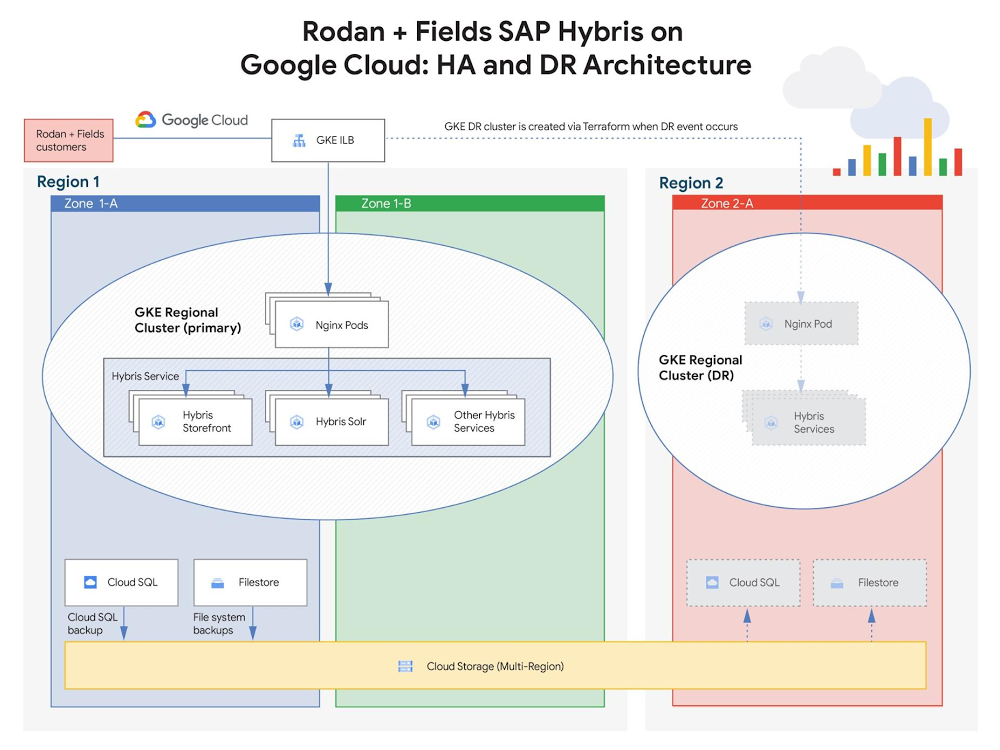
Since its founding in 2002, Rodan + Fields, one of the leading skincare brands in the U.S., has been delighting customers worldwide with its innovative product portfolio. Recently, however, after taking stock of its pre-existing IT infrastructure, Rodan + Fields realized it needed a more modern, scalable solution—one that could keep pace with the company’s growth while simplifying management of critical SAP workloads and delivering access to cutting-edge IT services. After carefully considering their options, the Rodan + Fields team decided to move the company’s mission-critical SAP workloads to Google Cloud.Ensuring business continuity was a top priority driving the company’s move to Google Cloud. Rodan + Fields needed an infrastructure solution that would protect against unpredictable, potentially catastrophic business disruptions, such as user error, malicious activities, natural disasters. To achieve this, Rodan + Fields partnered with Google Cloud to design and implement a cloud-native, automated resilience strategy, protecting the two core elements of its business infrastructure:SAP Hybris: The e-commerce platform supporting online shopping and customer experience managementSAP ERP:The resource planning platform supporting logistics for product manufacturing and distributionBuilding e-commerce resilience using SAP Hybris on Google Cloud With SAP Hybris powering Rodan + Fields’ online shopping experience, ensuring business continuity for the associated workloads was a must. Rodan + Fields consultants assist customers and execute sales entirely online, so the e-commerce site is responsible for all of the company’s global revenue and must operate reliably 24×7. If customers are unable to quickly and seamlessly browse products, place orders, and access support, the company risks substantial damage to its sales and reputation. The Rodan + Fields IT team defined the following key data protection requirements to mitigate risk to critical e-commerce services :High-availability (HA): The e-commerce infrastructure must deliver uptime resilience against local failures.Disaster recovery (DR): The e-commerce infrastructure must support rapid, automated recovery in the event of a larger-scale failure (e.g. geo-impact caused by a natural disaster).To address these requirements, Rodan + Fields partnered with Google Cloud to design and implement an architecture leveraging container-based application management and geo-redundant storage.High-availability and disaster recovery for SAP HybrisRodan + Fields decided to implement Google Kubernetes Engine (GKE), due to both its scalability (specifically, GKE supports clusters with up to 15,000 nodes. This is the most supported nodes of any cloud-based Kubernetes service) and its native high-availability features. With its Hybris application stack running on GKE, Rodan + Fields can spin up (or spin down) Kubernetes clusters to match its user volume. Like many retailers, Rodan + Fields experiences traffic in bursts, with especially high volume a few days of each month. As a result, the elasticity provided by GKE helps minimize costs by enabling infrastructure to be “right-sized” in alignment with the company’s business needs.As depicted in the diagram above, GKE also delivers on Rodan + Fields’ high availability requirements for the Hybris service, as GKE will automatically (and immediately) redeploy Hybris pods in the event of a failure. Also, since the Hybris service leverages GKE’s regional clustering capability, pods can also be redeployed in a secondary zone, which provides operational resilience for Rodan + Fields’ critical e-commerce infrastructure—even in the event of a zonal outage. In the cloud, “disaster recovery” typically refers to the ability to recover from an unexpected regional failure. To support this, Rodan + Fields implemented the following DR strategy to protect the three key elements of its Hybris infrastructure:Hybris service: Terraform infrastructure-as-code (IaC) scripts were developed by Rodan + Fields to automate recreation and configuration of the GKE-based Hybris service (and the associated load balancing) in a secondary region.E-commerce databases: Cloud SQL is configured to periodically store backups on multi-region Cloud Storage. This ensures accessibility in the secondary region if the primary region becomes unavailable.Shared file storage for e-commerce assets (e.g. media files, pictures of products, etc.): File system backups are stored periodically on multi-region Cloud Storage—again, ensuring accessibility in the secondary region if the primary region becomes unavailable.With these DR protection strategies in place, Rodan + Fields achieved an automated, testable failover process. If the primary region supporting Hybris were to become unavailable, the Terraform scripting can redeploy the Hybris service infrastructure in the secondary region and restore the associated databases and shared storage from backups.Delivering logistics resilience with SAP ERPTo prevent costly manufacturing/distribution issues, Rodan + Fields’ ERP systems also require cloud-native business continuity strategies. Those systems leverage SAP ERP Central Component (ECC), which supports operations planning and logistics processes worldwide. SAP ECC needs to run 24×7, which creates the following key protection requirements:Backup: ECC must be capable of restoring to a prior state in order to mitigate the potential impact of user error or malicious activity.Disaster recovery: ECC must support rapid recovery in the event of a larger-scale failure (e.g. geo-impact caused by a natural disaster).To address these ECC protection requirements, Rodan+Fields designed and implemented a backup and DR architecture leveraging VM snapshots, SAP database replication, and geo-redundant storage, as depicted below.Rodan + Fields leverages persistent disk snapshots to provide recoverable backups of SAP ECC VM system state (e.g. config data) and data disks. These snapshots are taken periodically, based on predefined policies, and are stored on multi-region Cloud Storage. If needed—for instance, to recover from a user or system error—the ECC VMs can be rapidly returned to a prior, known-good state by restoring from a selected snapshot. Rodan + Fields also implemented an automated multi-tier architecture to support disaster recovery, which protects the key elements of its ERP application stack:SAP ECC VM system state: Protected by the same VM snapshots that support backup. Since the snapshots reside on multi-region Cloud Storage, they can be recovered in the secondary region if the primary region becomes inaccessible.Shared NFS data (supporting SAP ECC VMs): Stored on a scale-out Filestore (formerly Elastifile) NFS storage cluster and replicated asynchronously to a live cluster in the secondary regionTo complement the DR strategy employed to protect Hybris, Rodan + Fields also implemented an automated, testable DR process to protect SAP ECC. Terraform scripting, created by Rodan + Fields integration partner, NTT, automates ERP DR processes, delivering 1) automated creation of new VMs in the failover region (from PD snapshots) and 2) automated failover to use the secondary Filestore cluster in the failover region. The Terraform scripts, which are stored on GitHub, contain the ECC configuration information required to regenerate the ERP service.Next steps on the cloud journeyBy shifting its SAP workloads to Google Cloud, Rodan + Fields is enjoying the benefits of modern, scalable infrastructure, while also protecting its business with a robust business continuity strategy. To support a peak in user access, Rodan + Fields was able to scale Hybris infrastructure by 10X in 10 minutes, supporting millions in additional revenue. In addition, as of the date of this blog publication, Rodan + Fields has experienced zero unplanned ERP outages in the year since the company migrated to running production on Google Cloud. And they aren’t stopping there… To gain additional business value, Rodan + Fields plans to continue modernizing its workflows to leverage additional cloud-native Google features and services, including:Using machine images to further simplify protection architecturesIntegrating ERP data with BigQuery to enhance data warehouse capabilities Learn more about Rodan + Fields SAP deployment on Google Cloud. For more stories of SAP customer deployments on Google Cloud, check out our solution page and YouTube channel.Related ArticleSAP on Google Cloud: 2 analyst studies reveal quantifiable business benefitsFrom uptime and infrastructure to efficiency and productivity—both Forrester and IDC identified major benefits to companies that have mad…Read Article
Quelle: Google Cloud Platform