Abodienste im Paket: Apple One ist in Deutschland verfügbar
Das große Premier-Abo von Apple One zusammen mit Fitness+ wird in Deutschland aber noch nicht angeboten. (Apple, Apple TV)
Quelle: Golem

Das große Premier-Abo von Apple One zusammen mit Fitness+ wird in Deutschland aber noch nicht angeboten. (Apple, Apple TV)
Quelle: Golem

Auch wenn einige Länder bei ALDI SÜD schon auf SAP Commerce als Lösung setzten, stellt die Unternehmensgruppe nun ganzheitlich darauf um – und sucht Mitarbeiter für ihr IT-Team. (SAP)
Quelle: Golem

Die Internet Movie Database, kurz: IMDb, ist das unverzichtbare Werkzeug für alle, die sich mit Filmen befassen. Mit Infos zu mehr als 6,5 Millionen Titeln ersetzt sie ganze Bibliotheken.. Von Peter Osteried (Internet, Digitalkino)
Quelle: Golem

Apple plant, mit dem Apple Silicon zuerst zwei Macbook Pro und ein Macbook Air auszustatten, alle drei sollen zeitnah erscheinen. (Apple Silicon, Mac)
Quelle: Golem
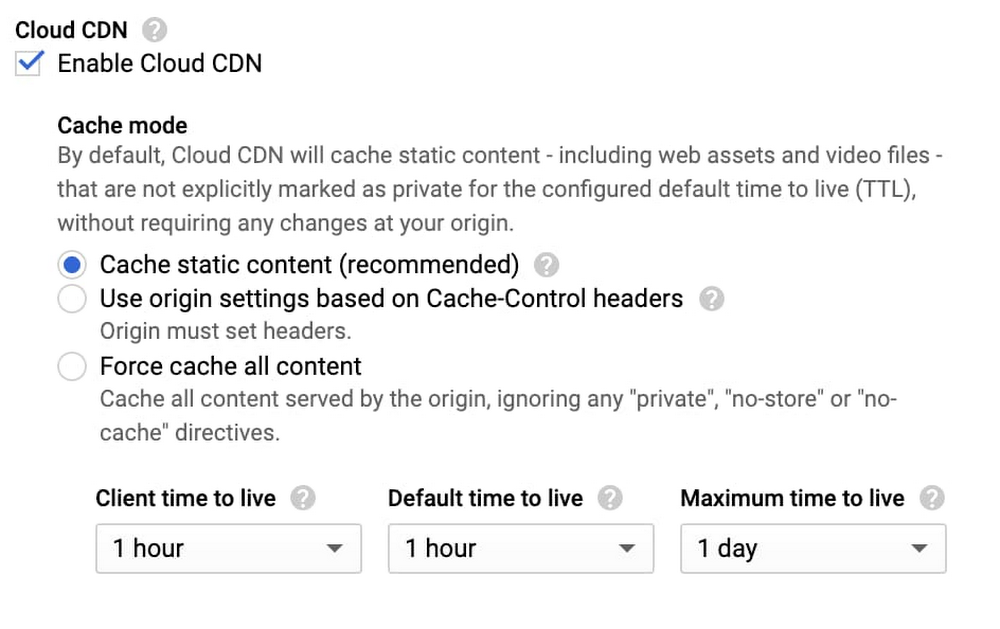
A content delivery network is a critical part of getting frequently used content to your users quickly and cost-effectively. We’re excited to announce new, more flexible controls for Cloud CDN, making it even easier to improve performance and reducing the serving costs for regularly accessed content, no matter where your users are.Today, we’re delivering three features in Preview that let you enable Cloud CDN as part of your HTTP(S) Load Balancer and start caching content with just one click. Specifically, Cloud CDN now offers:Cache modes, a new concept that allows Cloud CDN to automatically cache common static content types without further origin configuration, cache all responses, or continue to respect your origin’s cache directives The ability to set and/or override cache TTLs (“time to live”, or “expiration”), so you can fine-tune how long Cloud CDN caches your responses, when we revalidate expired objects in our caches, as well as define client-facing TTLs to make the most of browser cachesCustom response headers, allowing you to reflect the cache status to your clients, geographic data, and/or your own static response headers, such as Cross-Origin Resource Sharing (CORS) policies and/or web security headers when serving from Cloud Storage or Compute Engine.How to use these featuresThese new capabilities are openly available to all customers, and you can use the Google Cloud Console or the gcloud SDK on your existing Cloud CDN-enabled backends right now.If you have an existing backend with Cloud CDN enabled, you can turn on the new “Cache All Static” cache mode, which automatically caches common static content types, and fine-tunes the TTLs used to determine cache lifetime and behavior:Backends that enable Cloud CDN via the Cloud Console now defaults to caching all static content, so you can just check a box to benefit from our global network of caches.If you’re using Cloud Storage backends, you can now use our custom response header features to set both static and dynamic response headers. You can now return client geolocation data, the RTT (round trip time) between Google’s edge and the client, and static headers such as Content-Security-Policy, reducing the need to configure it across your origins.Here’s an example using the gcloud SDK that returns the cache status (such as HIT, MISS or DISABLED), the geolocation of the client (user) who connected, and then applies a useful web security header:Make sure you are on gcloud version 309.0.0 or greater, and that you’re using the beta channel, in order to use these new features.What’s next?We’re also working on additional capabilities for Cloud CDN, including the ability to serve stale content when your origin is overloaded or unavailable (for example, if your origin is external to Google Cloud), you will be able to bypass the cache when needed, and configure cache behavior at status-code granularity (often called “negative caching”). These capabilities will be available before the end of this year: monitor our release notes for updates.We’re also continuing to expand our global network: Google’s network is one of the most peered in the world, and nearly all of Google Cloud traffic is delivered over peering (a major advantage for reliability). To get started with Cloud CDN, take a look at our how-to guides and review our best practices here.Related ArticleEnabling hybrid deployments with Cloud CDN and Load BalancingCloud CDN and HTTP(S) Load Balancing now let you pull content and reach services that are on-prem or in another cloud over Google’s network.Read Article
Quelle: Google Cloud Platform
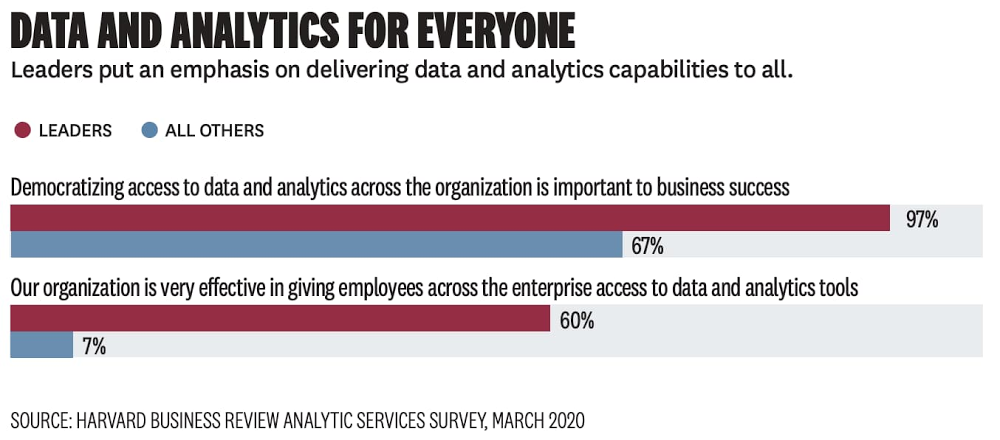
Today, we’re kicking off a multi-part series that looks at one of the things all businesses—regardless of geography, size, or industry—have in common: they want to be data-driven. As long as there has been data, businesses have tried to use it to better understand their customers, market, and competitors. What’s changed recently is the nature of three core factors that lead to becoming data-driven: a) data availability, b) data access, and c) insight access. As these factors have expanded, or become “democratized,” businesses have enabled themselves to be better managed not just top-down, but also bottoms-up, middle-out, and everywhere between. A recent Google Cloud/Harvard Business Review paper confirms this: 97% of industry leaders surveyed said democratizing access to data and analytics across the organization is important to business success. This blog series will explore what it means to be “data-driven,” how this concept has changed over time, and how Google Cloud is helping customers push the boundaries of what they can do with their data.The early days of the modern data landscape & the rise of big dataModern enterprise reporting and business intelligence began to take form in the 1990s, when companies started using enterprise data warehouses (EDWs) as the foundation of operational reporting. A breakthrough in the ability to understand a business as it was unfolding, the EDWlet analysts ask and answer questions like “What’s today’s inventory based on yesterday’s sales?” or “What do last week’s regional sales figures look like?”.Traditional business-oriented data and systems didn’t hold primacy for long. Almost as soon as self-service BI became available, the broader data landscape shifted, requiring new tools and new skills to generate differentiated insights from new kinds of signals. Society-wide digitization—of shopping habits, of communication, of entertainment, and more—gave companies a new window into how to better interpret and meet their customers’ needs. A new set of big data tools (spurred by the release of academic papers describing Google’s internal technology) gave data engineering experts the ability to collect and store this new data, making it available to expert users who could generate insights. Organizations built early data lakes and, with the gains from self-service BI fresh in their minds, expected rapid value generation. Unfortunately, even with this new data made available and accessible, most business users didn’t have the skills to generate insights. The systems were too complex for novice users.Clearly, in the new world of big and unstructured data, insights wouldn’t come just from making data available and democratizing its access. Democratization of insights, which is what really matters, had to come by expanding the capabilities of familiar tooling. Technology had to meet users where they were, not vice-versa. That’s where Google Cloud went to work.Google Cloud: Democratizing insights through radically simplified toolsAt Google Cloud, we’ve focused on empowering users to generate insights by leaning into the tools and skills they already have. The first step occurred behind the scenes. We automated the backend of our technology stack and helped pioneer the concept of “serverless” analytics, which meant resource provisioning, handling growing scale, performance tuning, deployment and other technical tasks associated with managing the stack were taken care of without user input. Users only need analysis, so Google Cloud developed simple user-facing tools that let them focus on their work while leaving machines to manage the complexity of executing user inputs.Empowering the data analyst to generate deeper insights through data accessIn democratizing and generating insights, there’s maybe no group more important to enable than data analysts. Typically the largest group of data-focused workers across Fortune-500 companies, this persona has a well-rounded grasp of both data and the business challenges that need to be solved. Unlocking new capabilities for data analysts via SQL has given our customers a whole new window into their businesses. Let’s examine how that happened.First, the decoupling of compute and storage allowed BigQuery to store more data more economically than other data warehouses in which compute and storage scale together. This led customers to adopt a “structured data lake” approach to data warehousing and increased the prevalence of ELT (extract-load-transform) using SQL within the data warehouse itself. This democratized data access by allowing more full-fidelity data to reside in the data warehouse. More importantly, it also democratized insight generation because the expanded data access occurred within a familiar tool—the data warehouse with its familiar SQL semantics.Next, we knew analysts wanted to access data outside the data warehouse, often in Google Cloud Storage. We built paths for them to access this data, via SQL, which allowed them to generate new insights by incorporating data not previously available to them. This object storage/data warehouse interoperability goes both ways; not only can data analysts use SQL to query object storage, but data scientists and data engineers can run Spark jobs against data in BigQuery. The result of increased data access within familiar tools is again, predictably, more insights.Empowering the business user to drive self-service insights through intuitive toolsA huge benefit to automated systems is the ability to build easy-to-use interfaces for businesses users that make it easy for them to drive their own insights, breaking the typical “request and wait” paradigm business users have become accustomed to.Business intelligence tools are the most common entry point for business users looking to either generate their own insights or make decisions based on the analysis generated from data analysts. Modern BI tools provide interactive, self-service capabilities that allow business users to customize the analysis that they’re driving for the specific business problem they’re looking to solve. However, these tools can only be as powerful as the system that serves the data to them. The serverless backend provided by BigQuery makes interactive, self-service BI easier than ever by providing the scalability needed for any amount of data or any number of users. BigQuery works seamlessly with any number of popular BI tools, including Tableau, Qlik, Microstrategy, and many more. At Google Cloud, the addition of Looker to our portfolio has made it easier for business users to interact with dashboards, follow data-driven workflows, and generate more value for their organizations. Businesses can embed data at every stage of a given workflow or application, making data-driven insights the default for front line workers, whether that means Sunrun defining cross-organizational metrics or CCA providing better and actionable insights to caregivers treating patients threatened by COVID-19.There’s a very tight relationship between the data and the expectation that something needs to be done with it Dr. Valmeek Kudesia, CCA VP of Clinical Informatics & Advanced AnalyticsIn addition to improving self-service business intelligence, we’re helping business users generate insights by bringing new capabilities to a familiar tool—the spreadsheet. Connected Sheets can deliver the power and scale of BigQuery to the hundreds of millions of business users who are familiar with a simple spreadsheet. That means being able to analyze billions of rows and petabytes of data without having to know SQL to drive analysis and insights, bringing scale to data insights.Beyond giving superpowers to spreadsheets, we’ve democratized insights for business users (and their customers) by driving the capabilities of BigQuery into the oldest query system there is—natural language. Data QnA makes it easy for non-technical business users to access the data insights they need by simply asking natural language questions of their data. This enables anyone to conversationally analyze petabytes of data stored in both BigQuery and federated data sources. Data QnA is among the most accessible self-service tools for data analysis and has the potential to drive new insights and data-driven decisions into every corner of the businesses that deploy it.“At Veolia, we were taking weeks responding to ad hoc analytics requests from our business partners. This was reducing the time we could spend on higher value activities,” said Fabrice Nico, Data and Robotic Manager at Veolia. “We at the BI team have since enabled self-service access to BigQuery data by asking questions in natural language. The Google service, through Sheets and chatbots, is going to free up our time significantly, and enable our business partners to execute faster through natural language-based analytics.”Finally, we know it’s hard to discuss data insights today without touching on both real-time analysis and machine learning. Increasingly, organizations need access to machine learning to help derive insights from the messy world of big data. If insights are the buried treasure of the data world, machine learning is the equivalent of a metal detector, particularly when the data volumes are large. Real-time data analysis is key to powering better customer experiences and better (often automated) decision making. At Google Cloud, we’ve given the democratization of these capabilities a lot of thought and investment, which you can read about in the upcoming parts of this blog series.Learn more about smart analytics on Google Cloud.
Quelle: Google Cloud Platform
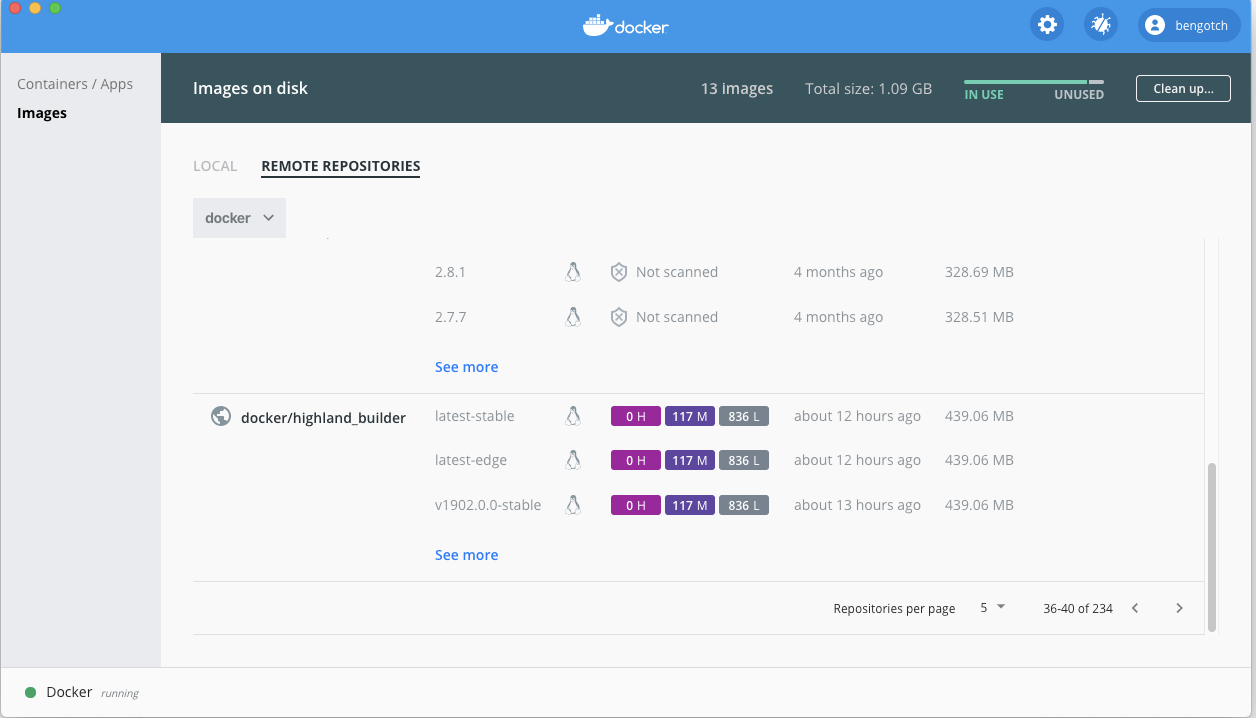
About a month ago we talked about how we planned to make Docker Desktop more first class as part of our Pro and Team subscriptions. Today we are pleased to announce that with the latest release of Docker Desktop we are launching support for Docker Desktop for Pro and Team users. This means that customers on Pro plans or team members on Team plans will be able to get support outside of the community support in our Github repository, this will include installation support, issues in running Desktop and of course the existing support for Docker Hub.
Along with this, we have our first Pro feature available in Docker Desktop! For Pro and Team users who have scanning enabled in Docker Hub, you will be able to see your scan results directly in the Docker Dashboard.
This is the first step in releasing unique features for Pro and Team users on Docker Desktop.
Along with this we are pleased to announce that in Docker Desktop 2.5 we have the GA release of the docker scan CLI powered by Snyk! To find out more about scanning images locally have a read of Marina’s blog post.
For customers who want more control over their version of Desktop and don’t want to keep dismissing updates, we will be providing the ability to ‘ignore’ updates in Desktop until you choose to install the new version. Additionally, we allow for centralized deployment and management of Docker Desktop teams at scale through revised licensing terms for Docker Teams. This will allow larger deployments of Docker Desktop to be rolled out automatically rather than relying on individuals to install it on their own.
We will be combining this with a new way to update Docker Desktop for all of our users, we will be moving to ‘delta’ updates. This means that the update size of Docker Desktop will reduce down from ~500mb to around ~20mb and will install faster as well.
We are really excited to be able to offer some new unique features for our Pro and Team customers as well as continuing to improve Desktop for our millions of existing users. For more information on what is coming on Desktop check out our public roadmap.
To get support you will need to submit a Desktop support ticket here, if you are not a Pro or Team plan member then have a look here at our offerings to get support today.
To find out more about what else is included in our Pro and Team plans then have a look at our pricing page to find out more. Or to just get started with Docker Desktop download it here today to begin using Docker!
The post Pro and Team Subscriptions Embrace Docker Desktop appeared first on Docker Blog.
Quelle: https://blog.docker.com/feed/
AWS Nitro Enklaven ist eine neue EC2-Funktion, die es Kunden ermöglicht, isolierte Computerumgebungen (Enklaven) zu schaffen, um hochsensible Daten wie personenbezogene Daten (PII), Daten aus den Bereichen Gesundheit, Finanzen und geistiges Eigentum innerhalb ihrer Amazon EC2-Instances weiter zu schützen und sicher zu verarbeiten. Nitro Enclaves hilft Kunden, die Angriffsfläche für ihre sensibelsten Datenverarbeitungsanwendungen zu reduzieren.
Quelle: aws.amazon.com
Amazon Kendra ist ein hochpräziser und einfach zu bedienender intelligenter Suchdienst auf der Grundlage von Machine Learning. Ab heute können AWS-Kunden Inhalte, die in Confluence-Repositorys enthalten sind, mit Hilfe des neuen, in Kendra integrierten Confluence Server-Konnektors automatisch indizieren und durchsuchen.
Quelle: aws.amazon.com
ACM für Nitro-Enklaven ist eine Enklaven-Anwendung, die es Ihnen ermöglicht, öffentliche und private SSL/TLS-Zertifikate mit Ihren Webanwendungen und Servern, die auf Amazon EC2-Instances laufen, mit AWS Nitro-Enklaven zu verwenden. SSL-/TLS-Zertifikate werden verwendet, um die Netzwerkkommunikation zu sichern und die Identität von Websites im Internet sowie von Ressourcen in privaten Netzwerken nachzuweisen. Nitro Enclaves ist eine EC2-Funktion, die die Erstellung isolierter Computerumgebungen zum Schutz und zur sicheren Verarbeitung hochsensibler Daten, wie z. B. privater SSL/TLS-Schlüssel, ermöglicht.
Quelle: aws.amazon.com






