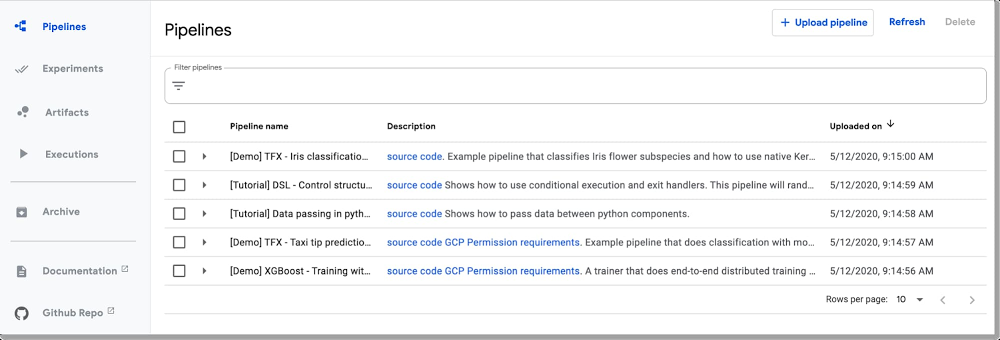
A machine learning workflow can involve many steps with dependencies on each other, from data preparation and analysis, to training, to evaluation, to deployment, and more. It’s hard to compose and track these processes in an ad-hoc manner—for example, in a set of notebooks or scripts—and things like auditing and reproducibility become increasingly problematic.Cloud AI Platform Pipelines, which was launched earlier this year, helps solve these issues: AI Platform Pipelines provides a way to deploy robust, repeatable machine learning pipelines along with monitoring, auditing, version tracking, and reproducibility, and delivers an enterprise-ready, easy to install, secure execution environment for your ML workflows.While the Pipelines Dashboard UI makes it easy to upload, run, and monitor pipelines, you may sometimes want to access the Pipelines framework programmatically. Doing so lets you build and run pipelines from notebooks, and programmatically manage your pipelines, experiments, and runs. To get started, you’ll need to authenticate to your Pipelines installation endpoint. How you do that depends on the environment in which your code is running. So, today, that’s what we’ll focus on.Event-triggered Pipeline callsOne interesting class of use cases that we’ll cover is using the SDK with a service like Cloud Functions to set up event-triggered Pipeline calls. These allow you to kick off a deployment based on new data added to a GCS bucket, new information added to a PubSub topic, or other events.The Pipelines Dashboard UI makes it easy to upload and run pipelines, but often you need remote access as well.With AI Platform Pipelines, you specify a pipeline using the Kubeflow Pipelines (KFP) SDK, or by customizing the TensorFlow Extended (TFX) Pipeline template with the TFX SDK. To connect using the SDK from outside the Pipelines cluster, your credentials must be set up in the remote environment to give you access to the endpoint of the AI Platform Pipelines installation. In many cases, where it’s straightforward to install and initialize gcloud for your account (or it’s already set up for you, as is the case with AI Platform Notebooks), connection is transparent.Alternatively, if you are running on Google Cloud, in a context where it is not straightforward to initialize gcloud, you can authenticate by obtaining and using an access token via the underlying VM’s metadata. If that runtime environment is using a different service account than the one used by the Pipelines installation, you’ll also need to give that service account access to the Pipelines endpoint. This scenario is the case, for example, with Cloud Functions, whose instances use the project’s App Engineservice account. Finally, if you are not running on Google Cloud, and gcloud is not installed, you can use a service account credentials file to generate an access token.We’ll describe these options below, and give an example of how to define a Cloud Function that initiates a pipeline run, allowing you to set up event-triggered Pipeline jobs.Using the Kubeflow Pipelines SDK to connect to an AI Platform Pipelines cluster via gcloud accessTo connect to an AI Platform Pipelines cluster, you’ll first need to find the URL of its endpoint.An easy way to do this is to visit your AI Pipelines dashboard, and click on SETTINGS.Click ‘Settings’ to get information about your installation.A window will pop up that looks similar to the following:KFP client settingsCopy the displayed code snippet to connect using your installation’s endpoint using the KFP SDK. This simple notebook example lets you test the process. (Here is an example that uses the TFX SDK and TFX Templates instead).Connecting from AI Platform NotebooksIf you’re using an AI Platform Notebook running in the same project, connectivity will just work. All you need to do is provide the URL for the endpoint of your Pipelines installation, as described above.Connecting from a local or development machineYou might instead want to deploy to your Pipelines installation from your local machine or other similar environments. If you have gcloud installed and authorized for your account, authentication should again just work.Connecting to the AI Platform Pipelines endpoint from a GCP runtimeFor serverless environments like Cloud Functions, Cloud Run, or App Engine, with transitory instances that use a different service account, it can be problematic to set up and initialize gcloud. Here we’ll use a different approach: we’ll allow the service account to access Cloud AI Pipelines’ inverse proxy, and obtain an access token that we pass when creating the client object. We’ll walk through how to do this with a Cloud Functions example.Example: Event-triggered Pipelines deployment using Cloud FunctionsCloud Functions is Google Cloud’s event-driven serverless compute platform. Using Cloud Functions to trigger a pipeline deployment opens up many possibilities for supporting event-triggered pipelines, where you can kick off a deployment based on new data added to a Google Cloud Storage bucket, new information added to a PubSub topic, and so on.For example, you might want to automatically kick off an ML training pipeline run once a new batch of data has arrived, or an AI Platform Data Labeling Service “export” finishes.Here, we’ll look at an example where deployment of a pipeline is triggered by the addition of a new file to a Cloud Storage bucket.For this scenario, you probably don’t want to set up a Cloud Functions trigger on the Cloud Storage bucket that holds your dataset, as that would trigger each time a file was added—probably not the behavior you want, if updates include multiple files. Instead, upon completion of the data export or ingestion process, you could write a Cloud Storage file to a separate “trigger bucket”, where the file contains information about the path to the newly added data. A Cloud Functions function defined to trigger on that bucket could read the file contents and pass the information about the data path as a param when launching the pipeline run.There are two primary steps to setting up a Cloud Functions function to deploy a pipeline. The first is giving the service account used by Cloud Functions—your project’s App Engine service account—access to the service account used by the Pipelines installation, by adding it as a Member with Project Viewer privileges. By default, the Pipelines service account will be your project’s Compute Engine default service account. Then, you define and deploy a Cloud Functions function that kicks off a pipeline run when triggered. The function obtains an access token for the Cloud Functions instance’s service account, and this token is passed to the KFP client constructor. Then, you can kick off the pipeline run (or make other requests) via the client object.Information about the triggering a Cloud Storage file or its contents can be passed as a pipeline runtime parameter.Because the Cloud Function needs to have the kfp SDK installed, you will need to define a requirements.txt file used by the Cloud Functions deployment that specifies this.This notebook walks you through the process of setting this up, and shows the Cloud Functions function code. The example defines a very simple pipeline that just echoes a file name passed as a parameter. The Cloud Function launches a run of that pipeline, passing the name of the new or modified file that triggered the Function call.Connecting to the Pipelines endpoint using a service account credentials fileIf you’re developing locally and don’t have gcloud installed, you can also obtain a credentials token via a locally-available service account credentials file. This example shows how to do that. It’s most straightforward to use credentials for the same service account as the one used for the Pipelines installation—by default the Compute Engine service account. Otherwise, you will need to give your alternative service account access to the Compute Engine account.SummaryThere are several ways you can use the AI Platform Pipelines API to remotely deploy pipelines, and the notebooks we introduced here should give you a great head start. Cloud Functions, in particular, lets you support many types of event-triggered pipelines. To learn more about putting this into practice, check out the Cloud Functions notebook for an example of how to automatically launch a pipeline run on new data. Give these notebooks a try, and let us know what you think! You can reach me on Twitter at @amygdala.Related ArticlePerformance and cost optimization best practices for machine learningBest practices on how you can enhance the performance and decrease the costs of your ML workloads on Google Cloud.Read Article
Quelle: Google Cloud Platform