Amazon CloudWatch startet den Metrik-Explorer

Amazon CloudWatch führt den Metrics Explorer ein, ein Tag-basiertes Dashboard-Tool, mit dem Kunden betriebliche Gesundheits- und Leistungsmetriken nach Tags filtern, aggregieren und visualisieren können. Der Metrics Explorer bietet Kunden eine flexible Fehlerbehebung, die es ihnen ermöglicht, Tag-basierte Dashboards für den Zustand ihrer Anwendungen zu erstellen, Korrelationen zu identifizieren und ihre Betriebsdaten schnell zu analysieren, um Probleme zu erkennen. Diese Tag-basierten Dashboards bleiben auch dann auf dem neuesten Stand, wenn Ressourcen kommen und gehen, und sie helfen den Kunden, die Ursache zu identifizieren und die Probleme schnell zu isolieren, wenn ein Alarm in einer Anwendung oder Umgebung auftritt. 
Quelle: aws.amazon.com

Amazon RDS for SQL Server unterstützt jetzt Database Mail

Amazon RDS for SQL Server unterstützt jetzt Database Mail. Mit Database Mail können Sie E-Mail-Nachrichten von Ihrer Amazon RDS for SQL Server-Datenbankinstance aus versenden. Nachdem Sie den/die E-Mail-Empfänger angegeben haben, können Sie der von Ihnen gesendeten Nachricht Dateien hinzufügen oder Ergebnisse abfragen. 
Quelle: aws.amazon.com

Hack your own custom domains for Container Registry

If you serve public container images from Container Registry or Artifact Registry, you are exposing your project ID and other details to your users downloading this image. However, by writing a small middleware and running it serverless, you can customize how your registry works.In this article, I would like to show you how you can develop and run a serverless reverse proxy to customize the behavior of your registry, such as serving your images publicly on your custom domain name instead of gcr.io.Anatomy of a “docker pull”Serving container images from a container registry is not magical. All container image registries, such as Google Container Registry, Google Artifact Registry or Docker Hub implement an open API specification. Therefore, when you actually run a pull command like: docker pull gcr.io/google-samples/hello:1.0 the underlying container engine (such as Docker Engine) makes bunch of HTTP REST API calls to the REST endpoint like https://gcr.io/v2/google-samples/hello-app/manifests/1.0 to discover details about this image and download the layer blobs. You can use a tools like crane to further inspect how a container registry works when you try to pull or push an image.Custom domains for your container registryServing images on custom domains are especially useful for public images such as open source projects. It also helps you hide the details of the underlying registry (such as gcr.io/*) from your users.When you use a registry like Container Registry or Artifact Registry to serve images publicly, not only you expose your project IDs to the outside world, you can also end up with really long image names:docker pull us-central1-docker.pkg.dev/<project-id>/<registry-name>/<image-name>From the example above, you can see that the name of your container image determines where the registry is hosted and therefore which host the API calls are made. If you were to build a registry that serves images on your custom domain e.g. example.com, you could pull the images by specifying example.com/IMAGE:TAG as the container image reference. In turn, the API requests would be proxied to the actual registry host.To build such an experience, you can simply use your existing Google Container Registry or Artifact Registry to store your images, and build a “reverse proxy” on top of it to forward the incoming requests while still serving the traffic on the custom domain name you own.Cloud Run: right tool for the jobCloud Run is a great fit to host an application like this on Google Cloud. Cloud Run is a serverless container hosting platform and its pricing is especially relevant here, since you only pay for each request served.In this design, you would be charged only while a request is being handled (i.e. someone is pulling an image), which can easily fit to the free tier.When you use this proxy with Google Container Registry, actual image layers (blobs) are not not downloaded from the registry API (instead, a Cloud Storage download link is generated for pulling the layer tarball). Since your possibly gigabytes-large layers are not going through this proxy, it is easy to keep the costs low on Cloud Run. However, when used with Artifact Registry, since layer blobs of the image are served through this proxy, it will be more costly due to egress networking charges serving larger blobs and longer “billable time” on Cloud Run as a result of proxying large responses during a request.Building a reverse proxy for your registryTo accomplish this task, I have built a simple reverse proxy using the Go programming language in about 200 lines of code. This proxy uses the httputil.ReverseProxy and adds some special handling around credential negotiation for serving public images (and private images publicly, if you want). You can find the example code and deployment instructions at my repository github.com/ahmetb/serverless-registry-proxy. To deploy this proxy to your project to serve public images on your custom domain, refer to the repository for step-by-step instructions. At a high level, you need to:Build the reverse proxy app from its source code into a container image and push it to your registry.Create a Docker registry on Google Container Registry or Artifact Registry, make it publicly accessible to allow serving images without credentials.Deploy the reverse proxy as a publicly-accessible Cloud Run service, while specifying which registry it should be proxying the requests to.Map your domain name to this Cloud Run service on Cloud Console.Cloud Run will now prepare and configure a SSL certificate for your custom domain.After DNS records finish propagating, it’s ready to go. Your users can now run: docker pull<YOUR-DOMAIN>/<IMAGE>:<TAG>to download images from your custom domainConclusionYou can extend the idea of building “middleware proxies” in front of your container registry and hosting them for cheaply on a serverless platform like Cloud Run with minimal costs.For example, you can build a registry proxy that serves only particular images or particular tags. Similarly, you can build your own authentication layer on top of an existing registry. Since the Registry API is a standard, my example code works for other container registries such as Docker Hub as well. This way, you can host a serverless proxy on Cloud Run that serves images from Docker Hub or any other registry.Feel free to examine the source code and fork the project to extend it for your needs. Hopefully this example open source project can also help you serve your container registry on a custom domain.Related ArticleComparing containerization methods: Buildpacks, Jib, and DockerfileContainer Images can be created using a variety of methods including Buildpacks, Jib, and Dockerfiles. Let’s compare them.Read Article
Quelle: Google Cloud Platform

Apigee: Your gateway to more manageable APIs for SAP

Businesses migrating their SAP environments to Google Cloud do so for a number of reasons. Most cite the agility, scalability and security advantages of migrating SAP workloads to Google Cloud; many also focus on improved uptime and performance. At some point, most businesses also want to explore the idea that there’s a fortune locked up in their business data—and that the cloud holds the key. But leveraging the cloud to transform data into dollars is a process that involves special challenges—and specialized tools to address these challenges. For businesses running SAP environments in the cloud, most of which maintain a significant stake in legacy systems and data stores, the challenges tend to get even bigger.The promises and pitfalls of APIsThis is where Google Cloud’s advanced data analytics, machine learning and AI capabilities, especially our API (application programming interface) management tools, come into play. Our Apigee API Management Platform is emerging as a star player for many of our SAP customers because it can open the door to innovation and opportunity for SAP systems and data stores.API management speaks directly to what it really means to get value from business data. By connecting the right data sets with people willing and able to monetize that data, your business can benefit both indirectly (for example, by generating insights that lead to increased sales or better customer experiences) and directly (such as by selling access to your data to another business).APIs have emerged as a pillar of modern digital business practices because they facilitate precisely these types of transactions. Today, every mobile device, website and application uses APIs to access connected services and data sources. APIs provide connection points between apps, platforms and entire application ecosystems. And by using de-facto standards such as REST (representational state transfer), businesses can utilize APIs to build and deploy innovative applications quickly.3 reasons legacy systems and modern APIs don’t mixGoogle Cloud customers running SAP environments may be ready to find the value in their data, but their SAP systems and data, as well as legacy APIs that don’t adhere to REST or other modern approaches,  may not quite be up to the task. This is because:Balancing accessibility, usability and security is a tough task—and the stakes are high. Opening up access to business-critical systems to third-party as well as internal developers could raise significant risks. Even for SAP teams with a high focus on security, the process of providing dependable, programmatic access to legacy SAP systems often involves significant time and effort. And while limiting access and API functionality are both valid ways to mitigate security risk, employing these tactics can slow the pace of innovation and very quickly undermine the reasons for starting this process in the first place.Managing APIs across legacy SAP applications and other data stores can be complex, costly and technically challenging. There’s a fundamental mismatch between the “how and why” of modern APIs and the types of programmatic access for which legacy systems were designed. Modern apps, for example, typically deliver API requests in far greater numbers; that’s true for client-side single-page applications as well as for more traditional server-side apps running on modern, elastically scaled app servers. There are also disparities in the size and structure of data payloads between what modern apps were designed to use and what legacy systems were designed to serve.These examples boil down to the same issue: If your business is running legacy SAP systems or is in the process of migrating away from them, you’ll have serious work to do to make your data accessible for modern use cases and integrations. And asking third-party developers to adjust their methods and skill sets to consume your legacy systems is going to be a very tough sell.Monetizing API access presents another set of technical and practical challenges. For many companies, the name of the data game is monetization: actually charging developers for the privilege of accessing your high-value data sources. Getting this right isn’t just a matter of putting a virtual turnstile in front of your existing APIs. Any monetization strategy lives or dies based on its pricing—and this means understanding exactly who’s using your data, when they access it and how they’re using it. Even if you are not charging your developers for API calls, there are also some valuable insights to be gained from more advanced types of analysis, right up to having a unified view of every data flow and data interaction related to your organization’s API traffic. Overall, API monetization demands that APIs be built in a modern style, designed and maintained for developer consumption rather than just, per legacy methods, for exposing a system.It probably comes as no surprise that an SAP environment, whether or not it’s considered legacy, was designed to focus on SAP system data and not designed to open the data inside an SAP system to other applications. And since these tools don’t build themselves, the question becomes, who will build them?Apigee: Bridging the gaps with API managementAn API management solution such as Apigee can help IT organizations tackle these issues more efficiently. In practice, companies are turning to Apigee for help with three primary SAP application modernization patterns, all of which speak to the challenges of using APIs to create value:1. Modernizing legacy services. One of Apigee’s most important capabilities involves placing an API “wrapper” around legacy SAP interfaces. Developers then get to work with feature-rich, responsive, thoroughly modern APIs, and the Apigee platform handles the process of translating and optimizing incoming API calls before passing the requests through to the underlying SAP environment.This approach to API management also gives IT organizations some useful capabilities. Apigee simplifies the process of designing, implementing and testing APIs that can add more functionality on top of legacy SAP interfaces; and it helps manage where, how and when developers work with APIs. This is also the basis for Apigee’s API monitoring and metrics—essential capabilities that would involve significant effort for most IT teams to build themselves.2. Abstracting APIs from source systems. By providing an abstraction layer between SAP legacy systems and developers, the Apigee platform also ensures a consistent, reliable and predictable developer experience. Through this decoupling of APIs from the underlying source systems, Apigee can adjust to changes in the disposition and availability of systems while carrying on business as usual with developers using its APIs. In this way, SAP enterprises can package and market their API offerings—for example, publishing APIs through a developer portal—and lets them monitor API consumption by target systems.Decoupling the source system from the developer entry points also shields connected applications from significant backend changes like a migration from ECC to S/4HANA. As you make backend changes to your services, apps continue to call the same API without any interruption. The migration may also provide opportunities for consolidating multiple SAP and non-SAP implementations into S/4HANA or cleaning up core SAP systems by moving out some of the functionality to cloud-native systems. Because Apigee abstracts consuming applications from changes to underlying systems and creates uniformity across these diverse systems, it can de-risk the migration from ECC to S/4HANA or similar consolidation projects.3. Creating cloud-native, scalable services. Apigee also excels at bridging the often wide gap between SAP applications and modern, distributed application architectures in which microservices play an essential role. In addition to repackaging SAP data as a microservice and providing capabilities to monetize this data, Apigee takes on some essential performance, availability and security functions: handling access control, authentication, security monitoring and threat assessment plus throttling traffic when necessary to keep backend systems running normally while providing applications with an endpoint that can scale to suit any of your workloads.Needless to say, Apigee’s security capabilities are absolutely essential no matter how you’re using API management tools. But because Apigee also offers performance, analytics and reliability features, it can position companies to jump into a fully mature API monetization strategy. At the same time, it can give IT teams confidence that opening their SAP systems to innovation does not expose mission critical systems to potential harm. Conrad Electronic and Apigee: using APIs to drive innovationWe’re seeing quite a few businesses using Apigee to create value from legacy SAP environments in ways that didn’t seem possible before. For an example of how Apigee and the rest of Google Cloud work together to open new avenues for innovation for SAP users, consider Conrad Electronic.Conrad Electronic combines many years of history as a successful German retailer with a progressive approach to innovation. The company has digitally transformed itself by leveraging an existing, legacy SAP environment alongside Google BigQuery, which provides a single repository for data that once resided in dozens of disparate systems. Conrad Electronic is using Apigee to amplify the impact and value of its transformation on two levels.First, it’s using Apigee to manage data exchanges with shipping companies and with the procurement systems of its B2B customers, giving these companies an improved retail experience and reducing the friction and potential for error that come with traditional transaction environments.At the same time, Conrad Electronic uses Apigee to give its own developers a modern set of tools for innovation and experimentation. A small development team ran with the idea, building an easy-to-use tool that gives in-store staff and visitors access to key product, service and warranty information, using their own tablets and other devices.“APIs give people the freedom and independence to implement their ideas quickly and effectively,” said Aleš Drábek, Conrad Electronics’ Chief Digital and Disruption Officer. “As an effective API management solution, Apigee enables us to harness the power of APIs to transform how we interact with customers and how we transfer data with our B2B customers.”Explore the possibilities with API managementTo learn more about how Apigeecan solve the challenges that come with opening up your SAP systems to new business models and methods for innovation, see here. Also for more information on Google Cloud solutions for SAP customers, seehere.Related ArticleGoogle named a leader in the 2020 Gartner Magic Quadrant for Full Life Cycle API ManagementFor the fifth year in a row, Google Cloud (Apigee) has been named a leader in Gartner’s Full Life Cycle API Management Magic Quadrant.Read Article
Quelle: Google Cloud Platform

Cloud SQL now supports PostgreSQL 13

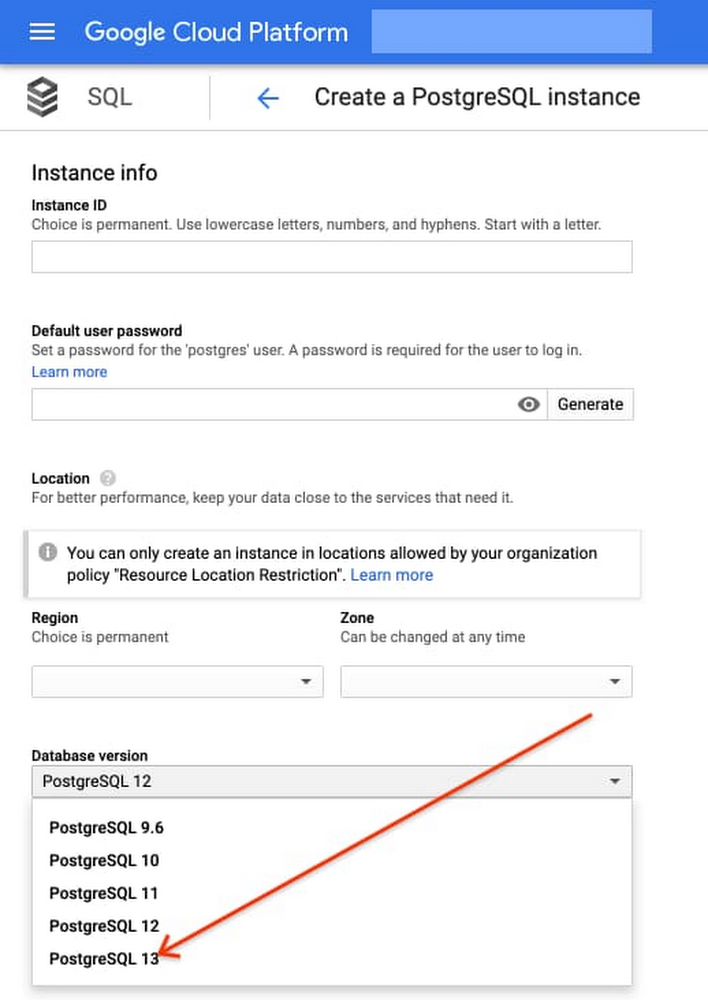
Today, we are announcing that Cloud SQL, our fully managed database service for PostgreSQL, MySQL, and SQL Server, now supports PostgreSQL 13. With PostgreSQL 13 available shortly after its community GA, you get access to the latest features of PostgreSQL while letting Cloud SQL handle the heavy operational lifting, so your team can focus on accelerating application delivery.PostgreSQL 13 introduces performance improvements across the board, including enhanced partitioning capabilities, increased index and vacuum efficiency, and better extended monitoring. Here are some highlights of what’s new:Additional partitioning and pruning cases support: As part of the continuous improvements of partitioned tables in the last two PostgreSQL versions, new cases of partition pruning and direct joins have been introduced, including joins between partitioned tables when their partition bounds do not match exactly. In addition, BEFORE triggers on partitioned tables are now supported.Incremental sorting: Sorting is a performance-intensive task, so every improvement in this area can make a difference. Now PostgreSQL 13 introduces incremental sorting, which leverages early-stage sorts of a query and sorts only the incremental unsorted fields, increasing the chances the sorted block will fit in memory and by that, improving performance.Efficient hash aggregation: In previous versions, it was decided in the planning stage whether hash aggregation functionality could be used, based on whether the hash table fits in memory. With the new version, hash aggregation can be determined based on cost analysis, regardless of space in memory.B-tree index now works more efficiently, thanks to storage space reduction enabled by removing duplicate values.Vacuuming: Vacuuming is an essential operation for database health and performance, especially for demanding and critical workloads. It reclaims storage occupied by dead tuples and catalogues it in the visibility map for future use. In PostgreSQL 13, performance improvements and enhanced automations are being introduced: Faster vacuum: Parallel vacuuming of multiple indexes reduces vacuuming execution time.Autovacuum: Autovacuum can now be triggered by inserts (in addition to the existing update and delete commands), ensuring the visibility map is updating in time. This allows better tuning of freezing tuples while they are still in buffer cache.Monitoring capabilities: WAL usage visibility in EXPLAIN, enhanced logging options, new system views for monitoring shared memory and LRU buffer usage, and more.WITH TIES addition to FETCH FIRST: To ease paging, simplify processing and reduce number of statements, FETCH FIRST WITH TIES returns any additional rows that tie for the last place in the result set according to the ORDER BY clause.Cloud SQL helps ensure you can benefit from what PostgreSQL 13 has to offer quickly and safely. With automatic patches and updates, as well as maintenance controls, you can reduce the risk associated with upgrades and stay current on the latest minor version.To support enterprise workloads, this version is also fully integrated with Cloud SQL’s newest capabilities, including IAM database authentication for enhanced security, audit logging to meet compliance needs, and point-in-time recovery for better data protection.IAM database authenticationPostgreSQL integration with Cloud Identity and Access Management (Cloud IAM) simplifies user management and authentication processes by using the same Cloud IAM credentials instead of traditional database passwords.Cloud SQL IAM database authentication consolidates the authentication workflow, allowing administrators to monitor and manage users’ access in an easy and simple way. This approach brings added consistency when integrating with other Google Cloud database services especially for demanding and scaled environments. Audit loggingAudit logging is enabled now in Cloud SQL for companies required to comply with government, financial, or ISO certifications. The pgaudit extension enables you to produce audit logs at the level of granularity needed for future investigation or auditing purposes. It provides you the flexibility to control the logged statements by setting configuration to specify which classes of statements will be logged. Point-in-time recoveryPoint-in-time recovery (PITR) helps administrators restore and recover an instance to a specific point in time using backups and WAL files when human error or a destructive event occurs. PITR provides an additional method of data protection and allows you to restore your instance to a new instance at any point in time in the past seven days. Point-in-time recovery is enabled by default when you create a new PostgreSQL 13 instance on Cloud SQL.Getting started with PostgreSQL 13To deploy a new PostgreSQL 13 instance using Cloud SQL, you simply need to select PostgreSQL 13 from the database version drop-down menu:To learn more about Cloud SQL for PostgreSQL 13, check out our documentation. Cloud SQL will continue to ensure that you get access to the latest versions and capabilities, while continuing to provide best-in-class availability, security, and integrations to meet your needs. Stay tuned for more updates across all of Google Cloud’s database engines.Related ArticleImproving security and governance in PostgreSQL with Cloud SQLManaged cloud databases need security and governance, and Cloud SQL just added pgAudit and Cloud IAM integrations to make security easier.Read Article
Quelle: Google Cloud Platform

EFA unterstützt jetzt NVIDIA GPUDirect RDMA

Wir freuen uns Ihnen mitzuteilen, dass Elastic Fabric Adapter (EFA) jetzt NVIDIA GPUDirect Remote Direct Memory Access (RDMA) unterstützt. GPUDirect RDMA Support für EFA wird auf Amazon Elastic Compute Cloud (Amazon EC2) P4d-Instances verfügbar sein – die nächste Generation GPU-basierter Instances auf AWS. P4d bietet die höchste Leistung für Machine Learning (ML) Training und High Performance Computing (HPC) in der Cloud für Anwendungen wie eine natürliche Sprachverarbeitung, Objekterkennung und Klassifizierung, seismische Analyse und computergestützte Wirkstoffentdeckung. GPUDirect RDMA Support für EFA ermöglicht, dass Netzwerkkarten (NICs) direkt auf den GPU-Speicher zugreifen. Dies verhindert zusätzliche Speicherkopien, was die ferngesteuerte GPU-to-GPU-Kommunikation über NIVIDIA GPU-basierte Amazon-EC2-Instances beschleunigt und den Orchestrierungsaufwand auf CPUs und Nutzeranwendungen reduziert. Dadurch können unsere Kunden, die Anwendungen mit NIVIDIA Collective Communications Library (NCCL) auf P4d ausführen, ihre fest gekoppelten Multi-Node-Workloads weiter beschleunigen.
Quelle: aws.amazon.com