Media Markt und Saturn: Erster Smart-TV der Ok-Eigenmarke mit Fire-TV-Oberfläche
Der Ok-Smart-TV bietet 4K-Auflösung mit Dolby Vision und hat eine Bilddiagonale von 55 Zoll. (Fire TV, Amazon)
Quelle: Golem

Der Ok-Smart-TV bietet 4K-Auflösung mit Dolby Vision und hat eine Bilddiagonale von 55 Zoll. (Fire TV, Amazon)
Quelle: Golem

In der Ladestation Pixel Stand wird das Pixel 5 ungewollt zum Nachtlicht: Der Bildschirm schaltet sich unverhofft bei voller Helligkeit ein. (Pixel 5, Smartphone)
Quelle: Golem
The post What is container orchestration? appeared first on Mirantis | Pure Play Open Cloud.
The past several years have brought the onset of applications built in containers such as Docker containers, but running a production application means more than simply creating a container and running it on Docker Engine. It means container orchestration.
Understanding container orchestration
Before we get into the specifics of how it works, we should understand what is meant by container orchestration.
Containerization of applications makes it possible to more easily run them in diverse environments, because Docker Engine acts as the application’s conceptual “home”. However, it doesn’t solve all of the problems involved in running a production application — just the opposite, in fact.
A non-containerized application assumes that it will be installed and run manually, or at least delivered via a virtual machine. But a containerized application has to be placed, started, and provided with resources. This kind of container automation is why you need container orchestration tools.
These Docker container orchestration tools perform the following tasks:
Determine what resources, such as compute nodes and storage, are available
Determine the best node (or nodes) on which to run specific containers
Allocate resources such as storage and networking
Start one or more copies of the desired containers, based on redundancy requirements
Monitor the containers and in the event that one or more of them is no longer functional, replace them.
Multiple container orchestration tools exist, and they don’t all handle objects in the same way.
How to plan for container orchestration
In an ideal situation, your application should not be dependent on which container orchestration platform you’re using. Instead, you should be able to orchestrate your containers using any platform as long as you configure that platform correctly.
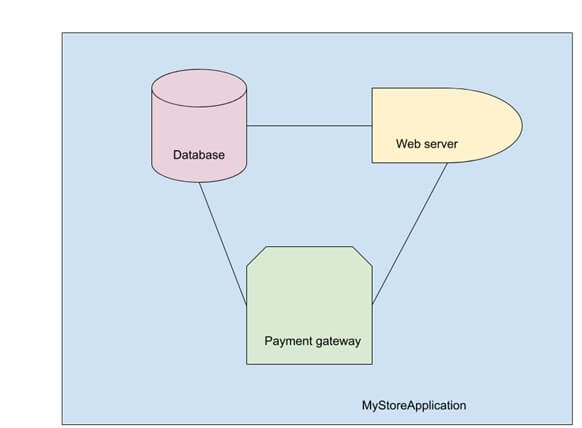
All of this relies, again, on knowing the architecture of your application so that you can implement it outside of the application itself. For example, let’s say we’re building an e-commerce site.
We have a database, web server, and payment gateway, all of which communicate over a network. We also have all of the various passwords needed for them to talk to each other.
The compute, network, storage, and secrets are all resources that need to be handled by the container orchestration platform, but how that happens depends on the platform that you choose.
Types of container orchestration platforms
Because different environments require different levels of orchestration, the market has spun off multiple container orchestration tools over the last few years. While they all do the same basic job of container automation, they work in different ways and were designed for different scenarios.
Docker Swarm Orchestration
To the engineers at Docker, orchestration was a capability to be provided as a first class citizen. As such, Swarm is included with Docker itself. Enabling Swarm mode is straightforward, as is adding nodes.
Docker Swarm enables developers to define applications in a single file, such as:
version: “3.7”
services:
database:
image: dockersamples/atsea_db
ports:
– “5432”
environment:
POSTGRES_USER: gordonuser
POSTGRES_DB_PASSWORD_FILE: /run/secrets/postgres-password
POSTGRES_DB: atsea
PGDATA: /var/lib/postgresql/data/pgdata
networks:
– atsea-net
secrets:
– domain-key
– postgres-password
deploy:
placement:
constraints:
– ‘node.role == worker’
appserver:
image: dockersamples/atsea_app
ports:
– “8080”
networks:
– atsea-net
environment:
METADATA: proxy-handles-tls
deploy:
labels:
com.docker.lb.hosts: atsea.docker-ee-stable.cna.mirantis.cloud
com.docker.lb.port: 8080
com.docker.lb.network: atsea-net
com.docker.lb.ssl_cert: wildcard_docker-ee-stable_crt
com.docker.lb.ssl_key: wildcard_docker-ee-stable_key
com.docker.lb.redirects: http://atsea.docker-ee-stable.cna.mirantis.cloud,https://atsea.docker-ee-stable.cna.mirantis.cloud
com.libkompose.expose.namespace.selector: “app.kubernetes.io/name:ingress-nginx”
replicas: 2
update_config:
parallelism: 2
failure_action: rollback
placement:
constraints:
– ‘node.role == worker’
restart_policy:
condition: on-failure
delay: 5s
max_attempts: 3
window: 120s
secrets:
– domain-key
– postgres-password
payment_gateway:
image: cna0/atsea_gateway
secrets:
– staging-token
networks:
– atsea-net
deploy:
update_config:
failure_action: rollback
placement:
constraints:
– ‘node.role == worker’
networks:
atsea-net:
name: atsea-net
secrets:
domain-key:
name: wildcard_docker-ee-stable_key
file: ./wildcards.docker-ee-stable.key
domain-crt:
name: wildcard_docker-ee-stable_crt
file: ./wildcards.docker-ee-stable.crt
staging-token:
name: staging_token
file: ./staging_fake_secret.txt
postgres-password:
name: postgres_password
file: ./postgres_password.txt
In this example, we have three services: the database, the application server, and the payment gateway, all of which include their own particular configurations. These configurations also refer to objects such as networks and secrets, which are defined independently.
The advantage of Swarm is that it’s got a small learning curve, and developers can run their applications in the same environment on their laptop as it will use when it runs in production. The disadvantage is that it’s not as full-featured as its companion, Kubernetes.
Kubernetes Orchestration
While Swarm is still widely used in many contexts, the acknowledged champion of container orchestration is Kubernetes. Like Swarm, Kubernetes enables developers to create resources such as groups of replicas, networking, and storage, but it’s done in a completely different way.
For one thing, Kubernetes is a separate piece of software; in order to use it, you must either install a distribution locally or have access to an existing cluster. For another, the entire architecture of applications and how they’re created is totally different from Swarm. For example, the application we created in the earlier example would look like this:
apiVersion: v1
data:
staging-token: c3RhZ2luZw0K
kind: Secret
metadata:
creationTimestamp: null
labels:
io.kompose.service: staging-token
name: staging-token
type: Opaque
—
apiVersion: v1
data:
postgres-password: cXdhcG9sMTMNCg==
kind: Secret
metadata:
creationTimestamp: null
labels:
io.kompose.service: postgres-password
name: postgres-password
type: Opaque
—
apiVersion: apps/v1
kind: Deployment
metadata:
annotations:
kompose.version: 1.21.0 (HEAD)
creationTimestamp: null
labels:
io.kompose.service: payment-gateway
name: payment-gateway
spec:
replicas: 1
selector:
matchLabels:
io.kompose.service: payment-gateway
strategy: {}
template:
metadata:
annotations:
kompose.version: 1.21.0 (HEAD)
creationTimestamp: null
labels:
io.kompose.network/atsea-net: “true”
io.kompose.service: payment-gateway
spec:
containers:
– image: cna0/atsea_gateway
name: payment-gateway
resources: {}
volumeMounts:
– mountPath: /run/secrets/staging-token
name: staging-token
nodeSelector:
node-role.kubernetes.io/worker: “true”
restartPolicy: Always
volumes:
– name: staging-token
secret:
items:
– key: staging-token
path: staging-token
secretName: staging-token
status: {}
—
apiVersion: networking.k8s.io/v1
kind: NetworkPolicy
metadata:
creationTimestamp: null
name: ingress-appserver
spec:
ingress:
– from:
– namespaceSelector:
matchLabels:
app.kubernetes.io/name: ingress-nginx
– podSelector: {}
podSelector:
matchLabels:
io.kompose.network/atsea-net: “true”
policyTypes:
– Ingress
—
apiVersion: v1
data:
domain-key: <snip>
kind: Secret
metadata:
creationTimestamp: null
labels:
io.kompose.service: domain-key
name: domain-key
type: Opaque
—
apiVersion: v1
data:
Domain-crt: <snip>
kind: Secret
metadata:
creationTimestamp: null
labels:
io.kompose.service: domain-crt
name: domain-crt
type: Opaque
—
apiVersion: v1
kind: Service
metadata:
annotations:
kompose.version: 1.21.0 (HEAD)
creationTimestamp: null
labels:
io.kompose.service: database
name: database
spec:
ports:
– name: “5432”
port: 5432
targetPort: 5432
selector:
io.kompose.service: database
status:
loadBalancer: {}
—
apiVersion: apps/v1
kind: Deployment
metadata:
annotations:
kompose.version: 1.21.0 (HEAD)
creationTimestamp: null
labels:
io.kompose.service: database
name: database
spec:
replicas: 1
selector:
matchLabels:
io.kompose.service: database
strategy: {}
template:
metadata:
annotations:
kompose.version: 1.21.0 (HEAD)
creationTimestamp: null
labels:
io.kompose.network/atsea-net: “true”
io.kompose.service: database
spec:
containers:
– env:
– name: PGDATA
value: /var/lib/postgresql/data/pgdata
– name: POSTGRES_DB
value: atsea
– name: POSTGRES_DB_PASSWORD_FILE
value: /run/secrets/postgres-password
– name: POSTGRES_USER
value: gordonuser
image: dockersamples/atsea_db
name: database
ports:
– containerPort: 5432
resources: {}
volumeMounts:
– mountPath: /run/secrets/domain-key
name: domain-key
– mountPath: /run/secrets/postgres-password
name: postgres-password
nodeSelector:
node-role.kubernetes.io/worker: “true”
restartPolicy: Always
volumes:
– name: domain-key
secret:
items:
– key: domain-key
path: domain-key
secretName: domain-key
– name: postgres-password
secret:
items:
– key: postgres-password
path: postgres-password
secretName: postgres-password
status: {}
—
apiVersion: networking.k8s.io/v1
kind: NetworkPolicy
metadata:
creationTimestamp: null
name: atsea-net
spec:
ingress:
– from:
– podSelector:
matchLabels:
io.kompose.network/atsea-net: “true”
podSelector:
matchLabels:
io.kompose.network/atsea-net: “true”
—
apiVersion: v1
kind: Service
metadata:
annotations:
kompose.version: 1.21.0 (HEAD)
creationTimestamp: null
labels:
io.kompose.service: appserver
name: appserver
spec:
ports:
– name: “8080”
port: 8080
targetPort: 8080
selector:
io.kompose.service: appserver
status:
loadBalancer: {}
—
apiVersion: v1
kind: Pod
metadata:
creationTimestamp: null
labels:
io.kompose.network/atsea-net: “true”
io.kompose.service: appserver
name: appserver
spec:
containrs:
– env:
– name: METADATA
value: proxy-handles-tls
image: dockersamples/atsea_app
name: appserver
ports:
– containerPort: 8080
resources: {}
volumeMounts:
– mountPath: /run/secrets/domain-key
name: domain-key
– mountPath: /run/secrets/postgres-password
name: postgres-password
nodeSelector:
node-role.kubernetes.io/worker: “true”
restartPolicy: OnFailure
volumes:
– name: domain-key
secret:
items:
– key: domain-key
path: domain-key
secretName: domain-key
– name: postgres-password
secret:
items:
– key: postgres-password
path: postgres-password
secretName: postgres-password
status: {}
—
apiVersion: networking.k8s.io/v1beta1
kind: Ingress
metadata:
annotations:
kompose.version: 1.21.0 (HEAD)
creationTimestamp: null
labels:
io.kompose.service: appserver
name: appserver
spec:
rules:
– host: atsea.docker-ee-stable.cna.mirantis.cloud
http:
paths:
– backend:
serviceName: appserver
servicePort: 8080
tls:
– hosts:
– atsea.docker-ee-stable.cna.mirantis.cloud
secretName: tls
status:
loadBalancer: {}
The application is the same, it’s just created in a different way. As you can see, the web application server, the database, and the payment gateway are still created using Kubernetes, just with a different structure. In addition, the support structures such as networks and secrets must be created.
The additional complexity does bring a number of benefits, however. Kubernetes is much more full-featured than Swarm, and can be appropriate in both small and large environments.
Where to find container orchestration
Not only are there different types of container orchestration, you can also find it in different places, depending on your situation.
Local desktop/laptop
Most developers work on their desktop or laptop machine, so it’s convenient if the target container orchestration platform is available at that level.
For Swarm users, the process is straightforward; Swarm is already part of Docker and just needs to be enabled.
For Kubernetes, the developer needs to take an additional step to install Kubernetes on their machine, but there are several tools that make this possible, such as Kubeadm.
Internal network
Once the developer is ready to deploy, if the application will live on an on-premise data center, typically the user won’t need to install a cluster because it will have been installed by administrators; instead they will connect using the connection information given to them.
Administrators can deploy a number of different cluster types; for example, enterprise grade Docker Swarm clusters and Kubernetes clusters can be deployed by Docker Enterprise Container Cloud.
AWS
Businesses that run their infrastructure on Amazon Web Services have a number of different choices. For example, you can run install Docker Enterprise on Amazon EC2 compute servers, or you can use Docker Enterprise Container Cloud to deploy clusters directly on Amazon Web Services. You also have the option to use specific container resources, such as Amazon Container Services or Amazon Kubernetes service.
Google
Choices for Google cloud are similar; you can install a container management platform such as Docker Enterprise, or you can use Google Kubernetes Engine to spin up clusters using Google’s hardware and software — and their API.
Azure
The situation is the same for Azure Cloud: you must choose between deploying a distribution such as Docker Enterprise on compute nodes, providing Swarm and Kubernetes capabilities, or use the Azure Kubernetes Service to provide Kubernetes clusters to your users.
Getting started with container orchestration
The best way to get started with container orchestration is to simply pick a system and try it out! You can try installing kubeadm, or you can make it easy on yourself and install a full system such as Docker Enterprise, which provides you with multiple options for container orchestration platforms.
The post What is container orchestration? appeared first on Mirantis | Pure Play Open Cloud.
Quelle: Mirantis
Telecommunications providers are under a lot of pressure. Customers increasingly expect one provider to meet all their telephony, digital entertainment, and broadband needs. And as the choice of providers increases and switching costs decrease, it’s harder than ever to create and maintain loyalty. At UPC Polska, we know this challenge all too well. As a leading telecommunications provider in Poland, we serve 1.5 million of customers with 3 million services each day, via an IT infrastructure built over the past 20 years. While we still run several business critical applications on premises, it also became increasingly clear to us that we could not develop, test, and deploy new features fast enough in our existing environment. As a result, we came to a stark realization: we had to transform our IT infrastructure to accelerate our feature release process, or risk losing customers. After considering several options, we selectedGoogle Cloud’s Anthos because it offered a uniform management experience across our hybrid environment and easy application modernization. We wanted to implement Anthos as soon as possible, but also knew we needed an experienced global systems integrator to help us do so securely and effectively. As a result, we turned to Accenture who helped us complete the project in just six weeks.Blending cultural and technology transformationOur customer service application allows us to build highly personalized relationships with over a million customers. Since rapid feature releases are critical to our commercial success, that application was one of the first targets for modernization with Anthos. Accenture came in, worked hard to understand our architecture, and provided the cloud-first strategy and assurance we needed to confidently migrate the app to the new hybrid environment. With the support of Google Cloud and Accenture, our team embraced the shift in management and development models from Waterfall to Agile. Although this was a difficult transition due to significant technological and infrastructure shifts and changes in processes, responsibilities, and ways of working, it ultimately increased speed-to-market on new features .To help ensure success for our DevOps team with this new approach, we deployed Anthos in our on-premises data centers. With Anthos, we can uniformly set policy at scale and continuously release features without worrying about security, vulnerability management or downtime across different environments. Our developers can then focus on writing better code, while operators use Anthos to effectively manage and run those applications anywhere. Accenture further drove the cloud-first DevOps culture shift we needed to make this all work, through training and support that quickly got our staff up to speed.The biggest advantage of working with Google Cloud and Accenture to deploy Anthos has been increased engagement among our staff. Teams are working passionately to achieve as much as possible because they can now focus on their core responsibilities rather than infrastructure management. Anthos helps us control which workloads, features, and data go into the cloud, and which are better suited for our on-premises infrastructure. Anyone working on this project today at UPC Polska would tell you that Anthos gives us the best of both worlds—the agility and speed of the cloud along with the power and comfort of still being able to use our traditional on-premises infrastructure.With the incredible collaboration between our team, Accenture, and Google Cloud, we have the development, testing, and production clusters we need integrated into our Agile development process. Now, both developers and operators enjoy increased scalability, stronger system resiliency, and more knowledge about containers.Making efforts countEverything we have done with Accenture and Google Cloud is driven by our commitment to creating, delivering, and improving the quality of services we offer to our 1.5 million customers. Personalization at that scale can be challenging, even with all the right technologies and DevOps strategies in place. Luckily, we have an impressive team and plenty of support through Google Cloud and Accenture. With our IT infrastructure and culture working together as part of a more Agile model powered by Anthos, the sky’s the limit for our personalization efforts, which frees us to dream up more ways to serve our customers. For example, we’re exploring projects like Software Defined Access Networks, cloud-based CRM, more personalized customer experiences, smart home technology, integrations between mobile and fixed networks, and an ever-growing portfolio of content and services. As we enter this new and fast-paced time in UPC Polska’s history, we look forward to working with Accenture and Google Cloud to better serve our customers.Read the full case study to learn more about how UPC partnered with Google Cloud and Accenture on this project.
Quelle: Google Cloud Platform
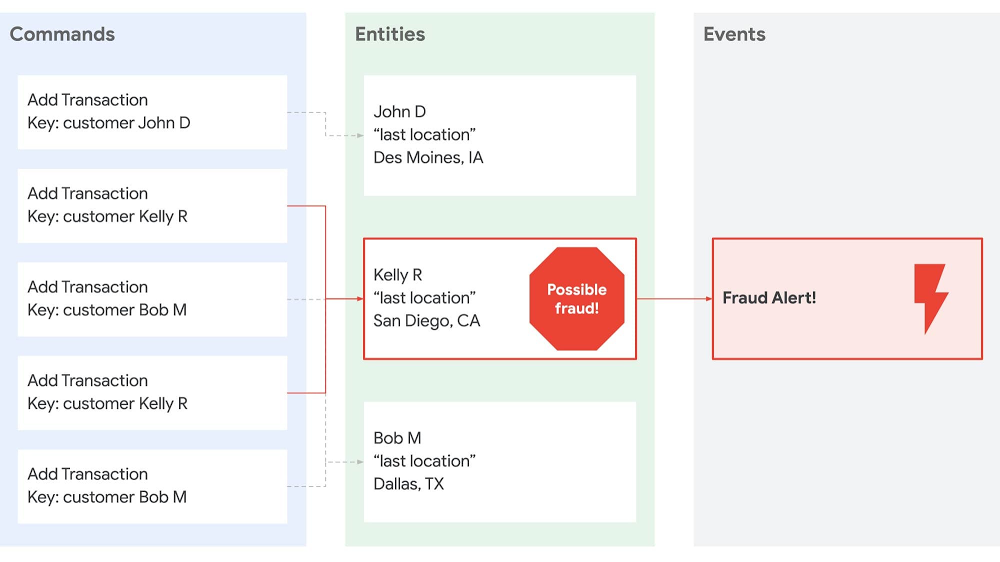
In recent years, stateless middle-tiers have been touted as a simple way to achieve horizontal scalability. But the rise of microservices has pushed the limits of the stateless architectural pattern, causing developers to look for alternatives.Stateless middle-tiers have been a preferred architectural pattern because they helped with horizontal scaling by alleviating the need for server affinity (aka sticky sessions). Server affinity made it easy to hold data in the middle-tier for low-latency access and easy cache invalidation. The stateless model pushed all “state” out of the middle-tier into backing data stores. In reality the stateless pattern just moved complexity and bottlenecks to that backing data tier. The growth of microservice architectures exacerbated the problem by putting more pressure on the middle tier, since technically, microservices should only talk to other services and not share data tiers. All manners of bailing wire and duct tape have been employed to overcome the challenges introduced by these patterns. New patterns are now emerging which fundamentally change how we compose a system from many services running on many machines.To take an example, imagine you have a fraud detection system. Traditionally the transactions would be stored in a gigantic database and the only way to perform some analysis on the data would be to periodically query the database, pull the necessary records into an application, and perform the analysis. But these systems do not partition or scale easily. Also, they lack the ability for real-time analysis. So architectures shifted to more of an event-driven approach where transactions were put onto a bus where a scalable fleet of event-consuming nodes could pull them off. This approach makes partitioning easier, but it still relies on gigantic databases that received a lot of queries. Thus, event-driven architectures often ran into challenges with multiple systems consuming the same events but at different rates.Another (we think better) approach, is to build an event-driven system that co-locates partitioned data in the application tier, while backing the event log in a durable external store. To take our fraud detection example, this means a consumer can receive transactions for a given customer, keep those transactions in memory for as long as needed, and perform real-time analysis without having to perform an external query. Each consumer instance receives a subset of commands (i.e., add a transaction) and maintains its own “query” / projection of the accumulated state. For instance:By separating commands and queries we can easily achieve end-to-end horizontal scaling, fault tolerance, and microservice decoupling. And with the data being partitioned in the application tier we can easily scale that tier up and down based on the number of events or size of data, achieving serverless operations. Making it work with CloudstateThis architecture is not entirely uncommon, going by the names Event Sourcing, Command Query Response Segregation (CQRS), and Conflict-Free Replicated Data Types. (Note: for a great overview of this see a presentation titled “Cloudstate – Towards Stateful Serverless” by Jonas Bonér.) But until now, it’s been pretty cumbersome to build systems with these architectures due to primitive programming and operational models. The new Cloudstate open-source project attempts to change that by building more approachable programming and operational models.Cloudstate’s programming model is built on top of protocol buffers (protobufs) which enable evolvable data schemas and generated service interaction stubs. When it comes to data schemas, protobufs allow you to add fields to event / message objects without breaking systems that are still using older versions of those objects. Likewise, with the gRPC project, protobufs can be automatically wrapped with client and server “stubs” so that no code needs to be written for handling protobuf-based network communication. For example, in the fraud detection system, the protobuf might be:The `Transaction` message contains the details about a transaction and the `user_id` field enables automatic sharding of data based on the user.Cloudstate adds support for event sourcing on top of this foundation so developers can focus on just the commands and accumulated state that a given component needs. For our fraud detection example, we can simply define a class / entity to hold the distributed state and handle each new transaction. You can use any language, but we use Kotlin, a Google-sponsored language that extends Java.With the exception of a tiny bit of bootstrapping code, that’s all you need to build an event-sourced system with Cloudstate!The operational model is also just as delightful since it is built on Kubernetes and Knative. First you need to containerize the service. For JVM-based builds (Maven, Gradle, etc.) you can do this with Jib. In our example we use Gradle and can just run:This creates a container image for the service and stores it on the Google Container Registry. To run the Cloudstate service on your own Kubernetes / Google Kubernetes Engine (GKE) cluster, you can use the Cloudstate operator and a deployment descriptor such as:There you have it—a scalable, distributed event-sourced service! And if you’d rather not manage your own Kubernetes cluster, then you can also run your Cloudstate service in the Akka Serverless managed environment, provided by Lightbend, the company behind Cloudstate.To deploy the Cloudstate service on Lightbend Cloudstate simply run:It’s that easy! Here is a video that walks through the full fraud detection sample:You can find the source for the sample on GitHub: github.com/jamesward/cloudstate-sample-fraudAkka Serverless under the hoodAs an added bonus, Akka Serverless itself is built on Google Cloud. To deliver this stateful serverless cloud service on Google Cloud, Cloudstate needs a distributed durable store for messages. With the open-source Cloudstate you can use PostgreSQL or Apache Cassandra. The managed Akka Serverless service is built on Google Cloud Spanner due to its global scale and high throughput. Lightbend also chose to build their workload execution on GKE to take advantage of its autoscaling and security features.Together, Lightbend and Google Cloud have many shared customers who have built modern, resilient, and scalable systems with Lightbend’s open source and Google’s Cloud services. So we are excited that Cloudstate brings together Lightbend and Google Cloud and we look forward to seeing what you will build with it! To get started check out the Open Source Cloudstate project and Lightbend’s Akka Serverless managed cloud service.
Quelle: Google Cloud Platform
2020 has brought with it some tremendous innovations in the area of cloud security. As cloud deployments and technologies have become an even more central part of organizations’ security program, we hope you’ll join us for the latest installment of our Google Cloud Security Talks, a live online event on November 18th, where we’ll help you navigate the latest thinking in cloud security.We’ll share expert insights into our security ecosystem and cover the following topicsSunil Potti and Rob Sadowski will open the digital event with our latest Google Cloud security announcements.This will be followed by a panel discussion with Dave Hannigan and Jeanette Manfra from Google Cloud’s Office of the CISO on how cloud migration is a unique opportunity to dismantle the legacy security debt of the past two decades.Kelly Waldher and Karthik Lakshminarayan will talk about the new Google Workspace and how it can enable users to access data safely and securely while preserving individual trust and privacy.We will present our vision of network security in the cloud with Shailesh Shukla and Peter Blum, where we’ll talk about the recent innovations that are making network security in the cloud powerful but invisible, protecting infrastructure and users from cyber attacks. Sam Lugani and Ibrahim Damlaj will do a deeper dive on Confidential Computing, and more specifically Confidential GKE Nodes and how they can add another layer of protection for containerized workloads.You will also learn how Security Command Center can help you identify misconfigurations in your virtual machines, containers, network, storage, and identity and access management policies as well vulnerabilities in your web applications, with Kathryn Shih and Timothy Peacock.Anton Chuvakin and Seth Vargo will talk about the differences between key management and secret management to help you choose the best security controls for your use cases.Finally, we will host the Google Cloud Security Showcase, a special segment where we’ll focus on a few security problems and show how we’ve recently helped customers solve them using the tools and products that Google Cloud provides. We look forward to sharing our latest security insights and solutions with you. Sign-up now to reserve your virtual seat.
Quelle: Google Cloud Platform
Docker Hub is a popular registry for hosting public container images. Earlier this summer, Docker announced it will begin rate-limiting the number of pull requests to the service by “Free Plan” users. For pull requests by anonymous users this limit is now 100 pull requests per 6 hours; authenticated users have a limit of 200 pull requests per 6 hours. When the new rate limits take effect on November 1st, they might disrupt your automated build and deployment processes on Cloud Build or how you deploy artifacts to Google Kubernetes Engine (GKE), Cloud Run or App Engine Flex from Docker Hub. This situation is made more challenging because, in many cases, you may not be aware that a Google Cloud service you are using is pulling images from Docker Hub. For example, if your Dockerfile has a statement like “FROM debian:latest”or your Kubernetes Deployment manifest has a statement like “image: postgres:latest” it is pulling the image directly from Docker Hub. To help you identify these cases, Google Cloud has prepared a guide with instructions on how to scan your codebase and workloads for container image dependencies from third-party container registries, like Docker Hub.We are committed to helping you run highly reliable workloads and automation processes. In the rest of the blog post, we’ll discuss how these new Docker Hub pull rate limits may affect your deployments running on various Google Cloud services, and strategies for mitigating against any potential impact. Be sure to check back often, as we will update this post regularly. Impact on Kubernetes and GKEOne of the groups that may see the most impact from these Docker Hub changes is users of managed container services. Like it does for other managed Kubernetes platforms, Docker Hub treats GKE as an anonymous user by default. This means that unless you are specifying Docker Hub credentials in your configuration, your cluster is subject to the new throttling of 100 image pulls per six hours, per IP. And many Kubernetes deployments on GKE use public images. In fact, any container name that doesn’t have a container registry prefix such as gcr.io is pulled from Docker Hub. Examples include nginx, and redis.Container Registry hosts a cache of the most requested Docker Hub images from Google Cloud, and GKE is configured to use this cache by default. This means that the majority of image pulls by GKE workloads should not be affected by Docker Hub’s new rate limits. Furthermore, to remove any chance that your images would not be in the cache in the future, we recommend that you migrate your dependencies into Container Registry, so that you can pull all your images from a registry under your control.In the interim, to verify whether or not you are affected, you can generate a list of DockerHub images your cluster consumes:You may want to know if the images you use are in the cache. The cache will change frequently but you can check for current images via a simple command:It is impractical to predict cache hit-rates, especially in times where usage will likely change dramatically. However, we are increasing cache retention times to ensure that most images that are in the cache stay in the cache.GKE nodes also have their own local disk cache, so when reviewing your usage of DockerHub, you only need to count the number of unique image pulls (of images not in our cache) made from GKE nodes: For private clusters, consider the total number of such image pulls across your cluster (as all image pulls will be routed via a single NAT gateway). For public clusters you have a bit of extra breathing room, as you only need to consider the number of unique image pulls on a per-node basis. For public nodes, you would need to churn through more than 100 unique public uncached images every 6 hours to be impacted, which is fairly uncommon.If you determine that your cluster may be impacted, you can authenticate to DockerHub by adding imagePullSecrets with your Docker Hub credentials to every Pod that references a container image on Docker Hub.While GKE is one of the Google Cloud services that may see an impact from the Docker Hub rate limits, any service that relies on container images may be affected, including similar Cloud Build, Cloud Run, App Engine, etc.Finding the right path forward Upgrade to a paid Docker Hub accountArguably, the simplest—but most expensive—solution to Docker Hub’s new rate limits is to upgrade to a paid Docker Hub account. If you choose to do that and you use Cloud Build, Cloud Run on Anthos, or GKE, you can configure the runtime to pull with your credentials. Below are instructions for how to configure each of these services:Cloud Build: Interacting with Docker Hub imagesCloud Run on Anthos: Deploying private container images from other container registriesGoogle Kubernetes Engine: Pull an Image from a Private RegistrySwitch to Container RegistryAnother way to avoid this issue is to move any container artifacts you use from Docker Hub to Container Registry. Container Registry stores images as Google Cloud Storage objects, allowing you to incorporate container image management as part of your overall Google Cloud environment. More to the point, opting for a private image repository for your organization puts you in control of your software delivery destiny. To help you migrate, the above-mentioned guide also provides instructions on how to copy your container image dependencies from Docker Hub and other third-party container image registries to Container Registry. Please note that these instructions are not exhaustive—you will have to adjust them based on the structure of your codebase.Additionally, you can use Managed Base Images, which are automatically patched by Google for security vulnerabilities, using the most recent patches available from the project upstream (for example, GitHub). These images are available in the GCP Marketplace.Here to help you weather the changeThe new rate limits on Docker Hub pull requests will have a swift and significant impact on how organizations build and deploy container-based applications. In partnership with the Open Container Initiative (OCI), a community devoted to open industry standards around container formats and runtimes, we are committed to ensuring that you weather this change as painlessly as possible.
Quelle: Google Cloud Platform
Docker is happy to announce the GA of our V2 Github Action. We’ve been working with @crazy-max over the last few months along with getting feedback from the wider community on how we can improve our existing Github Action. We have now moved from our single action to a clearer division and advanced set of options that not only allow you to just build & push but also support features like multiple architectures and build cache.
The big change with the advent of our V2 action is also the expansion of the number of actions that Docker is providing on Github. This more modular approach and the power of Github Actions has allowed us to make the minimal UX changes to the original action and add a lot more functionality.
We still have our more meta build/push action which does not actually require all of these preconfiguration steps and can still be used to deliver the same workflow we had with the previous workflow! To Upgrade the only changes are that we have split out the login to a new step and also now have a step to setup our builder.
–
name: Setup Docker Buildx
uses: docker/setup-buildx-action@v1
This step is setting up our builder, this is the tool we are going to use to build our Docker image.
This means our full Github Action is now:
name: ci
on:
push:
branches: main
jobs:
main:
runs-on: ubuntu-latest
steps:
–
name: Setup Docker Buildx
uses: docker/setup-buildx-action@v1
–
name: Login to DockerHub
uses: docker/login-action@v1
with:
username: ${{ secrets.DOCKERHUB_USERNAME }}
password: ${{ secrets.DOCKERHUB_TOKEN }}
–
name: Build and push
id: docker_build
uses: docker/build-push-action@v2
with:
push: true
tags: bengotch/samplepython:latest
For users looking for more information on how to move from V1 of the Github Action to V2, check out our release migration notes.
Let’s now look at some of the more advanced features we have unlocked by adding in this step and the new QEMU option.
Multi platform
By making use of BuildKit we now have access to multi-architecture builds, this allows us to build images targeted at more than one platform and also build Arm images.
To do this, we will need to add in our QEMU step:
name: Set up QEMU
uses: docker/setup-qemu-action@v1
And then within our build & push step we will need to specify out platform to use:
–
name: Build and push
uses: docker/build-push-action@v2
with:
context: .
file: ./Dockerfile
platforms: linux/386,linux/amd64,linux/arm/v6,linux/arm/v7,linux/arm64,linux/ppc64le,linux/s390x
push: true
tags: |
bengotch/app:latest
Cache Registry
To make use of caching to speed up my builds I can now make use of the
name: ci
on:
push:
branches: master
jobs:
registry-cache:
runs-on: ubuntu-latest
steps:
–
name: Set up Docker Buildx
uses: docker/setup-buildx-action@v1
–
name: Login to DockerHub
uses: docker/login-action@v1
with:
username: ${{ secrets.DOCKERHUB_USERNAME }}
password: ${{ secrets.DOCKERHUB_TOKEN }}
–
name: Build and push
uses: docker/build-push-action@v2
with:
push: true
tags: user/app:latest
cache-from: type=registry,ref=user/app:latest
cache-to: type=inline
To see more examples of the best practices for using our latest version of the Github Action check out Chads example repohttps://github.com/metcalfc/docker-action-examples. You can make use of the features in here or some of the more advanced features we can now offer with the V2 action such as push to multiple registries, use of a local registry for e2e test, export an image to the Docker client and more!
To learn more about the changes to our Github Action, have a read through our updated usage documentation or check out our blog post on the best practices with Docker and Github Actions. If you have questions or feedback on the changes from V1 to V2 please raise tickets on our repo or our public roadmap
The post Docker V2 Github Action is Now GA appeared first on Docker Blog.
Quelle: https://blog.docker.com/feed/
2020 has been quite the year. Pandemic, lockdowns, virtual conferences and back-to-back Zoom meetings. Global economic pressures, confinement and webcams aside, we at Docker have been focused on delivering what we set out to do when we announced Docker’s Next Chapter: Advancing Developer Workflows for Modern Apps last November 2019. I wish to thank the Docker team for their “can do!” spirit and efforts throughout this unprecedented year, as well as our community, our Docker Captains, our ecosystem partners, and our customers for their non-stop enthusiasm and support. We could not have had the year we had without you.
This next chapter is being jointly written with you, the developer, as so much of our motivation and inspiration comes from your sharing with us how you’re using Docker. Consider the Washington University School of Medicine (WUSM): WUSM’s team of bioinformatics developers uses Docker to build pipelines – consisting of up to 25 Docker images in some cases – for analyzing the genome sequence data of cancer patients to inform diagnosis and treatments. Furthermore, they collaborate with each other internally and with other cancer research institutions by sharing their Docker images through Docker Hub. In the words of WUSM’s Dr. Chris Miller, this collaboration “helps to accelerate science and medicine globally.”
WUSM is but one of the many examples we’ve heard this last year of Docker’s role in simplifying and accelerating how development teams build, share, and run modern apps. This inspires us to make the development of modern apps even simpler, to offer even more choices in app stacks and tools, and to help you move even faster.
Early indicators suggest we’re on the right path. There’s been a significant increase in Docker usage this past year as more and more developers embrace Docker to build, share, and run modern applications. Specifically, 11.3 million monthly active users sharing apps from 7.9 million Docker Hub repositories at a rate of 13.6 billion pulls per month – up 70% year-over-year. Furthermore, in May the 2020 Stack Overflow Developer Survey of 65,000 developers resulted in Docker as the #1 most wanted, the #2 most loved, and the #3 most popular platform.
One of the reasons for this growth is that Docker offers choice to developers by integrating with best-of-breed tools and services. This past year, the industry’s largest cloud providers – AWS and Microsoft – partnered with Docker to create fast, friction-free “code-to-cloud” automations for developers. We partnered with Snyk to “shift left” security and make it a natural part of a developer’s inner loop as well as to secure Docker Official Images and Docker Certified Images. And to help development teams further automate their pipelines, this year we shipped our own Docker GitHub Action. We’ll be sharing more in the months to come on how Docker and its ecosystem partners are working together to bring more choices to developers so watch this space.
Sustainable Community, Code, & Company
The sustainability of open source businesses is often a topic of discussion. Docker isn’t immune to economic realities, and this past year we’ve focused on the sustainability of the community, code, and company. For the community, we’ve made investments to make it even more accessible, including virtual DockerCon which attracted 80,000 attendees from around the world. For the code, to ensure we can effectively engage and support we’ve intentionally aligned our open source efforts around projects relevant to developers, including BuildKit, Notary, OCI, the Docker GitHub Action, the Compose spec, and our Compose integrations with cloud providers.
For the company, achieving sustainability has been a multi-step process with the objective of continuing to offer all developers 100% free build, share, run tools and, as they scale their use, to provide compelling value in our subscriptions. First, we introduced per-seat pricing to make our subscriptions easier to understand for developers and development teams. Then we introduced annual purchasing options which offer discounts for longer-term commitments. More recently, we announced establishing upper limits on ‘docker pulls’ as the first step in our move toward usage-based pricing. This ensures we scale sustainably while continuing to offer 100% free build, share, and run tools to the tens of millions more developers joining the Docker community.
What’s Next?
As busy as our first year has been, we’re looking forward to working with our developer community in the coming year to deliver more great tools and integrations that help development teams build, share, and run modern apps. In fact, you’ve already given us plenty of great ideas and feedback in our public roadmap on GitHub – keep ‘em comin’. To prioritize and focus our efforts, our guiding questions continue to be:
“Does this feature simplify for the development team the complexity of building, sharing, and running a modern app?”
“Does this offer the development team more choice in terms of app stack technologies and/or pipeline tools – without introducing complexity?”
“Does this help a development team iterate more quickly and accelerate the delivery of their application?”
With that, here’s a sneak peek of what to look for in our second year:
App Dev Environments – To help teams get up-and-running quickly with new projects, expect more prescriptive development environments and pipeline tools in a “batteries included, but swappable” approach. You’ve maybe already seen our early hints around this for Go, Python, and Node.js – more to come.
Container Image Management – Expect more visibility and more tools for development teams to proactively manage their images.
Pipeline Automation – Our GitHub- and Atlassian BitBucket-integrated autobuilds service and our Docker GitHub Action are loved by many of you, but you also have other favorite build and CI tools you’d like to see more tightly integrated. Stay tuned.
Collaboration – Getting an app from code-to-cloud is a team effort. The more effortlessly a team can share – code, images, context, automation, and more – the faster they can ship. Docker Compose has already proven its value for development team collaboration; look for us to build on its success.
Content – Developers have already voted with their pulls – Docker Official Images are by far the most popular category of images pulled. Why? Because development teams trust them as the basis for their modern apps. In the coming year, look for additional breadth and depth of trusted content to be made available. This includes apps from ISVs distributing Docker Certified Images as Docker Verified Publishers. In fact, this program already recognizes more than 90 ISVs, with more joining every day.
As we look forward to 2021 – hopefully a year that frees us to meet safely together in person again – Docker remains committed to providing a collaborative application development platform to help teams build, share, and run modern apps that transform their organizations. The Docker team is thankful that we’re on this journey together with our community members, contributors, ecosystem partners, and customers – let’s have a great year!
The post Docker’s Next Chapter: Our First Year appeared first on Docker Blog.
Quelle: https://blog.docker.com/feed/

Die Fritzbox 7530 unterstützt Wi-Fi 6 auch auf Hardwareebene und ist daher mit aktuellen Endgeräten und Mesh-Systemen kompatibel. (Fritzbox, DSL)
Quelle: Golem






