iPhone: Facebook muss Spiele aus Facebook Gaming entfernen
Nun ist Facebook Gaming auch für iOS erhältlich – mit eingeschränktem Funktionsumfang. Der Anbieter gibt Apple die Schuld. (Facebook, Google)
Quelle: Golem

Nun ist Facebook Gaming auch für iOS erhältlich – mit eingeschränktem Funktionsumfang. Der Anbieter gibt Apple die Schuld. (Facebook, Google)
Quelle: Golem

Der neue iMac kann nicht mehr mit SSDs aufgerüstet werden – bei den günstigeren Varianten wurde die Möglichkeit gestrichen, bei den teureren ist sie fraglich. (iMac, Apple)
Quelle: Golem
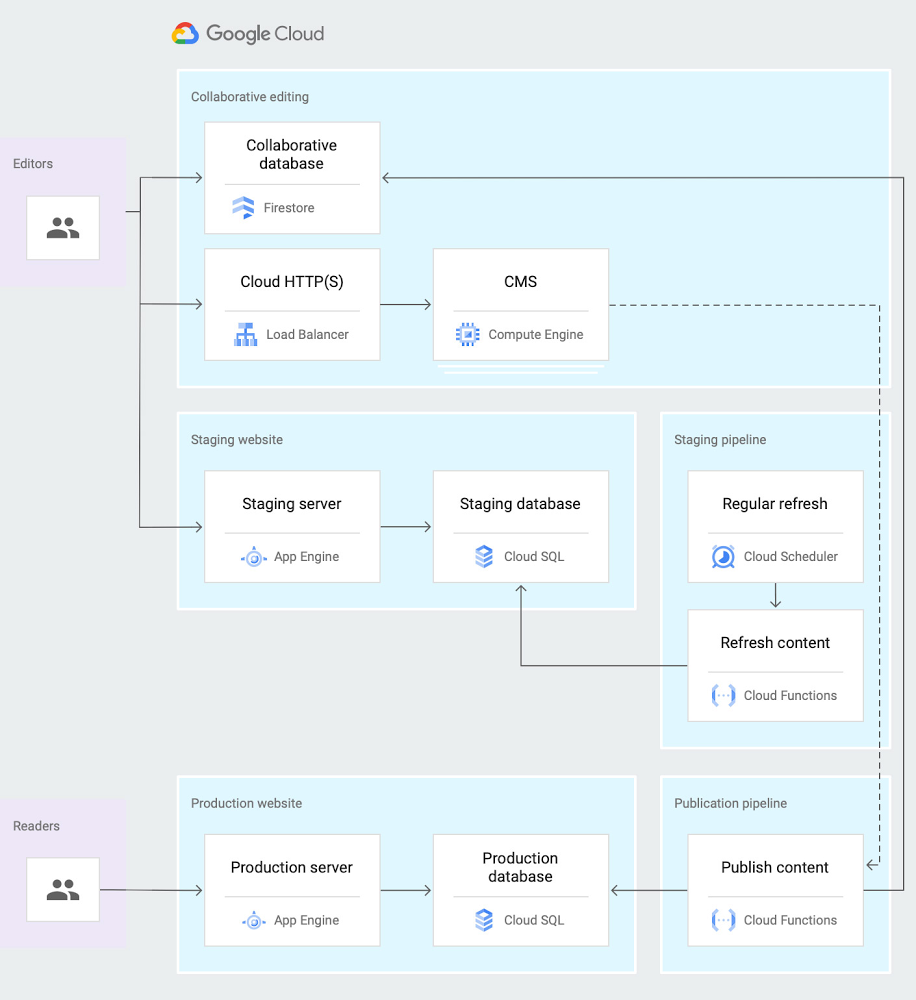
If you’ve been building and maintaining large web or mobile apps, you’ve probably heard of Firestore, Google’s scalable, serverless document database. But perhaps you’ve also wondered precisely how Firestore matches up to other Google Cloud database products. To help you understand Firestore’s core strengths, we’ve recently published a new reference guide that explains Firestore’s differentiating features like real-time updates, offline data persistence, and transactions.Firestore particularly shines in cases where you care both about scale and speed of development. If you need to quickly build an application that you expect to serve a large amount of traffic, then Firestore is a powerful option to consider.For example, we’ve recently heard that Google Cloud customers are using Firestore to rapidly build and deploy new applications in response to the abrupt and unforeseen disruptions caused by the COVID-19 crisis. By placing Firestore as a front end for their mainframe database system, government agencies can avoid slowdowns and downtimes under the suddenly increasing loads. Healthcare agencies can develop mobile apps with Firestore to keep the public informed, support initial virus self-diagnosis, and allow residents to contact health officials.This newly published guide provides reference architectures for real-world use cases in retail, media, telecommunications, gaming, and internet of things (IoT). For example, the guide describes an architecture for a collaborative content editing system, as shown in the diagram below. Media leader The New York Times chose the Firestore database service as they built a truly real-time collaboration tool that lets multiple writers and editors make changes in docs at the same time, keeping track of the newest updates. Firestore is designed for just this type of task, since it supports offline and real-time sync.Click to enlargeCheck out the new Firestore guide for all the details and next steps for building your own scalable solutions using Firestore.Hear from the product team and other customers at Google Cloud Next ‘20: OnAir on what’s new and how they are innovating with Firestore in these sessions: DBS215: Simplify Complex Application Development Using Cloud FirestoreDBS202: NYT: Building a Real-Time Collaborative Editor with Firestore
Quelle: Google Cloud Platform
Security is at the heart of any cloud journey. On the one hand, as you adopt cloud services and move workloads to the cloud, you need to make sure you’re conforming to your established security policies. On the other hand, you can take advantage of new capabilities, use new tools, and help improve your security posture. We’ve had many conversations with our users to understand the most pressing security use cases they want to address in their cloud environments, and shared our expertise on how we can help. With the Google Cloud Security Showcase we want to share these insights with everyone.The Google Cloud Security Showcase is a video resource that’s focused on solving security problems and helping you create a safer cloud deployment. The showcase currently has almost 50 step-by-step videos on specific security challenges or use cases—complete with actionable information to help you solve that specific issue—so there’s sure to be something for every security professional. In this blog we’ll highlight some of these use cases and example videos across major security domains to show what the Google Cloud Security Showcase is and how it can help you. Topic: infrastructure securityThe videos in this section show how you can take advantage of key features in Google Cloud’s secure-by-design infrastructure.How can I isolate my containerized workloads?Topic: network securityThe videos in this area describe how to use Cloud products to define and enforce your perimeter and allow for network segmentation, remote access, and DoS defense.How do I protect my web applications against DDoS attacks?Other examples from this topic include How do I implement Hierarchical Firewall Policies? and How do I use Packet Mirroring to manage network traffic and detect anomalies?Topic: endpoint securityThe videos in this section demonstrate how to use Cloud controls that help secure endpoints and prevent device compromise with device hardening, device management, and patch and vulnerability management.How do I configure my G Suite deployment to best protect my devices?Other examples from this topic include How do I manage Windows 10 devices within my organization? and How can I secure user data with ephemeral mode on a Chrome Enterprise device?Topic: data securityThe videos here detail how you can employ data discovery, data governance, and native controls that help prevent loss, leakage, and exfiltration.How can I protect the confidentiality of workloads while they’re processed?Other examples from this topic include How can I protect my GCP VMs from rootkits and bootkits? and How do I protect data in GCP using my own externally stored encryption keys?Topic: identity and access managementThe videos here detail ways you can use our platforms to manage and secure employee, partner, and customer identities, and their access to apps and data, both in the cloud and on-premises.How do I protect my high-risk users with the advanced protection program?Other examples from this topic include How do I add authentication and identity management to my apps? and How do I control access to web apps and VMs?Topic: application securityThe videos on this topic detail how to better protect your applications with application testing, scanning, and API security features.How can I catch web app vulnerabilities before they are pushed into production?Other examples from this topic include How do I control which third-party apps have access to my data? and How do I use reCAPTCHA Enterprise to protect my website from fraud?Topic: security monitoring and operationsThe videos in this section describe how to monitor for malicious activity, handle security incidents, and support your operational processes for preventing, detecting, and responding to threats.How do I manage threats inside and outside Google Cloud Infrastructure?Other examples from this topic include How do I manage misconfigurations in Google Cloud resources? and How do I investigate a phishing attack with Chronicle?Topic: Governance, risk, and complianceVideos here show how our controls, tools, and certifications can help support governance and compliance processes, including audits and risk assessments and compliance reporting.How can Assured Workloads for Government help me meet regulatory compliance requirements?Other examples from this topic include How can I control how long data is retained? and How do I make sure my Google Cloud deployment meets Center for Internet Security (CIS) benchmarks?These examples just scratch the surface of what’s available. We hope the security showcase makes it easier for IT admins and developers to protect your organization while saving time and effort. For the rest of the use-case-based security videos, check out our YouTube playlist.
Quelle: Google Cloud Platform

Here at Docker, we have a deep love for developers and with more and more of the community working remotely, we thought it would be a great time to start live streaming and connecting with the community virtually.
To that end, Chad Metcalf (@metcalfc) and I (@pmckee) have started to live stream every Wednesday at 10am Pacific Time on YouTube. You can find all of the past streams and subscribe to get notifications when we go live on our YouTube channel.
Every week we will cover a new topic focusing on developers and developer productivity using the Docker platform. We will have guest speakers, demo a bunch of code and answer any questions that you might have.
Below I’ve compiled a list of past live streams that you can watch at your leisure and we look forward to seeing you on the next live stream.
Docker AWS – A match made in heaven
Cloud container runtimes are complex and the learning curve can be steep for some developers. Not all development teams have DevOps teams to partner with which shifts the burden of understanding runtime environments, CLIs, and configuration for the cloud to the development team. But one thing is for sure, developers love the simplicity of Docker and Compose.
In this live stream, follow along as Chad Metcalf (@metcalfc) uses the new ECS context along with Docker Compose commands to run an application locally and then without changes deploy directly to ECS.
Running Docker containers in Azure ACI
Back in June, we announced our partnership with Microsoft to help developers seamlessly move their code and applications from their desktops running Docker to the Cloud running on Azure Container Instances (ACI) .
Developers can now easily switch between their local Docker context to an ACI context and run a single Docker container or a service composed of a group of multiple containers defined with a Docker Compose file. All this is done without setting up infrastructure and takes advantage of features such as mounting Azure Storage and GitHub repositories as volumes.
In this live stream, Chad Metcalf (@metcalfc) walks us through the new Azure ACI integration using Docker Context and Compose. He starts out by running a single container locally and then switching context to ACI and deploying that same container in the cloud. Then he moves on to show the same developer workflow but now using Docker Compose and ACI to deploy a multi-container application.
Getting Started Q&A
At Docker, our mission is to help developers become more productive. The Docker product is essential to every developer who is using containers and deploying to the cloud. Whether that’s on-prem or on a public cloud.
In this live stream, we answer the top questions developers have when getting started with Docker. We talk about running containers locally, setting up Docker Compose files, building images and a little bit of networking.
If you have a question that you would like us to answer, please feel free to fill out this form and we would be happy to answer these questions on the next Q&A live stream. Or feel free to join us live and drop your questions in the chat box.
VSCode Docker Extension
VSCode is a developer favorite and Microsoft has created a fantastic plug-in to help developers manage the development lifecycle using Docker. In this live stream, Chad Metcalf (@metcalfc) walks Peter McKee (@pmckee) through the major features of the VSCode Docker Extension and answers your questions. We cover the new context features and show how to start, stop and connect to containers using the VSCode Docker Extension.
Resources
For more on how to use Docker and to sign-up for a free account, check out the resources below:
Create a Free Docker AccountDownload DockerDocker OverviewGetting started tutorial
The post Docker Talks Live Stream Monthly Recap appeared first on Docker Blog.
Quelle: https://blog.docker.com/feed/

Was am 7. August 2020 neben den großen Meldungen sonst noch passiert ist, in aller Kürze. (Kurznews, WLAN)
Quelle: Golem

Die PC-Version ist ein tolles Abenteuer und das schönste Horizon Zero Dawn – trotz kleiner Probleme, an denen die Entwickler arbeiten. (Horizon Zero Dawn, Spieletest)
Quelle: Golem

Der Start der Telefónica mit einem eigenen Glasfaser-Netz in Deutschland ist für den Konkurrenten Deutsche Glasfaser kein Problem. (Telefónica, Glasfaser)
Quelle: Golem

Auch weil es dabei nicht um Glasfaser geht, sind die Netzbetreiber im Breko gegen die Pläne zweier Bundesministerien für einen Universaldienst im neuen Telekommunikationsgesetz. (Breko, Glasfaser)
Quelle: Golem

Für die Zeit des Rollouts von Glasfaser sei “Vectoring als Übergang gut geeignet”, sagte Uwe Nickl, Chef der Deutsche Glasfaser. Der FTTH-Rollout brauche noch viele Jahre. (Deutsche Glasfaser, Vodafone)
Quelle: Golem






