COVID-19 public datasets: our continued commitment to open, accessible data

Back in March, we announced that new COVID-19 public datasets would be joining our Google Cloud Public Datasets program to increase access to critical datasets to support the global response to the novel coronavirus. While the program initially focused on COVID-19 case data, we’ve since expanded our datasets offering to provide additional value to members of the research community and public decision makers. In addition, we’re extending our initial offering of free querying of COVID-19 public datasets for an additional year, through September 15, 2021.These expanded datasets would not have been possible without numerous partnerships with data providers working closely with Google Cloud to onboard their data to BigQuery. By onboarding public data to BigQuery, these data providers remove barriers and increase the velocity with which users can access and query these large data files. With the COVID-19 public datasets and BigQuery, everything is easily found in one place. As we strive to continue supporting our users, we want to help ensure that a lack of resources is not a contributing factor in one’s ability to make sense of this data. That’s why we’re expanding datasets access, and we hope that this will expand the pool of contributors who are finding solutions to this pandemic, whether that’s students and faculty querying these datasets through distance learning in the fall or public decision makers gauging when their communities can safely reopen. We hope that these datasets continue to provide universally accessible and useful information in the fight against COVID-19.How Google has worked with organizations to make COVID-19 datasets availableSince the beginning of the pandemic, The New York Times has tracked and visualized cases across the United States. They have publicly shared aggregated case data at the county and state level, allowing researchers to track, model, and visualize the spread of the virus. These rich datasets provide U.S. national-level, state-level, and county-level cases and deaths, beginning with the first reported coronavirus case in Washington State on January 21, 2020. As deaths began to increase across the United States and abroad, The New York Times published the data behind their excess deaths tracker to provide researchers and the public with a better record of the true toll of the pandemic globally. We worked with them to make this data accessible on BigQuery. The New York Times also estimated the prevalence of mask-wearing in counties in the United States and made that data available to provide researchers a way to better understand the role of mask-wearing in the course of the pandemic. To complement this and many other efforts to better understand the impact of policy actions, Google also released the COVID-19 Community Mobility Reports, which provide data on community movement trends, and made the data available on BigQuery. We also recently announced our COVID-19 Public Forecasts to help first responders and other healthcare and public sector-impacted organizations project metrics, such as case counts and deaths, into the future. This data is also available on BigQuery.Next, we prioritized data that could help in understanding the varying effects of COVID-19 in our communities and healthcare systems by publishing datasets relating to social determinants of health. To expand the scope of COVID-19 related queries that qualify for free querying, we included existing datasets like the American Community Survey from the U.S. Census Bureau and OpenStreetMap. We also worked with organizations like BroadStreet to make datasets like the U.S. Area Deprivation Index available on BigQuery. This dataset provides a measure of community vulnerability to public health issues at a highly granular level. Finally, we are publishing aggregated hospital capacity data from the American Hospital Association to help decision makers better understand their community’s ability to handle a surge in hospitalizations.We also recognize that the scientific community’s response to COVID-19 often depends on the availability and accessibility of high-quality scientific data. We’ve worked to include the Immune Epitope Database (Vita et al, Nucleic Acid Research, 2018) on BigQuery as a resource to researchers investigating the immune response to the SARS-CoV-2 virus. We have also published a series of articles to show how researchers can explore and build predictive models from this dataset using Google Cloud AI Platform. As an additional resource to the scientific community, we’ve created the COVID-19 Open Data dataset, which combines numerous publicly available COVID-19 and related datasets at a fine geographic level and makes them available both in BigQuery and in CSV and JSON formats. The code used to create this dataset is open-source and available on GitHub.As we continue to expand the list of COVID-19 public datasets, we will continue to release new datasets aligned with these four established focus areas:Epidemiology and health response, such as case and testing statistics and hospital dataGovernment policy response and effects, such as mobility and mask complianceSocial determinants of health and community responseBiomedical and other research dataFor those attending Google Cloud Next ‘20: OnAir, be sure to check out Data vs. COVID-19: How Public Data is Helping Flatten the Curve. This session will highlight how public data and the Google Cloud and COVID-19 public datasets are helping combat the pandemic and informing individual decision-making to help everyone make informed decisions about the spread and risks of the virus, and explain how cooperative efforts could help flatten the curve.
Quelle: Google Cloud Platform
Understanding IP address management in GKE

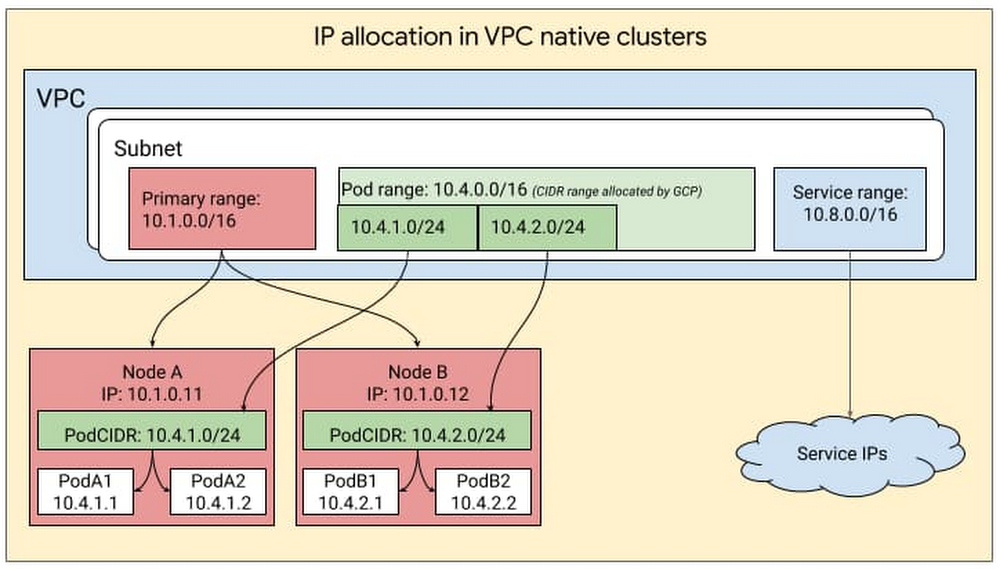
When it comes to giving out IP addresses, Kubernetes has a supply and demand problem. On the supply side, organizations are running low on IP addresses, because of large on-premises networks and multi-cloud deployments that use RFC1918 addresses (address allocation for private internets). On the demand side, Kubernetes resources such as pods, nodes and services each require an IP address. This supply and demand challenge has led to concerns of IP address exhaustion while deploying Kubernetes. Additionally, managing these IP addresses involves a lot of overhead, especially in cases where the team managing cloud architecture is different from the team managing the on-prem network. In this case, the cloud team often has to negotiate with the on-prem team to secure unused IP blocks.There’s no question that managing IP addresses in a Kubernetes environment can be challenging. While there’s no silver bullet for solving IP exhaustion, Google Kubernetes Engine (GKE) offers ways to solve or work around this problem. For example, Google Cloud partner NetApp relies heavily on GKE and its IP address management capabilities for users of its Cloud Volumes Service file service. “NetApp’s Cloud Volumes Service is a flexible, scalable, cloud-native file service for our customers,” said Rajesh Rajaraman, Senior Technical Director at NetApp. “GKE gives us the flexibility to take advantage of non-RFC IP addresses and we can provide scalable services seamlessly without asking our customers for additional IPs,” Google Cloud and GKE enable us to create a secure SaaS offering and scale alongside our customers.”Since IP addressing in itself is a rather complex topic and the subject of many books and web articles, this blog assumes you are familiar with the basics of IP addressing. So without further ado, let’s take a look at how IP addressing works in GKE, some common IP addressing problems and GKE features to help you solve them. The approach you take will depend on your organization, your use cases, applications, skill sets, and whether or not there’s an IP Address Management (IPAM) solution in place. IP address management in GKEGKE leverages the underlying GCP architecture for IP address management, creating clusters within a VPC subnet and creating secondary ranges for Pods (i.e., pod range) and services (service range) within that subnet. The user can provide the ranges to GKE while creating the cluster or let GKE create them automatically. IP addresses for the nodes come from the IP CIDR assigned to the subnet associated with the cluster. The pod range allocated to a cluster is split up into multiple sub-ranges—one for each node. When a new node is added to the cluster, GCP automatically picks a sub-range from the pod-range and assigns it to the node. When new pods are launched on this node, Kubernetes selects a pod IP from the sub-range allocated to the node. This can be visualized as follows:Provisioning flexibilityIn GKE, you can obtain this IP CIDR either in one of two ways: by defining a subnet and then mapping it to the GKE cluster, or by auto-mode where you let GKE pick a block automatically from the specific region. If you’re just starting out, run exclusively on Google Cloud and would just like Google Cloud to do IP address management on your behalf, we recommend auto-mode. On the other hand, if you have a multi-environment deployment, have multiple VPCs and would like control over IP management in GKE, we recommend using custom-mode, where you can manually define the CIDRs that GKE clusters use.Flexible Pod CIDR functionalityNext, let’s look at IP address allocation for Pods. By default, Kubernetes assigns a /24 subnet mask on a per node basis for Pod IP assignment. However, more than 95% of GKE clusters are created with no more than 30 Pods per node. Given this low Pod density per node, allocating a /24 CIDR block on every Pod is a waste of IP addresses. For a large cluster with many nodes, this waste gets compounded across all the nodes in the cluster. This can greatly exacerbate IP utilization. With Flexible Pod CIDR functionality, you can define Pod density per Node and thereby use fewer IP blocks per node. This setting is available on a per Node-pool basis, so that if tomorrow the Pod density changes, then you can simply create a new Node pool and define a higher Pod density. This can either help you fit more Nodes for a given Pod CIDR range, or allocate a smaller CIDR range for the same number of Nodes, thus optimizing the IP address space utilization in the overall network for GKE clusters.The Flexible Pod CIDR feature helps to make GKE cluster size more fungible and is frequently used in three situations: For hybrid Kubernetes deployments, you can avoid assigning a large CIDR block to a cluster, since that increases the likelihood of overlap with your on-prem IP address management. The default sizing can also cause IP exhaustion.To mitigate IP exhaustion – If you have a small cluster, you can use this feature to map your cluster size to the scale of your Pods and therefore preserve IPs.For flexibility in controlling cluster sizes: You can tune your cluster size of your deployments by using a combination of container address range and flexible CIDR blocks. Flexible CIDR blocks give you two parameters to control cluster size: you can continue to use your container address range space, thus preserving your IPs, while at the same time increasing your cluster size. Alternatively you can reduce the container address range (use a smaller range) and still keep the cluster size the same.Replenishing IP inventoryAnother way to solve IP exhaustion issues is to replenish the IP inventory. For customers who running out of RFC 1918 addresses, you can now use two new types of IP blocks:Reserved addresses that are not RFC 1918Privately used Public IPs (PUPIs), currently in betaLet’s take a closer look.Non-RFC 1918 reserved addresses For customers who have an IP shortage, GCP added support for additional reserved CIDR ranges that are outside the RFC 1918 range. From a functionality perspective, these are treated similar to RFC1918 addresses and are exchanged by default over peering. You can deploy these in both private and public clusters. Since these are reserved, they are not advertised over the internet, and when you use such an address, the traffic stays within your cluster and VPC network. The largest block available is a /4 which is a very large block.Privately used Public IPs (PUPI)Similar to non-RFC 1918 reserved addresses, with PUPIs, you can use any Public IP, except Google owned Public IPs on GKE. These IPs are not advertised to the internet.To take an example, imagine you need more IP addresses and you use the following IP range privately A.B.C.0/24. If this range is owned by a Service MiscellaneousPublicAPIservice.com, devices in your routing domain will no longer be able to reach MiscellaneousPublicAPIservice.com and will instead be routed to your Private services that are using those IP addresses. This is why there are some general guidelines when using PUPIs. PUPIs are given higher priority over real IPs on the internet because they belong within the customer’s VPC and therefore, their traffic doesn’t go outside of the VPC. Thus, when using PUPIs, it’s best to ensure you are selecting IP ranges that you are sure will not be accessed by any internal services.Also, PUPIs have a special property in that they can be selectively exported and imported over VPC Peering. With this function, a user can have deployment with multiple clusters in different VPCs and reuse the same PUPIs for Pod IPs. If the clusters need to communicate with each other, then you can create a servicetype loadbalancer with Internal LB annotation. Then only these Services VIPs can be advertised to the peer, allowing you to reuse PUPIs across clusters and at the same time ensuring connectivity between the clusters.The above works for your environment whether you are running purely on GCP or if you run in a hybrid environment. If you are running a hybrid environment, there are other solutionswhere you can create islands of clusters in different environments by using overlapping IPs and then use a NAT or proxy solution to connect the different environments. The IP addresses you needIP address exhaustion is a hard problem with no easy fixes. But by allowing you to flexibly assign CIDR blocks and replenish your IP inventory, GKE ensures that you have the resources you need to run. For more, check out the documentation on how to create a VPC-native cluster with alias IP ranges, and this solution on GKE address management.
Quelle: Google Cloud Platform

Manage Posts and Pages with the Block Editor Sidebar

We wanted to make it easier to manage posts and pages when you’re working within the Block Editor. With the Block Editor Sidebar you can view, create, edit, and manage posts and pages right from the Block Editor!  
Wait, another sidebar?
Have you ever finished editing something and then needed to make a quick edit to an existing post, or start a new one? Previously this meant navigating to your dashboard and to the posts list.
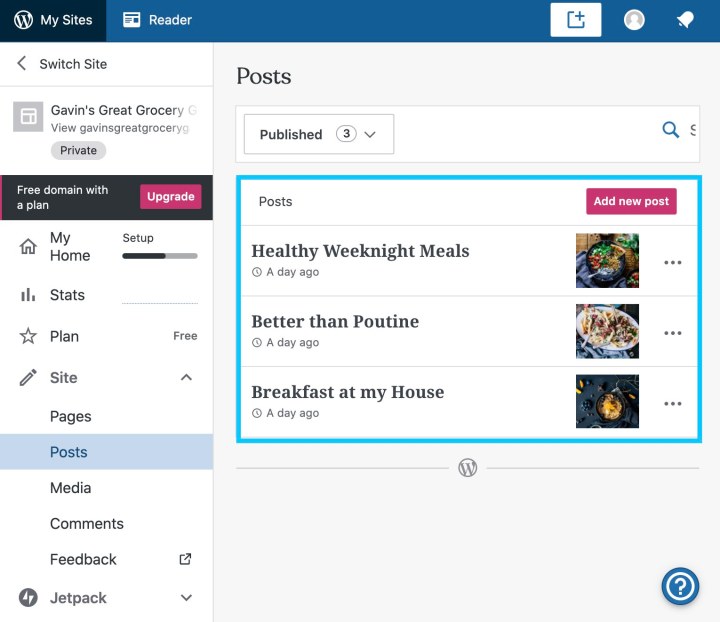
The Block Editor Sidebar allows you to view and access your site’s posts and pages — whether they’re drafts, published, or scheduled — and create new ones right from the editor.
Using the sidebar
The sidebar is available in the Block Editor when editing both posts and pages. For now, when editing a post you’ll only be able to see recent posts, and create new posts. Similarly, if you’re editing a page you’ll see a list of your recent pages and a link to create a new page.
The following steps refer to posts, but you can use the same steps to edit pages.
Open an existing post or create a new one to open the editor.

To view the sidebar, click on the WordPress.com logo at the top left of the editor.

To return to your posts list, select the View Posts link.

To load an existing post, select the post title in the list of recent posts. Unless it’s already been published, the post’s status will appear next to the title, for example “Draft” or “Scheduled.”

To create a new post, click on the Add new post link.

To dismiss the sidebar, click anywhere outside the sidebar or press the “Escape” key.
What’s next?
Now that we have the Block Editor Sidebar in place, we’ll extend its capabilities with more tools and shortcuts to help you manage your site’s content.
Do you have ideas for site-level features you’d like to see in the Block Editor Sidebar? Or suggestions about how we can improve this feature? Please let us know in the comments!
Quelle: RedHat Stack

Docker Hub Incident Review – 5 July 2020

Background

This is Docker’s first time publishing an incident report publicly. While we have always done detailed post mortems on incidents internally, as part of the changing culture at Docker, we want to be more open externally as well. For example, this year we have started publishing our roadmap publicly and asking our users for their input. You should expect to see us continue publishing reports for most significant incidents.In publishing these reports, we hope others can learn from the issues we have faced and how we have dealt with them. We hope it builds trust in our services and our teams. We also think this one is pretty interesting due to the complex interaction between multiple services and stakeholders.

Incident Summary

Amazon Linux users in several regions encountered intermittent hanging downloads of Docker images from the Docker Hub registry between roughly July 5 19:00 UTC and July 6 06:30 UTC. The issue stemmed from an anti-botnet protection mechanism our CDN provider Cloudflare had deployed. Teams from Docker, Cloudflare, and AWS worked together to pinpoint the issue and the mechanism in question was disabled, leading to full service restoration.

What Happened

At about 01:45 UTC on Monday July 6th (Sunday evening Pacific time), Docker was contacted by AWS about image pulls from Docker Hub failing for a number of their services and users. Both the Docker Hub and Infrastructure teams immediately started digging into the problem.The initial troubleshooting step was of course to try doing image pulls from our local machines. These all worked, and combined with our monitoring and alerting showing no issues, ruled out a service-wide issue with the registry. 

Next, we checked pulls in our own infrastructure running in AWS. As expected by the lack of alarms in our own monitoring, this worked. This told us that the issue was more specific than “all AWS infrastructure” – it was either related to region or a mechanism in the failing services themselves.

Based on some early feedback from AWS engineers that the issue affected systems that used Amazon Linux (including higher level services like Fargate), the Docker team started spinning up instances with Amazon Linux and another OS in multiple AWS regions. Results here showed two things – both operating systems in AWS region us-east-1 worked fine, and in some other regions, Amazon Linux failed to pull images successfully where the other OS worked fine.The fact that us-east-1 worked for both operating systems told us the problem was related to our CDN, Cloudflare. This is because Docker Hub image data is stored in S3 buckets in us-east-1, so requests from that region are served directly from S3. Other regions, where we saw issues, were served via the CDN. Docker opened an incident with Cloudflare at 02:35 UTC.Because we only observed the issue on Amazon Linux, engineers from all three companies began digging into the problem to figure out what the interaction between that OS and Cloudflare was. A number of avenues were examined – was Amazon Linux using custom docker/containerd packages? No. Did the issue still exist when replicating a pull using curl rather than Docker Engine? Yes. It’s now pretty clear that the issue is some sort of low-level network implementation detail, and all teams start focusing on this.

At about 05:00 UTC, engineers from AWS examining networking differences between Amazon Linux and other operating systems discover that modifying a network packet attribute to match other systems makes the issue disappear. This info is shared with Cloudflare.

Cloudflare investigates given this new information and finds that some traffic to Docker Hub is being dropped due to an anti-botnet mitigation system. This system had recently had a new detection signature added that flagged packets with a certain attribute as potentially part of an attack.

The fact that packets from Amazon Linux matched this signature combined with the large scale of traffic to Docker Hub activated this mechanism in several regions. While Cloudflare had been monitoring this change for some time before enabling it, this interaction had not been uncovered before the mechanism was switched from monitoring to active. 

Cloudflare then disabled this mechanism for Docker Hub traffic and all parties confirmed full resolution at about 06:30 UTC.

Conclusion

So what did we learn?

First, we learned that our visibility into end-user experience of our CDN downloads was limited. In our own monitoring, we’ve identified that we can track increases in 206 response codes to indicate that such an issue may be occurring; when downloads hang, the client often attempts to reconnect and download the partial content it did not previously receive. This monitoring is now in place, and this information will lead to much quicker resolution in future such incidents.Additionally, we will work with Cloudflare to increase our visibility into mitigations that are actively affecting traffic for Docker Hub.

Lastly – this reaffirmed that the internet is a complicated place. This issue involved details all the way up from low-level network implementation to higher-order services that abstract away such things. Never underestimate the impact of every layer of your stack and it’s dependencies on other parties.

We’d like to thank our partners at Cloudflare and AWS for their work in diagnosing the problem. It took all three parties working together to resolve this issue for our joint users. We know developers and operators rely on many different providers to power their systems, and the closer we work together, the better we can support you.
The post Docker Hub Incident Review – 5 July 2020 appeared first on Docker Blog.
Quelle: https://blog.docker.com/feed/