Appstores: Facebook weist auf Apple-Provision bei In-App-Käufen hin
Auch Facebook ist die sogenannte Apple-Tax schon länger ein Ärgernis. Kunden der neuen Events-Funktion sollen nun darüber informiert werden. (Facebook, Apple)
Quelle: Golem

Auch Facebook ist die sogenannte Apple-Tax schon länger ein Ärgernis. Kunden der neuen Events-Funktion sollen nun darüber informiert werden. (Facebook, Apple)
Quelle: Golem

Mozilla gilt als integraler Bestandteil der Community der Programmiersprache Rust. Das Projekt soll durch die Entlassungen jedoch nicht gefährdet sein. (Rust, Firefox)
Quelle: Golem

Mit 500 Millionen Euro wollen Bund und Länder Laptops für die Lehrerschaft finanzieren. Die Telekom plant eine spezielle Flatrate. (Digitale Bildung, Server)
Quelle: Golem
medium.com – One interesting Terraform provider is the Helm provider that can install Helm Charts. This can be useful for situations like: This article demonstrates how to use create a module that deploy Helm Cha…
Quelle: news.kubernauts.io
IAM Recommender helps security professionals enforce the principle of least privilege by identifying and removing unwanted access to Google Cloud Platform (GCP) resources. In our previous blog, we described some best practices for achieving least privilege with less effort using IAM Recommender—which uses machine learning to help determine what users actually need by analyzing their permission use over a 90-day period. In this post we’ll peek under the hood to see how IAM Recommender works, with the help of a step-by-step example.A DIY approachFor a little more background, IAM Recommender generates daily policy recommendations and serves them to users automatically. Google collects the logs, correlates data, and recommends a modified IAM policy to minimize risk. We then surface these results in various places to ensure visibility: in-context in the IAM Permissions page in Cloud Console, through a Recommendations Hub in Cloud Console, and through BigQuery.Let’s think through what building an analytics system that does all of this from the ground up would require: You first need to build an entitlements warehouse that periodically collects normalized role bindings for all your resources, so you’ll need to pay attention to hierarchies and inherited role bindings. Then, to ensure your recommendations don’t break any existing workloads, you’ll need to collect and build telemetry to determine which permissions have been used recently. You can do this by storing Cloud Audit Logs data access logs for the resources you want to analyze. This, however, is a very high volume of log data that comes at a cost, and the analysis is non-trivial; it requires series log processing, parsing, and normalization, and aggregation.You will sometimes find gaps in your access logs data, which could arise from sporadic individual behaviors such as users taking vacations or changing projects. You’ll need to use machine learning to plug these gaps, which is also not trivial because of high-dimensions and sparse features of the training data.To ensure you build for business continuity, you’ll need to build in monitoring and controls, and add provisions for break-glass.Once this work is done, you can use the analytics pipeline to analyze utilization against policy data to determine which permissions are safe to remove. You might want to enhance this with machine learning to predict future permission needs to ensure users don’t have to come back for additional access.Lastly, once you’ve determined the right sets of permissions, roles, conditions, and resources, you’ll need to come up with a model that ranks the best IAM policy to meet your users’ needs.We wanted to empower you with actionable intelligence while saving all of this effort. The end result is Active Assist which does this analysis for you at Google scale. But, even if you were able to do all of this, you could only analyze your own data. We’re able to gain additional insight from cross-customer analysis, further identifying gaps and potential misconfigurations in your policies before they can become a problem. Google Cloud proactively protects the privacy of our users during this analysis with techniques that are described in detail in our blog here.Let’s look a little deeper into our implementation.Safe to applyWhen we launched this product, a key consideration was to ensure recommendations were safe to apply—that they wouldn’t break workloads. Making safe recommendations depends on having high-quality input data. IAM Recommender analyzes authorization telemetry data to compute policy utilization and make subsequent recommendations. At Google Cloud, our production systems take care of processing and ensure data quality and freshness directly from the source of the logs. Importantly, IAM Recommender does this for all customers at scale, which is more efficient than each customer doing it on their own. We collect and store petabytes of logs data to enable this functionality, at no additional charge.But authorization logs only tell a part of the story. In Google Cloud, resources can be organized hierarchically, where a child resource inherits the IAM policy attached to a parent. To make accurate recommendations, we also apply attributed inheritance data in our analytics. To ensure the quality of our recommendations, we built comprehensive monitoring and alerting systems with detection and validation scripts. We then automated these checks with ML to measure new recommendations against baselines. These checks against baselines ensure the analytics pipeline from the upstream input data to downstream dependencies are safe to apply. If we detect deviation from baselines, preventative measures kick in to halt the pipeline to ensure we are serving reliable recommendations.ML security analytics at petabyte scaleTo provide recommendations, we developed a multi-stage pipeline using Google Cloud’s Dataflow processing engine. To get a sense of scale, Cloud IAM is a planet-scale authorization engine that processes hundreds of millions of authorization requests every second. IAM Recommender ingests these authorization logs and generates and re-validates hundreds of millions of recommendations daily to serve the best results to our customers. Google Cloud’s scalable infrastructure allows us to provide this service cost-effectively.Our system performs detailed policy utilization analysis that replays authorization logs with the latest policy config snapshot and resource metadata on a daily basis. This data is fed into our ML training models, and the output is piped into policy utilization insights that support recommendations. We then use privacy-preserving ML techniques that plug gaps in observation data, which could be due to a recommendation variant, system outage, or other issue. (Check out this blog to explore these ML techniques in more depth.)Balancing the tradeoff between risk and complexityIAM Recommender uses a cost function to determine the set of roles that cover the needed permission set, ranks the roles by their security risk, and picks the least risky one. Determining the minimum set of roles is equivalent to the NP-complete set cover problem. To cut down on overhead, the approach optimizes for recurring patterns across multiple projects in a given organization, reducing permissions while maximizing role membership. In some cases we determine the best role is one that hasn’t been created yet—though our systems do find opportunities for reuse across your organization—and in these cases we recommend creating a custom role.Learn moreTo learn more about IAM Recommender, check out the documentation and our blog about Exploring the machine learning models behind Cloud IAM Recommender. To learn more about Active Assist, visit our website. To see how our customers solved for least privilege, check out one of our Google Cloud Next ‘20: OnAir sessions:Minimizing Permissions Using IAM RecommenderUsing Policy Intelligence to Achieve Least Privilege AccessCloud is Complex. Managing It Shouldn’t Be
Quelle: Google Cloud Platform
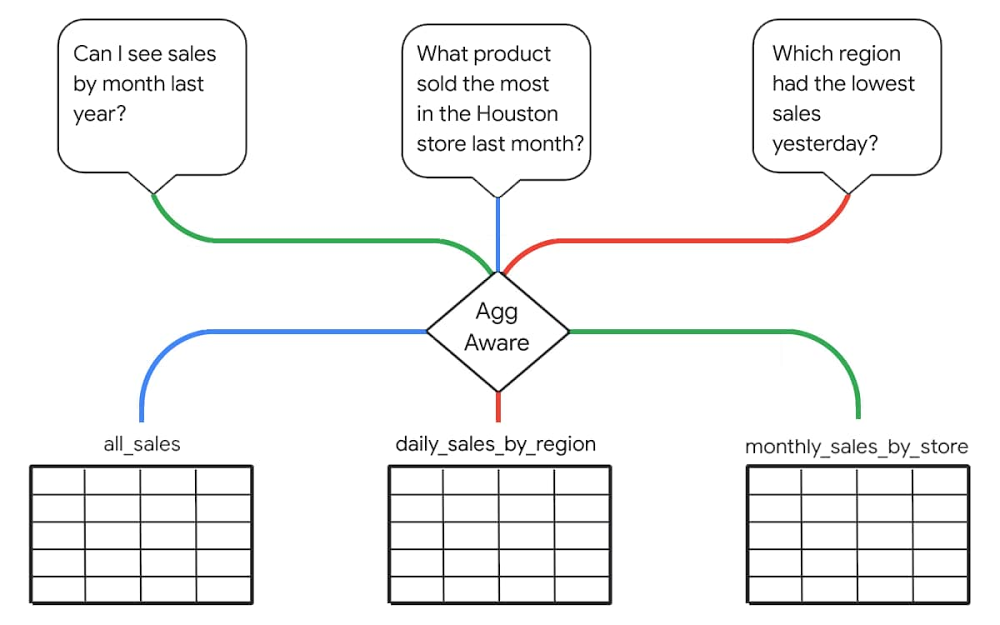
August has been a busy month for us here at Looker. We started off Data Analytics week at Google Cloud Next ’20: OnAir with a major release of top-requested enhancements—building on our vision of empowering companies to build powerful data experiences and drive positive, data-driven business outcomes. Then, throughout this week, we’ve presented our vision for data leaders, shared some of our newest capabilities, led virtual hands-on-labs, and highlighted inspiring customer stories and demos across the entire Next OnAir experience. In the smart analytics keynote, we show you how Looker is a critical component for delivering Google Cloud’s vision of an open, intelligent, and flexible platform. See how Sunrun leveraged Looker and BigQuery to accelerate their digital transformation initiatives, or how Looker fits into Verizon Media’s 100+ PB analytics platform. Hear how the Looker team supported data-driven responses to COVID-19, take a technical deep dive, see a demo of Looker with BigQuery BI Engine, or learn about Looker’s (not so) secret sauce: Intro to LookML. Finally, in our Looker Roadmap session, hear about many of the newest advancements and get a peek at what’s next. We’re particularly proud of the progress we’ve made on the data experiences roadmap we first announced last December. For the last year, we’ve focused on features that help our wide community of system administrators, application builders, model developers, data analysts, and business decision makers by providing the scale and performance, cost optimization, simplified management, and ease of development of data experiences they require. Companies, departments, and individuals all have unique, different ways they use data to guide their work. This understanding guides Looker’s approach to analytics and the new enhancements we announced this week. Let’s take a further look at a few key aspects of the announcements. Increased performance and efficiency with aggregate awarenessTo drive greater performance and efficiency at scale, Looker now includes aggregate awareness. With aggregate awareness, Looker can materialize query results and dynamically route user queries to different tables based on level of granularity. This helps minimize the total number of queried records, reducing query cost and improving response time. Aggregate awareness is fully managed in LookML, Looker’s semantic layer, reducing implementation time and cost while maintaining simplicity for users. Unlike other solutions, aggregate awareness doesn’t limit a query to a specific table. Instead, it can automatically UNION-in related data when query scope exceeds that of a given aggregate table.Managing Looker at scale just got easierSince last year, Looker administrators have been able to leverage Looker system activity analytics to track their usage of the Looker platform. Dashboards and data exploration experiences are pre-built in Looker to help measure user activity, query performance, scheduling, content (reports and dashboard) use, and any errors that might occur. With elite system activity, now available, administrators can retain system analytics data longer and perform more complex, faster analysis of this data. Coupled with new user and permissions management tools, including the ability to better leverage existing LDAP systems, system activity analytics helps Looker admins drive platform adoption and ensure the smooth operation of vital reports, dashboards, explores, and other, more advanced, data experiences.Simplifying and speeding access to insightsLooker has also redesigned the dashboard and reporting experience to include more intuitive interactions. It’s now easier than ever to provide users with tools that let them start at high-level dashboards and drill down into the data to find answers to questions. Delivering self-service access to data that’s accessible and intuitive, Looker offers easy cross-filtering in dashboards. A newly enhanced integration with Slack and improved alerting functionality put data right where users need it, on-demand, streamlining the time from question to insight and then to business-impacting action. These new ways of accessing data, minimizing friction in existing workflows, allow non-technical employees to take a proactive approach to their area of the business.Quickly, easily deliver new data experiencesWith a new extension framework for data product development, Looker also reduces friction developers experience when modeling, visualizing, or operationalizing their data. The extension framework allows front-end developers to build and deploy within Looker without relying on DevOps or standalone servers. Extensions also have full access to Looker APIs and can take advantage of existing authentication and permissions, simplifying the development process and speeding time to value for data products. Working-backwards from their desired end goal and dream application, our most innovative developers go beyond static reports and realize their vision with Looker developer tools and partners.Turnkey models for data-driven marketersWe’ve also introduced new Looker Blocks for marketers—built in partnership with experts at Google Cloud and with integrated BigQuery ML models—that make it easier than ever for data-driven marketers to get up and running quickly with out-of-the-box advanced analytics for Google Analytics 360, Google Marketing Platform, and Google Ads data. With these new blocks, marketing teams can dig deeper into web behavior, optimize campaign investment, define granular KPIs, expand insights by joining external datasets, and shorten the time from insight to action. Looker Blocks continue to be a powerful tool that accelerates analytics value—providing deep expertise and insights, faster, in a way that’s easy to implement and understand.From BI to data experiencesWith the announcements this week, Looker continues to enhance the tools you’re already using by infusing new, relevant data into your workday. To learn more about all the latest Looker enhancements for your business, click here. You can also register here and speak live with our team about these and other features and updates.
Quelle: Google Cloud Platform

Editor’s note: This is part two of a series on the COVID-19 public datasets. Check out part one to learn more about recently onboarded datasets and new program expansion.Back in March, we launched new COVID-19 public datasets into our Google Cloud Public Datasets program to make critical COVID-19 datasets available to the public and free to analyze using BigQuery.At launch, we aimed to get high-quality data into the hands of users as quickly as possible to support their efforts to monitor and understand the emergent pandemic. A few months in, we have expanded our original goals to include supporting public and private sector users with the data that they need to make informed decisions. Today, we’ll highlight how research organizations, governments, and partners have used these datasets to power their decisions, contribute to the growing body of research on the virus and its societal impacts, and create tools to support response efforts.Helping communities respond to COVID-19Reliable data is now more important than ever as leaders in healthcare, government, and private industry are challenged to make decisions in response to COVID-19. To equip organizations in charting the safest path forward, Google Cloud collaborated with Google Cloud partner SADA to build the National Response Portal. The portal is an open data platform that combines many relevant datasets for an on-the-ground view of the pandemic. “The National Response Portal takes full advantage of the Google Cloud Public Datasets program, giving us direct and easy access to the COVID-19 datasets that power our visualizations,” says Michael Ames, senior director of healthcare and life sciences at SADA. Via the portal, users can explore trends on COVID-19 cases and deaths, view forecasts anticipating future hotspots, and examine the impact of policy decisions and social mobility. Healthcare providers have begun contributing data as part of a growing effort to share data insights among the health community to empower better awareness and decision-making.To find out more and view the portal, check it out here.Equipping the public sector to monitor COVID-19When looking for a technical solution for monitoring COVID-19 cases and updating residents, the Oklahoma State Department of Health and the governor’s office turned to Google Cloud. The state needed a public-facing platform that would display real-time data on the pandemic. Using the COVID-19 public datasets along with Looker, Google Cloud’s business intelligence and analytics platform, the State of Oklahoma built a dashboard on Oklahoma COVID-19 statistics, located on the state’s public health website. Since the dashboard launched, it has been viewed tens of thousands of times each day. Department of Health staff and Oklahoma citizens are able to access and interact with consolidated information served by Looker dashboards for actionable insights. “The partnership with Google Cloud has enabled the OK Department of Health to be extremely agile in keeping the citizens of Oklahoma informed as to the impact of COVID-19 across the state,” says State of Oklahoma Digital Transformation Secretary David Ostrowe. The dashboard has decreased manual processing needs and has been easy to update and deploy changes over Google Cloud. The State of Oklahoma also received an A+ COVID-19 data quality rating from the COVID Tracking Project.Supporting research on COVID-19In the early days of the pandemic, Northeastern University used Google Cloud to model COVID-19 and forecast the impact that interventions like stay-at-home-orders would have on the spread of the virus. Northeastern University researchers used several Google Cloud products, including BigQuery, to analyze various datasets and inform their global metapopulation disease transmission model. The team relied on the U.S. Census Data and OpenStreetMap public datasets and BigQuery GIS capabilities to project the impact of different interventions on the global spread of the COVID-19 pandemic.”Our team models and forecasts the spatial spread of infectious diseases by quickly analyzing hundreds of terabytes of simulation data,” says Dr. Matteo Chinazzi, associate research scientist at Northeastern University. “With the help of BigQuery, we are able to accelerate insights from our epidemic models and better study evolution of an ongoing outbreak.” Dr. Chinazzi’s team has provided valuable insights on the effects of different containment and mitigation strategies. The team’s findings were published in Science in April. You can check them out through The Global Epidemic and Mobility (GLEAM) Project interactive dashboards.Visualizing the pandemicCARTO, a location intelligence platform integrated with BigQuery, used its mapping expertise to build an important COVID-19 dashboard using Google Cloud public datasets. CARTO combined census data with COVID-19 case data and social determinants of health datasets in this real-time dashboard to support organizations in monitoring and responding to the pandemic.“We built our COVID-19 dashboard to anticipate viewers looking for fast answers,” says Stephanie Schober, CARTO solution engineer. “As COVID-19 continues to spread, Google Cloud’s BigQuery content has enabled our dashboard to use real-time and reliable data.” ”Location data has been extremely relevant through this pandemic to ensure both private and public sector organizations can respond fast enough,” says Florence Broderick, VP of marketing at CARTO. “Geospatial analysis through CARTO and BigQuery has enabled a wide range of use cases, including PPE distribution, mobility analysis, and workplace-return planning.”If you’re interested in developing similar visualizations, check out more details from CARTO and tune into Data vs. COVID-19: How Public Data is Helping Flatten the Curve. Analyzing the global COVID-19 news narrative from web to television To support researchers in analyzing global media coverage of COVID-19 and comparing with outbreaks of the past decade, we have partnered with the GDELT Project to host several multimodal datasets. These datasets include media coverage across 152 languages and span more than a decade, totaling more than 3 trillion data points, all of them available as public datasets in BigQuery. “Google Cloud’s AI offerings make it possible to transform text, speech, imagery and video into rich annotations sharing a common taxonomy,” says GDELT Founder Dr. Kalev Leetaru. “BigQuery is the lens through which trillions of data points become actionable insights that can help guide our understanding of the global COVID-19 media narrative.” Data insights on COVID-19 media portrayal, such as trend analysis on mask use worldwide, and sample queries can be found on the GDELT Project Blog or you can explore the data directly in BigQuery. A Google Cloud COVID-19 research grant is also supporting additional data annotation on the COVID-19 pandemic and other major disease outbreaks. The project is using Cloud Speech-to-Text to compare COVID-19 radio coverage on 10 major U.S. stations. When completed, this dataset will make it possible for researchers to understand how television and radio coverage of the pandemic compares with online coverage.Helping companies manage operations throughout the pandemicIn the private sector, organizations have leveraged the COVID-19 datasets to support decision making in responding to the pandemic.Rolls-Royce joined with Google Cloud and other industry partners to form the Emergent Alliance. This data analytics coalition plans to leverage Google Cloud’s datasets in finding ways to support the global response to the pandemic, model economic recovery, and support return-to-work initiatives. When we launched COVID-19 public datasets, we set out on a mission to partner with data owners and make critical datasets easily accessible and free of analysis costs. We are inspired by the many organizations across healthcare, government, academia, and private industry that have led the way applying this data in innovative ways, supporting global response efforts. As communities continue to navigate the challenging path forward, we hope to play a small part in empowering them with data insights to prepare for what comes next.
Quelle: Google Cloud Platform
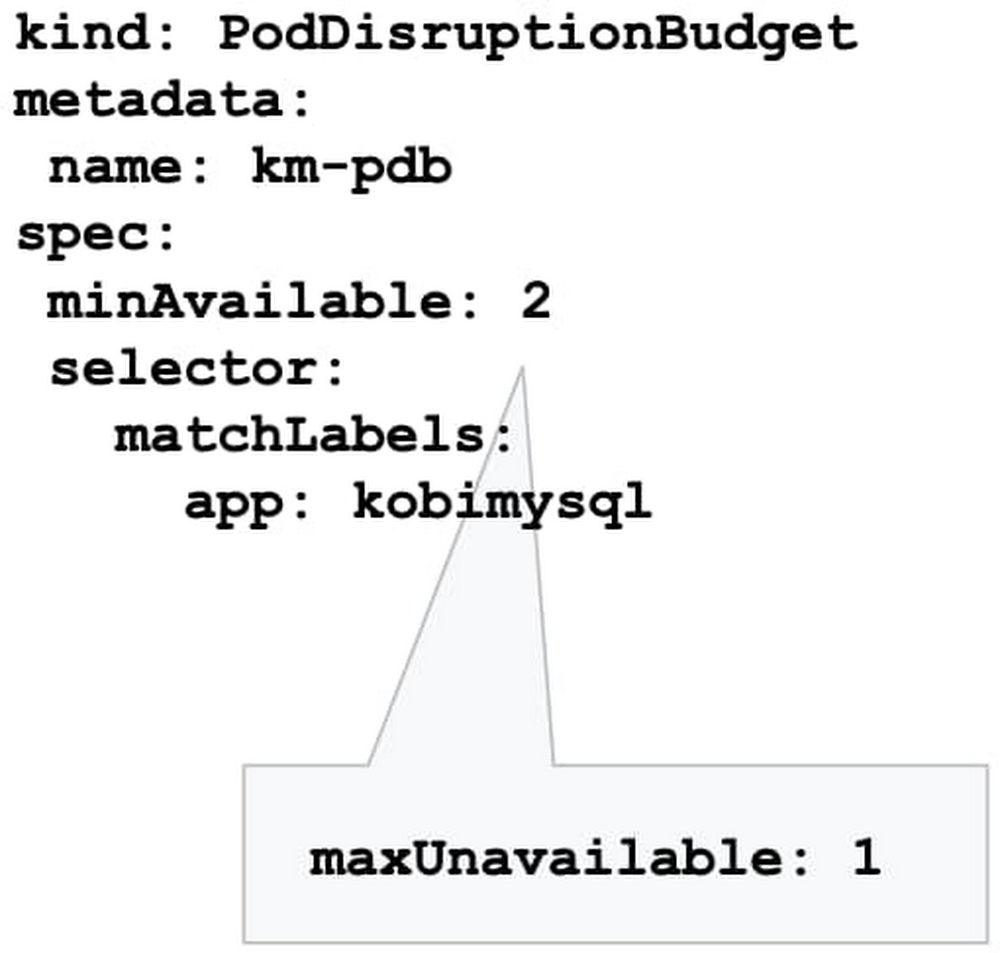
So, you followed our advice and built a highly available Google Kubernetes Engine (GKE) cluster based on our day 0 guidance. But day 2 is where the rubber hits the road: your GKE cluster is up and running, and serving traffic to your app, and can’t really afford to go down. The day 0 steps you took should help prevent that, but in production, ensuring business continuity isn’t just about the high availability of the workloads. It’s also about gracefully handling disruptions, and applying the latest security patches and bug fixes non-disruptively. In this blog post, we’ll discuss recommendations and best practices to help the applications running on your GKE cluster to stay happy and healthy. Manage disruptionAs with any platform’s lifecycle, there will come a time when your GKE cluster experiences an interruption, needs to be updated, or needs to shut down. You can limit the interference by proactively setting up the right number of replicas, setting a Pod Disruption Budget, and specifying your shutdown grace period.Make sure you have replicasYou may be familiar with the concept of Kubernetes replicas. Replicas ensure the redundancy of your workloads for better performance and responsiveness, and to avoid a single point of failure. When configured, replicas govern the number of pod replicas running at any given time.Set your tolerance for disruptionHowever, during maintenance, Kubernetes sometimes removes an underlying node VM, which can impact the number of replicas you have. How much disruption is too much? What’s the minimum number of replicas you need to continuously operate your workloads while your GKE cluster is undergoing maintenance? You can specify this using the Kubernetes Pod Disruption Budget, or PDB.Setting PodDisruptionBudget ensures that your workloads have a sufficient number of replicas, even during maintenance. Using the PDB, you can define a number (or percentage) of pods that can be terminated, even if terminating them brings the current replica count below the desired value. With PDB configured, Kubernetes will drain a node following the configured disruption schedule. New pods will be deployed on other available nodes. This approach ensures Kubernetes schedules workloads in an optimal way while controlling the disruption based on the PDB configuration.Once the PDB is set, GKE won’t shut down pods in your application if the number of pods is equal to or less than a configured limit. GKE respects a PDB for up to 60 minutes. Note that the PDB only protects against voluntary disruptions—upgrades for example. It offers no protection against involuntary disruptions (e.g., a hardware failure).Terminate gracefullySometimes, applications need to terminate unexpectedly. By default, Kubernetes sets the termination grace period to 30 seconds. This should be sufficient for most lightweight, cloud-native applications. However the default setting might be too low for heavyweight applications or applications that have long shutdown processes.The recommended best practice is to evaluate your existing grace periods and tune them based on the specific needs of your architecture and application. You can change the termination grace period by altering terminationGracePeriodSeconds.Schedule updates and patchesKeeping your cluster up to date with security patches and bug fixes is one of the most important things you can do to ensure the vitality of the cluster and business continuity. Regular updates protect your workloads from vulnerabilities and failures. However, timing plays a major role in performing these updates. Especially now when many teams are working from home or at reduced capacity, you want to increase the predictability of these upgrades, and perhaps avoid changes during regular business hours. You can do that by setting up maintenance windows, sequencing roll-outs, and setting up maintenance exclusions. Set your maintenance windowsSetting up a maintenance window lets you control automatic upgrades to both the cluster control plane and its nodes. GKE respects maintenance windows. Namely if the upgrade process runs beyond the defined maintenance window, GKE will attempt to pause the operation and resume it during the next maintenance window.You can also use maintenance windows in a multi-cluster environment to control and sequence disruption in different clusters. For example, you may want to control when to perform maintenance on clusters in different regions by setting different maintenance windows for each cluster.Practice regular updates New GKE releases are rolled out on a regular basis as patches become available in the fleet.The rollout process of these updates is done gradually, and some version upgrades may take several weeks to completely rollout in the entire GKE fleet.Nonetheless, in times of uncertainty, you can specify the day and time maintenance can occur in a week by setting your maintenance windows, to better plan and anticipate maintenance to your clusters.Please do not disturbThere are times when you may want to completely avoid maintenance (e.g. holidays, high season, company events, etc.), to ensure your clusters are available to receive traffic. With maintenance exclusions, you can prevent automatic maintenance from occurring during a specific time period. Maintenance exclusions can be set on new or existing clusters. The exclusion windows can also be used in conjunction with an upgrade strategy. For example, you may want to postpone an upgrade to a production cluster if a testing/staging environment fails because of an upgrade.Upgrade node pool versions without disruptionUpgrading a GKE node pool can be a particularly disruptive process, as it involves recreating every VM in the node pool. The process is to create a new VM with the new version (upgraded image) in a rolling update fashion, which requires shutting down all the pods running on the old node and shifting to the new node.By following the recommendations above, your workloads can run with sufficient redundancy (replicas) to minimize disruption, and Kubernetes will move and restart pods as needed. However, a temporarily reduced number of replicas can be still disruptive to your business, and may slow down workload performance until Kubernetes is able to meet the desired state again (i.e., meet the minimum number of needed replicas). To eliminate this disruption entirely, you can use the GKE node surge upgrade feature. Once configured, surge upgrade secures the resources (machines) needed for the upgrade by first creating a new node, then draining the old node, and finally shutting it down. This way, the expected capacity remains intact throughout the upgrade process.Speed up upgrades for large clustersLarge clusters mean larger nodepools, which can take a long time to upgrade if you’re updating one node at a time—especially if you’ve set a maintenance window. In this case, an upgrade starts at the beginning of the maintenance window, and lasts for the duration of the maintenance window (four hours). If GKE can’t complete upgrading all the nodes within the allotted maintenance window, it pauses the upgrade and resumes it in the next maintenance window.You can accelerate your upgrade completion time by concurrently upgrading multiple nodes with the surge upgrade feature. For example, if you set maxSurge=20 and maxUnavailable=0, GKE will upgrade 20 nodes at a time, without using any existing capacity. Bringing it all togetherContainerized applications are portable and easy to deploy and scale. GKE makes it even easier to run your workloads hassle-free with a wide range of cluster management capabilities. Knowing your application the best, you can drastically improve the availability and vitality of your clusters by following the recommendations above.To learn more, register for the Google Cloud Next ‘20: OnAir session, Ensuring Business Continuity at Times of Uncertainty and Digital-only Business with GKE, which goes live on August 25, 2020.
Quelle: Google Cloud Platform
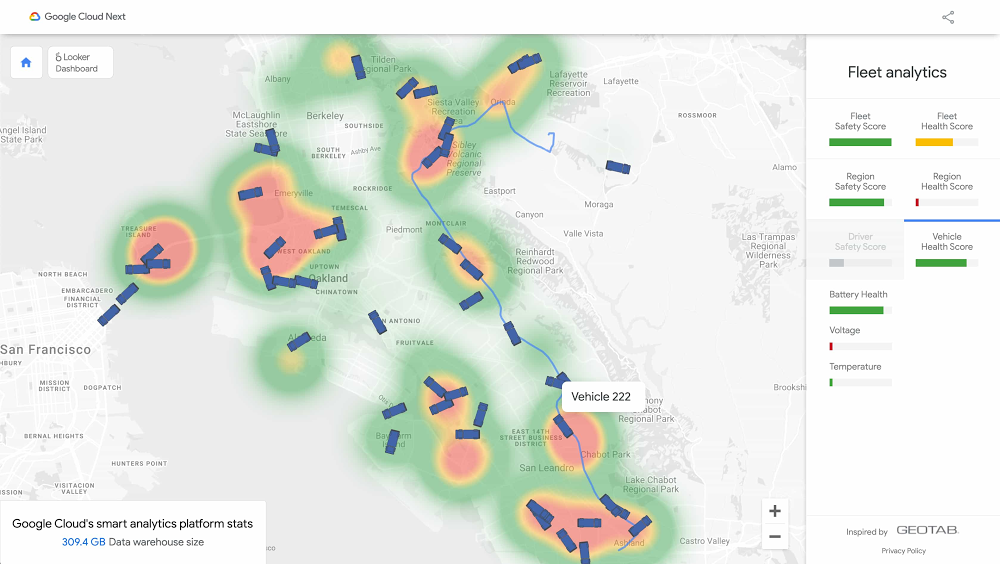
Data analytics technologies are becoming a must-have for businesses looking to stay competitive in a changing environment. And if there’s one lesson from this unpredictable year, it’s that we always need to be prepared for anything. We spent this week at Google Cloud Next ’20: OnAir exploring Google Cloud’s data analytics technologies and hearing how customers across all industries are using BigQuery, Dataflow, Dataproc, Looker and more to drive real-time data insights and power new data-driven applications. Key data analytics announcementsWe kicked off Next OnAir this year with the launch of BigQuery Omni, a multi-cloud analytics solution that lets you query data stored across Google Cloud, AWS and Azure (coming soon). Data QnA, a natural language interface for analytics, also launched at the beginning of Next OnAir, allowing a business user to just ask a question on their company’s dataset and get results back the same way.BigQuery Omni was designed to meet the needs of a multi-cloud computing future. So is Looker, acquired by Google Cloud earlier this year, which powers data experiences that deliver actionable business insights at the point of decision to help meet different types of data users where they are. Check out the latest announcements from Looker, such as new multi-cloud hosting options and new UI components, all designed to optimize costs and use data at greater scale. You can also find a technical deep-dive session on Looker’s technology.Also new this week: BigQuery now offers a 100-slot purchase option, so that SMBs and digital-native businesses can get started more easily, with predictable pricing options. In addition, BigQuery now offers a 99.99% availability with guaranteed SLAs, providing peace of mind that the platform will be available to handle all your mission-critical needs. Finally, we launched detailed and prescriptive design patterns that allow you to build real-time AI solutions like anomaly detection, pattern recognition, and predictive forecasting that can be used across multiple industries. These help you to quickly get started with your organization’s real-time needs. How customers are blazing new trails with analyticsJust this week, we heard how organizations using Google Cloud and data analytics are transforming digitally and improving customer and user experiences. Procter and Gamble shared how their cloud data analytics journey lets them personalize products for consumers. Major League Baseball (MLB) migrated to BigQuery to centralize their enterprise data warehouse (EDW) and bring better decision-making and tailored fan communications.And lifecycle pricing platform provider Revionics chose BigQuery to stay ahead of their application development needs, forecast growth, and give customers up-to-the-minute information at scale. Explore this fleet management demoA conference isn’t complete without demos, and Next OnAir brings them to you for easy exploration. Check out this interactive demo to see how you might increase vehicle safety and health using streaming and predictive analytics, and business intelligence within Google Cloud’s smart analytics platform. And this blog post gives you the backstory on how the demo was developed to create a live simulated world of 7,500 trucks generating approximately 25 million trip events per day. Here’s a look:Go deep with dataThere are plenty more sessions and topics to explore, from building a data lake to implementing real-time AI. If you’re curious about streaming analytics, check out this session on creating and managing real-time experiences. Wherever you are in your modernization journey, you can find tips and how-tos, like this post for DBAs on how to easily adapt to cloud data warehouses. Looking ahead: Data managementLooking forward to more Next OnAir? Next week is all about data management. On Tuesday, August 18, Penny Avril, director of product management for databases at Google Cloud, will talk with chat app ShareChat about how they’ve modernized their database infrastructure to stay ahead of user demand, plus dive into product features.Next OnAir runs through September 8, and you can find live technical talks and learning opportunities aligned with each week’s content. Click “Learn” on the Explore page to find each week’s schedule. Haven’t yet registered for Google Cloud ’20 Next: OnAir? Get started at g.co/cloudnext.
Quelle: Google Cloud Platform

Als Witz wäre er ein Brüller. Aber als Paper beim renommierten Wissenschaftsverlag Nature ist der Ziegelsteinstromspeicher ein Skandal. Ein IMHO von Frank Wunderlich-Pfeiffer (Akku, Internet)
Quelle: Golem






