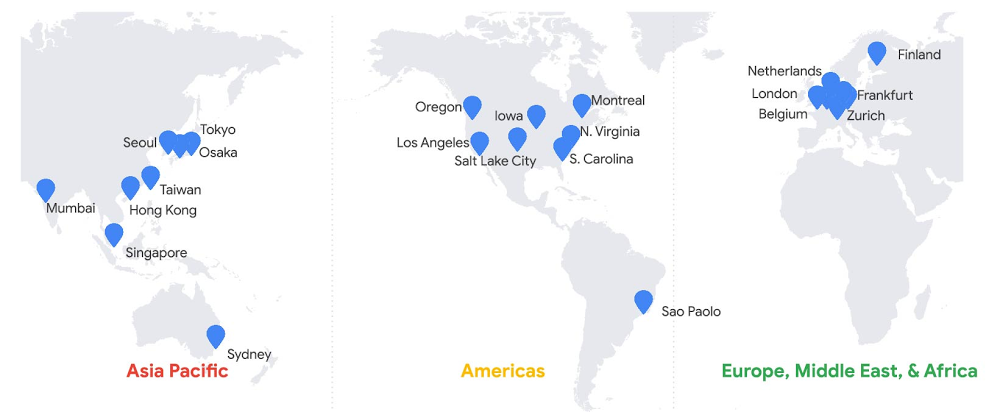
A database is a key architectural component of almost every application. When you design an application, you’ll invariably need to durably store application data. Without persisting data to a shared database, there are neither options for application scalability nor for upgrades to the underlying hardware. More disastrous, any data will be immediately lost in the case of infrastructure failure. With a reliable database, though, you enable application scalability and ensure data durability and consistency, service availability, and improved system supportability. A database is a key architectural component of almost every application.Google Cloud’s Spanner database was built to fulfill needs around storing structured data for products here at Google and at our many cloud customers. Spanner is part of Google’s core infrastructure, trusted to safeguard our business—so you can, too, regardless of your industry or use case.Before Spanner, our products predominantly used sharded MySQL for database use cases where transactions were needed. The goal of the development effort, as described in the Spanner paper, was to create a data storage service for those applications that have complex, evolving schemas, or those that want strong consistency in the presence of wide-area replication.One of the first concepts that comes up when considering Spanner is its ability to scale to arbitrarily large database sizes. Spanner does indeed support Google applications (such as Gmail and YouTube) that provide features for billions of our users, so scalability must be a first-class feature. In this post, we’ll explore how Spanner is designed for applications that operate at any scale, big or small, across a variety of use cases; how it provides a low-barrier to entry for developers; and how it lowers total cost of ownership (TCO). Here’s what you need to know.Start anywhere and scale as you growSpanner can handle data volumes at a massive scale, so it’s useful for applications of many sizes, not just those large ones. Further, your organization can benefit from standardizing on a single database engine for all workloads that require an RDBMS. Spanner provides a solid foundation for all kinds of applications with its combination of familiar relational database management system (RDBMS) features, such as ANSI 2011 SQL, DML, Foreign Keys and unique features such as strong external consistency via TrueTime and high availability via native synchronous replication. We’d like to take a moment to challenge what “smaller scale” may be perceived as: that smaller applications are not important, or that they do not have lofty availability goals or the need for transactional fortitude. This categorization does not indicate that an application is any less business-critical than a massive scale application. Nor does it imply that a given application will not eventually require higher scale than at its initial rollout. While your application might have a small user base or transaction volume to start, this Spanner scalability advantage should not be overlooked. An application designed with a Spanner back end will not require a rewrite or any sort of database migration if success results in future data volume or transaction growth. For example, if you are a gaming company developing the next cool, groundbreaking game, you want to be prepared to meet user growth if the game is a runaway success on launch day.No matter the scale of your application, there are strong benefits when you choose Spanner, including transaction support, high-availability guarantees, read-only replicas, and effortless scalability. Transaction support and strong external consistencySpanner provides external consistency guarantees via TrueTime. Spanner uses this fully redundant system of atomic clocks to obtain timestamps from what amounts to a virtual, distributed global clock. Since Spanner can apply a timestamp from a globally agreed-upon source to every transaction upon commit, the transaction commit sequence is unequivocal. External consistency requires that all transactions be executed sequentially. Spanner satisfies this strong consistency guarantee. Strong consistency is required by many application types, especially those where quantities of goods or currency are maintained, and for which eventual consistency would not be at all suitable. That includes, but is not limited to, supply chain management, retail pricing and inventory management, and banking, trading, and ledger applications.If your database does not have strong consistency, transactions must be split into separate operations. If a transaction is not atomic, that means that the transaction can partially fail. Imagine that you use a digital wallet to divide expenses, such as the cost of dinner, with friends. If a money transfer from your wallet to their wallets were not handled within a strongly consistent transaction, you could find yourself in the position where half of the transaction has failed: the funds are in neither your nor your friend’s wallet. The undesirable characteristics of eventual consistency is in the name: immediately after a database operation, the overall database state is inconsistent; only eventually will the changes be served back to all requesters. In the interim, disparate client requests may return different results. If you use a social media service, for example, you have likely experienced a lag time between pressing the button to post a picture and the moment that the image is shown on your timeline. Niantic, the creators of Pokemon GO, choose Spanner specifically to avoid this type of inconsistency in their social application.You can find more detail in this blog post on strong consistency. Essentially, what we’ve learned at Google is that application code is simpler and development schedules are shorter when developers can rely on underlying data stores to handle complex transaction processing and keeping data ordered. To quote the original Spanner paper, “we believe it is better to have application programmers deal with performance problems due to overuse of transactions as bottlenecks arise, rather than always coding around the lack of transactions.”High-availability guaranteesSpanner offers up to 99.999% availability with zero downtime for planned maintenance and schema changes. Spanner is a fully managed service, which means you don’t need to do any maintenance. Automatic software updates and instance optimizations happen in the background. This is achieved without any maintenance windows. Moreover, in case there is a hardware failure, your database will seamlessly recover without downtime.A Spanner instance provides this high availability via synchronous replication between three replicas in independent zones within a single cloud region for regional instances, and between at least four replicas in independent zones across two cloud regions for multi-region instances. Spanner regional instances are available in various regions in our Asia Pacific, Americas, and Europe, Middle East and Africa geographies; multi-region instances are offered in various combinations of regions across the globe.This protects your application from both infrastructure and zone failure for regional instance configurations, and region failure for multi-regional instance configurations.Read-only replicasIf you’re working with read requests that can tolerate a minor amount of data staleness, you can take better advantage of the computing power made available by these replicas and receive results with lower average read latency. This reduction of latency can be significant if you are using a multi-region instance configuration with replicas in geographic proximity to your application client.For queries that can accept this constraint, replicas are able to provide direct responses to your stale read queries without consulting the read-write replica (the split leader). In the case of multi-region instance configurations, the replicas may be much closer geographically to the application client, which can markedly improve the read performance. This capability is comparable to horizontal scaling that’s achieved when traditional RDBMS topologies are deployed with asynchronous read replicas. However, unlike a typical relational database, Spanner delivers this feature without incurring additional operational or management overhead.Effortless horizontal upscaling and downscalingSpanner decouples compute resources from data storage, which makes it possible to increase, decrease, or reallocate the pool of processing resources without any changes to the underlying storage. This is not possible with traditional open source or cloud-based relational database engines.This means that with a single click or API call, horizontal upscaling is possible so you can serve higher operations per second capacity as required by your application, even if data throughput remains low. Moreover, the additional compute resources added can process both reads and writes. Scaling down is just as simple. Spanner provides this capability at the press of a button, as instance nodes can be added or removed easily as your needs change, and these changes take effect in just a few seconds.In other databases, both relational and NoSQL, significant effort is required to grow a cluster horizontally to support additional write capacity. Further, it may not be straightforward, or even possible, to remove the capacity once added.Spanner stands out as a general-use databaseThe relational database is based on concepts outlined in a 1970 paper written by E.F. Codd, and despite being the oldest continually used database technology, the RDBMS retains its position as the database of choice for most new projects. The relational database is trusted technology and many successful companies have published lore relating to their initial choice of MySQL or PostgreSQL. Companies choose the technology because developers know SQL, and because the relational model is flexible during the product development process. (To the point made earlier, it is worth mentioning that in many cases, these origin stories go on to discuss the extreme management effort associated with relational databases once data volumes exceed an unmanageable level.)Of course, with Spanner, there are more abstract concepts involved. Spanner is a distributed database, and its strong external consistency is provided by a robust system featuring redundant local and remote atomic clocks located on the server racks and available via GPS signal, respectively. Yet, it still presents the familiar ANSI SQL compliant interface of a relational database. As a result, application developers can quickly achieve proficiency. The database technology has proven its worth for countless applications at Google—internal and external, big and small. Spanner is firmly seated as a foundational technology that enables a low barrier of entry for developers, and thus the freedom to try new ideas. While our user bases can be extremely large and transaction volumes can be exceptionally high for some product applications, there are other less frequently used applications that serve smaller cohorts. Spanner serves as the back-end data storage service for both application categories.And Google Cloud customers across various verticals have used Spanner successfully for numerous core business use cases: gaming (Lucille Games), fintech (Vodeno), healthcare (Maxwell Plus), retail (L.L.Bean), technology (Optiva) and media and entertainment (Whisper). Here are examples of how those in various industries use Spanner:Spanner lowers TCO with a simpler experience When considering the total cost of ownership (TCO), Spanner costs less to operate. Moreover, when you consider opportunity cost, the return on investment (ROI) can be even higher. Before you solely evaluate the operating expense of Spanner using the per-hour price, compare it to other database options by contrasting holistically the various costs of an alternate choice with the value provided by Spanner.First, consider the cost of running a production-grade database. There are three cost categories: resource, operational, and opportunity. Resource cost is relatively straightforward to calculate as it is based on published list prices. Operational costs are somewhat more difficult to calculate, as this cost is equivalent to the number of team members required to complete various tasks. Opportunity cost calculation is less tangible, but should not be ignored. When you choose to expend organizational budget, in currency or in hours, toward one effort category, there will be less budget available for other opportunities.For this exercise, we’ll first discuss resource cost by comparing the list price of Spanner compared with that of a self-managed open source database running on virtual machines. Then, we’ll compare the operational burden and cost of the same environments. Finally, we’ll address some opportunity value provided by Spanner.To start, when you consider a single database engine running on a small virtual machine, Spanner may appear costly. However, it is not recommended to run a production database on a single compute node. More likely, you will be running on a medium-sized virtual machine with sufficient memory and attached persistent disk provisioned with sufficient headroom for short- to medium-term growth.Also likely is that you will have provisioned a high-availability database topology, which includes an online database replica with the same specifications as your production virtual machine. Further, you may maintain an additional replica database specifically for read-only workloads. If this is the case, you have the compute and storage topology equivalent as provided by Spanner. You have three copies of the data, and three running virtual machines: one virtual machine to manage writes, a second as a high-availability replica, and a third to serve read-only workloads. This reflects the core philosophy behind Spanner: that you should operate with at least three replicas to ensure high availability.Now, let’s consider the relative list price of Spanner to that of a database running on Compute Engine. The list price for Spanner database storage is approximately twice that of zonal persistent disk. However, since you have three copies of data stored in persistent disk, the total cost will be higher.In this topology, for the same amount of application data, Spanner database storage costs approximately one-third less than the price of traditional database storage. Additionally, with Spanner, you only pay for what you use, which saves cost since you will not need to pre-provision initially unused space. And if your data decreases in size, unlike a traditional database, no migration will be required to materialize reduced storage costs.Compute resource price comparison is a bit more complex, as performance is dependent upon your workload. You can compare the price of your three-way replicated traditional RDBMS on production size virtual machines to an equivalent count of Spanner nodes to get a sense of the relative price.However, the scenario does not end here. As you know, the operational cost of managing your own databases is not insignificant. Also, every operational task introduces an additional amount of risk to system uptime. Spanner was designed to provide a high level of service with a low level of operational overhead.In most cases, the operational cost for Spanner approaches zero. To start, Spanner reduces the operational effort required to obtain and retain database backups. Spanner requires no maintenance windows or planned downtime. There is never a need for manual corruption remediation or index rebuilding with Spanner. Nor is any effort required to increase the available storage size for your database. (Unless you deem “effort” the button click to increase the instance node count.) Most important: There is no effort required (again, unless you count the button click) to achieve horizontal or vertical scaling, since Spanner automatically provides dynamic data resharding and data replication.The Enterprise Strategy Group quantified the total cost of ownership (TCO) savings of Spanner in their report Analyzing the Economic Benefits of Google Cloud Spanner Relational Database Service. What they found was that due to the TCO savings and the benefits provided by improved flexibility and innovation, every customer they interviewed preferred Spanner over other database options. Spanner’s total cost of ownership is 78% lower than on-premises databases and 37% lower than other cloud options. With this reduction in operational effort, you can focus on other things that can make your business more successful. This is the opportunity value provided by Spanner. Getting startedSpanner is incredibly powerful, but is also incredibly simple to operate. Spanner has been battle-tested at Google, and we’re proud to provide this technology to customers. There are strong (pun intended) reasons why Spanner is a great choice for your next project, regardless of the workload scope or size. We choose to use Spanner internally at Google Cloud to guarantee object listing in Cloud Storage, and the same choice is made by our customers, such as Colopl, which chose Spanner to help bring you Dragon Quest Walk. Spanner provides familiar relational semantics and query language, and shares the powerful flexibility that has made relational databases the top choice for data storage. No matter the size of your application or your business goals, there is a good chance that Spanner would make a great choice for you as well. Learn moreTo get started with Spanner, create an instanceor try it out with a Spanner Qwiklab.
Quelle: Google Cloud Platform