Windows 10 Enterprise: Microsoft gibt mehr Kontrolle über Telemetriedaten
Statt alle oder keine Informationen an Microsoft zu schicken, gibt es eine Alternative für GDPR-Länder. (Windows 10, Microsoft)
Quelle: Golem

Statt alle oder keine Informationen an Microsoft zu schicken, gibt es eine Alternative für GDPR-Länder. (Windows 10, Microsoft)
Quelle: Golem

When it comes to customer satisfaction, the customer service experience can often be more important than the actual product. According to Forbes, companies lost about $75 billion in 2018 due to poor customer service, and 39% of customers who experienced poor customer service will not do business with the offending company again.An important part of delivering a positive customer service experience is handling customer feedback, especially negative feedback, quickly and efficiently. But responding to and acting on customer feedback is a complex and time consuming process that’s usually done manually—making it a good fit for efficiency increases using AI. Integrating AI into a customer feedback management process can automate repetitive tasks, freeing up customer support agents to work on the most complex and time-sensitive cases. In this blog we’ll look at an example of how you can use AutoML to make your customer feedback management more efficient.Automating complaint classificationUsing AutoML Tables, we built an example solution (including code) to classify customer feedback. The AI-enabled classifications can then be used to send appropriate automated responses, to route complaints and other actionable feedback to the right support team, and to flag selected feedback as high priority. Automating these actions can reduce customer wait times, decrease the amount of feedback that needs to be handled manually, and bring critical issues to the surface.AutoML offers several advantages over a manually-built machine learning model. AutoML uses more than 10 years of Google Research technology to create faster models that make more accurate predictions. AutoML automatically manages the training and deployment of custom models. Once your data is in the appropriate structure, AutoML can train and deploy your custom model behind a scalable API in a couple hours, saving days, weeks, or even months versus developing a machine learning model.If you provide customer support, you probably already have the data you need to train your custom AutoML Tables model. Normal customer service workflow data—how feedback was resolved, what team feedback was routed to, what products the feedback addressed, what issues were identified, the resolution of negative feedback, the time to resolution, and the text of the feedback itself—are ingested by AutoML Tables, which learns from both structured data and text.The provided code example trains a model on publicly-available customer complaint data collected by Consumer Financial Protection Bureau (CFPB), a United States government agency focused on consumer protection in the financial sector. The data includes variables like the product type, the subproduct, the issue, location data, and the complaint narrative (a text field), along with data about the resolution of the complaint. The data is ingested from BigQuery, cleaned and transformed into a form appropriate for machine learning, and then used to train an AutoML Tables model. From there, the code makes batch predictions (for evaluation), deploys an API endpoint used to make predictions, and makes a prediction using the API. The code uses configuration to find and parse the data and deploy the model, easing adaptation to new datasets.Click to enlargeWhenever a customer takes the time to provide feedback—positive or negative—you have an opportunity to show them how much they’re valued. This example code and pipeline, powered by AutoML and BigQuery, provides the foundation for a more efficient and consumer-friendly customer service experience, which can help you improve not only your core customer support metrics, but also how your company is perceived in the eyes of consumers.To learn more about how we are helping companies manage the surge in customer needs related to COVID-19, see How Cloud AI is helping during COVID-19.AcknowledgementThis code linked from this post was built by Sahana Subramanian, Michael Sparkman, Karan Palsani, and Shane Kok, 2020 graduates of the Master of Science in Business Analytics program at the University of Texas at Austin. We’d also like to thank Dimos Christopoulos and Andrew Leach.
Quelle: Google Cloud Platform

Macs sollen ihre Besitzer künftig am Gesicht erkennen. Face-ID-Fragmente wurden in MacOS Big Sur entdeckt. (MacOS 11.0 Big Sur, Mac OS X)
Quelle: Golem

Vodafone ist von der britischen Entscheidug gegen Huawei enttäuscht und sieht sie nicht als Vorlage für Europa. (Vodafone, Huawei)
Quelle: Golem

Die klassische Tankstelle wird es wohl noch lange geben: Aral will erst einmal an nur 30 Tankstellen Schnelllader für Elektroautos errichten. (Ladesäule, Technologie)
Quelle: Golem

Die mangelnde Hintergrundaktualisierung scheint auch der Corona-Warn-App für iPhones zuzusetzen. Abhilfe ist noch nicht in Sicht. (Coronavirus, Android)
Quelle: Golem

Vodafone baut Frankfurt am Main in allen Stadtteilen mit 5G in einem LTE-Bereich (Band 3) aus. Dabei braucht man wieder Dynamic Spectrum Sharing (DSS). (Vodafone, Long Term Evolution)
Quelle: Golem
blog.kubernauts.io – In this short tutorial I’m going to show you how to deploy an AKS cluster with Terraform and import the created cluster into Rancher. If you don’t have access to a running Rancher environment, you ca…
Quelle: news.kubernauts.io
blog.container-solutions.com – In a GitOps style, a deployment starts with changes in application manifests in Git repositories tracked by ArgoCD, similar to how Flux works. However, what makes it shine is the capability to manage…
Quelle: news.kubernauts.io
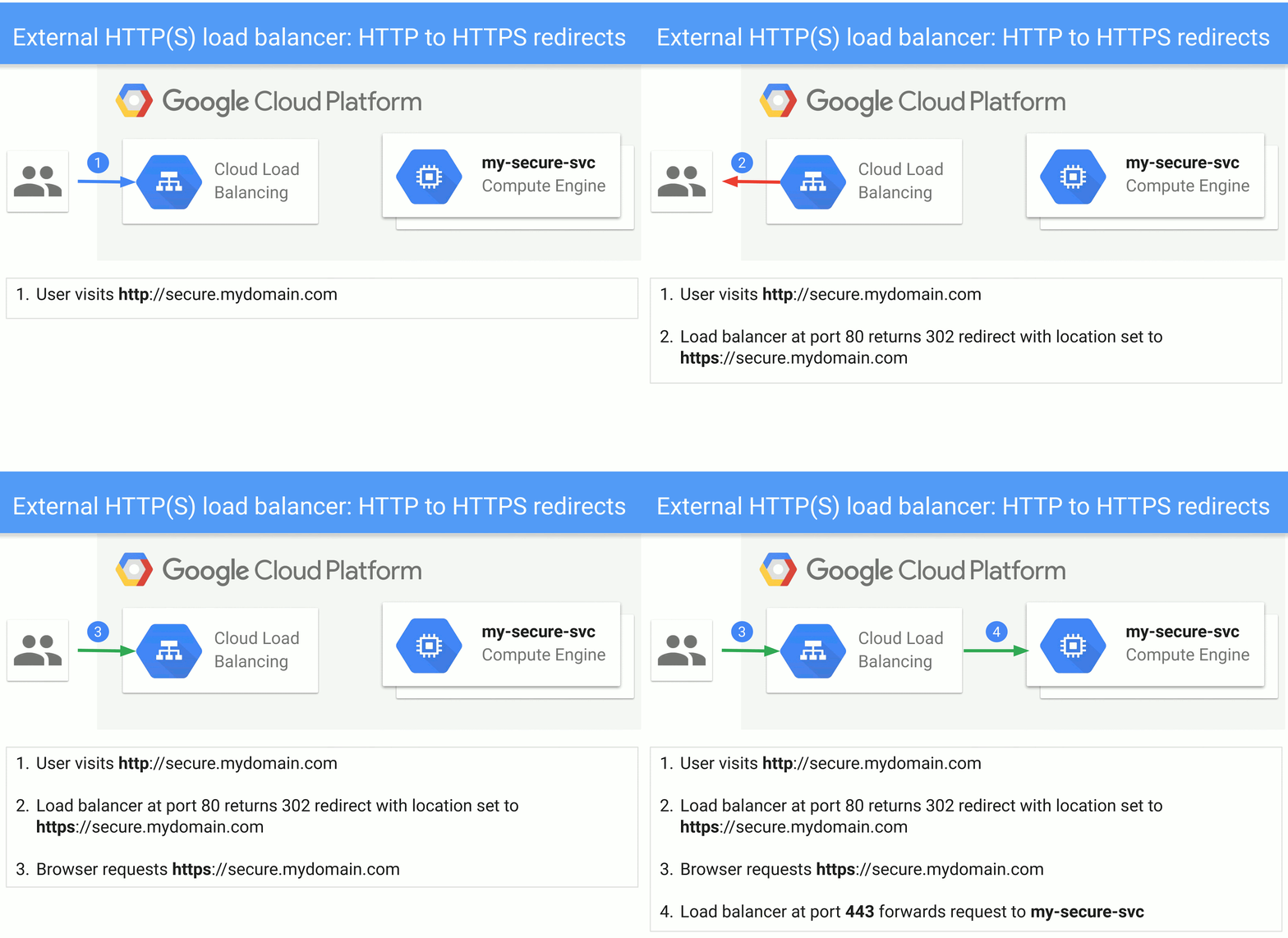
At the heart of every HTTP(S) load balancer is an enduring URL map that reliably directs each incoming request to its appropriate destination. In April, we announced two new actions supported by the URL map: redirects and rewrites. With URL redirects the load balancer redirects incoming requests from one URL to another. With rewrites, you can present external users with different URLs than those used by the backend service. In addition, we added more matching criteria that lets you match on HTTP headers and URL query parameters.These traffic control features will allow you to shift more of your routing decisions to the load balancer, rather than relying on homegrown solutions. And since we announced the features, we’ve seen a few common use cases emerge. Read on to learn how Google Cloud customers are using these features in production, to inspire some use cases of your own. HIPAA compliance with HTTP-to-HTTPS redirectThe Health Insurance Portability and Accountability Act of 1996 (HIPAA) demands that personal health information (PHI) be encrypted in transit. For web sites, this all but requires that you use HTTPS to protect web requests and responses. Unencrypted HTTP requests should result in a response to the browser telling the browser to re-send the request instead as an HTTPS request; this is known as a redirect response. Usually the browser silently follows the redirect response’s suggestion, for a seamless user experience.But having the backend web server generate the redirect responses results in increased computational costs, configurational complexity, latency and bandwidth consumption. Now you can short circuit the process, and have the load balancer issue the redirect directly, reducing any risk of an unencrypted request landing on your backend server. In addition to changing the scheme from HTTP to HTTPS, a redirect response generated from the load balancer can also signal that the request should be sent to a different host, or to a different URL path. To accomplish an HTTP to HTTPS redirect, simply configure the defaultUrlRedirect to set the httpsRedirect to true for all hosts.Backend reorganization with URL rewriteA URL redirect is usually a conversation between the user (browser) and the load balancer. Cloud Load Balancing’s new URL rewrite feature, however, only affects communication between the load balancer and the backend.A typical use case for URL rewrite arises when migrating static web content from a VM web server to Google Cloud Storage. In this case, you must map the URL paths for the static web elements to a URL that identifies the storage bucket and the path within the bucket. This translation is not of interest to the client browser, and affects only the interaction between the load balancer and the storage system backend.To accomplish this, first configure the routeAction as a urlRewrite, where the corresponding host and path matches the client to load-balancer URL.A/B testing with routing by query parameterAnother capability enabled by these new Cloud Load Balancing features is making routing decisions based on HTTP headers and/or query parameters, rather than just the host and path of the URL.For example, say you are testing out a new version of a website. You can add a query parameter to a URL that states that a given request should be directed to an experimental backend. Then, the load balancer checks for the presence of the ‘experimental’ query parameter and routes traffic to the experimental-web-server backend service:We hope you find these examples useful. To learn more about added traffic control features associated with External HTTP(S) Load Balancing, please refer to the documentation. Also check out the Traffic Control APIs supported by Internal HTTPS Load Balancer here. We’d love to learn how you are using these Traffic Control APIs and get your feedback.
Quelle: Google Cloud Platform






