Building containers without Docker

blog.alexellis.io – In this post I’ll outline several ways to build containers without the need for Docker itself. I’ll use OpenFaaS as the case-study, which uses OCI-format container images for its workloads. The easie…
Quelle: news.kubernauts.io

Genomics analysis with Hail, BigQuery, and Dataproc

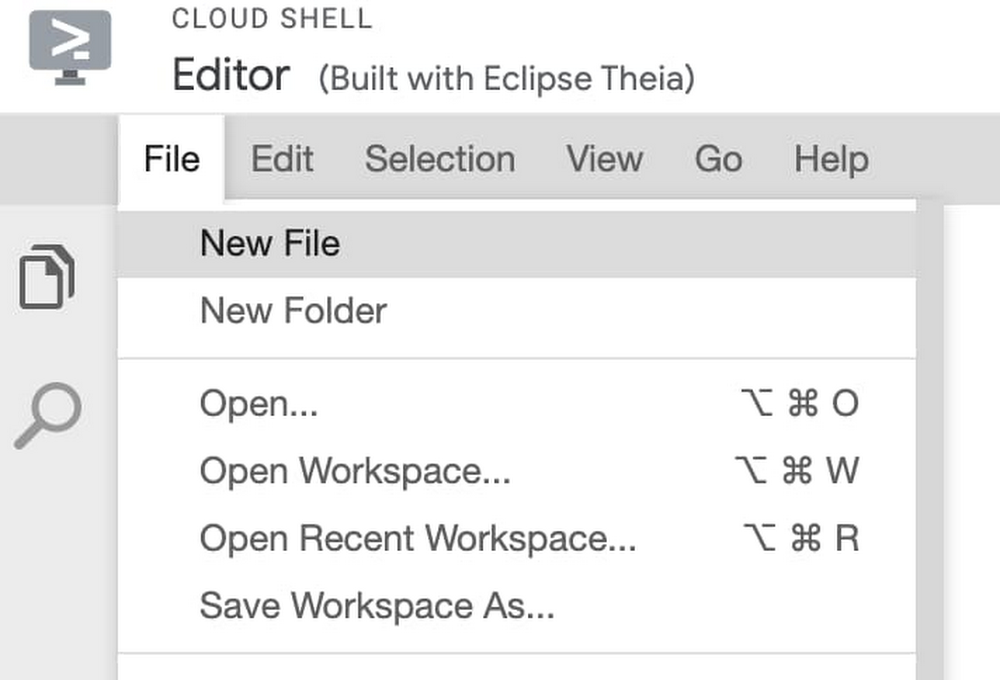
At Google Cloud, we work with organizations performing large-scale research projects. There are a few solutions we recommend to do this type of work, so that researchers can focus on what they do best—power novel treatments, personalized medicine, and advancements in pharmaceuticals. (Find more details about creating a genomics data analysis architecture in this post.)Hail is an open source, general-purpose, Python-based data analysis library with additional data types and methods for working with genomic data on top of Apache Spark. Hail is built to scale and has first-class support for multi-dimensional structured data, like the genomic data in a genome-wide association study (GWAS). The Hail team has made their software available to the community with the MIT license, which makes Hail a perfect augmentation to the Google Cloud Life Sciences suite of tools for processing genomics data. Dataproc makes open source data and analytics processing fast, easy, and more secure in the cloud and offers fully managed Apache Spark, which can accelerate data science with purpose-built clusters. And what makes Google Cloud really stand out from other cloud computing platforms is our healthcare-specific tooling that makes it easy to merge genomic data with data sets from the rest of the healthcare system. When genotype data is harmonized with phenotype data from electronic health records, device data, medical notes, and medical images, the hypothesis space becomes boundless. In addition, with Google Cloud-based analysis platforms like AI Platform Notebooks and Dataproc Hub, researchers can easily work together using state-of-the-art ML tools and combine datasets in a safe and compliant manner. Getting started with Hail and DataprocAs of Hail version 0.2.15, pip installations of Hail come bundled with a command-line tool, hailctl, which has a submodule called dataproc for working with Dataproc clusters configured for Hail. This means getting started with Dataproc and Hail is as easy as going to the Google Cloud console, then clicking the icon for Cloud Shell at the top of the console window. This Cloud Shell provides you with command-line access to your cloud resources directly from your browser without having to install tools on your system. From this shell, you can quickly install Hail by typing:Once Hail downloads and installs, you can create a Dataproc cluster fully configured for Apache Spark and Hail simply by running this command: Once the Dataproc cluster is created, you can click the button from the Cloud Shell that says Open Editor, which will take you to a built-in editor for creating and modifying code. From this editor, choose New File and call the file my-first-hail-job.py.In the editor, copy and paste the following code:By default, Cloud Shell Editor should save this file, but you can also explicitly save the file from the menu where the file was created. Once you have verified the file is saved, return to the command line terminal by clicking on the Open Terminal button. From the terminal, now run the command:Once the job starts, find the Dataproc section of the Google Cloud Console and review the output of your genomics job from the Jobs tab.Congratulations, you just ran your first Hail job on Dataproc! For more information, see Using Hail on Google Cloud Platform. Now, we’ll pull Dataproc and Hail into the rest of the clinical data warehouse. Create a Dataproc Hub environment for Hail As mentioned earlier, Hail version 0.2.15 pip installations come bundled with hailctl, a command-line tool that has a submodule called dataproc for working with Google Dataproc clusters. This includes a fully configured notebook environment that can be used simply by calling:However, to take advantage of notebook features specific to Dataproc, including the use of Dataproc Hub, you will need to use a Dataproc initialization action that provides a standalone version of Hail without the Hail-provided notebook. To create a Dataproc cluster that provides Hail from within Dataproc’s JuypterLab environment, run the following command:Once the cluster has been created (as indicated by the green check mark), click on the cluster name, choose the tab for Web Interfaces and click the component gateway link for JuypterLab.From within a Juypter IDE, you should have a kernel and console for Hail (see red box in image below):This running cluster can easily be translated into a Dataproc Hub configuration by running the Dataproc clusters export command:Use Dataproc Hub and BigQuery to analyze genomics data Now that the Juypter notebooks environment is configured with Hail for Dataproc, let’s take a quick survey of the ways we can interact with the BigQuery genotype and phenotype data stored in the insights zone.  Using BigQuery magic to query data into Pandas It is possible to run a GWAS study directly in BigQuery by using SQL logic to push the processing down into BigQuery. Then, you can bring just the query results back into a Pandas dataframe that can be visualized and presented in a notebook. From a Dataproc Juypter notebook, you can run BigQuery SQL, which returns the results in a Pandas dataframe simply by adding the bigquery magic command to the start of the notebook cell, like this: Find an example of a GWAS analysis performed in BigQuery with a notebook in this tutorial. A feature of BigQuery, BigQuery ML provides the ability to run basic regression techniques and K-means clusters using standard SQL queries.   More commonly, BigQuery is used for preliminary steps in GWAS/PheWAS: feature engineering, defining cohorts of data, and running descriptive analysis to understand the data. Let’s look at some descriptive statistics using the 1000 genome variant data hosted by BigQuery public datasets. Let’s say you wanted to understand what SNP data was available in chromosome 12 from the 1000 Genomes Project. In a Juypter cell, simply copy and paste the following into a cell:This query will populate a Pandas dataframe with very basic information from the 1000 Genomes Project samples in my cohort. You can now run standard Python and Pandas functions to review, plot, and understand the data available for this cohort.For more on writing SQL queries against tables that use the variant format, see the Advanced guide to analyzing variants using BigQuery. Using the Spark to BigQuery connector to work with BigQuery storage directly in Apache Spark When you need to process large volumes of genomic data for population studies and want to use generic classification and regression algorithms like Random Forest, Naive Bayes, or Gradient Boosted trees, or you need help with extracting or transforming features with algorithms like PCA or One Hot Encoding, Apache Spark offers these ML capabilities, among many others.Using the Apache Spark BigQuery connector from Dataproc, you can now treat BigQuery as another source to read and write data from Apache Spark. This is achieved nearly the same as any other Spark dataframe setup:Learn more here about the Apache Spark to BigQuery storage integration and how to get started.Run variant transforms to convert BigQuery into VCF for genomics tools like HailWhen you want to do genomics-specific tasks, this is where Hail can provide a layer on top of Spark that can be used to:Generate variant and sample annotationsUnderstand Mendelian violations in trios, prune variants in linkage disequilibrium, analyze genetic similarity between samples, and compute sample scores and variant loadings using PCAPerform variant, gene-burden and eQTL association analyses using linear, logistic, and linear mixed regression, and estimate heritabilityHail expects the data format to start with either VCF, BGEN, or PLINK. Luckily, BigQuery genomics data can easily be converted from the BigQuery VCF format into a VCF file using Variant Transforms. Once you create the VCF on Cloud Storage, call Hail’s import_vcf function, which transforms the file into Hail’s matrix table.To learn more about scalable genomics analysis with Hail, check out this YouTube series for Hail from the Broad Institute.
Quelle: Google Cloud Platform

Building a genomics analysis architecture with Hail, BigQuery, and Dataproc

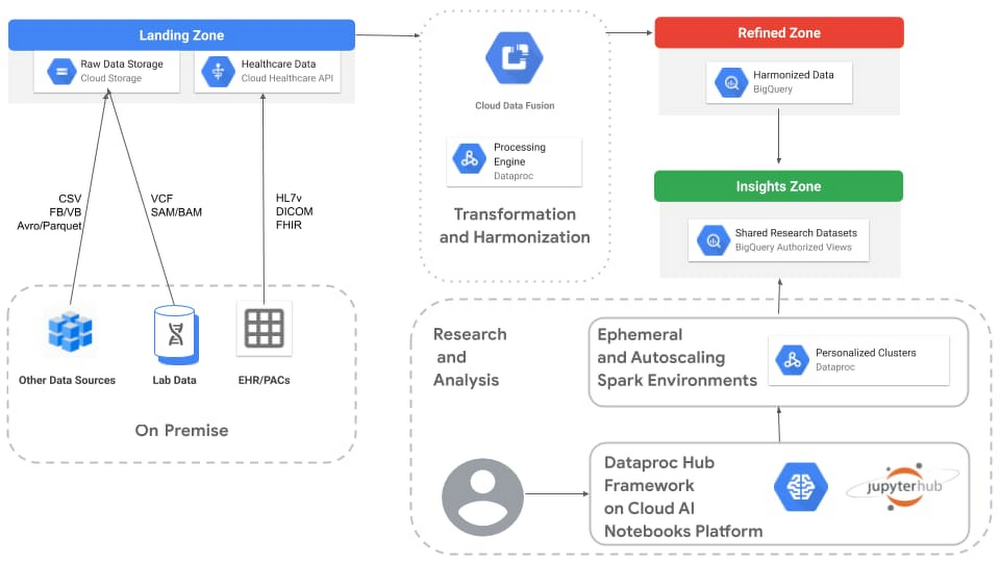
We hear from our users in the scientific community that having the right technology foundation is essential. The ability to very quickly create entire clusters of genomics processing, where billing can be stopped once you have the results you need, is a powerful tool. It empowers the scientific community to spend more time doing their research and less time fighting for on-prem cluster time and configuring software.   At Google Cloud, we’ve developed healthcare-specific tooling that makes it easy for researchers to look at healthcare and genomic data holistically. Combining genotype data with phenotype data from electronic health records (EHRs), device data, medical notes, and medical images makes scientific hypotheses limitless. And, our analysis platforms like AI Platform Notebooks and Dataproc Hub let researchers easily work together using state-of-the-art ML tools and combine datasets in a safe and compliant manner. Building an analytics architecture for genomic association studiesGenome-wide association studies (GWAS) are one of the most prevalent ways to study which genetic variants are associated with a human trait, otherwise known as a phenotype. Understanding the relationships between our genetic differences and phenotypes such as diseases and immunity is key to unlocking medical understanding and treatment options. Historically, GWAS studies were limited to phenotypes gathered during a research study. These studies were typically siloed, separate from day-to-day clinical data. However, the increased use of EHRs for data collection, coupled with natural language processing (NLP) advances that unlock the data in medical notes, has created an explosion of phenotype data available for research. In fact, Phenome-wide association studies (PheWas) are gaining traction as a complementary way to study the same associations that GWAS provides, but starting from the EHR data. In addition, the amount of genomics data now being created is causing storage bottlenecks. This is especially relevant as clinical trials move toward the idea of basket trials, where patients are sequenced for hundreds of genes up front, then matched to a clinical trial for a gene variant. While all of this data is a boon for researchers, most organizations are struggling to provide their scientists with a unified platform for analyzing this data in a way that balances respecting patient privacy with sharing data appropriately with other collaborators. Google Cloud’s data lake empowers researchers to securely and cost-effectively ingest, store, and analyze large volumes of data across both genotypes and phenotypes. When this data lake infrastructure is combined with healthcare-specific tooling, it’s easy to store and translate a variety of healthcare formats, as well as reduce toil and complexity. Researchers can move at the speed of science instead of the speed of legacy IT. A recent epidemiology studycited BigQuery as a “cloud-based tool to perform GWAS,” and suggests that a future direction for PheWAS “would be to extend existing [cloud platform] tools to perform large-scale PheWAS in a more efficient and less time-consuming manner.” The architecture we’ll describe here offers one possible solution to doing just that. GWAS/PheWAS architecture on Google CloudThe goal of the below GWAS/PheWAS architecture is to provide a modern data analytics architecture that will: Safely and cost-effectively store a variety of large-scale raw data types, which can be interpreted or feature-engineered differently by scientists depending on their research tasksOffer flexibility in analysis tools and technology, so researchers can choose the right tool for the job, across both Google Cloud and open source softwareAccelerate the number of questions asked and increase the amount of scientific research that can be done by: Reducing the time scientists and researchers spend implementing and configuring IT environments for their various toolsIncreasing access to compute resources that can be provisioned as neededMake it easy to share and collaborate with outside institutions while maintaining control over data security and compliance requirements. Check out full details on our healthcare analytics platform, including a reference architecture. The architecture depicted below represents one of many ways to build a data infrastructure on Google Cloud. The zones noted in the image are logical areas of the platform that make it easier to explain the purpose for each area. These logical zones are not to be confused with Google Cloud’s zones, which are physical definitions of where resources are located. This particular architecture is designed to enable data scientists to perform GWAS and PheWAS analysis using Hail, Dataproc Hub, and BigQuery.Click to enlargeHere’s more detail on each of the components.Landing zoneThe landing zone, also referred to by some customers as their “raw zone,” is where data is ingested in its native format without transformations or making any assumptions about what questions might be asked of it later. For the most part, Cloud Storage is well-suited to serve as the central repository for the landing zone. It is easy to bring genomic data stored in raw variant call format (VCF) or SAM/BAM/CRAMfiles into this durable and cost-effective storage. A variety of other sources, such as medical device data, cost analysis, medical billing, registry databases, finance, and clinical application logs are also well suited for this zone, with the potential to be turned into phenotypes later. Take advantage of storage classes to get low-cost, highly durable storage on infrequently accessed data. For clinical applications that use the standard healthcare formats of HL7v2, DICOM, and FHIR, the Cloud Healthcare API makes it easy to ingest the data in its native format and tap into additional functionality, such as: Automated de-identificationDirect exposure to the AI Platform for machine learningEasy export into BigQuery, our serverless cloud data warehouseTransformation and harmonizationThe goal of this particular architecture is to prepare our data for use in BigQuery. Cloud Data Fusion has a wide range of prebuilt plugins for parsing, formatting, compressing, and converting data. Cloud Data Fusion also includes Wrangler, a visualization tool that interactively filters, cleans, formats, and projects the data, based on a small sample (1000 rows) of the dataset. Cloud Data Fusion generates pipelines that run on Dataproc, making it easy to extend Data Fusion pipelines with additional capabilities from the Apache Spark ecosystem. Fusion can also help track lineage between the landing and refined zones. For a more complete discussion of preparing health data for BigQuery, check out Transforming and harmonizing healthcare data for BigQuery. Direct export to BigQuery BigQuery is used as the centerpiece of our refined and insights zones, so many healthcare and life science formats can be directly exported into BigQuery. For example, a FHIR store can be converted to a BigQuery dataset with a single command line call of gcloud beta healthcare fhir-stores export bq.See this tutorial for more information on ingesting FHIR to BigQuery. When it comes to VCF files, the Variant Transforms tool can load VCF files from Cloud Storage into BigQuery. Under the hood, this tool uses Dataflow, a processing engine that can scale to loading and transforming hundreds of thousands of samples and billions of records. Later in this post, we’ll discuss using this Variant Transforms tool to convert data back from BigQuery and into VCF. Refined zoneThe refined zone in this genomics analysis architecture contains our structured, yet somewhat disconnected data. Datasets tend to be associated with specific subject areas but standardized by Cloud Data Fusion to use specific structures (for example, aligned on SNOWMED, single VCF format, unified patient identity, etc). The idea is to make this zone the source of truth for your tertiary analysis. Since the data is structured, BigQuery can store this data in the refined zone, but also start to expose analysis capabilities, so that:Subject matter experts can be given controlled access to the datasets in their area of expertiseETL/ELT writers can use standard SQL to join and further normalize tables that combine various subject areasData scientists can run ML and advanced data processing on these refined datasets using Apache Spark on Dataproc via the BigQuery connector with Spark. Insights zoneThe insights zone is optimized for analytics and will include the datasets, tables, and views designed for specific GWAS/PheWAS studies. BigQuery authorized views lets you share information with specified users and groups without giving them access to the underlying tables (which may be stored in the refined zone). Authorized views is often an ideal way to share data in the insights zone with external collaborators. Keep in mind that BigQuery (in both the insights and refined zones) offers a separation of storage from compute, so you only need to pay for the processing needed for your study. However, BigQuery still provides many of the data warehouse capabilities that are often needed for a collaborative insights zone, such as managed metadata, ACID operations, snapshot isolation, mutations, and integrated security. For more on how BigQuery storage provides a data warehouse without the limitations associated with traditional data warehouse storage, check out Data warehouse storage or a data lake? Why not both?Research and analysis For the actual scientific research, our architecture uses managed Jupyter Lab notebook instances from AI Platform Notebooks. This enterprise notebook experience unifies the model training and deployment offered by AI Platform with the ingestion, preprocessing, and exploration capabilities of Dataproc and BigQuery. This architecture uses Dataproc Hub, which is a notebook framework that lets data scientists select a Spark-based predefined environment that they need without having to understand all the possible configurations and required operations. Data scientists can combine this added simplicity with genomics packages like Hail to quickly create isolated sandbox environments for running genomic association studies with Apache Spark on Dataproc. To get started with genomics analysis using Hail and Dataproc, check out part two of this post.
Quelle: Google Cloud Platform

11 best practices for operational efficiency and cost reduction with Google Cloud

As businesses consider the road ahead, many are finding they need to make tough decisions about what projects to prioritize and how to allocate resources. For many, the impact of COVID-19 has brought the benefits and limitations of their IT environment into focus. As these businesses plan their way forward, many will need to consider how to meet the needs of their new business realities with limited resources.This is a challenge ideally suited for IT—particularly any  business overly reliant on legacy infrastructure. A recent McKinsey study found that these legacy systems account for 74% of a company’s IT spend while hampering agility at the same time. Making fundamental IT changes like migrating on-premises workloads to the cloud can reduce costs, increase agility, and pay ROI dividends down the line.All of this is covered in our new eGuide, Solving for operational efficiency with Google Cloud. While modernization will look different for businesses of varying sizes and in varying industries, the benefits of moving to the cloud are broad and universal. These include:Increasing agility and reducing IT costs by adopting hybrid and multi-cloud strategies.Driving a higher return on ERP investments by migrating SAP systems to the cloud.Avoiding costly hardware refreshes and reducing on-premises infrastructure costs by migrating VMs to the cloud.Increasing scalability and gaining access to advanced analytics through data warehouse modernization.Make cluster management easier and more cost-effective by migrating on-premises Apache Hadoop clusters to the cloud.Gaining cost efficiencies by running specialized workloads in the cloud with a scalable Bare Metal Solution.Increasing flexibility and decreasing on-premises investments by migrating Windows workloads to the cloud.Embrace a modern architecture for scalability and cost efficiencies by offloading a mainframe environment.Leveraging AI to rapidly respond to customer needs and improve customer experience.Gaining more visibility and control to lower costs with billing and cost management tools.Improving productivity by transforming the way teams work together with cloud-native collaboration tools.With current business conditions, organizations need facts, knowledge, and best practices so they can prioritize investments and optimize costs. Our eGuide provides an overview of the key areas we see our customers prioritizing their investments and creating operational efficiencies, and highlights the many ways Google Cloud can support you in your journey. Read the eGuide. If you want more customized recommendations, take advantage of our IT Cost Assessment program which will analyze your individual IT spend against industry benchmark data and provide you with a view of cost optimization opportunities. Learn more here.Related ArticleNew IT Cost Assessment program: Unlock value to reinvest for growthOur new IT Cost Assessment program lets you understand how your company’s IT spend compares to your industry peers, so you can quickly id…Read Article
Quelle: Google Cloud Platform

Presto optional component now available on Dataproc

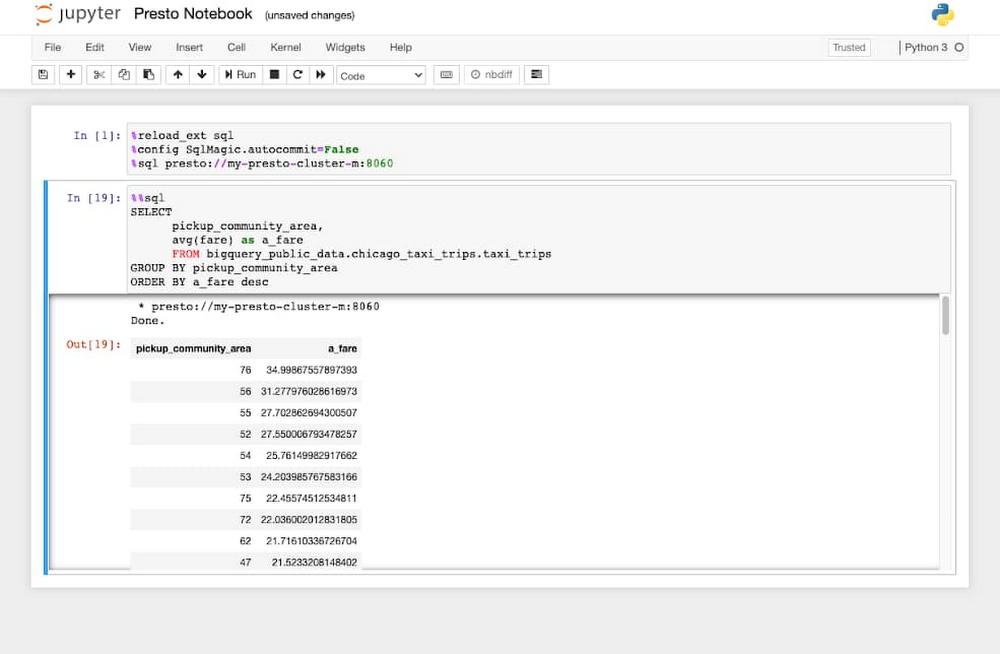
Presto is an open source, distributed SQL query engine for running interactive analytics queries against data sources of many types. We are pleased to announce the GA release of the Presto optional component for Dataproc, our fully managed cloud service for running data processing software from the open source ecosystem. This new optional component brings the full suite of support from Google Cloud, including fast cluster startup times and integration testing with the rest of Dataproc. The Presto release of Dataproc comes with several new features that improve on the experience of using Presto, including supporting BigQuery integration out of the box, Presto UI support in Component Gateway, JMX and logging integrations with Cloud Monitoring, Presto Job Submission for automating SQL commands, and improvements to the Presto JVM configurations. Why use Presto on DataprocPresto provides a fast and easy way to process and perform ad hoc analysis of data from multiple sources, across both on-premises systems and other clouds. You can seamlessly run federated queries across large-scale Dataproc instances and other sources, including BigQuery, HDFS, Cloud Storage, MySQL, Cassandra, or even Kafka. Presto can also help you plan out your next BigQuery extract, transform, and load (ETL) job. You can use Presto queries to better understand how to link the datasets, determine what data is needed, and design a wide and denormalized BigQuery table that encapsulates information from multiple underlying source systems. Check out a complete tutorial of this. With Presto on Dataproc, you can accelerate data analysis because the Presto optional component takes care of much of the overhead required to get started with Presto. Presto coordinators and workers are managed for you and you can use an external metastore such as Hive to manage your Presto catalogs. You also have access to Dataproc features like initialization actions and component gateway, which now includes the Presto UI. Here are additional details about the benefits Presto on Dataproc offers:Better JVM tuningWe’ve configured the Presto component to have better garbage collection and memory allocation properties based on the established recommendations of the Presto community. To learn more about configuring your cluster, check out the Presto docs.Integrations with BigQueryBigQuery is Google Cloud’s serverless, highly scalable and cost-effective cloud data warehouse offering. With the Presto optional component, the BigQuery connector is available by default to run Presto queries on data in BigQuery by making use of the BigQuery Storage API. To help get you started out of the box, the Presto optional component also comes with two BigQuery catalogs installed by default: bigquery for accessing data in the same project as your Dataproc cluster, and bigquery_public_data for accessing BigQuery’s public datasets project. You can also add your own catalog when creating a cluster via cluster properties. Adding the following properties to your cluster creation command will create a catalog named bigquery_my_other_project for access to another project called my-other-project:Note: This is only currently supported on Dataproc image version 1.5 or preview image version 2.0, as Presto version 331 or above is required for the BigQuery connector.Use an external metastore to keep track of your catalogsWhile catalogs can be added to your Presto cluster at creation time, you can also keep track of your Presto catalogs by using an external metastore such as Hive and adding this to your cluster configuration. When creating a cluster, add the following properties:The Dataproc Metastore, now accepting alpha customers, provides a completely managed and serverless option for keeping your Presto metadata information accessible from multiple Dataproc clusters and lets you share tables between other processing engines like Apache Spark and Apache Hive.Create a Dataproc cluster with the Presto optional componentYou can create a Dataproc cluster by selecting a region with the Presto, Anaconda and Jupyter optional components and component gateway enabled with the following command. You can also include the Jupyter optional component and necessary Python dependencies to run Presto commands from a Jupyter Notebook:Submit Presto jobs with the gcloud commandYou can use Dataproc’s Presto Jobs API to submit Presto commands to your Dataproc cluster. The following example will execute the “SHOW CATALOGS;” Presto command and return the list of catalogs available to you:You should then see the output:Query BigQuery public datasetsBigQuery datasets are known as schemas in Presto. To view the full list of datasets, you can use the SHOW SCHEMAS command:Then, run the SHOW TABLES command to see which tables are in the dataset. For this example, we’ll use the chicago_taxi_trips dataset.Then submit a Presto SQL query against the table taxi_trips using this code:You can also submit jobs using Presto SQL queries saved in a file. Create a file called taxi_trips.sql and add the following code to the file:Then, submit this query to the cluster by running the following query:Submit Presto SQL queries using Jupyter NotebooksUsing Dataproc Hub or the Jupyter optional component, with ipython-sql, you can execute Presto SQL queries from a Jupyter Notebook. In the first cell of your notebook, run the following command:Now, run ad hoc Presto SQL queries from your notebook:Access the Presto UI directly from the Cloud ConsoleYou can now access the Presto UI without needing to SSH into the cluster, thanks to Component Gateway, which creates a link that you can access from the cluster page in Cloud Console. With the Presto UI, you can monitor the status of your collaborators and workers, as well as the status of your Presto jobs.Logging, monitoring and diagnostic tarball integrationsPresto jobs are now integrated into Cloud Monitoring and Cloud Logging to better track their status. By default, Presto job information is not shown in the main cluster monitoring page for Dataproc clusters. However, you can easily create a new dashboard using Cloud Monitoring and the metrics explorer. To create a chart for all Presto jobs on your cluster, select the resource type Cloud Dataproc Cluster and metric Job duration. Then apply the filter to only show job_type = PRESTO_JOB and use the aggregator mean.In addition to Cloud Monitoring, Presto server and job logs are available in Cloud Logging, as shown here:Last, Presto config and log information will also now come bundled in your Dataproc diagnostic tarball. You can download this by running the following command:To get started with Presto on Cloud Dataproc, check out this tutorial on using Presto with Cloud Dataproc. And use the Presto optional component to create your first Presto on Dataproc cluster.
Quelle: Google Cloud Platform

Not just compliance: reimagining DLP for today’s cloud-centric world

As the name suggests, data loss prevention (DLP) technology is designed to help organizations monitor, detect, and ultimately prevent attacks and other events that can result in data exfiltration and loss. The DLP technology ecosystem—covering network DLP, endpoint DLP, and data discovery DLP—has a long history, going back nearly 20 years, and with data losses and leaks continuing to impact organizations, it continues to be an important security control.In this blog, we’ll look back at the history of DLP before discussing how DLP is useful in today’s environment, including compliance, security, and privacy use cases.DLP History Historically, however, DLP technologies have presented some issues that organizations have found difficult to overcome, including: Disconnects between business and ITMismatched expectationsDeployment headwindsDLP alert triage difficultiesDLP solutions were also born in the era when security technologies were typically hardware appliances or deployable software—while the cloud barely existed as a concept—and most organizations were focused on perimeter security. This meant that DLP was focused largely on blocking or detecting data as it crossed the network perimeter. With the cloud and other advances, this is not the reality today, and often neither users nor the applications live within the perimeter.This new reality means we have to ask new questions: How do you reinvent DLP for today’s world where containers, microservices, mobile phones, and scalable cloud storage coexist with traditional PCs and even mainframes?How does DLP apply in the world where legacy compliance mandates coexist with modern threats and evolving privacy requirements? How does DLP evolve away from some of the issues that have hurt its reputation among security professionals?DLP todayLet’s start with where some of the confusion around DLP use cases comes from. While DLP technology is rarely cited as a control in regulations today (here’s an example), for a few years it was widely considered primarily a compliance solution. Despite that compliance focus, some organizations used DLP technologies to support their threat detection mission, using it to detect intentional data theft and risky data negligence. Today, DLP is employed to support privacy initiatives and is used to monitor (and minimize the risk to) personal data in storage and in use. Paradoxically, at some organizations these DLP domains sometimes conflict with each other. For example, if the granular monitoring of employees for insider threat detection is implemented incorrectly it may conflict with privacy policies.The best uses for DLP today live under a triple umbrella of security, privacy, and compliance. It should cover use cases from all three domains, and do so without overburdening the teams operating it. Modern DLP is also a natural candidate for cloud migration due to its performance profile. In fact, DLP needs to move to the cloud simply because so much enterprise data is quickly moving there.To demonstrate how DLP can work for compliance, security, and privacy in this new cloud world, let’s break down a Cloud DLP use case from each domain to illustrate some tips and best practices.ComplianceMany regulations focus on protecting one particular type of data—payment data, personal health information, and so on. This can lead to challenges like how to find that particular type of data so that you can protect it in the first place. Of course, every organization strives to have well-governed data that can be easily located. We also know that in today’s world, where large volumes of data are stored across multiple repositories, this is easier said than done. Let’s look at the example of the Payment Card Industry Data Security Standard (PCI DSS), an industry mandate that covers payment card data. (Learn more about PCI DSS on Google Cloud here.) In many cases going back 10 years or more, the data that was in scope for PCI DSS—i.e. payment card numbers—was often found outside of what was considered to be a Cardholder Data Environment (CDE). This pushed data discovery to the forefront, even before cloud environments became popular. Today, the need to discover “toxic” data—i.e. data that can lead to possibly painful compliance efforts, like payment card numbers—is even stronger, and data discovery DLP is a common method for finding this “itinerant” payment data. When moving to the cloud, the same logic applies: you need to scan your cloud resources for card data to assure that there is no regulated data outside the systems or components designated to handle it. This use case is something that should become part of what PCI DSS now calls “BAU,” or business as usual, rather than an assessment-time activity. A good practice is to conduct a periodic broad scan of many locations followed by a deep scan of “high-risk” locations where such data has been known to accidentally appear. This may also be combined with a deep and broad scan before each audit or assessment, whether it’s quarterly or even annually. For specific advice on how to optimally configure Google Cloud DLP for this use case, review these pages. SecurityDLP technologies are also useful in security risk reduction projects. With data discovery, for example, somes obvious security use cases include detecting sensitive data that’s accessible to the public when it should not be and detecting access credentials in exposed code. DLP equipped with data transformation capabilities can also address a long list of use cases focused on making sensitive data less sensitive, with the goal of making it less risky to keep and thus less appealing to cyber criminals. These use cases range from the mundane, like tokenization of bank account numbers, to esoteric, like protecting AI training data pipelines from intentionally corrupt data. This approach of rendering valuable, “theft-worthy” data harmless is underused in modern data security practice, in part because of a lack of tools that make it easy and straightforward, compared to, say, merely using data access controls. Where specifically can you apply this method? Account numbers, access credentials, other secrets, and even data that you don‘t want a particular employee to see, such as customer data, are great candidates. Note that in some cases, the focus is not on making the data less attractive to external attackers, but reducing the temptation to internal attackers looking for a low hanging fruit.PrivacyUsing DLP for privacy presented a challenge when it was first discussed. This is because some types of DLP—such as agent-based endpoint DLP—collect a lot of information about the person using the system where the agent is installed. In fact, DLP was often considered to be a privacy risk, not a privacy protection technology. Google Cloud DLP, however, was born as a privacy protection technology even before it became a security technology.However, types of DLP that can discover, transform, and anonymize data—whether in storage or in motion (as a stream)—present clear value for privacy-focused projects. The range of use cases that involve transforming data that’s a privacy risk is broad, and includes names, addresses, ages (yes, even age can reveal the person’s identity when small groups are analyzed), phone numbers, and so on.For example, let’s look at the case when data is used for marketing purposes (such as trend analysis), but the production datastores are queried. It would be prudent in this case to transform the data in a way that retains its value for the task at hand (it still lets you see the right trend), but destroys the risk of it being misused (such as by removing the bits that can lead to person identification). There are also valuable privacy DLP use cases in the area where two datasets with lesser privacy risk are combined, creating a data set with dramatically higher risks. This may come, for example, from a retailer merging a customer’s shopping history with their location history (such as visits to the store). It makes sense to measure the re-identification risks and transform the datasets either before or after merging to reduce the risk of unintentional exposure.What’s nextWe hope that these examples help show that modern cloud-native DLP can be a powerful solution for some of today’s data challenges.If you’d like to learn more about Google Cloud DLP and how it can help your organization, here are some things to try:First, adopt DLP as an integral part of your data security, compliance, or privacy program, not a thing to be purchased and used standaloneSecond, review your needs and use cases, for example the types of sensitive data you need to secureThird, review Google Cloud DLP materials, including this video and these blogs. For privacy projects, review our guidance on de-identification of personal data, specifically.Fourth, implement one or a very small number of use cases to learn the specific lessons of applying DLP in your particular environment. For example, for many organizations the starting use case is likely to be scanning to discover one type of data in a particular repository.We built Google Cloud DLP for this new era, its particular use cases, and its cloud-native technology. Check out our Cloud Data Loss Prevention page for more resources on getting started.
Quelle: Google Cloud Platform

Azure Firewall Manager is now generally available

Azure Firewall Manager is now generally available and includes Azure Firewall Policy, Azure Firewall in a Virtual WAN Hub (Secure Virtual Hub), and Hub Virtual Network. In addition, we are introducing several new capabilities to Firewall Manager and Firewall Policy to align with the standalone Azure Firewall configuration capabilities.

Key features in this release include:Threat intelligence-based filtering allow list in Firewall Policy is now generally available.Multiple public IP addresses support for Azure Firewall in Secure Virtual Hub is now generally available.Forced tunneling support for Hub Virtual Network is now generally available.Configuring secure virtual hubs with Azure Firewall for east-west traffic (private) and a third-party security as a service (SECaaS) partner of your choice for north-south traffic (internet bound). Integration of third-party SECaaS partners are now generally available in all Azure public cloud regions.Zscaler integration will be generally available on July 3, 2020. Check Point is a supported SECaaS partner and will be in preview on July 3, 2020. iboss integration will be generally available on July 31, 2020.Support for domain name system (DNS) proxy, custom DNS, and fully-qualified domain name (FQDN) filtering in network rules using Firewall Policy are now in preview.

Firewall Policy is now generally available

Firewall Policy is an Azure resource that contains network address translation (NAT), network, and application rule collections, as well as threat intelligence and DNS settings. It’s a global resource that can be used across multiple Azure Firewall instances in Secured Virtual Hubs and Hub Virtual Networks. Firewall policies work across regions and subscriptions.

You do not need Firewall Manager to create a firewall policy. There are many ways to create and manage a firewall policy, including using REST API, PowerShell, or command-line interface (CLI).

After you create a firewall policy, you can associate the policy to one or more firewalls using Firewall Manager or using REST API, PowerShell, or CLI.  Refer to the policy-overview document for a more detailed comparison of rules and policy.

Migrating standalone firewall rules to Firewall Policy

You can also create a firewall policy by migrating rules from an existing Azure Firewall. You can use a script to migrate firewall rules to Firewall Policy, or you can use Firewall Manager in the Azure portal.

Importing rules from an existing Azure Firewall.

Firewall Policy pricing

If you just create a Firewall Policy resource, it does not incur any charges. Additionally, a firewall policy is not billed if it is associated with just a single Azure firewall. There are no restrictions on the number of policies you can create.

Firewall Policy pricing is fixed per Firewall Policy per region. Within a region, the price for Firewall Policy managing five firewalls or 50 firewalls is the same. The following example uses four firewall policies to manage 10 distinct Azure firewalls:

Policy 1: cac2020region1policy—Associated with six firewalls across four regions. Billing is done per region, not per firewall.
Policy 2: cac2020region2policy—Associated with three firewalls across three regions and is billed for three regions regardless of the number of firewalls per region.
Policy 3: cac2020region3policy—Not billed because the policy is not associated with more than one firewall.
Policy 4: cacbasepolicy—A central policy that is inherited by all three policies. This policy is billed for five regions. Once again, the pricing is lower compared to per-firewall billing approach.

Firewall Policy billing example.

Configure a threat intelligence allow list, DNS proxy, and custom DNS

With this update, Firewall Policy supports additional configurations including custom DNS and DNS proxy settings (preview) and a threat intelligence allow list. SNAT Private IP address range configuration is not yet supported but is in our roadmap.

While Firewall Policy can typically be shared across multiple firewalls, NAT rules are firewall specific and cannot be shared. You can still create a parent policy without NAT rules to be shared across multiple firewalls and a local derived policy on specific firewalls to add the required NAT rules. Learn more about Firewall Policy.

Firewall Policy now supports IP Groups

IP Groups is a new top-level Azure resource in that allows you to group and manage IP addresses in Azure Firewall rules. Support for IP Groups is covered in more detail in our recent Azure Firewall blog.

Configure secured virtual hubs with Azure Firewall and a third-party SECaaS partner

You can now configure virtual hubs with Azure Firewall for private traffic (virtual network to virtual network/branch to virtual network) filtering and a security partner of your choice for internet (virtual network to internet/branch to internet) traffic filtering.

A security partner provider in Firewall Manager allows you to use your familiar, best-in-breed, third-party SECaaS offering to protect internet access for your users. With a quick configuration, you can secure a hub with a supported security partner, and route and filter internet traffic from your virtual networks (VNets) or branch locations within a region. This is done using automated route management, without setting up and managing User Defined Routes (UDRs).

You can create a secure virtual hub using Firewall Manager’s Create new secured virtual hub workflow. The following screenshot shows a new secure virtual hub configured with two security providers.

Creating a new secure virtual hub configured two security providers.

Securing connectivity

After you create a secure hub, you need to update the hub security configuration and explicitly configure how you want internet and private traffic in the hub to be routed. For private traffic, you don’t need to specify prefixes if it’s in the RFC1918 range. If your organization uses public IP addresses in virtual networks and branches, you need to add those IP prefixes explicitly.

To simplify this experience, you can now specify aggregate prefixes instead of specifying individual subnets. Additionally, for internet security via a third-party security provider, you need to complete your configuration using the partner portal. Please see the security partner provider page for more details.

Selecting a third-party SECaaS for internet traffic filtering.

Secured virtual hub pricing

A secured virtual hub is an Azure Virtual WAN Hub with associated security and routing policies configured by Firewall Manager. Pricing for secured virtual hubs depends on the security providers configured.

See the Firewall Manager pricing page for additional details.

Next steps

For more information on these announcements, see the following resources:

Firewall Manager documentation.
Azure Firewall Manager now supports virtual networks blog.
New Azure Firewall features in Q2 CY2020 blog.

Quelle: Azure