Guide: Installing an OKD 4.5 Cluster

medium.com – OKD is the upstream and community-supported version of the Red Hat OpenShift Container Platform (OCP). OpenShift expands vanilla Kubernetes into an application platform designed for enterprise use at…
Quelle: news.kubernauts.io

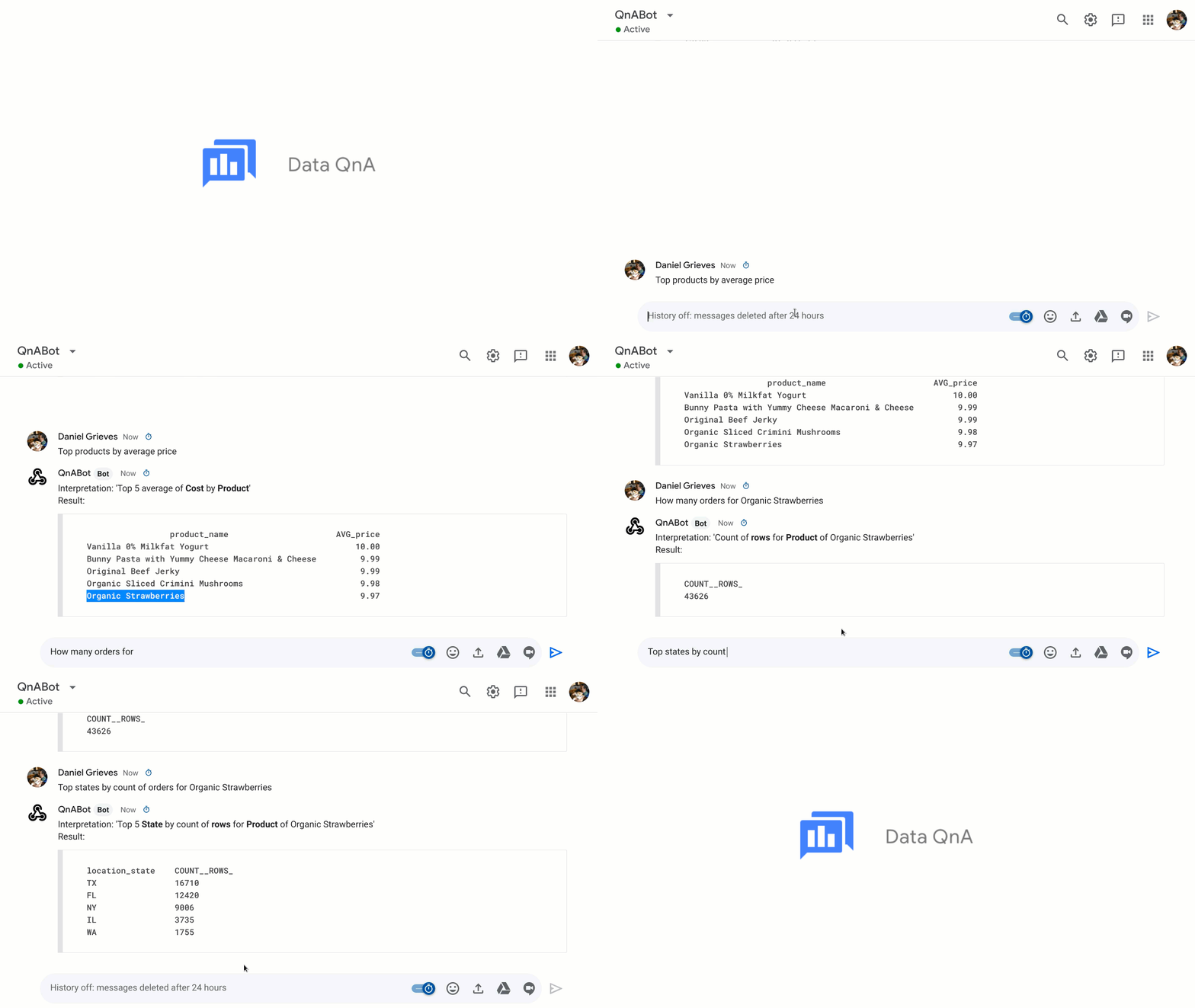
Ask questions to BigQuery and get instant answers through Data QnA

Today, we’re announcing Data QnA, a natural language interface for analytics on BigQuery data, now in private alpha. Data QnA helps enable your business users to get answers to their analytical queries through natural language questions, without burdening business intelligence (BI) teams. This means that a business user like a sales manager can simply ask a question on their company’s dataset, and get results back that same way.We built Data QnA to make it easier for non-technical users to access the data insights they need through natural language understanding techniques—all while maintaining the business’s governance and security controls. Data QnA is based on the Analyza system developed here at Google Research. Analyza uses semantic parsing for analyzing and exploring data using conversation, i.e., doing entity and intent recognition, then mapping to the underlying business datasets. Data QnA enables anyone to conversationally analyze petabytes of data stored in BigQuery and federated data sources. Data QnA can be embedded where users work, including chatbots, spreadsheets, BI platforms (such as Looker), and custom-built UIs. As part of this private alpha, we are rolling out support in English, and look forward to working with our customers to determine demand for regional localization.In most enterprises, when business users need data, they request a dashboard or report from the BI team, and it can take days, or even weeks, for the already overloaded team to respond. When the users get those answers, they are often not able to get an answer to the next question, as that would require yet another report. Self-service access to analytics when users need it, without requiring deep technical knowledge, can improve productivity and business outcomes dramatically. With the help of Data QnA, you’re able to put BigQuery data right in front of the user, in the context of their business workflows. “With Data QnA, Google Cloud is making a long term play at democratizing data insights for non-technical users,” said Mike Leone, Senior Analyst, ESG. “This self-service model will not only speed up the pace of innovation and digital transformation for businesses, but also help optimize overhead costs by saving valuable time and increasing the productivity of BI teams.”“At Veolia, we were taking weeks responding to ad hoc analytics requests from our business partners. This was reducing the time we could spend on higher value activities,” said Fabrice Nico, Data and Robotic Manager at Veolia. “We at the BI team have since enabled self-service access to BigQuery data by asking questions in natural language. The Google service, through Sheets and chatbots, is going to free up our time significantly, and enable our business partners to execute faster through natural language-based analytics.”How Data QnA worksData QnA enables self-service analytics for business users on BigQuery data as well as federated data from Cloud Storage, Bigtable, Cloud SQL, or Google Drive. Users can ask free-form text questions, like: “What was the growth of product xyz last month?” and get answers interactively. Data QnA is natively available through Google Sheets and BigQuery UI. Data QnA API can be used to embed it in other interfaces. In addition, you can integrate Data QnA into experiences built with Google Dialogflow. Data QnA enforces all underlying customer-defined data access policies, automatically restricting access of data to the right users.We’ve heard from customers, analysts and partners about Data QnA’s benefits, including self-serve analytics, increased BI team productivity, and saved time for both business users and IT teams.Data QnA allows users to formulate free-form text analytical questions, with auto-suggested entities while users type a question. Then, both an English interpretation and the SQL query are returned with the answer. “Did-you-mean” clarifications are returned if a question is ambiguous. When using the BigQuery Web UI, Data QnA also enables data analysts to formulate SQL queries using natural language questions.In addition, Data QnA has a management interface for data owners or admins to define business terms for underlying data, allowing business users to use the language they understand—initially just English, with more to come depending on demand. The interface also reports questions asked by the users along with the answers and SQL query, enabling the data owners to improve the service for their users.Getting started with Data QnAData QnA is available at no additional cost for BigQuery customers. All underlying queries and storage are charged as per the customer’s BigQuery costs. Access in Sheets is through its Connected Sheets feature, which is included in G Suite Enterprise, G Suite Enterprise for Education, and G Suite Enterprise Essentials, and Data QnA is included for no additional cost. Data QnA is available for BigQuery data in the U.S. and EU, with support for more regions to follow.You can work with the following Google Cloud partners to get started: Accenture, Deloitte, EPAM, Mavenwave (an Atos company), SADA, and Wipro.”We’re eager to put Data QnA to work with our customers to help accelerate their self-serve analytics initiatives,” says Arnab Charkaborty, Head of Applied Intelligence, US West at Accenture. “Data QnA is effectively drawing a straight line between all the business apps our customers use everyday and their data in BigQuery so anyone—no matter their level of data literacy—can ask questions in natural language without leaving that environment. That’s data democratization at its finest!” To learn more about the technology behind Data QnA and to see a few demos, register to watch our Next OnAir session: Data QnA: How Veolia democratizes access to BigQuery, available starting August 11.
Quelle: Google Cloud Platform

Introducing Active Assist: Reduce complexity, maximize your cloud ROI

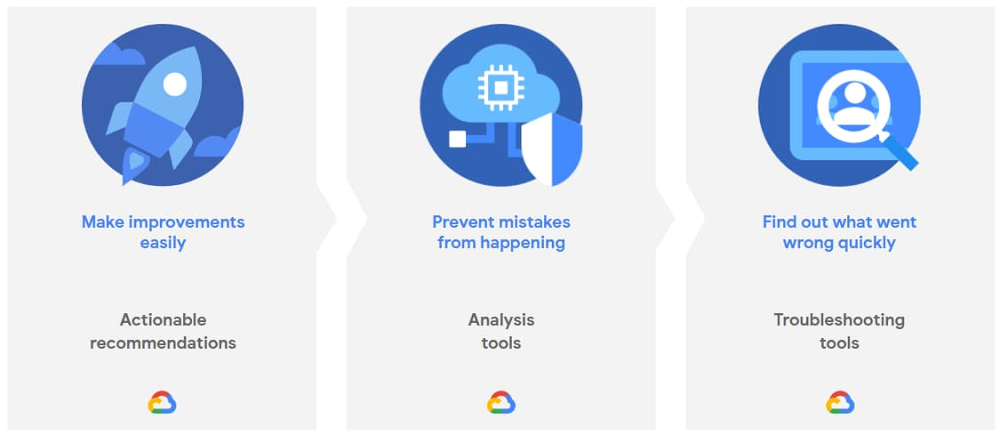
There’s huge value to running in the cloud. That’s why we continue to see cloud adoption grow year over year. But running more applications in the cloud means more systems to manage—and more complexity. In fact, nearly half of C-level executives cited complexity as the factor that will have the most negative impact on cloud computing’s ROI over the next five years1. That’s because complexity causes many problems: added waste, reduced security, and increased administrative toil to name just three. All of these things make your day harder and reduce your cloud ROI. That’s why we’re announcing Active Assist, a portfolio of intelligent tools and capabilities to help actively assist you in managing complexity in your cloud operations. Active Assist extends the core concepts we initially introduced with Policy Intelligence at Next ‘19 and applies them to the rest of Google Cloud. It leverages data, machine learning, automation, and intelligence, to bring “Google magic” to you, so you can enjoy a simpler, smarter cloud experience into your day-to-day operations. Active Assist’s portfolio will help you with three key activities: making proactive improvements to your cloud with smart recommendations, preventing mistakes from happening in the first place by giving you better analysis, and helping you figure out why something went wrong by using intuitive troubleshooting tools. With Active Assist as your sidekick, these tasks become simple and fast, helping you shift your time from administration to things like innovation.Through these troubleshooting and analysis tools, and actionable recommendations, Active Assist’s core aim is to  make it easy for you to maximize the value you get from the cloud, and actually includes some capabilities you may already be familiar with: In-context, actionable recommendations from across the Google Cloud Console to help you optimize with minimal effort. As well as the Recommendation Hub, which lets you see your recommendations in one place. That being said, you can also pull insights and recommendations directly from the Recommender API. This lets you incorporate them into your organization’s existing processes and workflows, to help you optimize cost and close security gaps easily. Check out our blog on Recommenders for more information. Automation like autoscaling and auto healing for your compute instances, so that your workloads always have the right amount of resources, and remain healthy and reliable while running. Analysis tools like Connectivity Tests and Network Topology in Network Intelligence Center, which let you analyze the impact of configuration changes before you apply them.If something’s gone wrong, troubleshooting tools like Policy Troubleshooter in Policy Intelligence help you quickly identify and remediate the problem.  In addition to these existing capabilities, we’ll continue to add more functionality to the Active Assist portfolio with contributions from across Google Cloud teams who are working on security, compute, networking, data, cost and billing, and more. In fact, if you’re interested in testing out new capabilities before they’re made publicly available, be sure to fill out the form to join our Active Assist Trusted Tester Group.Simply put, whether it’s sizing your compute and storage resources, securing your identities, configuring your networks, or maximizing your billing discounts, Active Assist’s mission is to add intelligence into your operations by integrating it directly into your daily tasks. Rather than hunting down these tools and recommendations individually, Active Assist alerts you directly within your workspace, and surfacing context-sensitive recommendations specific to the task at hand. Square, the San Francisco-based financial services, merchant services aggregator, and mobile payment company, has been using Active Assist and is seeing major benefits:Active Assist’s Policy Troubleshooter is going to make my life so much easier. I can’t begin to tell you how I’ve suffered from generic error messages in the past. Policy Troubleshooter is exactly what we need to quickly find, understand, and fix policy misconfigurations. Paul Friedman, Sr. Security Engineer, SquareOur goal with Active Assist is to make sure we help you manage the challenges that arise with cloud complexity, so you can optimize your cloud everywhere while saving time and focusing more on improving your business operations. To facilitate that, we want to make sure you can make the changes and improvements you need quickly, clearly, and easily. We’ve got a lot that can help you today, and even more planned for the future—so stay tuned! If you want to learn more about what’s included (and what’s new in) Active Assist, be sure to attend our upcoming Google Cloud Next ‘20: OnAir session, CMP100: Cloud is Complex. Managing it Shouldn’t Be. Or you can also visit our Active Assist web page, too.1. Deloitte Consulting
Quelle: Google Cloud Platform

Hewlett Packard Enterprise GreenLake for Anthos now generally available

Today, we’re excited to announce the next step in our partnership with Hewlett Packard Enterprise (HPE): the general availability of HPE GreenLake for Anthos.  As you look to move to hybrid cloud at your own pace and on your own terms, HPE GreenLake for Anthos enables you to seamlessly build, run, and manage services on premises and in the cloud with our hybrid and multi-cloud platform. You can deploy containers on demand without having to manage the underlying infrastructure on premises. Now more than ever, you can choose how you want to consume your IT infrastructure.Google Cloud’s Anthos: A modern application platform for your businessThe Anthos platform is an ideal approach to an increasingly hybrid and multi-cloud world. Anthos lets you build, deploy, and manage applications anywhere in a secure, consistent manner. The platform lets you modernize existing applications running on virtual machines as well as deploy cloud-native apps on containers, all while providing a consistent development and operations experience across deployments, reducing operational overhead, and improving developer productivity.HPE Greenlake for Anthos: The best of both worldsHPE GreenLake for Anthos combines the simplicity, agility, and cost-effectiveness of Google’s container hosting and management across hybrid and multi-cloud environments with the security, performance, and control of HPE’s on-premises architecture. HPE GreenLake for Anthos provisions and integrates hardware, software, and services to create an on-premises Anthos solution that is consumed as a cloud-like service.HPE GreenLake for Anthos enables a service-oriented architecture that makes the most of the benefits of container technologies. Start with the capacity you need today and grow your infrastructure as your applications require, using Anthos’ cluster lifecycle capabilities and HPE GreenLake’s active capacity management. Anthos Config Management delivers a gitops approach for managing clusters and simplifying many administrative tasks, freeing up your IT team to focus on delivering real business value.HPE is a build, sell and services partner of Google Cloud allowing HPE to be your single point of contact, providing advisory and professional services, managing capacity, billing, and supporting the entire stack. HPE Greenlake’s pay-per-use billing model means you consume the capacity you need—no more and no less. At the same time, HPE proactively monitors usage and provisions additional available capacity ahead of demand, which reduces the risk of investing too much or too little in your IT infrastructure. You get a scalable solution that simplifies your Anthos experience and makes it easier to understand current and future costs.“At Hewlett Packard Enterprise, our mission is to help customers accelerate their digital transformation and modernization strategy with HPE GreenLake cloud services that are self-service, pay per use, all managed for them and available in the environment of their choice from the edge to the cloud,” said Keith White, SVP and GM of HPE GreenLake Cloud Services. “As a trusted Google partner, we are pleased to offer HPE GreenLake for Anthos to provide our joint customers choice and the cloud experience on premises that best meets their needs and provides the greatest positive outcomes for their business.”Anthos is available with three HPE solutions: HPE SimpliVity hyperconverged infrastructure, HPE Nimble Storage dHCI, and HPE Synergy composable infrastructure. For customers who want to build and run their own environment, HPE offers HPE Reference Architectures for Anthos GKE deployed on premises. All offerings enable hybrid Dev/Test environments, so you can develop and deploy anywhere—in multiple public clouds as well as on premises.Help simplify IT and make modernization easier—-on premises or in the cloud—with hybrid cloud solutions seamlessly built on Google Cloud’s Anthos with HPE’s proven technology and services.Learn more about our partnership with HPE by visiting cloud.google.com/hpe.
Quelle: Google Cloud Platform

Last month today: June in Google Cloud

In June, we welcomed summer in the northern hemisphere, and we heard stories of struggle, protest, and perseverance. Our most-read stories reflected these realities, with many people still working and learning remotely.Growing cloud infrastructure, virtually and physicallyGoogle Kubernetes Engine (GKE) clusters will soon be able to scale past the current limits, up to 15,000 nodes, offering a way for enterprises to run internet-scale services, simplify infrastructure management, speed up batch processing, and absorb large spikes in resource demands. See how Bayer Crop Science uses GKE to decide which seeds to advance in its research and development pipeline.We celebrated the launch of Google Cloud’s new Jakarta region (asia-southeast2) virtually last month. It’s the first Google Cloud region in Indonesia—one of the fastest growing economies in the world—and ninth in Asia Pacific. Users in this region can enjoy lower latency access to data and apps running on Google Cloud.Working (and playing) at homeAs the pandemic moved the idea of having cloud-based devices from nice-to-have to a must-have, companies of all sizes rapidly shifted to a more versatile way of working by quickly deploying Chromebooks as a remote work solution. The VP of the Chrome OS shares his optimistic perspective of the future of computing as business leaders have had to accelerate their digital transformation and reimagine the way we work.Google Meet, available for free to anyone with an email address, added new features last month, including availability on the Nest Hub Max and layout improvements so you can see up to 16 participants and content being shared. We also announced a number of new Meet features we’re working on including tile layouts with up to 49 participants, background blur and replace, hand raising, breakout rooms, Jamboard integration, and more. All remote work and no remote play isn’t any fun. Last month, we announced that our Google Maps Platform gaming solution is now open to all mobile game developers to create immersive real-world games. You can now quickly build mobile games with Google Maps Platform using the Maps SDK for Unity and the Playable Locations API, so your game can include real-world locations and gameplay. There are already some fun real-world games created that include hatching dinosaurs, birdwatching, and more.Learning new things at home, for grownups and kidsAs summer began for many students last month, we announced new Meet features for educators, slated to launch later this year. More than 140 million educators and students use G Suite for Education, and new features are designed to improve moderation capabilities and engagement in remote or hybrid learning environments. These new features include knocking interface updates, hand raising, attendance tracking, and many more.Our Google Cloud training and certifications team also brought several new initiatives out last month, including Google Cloud skill badges, new certification prep learning journeys, and remote certification exam availability. You can get the first month of the certification prep training at no cost, and 30 days of unlimited Qwiklabs access too.If you’re looking for more ways to learn this summer, check out our Next ‘20: OnAir lineup, starting July 14. New content from customers and Google experts arrives each week, with themed weeks so you can pick your favorite topics, from application modernization to data analytics.That’s a wrap for June. Till next month, keep in touch on Twitter.
Quelle: Google Cloud Platform

Azure AI: Build mission-critical AI apps with new Cognitive Services capabilities

As the world adjusts to new ways of working and staying connected, we remain committed to providing Azure AI solutions to help organizations invent with purpose.

Building on our vision to empower all developers to use AI to achieve more, today we’re excited to announce expanded capabilities within Azure Cognitive Services, including:.

Text Analytics for health preview.
Form Recognizer general availability.
Custom Commands general availability.
New Neural Text to Speech voices.

Companies in healthcare, insurance, sustainable farming, and other fields continue to choose Azure AI to build and deploy AI applications to transform their businesses. According to IDC1, by 2022, 75 percent of enterprises will deploy AI-based solutions to improve operational efficiencies and deliver enhanced customer experiences.

To meet this growing demand, today’s product updates expand on existing language, vision, and speech capabilities in Azure Cognitive Services to help developers build mission-critical AI apps that enable richer insights, save time and reduce costs, and improve customer engagement.

Get rich insights with powerful natural language processing

One of the ways organizations are adapting is scaling the ability to rapidly process data and generate new insights from data. COVID-19 has accelerated the urgency, particularly for the healthcare industry. With the overwhelming amount of healthcare data generated every year2, it is increasingly critical for providers to quickly unlock access to this information to find new solutions that improve patient outcomes.

We are excited to introduce Text Analytics for health, a new feature of Text Analytics that enables health care providers, researchers, and companies to extract rich insights and relationships from unstructured medical data. Trained on a diverse range of medical data—covering various formats of clinical notes, clinical trials protocols, and more—the health feature is capable of processing a broad range of data types and tasks, without the need for time-intensive, manual development of custom models to extract insights from the data.

In response to the COVID-19 pandemic, Microsoft partnered with the Allen Institute of AI and leading research groups to prepare the COVID-19 Open Research Dataset. Based on the resource of over 47,000 scholarly articles, we developed a COVID-19 search engine using Text Analytics for health and Cognitive Search, enabling researchers to generate new insights in support of the fight against the disease.

Additionally, we continue to make advancements in natural language processing (NLP) so developers can more quickly build apps that generate insights about sentiment in text. The opinion mining feature in Text Analytics assigns sentiment to specific features or topics so that users can better understand customer feedback from social media data, review sites, and more.

Save time and reduce costs by turning forms into usable data

A lot of the unstructured data is contained in forms that have tables, objects, and other elements. These types of documents typically take manual labeling by document type or intensive coding to extract insights.

We’re making Form Recognizer generally available to help developers extract information from millions of documents efficiently and accurately—no data science expertise needed.

Customers like Sogeti, part of the Capgemini Group, are using Form Recognizer to help their clients more quickly process large volumes of digital documents.

“Sogeti constantly looks for new ways to help clients in their digital transformation journey by providing cutting-edge solutions in AI and machine learning. Our Cognitive Document Processing (CDP) offer enables clients to process and classify unstructured documents and extract data with high accuracy resulting in reduced operating costs and processing time. CDP leverages the powerful cognitive and tagging capabilities of the Form Recognizer to extract effortlessly, keyless paired data and other relevant information from scanned/digital unstructured documents, further reducing the overall process time.” – Mark Oost – Chief Technology Officer at Sogeti, Artificial Intelligence and Machine Learning

Wilson Allen, a leading provider of consulting and analytics solutions, is using Form Recognizer to help law and other professional services firms process and evaluate documents (PDFs and images, including financial forms, loan applications, and more), and train custom models to accurately extract values from complex forms.

“The addition of Form Recognizer to our toolkit is helping us turn large amounts of unstructured data into valuable information, saving more than 400 hours of manual data entry and freeing up time for employees to work on more strategic tasks.” – Norm Mullock – VP of Strategy at Wilson Allen

Improve customer engagement with voice-enabled apps

People and organizations continue to look for ways to enrich customer experiences while balancing the transition to digital-led, touch-free operations2. Advancements in voice technology are empowering developers to create more seamless, natural, voice-enabled experiences for customers to interact with brands.

One of those advancements, Custom Commands, a capability of Speech in Cognitive Services, is now generally available. Custom Commands allows developers to create task-oriented voice applications more easily for command-and-control scenarios that have a well-defined set of variables, like voice-controlled smart home thermostats. It brings together Speech to Text for speech recognition, Language Understanding for capturing spoken entities, and voice response with Text to Speech, to accelerate the addition of voice capabilities to your apps with a low-code authoring experience.

In addition, Neural Text to Speech is expanding language support with 15 new natural-sounding voices based on state-of-the-art neural speech synthesis models: Salma in Arabic (Egypt), Zariyah in Arabic (Saudi Arabia), Alba in Catalan (Spain), Christel in Danish (Denmark), Neerja in English (India), Noora in Finnish (Finland), Swara in Hindi (India), Colette in Dutch (Netherland), Zofia in Polish (Poland), Fernanda in Portuguese (Portugal), Dariya in Russian (Russia), Hillevi in Swedish (Sweden), Achara in Thai (Thailand), HiuGaai in Chinese (Cantonese, Traditional) and HsiaoYu in Chinese (Taiwanese Mandarin).

Customers are already adding speech capabilities to their apps to improve customer engagement. With Cognitive Services and Bot Service, the BBC created an AI-enabled voice assistant, Beeb, that delivers a more engaging, tailored experience for its diverse audiences.

We are excited to introduce these new product innovations that empower all developers to build mission-critical AI apps. To learn more, check out our resources below.

Get started today

Learn more with the resources below and get started with Azure Cognitive Services and an Azure free account.

Text Analytics for health: Read the technical blog for more information. See it in action with the COVID-19 search engine demo. Enter medical terms such as “ibuprofen” in the search bar and try exploring graph relationships.
Form Recognizer: Read the technical blog for more information. See it in action with the Form Recognizer demo, showcasing the ability to extract information from different types of forms. Access the code samples.
Custom Commands: Read the technical blog for more information. See it in action with the inventory, hospitality, and automotive demos. Start by selecting your scenario and saying a command out loud per the prompt. Access the code samples.
Neural Text to Speech: Read the technical blog for more information. See it in action with the demo. Use the pre-populated text or add your own, and try finetuning audio output. Access the code samples.

1 Worldwide Artificial Intelligence Predictions (IDC FutureScape 2020).

2 Adapting customer experience in the time of coronavirus (McKinsey 2020).

Quelle: Azure

Multi-arch build, what about Travis?

Following the previous article where we saw how to build multi arch images using GitHub Actions, we will now show how to do the same thing using another CI. In this article, we’ll consider Travis, which is one of the most tricky ones to use for this use case.

To start building your image with Travis, you will first need to create .travis.yml file at the root of your repository.

language: bashdist: bionicservices:  – dockerscript:  – docker version

You may notice that we specified using “bionic” to have the latest version of Ubuntu available – Ubuntu 18.04 (Bionic Beaver). As of today (May 2020), if you run this script, you’ll be able to see that the Docker Engine version it provides is 18.06.0-ce which is too old to be able to use buildx. So we’ll have to install Docker manually.

language: bashdist: bionicbefore_install:  – sudo rm -rf /var/lib/apt/lists/*  – curl -fsSL https://download.docker.com/linux/ubuntu/gpg | sudo apt-key add –  – sudo add-apt-repository “deb [arch=amd64] https://download.docker.com/linux/ubuntu $(lsb_release -cs) edge”  – sudo apt-get update  – sudo apt-get -y -o Dpkg::Options::=”–force-confnew” install docker-cescript:  – docker version

As you can see in the previous script, the installation process requires adding new keys in order to be able to synchronize the package database and download new packages from the Docker APT repository. We can then install the latest version of Docker available for Ubuntu 18.04. Once you have run this, you can see that we now have the version 19.03 of the Docker Engine.

At this point we are able to interact with the Docker CLI but we don’t yet have the buildx plugin installed. To install it, we will download it from GitHub.

language: bashdist: bionicbefore_install:  – sudo rm -rf /var/lib/apt/lists/*  – curl -fsSL https://download.docker.com/linux/ubuntu/gpg | sudo apt-key add –  – sudo add-apt-repository “deb [arch=amd64] https://download.docker.com/linux/ubuntu $(lsb_release -cs) edge”  – sudo apt-get update  – sudo apt-get -y -o Dpkg::Options::=”–force-confnew” install docker-ce
  – mkdir -vp ~/.docker/cli-plugins/
  – curl –silent -L “https://github.com/docker/buildx/releases/download/v0.3.0/buildx-v0.3.0.linux-amd64″ > ~/.docker/cli-plugins/docker-buildx
  – chmod a+x ~/.docker/cli-plugins/docker-buildx
script:
  – docker buildx version

We are now able to use buildx. It’s verbose and because of how Travis works and the versions it’s based on, we won’t be able to shorten that by using a Docker image like on CircleCI. We’ll have to keep this big boilerplate at the top of our script and allow it to take about 1.5min of build, each time you run the build.

Now it’s time to build our image for multiple architectures. We’ll use the same Dockerfile that we used for the previous article and the same build command:

FROM debian:buster-slim
RUN apt-get update
  && apt-get install -y curl
  && rm -rf /var/lib/apt/lists/*
ENTRYPOINT [ “curl” ]

Modify the Travis configuration file to have the following in the `script` section:

script:  – docker buildx build –platform linux/arm/v7,linux/arm64/v8,linux/amd64 –tag your-username/multiarch-example:buildx-latest .

If you launch it like this, you will see the following error:

multiple platforms feature is currently not supported for docker driver. Please switch to a different driver (eg. “docker buildx create –use”)

This is due to the fact that there is no buildkit driver already started. So, if we add that line to our configuration file and run it again, this will allow buildx to have an instance of a buildkit running to build the multiarch images.

Navigating to the Travis dashboard, you should see the following result:

The last step is now to store the image on the Docker Hub. To do so we’ll need an access token from Docker Hub to get write access.

Once you created an access token, you’ll have to add it to your project settings in the “Settings” section.

We can then create DOCKER_USERNAME and DOCKER_PASSWORD variables to login afterward.

Once this is done, you can add the login step and the –push option to the buildx command as follows.

script:  – docker login -u “$DOCKER_USERNAME” -p “$DOCKER_PASSWORD”  – docker buildx create –use  – docker buildx build –push –platformlinux/arm/v7,linux/arm64/v8,linux/amd64 –tagyour-username/multiarch-example:buildx-latest .

And voila, you can now create a multi arch image each time you make a change in your codebase.
The post Multi-arch build, what about Travis? appeared first on Docker Blog.
Quelle: https://blog.docker.com/feed/