Strafverfolgung: BKA liest Nachrichten per Whatsapp-Synchronisation mit
Mit physischem Zugriff auf das Smartphone fügt das BKA manchen Whatsapp-Installationen einen weiteren Client hinzu. (Whatsapp, Instant Messenger)
Quelle: Golem

Mit physischem Zugriff auf das Smartphone fügt das BKA manchen Whatsapp-Installationen einen weiteren Client hinzu. (Whatsapp, Instant Messenger)
Quelle: Golem
The post Preparing Kubernetes for the Real World – Q&A appeared first on Mirantis | Pure Play Open Cloud.
Last month we held a webinar where Mirantis and Tigera discussed some of the considerations that arise with regard to networking when you take your Kubernetes cluster out of the lab and into production. Here we have the questions and answers, but we’d love for you to view the whole webinar!
How do the Tigera and Docker Enterprise solutions integrate?
Docker Enterprise has what we call a “batteries included but swappable” model. With Calico, our customers get out-of-the-box networking for Windows and Linux workloads and a policy-driven security model and other features that Docker Enterprise doesn’t provide by itself.
Is it possible to configure Calico policies with Cisco infrastructure?
With the increasing adoption of container technologies and Cisco Application Centric Infrastructure (Cisco ACI) as a pervasive data-center fabric technology, it is only natural to see customers trying to integrate these two solutions. There are best practices for integrating Calico with Cisco ACI-based top of rack (ToR) routers in a robust dual ToR architecture. The result is a high performance non-overlay Calico network, with Calico network policy enforcement, where pods are first class citizens within the underlying fabric.
Cisco has developed a white paper that lays out detailed instructions for the required ACI configurations, plus associated Calico configuration to make the two work together seamlessly. You can read the full white paper here: Cisco Application Centric Infrastructure Calico Design White Paper
How do I upgrade Calico OSS to Calico Enterprise?
Tigera provides a phased approach to moving from the open source to the enterprise version of Calico. If you’re using the open source version of Calico we would recommend that you migrate to Calico Essentials, which provides support capabilities from the Tigera team to help you prepare for that migration.
We would also recommend that you take a look at a trial version of Calico Enterprise, which is available on the Tigera website, just to familiarize yourself with it, so that you’re aware of how the environment is going to change when you migrate from the OSS version to the enterprise version. Tigera’s customer success team can help you make a smooth transition from open source Calico to the Enterprise version.
What does “defend against lateral movement” refer to?
“Detect and defend against lateral movement” refers to the ability to detect when traffic is coming from a compromised container that may be scanning for other weaknesses or accessing other containers on the same network. Calico Enterprise provides this capability. Check out this Tigera blog that discusses lateral movement detection and defence in more detail, along with an associated webinar.
Egress access control can be achieved by using network policies in Kubernetes. How is Calico Enterprise different?
We’ve actually gone beyond what network policies can do in open source Kubernetes to provide customers with a couple of different options in terms of managing egress access control. We talked about the ability to control egress access on a per-app basis to any external endpoint, whether it’s a database or cloud service, and make that very granular. The other solution that we have, which is certainly unique to Calico Enterprise, is our ability to actually use external endpoints or control points as a way to manage egress access in the Kubernetes environment.
We can work with external firewalls and use the firewall as a control point. What we do is assign a pod inside a namespace as an egress access pod, and we use that pod that has access, with an IP address assigned to it, to connect to a control point like a firewall. It could be an API as well. So somebody who’s using any kind of Fortinet or Palo Alto Networks firewall, for example, can then use that firewall as a control point for those pods, with the IP egress access that are destined for an external endpoint outside of the cluster. With that IP address attached to that egress pod, it means that if you have a monitoring system outside of Kubernetes that’s tracking network traffic, you’ll be able to see that pod and you’ll be able to track that pod as part of a workload. So those are some additional capabilities that we provide beyond network policies.
Check out this Tigera blog that discusses egress access control using Calico Enterprise.
How is monitoring different from SignalFX and Prometheus?
This is a really important topic. There are lots of ways to do monitoring, and there’s really no one-size-fits-all method.
SignalFx is a Splunk-owned tool, so it’s licensed and has many important features for monitoring, many of which are centered around performance monitoring. For example, how is your Kubernetes performing? Where are there issues, and why? It taps into the intelligence that you get from having access to logs, events, and so on.
Prometheus, on the other hand, is a great open source tool. In fact, our solution within Mirantis, called Mirantis Cloud Platform (MCP), is based on the Prometheus monitoring tool. But one thing to note about Prometheus is that it’s not natively aware of all of the nuances of a container environment. Over time, we’ve “trained” our implementation of Prometheus to be opinionated about IaaS and container environments.
So those are two different approaches. You’re going to need to have a team with Prometheus, for example, that will know what to look for in a container environment and then how to translate that in terms of your data collection. How you store it, how you prune and rotate the data, how will you expose it, what visual interfaces are you going to use? We use Grafana as a front end to our Prometheus solution.
So the question being how monitoring is different from SignalFx and Prometheus, it’s not so much different, it’s just the big topic, and it has to be very carefully approached. We’ve had customers that have tried to roll their own in terms of even a Prometheus-based example, and one challenge that some customers have is that the data that’s been collected, to be done correctly, has to push meaningful alerts. If you’re collecting a bunch of data but you don’t know what the context is for that data, you’re not going to be able to produce the right alerts. If you can’t produce the right alerts, you’re going to struggle with your operations. You’re going to struggle knowing where and why some issues are happening, and what to do about it. So those are some of the cautions I would have about that.
Is Calico Enterprise included with Docker Enterprise?
Calico Enterprise is a separate, complementary solution that provides additional Kubernetes network and security capabilities for Docker Enterprise users.
Is Calico Enterprise available for doing a Proof of Concept in our own environment?
Yes, absolutely. If you go to the Tigera website on the homepage, you’ll find in the upper right hand corner an icon for a free trial. Anyone who’s interested in experiencing Calico Enterprise can access that. What we do is we set you up in an existing Kubernetes environment that’s already up and running, so you don’t have to invest any effort in getting infrastructure set up in your own environment. We take care of that for you, and you have access to that environment, so you can experiment and try out a full version of Calico Enterprise and see if it’s something that you think will fit in with your plans to expand your Kubernetes environment.
Where do developers get source images for use as inputs into the secure supply chain?
I’ll just use Docker Hub as an example. Docker Hub has certified images that are provided by various vendors. So if you’re looking to build a specific application using images that run specific vendor services, you might look at where those certified images can be found and Docker Hub is a great resource. It’s not just Docker related images if you will, but a variety of different images. It’s a good source for images that other groups have provided, and again, you can take into consideration the organization’s “certification label” however you want. You might still want to look at what’s in it and/or create your own. So you don’t always have to go get images for everything that you’re doing from somewhere else. You can compose your own and have more control over how it’s composed using what inputs.
Once you start building in your environment, you’ll have your known collection of trusted images. That’s where a tool like Docker Trusted Registry (DTR) comes in. DTR gives you a common, trusted place that you can go to for all of your image inputs. You can replicate it across sites so that your global team is able to reuse common certified images that also align with some of the features I was describing earlier. Things like signing the images, promoting them… I didn’t mention any of the other tags and characteristics of an image that can be used but with DTR, but you can promote only images that don’t exceed a certain age for example, or that have certain tags. There’s a very granular way of managing those images within DTR, but it requires either building your own images, signing them, and hosting them in your own registry, or acquiring certified images that come from outside your organization.
One feature I mentioned about DTR that’s important to keep in mind is the vulnerability scanning. The engine behind the DTR vulnerability scanning is the CVE database, and if you’ve been working in security you’ll know what CVE means — the industry source, if you will, of signatures that you want to know about. You want to be able to scan your images against those known industry signatures and make corrections.
What are key things to keep in mind when preparing to migrate a Kubernetes cluster from pilot to production?
Do you have the necessary tools to provide visibility into cluster activity, such as traffic flows?
Do you have troubleshooting tools that understand the Kubernetes context, such as namespace and pod?
Are you able to securely connect the cluster to external resources such as databases and APIs?
Does your Kubernetes toolbox provide ways to protect against cyber-threats?
Are Dev, Ops, Network and Security teams in alignment with the plan to move to production?
Take a look at NIST’s 800-190 publication covering containers for a really good set of security best practices to start with.
Do you have an example of a typical compliance requirement that cannot be met with Kubernetes alone, and would require third party software?
I’m answering that one with a smile on my face, because it accurately describes most of Kubernetes. As I mentioned earlier, Kubernetes on its own has no inherent security capabilities. All pods are exposed and accessible. For a compliance requirement of only allowing access only from known origins. Kubernetes provides ways of implementing that. Doing network policy of course, there are ways of satisfying that compliance requirement with Kubernetes, but to do it at scale in a visual way, the visualization is really not what native Kubernetes has.
If you had to prove to an auditor that you have a way of detecting a rogue traffic flow and identifying where that is and correcting that, that’s not something that native Kubernetes is going to provide. You’re going to need a solution like Calico Enterprise to provide that information and visualization. Lateral movement is another good example. Lateral movement means you’ve got a container that’s been compromised, for example, and that compromised container is looking at neighboring containers on the same network in an effort to gain access to sensitive resources, such as mail systems, shared folders, and legitimate credentials. You need to have a way of detecting and defending against threats like that. That cyber-defense capability is not something that’s natively part of Kubernetes, but it is part of the Calico Enterprise solution.
Can multiple Calico instances be tied together or sent to a northbound interface?
The short answer is “yes”. You assign a workload/app/instance to a namespace, designate one pod in that namespace as the egress pod, then assign a routable IP address to that pod. You can do that with multiple namespaces, each with a different workload/app/instance.
Using this approach, egress access for northbound traffic can be managed from an external control such as a firewall or API, and can be also managed using policy controls. Another advantage of this approach is that because you only need to assign one routable IP per namespace, you are able to preserve the limited number of routable IPs in your IP pool.
You mentioned NIST guidelines. In specific audits, are those enumerated if/when compliant?
Each audit is different, but your own security organization will typically have already defined a system security plan detailing what security compliance looks like for your environment. Your security and IT team will then have to show the auditor that you do in fact have all the processes, methods and configurations in place to implement the plan. An auditor will document any deviation from the plan. You may or may not have a list of NIST controls. That will be up to your team to define whether controls come from NIST or some other set of standards.
The post Preparing Kubernetes for the Real World – Q&A appeared first on Mirantis | Pure Play Open Cloud.
Quelle: Mirantis
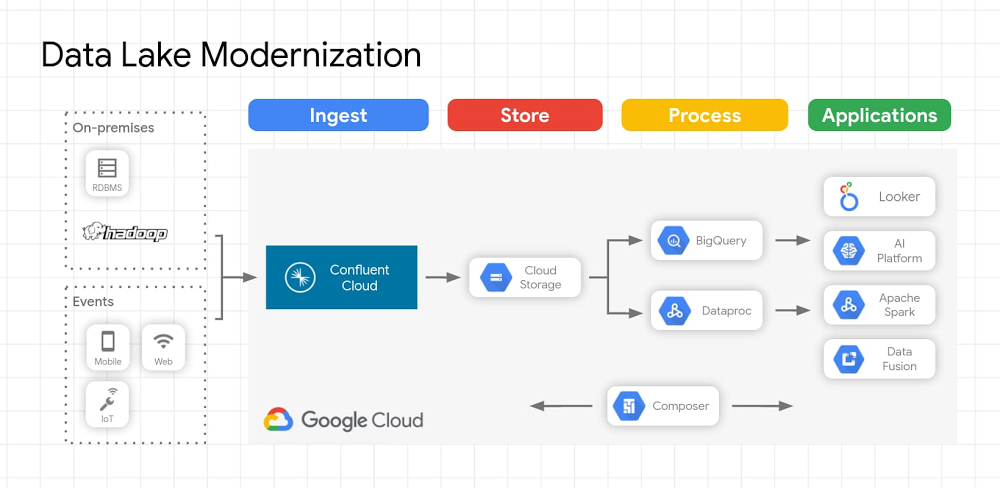
Data analytics has been a rapidly changing area of technology, and cloud data warehouses have brought new options for businesses to analyze data. Organizations have typically used data warehouses to curate data for business analytics use cases. Data lakes emerged as another option that allows for more types of data to be stored and used. However, it’s important to set up your data lake the right way to avoid those lakes turning into oceans or swamps that don’t serve business needs.The emergence of “keep everything” data lakesData warehouses require well-defined schemas for well-understood types of data, which is good for long-used data sources that don’t change or as a destination for refined data, but they can leave behind uningested data that doesn’t meet those schemas. As organizations move past traditional warehouses to address new or changing data formats or analytics requirements, data lakes are becoming the central repository for data before it is enriched, aggregated, filtered, etc. and loaded to data warehouses, data marts, or other destinations ultimately leveraged for analytics. Since it can be difficult to force data into a well-defined schema for storage, let alone querying, data lakes emerged as a way to complement data warehouses and enable previously untenable amounts of data to be stored for further analysis and insight extraction. Data lakes capture every aspect of your business, application, and other software systems operations in data form, in a single repository. The premise of a data lake is that it’s a low-cost data store with access to various data types that allow businesses to unlock insights that could drive new revenue streams, or engage audiences that were previously out of reach. Data lakes can quickly grow to petabytes, or even exabytes as companies, unbound from conforming to well-defined schemas, adopt a “keep everything” approach to data. Email, social media feeds, images, and video are examples of unstructured data that contain rich insights, but often goes unutilized. Companies store all structured and unstructured data for use someday; the majority of this data is unstructured, and independent research shows that ~1% of unstructured data is used for analytics. Open-source software and on-prem data lakesDuring the early part of the 2010s, Apache Hadoop emerged as one of the primary platforms for companies to build their data lake. While Hadoop can be a more cost-effective repository alongside a data warehouse, it’s also possible that data lakes become destinations for data with no value realization. In addition, directly integrating each data source with the Hadoop file system is a hugely time-consuming proposition, with the end result of only making data available to Hadoop for batch or micro-batch processing. This type of data capture isn’t suitable for real-time processing or syncing other real-time applications; rather than produce real-time streams of actionable insights, Hadoop data lakes can quickly become passive, costly, and less valuable.In the last few years, a new architecture has emerged around the flow of real-time data streams. Specifically, Apache Kafka has evolved to become a popular event streaming platform that allows companies to have a central hub for streams of data across an enterprise. Most central business systems output streams of events: retail has streams of orders, sales, shipments, and price adjustments; finance has stock changing prices, orders, and purchase/sale executions; web sites have streams of clicks, impressions, and searches. Other enterprise software systems have streams of requests, security validations, machine metrics, logs, and sometimes errors. Due to the challenges in managing on-prem Hadoop systems, many organizations are looking to modernize their data lakes in the cloud while maintaining investments made in other open source technologies such as Kafka.Building a modern data lakeA modern data lake solution that uses Apache Kafka, or a fully managed Apache Kafka service like Confluent Cloud, allows organizations to use the wealth of existing data in their on-premises data lake while moving that data to the cloud. There are lots of reasons organizations are moving their data from on-premises to cloud storage, including performance and durability, strong consistency, cost efficiency, flexible processing, and security. In addition to these reasons cloud data lakes enable you to take advantage of other cloud services including AI Platforms that help gain further insights from both batch and streaming data. Data ingestion to the data lake can be accomplished using Apache Kafka or Confluent, and data lake migrations of Kafka workloads can be easily accomplished with Confluent Replicator. Replicator allows you to easily and reliably replicate topics from one Kafka cluster to another. It continuously copies the messages in multiple topics, and when necessary creates the topics in the destination cluster using the same topic configuration in the source cluster. This includes preserving the number of partitions, the replication factor, and any configuration overrides specified for individual topics. Unity was able to use this technology for a high-volume data transfer between public clouds with no downtime. We’ve heard from other users that they’ve been able to use this functionality to migrate data for individual workloads, allowing organizations to selectively move the most important workloads to the cloud. Pre-built connectors let users move data from Hadoop data lakes as well as from other on-premises data stores including Teradata, Oracle, Netezza, MySQL, Postgres, and others. Once the data lake is migrated and new data is streaming to the cloud, you can turn your attention to analyzing the data using the most appropriate processing engine for the given use case. For use cases where data needs to be queryable, data can be stored in a well-defined schema as soon as it’s ingested. As an example, data ingested in Avro format and persisted in Cloud Storage enables you to:Reuse your on-premises Hadoop applications on Dataproc to query dataLeverage BigQuery as a query engine to query data directly from Cloud StorageUse Dataproc, Dataflow, or other processing engines to pre-process and load the data into BigQueryUse Looker to create rich BI dashboardsConnections to many common endpoints, including Google Cloud Storage, BigQuery, and Pub/Sub are available as fully managed connectors included with Confluent Cloud.Here’s an example of what this architecture looks like on Google Cloud:Click to enlargeTo learn more about data lakes on Google Cloud and Kafka workload migrations, join our upcoming webinar that will cover this topic in more depth: Modernizing Your Hadoop Data Lake with Confluent Cloud and Google Cloud Platform on July 23 at 10 am PT.
Quelle: Google Cloud Platform
Does Docker run on Windows?
Yes. Docker is available for Windows, MacOS and Linux. Here are the download links:
Docker Desktop for WindowsDocker Desktop for MacLinux
What is the difference between Virtual Machines (VM) and Containers?
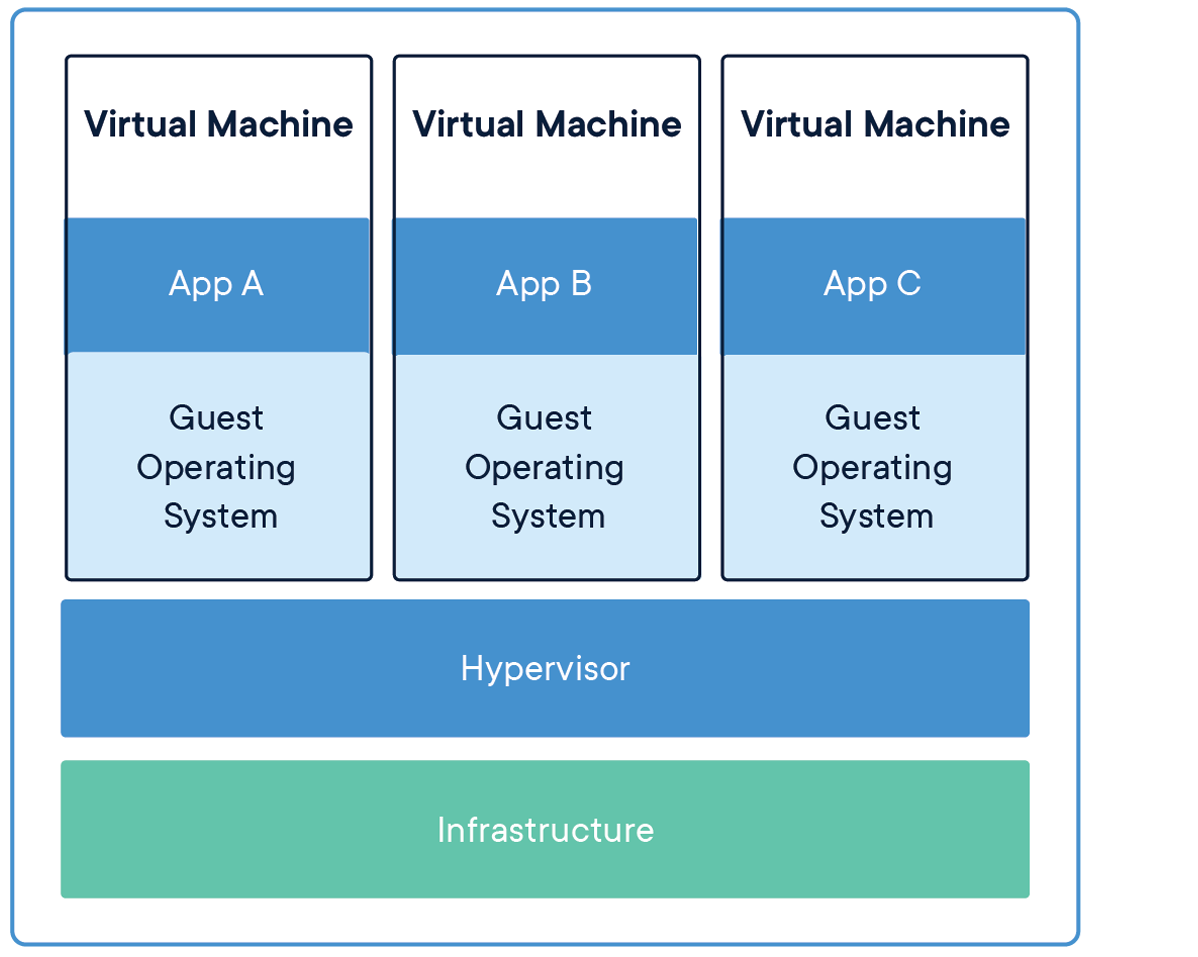
This is a great question and I get this one a lot. The simplest way I can explain the differences between Virtual Machines and Containers is that a VM virtualizes the hardware and a Container “virtualizes” the OS.
If you take a look at the image above, you can see that there are multiple Operating Systems running when using Virtual Machine technology. Which produces a huge difference in start up times and various other constraints and overhead when installing and maintaining a full blow operating system. Also, with VMs, you can run different flavors of operating systems. For example, I can run Windows 10 and a Linux distribution on the same hardware at the same time. Now let’s take a look at the image for Docker Containers.
As you can see in this image, we only have one Host Operating System installed on our infrastructure. Docker sits “on top” of the host operating system. Each application is then bundled in an image that contains all the configuration, libraries, files and executables the application needs to run.
At the core of the technology, containers are just an operating system process that is run by the OS but with restrictions on what files and other resources they can consume and have access to such as CPU and networking.
Since containers use features of the Host Operating System and therefore share the kernel, they need to be created for that operating system. So, for example, you can not run a container that contains linux binaries on Windows or vice versa.
This is just the basics and of course the technical details can be a little more complicated. But if you understand these basic concepts, you’ll have a good foundation of the difference between Virtual Machines and Containers.
What is the difference between an Image and a Container?
This is another very common question that is asked. I believe some of the confusion stems from the fact that we sometimes interchange these terms when talking about containers. I know I’ve been guilty of it.
An image is a template that is used by Docker to create your running Container. To define an image you create a Dockerfile. When Docker reads and executes the commands inside of your Dockerfile, the result is an image that then can be run “inside a container.”
A container, in simple terms, is a running image. You can run multiple instances of your image and you can create, start and stop them as well as connect them to other containers using networks.
What is the difference between Docker and Kubernetes?
I believe the confusion between the two stems from the development community talking as if these two are the same concepts. They are not.
Kubernetes is an orchestrator and Docker is a platform from building, shipping and running containers. Docker, in and of itself, does not handle orchestration.
Container Orchestration, in simple terms, is the process of managing and scheduling the running of containers across nodes that the orchestrator manages.
So generally speaking, Docker runs one instance of a container as a unit. You can run multiple containers of the same image, but Docker will not manage them as a unit.
To manage multiple containers as a unit, you would use an Orchestrator. Kubernetes is a container orchestrator. As well is AWS ECS and Azure ACI.
Why can’t I connect to my web application running in a container?
By default, containers are secure and isolated from outside network traffic – they do not expose any of its ports by default. Therefore if you want to be able to handle traffic coming from outside the container, you need to expose the port your container is listening on. For web applications this is typically port 80 or 443.
To expose a port when running a container, you can pass the –publish or -p flag.
For example:
$ docker run -p 80:80 nginx
This will run an Nginx container and publish port 80 to the outside world.
You can read all about Docker Networking in our documentation.
How do I run multiple applications in one container?
This is a very common question that I get from folks that are coming from a Virtual Machine background. The reason being is that when working with VMs, we can think of our application as owning the whole operating system and therefore can create multiple processes or runtimes.
When working with containers, it is best practice to map one process to one container for various architectural reasons that we do not have the space to discuss here. But the biggest reason to run one process inside a container is in respect to the tried and true KISS principle. Keep It Simple Simon.
When your containers have one process, they can focus on doing one thing and one thing only. This allows you to scale up and down relatively easily.
Stay tuned to this blog and my twitter handle (@pmckee) for more content on how to design and build applications with containers and microservices.
How do I persist data when running a container?
Containers are immutable and you should not write data into your container that you would like to be persisted after that container stops running. You want to think about containers as unchangeable processes that could stop running at any moment and be replaced by another very easily.
So, with that said, how do we write data and have a container use it at runtime or write data at runtime that can be persisted. This is where volumes come into play.
Volumes are the preferred mechanism to write and read persistent data. Volumes are managed by Docker and can be moved, copied and managed outside of containers.
For local development, I prefer to use bind mounts to access source code outside of my development container.
For an excellent overview of storage and specifics around volumes and bind mounts, please checkout our documentation on Storage.
Conclusion
These are just some of the common questions I get from people new to Docker. If you want to read more common questions and answers, check out our FAQ in our documentation.
Also, please feel free to connect on twitter (@pmckee) and ask questions if you like.
The post Top Questions for Getting Started with Docker appeared first on Docker Blog.
Quelle: https://blog.docker.com/feed/
Millions of cores, 100,000 community members, 10 years of you. Powering the world’s infrastructure, now and in the future. Thank you for the 10 incredible years of contribution and support. There are so many milestones to celebrate in the past 10 years of OpenStack with the community. Here we have gathered community members’ favorite cities… Read more »
Quelle: openstack.org
Millions of cores, 100,000 community members, 10 years of you. Powering the world’s infrastructure, now and in the future. Thank you for the 10 incredible years of contribution and support. There are so many milestones to celebrate in the past 10 years of OpenStack with the community. Here we gathered the first OpenStack events from… Read more »
Quelle: openstack.org
Millions of cores, 100,000 community members, 10 years of you. Powering the world’s infrastructure, now and in the future. Thank you for the 10 incredible years of contribution and support. There are so many milestones to celebrate in the past 10 years of OpenStack with the community. Here we have gathered the most unusual place… Read more »
Quelle: openstack.org
Millions of cores, 100,000 community members, 10 years of you. Powering the world’s infrastructure, now and in the future. Thank you for the 10 incredible years of contribution and support. There are so many milestones to celebrate in the past 10 years of OpenStack with the community. Here we have gathered people’s favorite OpenStack swag… Read more »
Quelle: openstack.org
Millions of cores, 100,000 community members, 10 years of you. Powering the world’s infrastructure, now and in the future. Thank you for the 10 incredible years of contribution and support. Wow, 10 years. Many amazing tech milestones happened in 2010. Steve Jobs launched the first iPad. Sprint announced its first 4G phone. Facebook reached 500… Read more »
Quelle: openstack.org

Der Auschluss aus der Ausschreibung im 5G-Core ist nicht das Ende der Zusammenarbeit. Huawei nimmt vermehrt selbst Stellung. (5G, Telekom)
Quelle: Golem






