Detecting and responding to Cloud Logging events in real-time

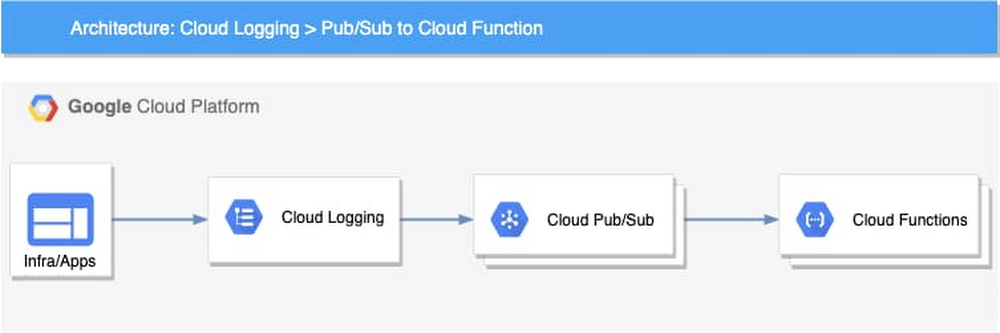
Logging is a critical component of your cloud infrastructure and provides valuable insight into the performance of your systems and applications. On Google Cloud, Cloud Logging is a service that allows you to store, search, monitor, and alert on log data and events from your Google Cloud Platform (GCP) infrastructure services and your applications. You can view and analyze log data in real time via Logs Viewer, command line or Cloud SDK. These logging tools are built to help you find and understand your logs. You may have business or technical processes that may require an automated action or you may want to reduce toil for your DevOps team. For example, you may want to use changes in your Cloud Audit Logs to take action and remediate a security vulnerability caused by inadvertent infrastructure changes.Using a Logging sink, you can build an event-driven system to detect and respond to log events in real time. Cloud Logging can help you to build this event-driven architecture through its integration with Cloud Pub/Sub and a serverless computing service such as Cloud Functions or Cloud Run.Architecture overviewThe high-level architecture of this event-driven system is both simple and flexible. There are four main components:Log events – The applications and the infrastructure send logs to Cloud LoggingLogging –  Cloud Logging sinks in the Logs Router lets you send log events to Pub/Sub topics based on the specific filters you createPub/Sub – Initiates Cloud Functions asynchronously based on the received log eventsCloud Functions – The business logic to process and respond to the log eventsThis loosely coupled event-driven system can autoscale based on the volume of log events without any capacity planning or management from the user. Using a serverless computing option can also significantly reduce the cost and improve programmers’ productivity. For example, you can use Cloud Function code to help analyze log entries, store data, and invoke other APIs or services as needed. Log eventsEach log event written to Cloud Logging includes a LogEntry, which includes the log name, timestamp, resource of the log source, payload, and metadata. Depending on how the log is written, the payload could be data stored as one of three types: a Unicode string (textPayload), a JSON object (jsonPayload), or a protocol buffer (protoPayload). You can examine the payload of the logs and extract useful events such as errors, exceptions, or specific messages. This same payload is available to the Cloud Function logic.For example, if public read permission is added to a Cloud Storage bucket, an audit log entry similar to the following one will be sent to Cloud Logging. You can extract the payload and process based on the action.Use casesThere is a wide range of situations where you can implement an event-driven system to process and respond to log events. To provide examples, we have developed three different Cloud Functions as reference code which respond to three different types of log messages. In our reference code, we implemented the logic using Cloud Functions to host and run the code. If you prefer, you could also implement similar logic using Cloud Run or App Engine. If you’re not sure which serverless computing options you need, you can read more at the serverless options comparison page to help you decide.Here are three common use cases that you can use as reference for an event-driven architecture for log events.1. Automatically enforce firewall rulesOur first use case is to automate firewall changes against “obvious policy violations” on Google Cloud such as allowing full internet access for an internal company service. In many organizations, there are security policies that only allow Ingress traffic to applications from specific ports, such as 80, 443, or within a particular IP range. If a change made to firewall rules violates these policies, that could open a security vulnerability and potentially leave a system open for compromise. For example, a private service not meant to receive internet traffic may be exposed with a firewall rule that allows all ingress traffic (0.0.0.0/0). You can remediate a firewall change that doesn’t adhere to policy when it is detected. Based on our event-driven architecture, the implementation includes three components:Logging sink – Using a Logging sink, you can direct specific log entries to your business logic. In this example, you can use Cloud Audit logs for Compute Engine which use the resource type gce_firewall_rule to filter for the logs of interest. You can also add an event type GCE_OPERATION_DONE to the filter to capture only the completed log events. Here is the Logging filter used to identify the logs. You can try out the query in the Logs Viewer.resource.type=”gce_firewall_rule” operation.last=truePub/Sub topic – In Pub/Sub, you can create a topic to which to direct the log sink and use the Pub/Sub message to trigger a cloud function. Cloud Function – In Cloud Functions, you can create logic to evaluate the received logs based on your business requirements.The cloud function can then be invoked for any firewall rule changes that are captured in Cloud Audit Logs including:compute.firewalls.patch compute.firewalls.insertcompute.firewalls.updateIf one of the log entries above appears in the audit logs, that triggers the cloud function logic. In the reference implementation, the cloud function retrieves the entire firewall rule details using the Compute Engine API and checks all the items in it. In our example, we simply remove the firewall rule if we find a violation. You can also patch the rule or roll it back with additional logic.After you write the code, you can deploy it using an Infrastructure-as-Code approach. For instance, you can use the following configuration with Cloud Deployment Manager to automate the deployment. In this configuration, you can see how the Logging sink, Pub/Sub topic and Cloud Function are provisioned. Optionally, you can also configure Sendgrid to send an email notification to your specified email address.2. Automatically remediate a misconfigured bucketOur second use case focuses on preventing a misconfigured bucket in Cloud Storage. A misconfigured bucket can expose sensitive data and cause damage to your organization. To help protect against this, you can monitor the configuration changes to the bucket. For example, if an admin inadvertently opens a bucket to the public for read/write, you can capture this change and remove the public access using a cloud function. This is especially useful when combined with an aggregated sink that captures all logs for your Google Cloud organization.You can then invoke the cloud function for any Cloud Storage bucket changes that Cloud Audit Logs captures, including:storage.buckets.createstorage.buckets.updatestorage.setIamPermissionsIf one of the changes above appears in the audit logs, you can look up the bucket policy and remove rules associated with allUsers or allAuthenticatedUsers.3. Automate your business event logicFor our last use case, we’ll show you how to extend the system by integrating it with other services. In Cloud Logging, you can create logs-based metrics, which are custom metrics in Cloud Monitoring from log entries. For example, the payment service in an ecommerce app logs various exceptions during the payment process. You can create a logs-based metric to count all those exceptions. After that, you can create an alerting policy to send your primary on-call person an alert if the metric exceeds a threshold in a short period.Built-in logs-based metrics are good for counting the number of log entries and tracking the distribution of a value in your logs. However, it might not be adequate when you need to perform computation based on the log entry content or add business-specific labels to your metrics. For those use cases, you can use the logs-based event-driven architecture to write the metrics. For example, let’s say that you want to monitor product recommendations in real time for your ecommerce app. You can use logs-based metrics to capture your specific business metrics. As an example, this microservices demo app is a simple demo ecommerce app that you can deploy. In it, when a user clicks a product, a recommendation is generated for related products on the site and written as a log entry. Using a logs-based event-driven architecture pattern, you can capture the log entries in a cloud function and then create your custom business metrics with business-specific labels for the products recommended by the application. With these metrics, you can create alerting policies in Cloud Monitoring just like you can for any other Monitoring metrics.Re-using the Pub/Sub and Cloud Function patternIn fact, we recently launched a Pub/Sub notification channel for alerting, which means that you could also use the same event-driven architecture described in these three examples to instead automate alerts for metrics not created from your logs.Get startedIt’s easy for you to build an automated, real-time analysis and operation capability with our logging and serverless computing services. You can find the code for the examples we discussed previously on github. If you haven’t already, get started with Cloud Logging and Serverless Computing with the Monitoring and Logging for Cloud Functions qwiklab. We also invite you to join the discussion on our mailing list. As always, we welcome your feedback.
Quelle: Google Cloud Platform
Predict workload failures before they happen with AutoML Tables

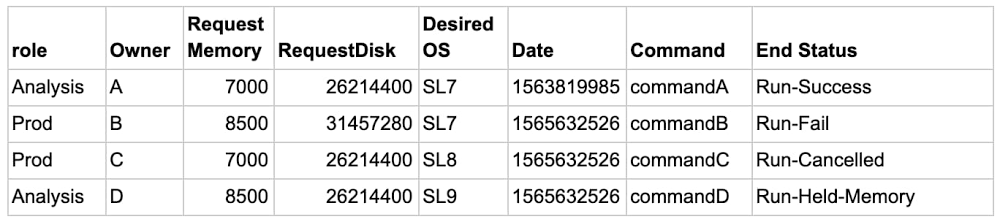
The worldwide High Performance and High Throughput Computing community consists of large research institutions that store hundreds of petabytes of data and run millions of compute workloads per year. These institutions have access to a grid of  interconnected data centers distributed across the globe, which allows researchers to schedule and run the compute workloads for their experiments at a grid site where resources are available.While most workloads succeed, about 10-15% of them eventually fail, resulting in lost time, misused compute resources, and wasted research funds. These workloads can fail for any number of reasons—incorrectly entered commands, requested memory, or even the time of day—and each type of failure contains unique information that can help the researcher trying to run it. For example, if a machine learning (ML) model could predict a workload was likely to fail because of memory (Run-Held-Memory class is predicted), the researcher could adjust the memory requirement and resubmit the workload without wasting the resources an actual failure would.  Using AI to effectively predict which workloads will fail allows the research community to optimize its infrastructure costs and decrease wasted CPU cycles. In this post we’ll look at how AutoML Tables can help researchers predict these failures before they ever run their workloads.Journey of 73 million events  With an annual dataset consisting of more than 73 million rows, each representing a workload, we decided to see if AutoML Tables can help us predict which workloads are likely to fail and therefore should not be processed on the grid. Successfully predicting which workloads will fail—and shouldn’t be run at all—helps free up resources, reduces wasted CPU cycles, and lets us spend research funds wisely. Here’s a sample dataset of four rows:The feature we’re predicting is End Status. In this sample, End Status can take one of 10 values (aka classes), including Run-Fail, Run-Success, Run-Cancelled, Run-Held-Memory, and so on, and there are more successful runs than failed ones.  In these situations, ML models usually predict common events (e.g. successes) well, but struggle to predict rare events (e.g. failures). We ultimately want to accurately predict each type of failure. Using ML terminology, we need to use a multi-class classification model and maximize recall for each of the classes.I have a data anomaly, where do I start?Let’s start with a simple approach. We’ll discuss an enterprise-grade solution using BigQuery in future posts.When solving similar types of problems, you often start with a CSV file saved in Cloud Storage. The first step is to load the file into an AI Platform Notebook on Google Cloud and do initial data exploration using Python. df.EndStatus.value_counts().plot(kind=’bar’, title=’Count of EndStatus’, logy=True)When predicting rare events, you’ll often see that some classes are orders of magnitude more represented than others—also known as a class imbalance.A model trained on such a dataset will forecast the most common class and ignore the others. To correct this, you can use a combination of undersampling of dominant classes and weighting techniques. Below is the code that computes weights for each row in the dataset and then generates a subset of the dataset with an equal number of datapoints for each class.After pre-processing using AI Platform Notebooks, you can export the resulting dataset to BigQuery, as shown below, and use it as a data source for AutoML Tables.The magic of AutoML Tables   When you’re getting started with a new ML problem on Google Cloud, you can take advantage of AutoML models.To do this, you’ll import the pre-processed dataset from BigQuery to AutoML Tables, specify the column with the target labels (EndStatus in our example), and assign the weight.The default automatic data split is 80% training, 10% validation, 10% test, and the suggested training time is based on the size of the dataset. AutoML performs the necessary feature engineering, searches among a variety of classification algorithms and tunes their parameters, and then returns the best model. You can follow the algorithm search process by examining the logs. In our use case, AutoML suggested a multi-layer neural network. Why use one model when you can use two?To improve  predictions, you can use multiple ML models. For example, you can first see if your problem can be simplified into a binary one. In our case, we can aggregate all the classes that are not successful into a failure class. We first run our data through a binary model, as shown below. If the forecast is successful, the researcher should go ahead and submit the workload. If the forecast is failure, you trigger the second model to predict the causes of failure. You can then send a message to the researcher informing them that their workload is likely to fail and that they should check the submission before proceeding.ResultsAfter training is over and you have the best performing model, AutoML Tables will present you with a confusion matrix. The confusion matrix below tells you that the model predicted 88% of Run-Success and 87% of Run-Fail workloads accurately.If the model predicts that the workload is likely to fail, to avoid a false negative result and provide the researcher with the cause of a potential failure, we run the workload through a multi-class classification model. The multi-class model will then predict why the workload will fail, for example because of disk space or memory issues, and inform the researcher that the workload is likely to fail.There is no perfect model, and some cases will always be harder to predict than others. For instance, it’s difficult to predict when a user decides to cancel a job manually.When you’re happy with the results, you can deploy the models directly from the AutoML Tables console or via the Python library. Models run as containers on a managed cluster and expose a REST API, which you can query directly or via one of the supported client libraries, including Python or Java.The deployed model supports both online and batch prediction. The online prediction will require a JSON object as input and will return a JSON object. The batch prediction will take a URL to an input dataset as either a BigQuery table or a CSV file in Cloud Storage and will return results in either BigQuery or Cloud Storage respectively. Incorporating the model described here into your on-premises workload processing workflow will let you process only the workloads that are likely to succeed, helping you optimize your on-premises infrastructure costs while providing meaningful information to your users. Next StepsWant to give it a try? Once you sign up for Google Cloud, you can practice predicting rare events, such as financial fraud, using AutoML Tables and a public dataset in BigQuery. Then, keep an eye out for part two of this series which will describe an enterprise-grade implementation of a multi-class classification model with AutoML Tables and BigQuery.
Quelle: Google Cloud Platform

Azure.com operates on Azure part 1: Design principles and best practices

Azure puts powerful cloud computing tools into the hands of creative people around the world. So, when your website is the face of that brand, you better use what you build, and it better be good. As in, 99.99-percent composite SLA good.

That’s our job at Azure.com, the platform where Microsoft hopes to inspire people to invent the next great thing. Azure.com serves up content to millions of people every day. It reaches people in nearly every country and is localized in 27 languages. It does all this while running on the very tools it promotes.

In developing Azure.com, we practice what we preach. We follow the guiding principles that we advise our customers to adopt and the principles of sustainable software engineering (SSE). Even this blog post is hosted on the very infrastructure that it describes.

In part one of our two-part series, we will peek behind the Azure.com web page to show you how we think about running a major brand website on a global scale. We will share our design approach and best practices for security, resiliency, scalability, availability, environmental sustainability, and cost-effective operations—on a global scale.

Products, features, and demos supported on Azure.com

As a content platform, Azure.com serves an audience of business and technical people—from S&P 500 enterprises to independent software vendors, and from government agencies to small businesses. To make sure our content reaches everyone, we follow Web Content Accessibility Guidelines (WCAG). We also adopted sustainable software engineering principles to help us responsibly achieve global scale and reduce our carbon footprint.

Azure.com supports static content, such as product and feature descriptions. But the fun is in the interactive components that let readers customize the details, like the products available by region page where we show service availability across 61 regions (and growing), the Azure updates page that keeps people informed about Azure changes, and the search box.

The Azure pricing page provides up-to-date pricing information for more than 200 services across multiple markets, and it factors in any discounts for which a signed-in user is eligible. We also built a comprehensive pricing calculator for all services. Prospective customers can calculate and share complex cost estimates in 24 currencies.

As a marketing channel, Azure.com also hosts demos. For example, we created in-browser interactive demos to display the benefits of Azure Cognitive Services, and we support streaming media for storytelling. We also provided a total cost of ownership (TCO) calculator for estimating cloud migration savings in 27 languages and 12 regions.

And did we mention the 99.99-percent composite SLA that Azure.com meets?

Pricing calculator: Interactive cost estimation tool for all Azure products and services.

History of Azure.com

As the number of Azure services has grown, so has our website, and it has always run on Azure. Azure.com is always a work in progress, but here are a few milestones in our development history:

2013: Azure.com begins life on the popular open-source Umbraco CMS. It markets seven Azure services divided into four categories: compute, data services, app services, and network.
2015: Azure.com moves to a custom ASP.NET Model View Controller (MVC) application hosted on Azure. It now supports 16 Azure services across four categories.
2020: Azure.com continues to expand its support of more categories of content. Today, the website describes more than 200 Azure offerings, including Azure services, capabilities, and features.


Azure.com timeline: Every year we support more great Azure products and services.

Design principles behind Azure.com

To create a solid architectural foundation for Azure.com, we follow the core pillars of great Azure architecture. These pillars are the design principles behind the security, performance, availability, and efficiency that make Azure.com run smoothly and meet our business goals.

Design principles: Azure.com follows the tenets of Azure architectural best practices.

You can take a class on how to Build great solutions with the Microsoft Azure Well-Architected Framework.

A pillar of security and resiliency

Like any cloud application, Azure.com requires security at all layers. That means everything covered by the Open Systems Interconnection (OSI) model, from the network to the application, web page, and backend dependencies. This is our defense-in-depth approach to security.

Resiliency is the ability to defend against malicious attacks, bad actors, or bots saturating your compute resources and possibly causing unnecessary scale-out and cost overruns. Resiliency isn’t about avoiding failure, but rather responding to failure in a way that avoids downtime and data loss.

One metric for resiliency is the recovery time objective (RTO), which says how long an application can be offline after suffering an outage. For us, it’s less than 30 minutes. Failure mode analysis (FMA) is another assessment of resiliency and includes planning for failures and running live fire drills. We use both these methods to assess the resiliency of Azure.com.

Super scalable and highly available

Any cloud application needs enough scalability to handle peak loads. For Azure.com, peaks occur during major events and marketing campaigns. Regardless of the load, Azure.com requires high availability to support around-the-clock operations. We trust the platform to support business continuity and guard against unexpected outages, overloaded resources, or failures caused by upstream dependencies.

As a case in point, we rely on Azure scalability to handle the big spikes in demand during Microsoft Build and Microsoft Ignite, the largest annual events handled by Azure.com. The number of requests per second (RPS) jumps 20 to 30 percent as tens of thousands of event attendees flock to Azure.com to learn about newly announced Azure products and services.

Whatever the scale, the Azure platform provides reliable, sustainable operations that enable Microsoft and other companies to deliver premium content to our customers.

Cost-effective high performance is a core design principle

Our customers often tell us that they want to move to a cloud-based system to save money. It’s no different at Azure.com, where cost-efficient provisioning is a core design principle. Azure.com has a handy cost calculator to compare the cost of running on-premises to running on Azure.

Efficiency means having a way to track and optimize underutilized resources and use dynamic scaling to support seasonal traffic demands. This principle applies to all layers of the software development life cycle (SDLC), starting with managing all the work items, using a source code repository, and implementing continuous integration (CI) and continuous deployment (CD). Cost-efficiency extends to the way we provision and host resources in multiple environments, and maintain an inventory of our digital estate.

But being cost-conscious doesn’t mean giving up on speed. Top-notch performance takes minimal network latency, fast server response times, and consistent page load and render times. Azure.com performance always focuses on the user experience, so we make sure to optimize network routing and minimize round-trip time (RTT).

Operating with zero downtime

Uptime is important for any large web application. We aim for zero downtime. That means no service downtime—ever. It’s a lofty goal, but it’s possible when you use CI/CD practices that spare users from the effects of the build and deployment cycles.

For example, if we push a code update, we aim for no site downtime, no failed requests, and no adverse impact on Azure.com users. Our CI/CD pipeline is based on Azure DevOps and pumps out hundreds of builds and multiple deployments to the live production servers every day without a hitch.

Another service level indicator (SLI) that we use is mean time to repair (MTTR). With this metric, lower is better. To minimize MTTR SLI, you need DevOps tools for identifying and repairing bottlenecks or crashing processes.

Next steps

From our experience working on Azure.com, we can say that following these design principles and best practices improves application resiliency, lowers costs, boosts security, and ensures scalability.

To review the workings of your Azure architecture, consider taking the architecture assessment.

For more information about the Azure services that make up Azure.com, see the next article in this blog series, How Azure.com operates on Azure part 2: Technology and architecture.
Quelle: Azure

How Azure.com operates on Azure part 2: Technology and architecture

When you’re the company that builds the cloud platforms used by millions of people, your own cloud content needs be served up fast. Azure.com—a complex, cloud-based application that serves millions of people every day—is built entirely from Azure components and runs on Azure.

Microsoft culture has always been about using our own tools to run our business. Azure.com serves as an example of the convenient platform-as-a-service (PaaS) option that Azure provides for agile web development. We trust Azure to run Azure.com with 99.99-percent availability across a global network capable of a round-trip time (RTT) of less than 100 milliseconds per request.

In part two of our two-part series we share our blueprint, so you can learn from our experience building a website on planetary scale and move forward with your own website transformation.

This post will help you get a technical perspective on the infrastructure and resources that make up Azure.com. For details about our design principles, read Azure.com operates on Azure part 1: Design principles and best practices.

The architecture of a global footprint

With Azure.com, our goal is to run a world-class website in a cost-effective manner at planetary scale. To do this, we currently run more than 25 Azure services. (See Services in Azure.com below.)

This blog examines the role of the main services, such as Azure Front Door, which routes HTTP requests to the web front end, and Azure App Service, a fully managed platform for creating and deploying cloud applications.

The following diagram shows you a high-level view of the global Azure.com architecture.

On the left, networking services provide the secure endpoints and connectivity that give users instant access, no matter where they are in the world.
On the right, developers use Azure DevOps services to run a continuous integration (CI) and continuous deployment (CD) pipeline that delivers updates and features with zero downtime.
In between, a variety of PaaS options that provide compute,  storage, security, monitoring, and more.

Azure.com global architecture: A high-level look at the Azure services and dataflow.

Host globally, deliver regionally

The Azure.com architecture is hosted globally but runs locally in multiple regions for high availability. Azure App Service hosts Azure.com from the nearest global datacenter infrastructure, and its automatic scaling features ensure that Azure.com meets changing demands.

The diagram below shows a close-up of the regional architecture hosted in App Service. We use deployment slots to deploy to development, staging, and production environments. Deployment slots are live apps with their own host names. We can swap content and configurations between the slots while maintaining application availability.

Azure.com regional architecture: App Service hosts regional instances in slots.

A look at the key PaaS components behind Azure.com

Azure.com is a complex, multi-tier web application. We use PaaS options as much as possible because managed services save us time. Less time spent on infrastructure and operations means more time to create a world-class customer experience. The platform performs OS patching, capacity provisioning, and load balancing, so we’re free to focus elsewhere.

Azure DNS

Azure DNS enables self-service quick edits to DNS records, global nameservers with 100-percent availability, and blazing fast DNS response times via Anycast addressing. We use Azure DNS aliases for both CNAME and ANAME record types.

Azure Front Door Service

Azure Front Door Service enables low-latency TCP-splitting, HTTP/2 multiplexing and concurrency, and performance based global routing. We saw a reduction in RTT to less than 100 milliseconds per request, as clients only need to connect to edge nodes, not directly to the origin.

For business continuity, Azure Front Door Service supports backend health probes, a resiliency pattern, that in effect removes unhealthy regions when they are misbehaving. In addition, to enable a backup site, Azure.com uses priority-based traffic routing. In the event our primary service backend goes offline, this method enables Azure Front Door Service to support ringed failovers.

Azure Front Door Service also acts as a reverse proxy, enabling pattern-based URL rewriting or request forwarding to handle dynamic traffic changes.

Web Application Firewall

Web Application Firewall (WAF) helps improve the platform’s security posture by providing load shedding bad bots and protection against OWASP top 10 attacks at the application layer. WAF forces developers to pay more attention to their data payloads, such as cookies, request URLs, form post parameters, and request headers.

We use WAF custom rules to block traffic to certain geographies, IPs, URLs, and other request properties. Rules offload traffic at the network edge from reaching your origin.

Content Delivery Network

To reduce load times, Azure.com uses Content Delivery Network (CDN) for load shedding to origin. CDN helps us lower the consumed bandwidth and keep costs down. CDN also improves performance by caching static assets at the Point of Presence (POP) edge nodes and reducing RTT latency. Without CDN, our origin nodes would have to handle every request for static assets.

CDN also supports DDoS protection, improving app security. We enable CDN compression and HTTP/2 to optimize delivery for static payloads. Using CDN is also a sustainable approach to optimizing network traffic because it reduces the data movement across a network.

Azure App Service

We use App Service horizontal autoscaling to handle burst traffic. The Autoscale feature is simple to use and is based on Azure Monitor metrics for requests per second (RPS) per node. We also reduced our Azure expenses by 50 percent by using elastic compute—a benefit that directly reduces our carbon consumption.

Azure.com uses several other handy App Service features:

Always On means there’s no idle timeout.
Application initialization provides custom warmup and validation.
VIP swap blue-green deployment pattern supports zero-downtime deployments.
To reduce network latency to the edge, we run our app in 12 geographically separate datacenters. This practice supports geo-redundancy should one or more datacenters go dark.
To improve app performance, we use the App Service DaaS – .NET profiler. This feature identifies node bottlenecks and hotspots for weak performing code blocks or slow dependencies.
For disaster recovery and improved mean time to recovery (MTTR), we use slot swap. In the event that an app deployment exception is not caught by our PPE testing, we can quickly roll back to last stable version.

App Service is also a PaaS service, which means we don't have to worry about the virtual machine (VM) infrastructure, OS updates, app frameworks, and the downtime associated with managing these. We follow the paired region concept when choosing our datacenters to mitigate against any rolling infrastructure updates and ensure improved isolation and resiliency.

As a final note, it’s important to choose the right App Service plan tier so that you can right-size your vertical scaling. The plan you choose also affects sustainable energy proportionality, which means running instances at a higher utilization rate to maximize carbon efficiency.

DaaS – .NET Profiler: identifying code bottlenecks and measuring improvements. In this case we found our HTML whitespace “minifier” was saturating our compute nodes. After disabling it, we verified response times, and CPU usage improved significantly.

Azure Monitor

Azure Monitor enables passive health monitoring over Application Insights, Log Analytics, and Azure Data Explorer data sources. We rely on these query monitor alerts to build configuration-based health models based on our telemetry logs so we know when our app is misbehaving before our customers tell us.

For example, we monitor CPU consumption by datacenter as the following screenshot shows. If we see sustained, high CPU usage for our app metrics, Monitor can trigger a notification to our response team, who can quickly respond, triage the problem, and help improve MTTR. We also receive proactive notifications if a client-browser is misbehaving or throwing console errors, such as when Safari changes a specific push and replace state pattern.

Performance counters: We are alerted if CPU spikes are sustained for more than five minutes.

Application Insights

Application Insights, a feature of Monitor, is used for client- and server-side Application Performance Management (APM) telemetry logging. It monitors page performance, exceptions, slow dependencies, and offers cross-platform profiling. Customers typically use Application Insights in break-fix scenarios to improve MTTR and to quickly triage failed requests and application exceptions.

We recommend enabling telemetry sampling so you don’t exhaust your data volume storage quota. We set up daily storage quota alerts to capture any telemetry saturation before it shuts off our logging pipeline.

Application Insights also provides OpenTelemetry support for distributed tracing across app domain boundaries and dependencies. This feature enables traceability from the client side all the way to the backend data or service tier.

Data volume capacity alert: Example showing that the data storage threshold is exceeded, which is useful for tracking runaway telemetry logs.

Developing with Azure DevOps

A big team works on Azure.com, and we use Azure DevOps Services to coordinate our efforts. We create internal technical docs with Azure Wikis, track work items using Azure Boards, build CI/CD workflows using Azure Pipelines, and manage application packages using Azure Artifacts. For software configuration management and quality gates, we use GitHub, which works well with Azure Boards.

We submit hundreds of daily pull requests as part of our build process, and the CI/CD pipeline deploys multiple updates every day to the production site. Having a single tool to manage the entire software development life cycle (SDLC) simplifies the learning curve for the engineering team and our internal customers.

To stay on top of what’s coming, we do a lot of planning in Delivery Plans. It’s a great tool for viewing incremental tasks and creating forecasts for the major events that affect Azure.com traffic, such as Microsoft Build, Microsoft Ignite, and Microsoft Ready.

What’s next

As the Azure platform evolves, so does Azure.com. But some things stay the same—the need for a reliable, scalable, sustainable, and cost-effective platform. That’s why we trust Azure.

Microsoft offers many resources and best practices for cloud developers, please see our additional resources below. To get started, create your Azure free account today.

Services in Azure.com

For more information about the services that make up Azure.com, check out the following resources.

Compute

Azure App Service
Azure Functions
Azure Cognitive Services

Networking

Azure Front Door
Azure DNS
Web Application Firewall
Azure Traffic Manager
Azure Content Delivery Network

Storage

Azure Cognitive Search
Azure Cache for Redis
Azure Blob storage and Azure queues
Application Insights
Azure Cosmos DB
Azure Data Explorer
Azure Media Services

Access provisioning

Azure Active Directory
Microsoft Graph
Azure Key Vault

Application life cycle

Azure DevOps
Azure Log Analytics
Azure Monitor
Azure Security Center
Azure Resource Manager
Azure Cost Management
Azure Service Health
Azure Advisor

Quelle: Azure

Stay ahead of attacks with Azure Security Center

With massive workforces now remote, the stress of IT admins and security professionals is compounded by the increased pressure to keep everyone productive and connected while combatting evolving threats. Now more than ever, organizations need to reduce costs, keep up with compliance requirements, all while managing risks in this constantly evolving landscape.

Azure Security Center is a unified infrastructure security management system that strengthens the security posture of your data centers and provides advanced threat protection across your hybrid workloads in the cloud, whether they're in Azure or not, as well as on-premises.

Last week Ann Johnson, Corporate Vice President, Cybersecurity Solutions Group, shared news of an upcoming Azure Security Center virtual event—Stay Ahead of Attacks with Azure Security Center on June 30, 2020, from 10:00 AM to 11:00 AM Pacific Time. It’s a great opportunity to learn threat protection strategies from the Microsoft security community and to hear how your peers are tackling tough and evolving security challenges.

At the event, you’ll learn how to strengthen your cloud security posture and achieve deep and broad threat protection across cloud workloads—in Azure, on-premises, and in hybrid cloud. We will also talk about how to combine Security Center with Azure Sentinel for advanced threat hunting.

The one-hour event will open with Microsoft Corporate Vice President of Cybersecurity Ann Johnson and General Manager of Microsoft Security Response Center Eric Doerr stepping through three strategies to help you lock down your environment:

Protect all cloud resources across cloud-native workloads, virtual machines, data services, containers, and IoT edge devices.
Strengthen your overall security posture with enhanced Azure Secure Score.
Connect Azure Security Center with Azure Sentinel for proactive hunting and threat mitigation with advanced querying and the power of AI.

You’ll then see demos of Secure Score and other Security Center features. Stuart Gregg, Security Operations Manager of ASOS, a world leader in online fashion retail business and a Microsoft customer, will join Ann and Eric to share how they’ve gained stronger threat protection by pairing these technologies with smarter security management practices. Our security experts will be online to answer your questions.

Following the virtual event, you’ll have the opportunity to watch deep dive sessions where I will be hosting Yuri Diogenes, from the Customer Experience Engineering team at Microsoft. Azure Security Center today provides threat protection across cloud-native workloads, data services and servers, and virtual machines. Yuri and I will take you through a demo tour about these capabilities and chat about how you can use Security Center to achieve hybrid and multicloud threat protection. Here are the details:

Cloud-native workloads. Kubernetes is the new standard for deploying and managing software in the cloud. Learn how Security Center supports containers and provides vulnerability assessment for virtual machines and containers.
Data services. Breakthroughs in big data and machine learning make it possible for Security Center to detect anomalous database access and query patterns, SQL injection attacks, and other threats targeting your SQL databases in Azure and Azure virtual machines. Learn how you can protect your sensitive data, protect your Azure Storage against malware, and protect your Azure Key Vault from threats.
Servers and virtual machines. Learn how to protect your Linux and Windows virtual machines (VMs) using the new Security Center features Just-In-Time VM Access, adaptive network hardening, and adaptive application controls. Yuri and I will also talk about how Security Center works with Microsoft Defender Advanced Threat Protection to provide threat detection for endpoint servers.

When it comes to threat protection, the key is to cover all resources. Azure Security Center provides threat protection for servers, cloud-native workloads, data, and IoT services. Threat protection capabilities are part of Standard Tier and you can start a free trial today.

I hope you’ll join us and learn how to implement broad threat protection across all your cloud resources and improve your cloud security posture management. If you can’t catch the event online, the content will be available for you to watch at the Azure Security Expert Series web page after the event.

Quelle: Azure

Top 5 Questions from “How to become a Docker Power User” session at DockerCon 2020

This is a guest post from Brian Christner. Brian is a Docker Captain since 2016, host of The Byte podcast, and Co-Founder & Site Reliability Engineer at 56K.Cloud. At 56K.Cloud, he helps companies to adapt technologies and concepts like Cloud, Containers, and DevOps. 56K.Cloud is a Technology company from Switzerland focusing on Automation, IoT, Containerization, and DevOps.

It was a fantastic experience hosting my first ever virtual conference session. The commute to my home office was great, and I even picked up a coffee on the way before my session started. No more waiting in lines, queueing for food, or sitting on the conference floor somewhere in a corner to check emails. 

The “DockerCon 2020 that’s a wrap” blog post highlighted my session “How to Become a Docker Power User using VS Code” session was one of the most popular sessions from DockerCon. Docker asked if I could write a recap and summarize some of the top questions that appeared in the chat. Absolutely.

Honestly, I liked the presented/audience interaction more than an in-person conference. Typically, a presenter broadcasts their content to a room full of participants, and if you are lucky and plan your session tempo well enough, you still have 5-10 minutes for Q&A at the end. Even with 5-10 minutes, I find it is never enough time to answer questions, and people always walk away as they have to hurry to the next session.

Virtual Events allow the presenters to answer questions in real-time in the chat. Real-time chat is brilliant as I found a lot more questions were being asked compared to in-person sessions. However, we averaged about 5,500 people online during the session, so the chat became fast and furious with Q&A.  

I quickly summarized the Chat transcript of people saying hello from countries/cities around the world. The chat kicked off with people from around the world chiming in to say “Hello from my home country/city. Just from the chat transcripts and people saying hello, I counted the following:

  Argentina 1  

  Austria 2  

  Belgium 1  

  Brazil 4  

  Canada 3  

  Chile 1  

  Colombia 1  

  Denmark 3  

  France 3  

  Germany 3  

  Greece 2  

  Guatemala 1  

  Italy 1  

  Korea 1  

  Mexico 1  

  My chair 1  

  Netherlands 2  

  Poland 2  

  Portugal 2  

  Saudi Arabia 1  

  South Africa 4  

  Spain 1  

  Switzerland 3  

  UK 3  

  USA 15  

  TOTAL  62 

Top 5 Questions

Based on the Chat transcript, we summarized the top 5 questions/requests.

The number one asked question was for the link to the demo code. VS Code demo Repo – https://github.com/vegasbrianc/vscode-docker-demoDoes VS Code support VIM/Emacs keybindings? Yes, and yes. You can either install the VIM or Emacs keybinding emulation to transform VS Code to your favorite editor keybinding shortcuts.We had several docker-compose questions ranging from can I run X with docker-compose to can I run docker-compose in production. Honestly, you can run docker-compose in production, but it depends on your application and use case. Please have a look at the Docker Voting Application, highlighting the different ways you can run the same application stack. Additionally, docker-compose documentation is an excellent resource.VS Code Debugging – This is a really powerful tool. If you select the Debug option when bootstrapping your project Debug is built in by default. Otherwise, you can add the debug code manually Docker context is one of the latest features to arrive in the VS Code Docker extension. A few questions asked how to setup Docker contexts and how to use it. At the moment, you still need to set up a Docker Context using the terminal. I would highly recommend reading the blog post by Anca Lordache wrote about using Docker Context as it provides a complete end-to-end set up of using Context with remote hosts

Bonus question!

The most requested question during the session is a link to the Cat GIF’s so here you go.

via GIPHY

More Information

That’s a wrap Blog post:- https://www.docker.com/blog/dockercon-2020-and-thats-a-wrap/Become a Docker Power User With Microsoft Visual Studio Code – https://docker.events.cube365.net/docker/dockercon/content/Videos/4YkHYPnoQshkmnc26  Code used in the talk and demo – https://github.com/vegasbrianc/vscode-docker-demoVIM Keybinding – https://marketplace.visualstudio.com/items?itemName=vscodevim.vimEmacs Keybinding – https://marketplace.visualstudio.com/items?itemName=vscodeemacs.emacsDocker Voting Application – https://github.com/dockersamples/example-voting-appdocker-compose documentation – https://docs.docker.com/compose/VS Code Debug – https://code.visualstudio.com/docs/containers/debug-commonHow to deploy on remote Docker hosts with docker-compose – https://www.docker.com/blog/how-to-deploy-on-remote-docker-hosts-with-docker-compose/

Additional links mentioned during the session

2020 Stackoverflow Survey – https://insights.stackoverflow.com/survey/2020#technology-most-loved-dreaded-and-wanted-platforms-loved5VS Code Containers overview documentation – https://code.visualstudio.com/docs/containers/overviewAwesome VS Code List – https://code.visualstudio.com/docs/containers/overviewCompose Spec – https://www.compose-spec.io/

Find out more about 56K.Cloud

We love Cloud, IoT, Containers, DevOps, and Infrastructure as Code. If you are interested in chatting connect with us on Twitter or drop us an email: info@56K.Cloud. We hope you found this article helpful. If there is anything you would like to contribute or you have questions, please let us know!
The post Top 5 Questions from “How to become a Docker Power User” session at DockerCon 2020 appeared first on Docker Blog.
Quelle: https://blog.docker.com/feed/





