3 strategies to ensure business continuity using Anthos

Whether your organization is scaling up to meet a sudden surge in demand or scaling down to manage costs, business continuity has never been more important. And in a climate where IT needs are rapidly changing, driven by evolving customer demands, business continuity means so much more than having the right a backup and disaster recovery plan.Our new whitepaper, ”Beyond business continuity: Three IT strategies for navigating change” addresses a broader definition of business continuity, and helps you build a path forward so you’re well prepared to handle whatever comes next.Here’s an overview of what the new whitepaper covers.Strategy #1: Ensure you have sufficient access to developers and IT professionals that can help build and operate your applications. Many organizations support existing legacy applications and struggle with technical debt such as poor alignment to standards and lack of enough programmers to keep their systems up and running. Organizations like these benefit from using a standardized technology platform that makes it easy to manage legacy applications and build new ones—no need to find employees that know a decades-old programming language.A standardized technology platform can also help you prepare for the future. It makes it easier to attract new talent when you run your IT on modern technology, and makes you less dependent on proprietary systems. Implementing a platform using OSS tools is one way to gain greater access to talent and avoid vendor lock-in.  Strategy #2: Ensure you can run IT services 24/7 and scale up or down with demand to manage costs.Modernizing your existing applications to a cloud-native architecture goes well beyond having the right disaster recovery and data backup plan. A cloud-native architecture makes it possible to scale up or down based on market conditions so you can deliver uninterrupted services while at the same time controlling costs. Modern cloud-native technologies like containers, serverless, and service mesh also mean you can build microservices-based applications, with a modular architecture that’s easier to update and scale than tightly coupled monolithic applications.Strategy #3: Centralize operations with control and automation to minimize cognitive load on operators, while ensuring rapid mitigation of failures.IT leaders are under increasing pressure to prioritize investments and optimize costs to support changing business goals in the short and long term. With budgets being prioritized to replace outdated technologies, you may find yourself being asked to do more with less. Investing in a standardized technology platform provides greater observability and delivers tools to consistently manage and maintain application configuration and security, saving you time and effort. Taking a GitOps approach and implementing modern CI/CD on that standardized platform also helps you to decouple infrastructure from applications and gain more flexibility and control for your operations.Anthos, our application modernization platform, supports all these strategies while delivering high availability, scalability, data protection and security for your services. Anthos democratizes access to modern technologies such as containers and service mesh, so you can modernize your existing applications and build new ones without having to start over. With the zero-trust model of security implemented by default, Anthos equips you to deliver reliable IT services. The declarative approach to policy and configuration management available in Anthos lets you control and automate IT operations without disruption. To learn more about the strategies, and how Anthos can help, read Beyond business continuity: Three IT strategies for navigating change.
Quelle: Google Cloud Platform

Introducing table-level access controls in BigQuery

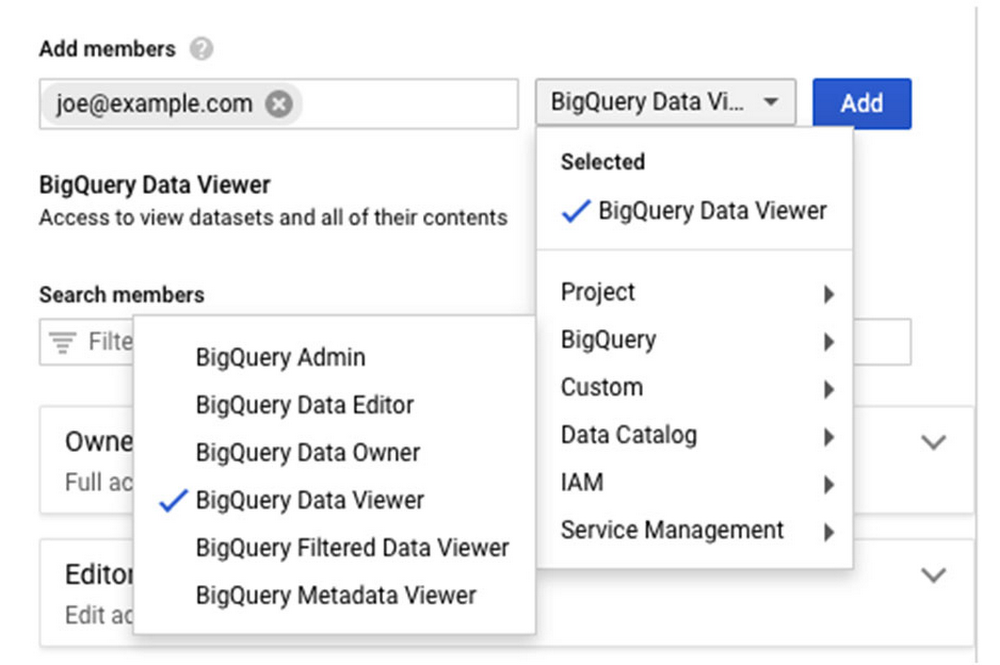
We’re announcing a key capability to help organizations govern their data in Google Cloud. Our new BigQuery table-level access controls (table ACLs) are an important step that enables you to control your data and share it at an even finer granularity. Table ACLs also bring closer compatibility with other data warehouse systems where the base security primitives include tables—allowing migration of security policies more easily. Table ACLs are built on top of Cloud Identity and Access Management (Cloud IAM), Google Cloud’s enterprise-grade access control platform that integrates across our cloud products. BigQuery already lets organizations provide controls over access to data sets, projects, and folders. With BigQuery table-level ACLs, you can use these same controls at the table scope, satisfying the principle of “least privilege.” This capability, combined with BigQuery column-level security, is key in helping organizations effectively govern data in Google Cloud and maintain regulatory compliance, such as GDPR, CCPA, etc.    Table ACLs enable you to share a single table, for reading and/or writing, without the surrounding dataset. This capability opens up use cases like sharing a single table externally with an outside contributor and segregating access control at the individual table level.Many BigQuery customers use authorized views to control read-only access to tables. Authorized views allow data owners to join multiple tables and reshape the data before sharing it. However, if you want to simply share a single table as is, authorized views become cumbersome. Table ACLs streamline and simplify this use case. Getting started with table ACLsTable ACLs are available in the BigQuery Web UI as a “share table” button that exposes the Cloud IAM permission panel (same as for sharing a dataset):The Table ACL functionality is also available via the BigQuery command line and REST APIs. Both of them use Cloud IAM Policy JSON. A policy defines and enforces which roles are granted to which members, and this policy is attached to a resource. The following example shows a policy where alice@example.com has been granted the BigQuery data owner role, and bob@example.com has been granted the BigQuery data viewer role:To obtain or set table policy, you can use bq get-iam-policy and bq set-iam-policy commands, respectively. Similarly, you can use tables.getIamPolicy and table.setIamPolicy REST APIs. For more info about IAM policies, see Understanding policies.To get started, check out the BigQuery table ACL documentation to learn more about specific permission types and use cases.
Quelle: Google Cloud Platform